2019 FORD EXPLORER Garage door
[x] Cancel search: Garage doorPage 215 of 571
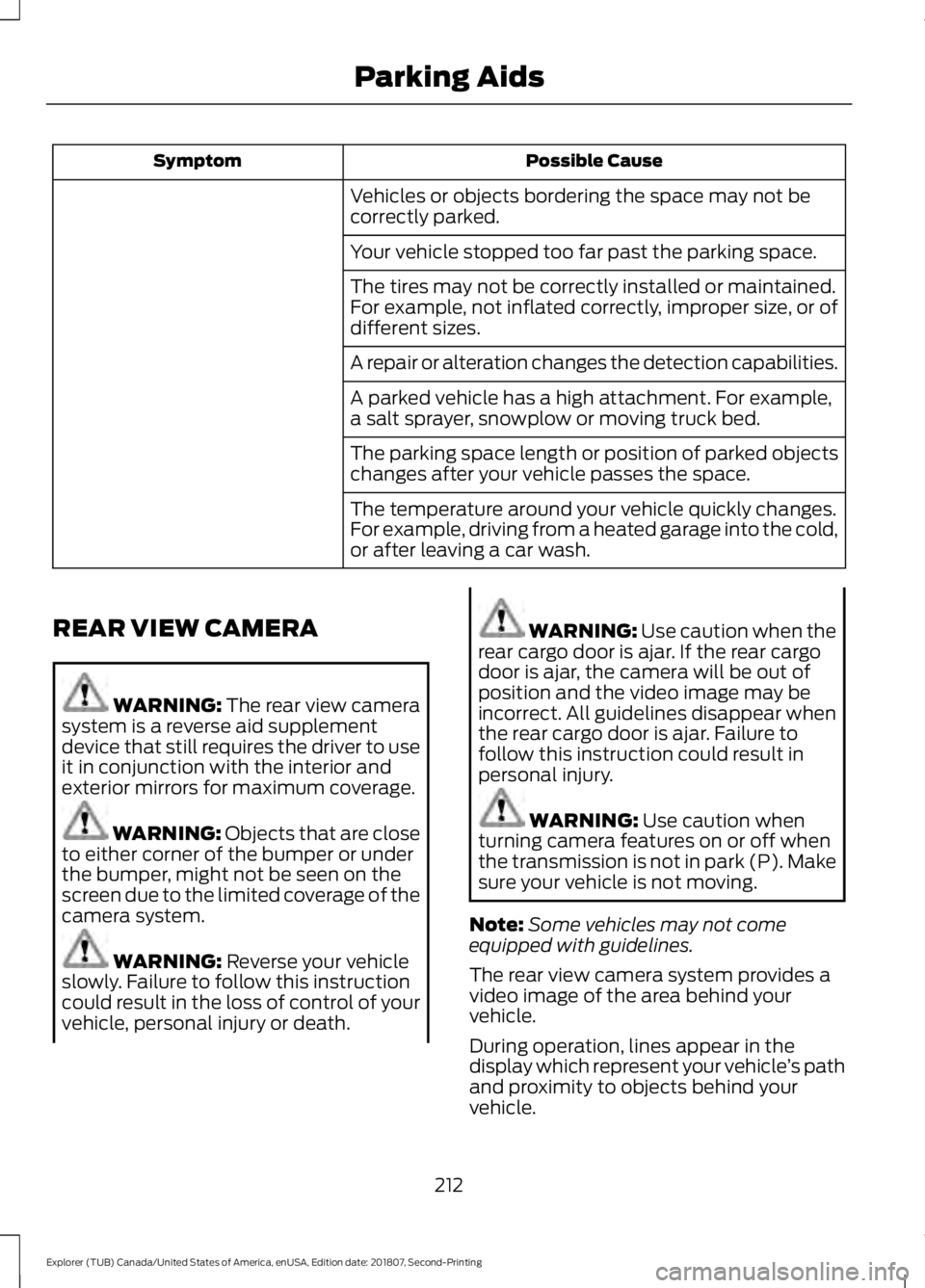
Possible Cause
Symptom
Vehicles or objects bordering the space may not be
correctly parked.
Your vehicle stopped too far past the parking space.
The tires may not be correctly installed or maintained.
For example, not inflated correctly, improper size, or of
different sizes.
A repair or alteration changes the detection capabilities.
A parked vehicle has a high attachment. For example,
a salt sprayer, snowplow or moving truck bed.
The parking space length or position of parked objects
changes after your vehicle passes the space.
The temperature around your vehicle quickly changes.
For example, driving from a heated garage into the cold,
or after leaving a car wash.
REAR VIEW CAMERA WARNING: The rear view camera
system is a reverse aid supplement
device that still requires the driver to use
it in conjunction with the interior and
exterior mirrors for maximum coverage. WARNING: Objects that are close
to either corner of the bumper or under
the bumper, might not be seen on the
screen due to the limited coverage of the
camera system. WARNING: Reverse your vehicle
slowly. Failure to follow this instruction
could result in the loss of control of your
vehicle, personal injury or death. WARNING:
Use caution when the
rear cargo door is ajar. If the rear cargo
door is ajar, the camera will be out of
position and the video image may be
incorrect. All guidelines disappear when
the rear cargo door is ajar. Failure to
follow this instruction could result in
personal injury. WARNING:
Use caution when
turning camera features on or off when
the transmission is not in park (P). Make
sure your vehicle is not moving.
Note: Some vehicles may not come
equipped with guidelines.
The rear view camera system provides a
video image of the area behind your
vehicle.
During operation, lines appear in the
display which represent your vehicle ’s path
and proximity to objects behind your
vehicle.
212
Explorer (TUB) Canada/United States of America, enUSA, Edition date: 201807, Second-Printing Parking Aids
Page 336 of 571
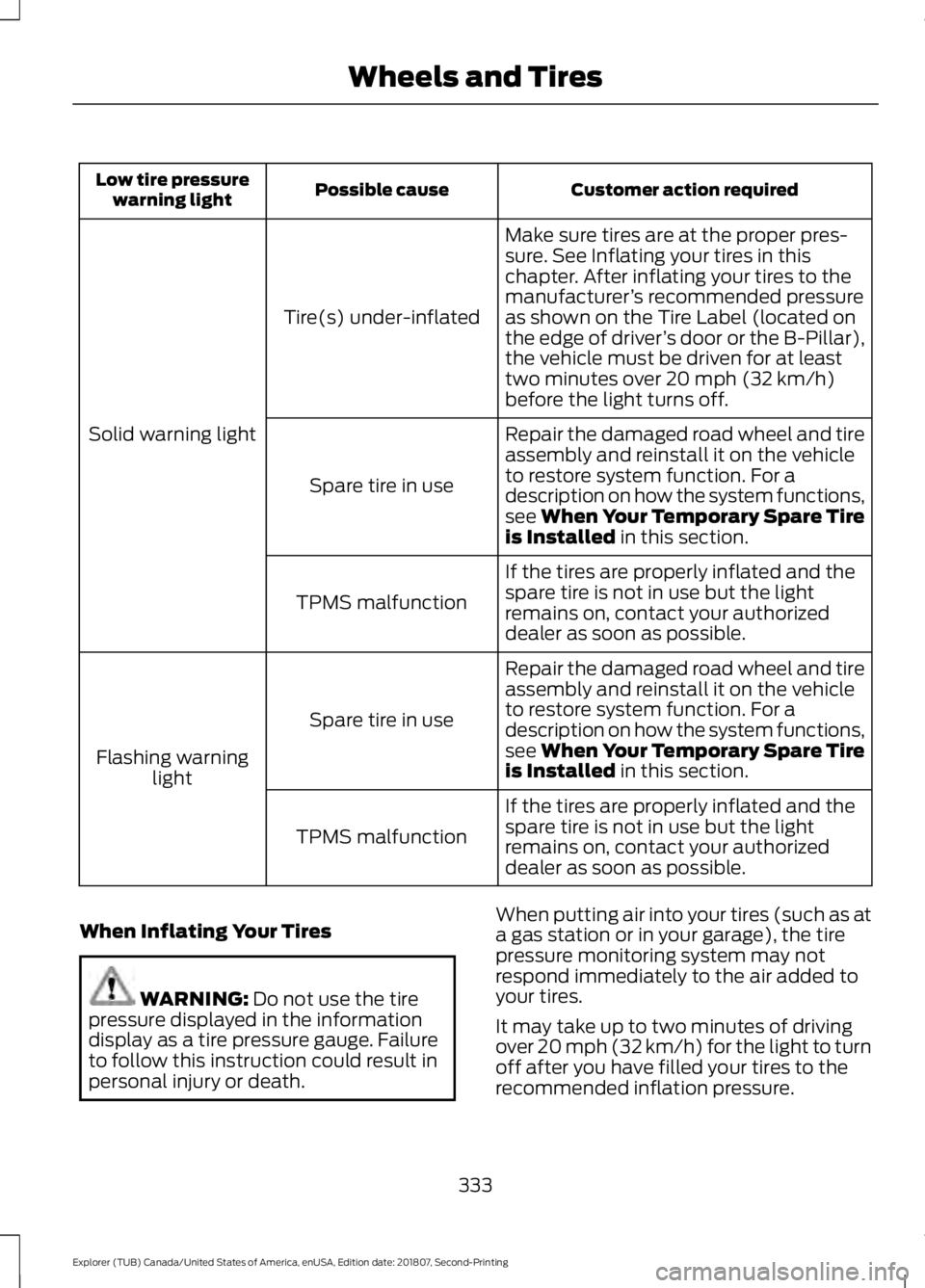
Customer action required
Possible cause
Low tire pressure
warning light
Make sure tires are at the proper pres-
sure. See Inflating your tires in this
chapter. After inflating your tires to the
manufacturer’s recommended pressure
as shown on the Tire Label (located on
the edge of driver ’s door or the B-Pillar),
the vehicle must be driven for at least
two minutes over 20 mph (32 km/h)
before the light turns off.
Tire(s) under-inflated
Solid warning light Repair the damaged road wheel and tire
assembly and reinstall it on the vehicle
to restore system function. For a
description on how the system functions,
see When Your Temporary Spare Tire
is Installed
in this section.
Spare tire in use
If the tires are properly inflated and the
spare tire is not in use but the light
remains on, contact your authorized
dealer as soon as possible.
TPMS malfunction
Repair the damaged road wheel and tire
assembly and reinstall it on the vehicle
to restore system function. For a
description on how the system functions,
see When Your Temporary Spare Tire
is Installed
in this section.
Spare tire in use
Flashing warning light
If the tires are properly inflated and the
spare tire is not in use but the light
remains on, contact your authorized
dealer as soon as possible.
TPMS malfunction
When Inflating Your Tires WARNING:
Do not use the tire
pressure displayed in the information
display as a tire pressure gauge. Failure
to follow this instruction could result in
personal injury or death. When putting air into your tires (such as at
a gas station or in your garage), the tire
pressure monitoring system may not
respond immediately to the air added to
your tires.
It may take up to two minutes of driving
over 20 mph (32 km/h) for the light to turn
off after you have filled your tires to the
recommended inflation pressure.
333
Explorer (TUB) Canada/United States of America, enUSA, Edition date: 201807, Second-Printing Wheels and Tires
Page 485 of 571
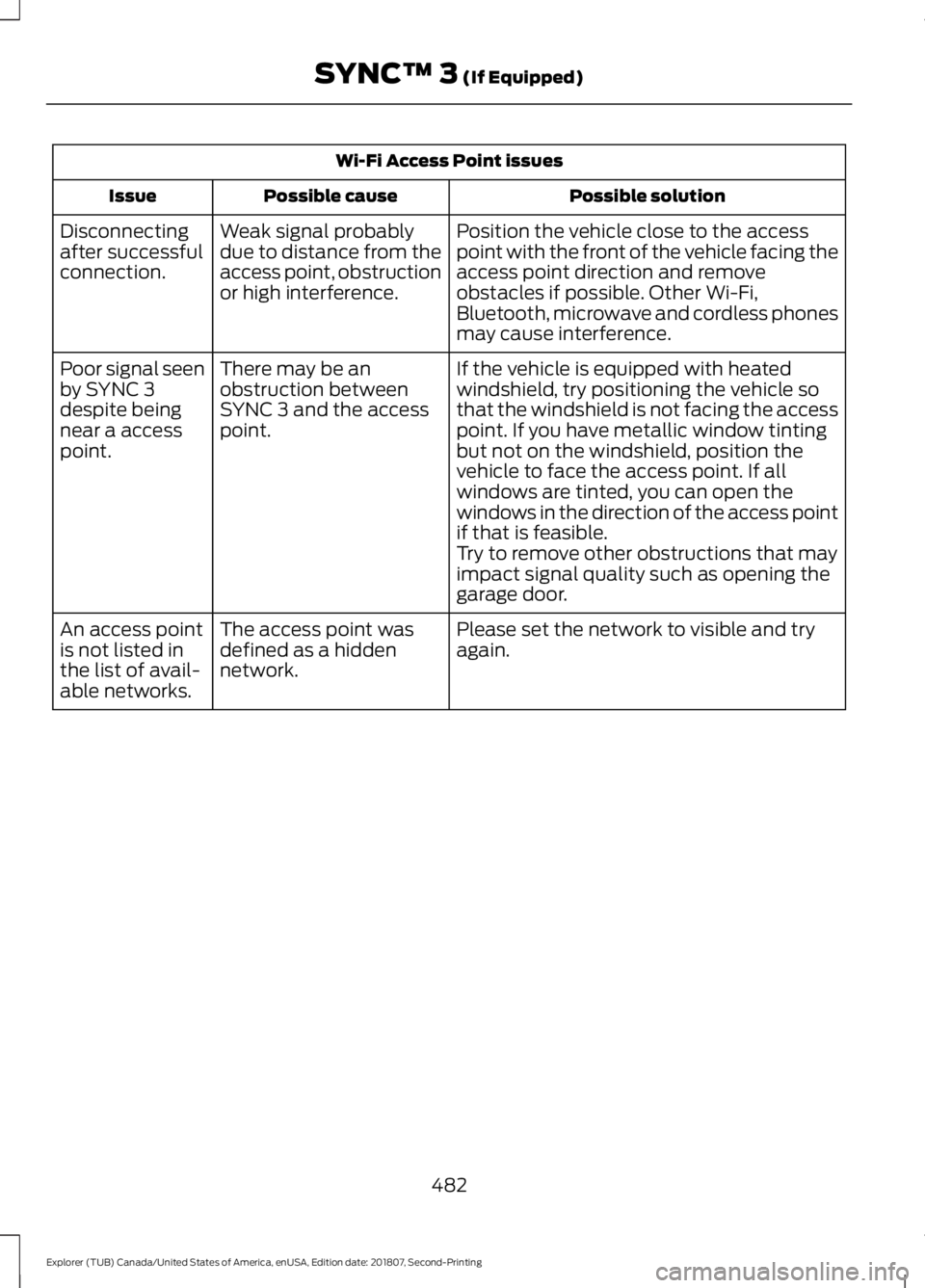
Wi-Fi Access Point issues
Possible solution
Possible cause
Issue
Position the vehicle close to the access
point with the front of the vehicle facing the
access point direction and remove
obstacles if possible. Other Wi-Fi,
Bluetooth, microwave and cordless phones
may cause interference.
Weak signal probably
due to distance from the
access point, obstruction
or high interference.
Disconnecting
after successful
connection.
If the vehicle is equipped with heated
windshield, try positioning the vehicle so
that the windshield is not facing the access
point. If you have metallic window tinting
but not on the windshield, position the
vehicle to face the access point. If all
windows are tinted, you can open the
windows in the direction of the access point
if that is feasible.
There may be an
obstruction between
SYNC 3 and the access
point.
Poor signal seen
by SYNC 3
despite being
near a access
point.
Try to remove other obstructions that may
impact signal quality such as opening the
garage door.
Please set the network to visible and try
again.
The access point was
defined as a hidden
network.
An access point
is not listed in
the list of avail-
able networks.
482
Explorer (TUB) Canada/United States of America, enUSA, Edition date: 201807, Second-Printing SYNC™ 3 (If Equipped)
Page 563 of 571

Flat Tire
See: Changing a Road Wheel....................... 334
Floor Mats......................................................256
Fog Lamps - Front See: Front Fog Lamps........................................ 88
Foot Pedals See: Adjusting the Pedals.................................. 81
Ford Credit
..........................................................11
US Only...................................................................... 11
Ford Protect
...................................................493
Ford Protect Extended Service Plan
(CANADA ONLY).......................................... 494
Ford Protect Extended Service Plans (U.S. Only).................................................................. 493
Four-Wheel Drive
.........................................188
Principle of Operation...................................... 188
Front Fog Lamps............................................88
Front Parking Aid.........................................203 Obstacle Distance Indicator......................... 204
Front Passenger Sensing System............46
Fuel and Refueling........................................172
Fuel Consumption
........................................179
Advertised Capacity........................................... 179
Fuel Economy....................................................... 179
Fuel Filler Funnel Location........................174
Fuel Quality - E85.........................................173 Choosing the Right Fuel - Flex Fuel
Vehicles.............................................................. 173
Switching Between E85 and Gasoline............................................................. 174
Fuel Quality - Gasoline................................172 Choosing the Right Fuel................................... 172
Fuel Shutoff
...................................................259
Fuses..................................................................271
Fuse Specification Chart............................271
Passenger Compartment Fuse Panel........276
Power Distribution Box..................................... 271
G
Garage Door Opener....................................157
Garage Door Opener See: Universal Garage Door Opener............157
Gauges...............................................................96 Engine Coolant Temperature Gauge............99
Fuel Gauge............................................................. 99
Information Display............................................. 98
Type 1........................................................................\
96Type 2........................................................................\
97
Type 3....................................................................... 98
Gearbox See: Transmission.............................................. 184
General Information on Radio Frequencies...................................................53
Intelligent Access................................................. 53
General Maintenance Information.......495 Multi-Point Inspection..................................... 497
Owner Checks and Services......................... 496
Protecting Your Investment.......................... 495
Why Maintain Your Vehicle?......................... 495
Why Maintain Your Vehicle at Your Dealership?..................................................... 495
Getting Assistance Outside the U.S. and Canada
..........................................................267
Getting the Services You Need..............264 Away From Home............................................. 264
Global Opening................................................91 Moonroof.................................................................. 91
Remote Control Front Windows..................... 91
H
Handbrake See: Parking Brake............................................. 194
Hazard Flashers
...........................................259
HDC See: Using Hill Descent Control................... 200
Headlamp Adjusting See: Adjusting the Headlamps.................... 299
Headlamp Exit Delay....................................86
Headrest See: Head Restraints......................................... 139
Head Restraints
............................................139
Adjusting the Head Restraint........................ 140
Tilting Head Restraints ..................................... 141
Heated Exterior Mirrors
...............................137
Heated Rear Window..................................137
Heated Seats.................................................154 Front Seats............................................................ 154
Second Row Heated Seats............................. 155
Heated Steering Wheel...............................80
Heating See: Climate Control......................................... 129
Hill Start Assist..............................................194 Switching the System On and Off...............195
Using Hill Start Assist....................................... 194
560
Explorer (TUB) Canada/United States of America, enUSA, Edition date: 201807, Second-Printing Index
Page 569 of 571

Towing Points................................................263
Installing the Recovery Hook......................... 263
Recovery Hook Location................................. 263
Towing the Vehicle on Four Wheels - 2.3L EcoBoost™
........................................252
Emergency Towing............................................ 252
Towing the Vehicle on Four Wheels - 3.5L Duratec/3.5L Ecoboost™............252
Emergency Towing............................................ 253
Recreational Towing......................................... 253
Towing..............................................................247
Traction Control
............................................196
Principle of Operation...................................... 196
Trailer Sway Control...................................248
Transmission Code Designation
............346
Transmission..................................................184
Transporting the Vehicle...........................262
Type Approvals
.............................................542
Radio Frequency Certification for Keys and
Remote Controls........................................... 553
Radio Frequency Certifications for Blind Spot Information System........................... 551
Radio Frequency Certifications for Body Control Module.............................................. 553
Radio Frequency Certifications for Cruise Control Module.............................................. 553
Radio Frequency Certifications for Mid Range Radar................................................... 545
Radio Frequency Certifications for Passive Anti-Theft System....................................... 546
Radio Frequency Certifications for Radio Transceiver Module..................................... 549
Radio Frequency Certifications for SYNC 3........................................................................\
... 552
Radio Frequency Certifications for Tire Pressure Monitoring Sensor(s)...............542
Radio Frequency Certifications for Wireless Charging........................................................... 552
Radio Frequency Statement for Audio Unit..................................................................... 553
U
Under Hood Overview - 2.3L EcoBoost™.................................................283
Under Hood Overview - 3.5L Duratec.........................................................284 Under Hood Overview - 3.5L
Ecoboost™.................................................285
Universal Garage Door Opener................157 HomeLink Wireless Control System............157
USB Port
..........................................................375
Using Adaptive Cruise Control................218
Automatic Cancellation................................... 221
Blocked Sensor................................................... 223
Canceling the Set Speed................................. 221
Changing the Set Speed.................................. 221
Detection Issues................................................. 222
Following a Vehicle............................................ 219
Hilly Condition Usage........................................ 221
Overriding the Set Speed............................... 220
Resuming the Set Speed................................. 221
Setting the Adaptive Cruise Speed..............219
Setting the Gap Distance............................... 220
Switching Adaptive Cruise Control Off....................................................................... 222
Switching Adaptive Cruise Control On........................................................................\
219
Switching to Normal Cruise Control...........224
System Not Available....................................... 223
Using Cruise Control
....................................217
Canceling the Set Speed.................................. 217
Changing the Set Speed................................... 217
Resuming the Set Speed................................. 218
Setting the Cruise Speed.................................. 217
Switching Cruise Control Off.......................... 218
Switching Cruise Control On........................... 217
Using Four-Wheel Drive
............................188
Driving In Special Conditions With
Four-Wheel Drive (4WD)........................... 189
How Your Vehicle Differs From Other Vehicles............................................................. 189
Using Hill Descent Control......................200 Principle of operation...................................... 200
Using hill descent control.............................. 200
Using MyKey With Remote Start Systems..........................................................63
Using Snow Chains.....................................329
Using Stability Control...............................198
Using Summer Tires...................................329
Using SYNC™ With Your Media Player.............................................................397
Accessing Your USB Song Library................401
Bluetooth Devices and System Settings............................................................ 403
566
Explorer (TUB) Canada/United States of America, enUSA, Edition date: 201807, Second-Printing Index