2019 FORD EXPEDITION door lock
[x] Cancel search: door lockPage 304 of 583
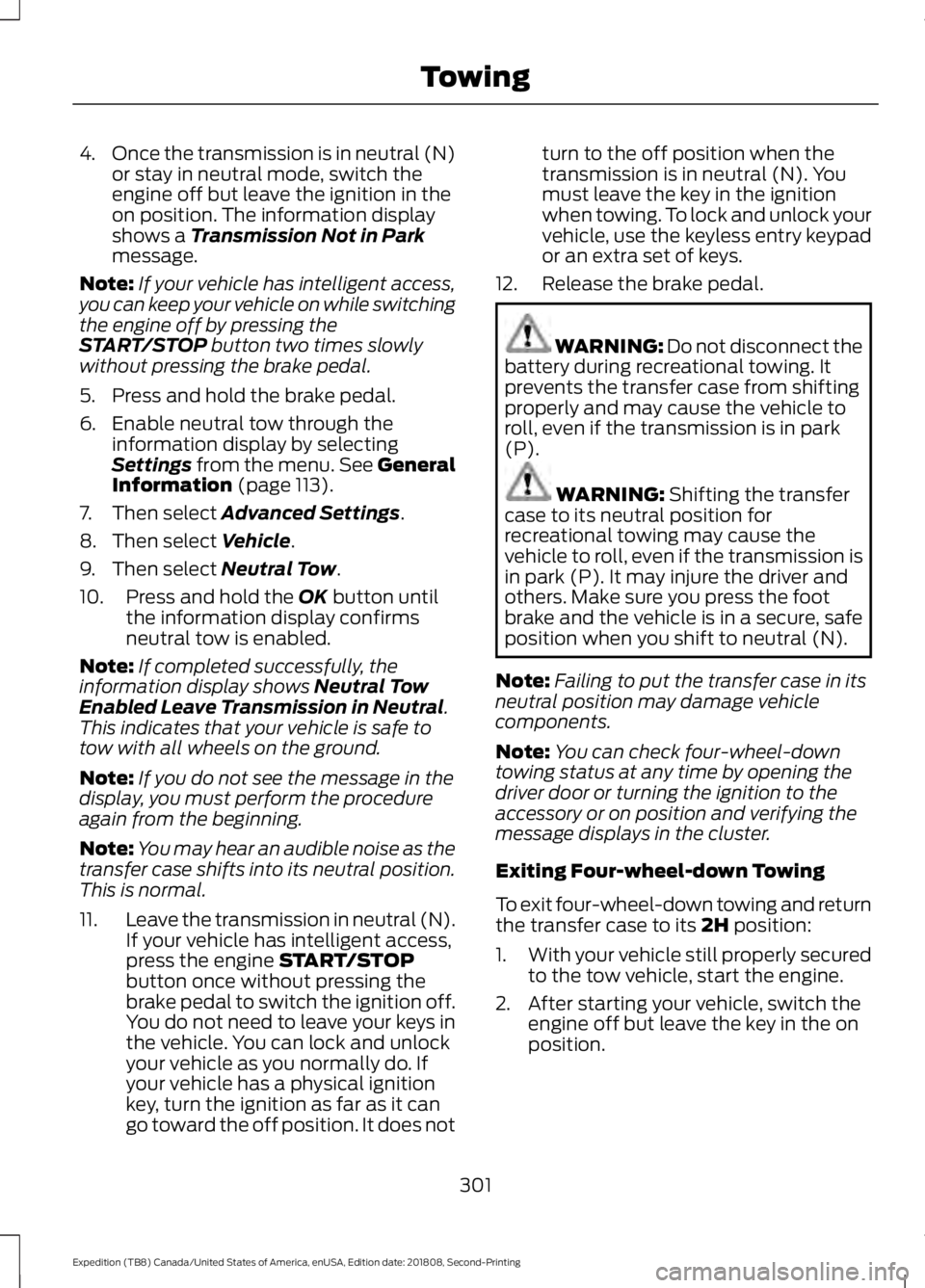
4.
Once the transmission is in neutral (N)
or stay in neutral mode, switch the
engine off but leave the ignition in the
on position. The information display
shows a Transmission Not in Park
message.
Note: If your vehicle has intelligent access,
you can keep your vehicle on while switching
the engine off by pressing the
START/STOP
button two times slowly
without pressing the brake pedal.
5. Press and hold the brake pedal.
6. Enable neutral tow through the information display by selecting
Settings
from the menu. See General
Information (page 113).
7. Then select
Advanced Settings.
8. Then select
Vehicle.
9. Then select
Neutral Tow.
10. Press and hold the
OK button until
the information display confirms
neutral tow is enabled.
Note: If completed successfully, the
information display shows
Neutral Tow
Enabled Leave Transmission in Neutral.
This indicates that your vehicle is safe to
tow with all wheels on the ground.
Note: If you do not see the message in the
display, you must perform the procedure
again from the beginning.
Note: You may hear an audible noise as the
transfer case shifts into its neutral position.
This is normal.
11. Leave the transmission in neutral (N).
If your vehicle has intelligent access,
press the engine
START/STOP
button once without pressing the
brake pedal to switch the ignition off.
You do not need to leave your keys in
the vehicle. You can lock and unlock
your vehicle as you normally do. If
your vehicle has a physical ignition
key, turn the ignition as far as it can
go toward the off position. It does not turn to the off position when the
transmission is in neutral (N). You
must leave the key in the ignition
when towing. To lock and unlock your
vehicle, use the keyless entry keypad
or an extra set of keys.
12. Release the brake pedal. WARNING:
Do not disconnect the
battery during recreational towing. It
prevents the transfer case from shifting
properly and may cause the vehicle to
roll, even if the transmission is in park
(P). WARNING:
Shifting the transfer
case to its neutral position for
recreational towing may cause the
vehicle to roll, even if the transmission is
in park (P). It may injure the driver and
others. Make sure you press the foot
brake and the vehicle is in a secure, safe
position when you shift to neutral (N).
Note: Failing to put the transfer case in its
neutral position may damage vehicle
components.
Note: You can check four-wheel-down
towing status at any time by opening the
driver door or turning the ignition to the
accessory or on position and verifying the
message displays in the cluster.
Exiting Four-wheel-down Towing
To exit four-wheel-down towing and return
the transfer case to its
2H position:
1. With your vehicle still properly secured
to the tow vehicle, start the engine.
2. After starting your vehicle, switch the engine off but leave the key in the on
position.
301
Expedition (TB8) Canada/United States of America, enUSA, Edition date: 201808, Second-Printing Towing
Page 330 of 583
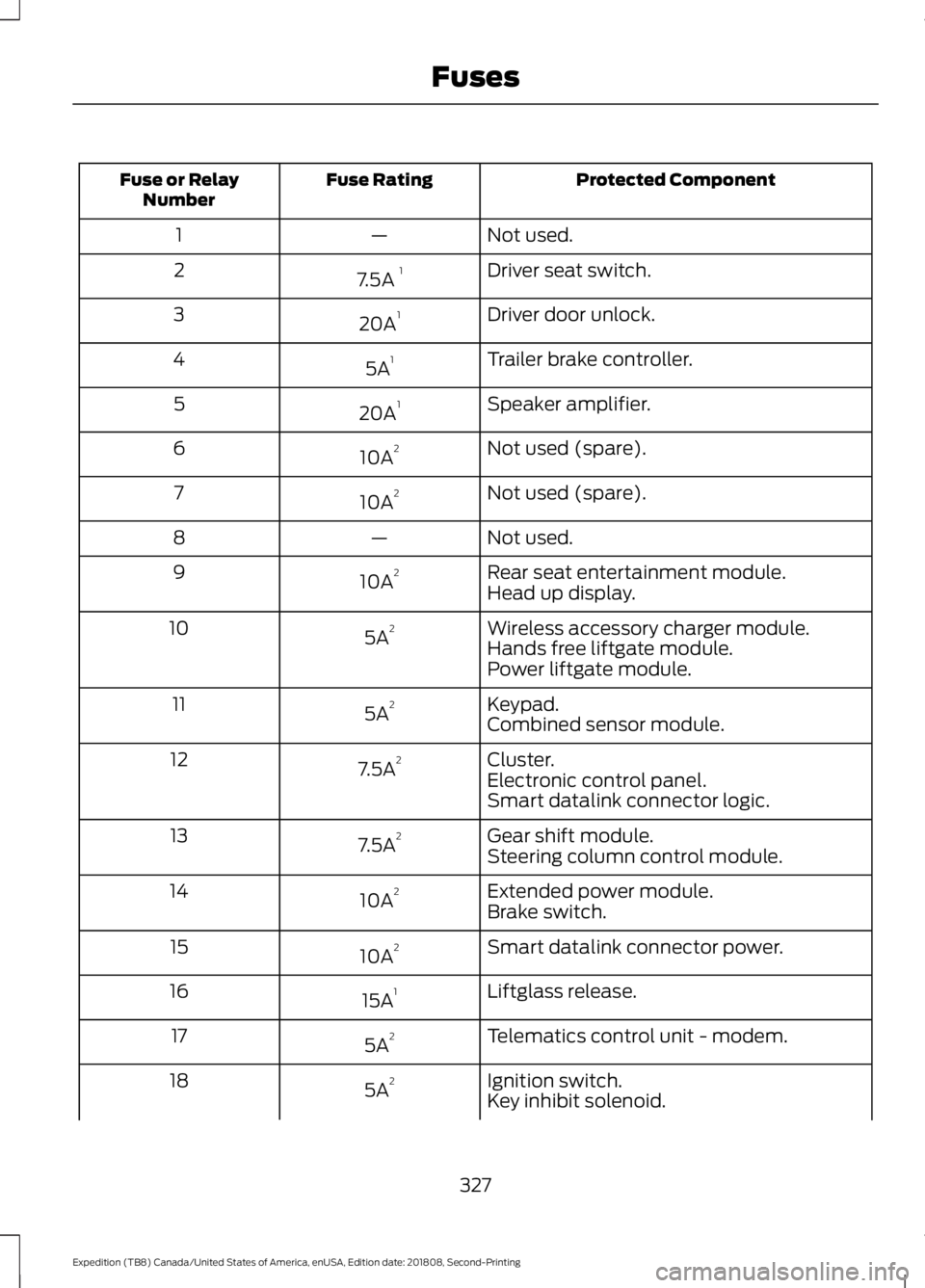
Protected Component
Fuse Rating
Fuse or Relay
Number
Not used.
—
1
Driver seat switch.
7.5A 1
2
Driver door unlock.
20A 1
3
Trailer brake controller.
5A 1
4
Speaker amplifier.
20A 1
5
Not used (spare).
10A 2
6
Not used (spare).
10A 2
7
Not used.
—
8
Rear seat entertainment module.
10A 2
9
Head up display.
Wireless accessory charger module.
5A 2
10
Hands free liftgate module.
Power liftgate module.
Keypad.
5A 2
11
Combined sensor module.
Cluster.
7.5A 2
12
Electronic control panel.
Smart datalink connector logic.
Gear shift module.
7.5A 2
13
Steering column control module.
Extended power module.
10A 2
14
Brake switch.
Smart datalink connector power.
10A 2
15
Liftglass release.
15A 1
16
Telematics control unit - modem.
5A 2
17
Ignition switch.
5A 2
18
Key inhibit solenoid.
327
Expedition (TB8) Canada/United States of America, enUSA, Edition date: 201808, Second-Printing Fuses
Page 331 of 583
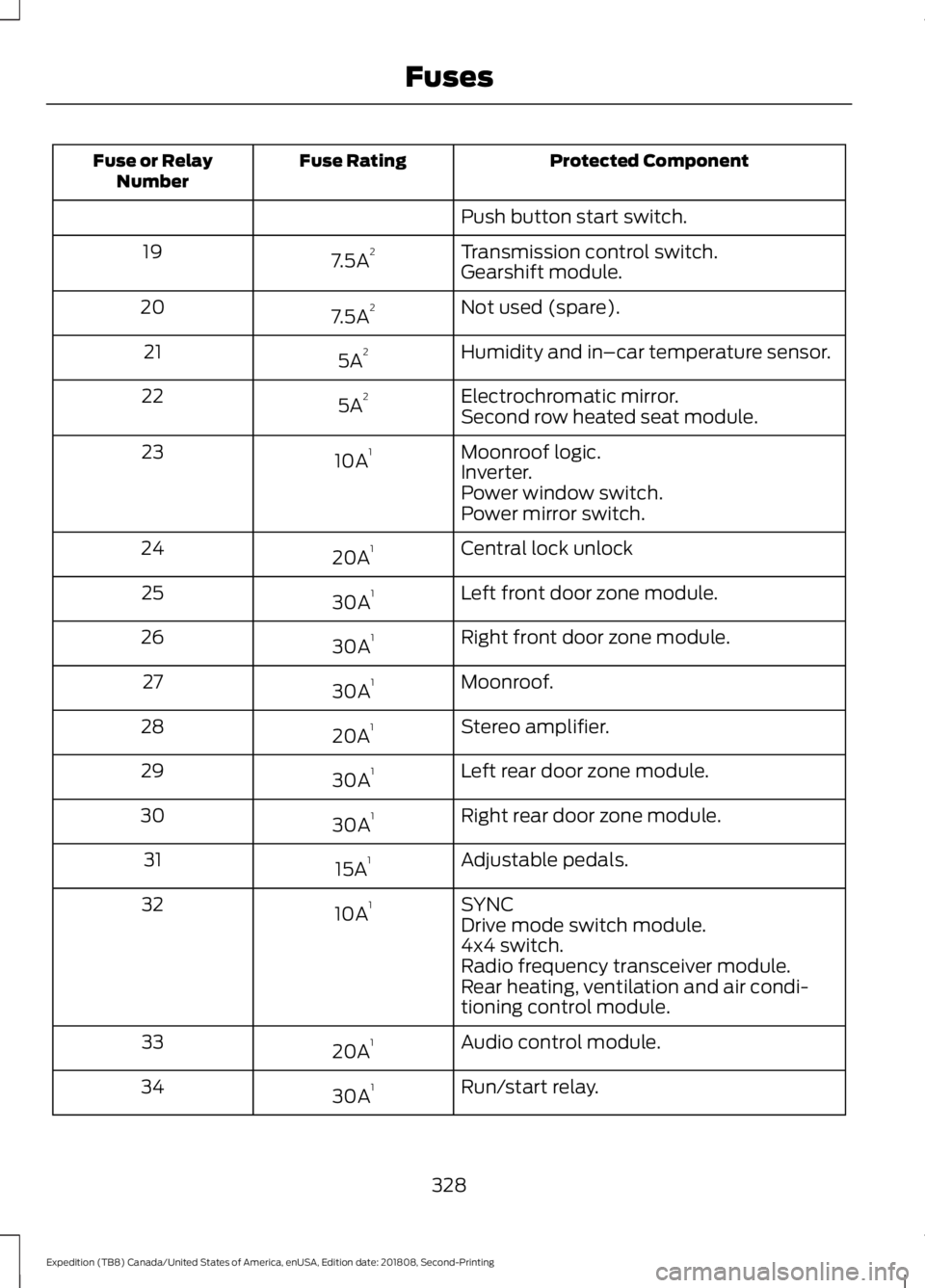
Protected Component
Fuse Rating
Fuse or Relay
Number
Push button start switch.
Transmission control switch.
7.5A 2
19
Gearshift module.
Not used (spare).
7.5A 2
20
Humidity and in–car temperature sensor.
5A 2
21
Electrochromatic mirror.
5A 2
22
Second row heated seat module.
Moonroof logic.
10A 1
23
Inverter.
Power window switch.
Power mirror switch.
Central lock unlock
20A 1
24
Left front door zone module.
30A 1
25
Right front door zone module.
30A 1
26
Moonroof.
30A 1
27
Stereo amplifier.
20A 1
28
Left rear door zone module.
30A 1
29
Right rear door zone module.
30A 1
30
Adjustable pedals.
15A 1
31
SYNC
10A 1
32
Drive mode switch module.
4x4 switch.
Radio frequency transceiver module.
Rear heating, ventilation and air condi-
tioning control module.
Audio control module.
20A 1
33
Run/start relay.
30A 1
34
328
Expedition (TB8) Canada/United States of America, enUSA, Edition date: 201808, Second-Printing Fuses
Page 354 of 583
WAXING
Regular waxing is necessary to protect your
car's paint from the elements. We
recommend that you wash and wax the
painted surface once or twice a year.
When washing and waxing, park your
vehicle in a shaded area out of direct
sunlight. Always wash your vehicle before
applying wax.
•
Use a quality wax that does not contain
abrasives.
• Follow the manufacturer ’s instructions
to apply and remove the wax.
• Apply a small amount of wax in a
back-and-forth motion, not in circles.
• Do not allow wax to come in contact
with any non-body (low-gloss black)
colored trim. The wax will discolor or
stain the parts over time.
•Roof racks.
• Bumpers.
• Grained door handles.
• Side moldings.
• Mirror housings.
• Windshield cowl area.
• Do not apply wax to glass areas.
• After waxing, your car's paint should
feel smooth, and be free of streaks and
smudges.
CLEANING THE ENGINE
Engines are more efficient when they are
clean because grease and dirt buildup keep
the engine warmer than normal. When washing:
•
Take care when using a power washer
to clean the engine. The high-pressure
fluid could penetrate the sealed parts
and cause damage.
• Do not spray a hot engine with cold
water to avoid cracking the engine
block or other engine components.
• Spray Motorcraft Engine Shampoo and
Degreaser on all parts that require
cleaning and pressure rinse clean. In
Canada, use Motorcraft Engine
Shampoo.
Note: If your vehicle has an engine cover
remove the cover before application of
Motorcraft Engine Shampoo and Degreaser.
Immediately rinse away any over spray.
• Never wash or rinse the engine while it
is hot or running; water in the running
engine may cause internal damage.
• Never wash or rinse any ignition coil,
spark plug wire or spark plug well, or
the area in and around these locations.
• Cover the battery, power distribution
box, and air filter assembly to prevent
water damage when cleaning the
engine.
CLEANING THE WINDOWS AND
WIPER BLADES
Car wash chemicals and environmental
fallout can result in windshield and wiper
blade contamination. Dirty windshield and
wipers will result in poor windshield wiper
operation. Keep the windshield and wiper
blades clean to maintain windshield wiper
performance.
351
Expedition (TB8) Canada/United States of America, enUSA, Edition date: 201808, Second-Printing Vehicle Care
Page 430 of 583
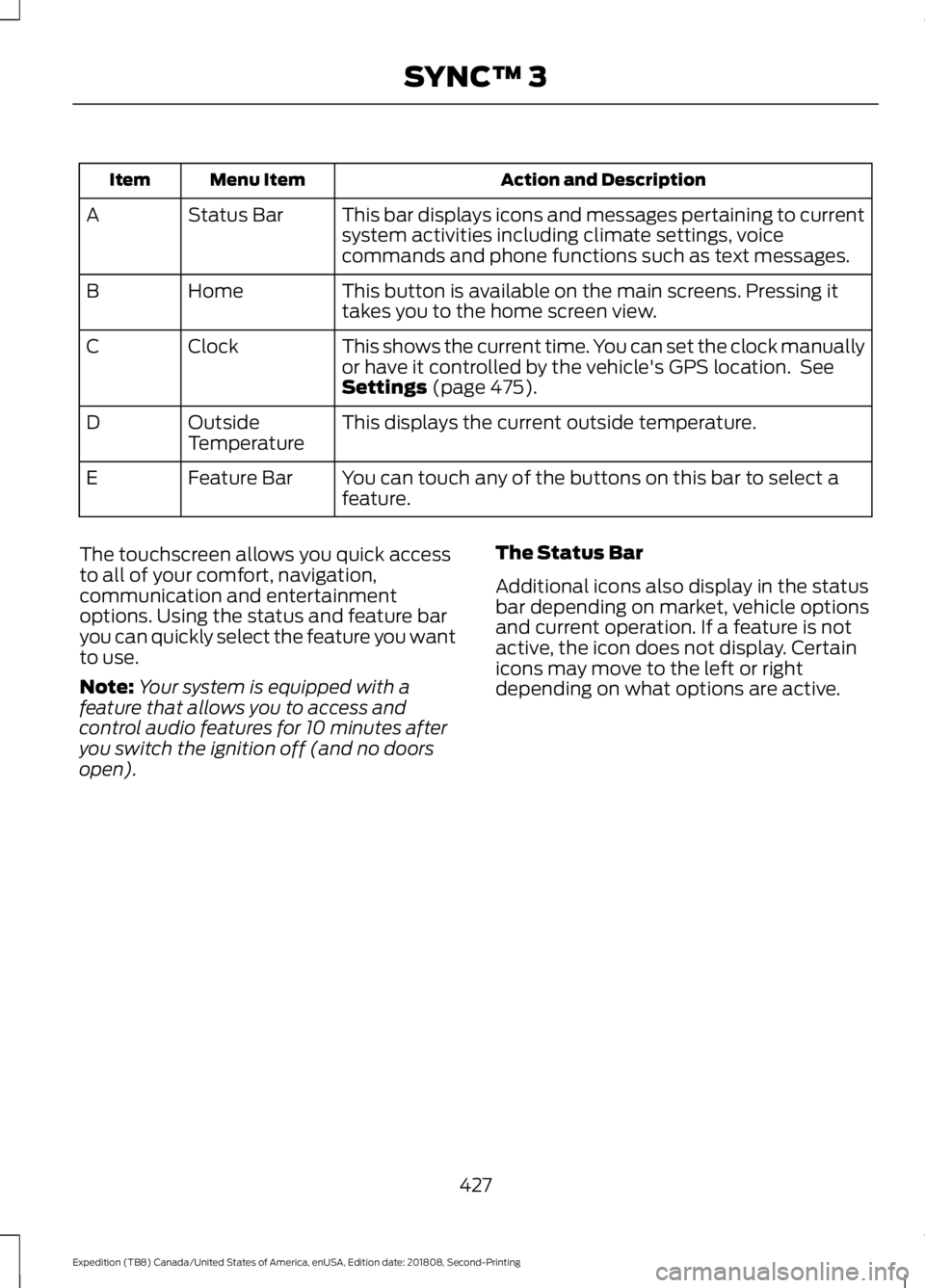
Action and Description
Menu Item
Item
This bar displays icons and messages pertaining to current
system activities including climate settings, voice
commands and phone functions such as text messages.
Status Bar
A
This button is available on the main screens. Pressing it
takes you to the home screen view.
Home
B
This shows the current time. You can set the clock manually
or have it controlled by the vehicle's GPS location. See
Settings (page 475).
Clock
C
This displays the current outside temperature.
Outside
Temperature
D
You can touch any of the buttons on this bar to select a
feature.
Feature Bar
E
The touchscreen allows you quick access
to all of your comfort, navigation,
communication and entertainment
options. Using the status and feature bar
you can quickly select the feature you want
to use.
Note: Your system is equipped with a
feature that allows you to access and
control audio features for 10 minutes after
you switch the ignition off (and no doors
open). The Status Bar
Additional icons also display in the status
bar depending on market, vehicle options
and current operation. If a feature is not
active, the icon does not display. Certain
icons may move to the left or right
depending on what options are active.
427
Expedition (TB8) Canada/United States of America, enUSA, Edition date: 201808, Second-Printing SYNC™ 3
Page 493 of 583
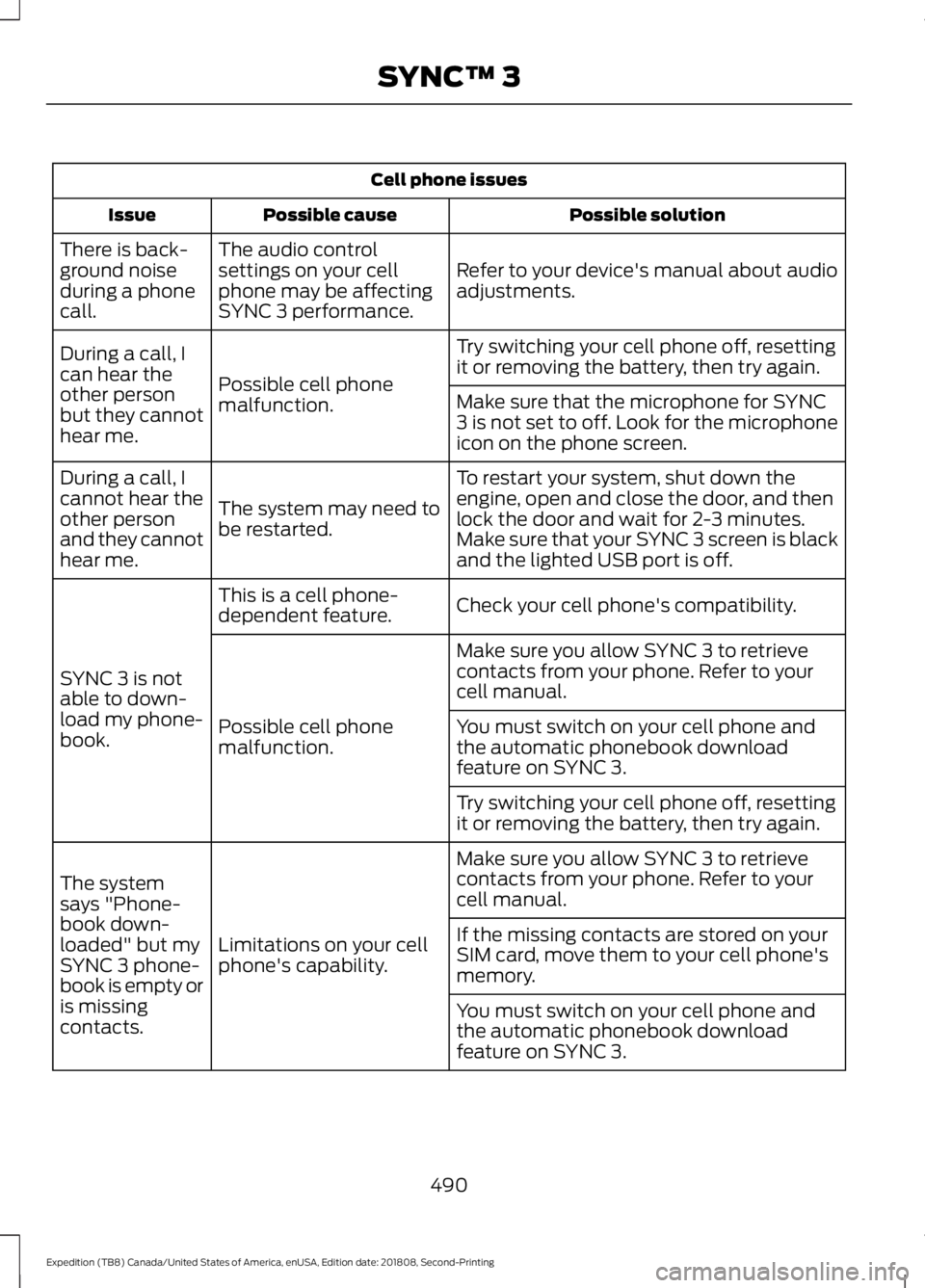
Cell phone issues
Possible solution
Possible cause
Issue
Refer to your device's manual about audio
adjustments.
The audio control
settings on your cell
phone may be affecting
SYNC 3 performance.
There is back-
ground noise
during a phone
call.
Try switching your cell phone off, resetting
it or removing the battery, then try again.
Possible cell phone
malfunction.
During a call, I
can hear the
other person
but they cannot
hear me.
Make sure that the microphone for SYNC
3 is not set to off. Look for the microphone
icon on the phone screen.
To restart your system, shut down the
engine, open and close the door, and then
lock the door and wait for 2-3 minutes.
Make sure that your SYNC 3 screen is black
and the lighted USB port is off.
The system may need to
be restarted.
During a call, I
cannot hear the
other person
and they cannot
hear me.
Check your cell phone's compatibility.
This is a cell phone-
dependent feature.
SYNC 3 is not
able to down-
load my phone-
book. Make sure you allow SYNC 3 to retrieve
contacts from your phone. Refer to your
cell manual.
Possible cell phone
malfunction. You must switch on your cell phone and
the automatic phonebook download
feature on SYNC 3.
Try switching your cell phone off, resetting
it or removing the battery, then try again.
Make sure you allow SYNC 3 to retrieve
contacts from your phone. Refer to your
cell manual.
Limitations on your cell
phone's capability.
The system
says "Phone-
book down-
loaded" but my
SYNC 3 phone-
book is empty or
is missing
contacts. If the missing contacts are stored on your
SIM card, move them to your cell phone's
memory.
You must switch on your cell phone and
the automatic phonebook download
feature on SYNC 3.
490
Expedition (TB8) Canada/United States of America, enUSA, Edition date: 201808, Second-Printing SYNC™ 3
Page 512 of 583
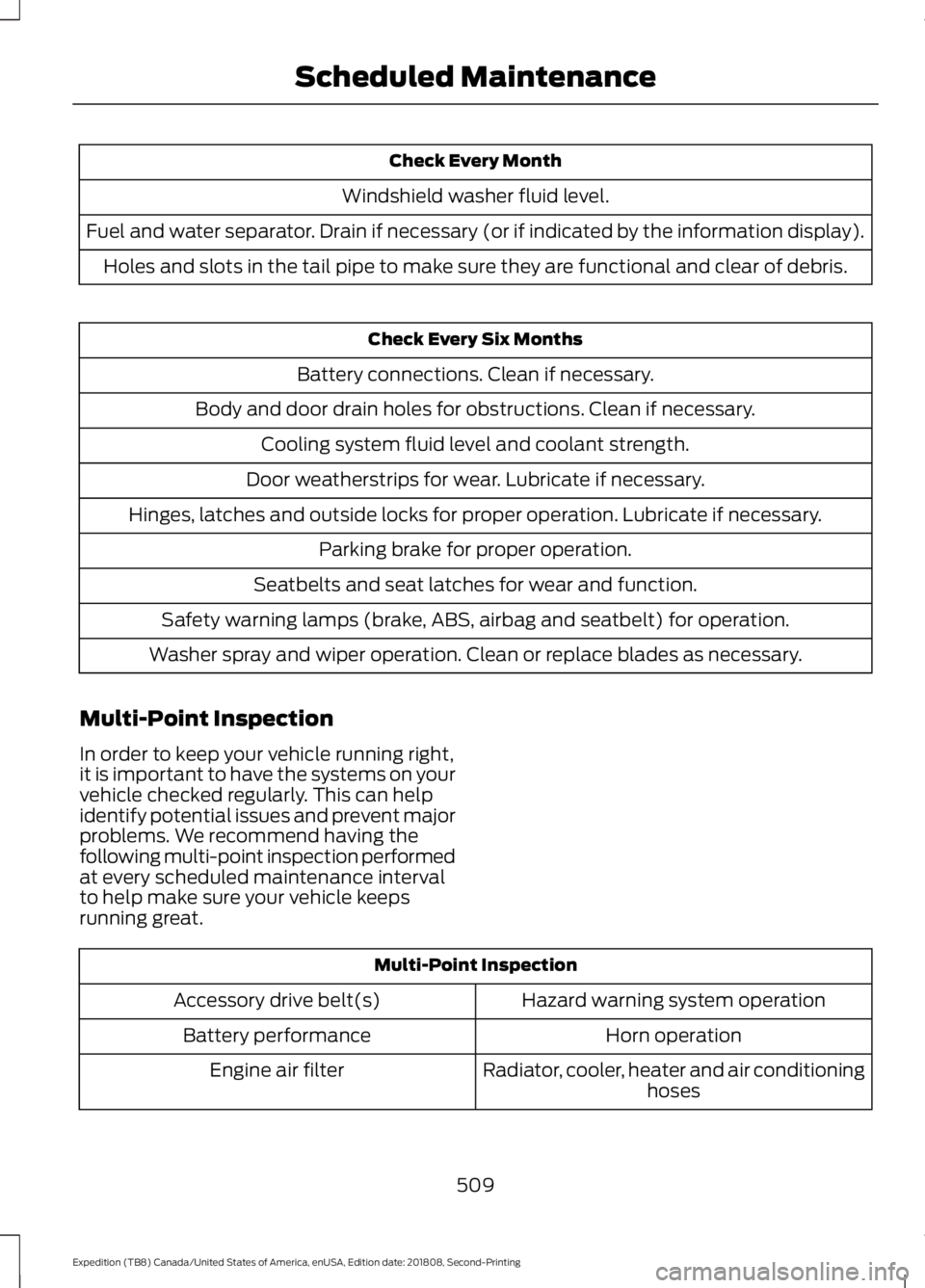
Check Every Month
Windshield washer fluid level.
Fuel and water separator. Drain if necessary (or if indicated by the information display). Holes and slots in the tail pipe to make sure they are functional and clear of debris. Check Every Six Months
Battery connections. Clean if necessary.
Body and door drain holes for obstructions. Clean if necessary. Cooling system fluid level and coolant strength.
Door weatherstrips for wear. Lubricate if necessary.
Hinges, latches and outside locks for proper operation. Lubricate if necessary. Parking brake for proper operation.
Seatbelts and seat latches for wear and function.
Safety warning lamps (brake, ABS, airbag and seatbelt) for operation.
Washer spray and wiper operation. Clean or replace blades as necessary.
Multi-Point Inspection
In order to keep your vehicle running right,
it is important to have the systems on your
vehicle checked regularly. This can help
identify potential issues and prevent major
problems. We recommend having the
following multi-point inspection performed
at every scheduled maintenance interval
to help make sure your vehicle keeps
running great. Multi-Point Inspection
Hazard warning system operation
Accessory drive belt(s)
Horn operation
Battery performance
Radiator, cooler, heater and air conditioninghoses
Engine air filter
509
Expedition (TB8) Canada/United States of America, enUSA, Edition date: 201808, Second-Printing Scheduled Maintenance
Page 573 of 583
Switching the Heated Exterior Mirrors On
and Off.............................................................. 457
Switching the Heated Rear Window On and Off....................................................................... 457
Switching the Heated Seats On and Off....................................................................... 457
Switching the Heated Steering Wheel On and Off.............................................................. 457
Switching the Rear Climate Controlled Seats On and Off.......................................... 458
Switching the Rear Heated Seats On and Off...................................................................... 458
Switching the Rear Ventilated Seats On and Off............................................................. 458
Switching the Ventilated Seats On and Off...................................................................... 458
Climate Control.............................................142
Climate Controlled Seats..........................167
Ventilated Seats................................................. 168
Coolant Check See: Engine Coolant Check............................ 335
Crash Sensors and Airbag Indicator.......54
Creating a MyKey
...........................................65
Programming and Changing Configurable
Settings.............................................................. 66
Cross Traffic Alert
........................................258
Blocked Sensors................................................ 260
Switching the System Off and On..............260
System Errors..................................................... 260
System Lights, Messages and Audible Alerts................................................................. 260
System Limitations........................................... 260
Using the Cross Traffic Alert System.........258
Cruise Control.................................................89 Principle of Operation....................................... 241
Cruise control See: Using Cruise Control................................ 241
Customer Assistance
..................................313
D
Data Recording
..................................................9
911 Assist Privacy Notice..................................... 13
Comfort, Convenience and Entertainment Data........................................................................\
11
Event Data................................................................. 11
Service Data............................................................ 10
Services That Third Parties Provide...............12 Services That We Provide..................................
12
Vehicles With a Modem...................................... 12
Vehicles With SYNC............................................. 12
Daytime Running Lamps
............................96
Type One - Conventional
(Non-Configurable)....................................... 96
Type Two - Configurable................................... 96
Declaration of Conformity.......................554 Radio Frequency Statement......................... 554
Digital Radio
..................................................403
HD Radio Reception and Station
Troubleshooting........................................... 404
Direction Indicators
.......................................98
Doors and Locks.............................................69
Drive Control.................................................266 Selectable Drive Modes.................................. 266
Driver Alert.....................................................249 Using Driver Alert............................................... 249
Driver and Passenger Airbags...................49 Children and Airbags.......................................... 50
Proper Driver and Front Passenger Seating Adjustment........................................................ 49
Driving Aids
....................................................249
Driving Hints..................................................303
Driving Through Water
..............................304
DRL See: Daytime Running Lamps........................ 96
E
Economical Driving
.....................................303
Electric Parking Brake.................................216 Applying the Electric Parking Brake.............216
Automatically Releasing the Electric
Parking Brake................................................... 217
Manually Releasing the Electric Parking Brake................................................................... 216
Releasing the Electric Parking Brake if the Vehicle Battery is Running Out of
Charge................................................................ 217
Electromagnetic Compatibility
..............526
Emission Law.................................................195
Noise Emissions Warranty, Prohibited
Tampering Acts and Maintenance.........196
Tampering With a Noise Control System............................................................... 195
570
Expedition (TB8) Canada/United States of America, enUSA, Edition date: 201808, Second-Printing Index