2019 FORD EXPEDITION USB
[x] Cancel search: USBPage 500 of 583
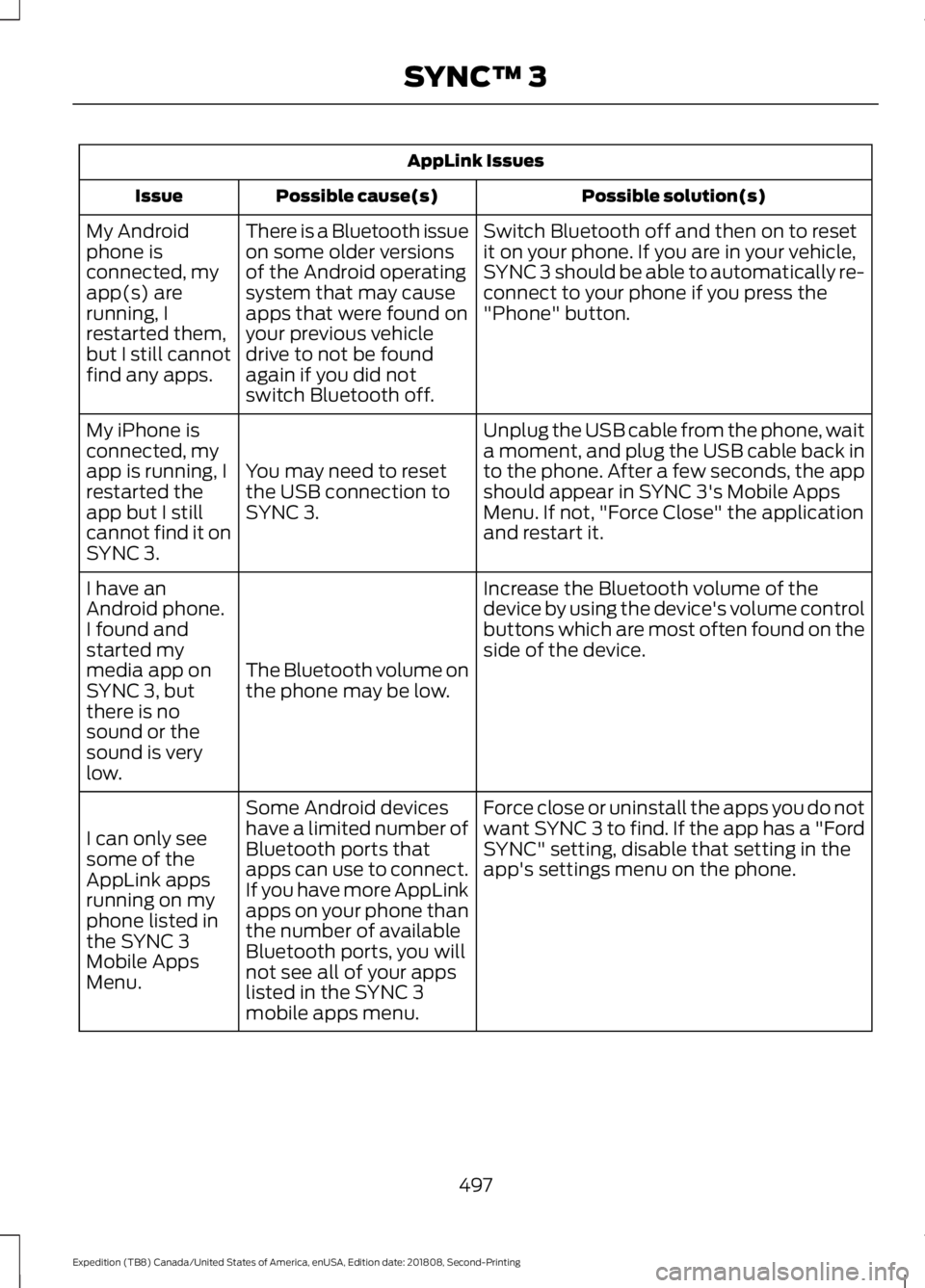
AppLink Issues
Possible solution(s)
Possible cause(s)
Issue
Switch Bluetooth off and then on to reset
it on your phone. If you are in your vehicle,
SYNC 3 should be able to automatically re-
connect to your phone if you press the
"Phone" button.
There is a Bluetooth issue
on some older versions
of the Android operating
system that may cause
apps that were found on
your previous vehicle
drive to not be found
again if you did not
switch Bluetooth off.
My Android
phone is
connected, my
app(s) are
running, I
restarted them,
but I still cannot
find any apps.
Unplug the USB cable from the phone, wait
a moment, and plug the USB cable back in
to the phone. After a few seconds, the app
should appear in SYNC 3's Mobile Apps
Menu. If not, "Force Close" the application
and restart it.
You may need to reset
the USB connection to
SYNC 3.
My iPhone is
connected, my
app is running, I
restarted the
app but I still
cannot find it on
SYNC 3.
Increase the Bluetooth volume of the
device by using the device's volume control
buttons which are most often found on the
side of the device.
The Bluetooth volume on
the phone may be low.
I have an
Android phone.
I found and
started my
media app on
SYNC 3, but
there is no
sound or the
sound is very
low.
Force close or uninstall the apps you do not
want SYNC 3 to find. If the app has a "Ford
SYNC" setting, disable that setting in the
app's settings menu on the phone.
Some Android devices
have a limited number of
Bluetooth ports that
apps can use to connect.
If you have more AppLink
apps on your phone than
the number of available
Bluetooth ports, you will
not see all of your apps
listed in the SYNC 3
mobile apps menu.
I can only see
some of the
AppLink apps
running on my
phone listed in
the SYNC 3
Mobile Apps
Menu.
497
Expedition (TB8) Canada/United States of America, enUSA, Edition date: 201808, Second-Printing SYNC™ 3
Page 502 of 583
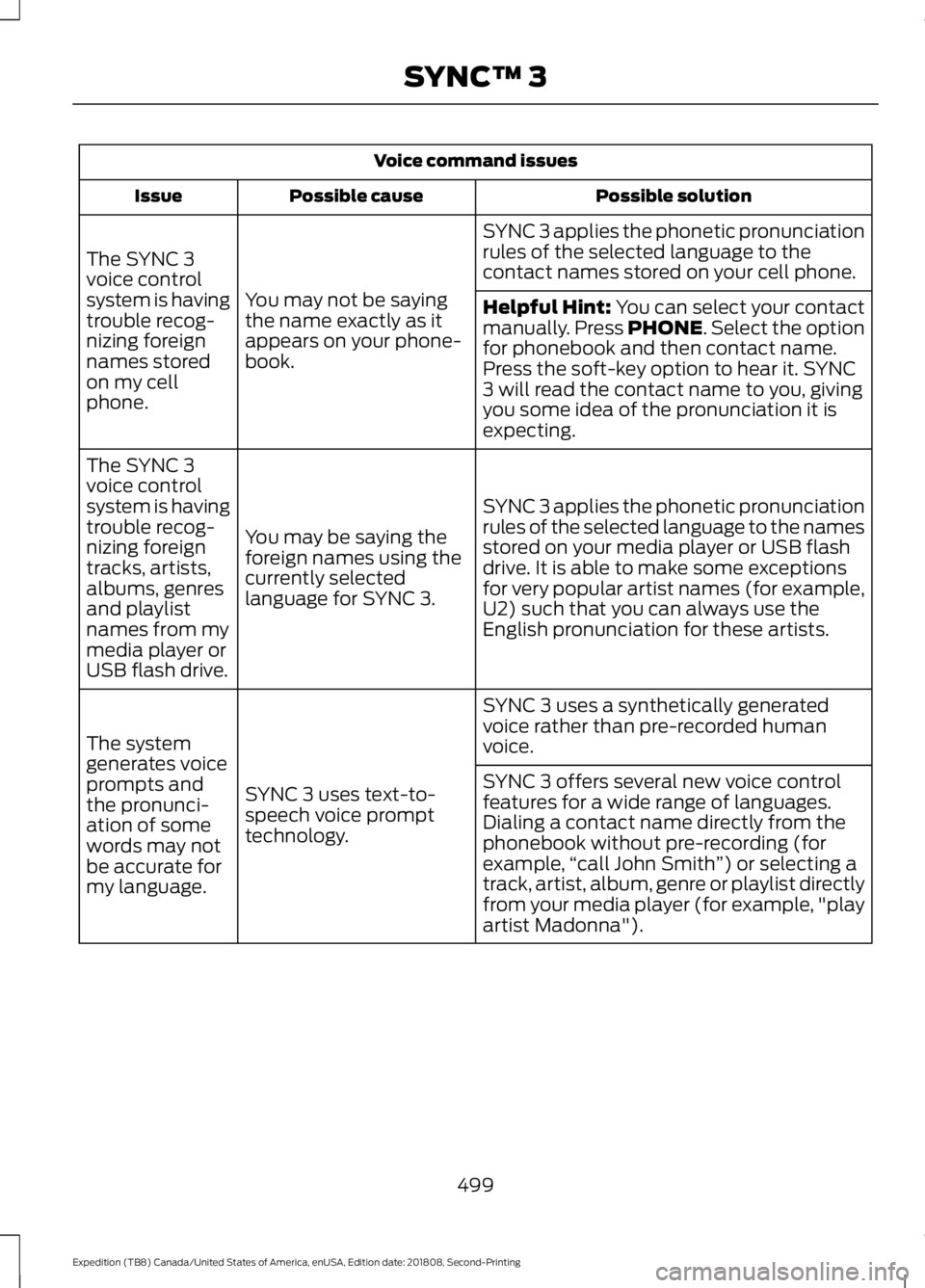
Voice command issues
Possible solution
Possible cause
Issue
SYNC 3 applies the phonetic pronunciation
rules of the selected language to the
contact names stored on your cell phone.
You may not be saying
the name exactly as it
appears on your phone-
book.
The SYNC 3
voice control
system is having
trouble recog-
nizing foreign
names stored
on my cell
phone.
Helpful Hint: You can select your contact
manually. Press PHONE. Select the option
for phonebook and then contact name.
Press the soft-key option to hear it. SYNC
3 will read the contact name to you, giving
you some idea of the pronunciation it is
expecting.
SYNC 3 applies the phonetic pronunciation
rules of the selected language to the names
stored on your media player or USB flash
drive. It is able to make some exceptions
for very popular artist names (for example,
U2) such that you can always use the
English pronunciation for these artists.
You may be saying the
foreign names using the
currently selected
language for SYNC 3.
The SYNC 3
voice control
system is having
trouble recog-
nizing foreign
tracks, artists,
albums, genres
and playlist
names from my
media player or
USB flash drive.
SYNC 3 uses a synthetically generated
voice rather than pre-recorded human
voice.
SYNC 3 uses text-to-
speech voice prompt
technology.
The system
generates voice
prompts and
the pronunci-
ation of some
words may not
be accurate for
my language. SYNC 3 offers several new voice control
features for a wide range of languages.
Dialing a contact name directly from the
phonebook without pre-recording (for
example,
“call John Smith ”) or selecting a
track, artist, album, genre or playlist directly
from your media player (for example, "play
artist Madonna").
499
Expedition (TB8) Canada/United States of America, enUSA, Edition date: 201808, Second-Printing SYNC™ 3
Page 505 of 583
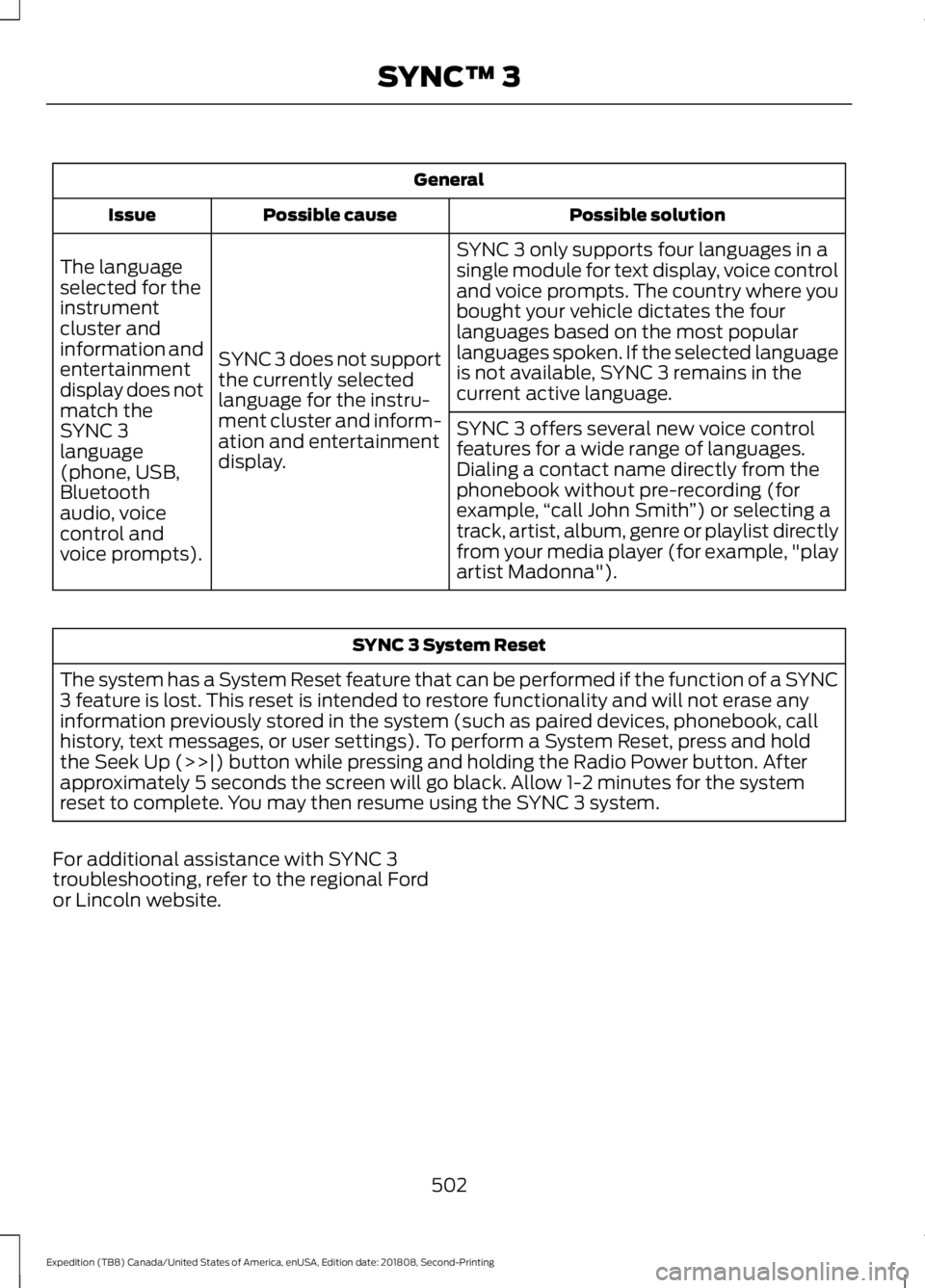
General
Possible solution
Possible cause
Issue
SYNC 3 only supports four languages in a
single module for text display, voice control
and voice prompts. The country where you
bought your vehicle dictates the four
languages based on the most popular
languages spoken. If the selected language
is not available, SYNC 3 remains in the
current active language.
SYNC 3 does not support
the currently selected
language for the instru-
ment cluster and inform-
ation and entertainment
display.
The language
selected for the
instrument
cluster and
information and
entertainment
display does not
match the
SYNC 3
SYNC 3 offers several new voice control
features for a wide range of languages.
Dialing a contact name directly from the
phonebook without pre-recording (for
example,
“call John Smith ”) or selecting a
track, artist, album, genre or playlist directly
from your media player (for example, "play
artist Madonna").
language
(phone, USB,
Bluetooth
audio, voice
control and
voice prompts). SYNC 3 System Reset
The system has a System Reset feature that can be performed if the function of a SYNC
3 feature is lost. This reset is intended to restore functionality and will not erase any
information previously stored in the system (such as paired devices, phonebook, call
history, text messages, or user settings). To perform a System Reset, press and hold
the Seek Up (>>|) button while pressing and holding the Radio Power button. After
approximately 5 seconds the screen will go black. Allow 1-2 minutes for the system
reset to complete. You may then resume using the SYNC 3 system.
For additional assistance with SYNC 3
troubleshooting, refer to the regional Ford
or Lincoln website.
502
Expedition (TB8) Canada/United States of America, enUSA, Edition date: 201808, Second-Printing SYNC™ 3
Page 571 of 583
Accessing the Clock Settings.......................
400
Accessing the Media Source Menu............400
Accessing the Phone Features.................... 400
Accessing the Settings Menu....................... 400
Accessing the Sound Settings..................... 400
Adjusting the Volume...................................... 400
Changing Radio Stations............................... 400
Listening to the Radio...................................... 401
Playing or Pausing Media................................ 401
Switching Radio Text On and Off................401
Switching Repeat Mode On and Off...........401
Switching Shuffle Mode On and Off..........401
Switching the Audio Unit On and Off.........401
Switching the Display On and Off...............401
Using Seek, Fast Forward and Reverse.............................................................. 401
Using the Display Control............................... 401
Using the Number Block................................. 401
Autolamps........................................................95 Windshield Wiper Activated
Headlamps........................................................ 95
Automatic Climate Control......................144 Accessing Rear Climate Controls.................144
Directing Air to the Footwell Air
Vents.................................................................. 144
Directing Air to the Instrument Panel Air Vents.................................................................. 144
Setting the Blower Motor Speed.................. 144
Setting the Temperature................................. 144
Switching Auto Mode On and Off................144
Switching Defrost On and Off....................... 145
Switching Dual Zone Mode On and Off........................................................................\
145
Switching Maximum Air Conditioning On and Off............................................................... 145
Switching Maximum Defrost On and Off........................................................................\
145
Switching Recirculated Air On and Off....................................................................... 146
Switching the Air Conditioning On and Off........................................................................\
145
Switching the Climate Control On and Off........................................................................\
145
Switching the Heated Seats On and Off........................................................................\
145
Switching the Ventilated Seats On and Off....................................................................... 146Automatic High Beam Control.................96
Automatic High Beam Indicator..................... 97
Switching the System On and Off.................97
Automatic Transmission...........................199 Automatic Transmission Adaptive
Learning........................................................... 205
Brake-Shift Interlock........................................ 204
If Your Vehicle Gets Stuck In Mud or Snow................................................................. 205
SelectShift™ Automatic Transmission.................................................. 203
Understanding the Shift Positions of your Automatic Transmission............................ 199
Automatic Transmission Fluid Check............................................................339
Auto-Start-Stop...........................................185 Disabling Auto-Start-Stop............................. 186
Enabling Auto-Start-Stop.............................. 185
Autowipers........................................................92
Autowipers Settings............................................ 93
Auxiliary Power Points................................174 110 Volt AC Power Point.................................... 174
12 Volt DC Power Point...................................... 174
USB Port and Power Point Locations..........174
B
Battery See: Changing the 12V Battery...................... 341
Blind Spot Information System
.............254
........................................................................\
.......... 254
Blind Spot Information System with Trailer Tow..................................................................... 256
Switching the System On and Off..............258
System Errors...................................................... 258
Using the Blind Spot Information System.............................................................. 255
BLIS See: Blind Spot Information System..........254
Bonnet Lock See: Opening and Closing the Hood...........331
Booster Seats
...................................................31
Types of Booster Seats...................................... 32
Brake Fluid Check
.......................................340
Brakes................................................................215 General Information.......................................... 215
Breaking-In....................................................303
Bulb Specification Chart..........................396
568
Expedition (TB8) Canada/United States of America, enUSA, Edition date: 201808, Second-Printing Index
Page 574 of 583
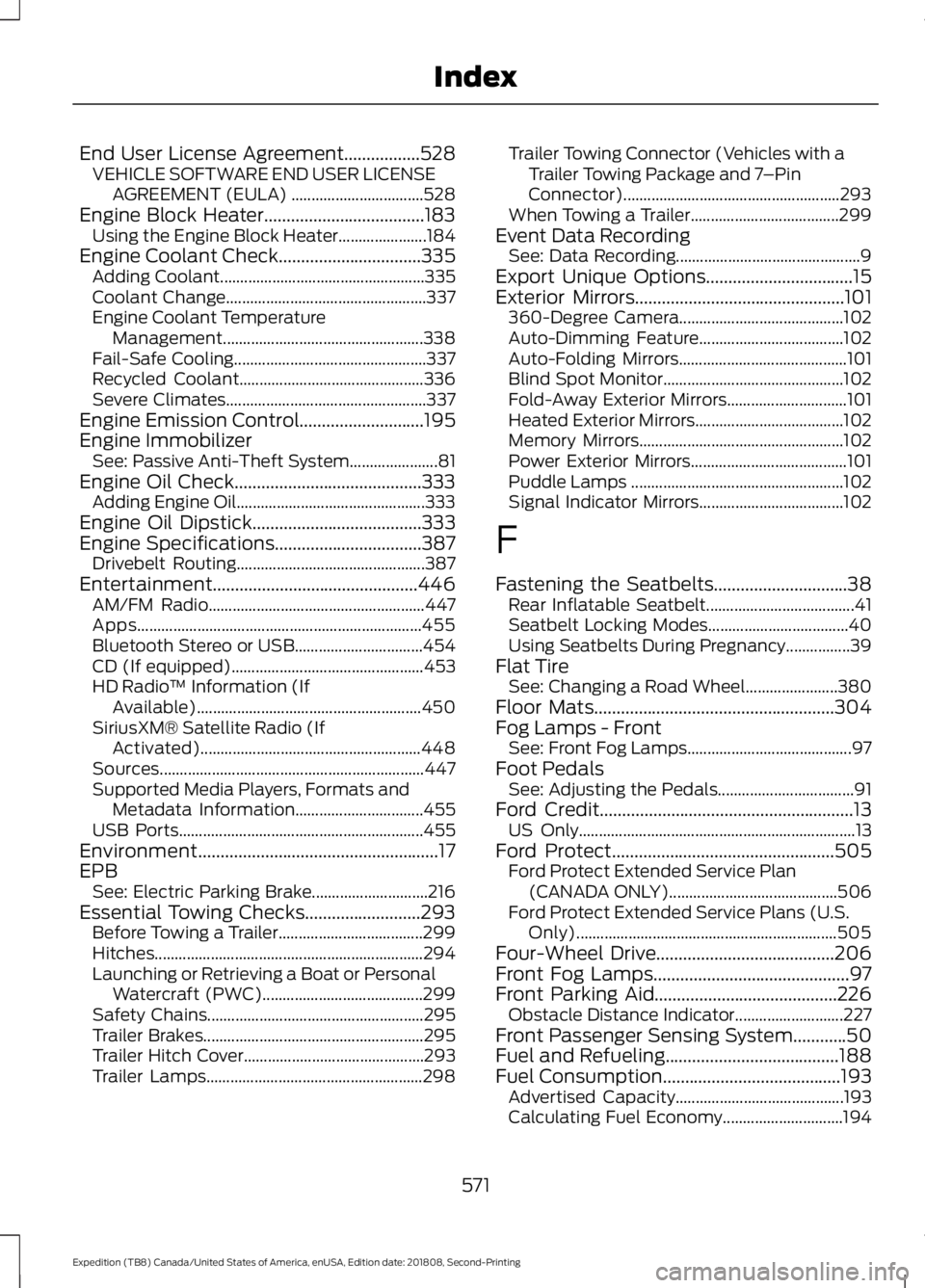
End User License Agreement.................528
VEHICLE SOFTWARE END USER LICENSE
AGREEMENT (EULA) ................................. 528
Engine Block Heater....................................183 Using the Engine Block Heater...................... 184
Engine Coolant Check................................335
Adding Coolant................................................... 335
Coolant Change.................................................. 337
Engine Coolant Temperature Management.................................................. 338
Fail-Safe Cooling................................................ 337
Recycled Coolant.............................................. 336
Severe Climates.................................................. 337
Engine Emission Control............................195
Engine Immobilizer See: Passive Anti-Theft System...................... 81
Engine Oil Check..........................................333 Adding Engine Oil...............................................333
Engine Oil Dipstick
......................................333
Engine Specifications.................................387
Drivebelt Routing............................................... 387
Entertainment..............................................446 AM/FM Radio...................................................... 447
Apps....................................................................... 455
Bluetooth Stereo or USB................................ 454
CD (If equipped)................................................ 453
HD Radio ™ Information (If
Available)........................................................ 450
SiriusXM® Satellite Radio (If Activated)....................................................... 448
Sources.................................................................. 447
Supported Media Players, Formats and Metadata Information................................ 455
USB Ports............................................................. 455
Environment......................................................17
EPB See: Electric Parking Brake............................. 216
Essential Towing Checks..........................293 Before Towing a Trailer.................................... 299
Hitches................................................................... 294
Launching or Retrieving a Boat or Personal Watercraft (PWC)........................................ 299
Safety Chains...................................................... 295
Trailer Brakes....................................................... 295
Trailer Hitch Cover............................................. 293
Trailer Lamps...................................................... 298Trailer Towing Connector (Vehicles with a
Trailer Towing Package and 7 –Pin
Connector)...................................................... 293
When Towing a Trailer..................................... 299
Event Data Recording See: Data Recording.............................................. 9
Export Unique Options.................................15
Exterior Mirrors
...............................................101
360-Degree Camera......................................... 102
Auto-Dimming Feature.................................... 102
Auto-Folding Mirrors.......................................... 101
Blind Spot Monitor............................................. 102
Fold-Away Exterior Mirrors.............................. 101
Heated Exterior Mirrors..................................... 102
Memory Mirrors................................................... 102
Power Exterior Mirrors....................................... 101
Puddle Lamps ..................................................... 102
Signal Indicator Mirrors.................................... 102
F
Fastening the Seatbelts..............................38 Rear Inflatable Seatbelt..................................... 41
Seatbelt Locking Modes................................... 40
Using Seatbelts During Pregnancy................39
Flat Tire See: Changing a Road Wheel....................... 380
Floor Mats......................................................304
Fog Lamps - Front See: Front Fog Lamps......................................... 97
Foot Pedals See: Adjusting the Pedals.................................. 91
Ford Credit
.........................................................13
US Only..................................................................... 13
Ford Protect..................................................505 Ford Protect Extended Service Plan
(CANADA ONLY).......................................... 506
Ford Protect Extended Service Plans (U.S. Only)................................................................. 505
Four-Wheel Drive........................................206
Front Fog Lamps
............................................97
Front Parking Aid.........................................226 Obstacle Distance Indicator........................... 227
Front Passenger Sensing System............50
Fuel and Refueling.......................................188
Fuel Consumption
........................................193
Advertised Capacity.......................................... 193
Calculating Fuel Economy.............................. 194
571
Expedition (TB8) Canada/United States of America, enUSA, Edition date: 201808, Second-Printing Index
Page 581 of 583
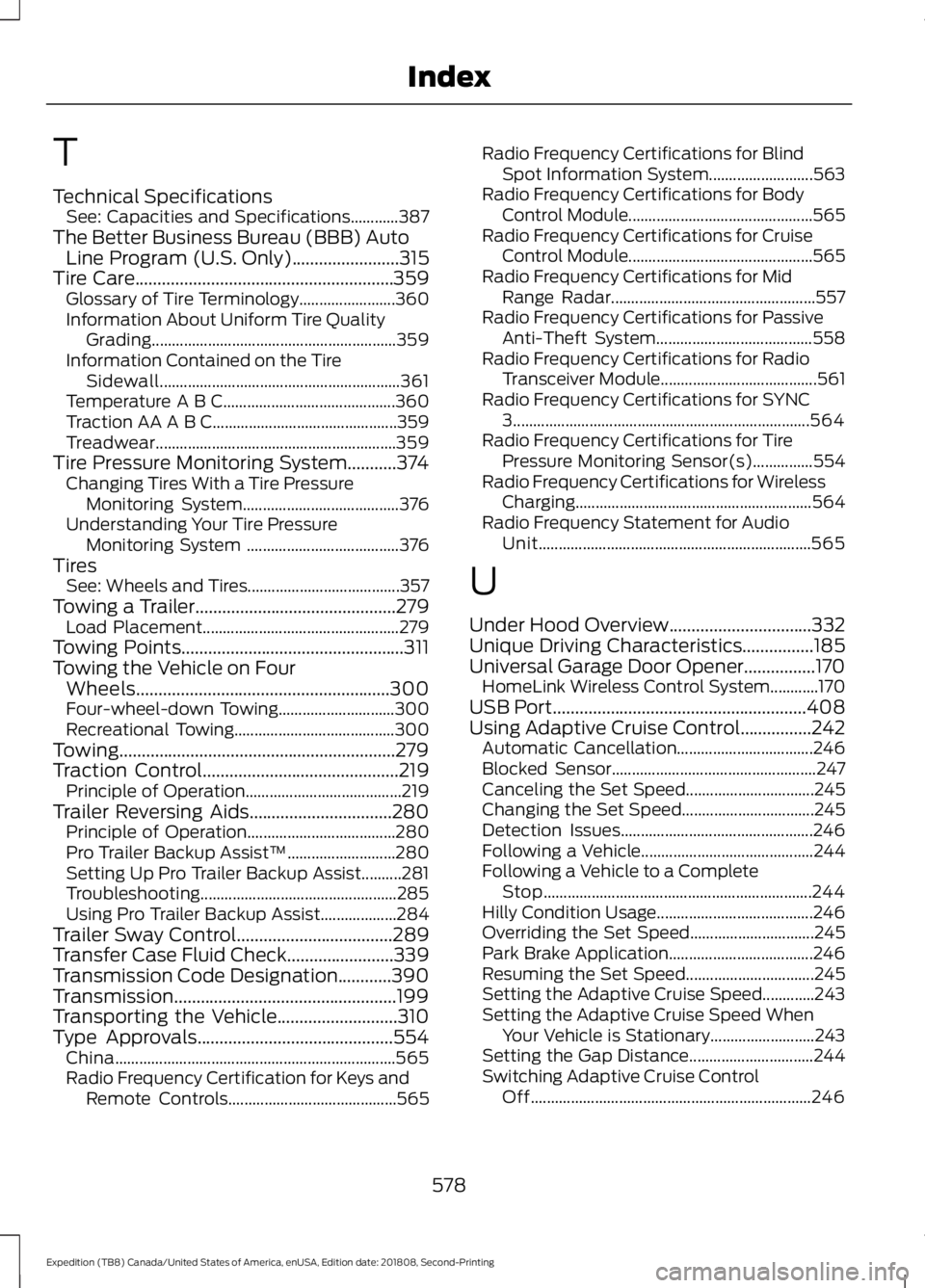
T
Technical Specifications
See: Capacities and Specifications............387
The Better Business Bureau (BBB) Auto Line Program (U.S. Only)........................315
Tire Care..........................................................359 Glossary of Tire Terminology........................ 360
Information About Uniform Tire Quality Grading............................................................. 359
Information Contained on the Tire Sidewall............................................................ 361
Temperature A B C........................................... 360
Traction AA A B C.............................................. 359
Treadwear............................................................ 359
Tire Pressure Monitoring System...........374 Changing Tires With a Tire Pressure
Monitoring System....................................... 376
Understanding Your Tire Pressure Monitoring System ...................................... 376
Tires See: Wheels and Tires...................................... 357
Towing a Trailer.............................................279 Load Placement................................................. 279
Towing Points
..................................................311
Towing the Vehicle on Four Wheels.........................................................300
Four-wheel-down Towing............................. 300
Recreational Towing........................................ 300
Towing..............................................................279
Traction Control............................................219 Principle of Operation....................................... 219
Trailer Reversing Aids................................280 Principle of Operation..................................... 280
Pro Trailer Backup Assist™........................... 280
Setting Up Pro Trailer Backup Assist..........281
Troubleshooting................................................. 285
Using Pro Trailer Backup Assist................... 284
Trailer Sway Control...................................289
Transfer Case Fluid Check........................339
Transmission Code Designation............390
Transmission..................................................199
Transporting the Vehicle
...........................310
Type Approvals............................................554
China...................................................................... 565
Radio Frequency Certification for Keys and Remote Controls.......................................... 565Radio Frequency Certifications for Blind
Spot Information System.......................... 563
Radio Frequency Certifications for Body Control Module.............................................. 565
Radio Frequency Certifications for Cruise Control Module.............................................. 565
Radio Frequency Certifications for Mid Range Radar................................................... 557
Radio Frequency Certifications for Passive Anti-Theft System....................................... 558
Radio Frequency Certifications for Radio Transceiver Module....................................... 561
Radio Frequency Certifications for SYNC 3........................................................................\
.. 564
Radio Frequency Certifications for Tire Pressure Monitoring Sensor(s)...............554
Radio Frequency Certifications for Wireless Charging........................................................... 564
Radio Frequency Statement for Audio Unit.................................................................... 565
U
Under Hood Overview
................................332
Unique Driving Characteristics................185
Universal Garage Door Opener................170 HomeLink Wireless Control System............170
USB Port
.........................................................408
Using Adaptive Cruise Control................242 Automatic Cancellation.................................. 246
Blocked Sensor................................................... 247
Canceling the Set Speed................................ 245
Changing the Set Speed................................. 245
Detection Issues................................................ 246
Following a Vehicle........................................... 244
Following a Vehicle to a Complete Stop................................................................... 244
Hilly Condition Usage....................................... 246
Overriding the Set Speed............................... 245
Park Brake Application.................................... 246
Resuming the Set Speed................................ 245
Setting the Adaptive Cruise Speed.............243
Setting the Adaptive Cruise Speed When Your Vehicle is Stationary.......................... 243
Setting the Gap Distance............................... 244
Switching Adaptive Cruise Control Off...................................................................... 246
578
Expedition (TB8) Canada/United States of America, enUSA, Edition date: 201808, Second-Printing Index