2019 FORD EXPEDITION cruise control
[x] Cancel search: cruise controlPage 251 of 583
A message displays if something obstructs
the radar signals from the sensor. The
sensor is in the lower grille. The system
cannot detect a vehicle ahead and does
not function when something blocks the
sensor.
Note:
You cannot see the sensor. It is
behind a fascia panel.
Keep the front of your vehicle free of dirt,
metal badges or objects. Vehicle front
protectors and aftermarket lights may also
block the sensor.
Possible Causes and Actions for This Message Displaying: Action
Cause
Clean the grille surface in front of the radar
or remove the object causing the obstruc-
tion.
The surface of the radar is dirty or
obstructed.
Wait a short time. It may take several
minutes for the radar to detect that it is free
from obstruction.
The surface of the radar is clean but the
message remains in the display.
Do not use the system in these conditions
because it may not detect any vehicles
ahead.
Heavy rain or snow is interfering with the
radar signals.
Do not use the system in these conditions
because it may not detect any vehicles
ahead.
Water, snow or ice on the surface of the
road may interfere with the radar signals.
Wait a short time or switch to normal cruise
control.
You are in a desert or remote area with no
other vehicles and no roadside objects.
Due to the nature of radar technology, it is possible to get a blockage warning with no
actual block. A false blocked condition either self clears, or clears after you restart your
vehicle.
Switching to Normal Cruise
Control WARNING: Normal cruise control
will not brake when your vehicle is
approaching slower vehicles. Always be
aware of which mode you have selected
and apply the brakes when necessary. The cruise control indicator light
replaces the adaptive cruise
control indicator light if you
select normal cruise control. The gap
setting does not display, and the system
does not respond to lead vehicles.
Automatic braking remains active to
maintain set speed.
You can change from adaptive cruise
control to normal cruise control through
the information display.
248
Expedition (TB8) Canada/United States of America, enUSA, Edition date: 201808, Second-Printing Cruise ControlE71340
Page 255 of 583
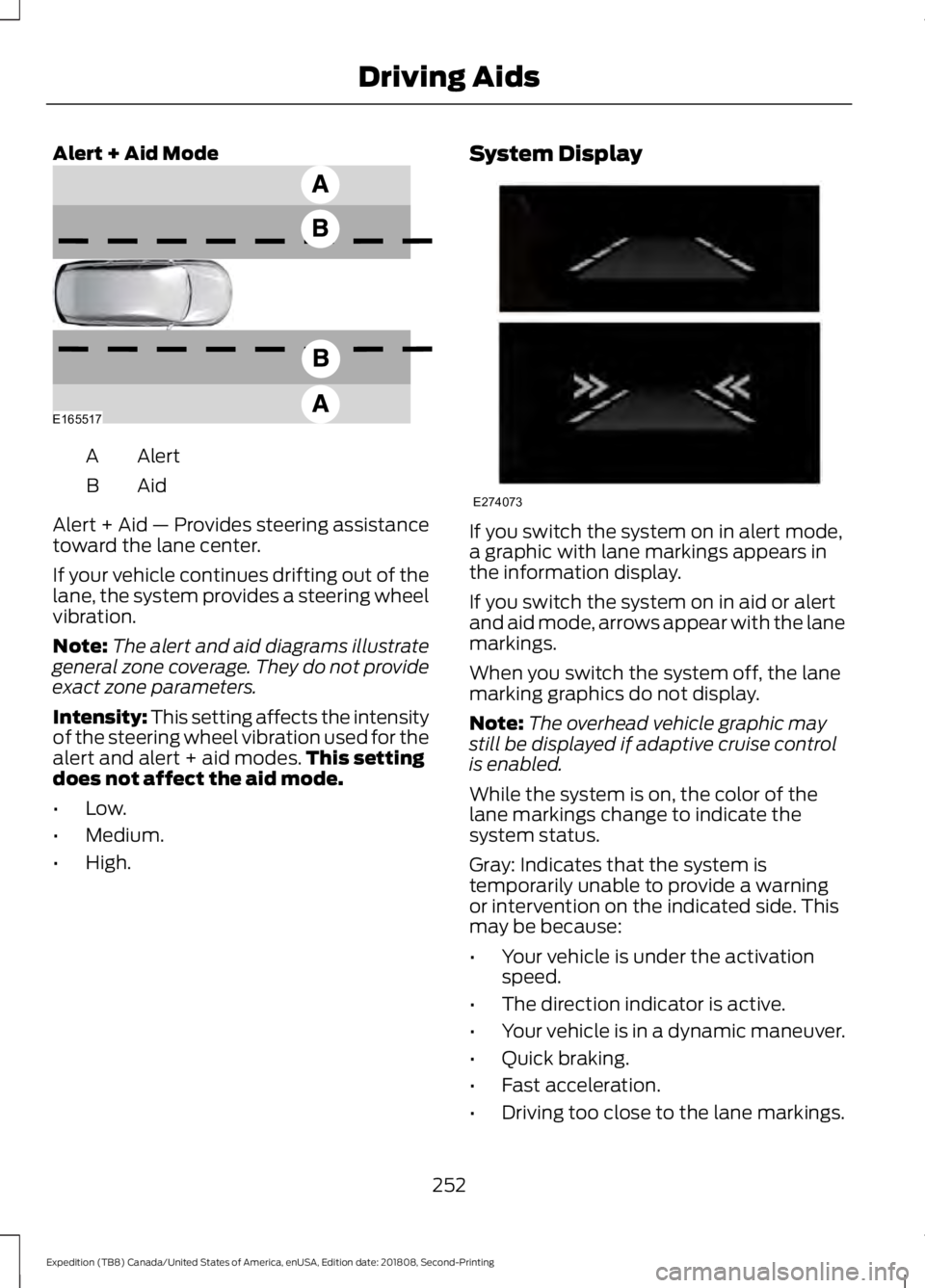
Alert + Aid Mode
Alert
A
AidB
Alert + Aid — Provides steering assistance
toward the lane center.
If your vehicle continues drifting out of the
lane, the system provides a steering wheel
vibration.
Note: The alert and aid diagrams illustrate
general zone coverage. They do not provide
exact zone parameters.
Intensity: This setting affects the intensity
of the steering wheel vibration used for the
alert and alert + aid modes. This setting
does not affect the aid mode.
• Low.
• Medium.
• High. System Display
If you switch the system on in alert mode,
a graphic with lane markings appears in
the information display.
If you switch the system on in aid or alert
and aid mode, arrows appear with the lane
markings.
When you switch the system off, the lane
marking graphics do not display.
Note:
The overhead vehicle graphic may
still be displayed if adaptive cruise control
is enabled.
While the system is on, the color of the
lane markings change to indicate the
system status.
Gray: Indicates that the system is
temporarily unable to provide a warning
or intervention on the indicated side. This
may be because:
• Your vehicle is under the activation
speed.
• The direction indicator is active.
• Your vehicle is in a dynamic maneuver.
• Quick braking.
• Fast acceleration.
• Driving too close to the lane markings.
252
Expedition (TB8) Canada/United States of America, enUSA, Edition date: 201808, Second-Printing Driving AidsE165517 E274073
Page 266 of 583
Active Braking: Active braking may
activate if the system determines that a
collision is imminent. The system may help
the driver reduce impact damage or avoid
the crash completely.
Note: If you perceive Pre-Collision Assist
alerts as being too frequent or disturbing,
then you can reduce the alert sensitivity,
though the manufacturer recommends
using the highest sensitivity setting where
possible. Setting lower sensitivity would
lead to fewer and later system warnings.
Note: The Pre-Collision Assist system
automatically disables when you select 4X4
LOW
or when you manually disable
AdvanceTrac ™.
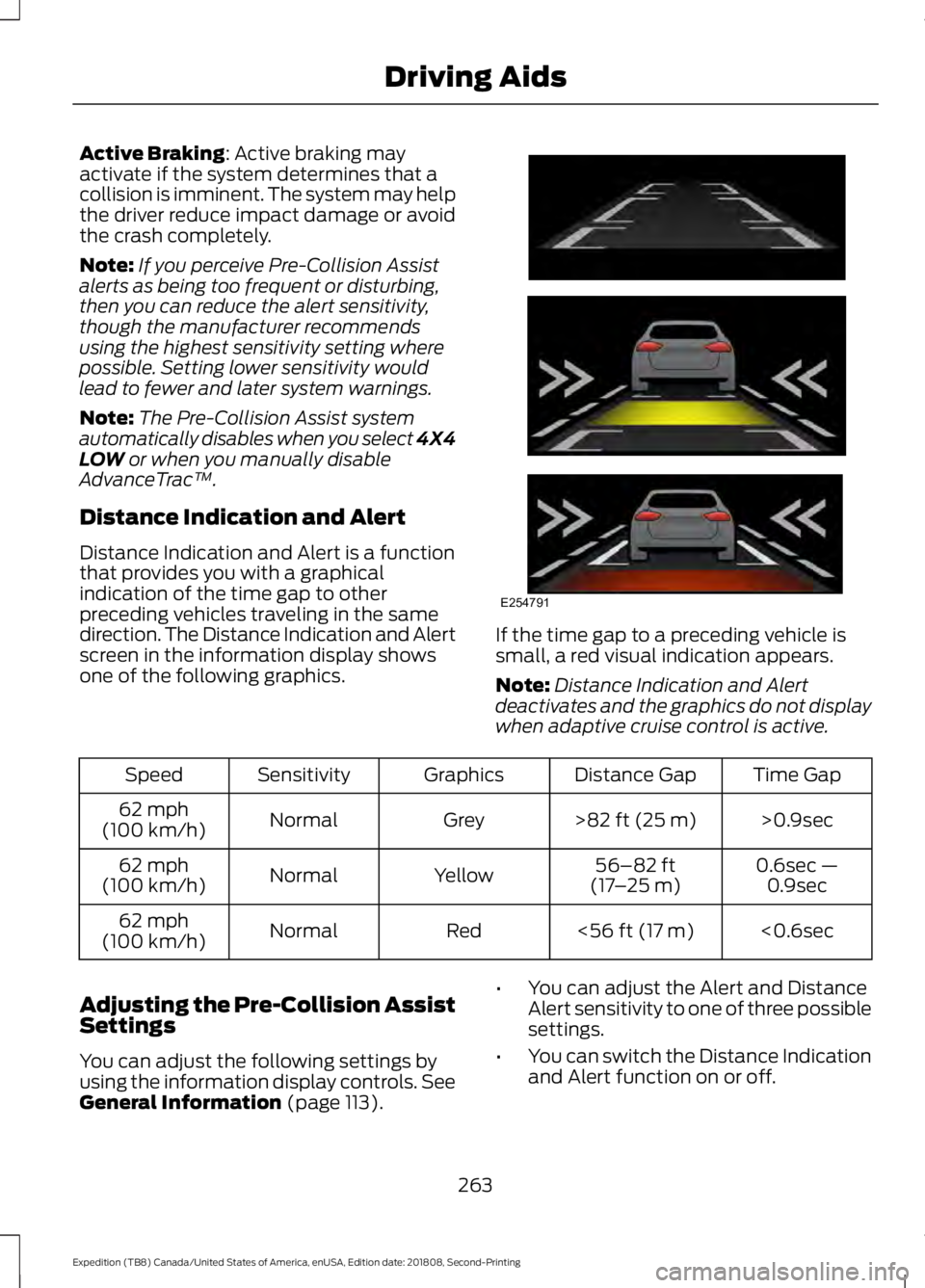
Distance Indication and Alert
Distance Indication and Alert is a function
that provides you with a graphical
indication of the time gap to other
preceding vehicles traveling in the same
direction. The Distance Indication and Alert
screen in the information display shows
one of the following graphics. If the time gap to a preceding vehicle is
small, a red visual indication appears.
Note:
Distance Indication and Alert
deactivates and the graphics do not display
when adaptive cruise control is active. Time Gap
Distance Gap
Graphics
Sensitivity
Speed
>0.9sec
>
82 ft (25 m)
Grey
Normal
62 mph
(100 km/h)
0.6sec —0.9sec
56–82 ft
(17 –25 m)
Yellow
Normal
62 mph
(100 km/h)
<0.6sec
<
56 ft (17 m)
Red
Normal
62 mph
(100 km/h)
Adjusting the Pre-Collision Assist
Settings
You can adjust the following settings by
using the information display controls.
See
General Information (page 113). •
You can adjust the Alert and Distance
Alert sensitivity to one of three possible
settings.
• You can switch the Distance Indication
and Alert function on or off.
263
Expedition (TB8) Canada/United States of America, enUSA, Edition date: 201808, Second-Printing Driving AidsE254791
Page 325 of 583
Protected Component
Fuse Rating
Fuse Number
4x4 module.
10A 1
13
Heated backlite.
Heated mirror relay coil.
Heated wiper park relay coil.
Transmission isolation relay coil.
Transmission control module.
15A 1
14
Voltage quality module run/start power.
15A 1
15
Blindspot information system.
Head Up Display.
Image processing module B.
Front view camera.
Rear view camera.
Cruise control module.
Powertrain control module (PCM) run/
start feed.
10A 1
16
Anti-lock brake system run / start feed.
10A 1
17
Electronic power assist steering run / start
feed.
10A 1
18
Not used.
—
19
Front blower.
40A 2
20
Passenger seat motors.
40A 2
21
Not used.
20A 1
22
Alternator A-line.
10A 1
23
Trailer brake control module.
30A 2
24
Body control module power 1.
50A 2
25
Electronic fan 3.
50A 2
26
Driver seat motors.
40A 2
27
Rear heated seats.
15A 1
28
Integrated wheel end solenoid.
10A 1
29
322
Expedition (TB8) Canada/United States of America, enUSA, Edition date: 201808, Second-Printing Fuses
Page 568 of 583
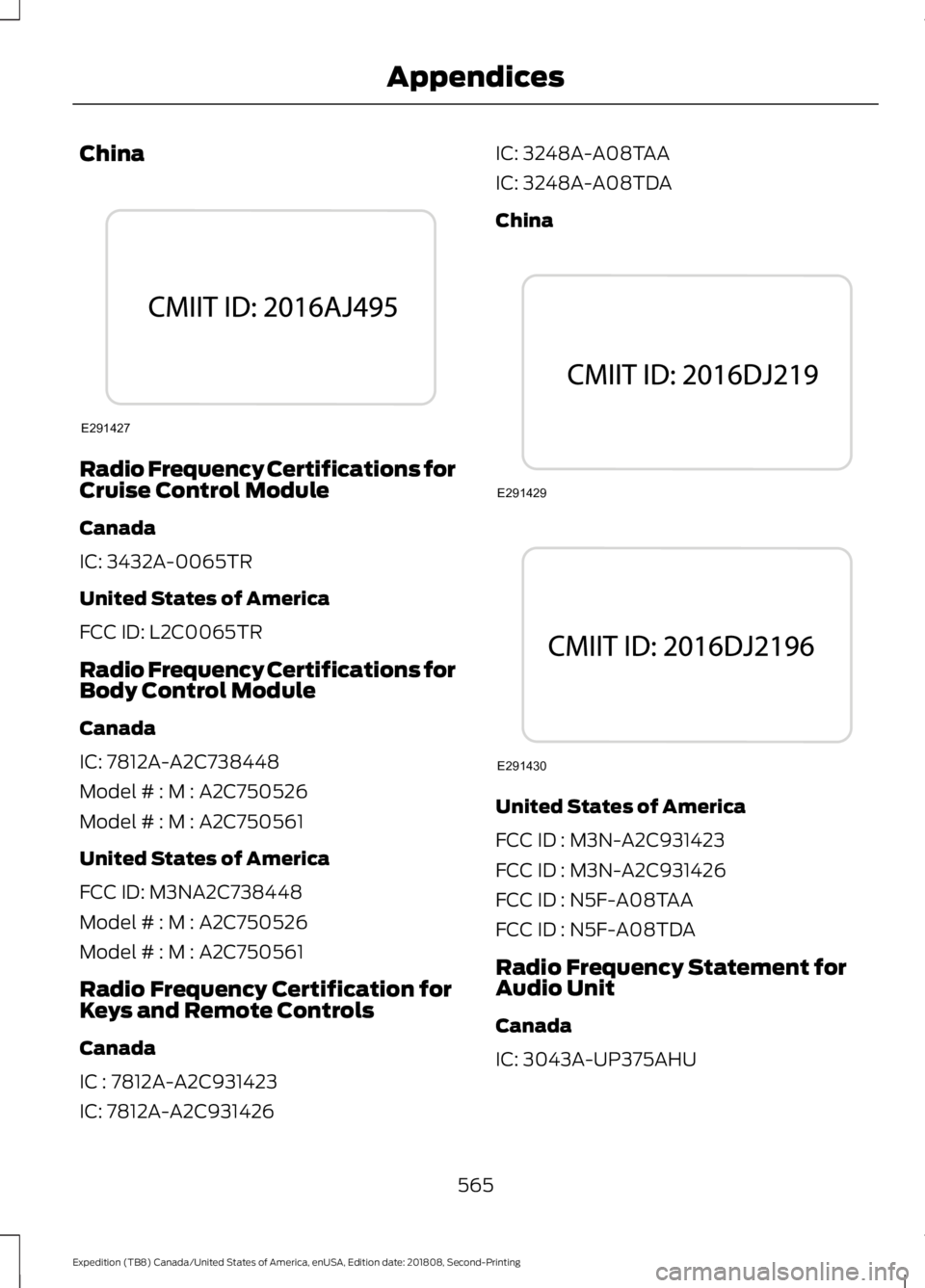
China
Radio Frequency Certifications for
Cruise Control Module
Canada
IC: 3432A-0065TR
United States of America
FCC ID: L2C0065TR
Radio Frequency Certifications for
Body Control Module
Canada
IC: 7812A-A2C738448
Model # : M : A2C750526
Model # : M : A2C750561
United States of America
FCC ID: M3NA2C738448
Model # : M : A2C750526
Model # : M : A2C750561
Radio Frequency Certification for
Keys and Remote Controls
Canada
IC : 7812A-A2C931423
IC: 7812A-A2C931426 IC: 3248A-A08TAA
IC: 3248A-A08TDA
China
United States of America
FCC ID : M3N-A2C931423
FCC ID : M3N-A2C931426
FCC ID : N5F-A08TAA
FCC ID : N5F-A08TDA
Radio Frequency Statement for
Audio Unit
Canada
IC: 3043A-UP375AHU
565
Expedition (TB8) Canada/United States of America, enUSA, Edition date: 201808, Second-Printing AppendicesE291427 E291429 E291430
Page 570 of 583
3
360 Degree Camera...................................238
Advanced Camera Views............................... 239
Camera Views..................................................... 239
Front Camera...................................................... 239
Keep Out Zone.................................................... 239
Side Camera........................................................ 240
4
4WD See: Four-Wheel Drive.................................... 206
A
A/C See: Climate Control......................................... 142
About This Manual...........................................7
ABS See: Brakes............................................................ 215
ABS driving hints See: Hints on Driving With Anti-Lock
Brakes................................................................. 215
Accessories....................................................503 Exterior Style....................................................... 503
Interior Style........................................................ 503
Lifestyle................................................................. 503
Peace of Mind..................................................... 503
Accessories See: Replacement Parts
Recommendation............................................ 14
ACC See: Using Adaptive Cruise Control............242
Active Park Assist........................................229 Using Active Park Assist.................................. 230
Adjustable Pedals...........................................91
Adjusting the Headlamps........................344 Horizontal Aim Adjustment........................... 345
Vertical Aim Adjustment................................ 344
Adjusting the Pedals......................................91
Adjusting the Steering Wheel - Vehicles With: Manual Adjustable Steering
Column............................................................87
Adjusting the Steering Wheel - Vehicles With: Power Adjustable Steering
Column............................................................87
End of Travel Position........................................ 88Memory Feature...................................................
88
Airbag Disposal...............................................55
Air Conditioning See: Climate Control......................................... 142
Air Filter See: Changing the Engine Air Filter.............347
Alarm See: Anti-Theft Alarm........................................ 83
Ambient Lighting
...........................................99
Adjusting the Brightness................................... 99
Changing the Color............................................. 99
Switching Ambient Lighting Off..................... 99
Switching Ambient Lighting On..................... 99
Anti-Theft Alarm............................................83 Arming the Alarm................................................ 84
Disarming the Alarm........................................... 84
Using the System................................................. 83
Appendices....................................................526
Apps..................................................................472 ........................................................................\
........... 472
SiriusXM Traffic and Travel Link................... 474
At a Glance........................................................18
Audible Warnings and Indicators.............112 Direction Indicator Chime................................. 112
Headlamps On Warning Chime...................... 112
Key in Ignition Warning Chime........................ 112
Parking Brake On Warning Chime.................112
Audio Control
..................................................88
Media........................................................................\
89
Seek, Next or Previous....................................... 89
Audio System
...............................................398
General Information......................................... 398
Audio Unit - Vehicles With: Touchscreen Display..........................................................402
Accessing the Sound Settings..................... 402
Adjusting the Volume...................................... 402
Changing Radio Stations............................... 402
Ejecting the CD................................................... 403
Inserting a CD..................................................... 403
Muting the Audio............................................... 403
Playing or Pausing Media............................... 403
Setting the Memory Presets......................... 403
Switching the Display On and Off..............403
Using Seek, Fast Forward and Reverse............................................................. 403
Audio Unit - Vehicles Without: Touchscreen Display
...............................399
Accessing the Apps Menu.............................. 399
567
Expedition (TB8) Canada/United States of America, enUSA, Edition date: 201808, Second-Printing Index
Page 573 of 583
Switching the Heated Exterior Mirrors On
and Off.............................................................. 457
Switching the Heated Rear Window On and Off....................................................................... 457
Switching the Heated Seats On and Off....................................................................... 457
Switching the Heated Steering Wheel On and Off.............................................................. 457
Switching the Rear Climate Controlled Seats On and Off.......................................... 458
Switching the Rear Heated Seats On and Off...................................................................... 458
Switching the Rear Ventilated Seats On and Off............................................................. 458
Switching the Ventilated Seats On and Off...................................................................... 458
Climate Control.............................................142
Climate Controlled Seats..........................167
Ventilated Seats................................................. 168
Coolant Check See: Engine Coolant Check............................ 335
Crash Sensors and Airbag Indicator.......54
Creating a MyKey
...........................................65
Programming and Changing Configurable
Settings.............................................................. 66
Cross Traffic Alert
........................................258
Blocked Sensors................................................ 260
Switching the System Off and On..............260
System Errors..................................................... 260
System Lights, Messages and Audible Alerts................................................................. 260
System Limitations........................................... 260
Using the Cross Traffic Alert System.........258
Cruise Control.................................................89 Principle of Operation....................................... 241
Cruise control See: Using Cruise Control................................ 241
Customer Assistance
..................................313
D
Data Recording
..................................................9
911 Assist Privacy Notice..................................... 13
Comfort, Convenience and Entertainment Data........................................................................\
11
Event Data................................................................. 11
Service Data............................................................ 10
Services That Third Parties Provide...............12 Services That We Provide..................................
12
Vehicles With a Modem...................................... 12
Vehicles With SYNC............................................. 12
Daytime Running Lamps
............................96
Type One - Conventional
(Non-Configurable)....................................... 96
Type Two - Configurable................................... 96
Declaration of Conformity.......................554 Radio Frequency Statement......................... 554
Digital Radio
..................................................403
HD Radio Reception and Station
Troubleshooting........................................... 404
Direction Indicators
.......................................98
Doors and Locks.............................................69
Drive Control.................................................266 Selectable Drive Modes.................................. 266
Driver Alert.....................................................249 Using Driver Alert............................................... 249
Driver and Passenger Airbags...................49 Children and Airbags.......................................... 50
Proper Driver and Front Passenger Seating Adjustment........................................................ 49
Driving Aids
....................................................249
Driving Hints..................................................303
Driving Through Water
..............................304
DRL See: Daytime Running Lamps........................ 96
E
Economical Driving
.....................................303
Electric Parking Brake.................................216 Applying the Electric Parking Brake.............216
Automatically Releasing the Electric
Parking Brake................................................... 217
Manually Releasing the Electric Parking Brake................................................................... 216
Releasing the Electric Parking Brake if the Vehicle Battery is Running Out of
Charge................................................................ 217
Electromagnetic Compatibility
..............526
Emission Law.................................................195
Noise Emissions Warranty, Prohibited
Tampering Acts and Maintenance.........196
Tampering With a Noise Control System............................................................... 195
570
Expedition (TB8) Canada/United States of America, enUSA, Edition date: 201808, Second-Printing Index
Page 576 of 583
Information Displays....................................113
General Information........................................... 113
Information Messages
................................125
Active Park............................................................ 126
Adaptive Cruise Control................................... 126
AdvanceTrac and Traction Control...............127
Airbag....................................................................... 127
Alarm and Security............................................. 127
Automatic Engine Shutdown......................... 128
Battery and Charging System........................ 128
Blind Spot Information and Cross Traffic Alert System.................................................... 129
Collision Warning System............................... 130
Doors and Locks................................................. 130
Driver Alert............................................................ 130
Drivetrain............................................................... 130
Engine....................................................................... 131
Four-Wheel Drive................................................. 131
Fuel........................................................................\
... 132
Keys and Intelligent Access............................ 133
Lane Keeping System....................................... 134
Maintenance......................................................... 134
MyKey...................................................................... 135
Off Road................................................................. 135
Park Aid.................................................................. 136
Park Brake.............................................................. 137
Power Steering..................................................... 137
Pro Trailer Backup Assist™............................ 138
Remote Start........................................................ 139
Seats....................................................................... 139
Starting System ................................................. 139
Tire Pressure Monitoring System.................140
Trailer...................................................................... 140
Transmission......................................................... 141
Installing Child Restraints............................21 Child Seats............................................................... 21
Combining Seatbelt and LATCH Lower Anchors for Attaching Child Safety
Seats.................................................................... 28
Using Lap and Shoulder Belts......................... 22
Using Lower Anchors and Tethers for CHildren (LATCH)............................................ 27
Using Tether Straps............................................. 28
Instrument Cluster
......................................106
Instrument Lighting Dimmer.....................95
Instrument Panel
............................................18
Interior Lamps.................................................98 Front Interior Lamp............................................. 98Rear Interior Lamps............................................
99
Interior Mirror
..................................................102
Auto-Dimming Mirror........................................ 103
Introduction.........................................................7
J
Jump Starting the Vehicle........................308 Connecting the Jumper Cables................... 308
Jump Starting..................................................... 309
Preparing Your Vehicle.................................... 308
Removing the Jumper Cables...................... 309
K
Keyless Entry
....................................................72
Displaying the Factory-Set Code.................... 74
Locking and Unlocking....................................... 74
SECURICODE™ KEYLESS ENTRY KEYPAD............................................................... 72
Keyless Starting
............................................180
Ignition Modes..................................................... 180
Keys and Remote Controls.........................56
L
Lane Keeping System
................................250
Switching the System On and Off................251
System Display................................................... 252
System Settings.................................................. 251
Troubleshooting................................................. 253
Liftgate...............................................................76
Liftgate Window
...........................................105
Opening the Liftgate Window....................... 105
Lighting Control
..............................................94
Flashing the Headlamp High Beam..............95
Headlamp High Beam........................................ 94
Lighting..............................................................94 General Information............................................ 94
Limited Slip Differential.............................214 Locking Function................................................. 214
Spare Tire............................................................... 214
Trailer Towing....................................................... 214
Load Carriers See: Roof Racks and Load Carriers.............272
Load Carrying
................................................269
573
Expedition (TB8) Canada/United States of America, enUSA, Edition date: 201808, Second-Printing Index