2019 FORD EXPEDITION brake fluid
[x] Cancel search: brake fluidPage 398 of 583
An oil that displays this symbol conforms
to current engine, emission system and
fuel economy performance standards of
the ILSAC.
Do not use supplemental engine oil
additives because they are unnecessary
and could lead to engine damage not
covered by your vehicle warranty.
Note:
We recommend using DOT 4 Low
Viscosity (LV) High Performance Brake Fluid
or equivalent meeting WSS-M6C65-A2.
Please refer to the brake reservoir cap for
the proper brake fluid. Use of any fluid other
than the recommended fluid may cause
degraded brake performance and not meet
our performance standards. Keep brake fluid
clean and dry. Contamination with dirt,
water, petroleum products or other
materials may result in brake system
damage and possible failure.
Alternative Engine Oil for
Extremely Cold Climates
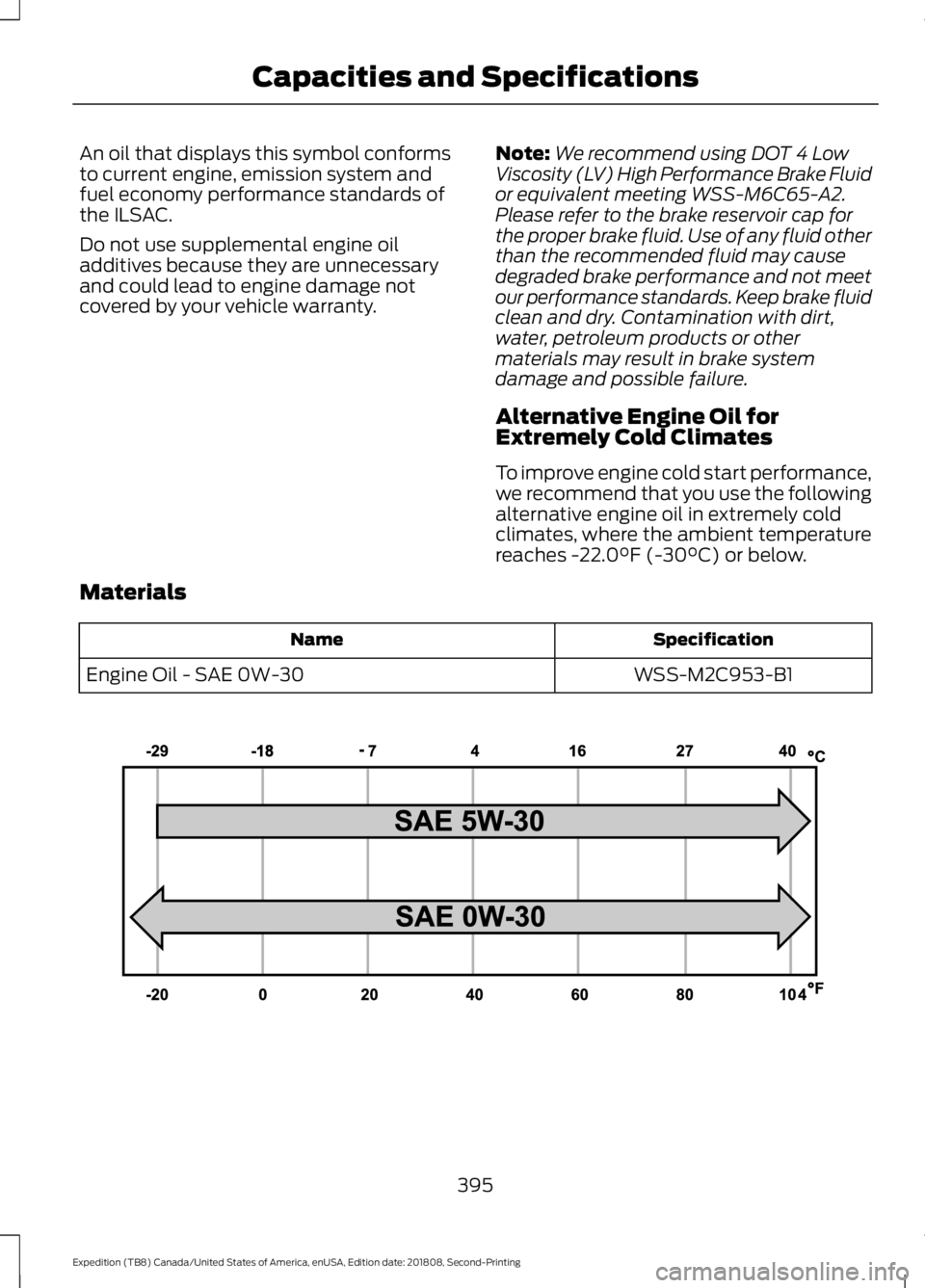
To improve engine cold start performance,
we recommend that you use the following
alternative engine oil in extremely cold
climates, where the ambient temperature
reaches -22.0°F (-30°C) or below.
Materials Specification
Name
WSS-M2C953-B1
Engine Oil - SAE 0W-30 395
Expedition (TB8) Canada/United States of America, enUSA, Edition date: 201808, Second-Printing Capacities and SpecificationsE240523
Page 509 of 583

Less Cost to Properly Maintain Your
Vehicle
Ford Protect extended service plan also
offers a Premium Maintenance Plan that
covers all scheduled maintenance, and
selected wear items. The coverage is
prepaid, so you never have to worry about
the cost of your vehicle
’s maintenance.
Covered maintenance includes:
• Windshield wiper blades.
• Spark plugs.
• The clutch disc (if equipped).
• Brake pads and linings.
• Shock absorbers.
• Struts.
• Engine Belts.
• Engine coolant hoses, clamps and
o-rings.
• Diesel exhaust fluid replenishment (if
equipped).
• Cabin air filter replacement every
20,000 mi (32,000 km) (electric
vehicles only).
Interest Free Finance Options
Just a 10% down payment will provide you
with an affordable, no interest, no fee
payment program allowing you all the
security and benefits Ford Protect
extended service plan has to offer while
paying over time. You are pre-approved
with no credit check or hassles. To learn
more, call our Ford Protect extended
service plan specialists at 800-367-3377.
Ford Protect Extended Service Plan
P.O. Box 321067
Detroit, MI 48232 Ford Protect Extended Service
Plan (CANADA ONLY)
You can get more protection for your
vehicle by purchasing a Ford Protect
extended service plan. Ford Protect
extended service plan is the only service
contract backed by Ford Motor Company
of Canada, Limited. Depending on the plan
you purchase, Ford Protect extended
service plan provides benefits such as:
•
Rental reimbursement.
• Coverage for certain maintenance and
wear items.
• Protection against repair costs after
your New Vehicle Limited Warranty
Coverage expires.
• Roadside Assistance benefits.
There are several Ford Protect extended
service plans available in various time,
distance and deductible combinations.
Each plan is tailored to fit your own driving
needs, including reimbursement for towing
and rental. When you purchase Ford
Protect extended service plan, you receive
added peace-of-mind protection
throughout Canada, the United States and
Mexico, provided by a network of
participating authorized Ford Motor
Company dealers.
Note: Repairs performed outside of
Canada, the United States and Mexico are
not eligible for Ford Protect extended
service plan coverage.
This information is subject to change. For
more information; visit your local Ford of
Canada dealer or www.ford.ca to find the
Ford Protect extended service plan that is
right for you.
506
Expedition (TB8) Canada/United States of America, enUSA, Edition date: 201808, Second-Printing Ford Protect
Page 512 of 583
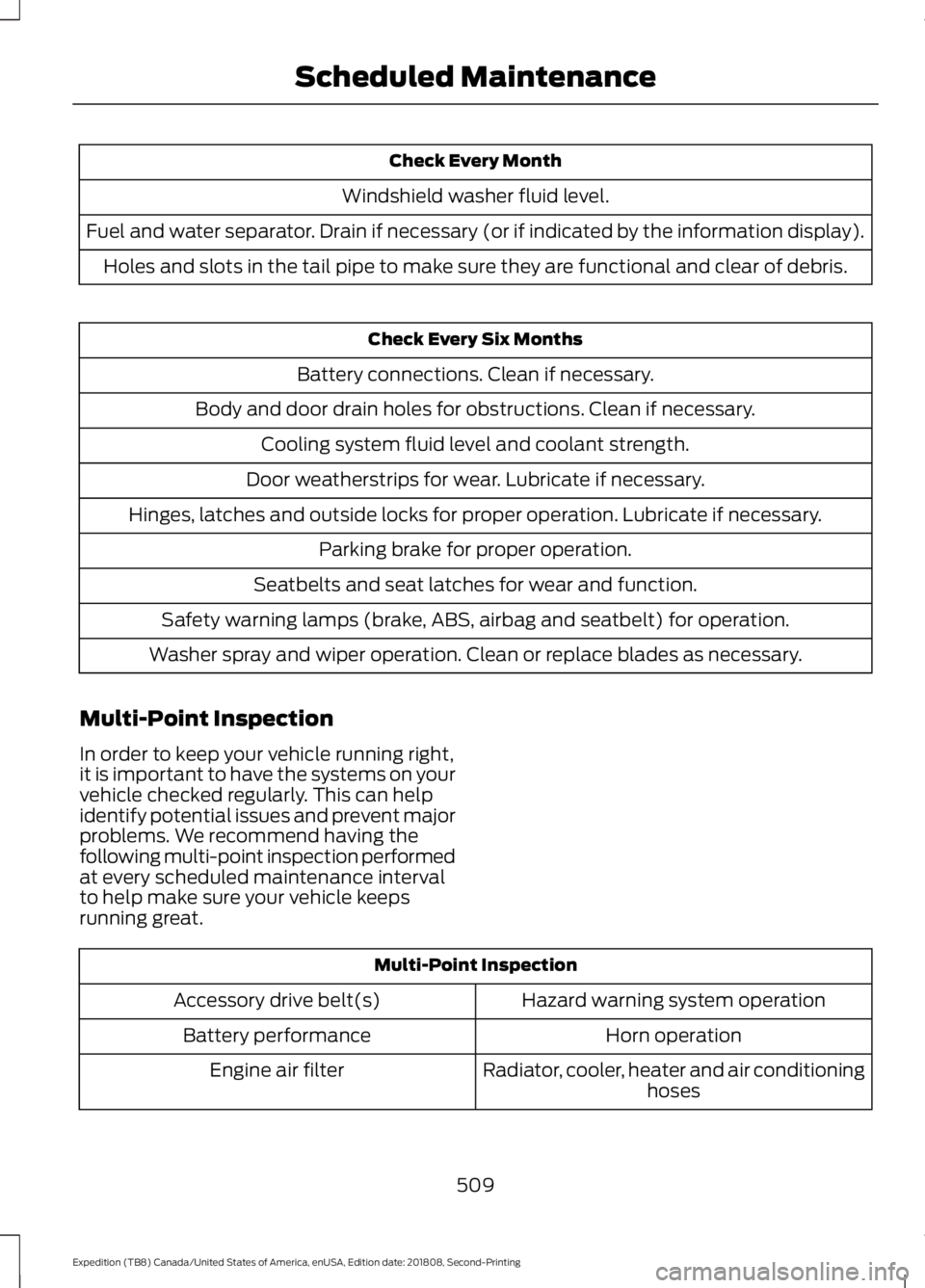
Check Every Month
Windshield washer fluid level.
Fuel and water separator. Drain if necessary (or if indicated by the information display). Holes and slots in the tail pipe to make sure they are functional and clear of debris. Check Every Six Months
Battery connections. Clean if necessary.
Body and door drain holes for obstructions. Clean if necessary. Cooling system fluid level and coolant strength.
Door weatherstrips for wear. Lubricate if necessary.
Hinges, latches and outside locks for proper operation. Lubricate if necessary. Parking brake for proper operation.
Seatbelts and seat latches for wear and function.
Safety warning lamps (brake, ABS, airbag and seatbelt) for operation.
Washer spray and wiper operation. Clean or replace blades as necessary.
Multi-Point Inspection
In order to keep your vehicle running right,
it is important to have the systems on your
vehicle checked regularly. This can help
identify potential issues and prevent major
problems. We recommend having the
following multi-point inspection performed
at every scheduled maintenance interval
to help make sure your vehicle keeps
running great. Multi-Point Inspection
Hazard warning system operation
Accessory drive belt(s)
Horn operation
Battery performance
Radiator, cooler, heater and air conditioninghoses
Engine air filter
509
Expedition (TB8) Canada/United States of America, enUSA, Edition date: 201808, Second-Printing Scheduled Maintenance
Page 513 of 583
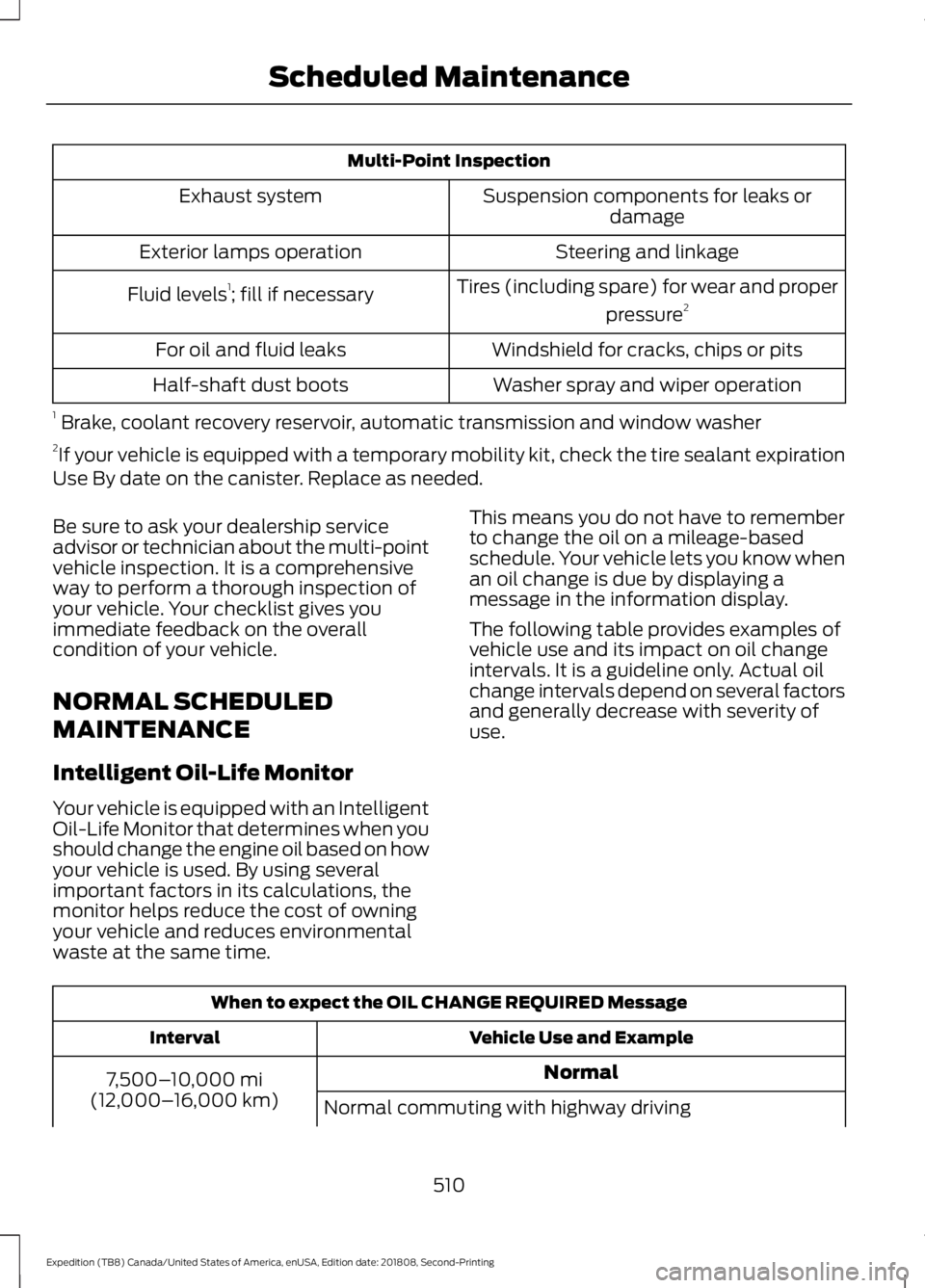
Multi-Point Inspection
Suspension components for leaks ordamage
Exhaust system
Steering and linkage
Exterior lamps operation
Tires (including spare) for wear and properpressure2
Fluid levels 1
; fill if necessary
Windshield for cracks, chips or pits
For oil and fluid leaks
Washer spray and wiper operation
Half-shaft dust boots
1 Brake, coolant recovery reservoir, automatic transmission and window washer
2 If your vehicle is equipped with a temporary mobility kit, check the tire sealant expiration
Use By date on the canister. Replace as needed.
Be sure to ask your dealership service
advisor or technician about the multi-point
vehicle inspection. It is a comprehensive
way to perform a thorough inspection of
your vehicle. Your checklist gives you
immediate feedback on the overall
condition of your vehicle.
NORMAL SCHEDULED
MAINTENANCE
Intelligent Oil-Life Monitor
Your vehicle is equipped with an Intelligent
Oil-Life Monitor that determines when you
should change the engine oil based on how
your vehicle is used. By using several
important factors in its calculations, the
monitor helps reduce the cost of owning
your vehicle and reduces environmental
waste at the same time. This means you do not have to remember
to change the oil on a mileage-based
schedule. Your vehicle lets you know when
an oil change is due by displaying a
message in the information display.
The following table provides examples of
vehicle use and its impact on oil change
intervals. It is a guideline only. Actual oil
change intervals depend on several factors
and generally decrease with severity of
use.
When to expect the OIL CHANGE REQUIRED Message
Vehicle Use and Example
Interval
Normal
7,500– 10,000 mi
(12,000– 16,000 km)
Normal commuting with highway driving
510
Expedition (TB8) Canada/United States of America, enUSA, Edition date: 201808, Second-Printing Scheduled Maintenance
Page 514 of 583
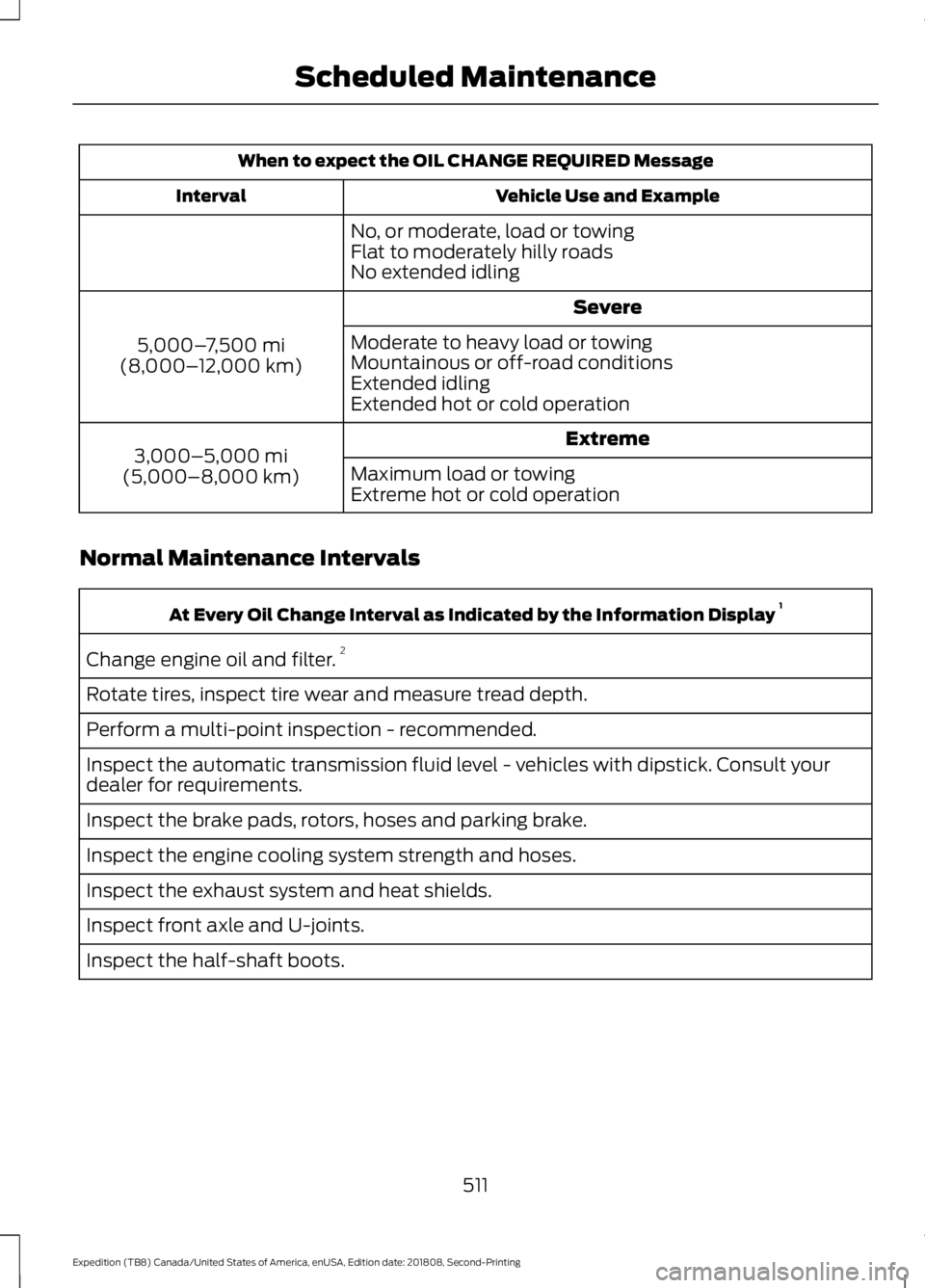
When to expect the OIL CHANGE REQUIRED Message
Vehicle Use and Example
Interval
No, or moderate, load or towing
Flat to moderately hilly roads
No extended idling Severe
5,000– 7,500 mi
(8,000– 12,000 km) Moderate to heavy load or towing
Mountainous or off-road conditions
Extended idling
Extended hot or cold operation
Extreme
3,000–5,000 mi
(5,000–8,000 km) Maximum load or towing
Extreme hot or cold operation
Normal Maintenance Intervals At Every Oil Change Interval as Indicated by the Information Display
1
Change engine oil and filter. 2
Rotate tires, inspect tire wear and measure tread depth.
Perform a multi-point inspection - recommended.
Inspect the automatic transmission fluid level - vehicles with dipstick. Consult your
dealer for requirements.
Inspect the brake pads, rotors, hoses and parking brake.
Inspect the engine cooling system strength and hoses.
Inspect the exhaust system and heat shields.
Inspect front axle and U-joints.
Inspect the half-shaft boots.
511
Expedition (TB8) Canada/United States of America, enUSA, Edition date: 201808, Second-Printing Scheduled Maintenance
Page 571 of 583
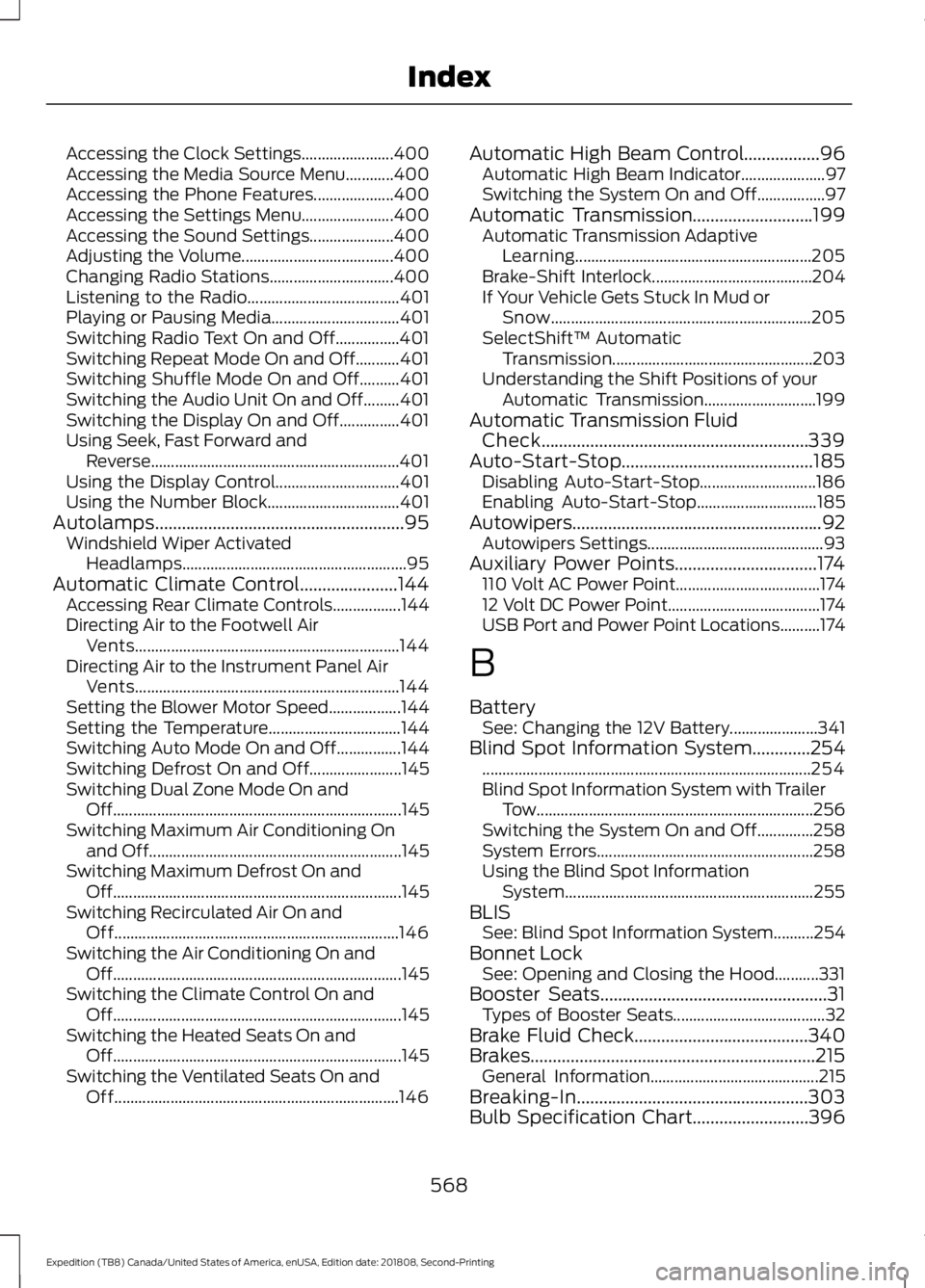
Accessing the Clock Settings.......................
400
Accessing the Media Source Menu............400
Accessing the Phone Features.................... 400
Accessing the Settings Menu....................... 400
Accessing the Sound Settings..................... 400
Adjusting the Volume...................................... 400
Changing Radio Stations............................... 400
Listening to the Radio...................................... 401
Playing or Pausing Media................................ 401
Switching Radio Text On and Off................401
Switching Repeat Mode On and Off...........401
Switching Shuffle Mode On and Off..........401
Switching the Audio Unit On and Off.........401
Switching the Display On and Off...............401
Using Seek, Fast Forward and Reverse.............................................................. 401
Using the Display Control............................... 401
Using the Number Block................................. 401
Autolamps........................................................95 Windshield Wiper Activated
Headlamps........................................................ 95
Automatic Climate Control......................144 Accessing Rear Climate Controls.................144
Directing Air to the Footwell Air
Vents.................................................................. 144
Directing Air to the Instrument Panel Air Vents.................................................................. 144
Setting the Blower Motor Speed.................. 144
Setting the Temperature................................. 144
Switching Auto Mode On and Off................144
Switching Defrost On and Off....................... 145
Switching Dual Zone Mode On and Off........................................................................\
145
Switching Maximum Air Conditioning On and Off............................................................... 145
Switching Maximum Defrost On and Off........................................................................\
145
Switching Recirculated Air On and Off....................................................................... 146
Switching the Air Conditioning On and Off........................................................................\
145
Switching the Climate Control On and Off........................................................................\
145
Switching the Heated Seats On and Off........................................................................\
145
Switching the Ventilated Seats On and Off....................................................................... 146Automatic High Beam Control.................96
Automatic High Beam Indicator..................... 97
Switching the System On and Off.................97
Automatic Transmission...........................199 Automatic Transmission Adaptive
Learning........................................................... 205
Brake-Shift Interlock........................................ 204
If Your Vehicle Gets Stuck In Mud or Snow................................................................. 205
SelectShift™ Automatic Transmission.................................................. 203
Understanding the Shift Positions of your Automatic Transmission............................ 199
Automatic Transmission Fluid Check............................................................339
Auto-Start-Stop...........................................185 Disabling Auto-Start-Stop............................. 186
Enabling Auto-Start-Stop.............................. 185
Autowipers........................................................92
Autowipers Settings............................................ 93
Auxiliary Power Points................................174 110 Volt AC Power Point.................................... 174
12 Volt DC Power Point...................................... 174
USB Port and Power Point Locations..........174
B
Battery See: Changing the 12V Battery...................... 341
Blind Spot Information System
.............254
........................................................................\
.......... 254
Blind Spot Information System with Trailer Tow..................................................................... 256
Switching the System On and Off..............258
System Errors...................................................... 258
Using the Blind Spot Information System.............................................................. 255
BLIS See: Blind Spot Information System..........254
Bonnet Lock See: Opening and Closing the Hood...........331
Booster Seats
...................................................31
Types of Booster Seats...................................... 32
Brake Fluid Check
.......................................340
Brakes................................................................215 General Information.......................................... 215
Breaking-In....................................................303
Bulb Specification Chart..........................396
568
Expedition (TB8) Canada/United States of America, enUSA, Edition date: 201808, Second-Printing Index
Page 575 of 583

Filling the Fuel Tank...........................................
194
Fuel Filler Funnel Location.......................189
Fuel Filter.........................................................341
Fuel Quality....................................................188 Choosing the Right Fuel.................................. 188
Fuel Shutoff
...................................................307
Fuse Box Locations.....................................320 Engine Compartment Fuse Box................... 320
Passenger Compartment Fuse Box...........320
Fuses................................................................320
Fuse Specification Chart..........................320 Engine Compartment Fuse Box................... 320
Passenger Compartment Fuse Box............326
G
Garage Door Opener...................................170
Garage Door Opener See: Universal Garage Door Opener............170
Gauges.............................................................106 Engine Coolant Temperature Gauge..........108
Engine Oil Pressure Gauge............................. 108
Fuel Gauge............................................................ 108
Transmission Fluid Temperature Gauge................................................................ 108
Turbo Boost Gauge........................................... 108
Type 1 and 2.......................................................... 106
Type 3...................................................................... 107
Gearbox See: Transmission.............................................. 199
General Information on Radio Frequencies...................................................56
Intelligent Access................................................. 56
General Maintenance Information
........507
Multi-Point Inspection.................................... 509
Owner Checks and Services......................... 508
Protecting Your Investment........................... 507
Why Maintain Your Vehicle?.......................... 507
Why Maintain Your Vehicle at Your Dealership?..................................................... 507
Getting Assistance Outside the U.S. and Canada..........................................................316
Getting the Services You Need................313 Away From Home............................................... 313
Global Opening............................................100 Moonroof................................................................ 101
Remote Control Front Windows.................... 101H
Hazard Flashers
............................................307
Headlamp Adjusting See: Adjusting the Headlamps..................... 344
Headlamp Exit Delay....................................96
Headlamp Removal See: Removing a Headlamp.......................... 345
Headrest See: Head Restraints......................................... 153
Head Restraints.............................................153 Adjusting the Head Restraint......................... 154
Front Seat Manual Head Restraints............154
Heated Exterior Mirrors................................151
Heated Rear Window...................................151
Heated Seats
.................................................166
Front Seats........................................................... 166
Rear Seats.............................................................. 167
Heated Steering Wheel
...............................90
Heated Windshield......................................150 Windshield Wiper De-Icer............................... 150
Heating See: Climate Control......................................... 142
Hill Descent Control
....................................223
Principle of Operation...................................... 223
Hill Start Assist...............................................217 Switching the System On and Off...............218
Using Hill Start Assist....................................... 218
Hints on Controlling the Interior Climate..........................................................146
Defogging the Side Windows in Cold Weather............................................................ 148
General Hints....................................................... 146
Quickly Cooling the Interior............................. 147
Quickly Heating the Interior............................. 147
Recommended Settings for Cooling..........148
Recommended Settings for Heating...........147
Hints on Driving With Anti-Lock Brakes.............................................................215
Home Screen
................................................438
Hood Lock See: Opening and Closing the Hood...........331
I
Ignition Switch...............................................179
In California (U.S. Only).............................314
Information Display Control......................90
572
Expedition (TB8) Canada/United States of America, enUSA, Edition date: 201808, Second-Printing Index
Page 581 of 583
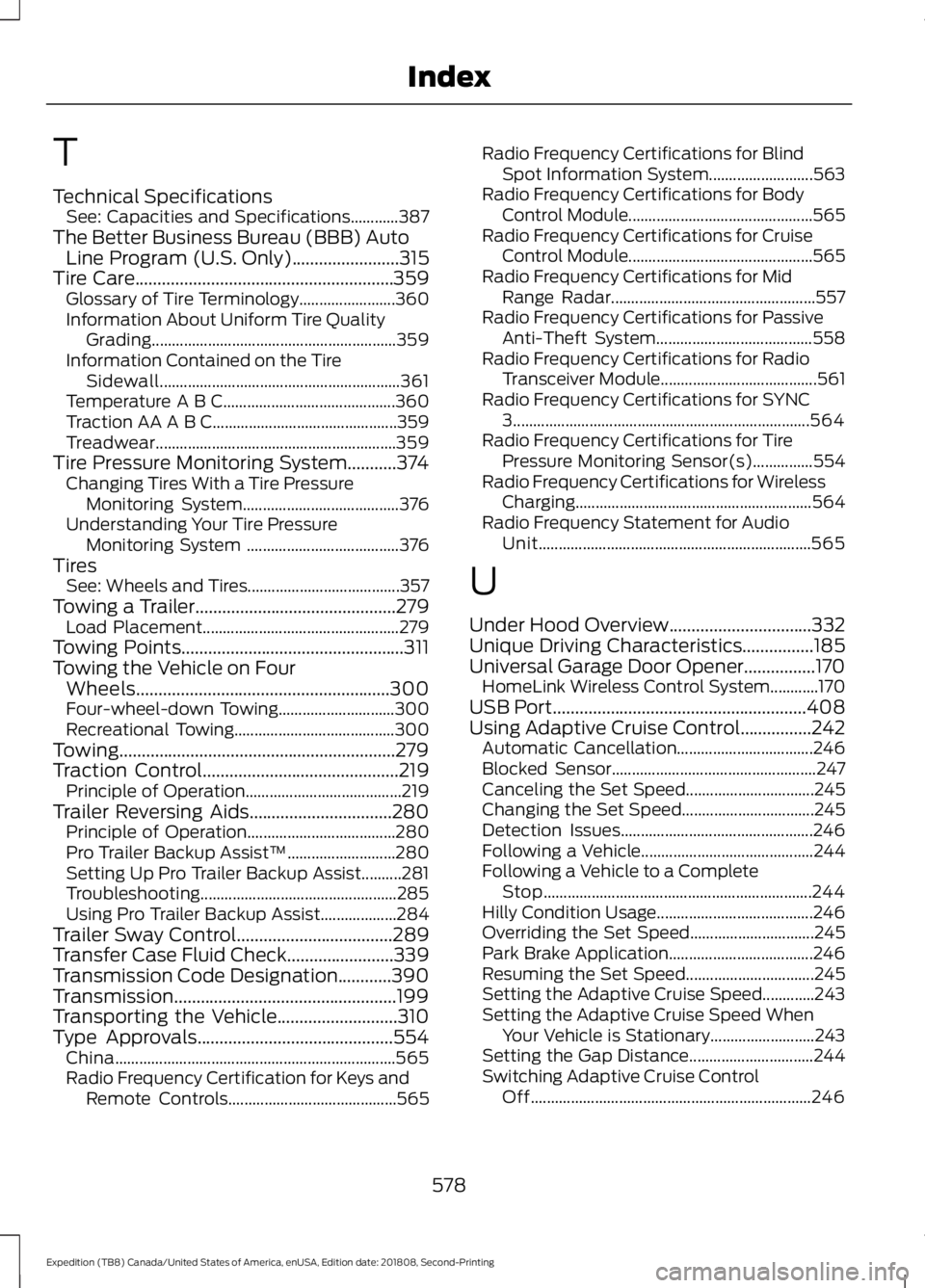
T
Technical Specifications
See: Capacities and Specifications............387
The Better Business Bureau (BBB) Auto Line Program (U.S. Only)........................315
Tire Care..........................................................359 Glossary of Tire Terminology........................ 360
Information About Uniform Tire Quality Grading............................................................. 359
Information Contained on the Tire Sidewall............................................................ 361
Temperature A B C........................................... 360
Traction AA A B C.............................................. 359
Treadwear............................................................ 359
Tire Pressure Monitoring System...........374 Changing Tires With a Tire Pressure
Monitoring System....................................... 376
Understanding Your Tire Pressure Monitoring System ...................................... 376
Tires See: Wheels and Tires...................................... 357
Towing a Trailer.............................................279 Load Placement................................................. 279
Towing Points
..................................................311
Towing the Vehicle on Four Wheels.........................................................300
Four-wheel-down Towing............................. 300
Recreational Towing........................................ 300
Towing..............................................................279
Traction Control............................................219 Principle of Operation....................................... 219
Trailer Reversing Aids................................280 Principle of Operation..................................... 280
Pro Trailer Backup Assist™........................... 280
Setting Up Pro Trailer Backup Assist..........281
Troubleshooting................................................. 285
Using Pro Trailer Backup Assist................... 284
Trailer Sway Control...................................289
Transfer Case Fluid Check........................339
Transmission Code Designation............390
Transmission..................................................199
Transporting the Vehicle
...........................310
Type Approvals............................................554
China...................................................................... 565
Radio Frequency Certification for Keys and Remote Controls.......................................... 565Radio Frequency Certifications for Blind
Spot Information System.......................... 563
Radio Frequency Certifications for Body Control Module.............................................. 565
Radio Frequency Certifications for Cruise Control Module.............................................. 565
Radio Frequency Certifications for Mid Range Radar................................................... 557
Radio Frequency Certifications for Passive Anti-Theft System....................................... 558
Radio Frequency Certifications for Radio Transceiver Module....................................... 561
Radio Frequency Certifications for SYNC 3........................................................................\
.. 564
Radio Frequency Certifications for Tire Pressure Monitoring Sensor(s)...............554
Radio Frequency Certifications for Wireless Charging........................................................... 564
Radio Frequency Statement for Audio Unit.................................................................... 565
U
Under Hood Overview
................................332
Unique Driving Characteristics................185
Universal Garage Door Opener................170 HomeLink Wireless Control System............170
USB Port
.........................................................408
Using Adaptive Cruise Control................242 Automatic Cancellation.................................. 246
Blocked Sensor................................................... 247
Canceling the Set Speed................................ 245
Changing the Set Speed................................. 245
Detection Issues................................................ 246
Following a Vehicle........................................... 244
Following a Vehicle to a Complete Stop................................................................... 244
Hilly Condition Usage....................................... 246
Overriding the Set Speed............................... 245
Park Brake Application.................................... 246
Resuming the Set Speed................................ 245
Setting the Adaptive Cruise Speed.............243
Setting the Adaptive Cruise Speed When Your Vehicle is Stationary.......................... 243
Setting the Gap Distance............................... 244
Switching Adaptive Cruise Control Off...................................................................... 246
578
Expedition (TB8) Canada/United States of America, enUSA, Edition date: 201808, Second-Printing Index