Page 205 of 300
WARNING!
•Take care to avoid the radiator cooling fan whenever
the hood is raised. It can start anytime the ignition
switch is ON. You can be injured by moving fan
blades.
• Remove any metal jewelry such as rings, watch
bands and bracelets that could make an inadvertent
electrical contact. You could be seriously injured.
• Batteries contain sulfuric acid that can burn your
skin or eyes and generate hydrogen gas which is
flammable and explosive. Keep open flames or
sparks away from the battery.
1. Apply the parking brake, place the transmission into PARK and turn the ignition to LOCK.
2. Turn off the heater, radio, and all unnecessary electrical accessories.
3. Remove the protective cover over the positive (+)bat-
tery post.
4. If using another vehicle to jump start the battery, park the vehicle within the jumper cables reach, apply the
parking brake and make sure the ignition is OFF.
WARNING!
Do not allow vehicles to touch each other as this could
establish a ground connection and personal injury
could result.
Jump Starting Procedure
WARNING!
Failure to follow this jump starting procedure could
result in personal injury or property damage due to
battery explosion.
CAUTION!
Failure to follow these procedures could result in
damage to the charging system of the booster vehicle
or the discharged vehicle.
Connecting The Jumper Cables
1. Connect the positive (+)end of the jumper cable to the
positive (+)post of the discharged vehicle.
2. Connect the opposite end of the positive (+)jumper
cable to the positive (+)post of the booster battery.
7
IN CASE OF EMERGENCY 203
Page 209 of 300
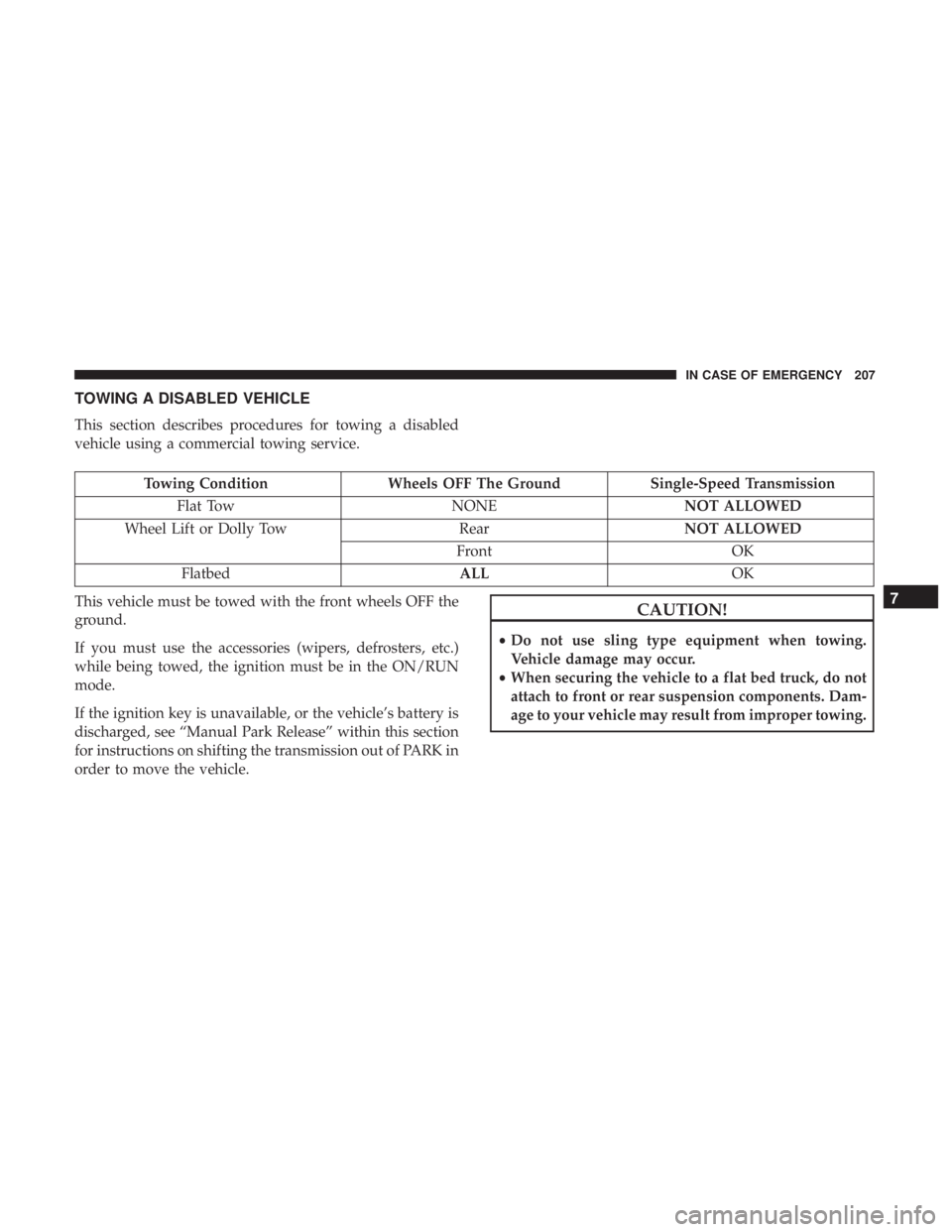
TOWING A DISABLED VEHICLE
This section describes procedures for towing a disabled
vehicle using a commercial towing service.
Towing ConditionWheels OFF The Ground Single-Speed Transmission
Flat Tow NONENOT ALLOWED
Wheel Lift or Dolly Tow RearNOT ALLOWED
Front OK
Flatbed ALLOK
This vehicle must be towed with the front wheels OFF the
ground.
If you must use the accessories (wipers, defrosters, etc.)
while being towed, the ignition must be in the ON/RUN
mode.
If the ignition key is unavailable, or the vehicle’s battery is
discharged, see “Manual Park Release” within this section
for instructions on shifting the transmission out of PARK in
order to move the vehicle.
CAUTION!
• Do not use sling type equipment when towing.
Vehicle damage may occur.
• When securing the vehicle to a flat bed truck, do not
attach to front or rear suspension components. Dam-
age to your vehicle may result from improper towing.
7
IN CASE OF EMERGENCY 207
Page 223 of 300
CAUTION!
It is recommended to have the cooling systems ser-
viced at your authorized dealer. Failure to do so could
result in poor cooling system performance and/or ve-
hicle damage.
Disposal Of Used Power Electronics And Battery
Thermal Management Systems Coolant
Used antifreeze is a regulated substance requiring proper
disposal. Check with your local authorities to determine
the disposal rules for your community. To prevent inges-
tion by animals or children, do not store antifreeze in open
containers or allow it to remain in puddles on the ground.
If ingested by a child, contact a physician immediately.
Clean up any ground spills immediately.
Points To Remember
WARNING!
•Turn vehicle OFF and disconnect the fan motor lead
before working near the radiator cooling fan.
• You or others can be badly burned by hot coolant
(antifreeze) or steam from your radiator. If you see or
hear steam coming from under the hood, do not open
the hood until the radiator has had time to cool.
Never open a cooling system pressure cap when the
radiator or coolant bottle is hot.
• Do not put your hands, tools, clothing, and jewelry
near the radiator cooling fan. The fan may start at any
time, whether the ignition is on or off.
If an examination of your underhood compartment shows
no evidence of cooler or hose leaks, the vehicle may be
safely driven.
• Do not overfill the coolant recovery bottles.
• Check coolant (antifreeze) freeze point in the coolant
recovery bottles. If coolant (antifreeze) needs to be
added, contents of coolant recovery bottles must also be
protected against freezing.
8
SERVICING AND MAINTENANCE 221
Page 264 of 300

Customer Programmable Features — Uconnect 3/3
NAV Display Settings
Push the Settingsbutton on the faceplate, to display
the settings menu screen. In this mode the Uconnect
system allows you to access programmable feature
settings.
NOTE: Only one touchscreen area may be selected at a
time.
When making a selection, press the button on the touch-
screen to enter the desired mode. Once in the desired mode, press and release the preferred setting and make
your selection. Once the setting is complete, either press
the back arrow button on the touchscreen or push the back
button on the faceplate to return to the previous menu. Or
press the “X” button on the touchscreen to close out of the
settings screen. Pressing the up or down arrow buttons on
the right side of the screen allows you to toggle up or down
through the available settings.
NOTE:
All settings should be changed with the ignition in
the “AVV/MAR” position.
Display
After pressing the “Display” button on the touchscreen, the
following settings will be available:
Setting Name Selectable Options
Display Mode Auto Manual
NOTE:
When the “Display Mode” feature is set to “Auto” the radio touchscreen’s brightness will be adjusted with all other
instrument panel displays and lights when they are adjusted using the instrument cluster display buttons on the
right-hand side of the instrument cluster display. When the “Display Mode” feature is set to “Manual” the radio
screen brightness can be adjusted independently using the “Brightness” feature below.
262 MULTIMEDIA
Page 271 of 300
Setting NameSelectable Options
Balance/Fade When in the “Balance/ Fade” display, you may adjust the Balance settings.
Auto-On Radio OnOffRecall Last
NOTE:
When the “Auto-On Radio” feature is selected, the radio automatically turns on when the vehicle is in RUN or recalls
whether it was on or off at last ignition off. Radio Off With Door On Off
NOTE:
When the “Radio Off With Door” feature is selected, the radio remains on until the driver or passenger door is
opened or when the Radio Off Delay time expires.
Phone/Bluetooth
After pressing the “Phone/Bluetooth” button on the touch-
screen, the following settings will be available:
Setting Name Selectable Options
Paired Phones List of Paired Phones
NOTE: The “Paired Phones” feature shows which phones are paired to the Phone/Bluetooth system. For further in-
formation, refer to the Uconnect Owner ’s Manual Supplement.
10
MULTIMEDIA 269
Page 293 of 300

HazardDriving Through Flowing, Rising, Or Shallow Standing
Water ................................ .177
Headlights ................................58
Cleaning .............................. .249
High Beam/Low Beam Select Switch ...........58
Lights On Reminder .......................58
Passing ............................. .58, 59
Switch ............................. .58, 59
Time Delay ..............................58
Head Restraints ............................52
Heated Mirrors ......................... .56, 58
Heated Seats ...............................50
High Voltage Battery .........................16
Hood Prop ................................78
Hood Release ..............................78
Ignition ..................................39
Switch .................................39
Immobilizer (Sentry Key) ......................41
Instrument Cluster Descriptions .............................99
Display ................................87
Instrument Cluster ........................86 Instrument Cluster Display
Instrument Cluster Display ..................86
Instrument Panel Lens Cleaning ................252
Interior Appearance Care .....................251
Interior Lights ..............................61
iPod/USB/MP3 Control ..................... .273
Jack Operation ........................... .226
Key Fob Programming Additional Key Fobs ..........38, 42
Key-In Reminder ............................41
Keys ....................................36
Replacement .............................42
Sentry (Immobilizer) .......................41
Lane Change And Turn Signals .................58
Lane Change Assist ...................... .58, 61
Lap/Shoulder Belts .........................115
Latches ................................. .154
Hood ..................................78
Leaks, Fluid ............................. .154
Life Of Tires ............................. .238
Liftgate ..................................84
Light Bulbs .......................... .154, 182
12
INDEX 291