Page 268 of 300
Charging Schedule
To set up a charging schedule, press the “More” or “Set-
tings” button on the touchscreen.
Setting NameSelectable Options
Enable Schedule OnOff
NOTE:
Continue setting up the schedule, picking from the following menus:
•Weekdays or Weekends
•Start and End Times
Safety/Assistance
After pressing the “Safety/Assistance” button on the
touchscreen, the following settings will be available:
Setting Name Selectable Options
Hill Start Assist — If Equipped OnOff
Rear View Camera Delay OnOff
ParkView Backup Camera Active Guide Lines On
Off
NOTE: When this feature is enabled, active (dynamic) grid lines are overlaid on the Rear Backup Camera image to
illustrate the width of the vehicle and its projected back up path based on the steering wheel position. A dashed cen-
ter line overlay indicates the center of the vehicle to assist with parking or aligning to a hitch/receiver.
266 MULTIMEDIA
Page 274 of 300

STEERING WHEEL AUDIO CONTROLS
The remote sound system controls are located on the rear
surface of the steering wheel. Reach behind the wheel to
access the switches.
The right-hand control is a rocker-type switch with a
pushbutton in the center and controls the volume and
mode of the sound system. Pushing the top of the rocker
switch increases the volume, and pushing the bottom of the
rocker switch decreases the volume.Pushing the center button makes the radio switch between
the various modes available (AM/FM/SAT/AUX/Media
Player, etc.) and can also be used to select/enter an item
while scrolling through menu.
The left-hand control is a rocker-type switch with a push-
button in the center. The function of the left-hand control is
different depending on which mode you are in.
The following describes the left-hand control operation in
each mode.
Radio Operation
Pushing the top of the switch will “Seek” up for the next
listenable station and pushing the bottom of the switch will
“Seek” down for the next listenable station.
The button located in the center of the left-hand control
will tune to the next preset station that you have pro-
grammed in the radio preset button.
Media Mode
Pushing the top of the switch once goes to the next track on
the selected media (AUX/USB/Bluetooth). Pushing the
bottom of the switch once goes to the beginning of the
Sound System Controls (Back View Of Steering Wheel)
272 MULTIMEDIA
Page 278 of 300
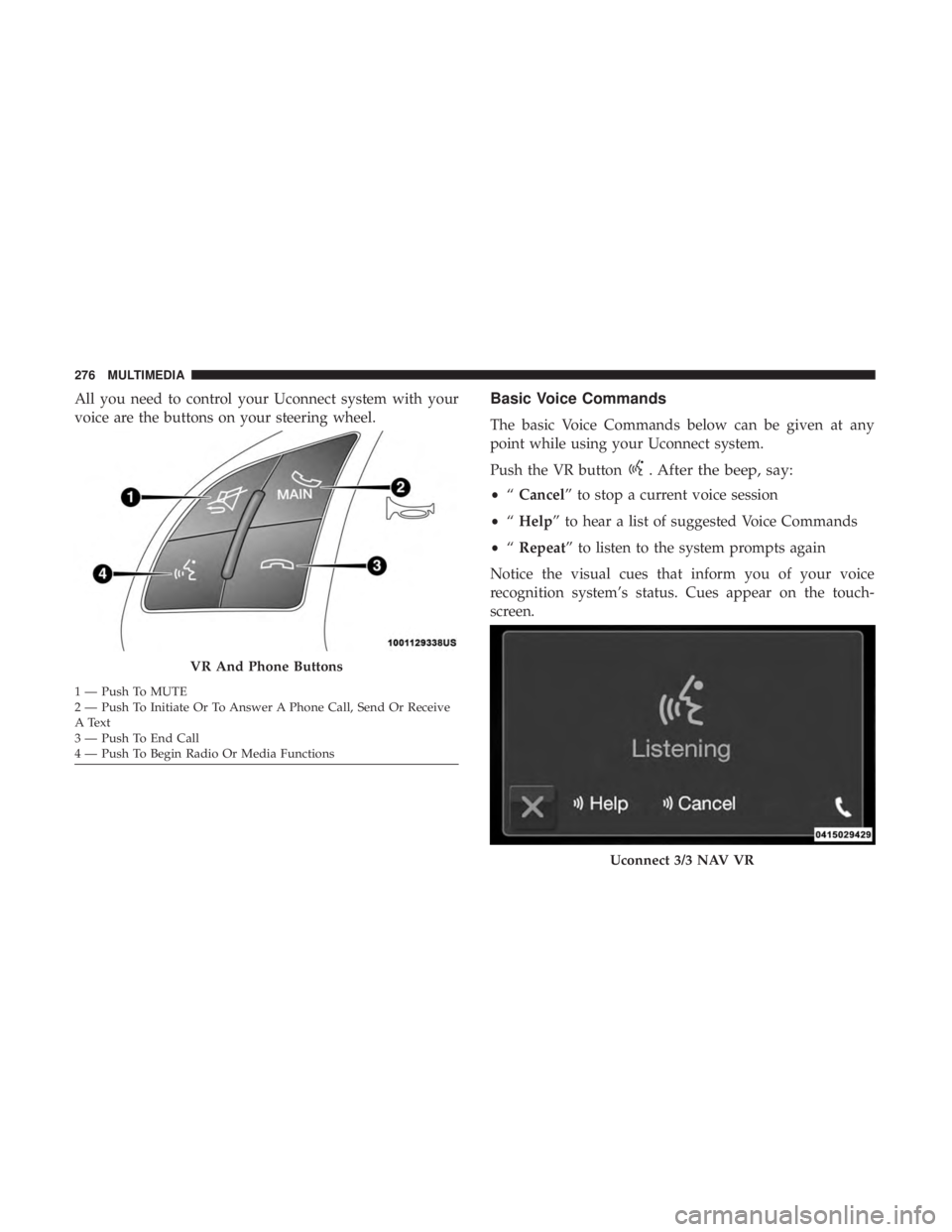
All you need to control your Uconnect system with your
voice are the buttons on your steering wheel.Basic Voice Commands
The basic Voice Commands below can be given at any
point while using your Uconnect system.
Push the VR button
. After the beep, say:
•“Cancel” to stop a current voice session
• “Help” to hear a list of suggested Voice Commands
• “Repeat” to listen to the system prompts again
Notice the visual cues that inform you of your voice
recognition system’s status. Cues appear on the touch-
screen.
VR And Phone Buttons
1 — Push To MUTE
2 — Push To Initiate Or To Answer A Phone Call, Send Or Receive
A Text
3 — Push To End Call
4 — Push To Begin Radio Or Media Functions
Uconnect 3/3 NAV VR
276 MULTIMEDIA
Page 297 of 300

Wheel, Heated...........................55
Wheel, Tilt ..............................55
Steering Wheel Audio Controls .................272
Storage ...................................80
Storage, Vehicle .............................72
Stuck, Freeing ............................ .206
Sun Roof .................................75
Supplemental Restraint System – Air Bag ..........124
Telescoping Steering Column ...................55
Temperature Control, Automatic (ATC) ............71
Tilt Steering Column .........................55
Time Delay Headlight ...............................58
Tire And Loading Information Placard ............230
Tire Markings ............................ .227
Tires......................... .154, 234, 241, 247
Aging (Life Of Tires) ..................... .238
Air Pressure ........................... .234
Chains ............................... .245
Changing ............................. .226
Compact Spare ......................... .242
General Information ...................234, 241
High Speed ............................ .236
Inflation Pressure ....................... .235Jacking
............................... .226
Life Of Tires ........................... .238
Load Capacity ...................... .230, 231
Pressure Monitoring System (TPMS) ............96
Quality Grading ........................ .247
Radial ............................... .236
Replacement ........................... .239
Rotation .............................. .246
Safety ............................ .226, 234
Snow Tires ............................ .241
Spare Tires ......................... .241, 243
Spinning .............................. .237
Tread Wear Indicators .....................238
Wheel Nut Torque ....................... .255
Tire Safety Information ...................... .226
T
ire Service Kit ............194, 195, 196, 197, 200, 201
To Open Hood .............................78
Towing ................................. .175
Disabled Vehicle ........................ .207
Recreational ........................... .175
Towing Behind A Motorhome ..................175
Traction ................................ .176
Traction Control .......................... .103
Trailer Towing ............................ .175
12
INDEX 295