Page 46 of 300
Central Lock/Unlock (Switch Safe Lock Device) —
If Equipped
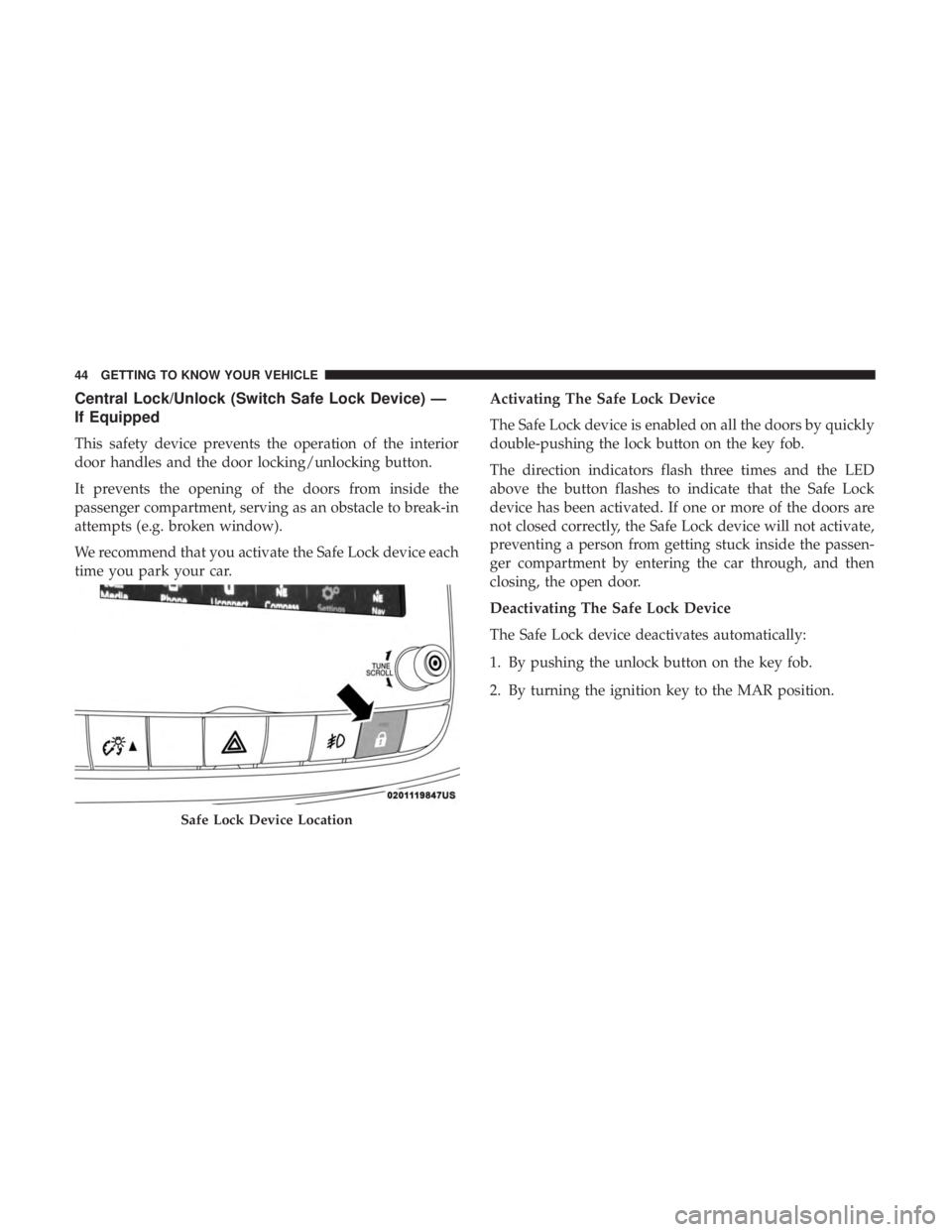
This safety device prevents the operation of the interior
door handles and the door locking/unlocking button.
It prevents the opening of the doors from inside the
passenger compartment, serving as an obstacle to break-in
attempts (e.g. broken window).
We recommend that you activate the Safe Lock device each
time you park your car.Activating The Safe Lock Device
The Safe Lock device is enabled on all the doors by quickly
double-pushing the lock button on the key fob.
The direction indicators flash three times and the LED
above the button flashes to indicate that the Safe Lock
device has been activated. If one or more of the doors are
not closed correctly, the Safe Lock device will not activate,
preventing a person from getting stuck inside the passen-
ger compartment by entering the car through, and then
closing, the open door.
Deactivating The Safe Lock Device
The Safe Lock device deactivates automatically:
1. By pushing the unlock button on the key fob.
2. By turning the ignition key to the MAR position.
Safe Lock Device Location
44 GETTING TO KNOW YOUR VEHICLE
Page 47 of 300

DOORS
Manual Lock
To lock each door from the inside, push the inside door
handle toward the door until the red lock indicator is
visible. To unlock the doors from the inside, pull the inside
door handle to the first detent or until the lock symbol is no
longer visible.
If the lock symbol is visible when the door is shut, the door
will lock. Therefore, make sure the key fob is not inside the
vehicle before closing the door.NOTE:
The manual lock knob unlocks each individual
door separately.WARNING!
• When exiting the vehicle, always remove the key fob
from the vehicle and lock your vehicle.
• Never leave children alone in a vehicle, or with
access to an unlocked vehicle.
• Allowing children to be in a vehicle unattended is
dangerous for a number of reasons. A child or others
could be seriously or fatally injured. Children
should be warned not to touch the parking brake,
brake pedal or the gear selector.
• Do not leave the key fob in or near the vehicle, or in
a location accessible to children, and do not leave the
ignition of a vehicle equipped with Keyless Enter-
N-Go in the ON/RUN mode. A child could operate
power windows, other controls, or move the vehicle.
• Do not leave children or animals inside parked
vehicles in hot weather. Interior heat build-up may
cause serious injury or death.
Manual Lock/Unlock Switch
3
GETTING TO KNOW YOUR VEHICLE 45
Page 48 of 300
CAUTION!
An unlocked car is an invitation. Always remove the
key from the ignition and lock all doors when leaving
the vehicle unattended.
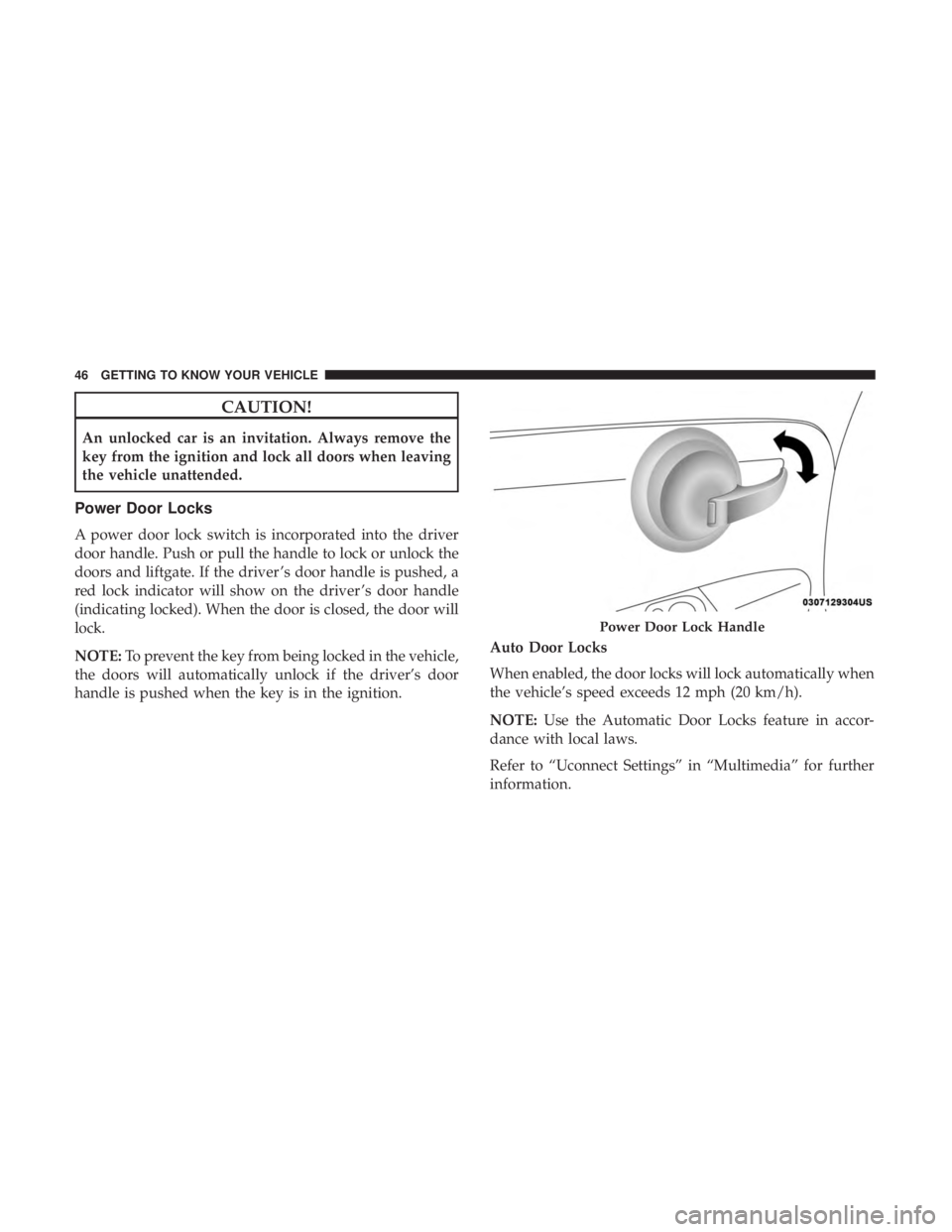
Power Door Locks
A power door lock switch is incorporated into the driver
door handle. Push or pull the handle to lock or unlock the
doors and liftgate. If the driver ’s door handle is pushed, a
red lock indicator will show on the driver ’s door handle
(indicating locked). When the door is closed, the door will
lock.
NOTE:To prevent the key from being locked in the vehicle,
the doors will automatically unlock if the driver’s door
handle is pushed when the key is in the ignition. Auto Door Locks
When enabled, the door locks will lock automatically when
the vehicle’s speed exceeds 12 mph (20 km/h).
NOTE:
Use the Automatic Door Locks feature in accor-
dance with local laws.
Refer to “Uconnect Settings” in “Multimedia” for further
information.
Power Door Lock Handle
46 GETTING TO KNOW YOUR VEHICLE
Page 64 of 300

Interior Light Timing (Center Position)
There are four different modes of operation that can be
activated in this position:
•When one door is opened, a three minute timer is
activated.
• When the key is removed from the ignition (within two
minutes of the ignition being turned OFF), a 10 second
timer is activated.
• When the doors are unlocked with the key fob, a 10
second timer is activated.
• When the doors are locked with the key fob, the lights
will turn off.
Interior Light Timing (On/Right Position)
When all doors are closed a 15-minute timer is activated.
NOTE: The timer is deactivated when the key is moved
into the ON/RUN position.
Dimmer Control
The brightness of the instrument panel lighting can be
regulated by pushing the buttons on the right side of the
instrument cluster. The (+) button increases the brightness
and the (-) button decreases the brightness. You can control
brightness of the radio by itself or the entire instrument
panel. Refer to “Uconnect Settings” in “Multimedia” for
more information.
Ambient Light
The vehicle is equipped with ambient light on the center
stack. The ambient light will be on when the headlights are
turned on by rotating the end of the multifunction lever.
62 GETTING TO KNOW YOUR VEHICLE
Page 86 of 300
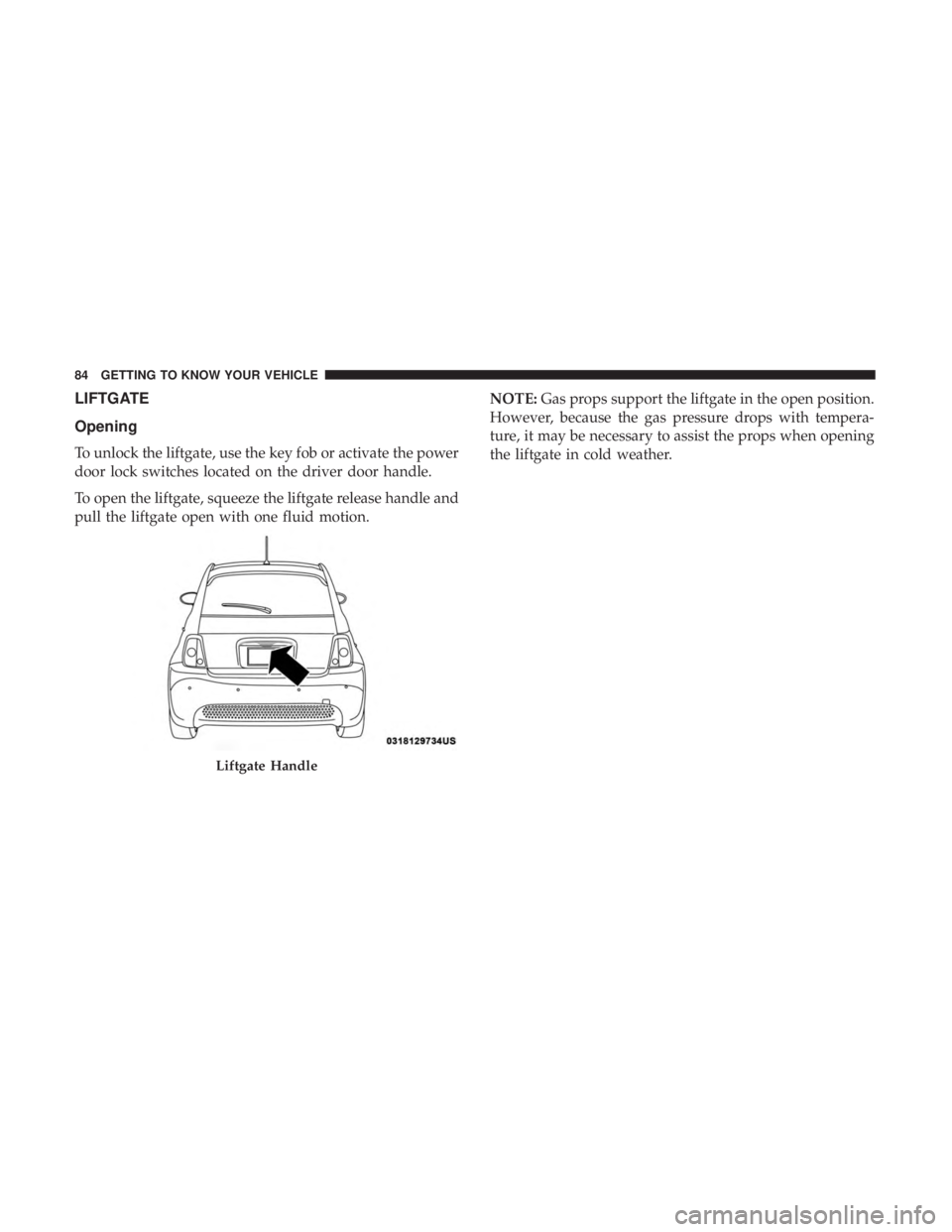
LIFTGATE
Opening
To unlock the liftgate, use the key fob or activate the power
door lock switches located on the driver door handle.
To open the liftgate, squeeze the liftgate release handle and
pull the liftgate open with one fluid motion.NOTE:
Gas props support the liftgate in the open position.
However, because the gas pressure drops with tempera-
ture, it may be necessary to assist the props when opening
the liftgate in cold weather.
Liftgate Handle
84 GETTING TO KNOW YOUR VEHICLE
Page 91 of 300

NOTE:The Up and Down buttons activate different func-
tions according to the following situations:
• To scroll the menu options upwards or downwards.
• To increase or decrease values during settings.
NOTE: When opening one of the front doors, the instru-
ment cluster display will turn on the clock and the miles or
kilometers covered (if equipped) for a few seconds.
NOTE: When the Uconnect “Display Mode” feature is set
to “Auto”, the instrument cluster display Up and Down
control buttons may be used to adjust the brightness of the
entire Instrument Panel (e.g. Instrument Cluster, Radio,
and Climate Controls). Refer to “Uconnect Settings” in
“Multimedia” for further information.
Display Menu Set-Up
The menu comprises a series of functions arranged in a
cycle. Push and release the uparrow and downarrow to
access the different options and settings (setup).
The setup menu can be activated by pushing the MENU
button. Single pushes on the uparrow or downarrow will
scroll through the setup menu options. The menu includes
the following functions:
• Battery % Display •
Button Volume
• Stored Warnings
• Tutorial
• Connectivity ID
• Restore Factory Settings
• Exit Menu
Selecting An Option Of The Main Menu Without Sub-
menu:
1. Briefly push and release the MENUbutton to select the
main menu option to set.
2. Push and release the uparrow and downarrow (by
single pushes) to select the new setting.
3. Briefly push and release the MENUbutton to store the
new setting and go back to the main menu option
previously selected.
Selecting An Option Of The Main Menu With Submenu:
1. Briefly push and release the MENUbutton to display
the first submenu option.
2. Push and release the uparrow and downarrow (by
single pushes) to scroll through all the submenu options.
4
GETTING TO KNOW YOUR INSTRUMENT PANEL 89
Page 95 of 300

indicated by the Brake Warning Light, which will turn on
when the brake fluid level in the master cylinder has
dropped below a specified level.
The light will remain on until the cause is corrected.
NOTE:The light may flash momentarily during sharp
cornering maneuvers, which change fluid level conditions.
The vehicle should have service performed, and the brake
fluid level checked.
If brake failure is indicated, immediate repair is necessary.
WARNING!
Driving a vehicle with the red brake light on is
dangerous. Part of the brake system may have failed. It
will take longer to stop the vehicle. You could have a
collision. Have the vehicle checked immediately.
Vehicles equipped with the Anti-Lock Brake System (ABS)
are also equipped with Electronic Brake Force Distribution
(EBD). In the event of an EBD failure, the Brake Warning
Light will turn on along with the ABS Light. Immediate
repair to the ABS system is required.
Operation of the Brake Warning Light can be checked by
turning the ignition switch from the OFF position to the ON/RUN position. The light should illuminate for ap-
proximately two seconds. The light should then turn off
unless the parking brake is applied or a brake fault is
detected. If the light does not illuminate, have the light
inspected by an authorized dealer.
The light also will turn on when the parking brake is
applied with the ignition switch in the ON/RUN position.
NOTE:
This light shows only that the parking brake is
applied. It does not show the degree of brake application.
— Battery Charge Warning Light
This light illuminates when the battery is not charging
properly. If it stays on while the vehicle is running, there
may be a malfunction with the charging system. Contact
your authorized dealer as soon as possible.
This indicates a possible problem with the electrical system
or a related component.
— Door Open Warning Light
This indicator will illuminate when one or more door(s) are
not fully closed.
NOTE: If the vehicle is moving and a door is opened, there
will also be a single chime.
4
GETTING TO KNOW YOUR INSTRUMENT PANEL 93
Page 135 of 300

NOTE:
•Air bag covers may not be obvious in the interior trim,
but they will open during air bag deployment.
• After any collision, the vehicle should be taken to an
authorized dealer immediately.
Enhanced Accident Response System
In the event of an impact, if the communication network
remains intact, and the power remains intact, depending
on the nature of the event, the ORC will determine whether
to have the Enhanced Accident Response System perform
the following functions:
• Cut off fuel to the engine (If Equipped)
• Cut off battery power to the electric motor (If Equipped)
• Flash hazard lights as long as the battery has power
• Turn on the interior lights, which remain on as long as
the battery has power or for 15 minutes from the
intervention of the Enhanced Accident Response Sys-
tem.
• Unlock the power door locks. Your vehicle may also be designed to perform any of these
other functions in response to the Enhanced Accident
Response System:
•
Turn off the Fuel Filter Heater, Turn off the HVAC
Blower Motor, Close the HVAC Circulation Door
• Cut off battery power to the:
• Engine
• Electric Motor (if equipped)
• Electric power steering
• Brake booster
• Electric park brake
• Automatic transmission gear selector
• Horn
• Front wiper
• Headlamp washer pump5
SAFETY 133