Page 204 of 332
Underhood Fuses
The Front Distribution Unit is located on the right side of
the engine compartment, next to the battery. To access the
fuses, press the release tabs and remove the cover.The ID number of the electrical component corresponding
to each fuse can be found on the back of the cover.
Cavity
Maxi Fuse Mini Fuse Description
F01 60 Amp Blue –Body Controller
F02 20 Amp Yellow –Audio Amplifier
F03 20 Amp Yellow –Ignition Switch
F04 40 Amp Orange –Anti-Lock Brake Pump
F05 70 Amp Tan –Electric Power Steering
Front Distribution Unit
202 IN CASE OF EMERGENCY
Page 219 of 332
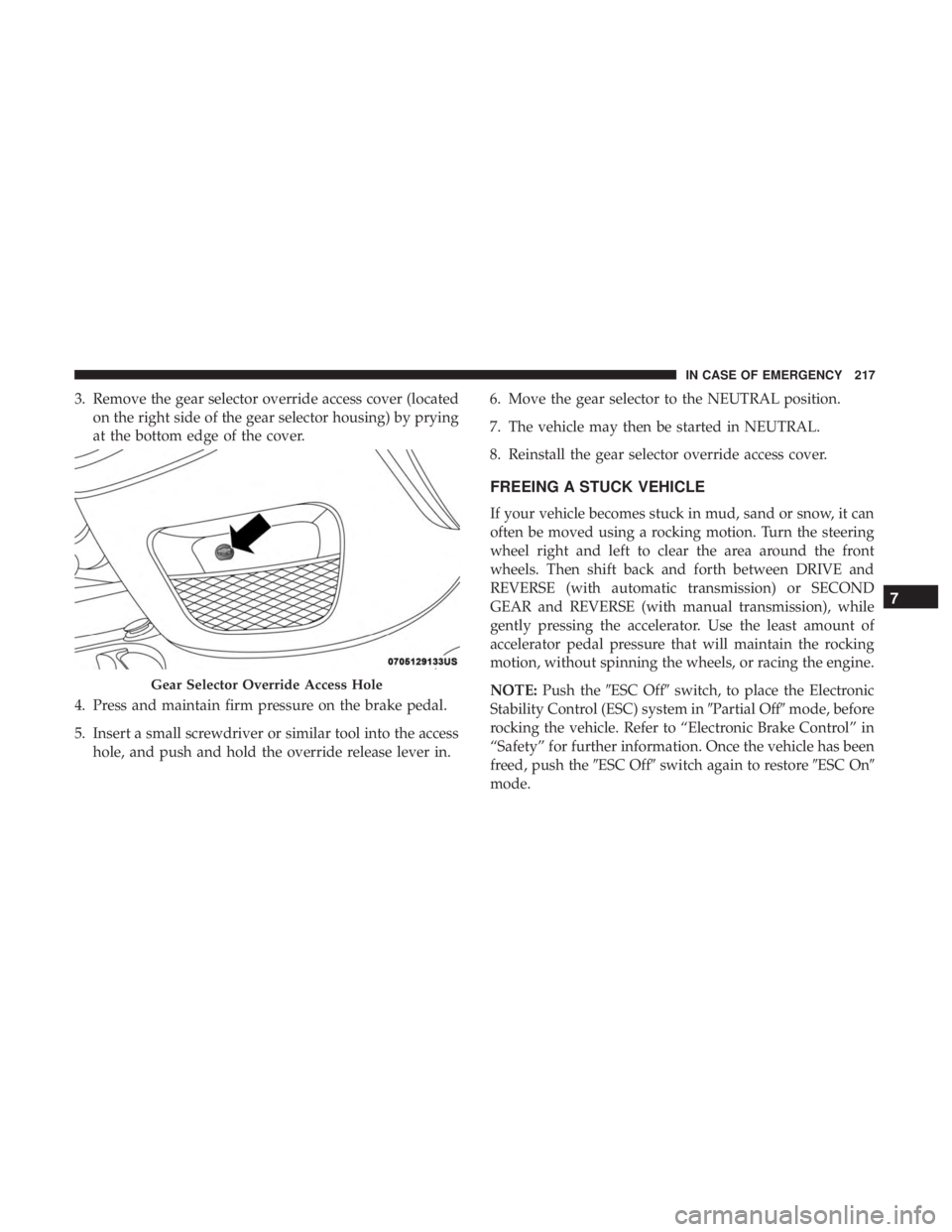
3. Remove the gear selector override access cover (locatedon the right side of the gear selector housing) by prying
at the bottom edge of the cover.
4. Press and maintain firm pressure on the brake pedal.
5. Insert a small screwdriver or similar tool into the access hole, and push and hold the override release lever in. 6. Move the gear selector to the NEUTRAL position.
7. The vehicle may then be started in NEUTRAL.
8. Reinstall the gear selector override access cover.
FREEING A STUCK VEHICLE
If your vehicle becomes stuck in mud, sand or snow, it can
often be moved using a rocking motion. Turn the steering
wheel right and left to clear the area around the front
wheels. Then shift back and forth between DRIVE and
REVERSE (with automatic transmission) or SECOND
GEAR and REVERSE (with manual transmission), while
gently pressing the accelerator. Use the least amount of
accelerator pedal pressure that will maintain the rocking
motion, without spinning the wheels, or racing the engine.
NOTE:
Push the �ESC Off� switch, to place the Electronic
Stability Control (ESC) system in �Partial Off�mode, before
rocking the vehicle. Refer to “Electronic Brake Control” in
“Safety” for further information. Once the vehicle has been
freed, push the �ESC Off�switch again to restore �ESC On�
mode.
Gear Selector Override Access Hole
7
IN CASE OF EMERGENCY 217
Page 260 of 332

Tires — General Information
Tire Pressure
Proper tire inflation pressure is essential to the safe and
satisfactory operation of your vehicle. Four primary areas
are affected by improper tire pressure:
•Safety and Vehicle Stability
• Economy
• Tread Wear
• Ride Comfort
Safety
WARNING!
• Improperly inflated tires are dangerous and can
cause collisions.
• Underinflation increases tire flexing and can result
in overheating and tire failure.
• Overinflation reduces a tire’s ability to cushion
shock. Objects on the road and chuckholes can cause
damage that result in tire failure.
(Continued)
WARNING! (Continued)
•Overinflated or underinflated tires can affect vehicle
handling and can fail suddenly, resulting in loss of
vehicle control.
• Unequal tire pressures can cause steering problems.
You could lose control of your vehicle.
• Unequal tire pressures from one side of the vehicle
to the other can cause the vehicle to drift to the right
or left.
• Always drive with each tire inflated to the recom-
mended cold tire inflation pressure.
Both under-inflation and over-inflation affect the stability
of the vehicle and can produce a feeling of sluggish
response or over responsiveness in the steering.
NOTE:
• Unequal tire pressures from side to side may cause
erratic and unpredictable steering response.
• Unequal tire pressure from side to side may cause the
vehicle to drift left or right.
258 SERVICING AND MAINTENANCE
Page 265 of 332

Keep dismounted tires in a cool, dry place with as little
exposure to light as possible. Protect tires from contact with
oil, grease, and gasoline.
Replacement Tires
The tires on your new vehicle provide a balance of many
characteristics. They should be inspected regularly for
wear and correct cold tire inflation pressures. The manu-
facturer strongly recommends that you use tires equivalent
to the originals in size, quality and performance when
replacement is needed. Refer to the paragraph on “Tread
Wear Indicators” in this section. Refer to the Tire and
Loading Information placard or the Vehicle Certification
Label for the size designation of your tire. The Load Index
and Speed Symbol for your tire will be found on the
original equipment tire sidewall.
See the Tire Sizing Chart example found in the “Tire Safety
Information” section of this manual for more information
relating to the Load Index and Speed Symbol of a tire.
It is recommended to replace the two front tires or two rear
tires as a pair. Replacing just one tire can seriously affect
your vehicle’s handling. If you ever replace a wheel, make
sure that the wheel’s specifications match those of the
original wheels.It is recommended you contact an authorized tire dealer or
original equipment dealer with any questions you may
have on tire specifications or capability. Failure to use
equivalent replacement tires may adversely affect the
safety, handling, and ride of your vehicle.
WARNING!
•
Do not use a tire, wheel size, load rating, or speed
rating other than that specified for your vehicle.
Some combinations of unapproved tires and wheels
may change suspension dimensions and perfor-
mance characteristics, resulting in changes to steer-
ing, handling, and braking of your vehicle. This can
cause unpredictable handling and stress to steering
and suspension components. You could lose control
and have a collision resulting in serious injury or
death. Use only the tire and wheel sizes with load
ratings approved for your vehicle.
• Never use a tire with a smaller load index or capacity,
other than what was originally equipped on your
vehicle. Using a tire with a smaller load index could
result in tire overloading and failure. You could lose
control and have a collision.
(Continued)
8
SERVICING AND MAINTENANCE 263
Page 272 of 332

CAUTION!(Continued)
•Observe the traction device manufacturer ’s instruc-
tions on the method of installation, operating speed,
and conditions for use. Always use the suggested
operating speed of the device manufacturer ’s if it is
less than 30 mph (48 km/h).
• Do not use traction devices on a compact spare tire.
Tire Rotation Recommendations
The tires on the front and rear of your vehicle operate at
different loads and perform different steering, driving, and
braking functions. For these reasons, they wear at unequal
rates.
These effects can be reduced by timely rotation of tires. The
benefits of rotation are especially worthwhile with aggres-
sive tread designs such as those on all season type tires.
Rotation will increase tread life, help to maintain mud,
snow and wet traction levels, and contribute to a smooth,
quiet ride. Refer to the “Scheduled Servicing” for the proper mainte-
nance intervals. The reasons for any rapid or unusual wear
should be corrected prior to rotation being performed.
The suggested rotation method is the “forward cross”
shown in the following diagram. This rotation pattern does
not apply to some directional tires that must not be
reversed.
Tire Rotation
270 SERVICING AND MAINTENANCE
Page 291 of 332

MULTIMEDIA
CONTENTS
�UCONNECT SYSTEMS ...................290
� CYBERSECURITY ...................... .290
� UCONNECT SETTINGS ...................291
▫ Customer Programmable Features —
Uconnect 3/3 NAV Display Settings ..........292
� STEERING WHEEL AUDIO CONTROLS .......301
▫ Radio Operation ....................... .301
▫ Media Mode ......................... .301
� IPOD/USB/MEDIA PLAYER CONTROL —
IF EQUIPPED ......................... .302
� RADIO OPERATION AND MOBILE PHONES . . .302
▫ General Information ....................303 �
UCONNECT 3/3 NAV VOICE RECOGNITION
QUICK TIPS .......................... .303
▫ Introducing Uconnect ....................303
▫ Get Started .......................... .303
▫ Basic Voice Commands ...................304
▫ Radio .............................. .305
▫ Media .............................. .306
▫ Phone .............................. .306
▫ General Information .....................307
▫ Additional Information ...................307
� CD/DVD DISC MAINTENANCE ............308
10
Page 297 of 332
Safety/Assistance
After pressing the “Safety/Assistance” button on the
touchscreen, the following settings will be available:
Setting NameSelectable Options
Hill Start Assist — If Equipped OnOff
Rear View Camera Delay OnOff
ParkView Backup Camera Active Guide Lines On
Off
NOTE: When this feature is enabled, active (dynamic) grid lines are overlaid on the Rear Backup Camera image to
illustrate the width of the vehicle and its projected back up path based on the steering wheel position. A dashed cen-
ter line overlay indicates the center of the vehicle to assist with parking or aligning to a hitch/receiver.
ParkView Backup Camera Fixed Guide Lines On
Off
NOTE: When this feature is enabled, fixed (static) grid lines are overlaid on the Rear Backup Camera image to illus-
trate the width of the vehicle.
10
MULTIMEDIA 295
Page 303 of 332

STEERING WHEEL AUDIO CONTROLS
The remote sound system controls are located on the rear
surface of the steering wheel. Reach behind the wheel to
access the switches.
The right-hand control is a rocker-type switch with a
pushbutton in the center and controls the volume and
mode of the sound system. Pushing the top of the rocker
switch increases the volume, and pushing the bottom of the
rocker switch decreases the volume.Pushing the center button makes the radio switch between
the various modes available (AM/FM/SAT/AUX/Media
Player, etc.) and can also be used to select/enter an item
while scrolling through menu.
The left-hand control is a rocker-type switch with a push-
button in the center. The function of the left-hand control is
different depending on which mode you are in.
The following describes the left-hand control operation in
each mode.
Radio Operation
Pushing the top of the switch will “Seek” up for the next
listenable station and pushing the bottom of the switch will
“Seek” down for the next listenable station.
The button located in the center of the left-hand control
will tune to the next preset station that you have pro-
grammed in the radio preset button.
Media Mode
Pushing the top of the switch once goes to the next track on
the selected media (AUX/USB/Bluetooth). Pushing the
bottom of the switch once goes to the beginning of the
Sound System Controls (Back View Of Steering Wheel)
10
MULTIMEDIA 301

