Page 36 of 524

NOTE:If “Unlock All Doors 1st Press” is programmed all
doors will unlock when you grab hold of the driver ’s front
door handle. To select between “Unlock Driver Door 1st
Press” and “Unlock All Doors 1st Press,” refer to
“Uconnect Settings” in “Multimedia” for further informa-
tion.
To Unlock From The Passenger Side:
With a valid Passive Entry key fob within 5 ft (1.5 m) of the
passenger door handle, grab the front passenger door
handle to unlock all four doors and the liftgate automati-
cally.
NOTE: All doors and the liftgate will unlock when the
front passenger door handle is grabbed regardless of the
driver ’s door unlock preference setting (“Unlock Driver
Door 1st Press” or “Unlock All Doors 1st Press”). Preventing Inadvertent Locking Of Passive Entry Key
Fob In Vehicle:
To minimize the possibility of unintentionally locking a
Passive Entry key fob inside your vehicle, the Passive Entry
system is equipped with an automatic door unlock feature
which will function if the ignition is OFF.
If one of the vehicle doors is open and the vehicle is locked
with a door panel switch, key fob button or door handle
button, once all open doors have been closed the vehicle
checks the inside and outside of the vehicle for any valid
Passive Entry key fobs. If one of the vehicle’s Passive Entry
key fobs is detected inside the vehicle, and no other valid
Passive Entry key fobs are detected outside the vehicle, the
Passive Entry System automatically unlocks all vehicle
doors and chirps the horn three times (on the third attempt,
ALL doors will lock and the Passive Entry key fob can be
locked in the vehicle).
34 GETTING TO KNOW YOUR VEHICLE
Page 37 of 524
To Enter The Liftgate:
With a valid Passive Entry key fob within 5 ft (1.5 m) of the
liftgate, push the button underneath the left side of the
accent bar, which is located on the liftgate below the glass,
to lock or unlock the vehicle.To Lock The Vehicle’s Doors:
With one of the vehicle’s Passive Entry key fobs within 5 ft
(1.5 m) of the driver or passenger front door handle, push
the door handle lock button to lock all four doors and
liftgate.
Liftgate Unlock/Lock ButtonPush The Door Handle Button To Lock
3
GETTING TO KNOW YOUR VEHICLE 35
Page 38 of 524

Do NOT grab the door handle, when pushing the door
handle button. This could unlock the door(s).NOTE:
•
After pushing the door handle button, you must wait
two seconds before you can lock or unlock the doors,
using either Passive Entry door handle. This is done to
allow you to check if the vehicle is locked by pulling the
door handle, without the vehicle reacting and unlocking.
• If Passive Entry is disabled using Uconnect System, the
key protection described in �Preventing Inadvertent
Locking of Passive Entry key fob in Vehicle� remains
active/functional.
• The Passive Entry system will not operate if the key fob
battery is dead.
The vehicle doors can also be locked by using the key fob
lock button or the lock button located on the vehicle’s
interior door panel.
General Information
The following regulatory statement applies to all radio
frequency (RF) devices equipped in this vehicle:
This device complies with Part 15 of the FCC Rules and
with Industry Canada license-exempt RSS standard(s).
Operation is subject to the following two conditions:
Do NOT Grab The Door Handle When Locking
36 GETTING TO KNOW YOUR VEHICLE
Page 39 of 524
1. This device may not cause harmful interference, and
2. This device must accept any interference received, in-cluding interference that may cause undesired opera-
tion.
NOTE: Changes or modifications not expressly approved
by the party responsible for compliance could void the
user ’s authority to operate the equipment.
Child-Protection Door Lock System — Rear Doors
To Engage The Child-Protection Door Lock System
To provide a safer environment for small children riding in
the rear seats, the rear doors are equipped with a Child-
Protection Door Lock system.
1. Open the rear door.
2. Insert the tip of the emergency key (or alike) into the child lock control and rotate it to the lock position.
Child-Protection Door Lock Location
Child-Protection Door Lock Function
3
GETTING TO KNOW YOUR VEHICLE 37
Page 40 of 524

3. Repeat steps 1 and 2 for the opposite rear door.
NOTE:When the Child-Protection Door lock system is
engaged, the door can be opened only by using the outside
door handle even though the inside door lock is in the
unlocked position.
WARNING!
Avoid trapping anyone in a vehicle in a collision.
Remember that the rear doors can only be opened from
the outside when the Child-Protection locks are en-
gaged. Failure to follow this warning may result in
serious injury or death.
NOTE: •After engaging the Child-Protection Door lock system,
always test the door from the inside to make certain it
is in the desired position.
• For emergency exit with the system engaged, move the
lock knob up to the unlock position, roll down the
window, and open the door with the outside door
handle. To Disengage The Child-Protection Door Lock System
1. Open the rear door.
2. Insert the tip of the emergency key (or alike) into the
child lock control and rotate it to the unlock position.
3. Repeat steps 1 and 2 for the opposite rear door.
NOTE: After disengaging the Child-Protection Door Lock
system, always test the door from the inside to make
certain it is in the desired position.
Child-Protection Door Lock Function
38 GETTING TO KNOW YOUR VEHICLE
Page 47 of 524
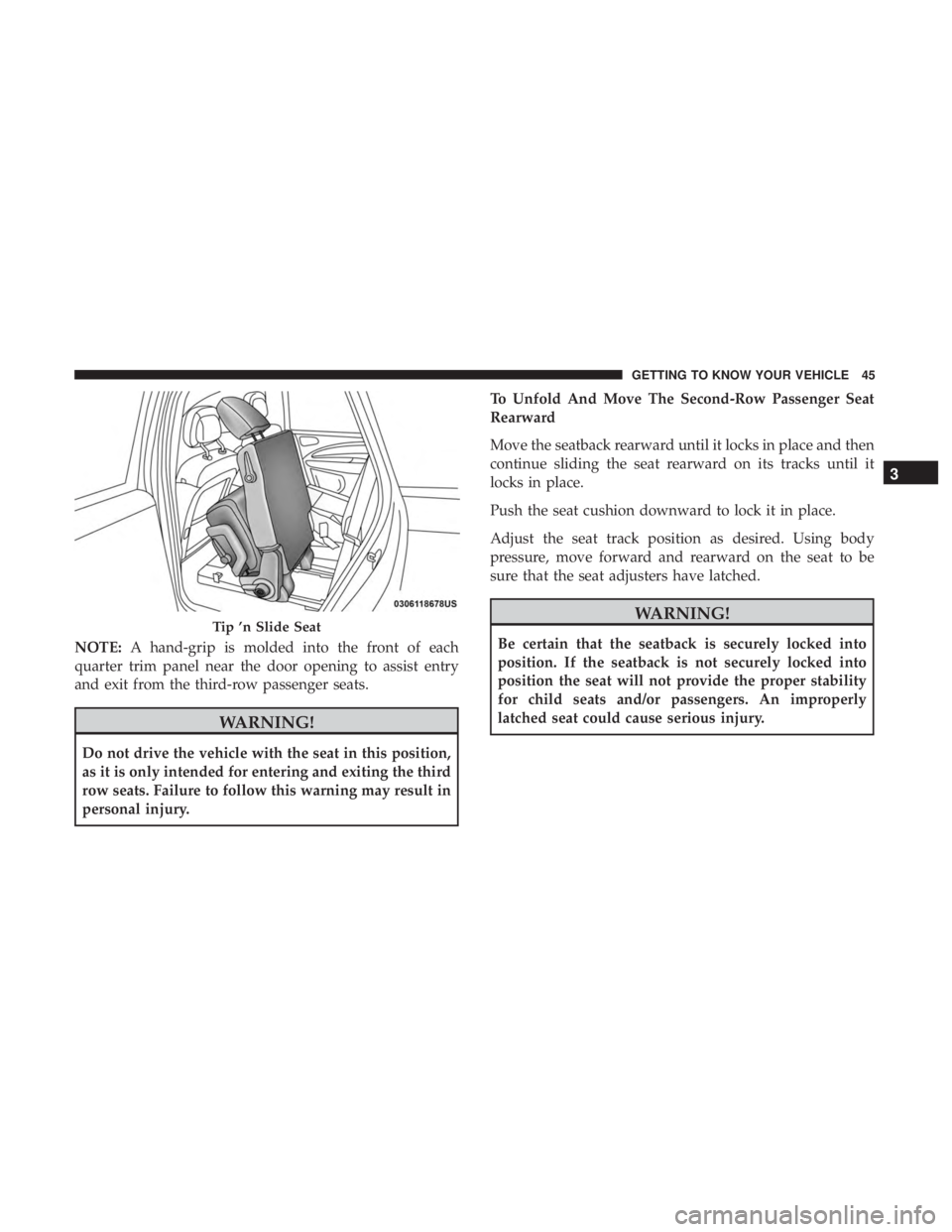
NOTE:A hand-grip is molded into the front of each
quarter trim panel near the door opening to assist entry
and exit from the third-row passenger seats.
WARNING!
Do not drive the vehicle with the seat in this position,
as it is only intended for entering and exiting the third
row seats. Failure to follow this warning may result in
personal injury. To Unfold And Move The Second-Row Passenger Seat
Rearward
Move the seatback rearward until it locks in place and then
continue sliding the seat rearward on its tracks until it
locks in place.
Push the seat cushion downward to lock it in place.
Adjust the seat track position as desired. Using body
pressure, move forward and rearward on the seat to be
sure that the seat adjusters have latched.
WARNING!
Be certain that the seatback is securely locked into
position. If the seatback is not securely locked into
position the seat will not provide the proper stability
for child seats and/or passengers. An improperly
latched seat could cause serious injury.
Tip ’n Slide Seat
3
GETTING TO KNOW YOUR VEHICLE 45
Page 69 of 524

INTERIOR LIGHTS
Courtesy/Interior Lighting
The interior lights come on when a door is opened.
To protect the battery, the interior lights will turn off
automatically 10 minutes after the ignition is placed in the
OFF position. This will occur if the interior lights were
switched on manually or are on because a door is open.
The Battery Protection also includes the glove compart-
ment light. To restore interior light operation after auto-
matic battery protection is enabled (Lights off), either place
the ignition in the ON/RUN position or cycle the light
switch.
Front Lights
The overhead console has two courtesy lights. The lights
turn on when a front door, a rear door or the liftgate is
opened. If your vehicle is equipped with Remote Keyless
Entry the lights will also turn on when the unlock button
on the key fob is pushed. The courtesy lights also function
as reading lights. Push in on each lens to turn these lights
on while inside the vehicle. Push the lens a second time to
turn each light off. You may adjust the direction of these
lights by pushing the outside ring, which is identified with
four directional arrows.
Rear Dome Light
Rotate the instrument panel dimmer control completely
upward to the second detent to turn on the interior lights.
The interior lights will remain on when the dimmer control
is in this position.
Rotate the dimmer control downward to the last detent (off
position). The interior lights will remain off when the doors
are open.
Courtesy/Reading Light
3
GETTING TO KNOW YOUR VEHICLE 67
Page 106 of 524
Window Lockout Switch
The window lockout switch on the driver’s door trim panel
allows you to disable the window control on the rear
passenger doors. To disable the window controls, push and
release the window lockout button (setting it in the down
position). To enable the window controls, push and release
the window lockout button again (setting it in the up
position).
Wind Buffeting
Wind buffeting can be described as the perception of
pressure on the ears or a helicopter-type sound in the ears.
Your vehicle may exhibit wind buffeting with the windows
down, or the sunroof (if equipped) in certain open or
partially open positions. This is a normal occurrence and
can be minimized. If the buffeting occurs with the rear
windows open, open the front and rear windows together
to minimize the buffeting. If the buffeting occurs with the
sunroof open, adjust the sunroof opening to minimize the
buffeting or open any window.
Window Lockout Switch
104 GETTING TO KNOW YOUR VEHICLE


