Page 407 of 524
Lights
After pressing the Lights button on the touchscreen, the following settings will be available:
Setting NameSelectable Options
Headlight Off Delay 0 sec30 sec
60 sec 90 sec
NOTE:
When the “Headlight Off Delay” feature is selected, it allows the adjustment of the amount of time the headlights
remain on after the engine is shut off. Headlights With Wipers — If Equipped On
Off
Headlight Illuminated On Approach 0 sec30 sec
60 sec 90 sec
NOTE:
When the “Headlight Illumination On Approach” feature is selected, it allows the adjustment of the amount of time
the headlights remain on after the doors are unlocked with the key fob. Auto Dim High Beams— If Equipped On
Off
NOTE:
When the “Auto Dim High Beams” feature is selected, the high beam headlights activate/deactivate automatically
under certain conditions. Daytime Running Lights — If OnOff
10
MULTIMEDIA 405
Page 408 of 524
Setting NameSelectable Options
Equipped
Steering Directed Headlights — If Equipped On
Off
NOTE:
The “Steering Directed Headlights” feature causes the headlights to turn relative to a change in direction of the steer-
ing wheel. Flash Lights With Lock OnOff
Doors & Locks
After pressing the Doors & Locks button on the touchscreen, the following settings will be available:
Setting Name Selectable Options
Auto Door Locks — If Equipped OnOff
NOTE:
When the “Auto Door Locks” feature is selected, all doors will lock automatically when the vehicle reaches a speed of
12 mph (20 km/h). Auto Unlock On Exit OnOff
NOTE:
When this feature is selected, all doors will unlock when the vehicle is stopped, the transmission is in the PARK or
NEUTRAL position and the driver’s door is opened. Flash Lights With Lock OnOff
406 MULTIMEDIA
Page 411 of 524
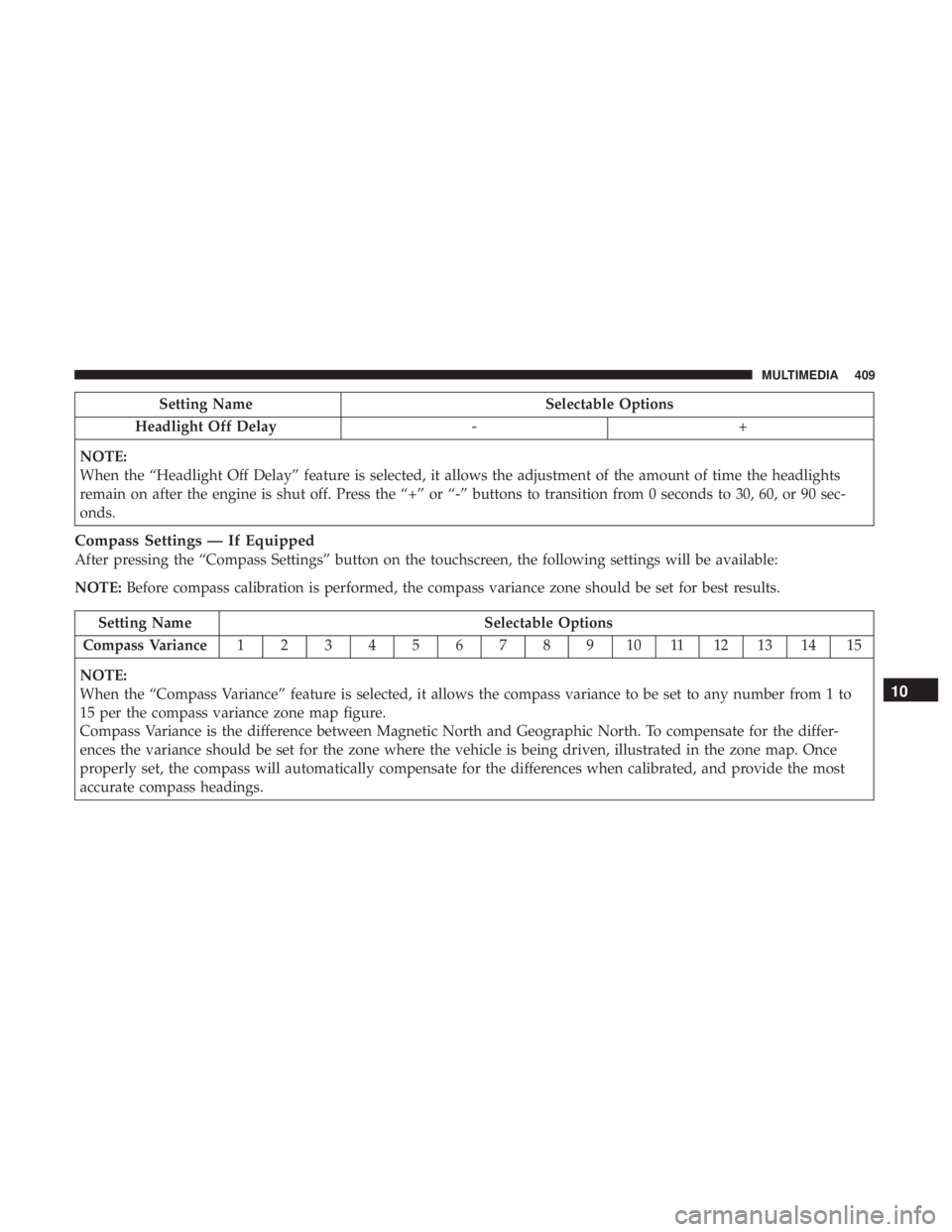
Setting NameSelectable Options
Headlight Off Delay -+
NOTE:
When the “Headlight Off Delay” feature is selected, it allows the adjustment of the amount of time the headlights
remain on after the engine is shut off. Press the “+” or “-” buttons to transition from 0 seconds to 30, 60, or 90 sec-
onds.
Compass Settings — If Equipped
After pressing the “Compass Settings” button on the touchscreen, the following settings will be available:
NOTE: Before compass calibration is performed, the compass variance zone should be set for best results.
Setting Name Selectable Options
Compass Variance 123456789101112131415
NOTE:
When the “Compass Variance” feature is selected, it allows the compass variance to be set to any number from 1 to
15 per the compass variance zone map figure.
Compass Variance is the difference between Magnetic North and Geographic North. To compensate for the differ-
ences the variance should be set for the zone where the vehicle is being driven, illustrated in the zone map. Once
properly set, the compass will automatically compensate for the differences when calibrated, and provide the most
accurate compass headings.
10
MULTIMEDIA 409
Page 418 of 524

Single Video Screen
NOTE:Typically there are two different ways to operate
the features of the Video Entertainment System (VES).
• The Remote Control
• The Touchscreen Radio (If Equipped)
Play Video Games
Connect the video game console to the Auxiliary RCA
input jacks located on the back of the center console. Audio/Video RCA Jacks (AUX Jacks) on the rear of the
center console enable the monitor to display video directly
from a video camera, connect video games for display on
the screen, or play music directly from an MP3 player.
1. Video in (yellow).
2. Left audio in (white).
3. Right audio in (red).
When connecting an external source to the AUX input, be
sure to follow the standard color coding for the VES jacks:
NOTE:
Certain high-end video games consoles will ex-
ceed the power limit of the vehicle’s Power Inverter. Refer
to the Power Inverter section within “Internal Equipment”
in “Getting To Know Your Vehicle”.
Ensure the remote control channel selector switch and
Headphone switch (IR channel) are the same number.
Using The Remote Control
1. Push the MODE button on the Remote Control.
2. While looking at the video screen, highlight VES AUX 2, by either pushing Up/Down/Left/Right buttons or by
repeatedly pushing the MODE button, then push EN-
TER on the Remote Control.
Auxiliary RCA Input Jacks
416 MULTIMEDIA
Page 419 of 524

Using The Touchscreen Radio Controls
1. Press the “MORE” button on the touchscreen.
2. Press the “Rear Entertainment” button on the touch-screen to display the Rear Entertainment Controls.
3. If the Rear Entertainment is turned off, press the “Power” button on the touchscreen.
4. Press the “1” or “2” button on the touchscreen for the channel desired and press the “Source” button on the
touchscreen to select the desired mode.
Listen To An Audio Source On Channel 2 While A
Video Is Playing On Channel 1
Ensure the Remote Control and Headphone switch is on
Channel 2.
Using The Remote Control
1. Push the MODE button on the Remote Control and theMode Select Screen will display, unless a video is
playing then only a small banner will appear on the
bottom of the screen.
2. While looking at the video screen, either press Up/ Down/Left/Right on the Remote Control to highlight the desired audio source or repeatedly push the MODE
button on the remote until the desired audio source
appears on the screen.
Using The Touchscreen Radio Controls
1. Press the “MORE” button on the touchscreen.
2. Press the “Rear Entertainment” button on the touch-
screen to display the Rear Entertainment Controls.
3. If the Rear Entertainment is turned off, press the “Power” button on the touchscreen.
4. Press the “1” or “2” button on the touchscreen for the channel desired and press the “Source” button on the
touchscreen to select the desired mode.
Play A DVD Using The Touchscreen Radio
Insert the DVD with the label facing up. The radio auto-
matically selects the appropriate mode after the disc is
recognized and displays the menu screen or starts playing
the first track.
Using The Remote Control
1. Push the MODE button on the Remote Control.
10
MULTIMEDIA 417
Page 420 of 524

2. While looking at the Video Screen, highlight DISC byeither pushing Up/Down/Left/Right buttons or by
repeatedly pushing the MODE button, then push EN-
TER.
NOTE:
• The VES system will retain the last setting when turned
off.
• Viewing a DVD on the Touchscreen radio screen is not
available in some regions or locations, the vehicle must
be stopped, and the gear selector must be in the PARK
position. Refer to local and state laws.
Using The Touchscreen Radio Controls
1. Press the “MORE” button on the touchscreen.
2. Press the “Rear Entertainment” button on the touch- screen to display the Rear Entertainment Controls.
3. If the Rear Entertainment is turned off, press the “Power” button on the touchscreen.
4. Press the “1” or “2” button on the touchscreen for the channel desired and press the “Source” button on the
touchscreen to select the desired mode.
VES Remote Control — If Equipped
Controls And Indicators
1. Power – Turns the screen and wireless headphonetransmitter for the selected Channel on or off. To hear
audio while the screen is closed, push the Power button
to turn the headphone transmitter on.
2. Channel Selector Indicators – When a button is pushed, the currently affected channel or channel button is
illuminated momentarily.
VES Remote Control
418 MULTIMEDIA
Page 421 of 524

3. Light – Turns the remote control backlighting on or off.The remote backlighting turns off automatically after
five seconds.
4. Channel/Screen Selector Switch – Indicates which chan- nel is being controlled by the remote control. When the
selector switch is in the Channel 1 position, the remote
controls the functionality of headphone Channel 1 (right
side of the screen). When the selector switch is in the
Channel 2, position the remote controls the functionality
of headphone Channel 2 (left side of the screen).
5. �� – In radio modes, push to seek the next tunable
station. In disc modes, push and hold to fast forward
through the current audio track or video chapter. In
menu modes use to navigate in the menu.
6. �/ Prev – In radio modes, push to select to the previous
station. In disc modes, push to advance to the start of the
current or previous audio track or video chapter. In
menu modes, use to navigate in the menu.
7. MENU – Push to return to the main menu of a DVD disc, to select an audio or video channel from the Station
list, or select playback modes (SCAN/RANDOM for a
CD). 8.
�/�(Play/Pause) – Begin/resume or pause disc play.
9.
(Stop) – Stops disc play.
10. PROG Up/Down – When listening to a radio mode, pushing PROG Up selects the next preset and pushing
PROG Down selects the previous preset stored in the
radio.
11. Mute – Push to mute the headphone audio output for the selected channel.
12. SLOW – Push to slow playback of a DVD disc. Push play (�) to resume normal play.
13. STATUS – Push to display the current status.
14. MODE – Push to change the mode of the selected channel. See the Mode Selection section of this manual
for details on changing modes.
15. SETUP – When in a video mode, push the SETUP button to access the display settings (see the display
settings section) to access the DVD setup menu, select
the menu button on the radio. When a disc is loaded in
the DVD player (if equipped) and the VES mode is
selected and the disc is stopped, push the SETUP
button to access the DVD Setup menu. (see the DVD
Setup Menu of this manual.)
10
MULTIMEDIA 419
Page 422 of 524

16. BACK – When navigating in menu mode, push toreturn to the previous screen. When navigating a DVDs
disc menu, the operation depends on the disc’s con-
tents.
17. �� – In radio modes, push to seek to the previous
tunable station. In disc modes, push and hold to fast
rewind through the current audio track or video chap-
ter. In menu modes use to navigate in the menu.
18. ENTER – Push to select the highlighted option in a menu.
19. �/ NEXT – In radio modes, push to select to the next
station. In disc modes, push to advance to the next
audio track or video chapter. In menu modes, use to
navigate in the menu.
Remote Control Storage
The video screen comes with a built in storage compart-
ment for the remote control which is accessible when the
screen is opened. To remove the remote, use your index finger to pull and rotate the remote towards you. Do not try
to pull the remote straight down as it will be very difficult
to remove. To return the remote back into its storage area,
insert one long edge of the remote into the two retaining
clips first, and then rotate the remote back up into the other
two retaining clips until it snaps back into position.
VES Remote Control Storage
420 MULTIMEDIA

