Page 77 of 598

NOTE:
•Your vehicle is equipped with plastic headlight and fog
light (if equipped) lenses that are lighter and less sus-
ceptible to stone breakage than glass lights. Plastic is not
as scratch resistant as glass and therefore different lens
cleaning procedures must be followed.
• To minimize the possibility of scratching the lenses and
reducing light output, avoid wiping with a dry cloth. To
remove road dirt, wash with a mild soap solution
followed by rinsing.
CAUTION!
Do not use abrasive cleaning components, solvents,
steel wool or other abrasive materials to clean the
lenses.
Daytime Running Lights — If Equipped
The Daytime Running Lights come on whenever the en-
gine is running, and the transmission is not in the PARK
position. The lights will remain on until the ignition is
switched to the OFF or ACC position or the parking brake
is engaged. The headlight switch must be used for normal
nighttime driving. NOTE:
If allowed by law in the country in which the
vehicle was purchased the Daytime Running Lights can be
turned on and off using the Uconnect System, refer to
“Uconnect Settings” in “Multimedia” for further informa-
tion.
High/Low Beam Switch
Push the multifunction lever toward the instrument panel
to switch the headlights to high beams. Pulling the multi-
function back toward the steering wheel will turn the low
beams back on, or shut the high beams off.
Automatic High Beam — If Equipped
The Automatic High Beam Headlamp Control system
provides increased forward lighting at night by automat-
ing high beam control through the use of a digital camera
mounted on the inside rearview mirror. This camera de-
tects vehicle specific light and automatically switches from
high beams to low beams until the approaching vehicle is
out of view.
3
GETTING TO KNOW YOUR VEHICLE 75
Page 82 of 598

To turn the lights off, push the switch a second time. The
lights also turn on when a door is opened. The lights will
also turn on when the unlock button on the key fob is
pushed.
Ambient Light — If Equipped
The overhead console is equipped with an ambient light
feature. This light casts illumination for improved visibility
of the floor and center console area.
Dimmer Control
Courtesy and dome lights are turned on when the front
doors are opened or when the dimmer control (rotating
wheel on the right side of the headlight switch) is rotated
to its farthest upward position. If your vehicle is equipped
with a key fob and the unlock button is pushed, the
courtesy and dome lights will turn on. When a door is open
and the interior lights are on, rotating the dimmer control
all the way down, to the (O) off detent, will cause all the
interior lights to go out. This is also known as the “Party”
mode because it allows the doors to stay open for extended
periods of time without discharging the vehicle’s battery.
Front Map/Reading Light Switches
Ambient Light
80 GETTING TO KNOW YOUR VEHICLE
Page 85 of 598
NOTE:If the vehicle is moving less than 10 mph
(16 km/h), delay times will be doubled.
Windshield Washer Operation
To use the washer, push on the end of the lever (toward the
steering wheel) and hold while spray is desired. If the lever
is pushed while in the intermittent setting, the wipers will
turn on and operate for several wipe cycles after the end of
the lever is released, and then resume the intermittent
interval previously selected. If the end of the lever is pushed while the wipers are in the
off position, the wipers will operate for several wipe cycles,
then turn off.
NOTE:
As a protective measure, the pump will stop if the
switch is held for more than 20 seconds. Once the switch is
released the pump will resume normal operation.
Intermittent Wiper OperationWindshield Washer Operation
3
GETTING TO KNOW YOUR VEHICLE 83
Page 94 of 598
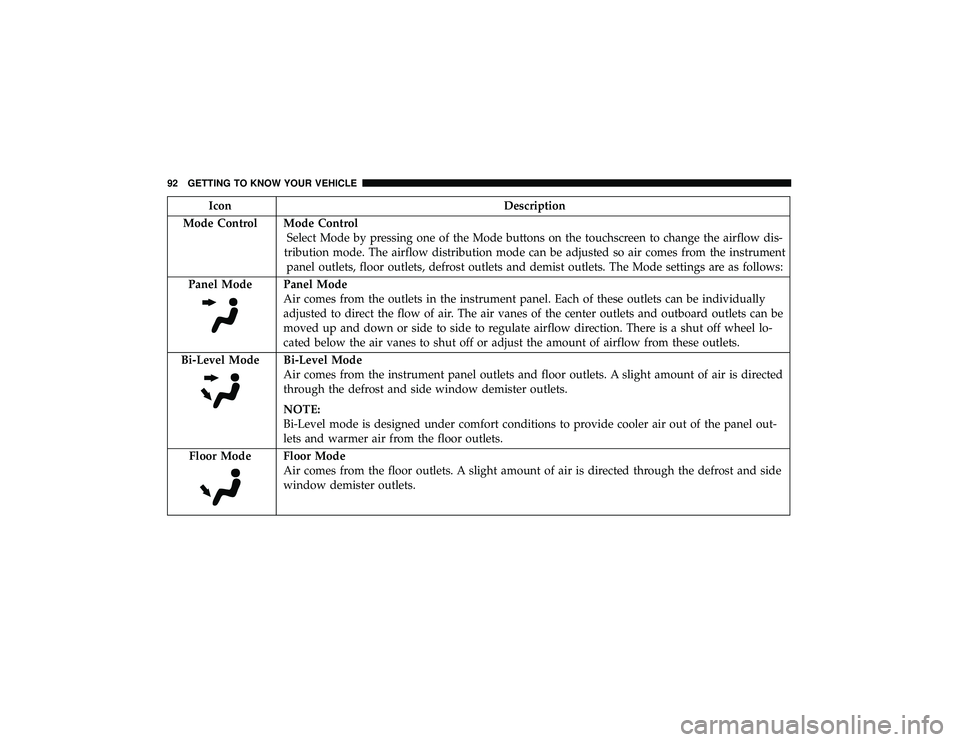
IconDescription
Mode Control Mode Control Select Mode by pressing one of the Mode buttons on the touchscreen to change the airflow dis-
tribution mode. The airflow distribution mode can be adjusted so air comes from the instrument panel outlets, floor outlets, defrost outlets and demist outlets. The Mode settings are as follows:
Panel Mode
Panel Mode
Air comes from the outlets in the instrument panel. Each of these outlets can be individually
adjusted to direct the flow of air. The air vanes of the center outlets and outboard outlets can be
moved up and down or side to side to regulate airflow direction. There is a shut off wheel lo-
cated below the air vanes to shut off or adjust the amount of airflow from these outlets.
Bi-Level Mode
Bi-Level Mode
Air comes from the instrument panel outlets and floor outlets. A slight amount of air is directed
through the defrost and side window demister outlets.
NOTE:
Bi-Level mode is designed under comfort conditions to provide cooler air out of the panel out-
lets and warmer air from the floor outlets.
Floor Mode
Floor Mode
Air comes from the floor outlets. A slight amount of air is directed through the defrost and side
window demister outlets.
92 GETTING TO KNOW YOUR VEHICLE
Page 144 of 598

WARNING!
Cargo must be securely tied down before driving your
vehicle. Improperly secured loads can fly off the ve-
hicle, particularly at high speeds, resulting in personal
injury or property damage. Follow the roof rack cau-
tions when carrying cargo on your roof rack.
CAUTION!
•To prevent damage to the roof of your vehicle, DO
NOT carry any loads on the roof rack without the
crossbars deployed. The load should be secured and
placed on top of the crossbars, not directly on the
roof. If it is necessary to place the load on the roof,
place a blanket or other protective layer between the
load and the roof surface.
• To avoid damage to the roof rack and vehicle, do not
exceed the maximum roof rack load capacity of 150 lb
(68 kg). Always distribute heavy loads as evenly as
possible and secure the load appropriately.
(Continued)
CAUTION! (Continued)
•Load should always be secured to cross bars first,
with tie down loops used as additional securing
points if needed. Tie loops are intended as supple-
mentary tie down points only. Do not use ratcheting
mechanisms with the tie loops. Check the straps and
thumb wheels frequently to be sure that the load
remains securely attached.
• Long loads that extend over the windshield, such as
wood panels or surfboards, or loads with large
frontal area should be secured to both the front and
rear of the vehicle.
• Travel at reduced speeds and turn corners carefully
when carrying large or heavy loads on the roof rack.
Wind forces, due to natural causes or nearby truck
traffic, can add sudden upward lift to a load. This is
especially true on large flat loads and may result in
damage to the cargo or your vehicle.
• The use of Sport Mode is not recommended when
using the Roof Luggage Rack to carry a load.
(Continued)
142 GETTING TO KNOW YOUR VEHICLE
Page 148 of 598

4. Fuel Gauge•The pointer shows the level of fuel in the fuel tank
when the Keyless Push Button Ignition is in the
ON/RUN position.
•
The fuel pump symbol points to the side of the
vehicle where the fuel door is located.
5. Instrument Cluster Display
•The instrument cluster display features a driver-
interactive display. Refer to “Instrument Cluster Dis-
play” in “Getting To Know Your Instrument Panel” for
further information.
NOTE: The hard telltales will illuminate for a bulb check
when the ignition is first cycled.
INSTRUMENT CLUSTER DISPLAY
Your vehicle will be equipped with an instrument cluster
display, which offers useful information to the driver. With
the ignition in the STOP/OFF mode, opening/closing of a
door will activate the display for viewing, and display the
total miles, or kilometers, in the odometer. Your instrument
cluster display is designed to display important informa-
tion about your vehicle’s systems and features. Using a driver interactive display located on the instrument panel,
your instrument cluster display can show you how sys-
tems are working and give you warnings when they are
not. The steering wheel mounted controls allow you to
scroll through the main menus and submenus. You can
access the specific information you want and make selec-
tions and adjustments.
Location And Controls
Instrument Cluster Display Location
146 GETTING TO KNOW YOUR INSTRUMENT PANEL
Page 149 of 598
The Main Menu items consists of the following:
•Speedometer Main Gauge
• Vehicle Info
• Driver Assist — If Equipped
• Fuel Economy
• Trip
• Trailer Tow — If Equipped
• Stop/Start — If Equipped
• Audio
• Stored Messages
• Screen Setup
The system allows the driver to select information by
pushing the following buttons mounted on the steering
wheel: •
Up Arrow Button
Push and release the uparrow button to scroll
upward through the main menu.
• Down Arrow Button
Push and release the downarrow button to scroll
downward through the main menu.
Instrument Cluster Display Control Buttons
4
GETTING TO KNOW YOUR INSTRUMENT PANEL 147
Page 150 of 598

•Right Arrow Button
Push and release the rightarrow button to access
the information screens or submenu screens of a
main menu item.
• Left Arrow Button
Push the leftarrow button to return to the main
menu from an info screen or submenu item.
• OK Button
Push the OKbutton to access/select the information
screens or submenu screens of a main menu item. Push and
hold the OKbutton for one second to reset displayed/
selected features that can be reset.
The instrument cluster display is located in the center
portion of the cluster and consist of multiple sections:
• Main Screen — The inner ring of the display will
illuminate in grey under normal conditions, yellow for
non critical warnings, red for critical warnings, and
white for on demand information. •
Submenu Dots — Whenever there are submenus avail-
able, the position within the submenus is shown here.
• Reconfigurable Telltales/Information
• Gear Selector Status (PRND)
• Driver Interactive Display (Compass, Temp, Range to
Empty, Trip A, Trip B, Average Fuel Economy, Current
Fuel Economy, Time, Trailer Trip and Gain)
• All Wheel Drive (AWD) Status — If Equipped
The instrument cluster display will normally display the
main menu or the screens of a selected feature of the main
menu. The main display area also displays “pop up”
messages that consist of approximately 60 possible warn-
ing or information messages. These pop up messages fall
into several categories:
• Five Second Stored Messages
When the appropriate conditions occur, this type of mes-
sage takes control of the main display area for five seconds
and then returns to the previous screen. Most of the
messages of this type are then stored (as long as the
condition that activated it remains active) and can be
reviewed from the “Messages” main menu item. Examples
of this message type are “Right Front Turn Signal Lamp
Out” and “Low Tire Pressure.”
148 GETTING TO KNOW YOUR INSTRUMENT PANEL

