Page 107 of 496
CAUTION!(Continued)
•Accessories that draw higher power (i.e., coolers,
vacuum cleaners, lights, etc.) will degrade the battery
even more quickly. Only use these intermittently and
with greater caution.
• After the use of high power draw accessories or long
periods of the vehicle not being started (with acces-
sories still plugged in), the vehicle must be driven a
sufficient length of time to allow the alternator to
recharge the vehicle’s battery.
• Power outlets are designed for accessory plugs only.
Do not hang any type of accessory or accessory
bracket from the plug. Improper use of the power
outlet can cause damage.
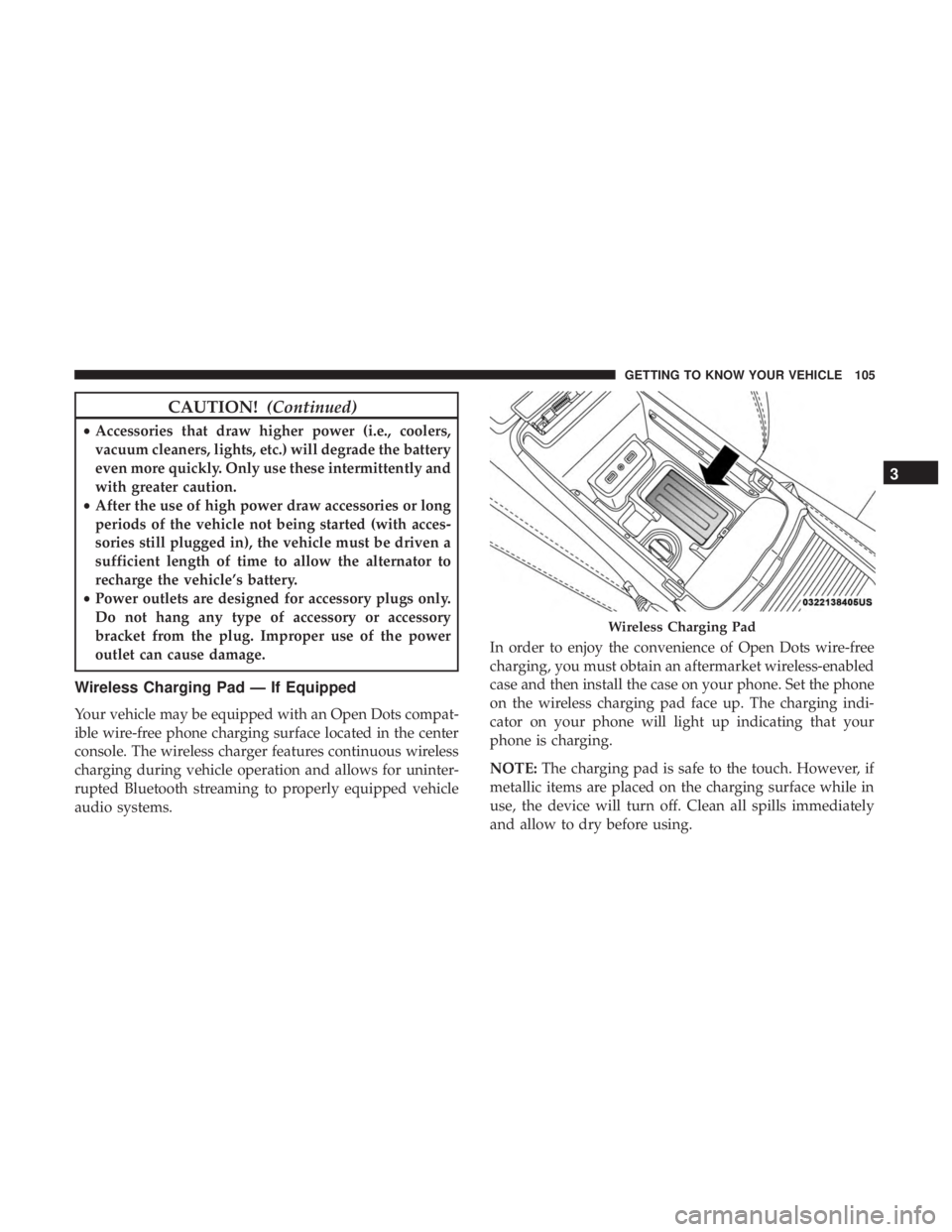
Wireless Charging Pad — If Equipped
Your vehicle may be equipped with an Open Dots compat-
ible wire-free phone charging surface located in the center
console. The wireless charger features continuous wireless
charging during vehicle operation and allows for uninter-
rupted Bluetooth streaming to properly equipped vehicle
audio systems. In order to enjoy the convenience of Open Dots wire-free
charging, you must obtain an aftermarket wireless-enabled
case and then install the case on your phone. Set the phone
on the wireless charging pad face up. The charging indi-
cator on your phone will light up indicating that your
phone is charging.
NOTE:
The charging pad is safe to the touch. However, if
metallic items are placed on the charging surface while in
use, the device will turn off. Clean all spills immediately
and allow to dry before using.
Wireless Charging Pad
3
GETTING TO KNOW YOUR VEHICLE 105
Page 291 of 496
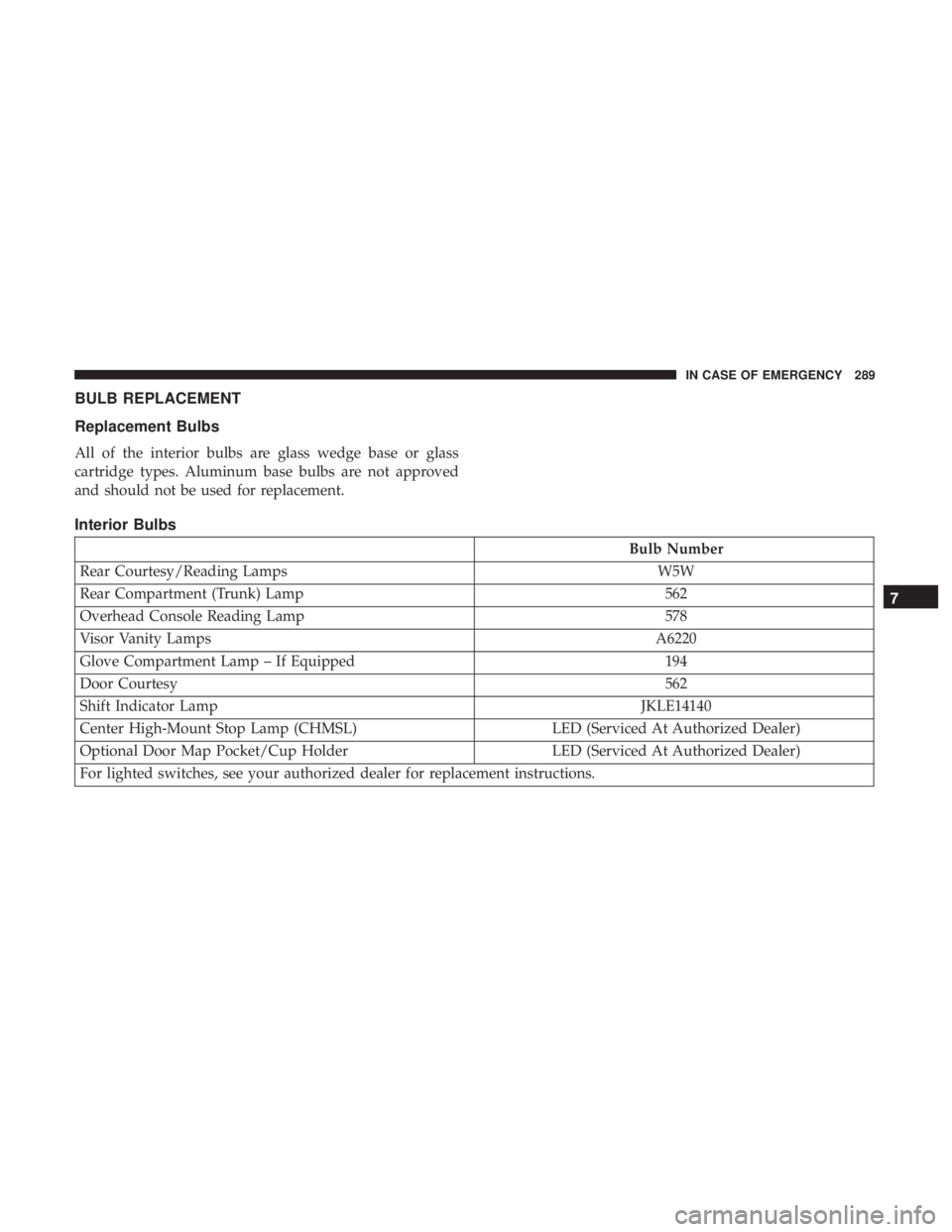
BULB REPLACEMENT
Replacement Bulbs
All of the interior bulbs are glass wedge base or glass
cartridge types. Aluminum base bulbs are not approved
and should not be used for replacement.
Interior Bulbs
Bulb Number
Rear Courtesy/Reading Lamps W5W
Rear Compartment (Trunk) Lamp 562
Overhead Console Reading Lamp 578
Visor Vanity Lamps A6220
Glove Compartment Lamp – If Equipped 194
Door Courtesy 562
Shift Indicator Lamp JKLE14140
Center High-Mount Stop Lamp (CHMSL) LED (Serviced At Authorized Dealer)
Optional Door Map Pocket/Cup Holder LED (Serviced At Authorized Dealer)
For lighted switches, see your authorized dealer for replacement instructions.
7
IN CASE OF EMERGENCY 289
Page 300 of 496
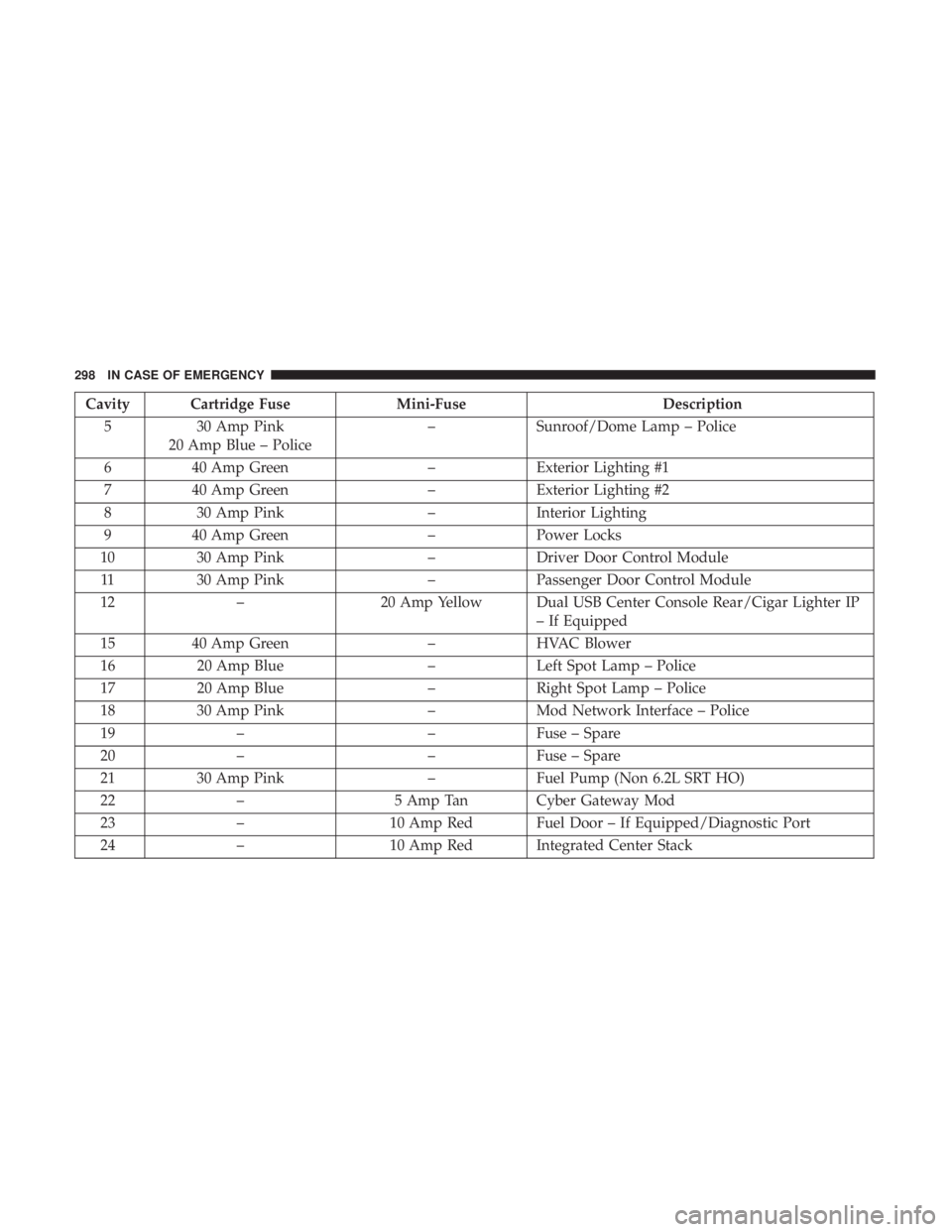
Cavity Cartridge FuseMini-FuseDescription
5 30 Amp Pink
20 Amp Blue – Police –
Sunroof/Dome Lamp – Police
6 40 Amp Green –Exterior Lighting #1
7 40 Amp Green –Exterior Lighting #2
8 30 Amp Pink –Interior Lighting
9 40 Amp Green –Power Locks
10 30 Amp Pink –Driver Door Control Module
11 30 Amp Pink –Passenger Door Control Module
12 – 20 Amp Yellow Dual USB Center Console Rear/Cigar Lighter IP
– If Equipped
15 40 Amp Green –HVAC Blower
16 20 Amp Blue –Left Spot Lamp – Police
17 20 Amp Blue –Right Spot Lamp – Police
18 30 Amp Pink –Mod Network Interface – Police
19 – –Fuse – Spare
20 – –Fuse – Spare
21 30 Amp Pink –Fuel Pump (Non 6.2L SRT HO)
22 – 5 Amp Tan Cyber Gateway Mod
23 – 10 Amp Red Fuel Door – If Equipped/Diagnostic Port
24 – 10 Amp Red Integrated Center Stack
298 IN CASE OF EMERGENCY
Page 324 of 496
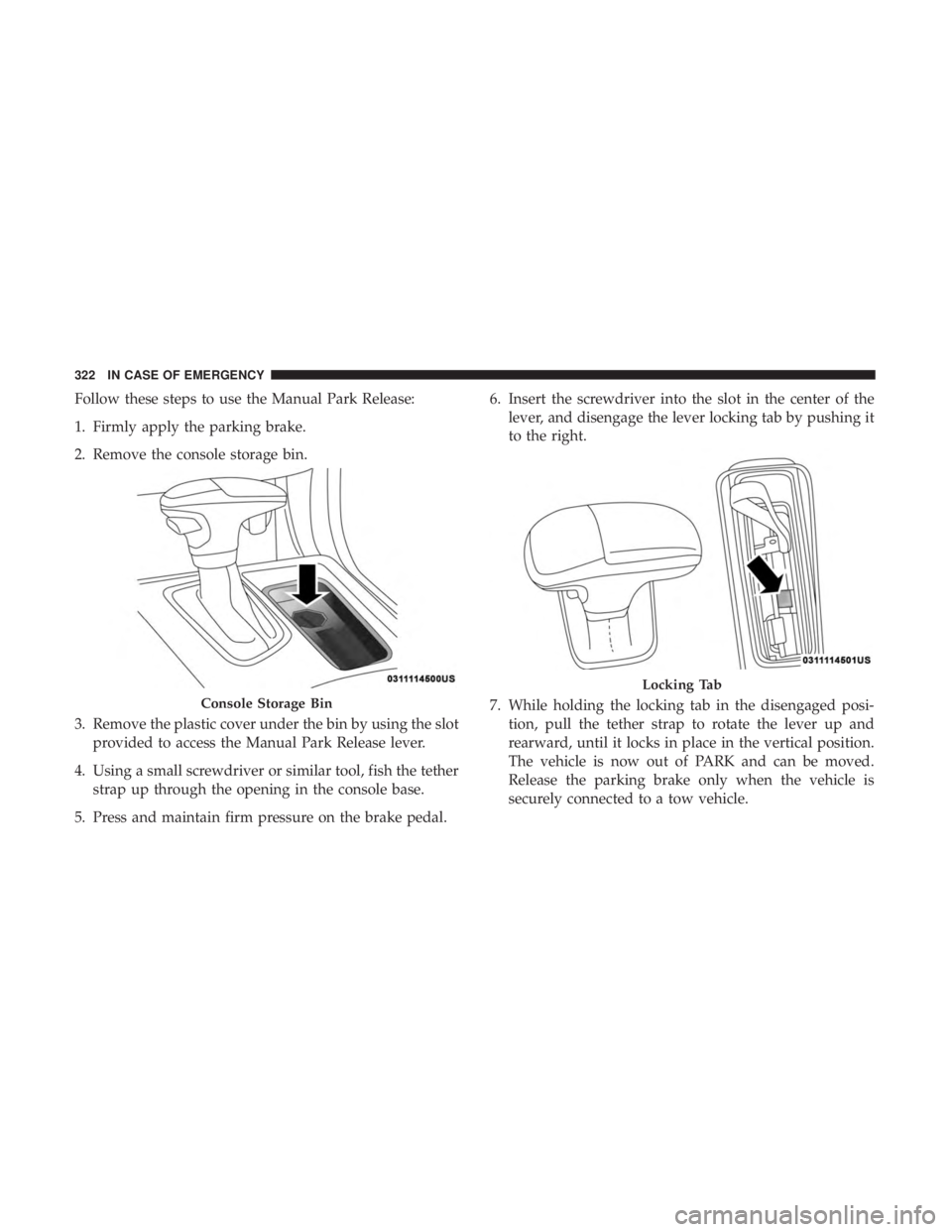
Follow these steps to use the Manual Park Release:
1. Firmly apply the parking brake.
2. Remove the console storage bin.
3. Remove the plastic cover under the bin by using the slotprovided to access the Manual Park Release lever.
4. Using a small screwdriver or similar tool, fish the tether strap up through the opening in the console base.
5. Press and maintain firm pressure on the brake pedal. 6. Insert the screwdriver into the slot in the center of the
lever, and disengage the lever locking tab by pushing it
to the right.
7. While holding the locking tab in the disengaged posi- tion, pull the tether strap to rotate the lever up and
rearward, until it locks in place in the vertical position.
The vehicle is now out of PARK and can be moved.
Release the parking brake only when the vehicle is
securely connected to a tow vehicle.
Console Storage Bin
Locking Tab
322 IN CASE OF EMERGENCY
Page 456 of 496
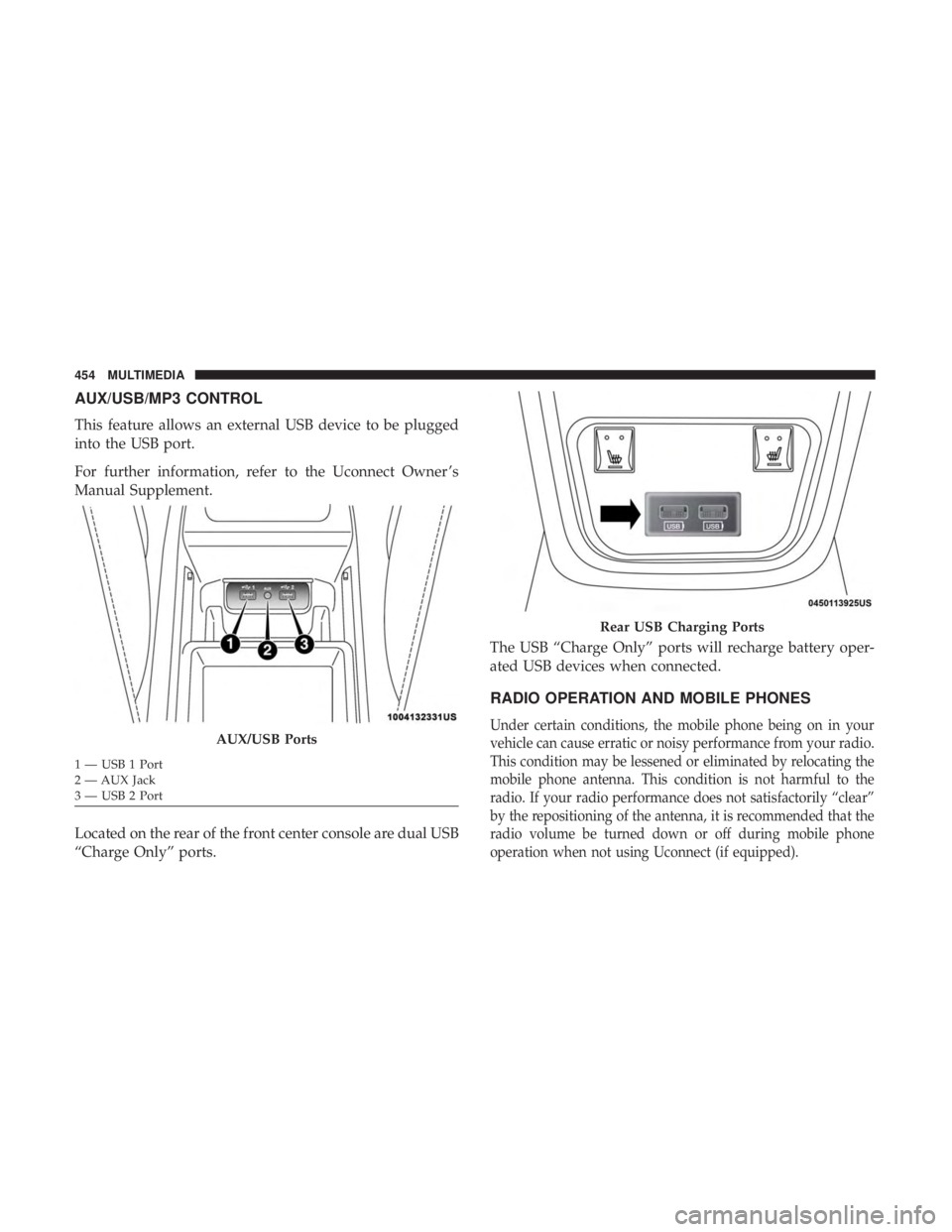
AUX/USB/MP3 CONTROL
This feature allows an external USB device to be plugged
into the USB port.
For further information, refer to the Uconnect Owner ’s
Manual Supplement.
Located on the rear of the front center console are dual USB
“Charge Only” ports.The USB “Charge Only” ports will recharge battery oper-
ated USB devices when connected.
RADIO OPERATION AND MOBILE PHONES
Under certain conditions, the mobile phone being on in your
vehicle can cause erratic or noisy performance from your radio.
This condition may be lessened or eliminated by relocating the
mobile phone antenna. This condition is not harmful to the
radio. If your radio performance does not satisfactorily “clear”
by the repositioning of the antenna, it is recommended that the
radio volume be turned down or off during mobile phone
operation when not using Uconnect (if equipped).AUX/USB Ports
1 — USB 1 Port
2 — AUX Jack
3 — USB 2 Port
Rear USB Charging Ports
454 MULTIMEDIA