Page 96 of 532
Console Storage
The center console has a storage compartment located
underneath the armrest. The compartment contains a 12
Volt power outlet, and is also equipped with a USB port
featuring active charging, which will continue charging
your device up to 60 minutes after the ignition is turned
off. The USB port also may be equipped with an IPOD/
USB control, or Apple CarPlay and Android Auto. Refer to
“IPOD/USB/MP3 Control – If Equipped” in “Multimedia”
for further information. If equipped with Apple CarPlay
and Android Auto, refer to the Uconnect Owner ’s Manual
Supplement.
WARNING!
Do not operate this vehicle with a console compart-
ment lid in the open position. Driving with the console
compartment lid open may result in injury in a colli-
sion.
Cupholders
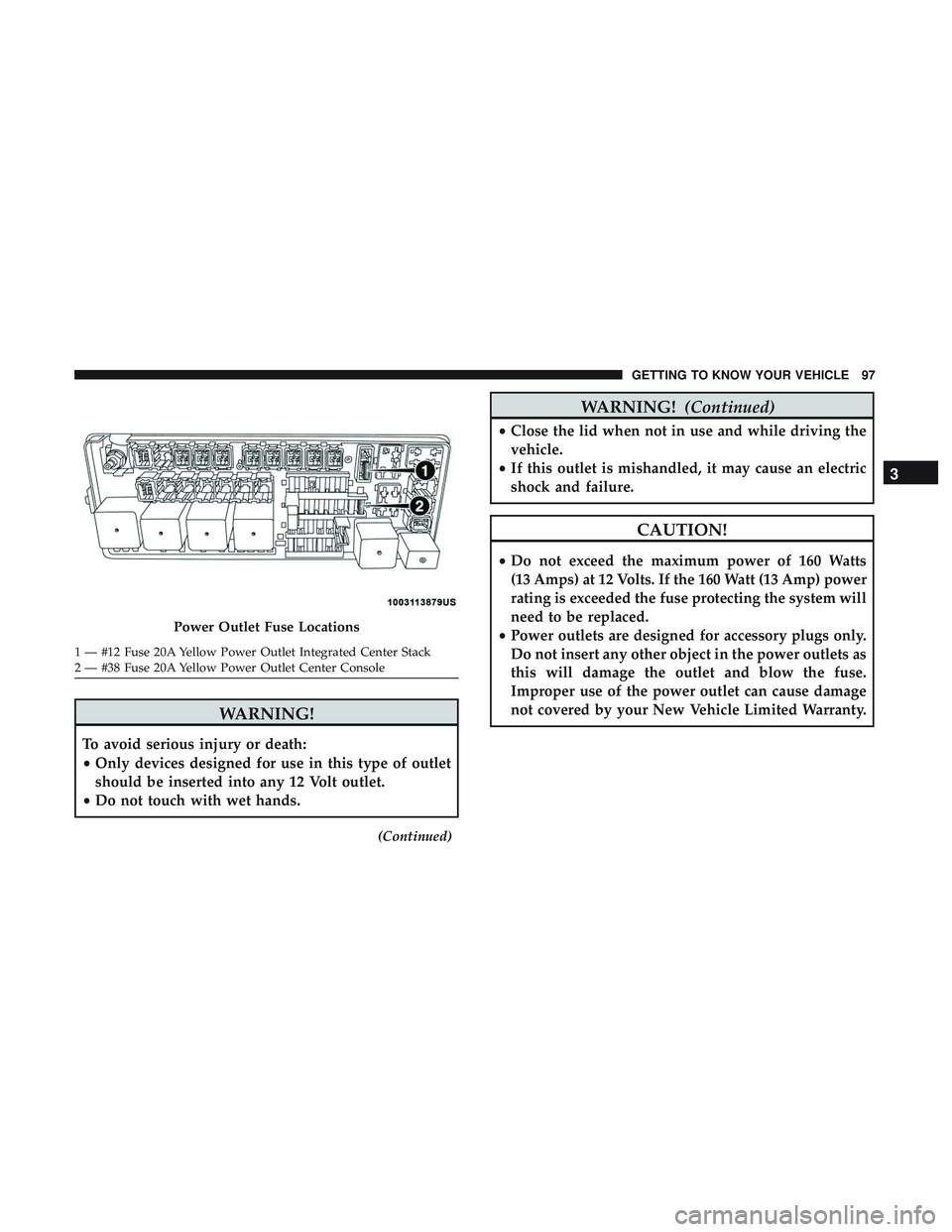
The front cupholders are located in the center console and
in the door panels.
Center Console
Front Cupholders
94 GETTING TO KNOW YOUR VEHICLE
Page 97 of 532
WARNING!
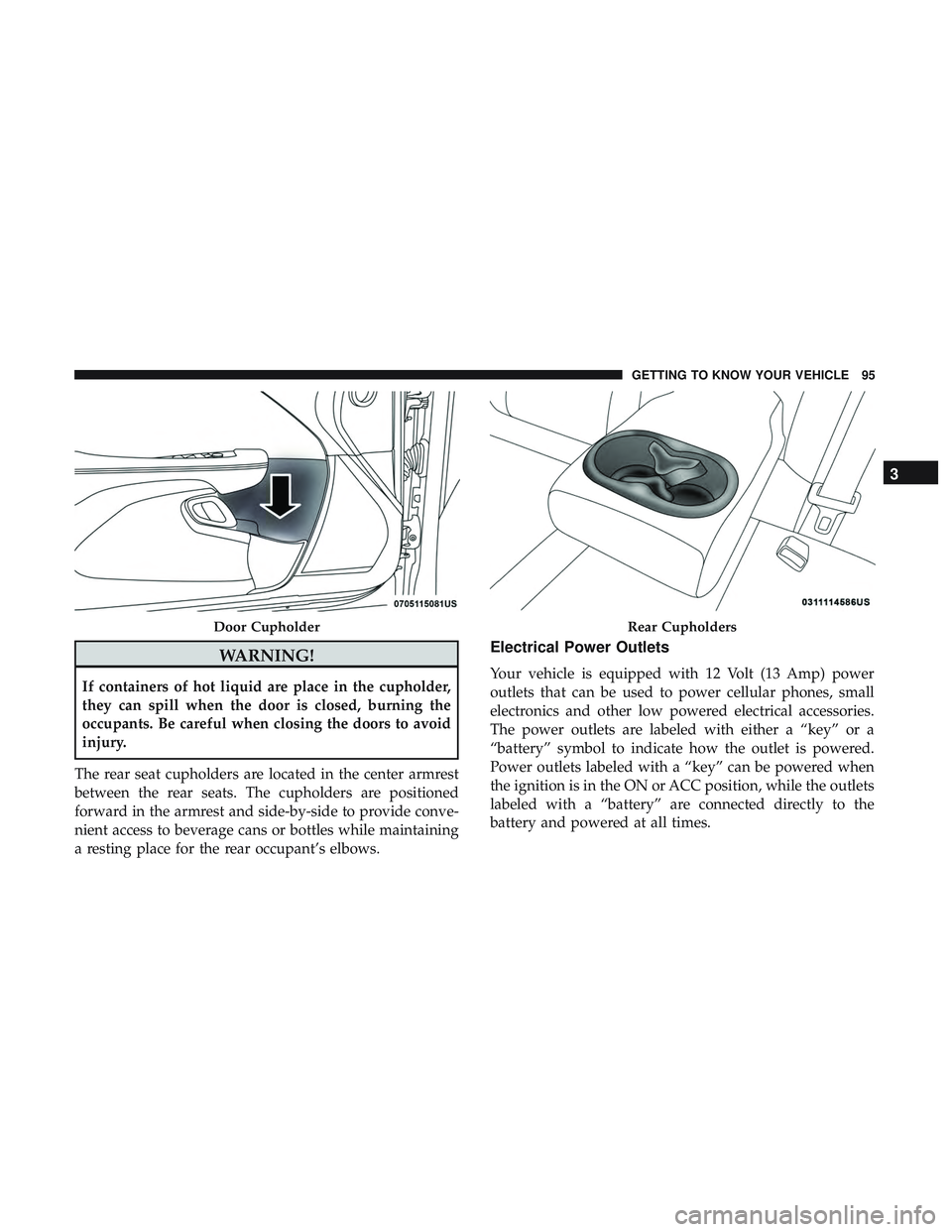
If containers of hot liquid are place in the cupholder,
they can spill when the door is closed, burning the
occupants. Be careful when closing the doors to avoid
injury.
The rear seat cupholders are located in the center armrest
between the rear seats. The cupholders are positioned
forward in the armrest and side-by-side to provide conve-
nient access to beverage cans or bottles while maintaining
a resting place for the rear occupant’s elbows.
Electrical Power Outlets
Your vehicle is equipped with 12 Volt (13 Amp) power
outlets that can be used to power cellular phones, small
electronics and other low powered electrical accessories.
The power outlets are labeled with either a “key” or a
“battery” symbol to indicate how the outlet is powered.
Power outlets labeled with a “key” can be powered when
the ignition is in the ON or ACC position, while the outlets
labeled with a “battery” are connected directly to the
battery and powered at all times.
Door CupholderRear Cupholders
3
GETTING TO KNOW YOUR VEHICLE 95
Page 99 of 532
WARNING!
To avoid serious injury or death:
•Only devices designed for use in this type of outlet
should be inserted into any 12 Volt outlet.
• Do not touch with wet hands.
(Continued)
WARNING! (Continued)
•Close the lid when not in use and while driving the
vehicle.
• If this outlet is mishandled, it may cause an electric
shock and failure.
CAUTION!
• Do not exceed the maximum power of 160 Watts
(13 Amps) at 12 Volts. If the 160 Watt (13 Amp) power
rating is exceeded the fuse protecting the system will
need to be replaced.
• Power outlets are designed for accessory plugs only.
Do not insert any other object in the power outlets as
this will damage the outlet and blow the fuse.
Improper use of the power outlet can cause damage
not covered by your New Vehicle Limited Warranty.
Power Outlet Fuse Locations
1 — #12 Fuse 20A Yellow Power Outlet Integrated Center Stack
2 — #38 Fuse 20A Yellow Power Outlet Center Console
3
GETTING TO KNOW YOUR VEHICLE 97
Page 103 of 532
GETTING TO KNOW YOUR INSTRUMENT PANEL
CONTENTS
�INSTRUMENT CLUSTER ..................102
▫ Instrument Cluster Descriptions .............103
� INSTRUMENT CLUSTER DISPLAY ...........105
▫ Location And Controls ...................105
▫ Engine Oil Life Reset ....................107
▫ Performance Shift Indicator (PSI) —
If Equipped .......................... .108
▫ Instrument Cluster Display Selectable Menu
Items .............................. .108
▫ Battery Saver On/Battery Saver Mode
Message — Electrical Load Reduction Actions —
If Equipped ..........................113
� WARNING LIGHTS AND MESSAGES .........115▫
Red Warning Lights .....................115
▫ Yellow Warning Lights ...................119
▫ Yellow Indicator Lights ...................123
▫ Green Indicator Lights ...................123
▫ White Indicator Lights ...................124
▫ Blue Indicator Lights ....................125
� ONBOARD DIAGNOSTIC SYSTEM — OBD II . . .125
▫ Onboard Diagnostic System (OBD II)
Cybersecurity ........................ .126
� EMISSIONS INSPECTION AND MAINTENANCE
PROGRAMS .......................... .1264
Page 106 of 532

3. Speedometer•Indicates vehicle speed.
4. Fuel Gauge •The pointer shows the level of fuel in the fuel tank
when the Keyless Push Button Ignition is in the
ON/RUN position.
•
The fuel pump symbol points to the side of the
vehicle where the fuel door is located.
5. Temperature Gauge
•The temperature gauge shows engine coolant tem-
perature. Any reading within the normal range indi-
cates that the engine cooling system is operating
satisfactorily.
• The gauge pointer will likely indicate a higher tem-
perature when driving in hot weather, up mountain
grades, or when towing a trailer. It should not be
allowed to exceed the upper limits of the normal
operating range.
WARNING!
A hot engine cooling system is dangerous. You or
others could be badly burned by steam or boiling
coolant. You may want to call an authorized dealer for
service if your vehicle overheats. If you decide to look
under the hood yourself, see “Servicing And Mainte-
nance.” Follow the warnings under the Cooling System
Pressure Cap paragraph.
CAUTION!
Driving with a hot engine cooling system could dam-
age your vehicle. If the temperature gauge reads “H,”
pull over and stop the vehicle. Idle the vehicle with the
air conditioner turned off until the pointer drops back
into the normal range. If the pointer remains on the
“H,” turn the engine off immediately and call an
authorized dealer for service.
NOTE: The hard telltales will illuminate for a bulb check
when the ignition is first cycled.
104 GETTING TO KNOW YOUR INSTRUMENT PANEL
Page 107 of 532
INSTRUMENT CLUSTER DISPLAY
Your vehicle will be equipped with an instrument cluster
display, which offers useful information to the driver. With
the ignition in the STOP/OFF mode, opening/closing of a
door will activate the display for viewing, and display the
total miles, or kilometers, in the odometer. Your instrument
cluster display is designed to display important informa-
tion about your vehicle’s systems and features. Using a
driver interactive display located on the instrument panel,
your instrument cluster display can show you how sys-
tems are working and give you warnings when they are
not. The steering wheel mounted controls allow you to
scroll through the main menus and submenus. You can
access the specific information you want and make selec-
tions and adjustments.
Location And Controls
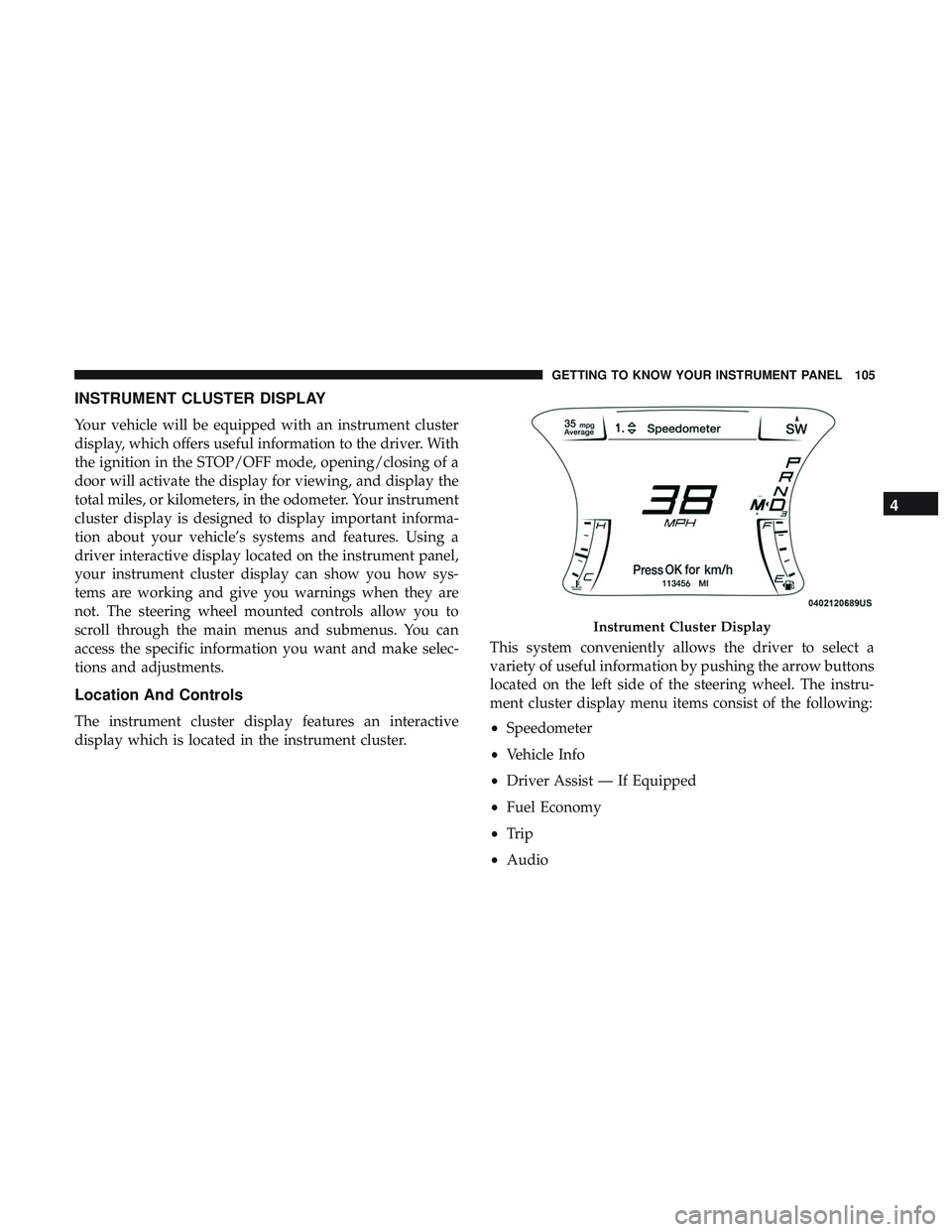
The instrument cluster display features an interactive
display which is located in the instrument cluster.This system conveniently allows the driver to select a
variety of useful information by pushing the arrow buttons
located on the left side of the steering wheel. The instru-
ment cluster display menu items consist of the following:
•
Speedometer
• Vehicle Info
• Driver Assist — If Equipped
• Fuel Economy
• Trip
• Audio
Instrument Cluster Display
4
GETTING TO KNOW YOUR INSTRUMENT PANEL 105
Page 112 of 532
Push the ADAPTIVE CRUISE CONTROL (ACC) ON/OFF
button (located on the steering wheel) until one of the
following displays in the instrument cluster display:
Adaptive Cruise Control Off
When ACC is deactivated, the display will read “Adaptive
Cruise Control Off.”
Adaptive Cruise Control Ready
When ACC is activated but the vehicle speed setting has
not been selected, the display will read “Adaptive Cruise
Control Ready.”
Push the SET + or the SET- button (located on the steering
wheel) and the following will display in the instrument
cluster display:
ACC SET
When ACC is set, the set speed will display in the
instrument cluster.
The ACC screen may display once again if any ACC
activity occurs, which may include any of the following:
•Distance Setting Change
• System Cancel •
Driver Override
• System Off
• ACC Proximity Warning
• ACC Unavailable Warning
• The instrument cluster display will return to the last
display selected after five seconds of no ACC display
activity.
For further information, refer to “Adaptive Cruise Control
(ACC) — If Equipped” in “Starting And Operating.”
Fuel Economy
Two submenu pages; one with Current Value (instanta-
neous calculation of the fuel economy) displayed and one
without the Current Value displayed (toggle the leftor
right arrow button to select one):
• Current Fuel Economy (MPG, L/100 km, or km/L).
• Range To Empty (miles or km).
• Average Fuel Economy (MPG, L/100 km, or km/L).
• The Max and Min values will correspond to the particu-
lar engine requirements.
110 GETTING TO KNOW YOUR INSTRUMENT PANEL
Page 113 of 532
•Lower end of gauge will be displayed in an amber color
and turn green as Fuel Economy improves.
• Hold the OKbutton to reset average fuel economy
information.
Trip Info
Push and release the upordown arrow button until the
Trip Menu item is displayed in the instrument cluster
display. Toggle the leftorright arrow button to select Trip
A or Trip B. The Trip information will display the follow-
ing:
• Distance – Shows the total distance (mi or km) traveled
for Trip A or Trip B since the last reset.
• Average Fuel Economy – Shows the average fuel
economy (MPG, L/100km or km/L) of Trip A or Trip B
since the last reset.
• Elapsed Time – Shows the total elapsed time of travel
since the last reset.
Hold the OKbutton to reset feature information.
Audio
This menu displays the Audio information of the currently
playing audio source (e.g. FM radio).
Messages
This feature shows the number of stored warning mes-
sages, if any. Pushing the rightorleft arrow button will
allow you to scroll through the stored messages.
Screen Setup
Push and release the upordown arrow button until the
Screen Setup Menu displays in the instrument cluster
display. Push and release the OKbutton to enter the
submenus. The Screen Setup feature allows you to change
what information is displayed in the instrument cluster as
well as the location that information is displayed.
1. Upper Left
•Compass (default)
• Outside Temp.
• Time (default)
• Range to Empty (default)
• Average (MPG, L/100 km, or km/L)
• Current (MPG, L/100 km, or km/L)
• Trip A Distance
• Trip B Distance
• None4
GETTING TO KNOW YOUR INSTRUMENT PANEL 111