Page 296 of 532
Cavity Cartridge FuseMini-FuseDescription
31 – 25 Amp Clear Engine Module
32 – – Fuse – Spare
33 – – Fuse – Spare
34 – 25 Amp Clear Powertrain #1
35 –20 Amp Yellow Powertrain #2
36 – 10 Amp Red Anti-Lock Brake Module / Steering Column Lock
Module (300 if equipped)
37 – 10 Amp Red Engine Controller / Rad Fan Relays (Charger/300)
/ Electric Power Steering Module (Charger/300) /5-Speed TCM
38 – 10 Amp Red Airbag Module
39 – 10 Amp Red EPS (Challenger) / EHPS (Police) / AC Clutch Re-
lay / Vacuum Pump Relay / Rad Fan Relays(Challenger)
48 – 10 Amp Red AWD Module / Front Axle Disconnect – If
Equipped
49 – – Fuse – Spare
50 – – Fuse – Spare
51 –20 Amp Yellow Vacuum Pump
52 – 5 Amp Tan Adaptive Cruise – If Equipped
53 – – Fuse – Spare
294 IN CASE OF EMERGENCY
Page 299 of 532
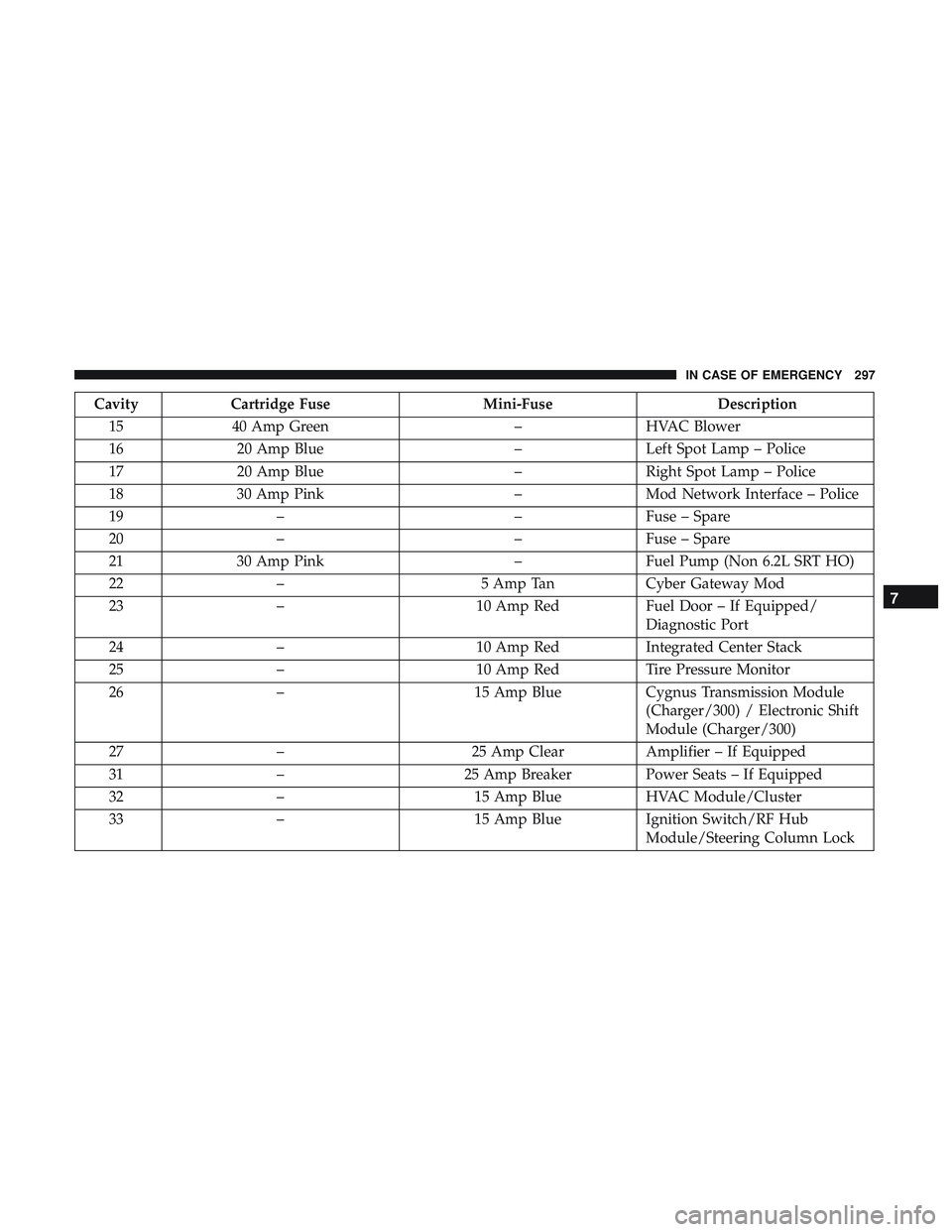
CavityCartridge Fuse Mini-FuseDescription
15 40 Amp Green –HVAC Blower
16 20 Amp Blue –Left Spot Lamp – Police
17 20 Amp Blue –Right Spot Lamp – Police
18 30 Amp Pink –Mod Network Interface – Police
19 – –Fuse – Spare
20 – –Fuse – Spare
21 30 Amp Pink –Fuel Pump (Non 6.2L SRT HO)
22 – 5 Amp TanCyber Gateway Mod
23 – 10 Amp RedFuel Door – If Equipped/
Diagnostic Port
24 – 10 Amp RedIntegrated Center Stack
25 – 10 Amp RedTire Pressure Monitor
26 – 15 Amp BlueCygnus Transmission Module
(Charger/300) / Electronic Shift
Module (Charger/300)
27 – 25 Amp ClearAmplifier – If Equipped
31 – 25 Amp BreakerPower Seats – If Equipped
32 – 15 Amp BlueHVAC Module/Cluster
33 – 15 Amp BlueIgnition Switch/RF Hub
Module/Steering Column Lock
7
IN CASE OF EMERGENCY 297
Page 300 of 532
CavityCartridge Fuse Mini-FuseDescription
(300) – If Equipped
34 – 10 Amp RedSteering Column Module/Clock
(300)
35 – 5 Amp TanBattery Sensor
36 – 15 Amp BlueElectronic Exhaust Valve – If
Equipped
37 – 20 Amp YellowRadio
38 – 20 Amp YellowPower Outlet Inside Arm Rest/
Console Media Hub
40 30 Amp Pink –Fuel Pump (6.2L SRT HO – If
Equipped)
41 30 Amp Pink –Fuel Pump (6.2L SRT HO – If
Equipped)
42 30 Amp Pink –Rear Defrost
43 – 20 Amp YellowComfort Seat And Steering
Wheel Module (Heated Steering
Wheel/RR Heated Seats)
44 – 10 Amp RedPark Assist / Blind Spot / Rear
View Camera
298 IN CASE OF EMERGENCY
Page 339 of 532
SCHEDULED SERVICING
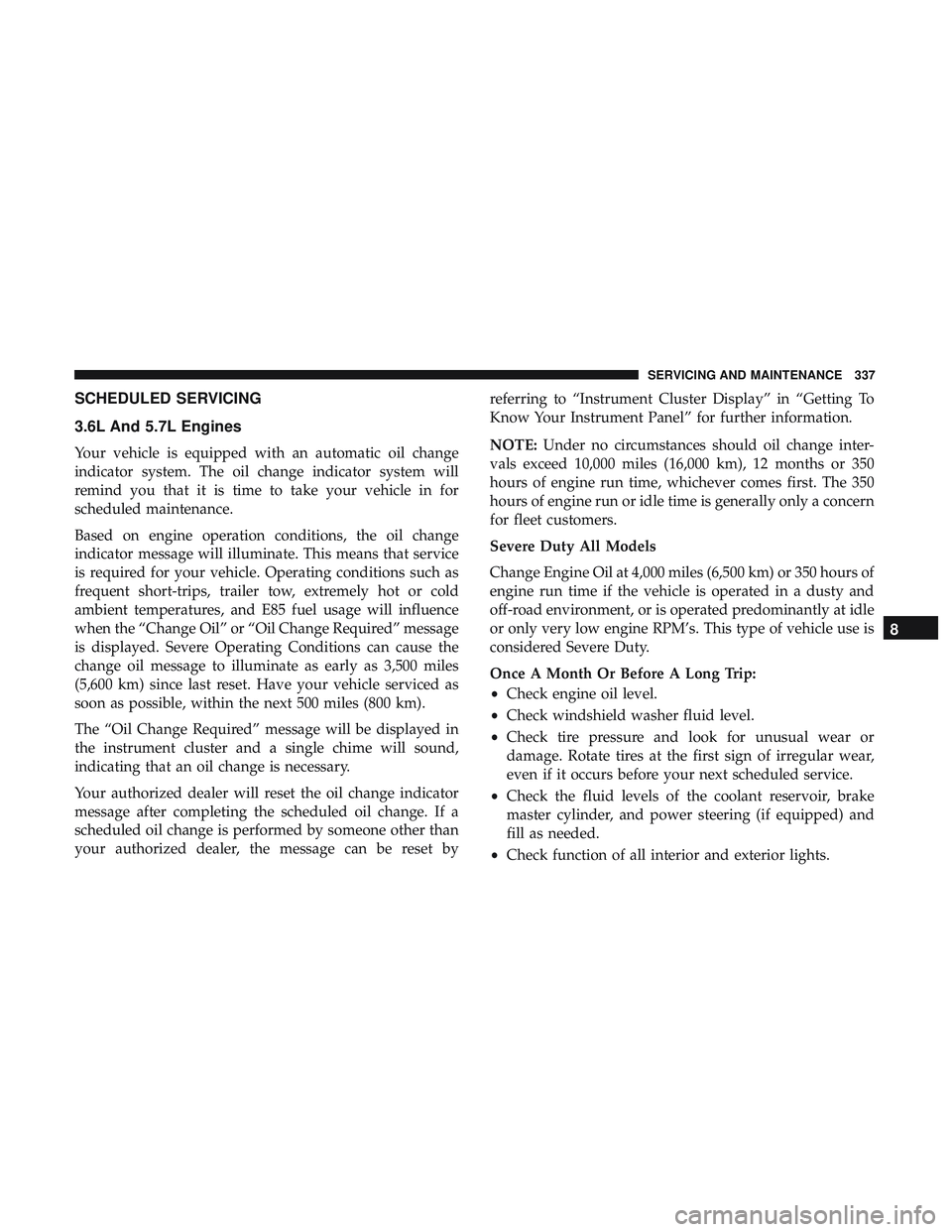
3.6L And 5.7L Engines
Your vehicle is equipped with an automatic oil change
indicator system. The oil change indicator system will
remind you that it is time to take your vehicle in for
scheduled maintenance.
Based on engine operation conditions, the oil change
indicator message will illuminate. This means that service
is required for your vehicle. Operating conditions such as
frequent short-trips, trailer tow, extremely hot or cold
ambient temperatures, and E85 fuel usage will influence
when the “Change Oil” or “Oil Change Required” message
is displayed. Severe Operating Conditions can cause the
change oil message to illuminate as early as 3,500 miles
(5,600 km) since last reset. Have your vehicle serviced as
soon as possible, within the next 500 miles (800 km).
The “Oil Change Required” message will be displayed in
the instrument cluster and a single chime will sound,
indicating that an oil change is necessary.
Your authorized dealer will reset the oil change indicator
message after completing the scheduled oil change. If a
scheduled oil change is performed by someone other than
your authorized dealer, the message can be reset byreferring to “Instrument Cluster Display” in “Getting To
Know Your Instrument Panel” for further information.
NOTE:
Under no circumstances should oil change inter-
vals exceed 10,000 miles (16,000 km), 12 months or 350
hours of engine run time, whichever comes first. The 350
hours of engine run or idle time is generally only a concern
for fleet customers.
Severe Duty All Models
Change Engine Oil at 4,000 miles (6,500 km) or 350 hours of
engine run time if the vehicle is operated in a dusty and
off-road environment, or is operated predominantly at idle
or only very low engine RPM’s. This type of vehicle use is
considered Severe Duty.
Once A Month Or Before A Long Trip:
• Check engine oil level.
• Check windshield washer fluid level.
• Check tire pressure and look for unusual wear or
damage. Rotate tires at the first sign of irregular wear,
even if it occurs before your next scheduled service.
• Check the fluid levels of the coolant reservoir, brake
master cylinder, and power steering (if equipped) and
fill as needed.
• Check function of all interior and exterior lights.
8
SERVICING AND MAINTENANCE 337
Page 431 of 532

Setting NameSelectable Options
Electric Power Steering Default— If Equipped Sport
Normal Comfort
NOTE:
When �Electric Power Steering Default� is selected, it allows you to change the default setting of your vehicle to either
normal, sport, or comfort.
ParkSense — If Equipped Sound Only Sound and Display
NOTE:
The ParkSense system will scan for objects behind the vehicle when the gear selector is in REVERSE and the vehicle
speed is less than 7 mph (11 km/h). It will provide an alert (audible and/or visual) to indicate the proximity to other
objects. The system can be enabled with Sound Only, or Sound and Display. Rear ParkSense Volume — If Equipped Low
Medium High
NOTE:
The Rear ParkSense Chime Volume settings can be selected from the instrument cluster display or Uconnect System.
The chime volume settings include LOW, MEDIUM, and HIGH. The factory default volume setting is MEDIUM. To
make your selection, press the “Rear ParkSense Vol.” button on the touchscreen, until a check-mark appears next to
setting, indicating that the setting had been selected. ParkSense will retain its last known configuration state through
ignition cycles. Rear ParkSense Braking Assist— If Equipped On
Off
10
MULTIMEDIA 429
Page 437 of 532
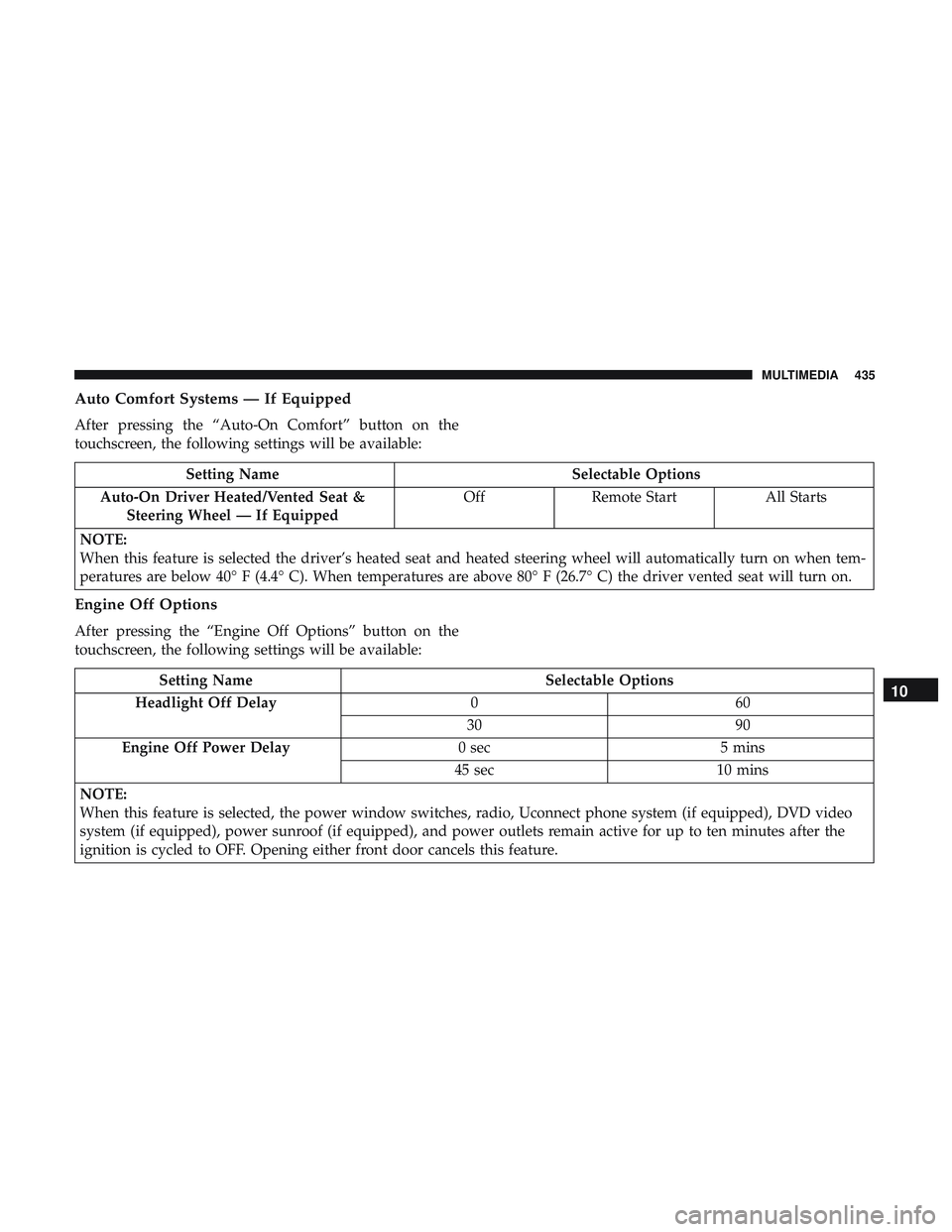
Auto Comfort Systems — If Equipped
After pressing the “Auto-On Comfort” button on the
touchscreen, the following settings will be available:
Setting NameSelectable Options
Auto-On Driver Heated/Vented Seat & Steering Wheel — If Equipped Off
Remote Start All Starts
NOTE:
When this feature is selected the driver’s heated seat and heated steering wheel will automatically turn on when tem-
peratures are below 40° F (4.4° C). When temperatures are above 80° F (26.7° C) the driver vented seat will turn on.
Engine Off Options
After pressing the “Engine Off Options” button on the
touchscreen, the following settings will be available:
Setting Name Selectable Options
Headlight Off Delay 060
30 90
Engine Off Power Delay 0 sec5 mins
45 sec 10 mins
NOTE:
When this feature is selected, the power window switches, radio, Uconnect phone system (if equipped), DVD video
system (if equipped), power sunroof (if equipped), and power outlets remain active for up to ten minutes after the
ignition is cycled to OFF. Opening either front door cancels this feature.10
MULTIMEDIA 435
Page 452 of 532
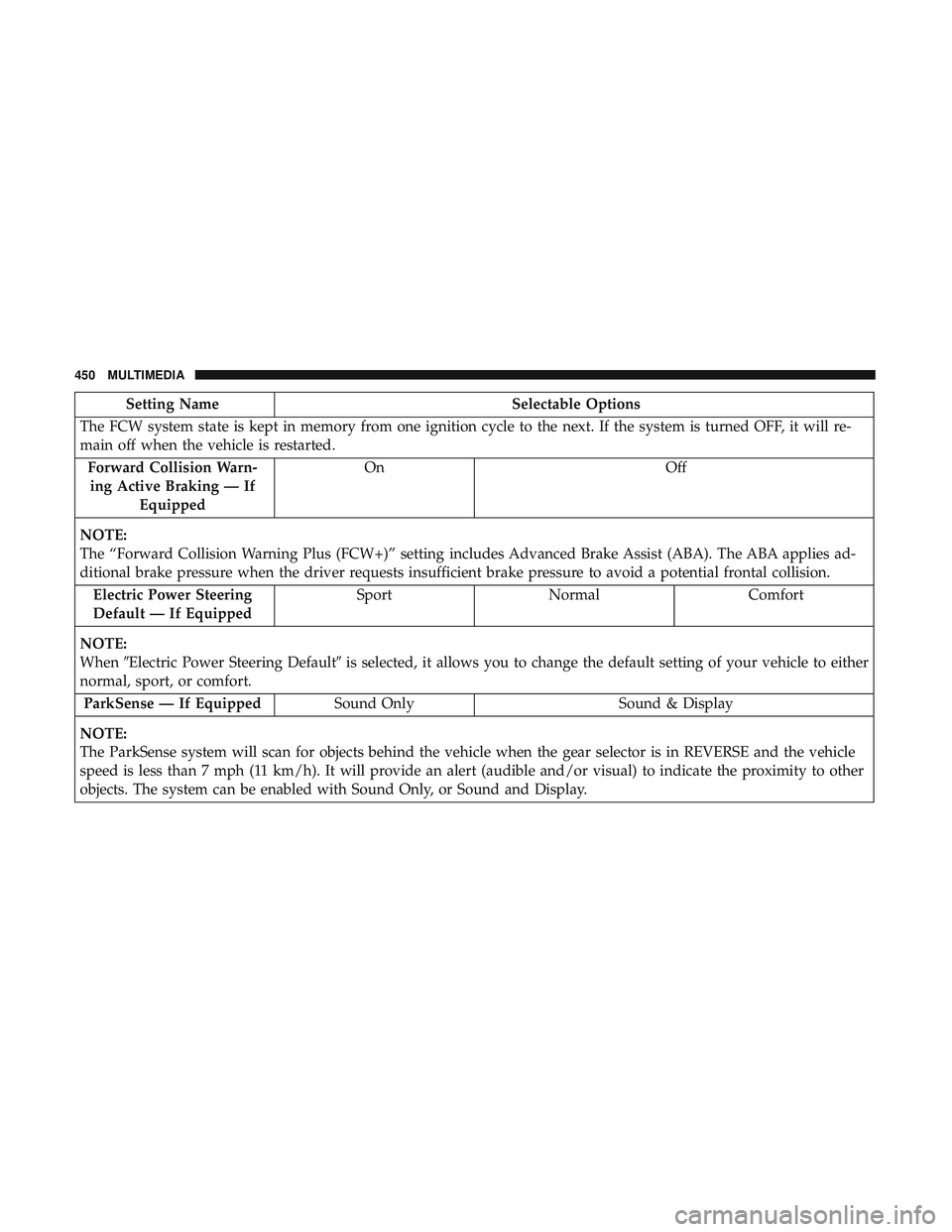
Setting NameSelectable Options
The FCW system state is kept in memory from one ignition cycle to the next. If the system is turned OFF, it will re-
main off when the vehicle is restarted. Forward Collision Warn-ing Active Braking — If Equipped On
Off
NOTE:
The “Forward Collision Warning Plus (FCW+)” setting includes Advanced Brake Assist (ABA). The ABA applies ad-
ditional brake pressure when the driver requests insufficient brake pressure to avoid a potential frontal collision. Electric Power Steering
Default — If Equipped Sport
Normal Comfort
NOTE:
When �Electric Power Steering Default� is selected, it allows you to change the default setting of your vehicle to either
normal, sport, or comfort.
ParkSense — If Equipped Sound Only Sound & Display
NOTE:
The ParkSense system will scan for objects behind the vehicle when the gear selector is in REVERSE and the vehicle
speed is less than 7 mph (11 km/h). It will provide an alert (audible and/or visual) to indicate the proximity to other
objects. The system can be enabled with Sound Only, or Sound and Display.
450 MULTIMEDIA
Page 458 of 532
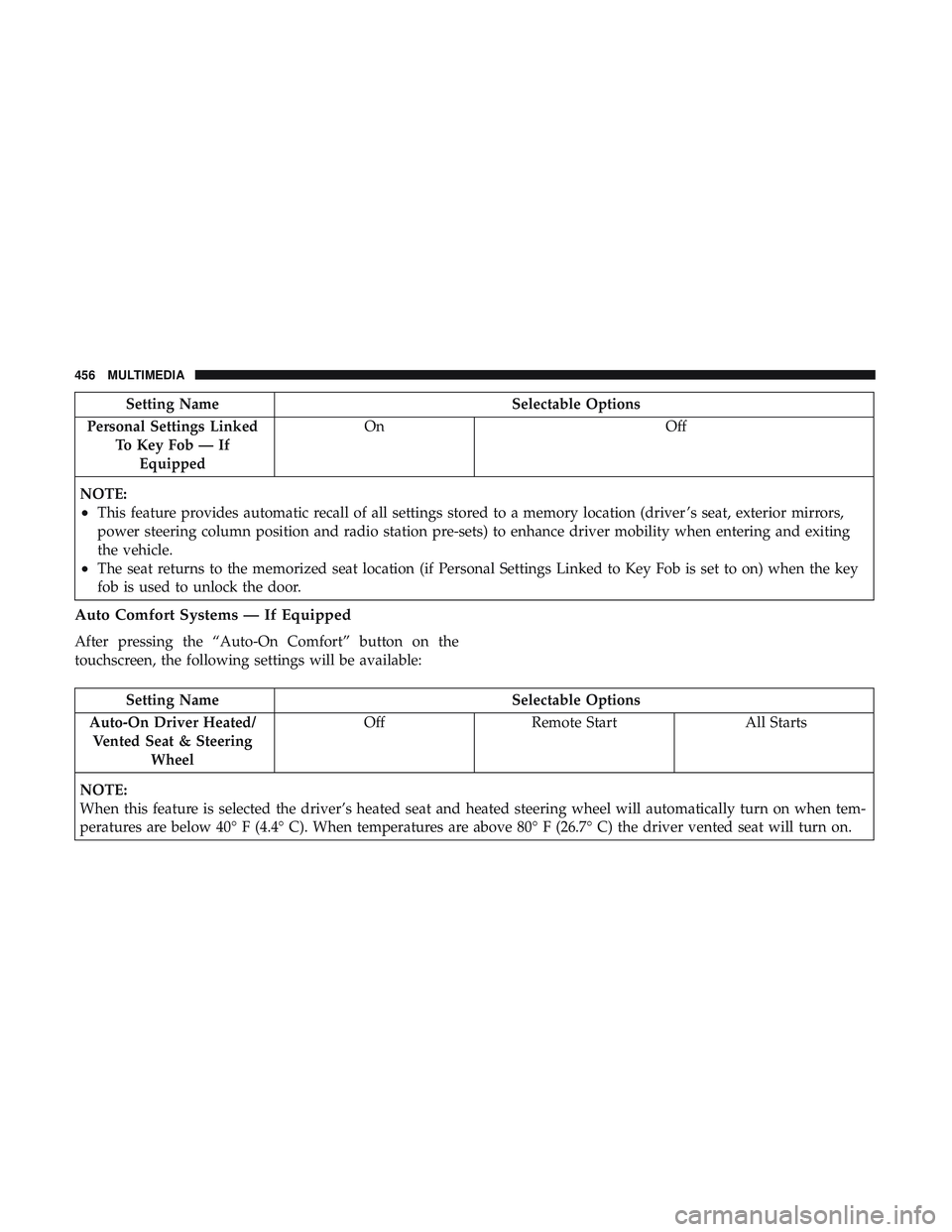
Setting NameSelectable Options
Personal Settings Linked To Key Fob — IfEquipped On
Off
NOTE:
•This feature provides automatic recall of all settings stored to a memory location (driver ’s seat, exterior mirrors,
power steering column position and radio station pre-sets) to enhance driver mobility when entering and exiting
the vehicle.
•The seat returns to the memorized seat location (if Personal Settings Linked to Key Fob is set to on) when the key
fob is used to unlock the door.
Auto Comfort Systems — If Equipped
After pressing the “Auto-On Comfort” button on the
touchscreen, the following settings will be available:
Setting Name Selectable Options
Auto-On Driver Heated/ Vented Seat & Steering Wheel Off
Remote Start All Starts
NOTE:
When this feature is selected the driver’s heated seat and heated steering wheel will automatically turn on when tem-
peratures are below 40° F (4.4° C). When temperatures are above 80° F (26.7° C) the driver vented seat will turn on.
456 MULTIMEDIA