Page 242 of 532
WARNING!
Leaving the Adaptive Cruise Control (ACC) system on
when not in use is dangerous. You could accidentally
set the system or cause it to go faster than you want.
You could lose control and have a collision. Always
leave the system off when you are not using it.
To Set A Desired ACC Speed
When the vehicle reaches the speed desired, push the
SET(+)button or the SET (-)button and release. The
instrument cluster display will show the set speed. If the system is set when the vehicle speed is above 20 mph
(32 km/h), the set speed shall be the current speed of the
vehicle.
Remove your foot from the accelerator pedal. If you do not,
the vehicle may continue to accelerate beyond the set
speed. If this occurs:
•
The message “DRIVER OVERRIDE” will show in the
instrument cluster display.
•
The system will not be controlling the distance between
your vehicle and the vehicle ahead. The vehicle speed will
only be determined by the position of the accelerator pedal.
To Cancel
The following conditions cancel the system:
• The brake pedal is applied.
• The CANC (cancel) button is pushed.
• The vehicle speed goes below 15 mph (24 km/h).
• An Anti-Lock Brake System (ABS) event occurs.
• The gear selector is removed from the Drive position.
• The Electronic Stability Control/Traction Control Sys-
tem (ESC/TCS) activates.
• The vehicle parking brake is applied.
Adaptive Cruise Control Off
240 STARTING AND OPERATING
Page 256 of 532
button is released. The decrease in set speed is reflected
in the instrument cluster display.
Metric Speed (km/h)
• Pushing the SET (-)button once will result in a 1 km/h
decrease in set speed. Each subsequent tap of the button
results in a decrease of 1 km/h.
• If the button is continually pushed, the set speed will
continue to decrease in 10 km/h decrements until the
button is released. The decrease in set speed is reflected
in the instrument cluster display.
To Cancel
The following conditions will cancel the Normal (Fixed
Speed) Cruise Control without clearing the memory:
• The brake pedal is applied.
• The CANC button is pushed.
• The Electronic Stability Control/Traction Control Sys-
tem (ESC/TCS) activates.
• The vehicle parking brake is applied.
• The braking temperature exceeds normal range (over-
heated).
• The gear selector is removed from the DRIVE position.
To Resume Speed
To resume a previously set speed, push the RES button and
release. Resume can be used at any speed above 20 mph
(32 km/h).
To Turn Off
The system will turn off and erase the set speed in memory
if:
•The Normal (Fixed Speed) Cruise Control on/off button
is pushed.
• The ignition is turned OFF.
• The Adaptive Cruise Control (ACC) on/off button is
pushed.
PARKSENSE REAR PARK ASSIST — IF EQUIPPED
The ParkSense Rear Park Assist system provides visual and
audible indications of the distance between the rear fascia
and a detected obstacle when backing up, e.g. during a
parking maneuver.
Refer to “ParkSense System Usage Precautions” in this
section for limitations of this system and recommenda-
tions.
254 STARTING AND OPERATING
Page 282 of 532
�MANUAL PARK RELEASE — 8–SPEED
TRANSMISSION ....................... .328
� FREEING A STUCK VEHICLE ..............330
� TOWING A DISABLED VEHICLE ............332
▫ All Wheel Drive (AWD) Models ............333▫
Rear-Wheel Drive (RWD) Models ...........334
� ENHANCED ACCIDENT RESPONSE SYSTEM
(EARS) .............................. .334
� EVENT DATA RECORDER (EDR) ............334
280 IN CASE OF EMERGENCY
Page 330 of 532
to the radiator and aids in removing heat from the
engine cooling system.
WARNING!
You or others can be badly burned by hot engine
coolant (antifreeze) or steam from your radiator. If you
see or hear steam coming from under the hood, do not
open the hood until the radiator has had time to cool.
Never try to open a cooling system pressure cap when
the radiator or coolant bottle is hot.
CAUTION!
Driving with a hot cooling system could damage your
vehicle. If the temperature gauge reads HOT (H), pull
over and stop the vehicle. Idle the vehicle with the air
conditioner turned off until the pointer drops back
into the normal range. If the pointer remains on HOT
(H), and you hear continuous chimes, turn the engine
off immediately and call for service.
MANUAL PARK RELEASE — 8–SPEED
TRANSMISSION
WARNING!
Always secure your vehicle by fully applying the
parking brake before activating the Manual Park Re-
lease. In addition, you should be seated in the driver’s
seat with your foot firmly on the brake pedal when
activating the Manual Park Release. Activating the
Manual Park Release will allow your vehicle to roll
away if it is not secured by the parking brake, or by
proper connection to a tow vehicle. Activating the
Manual Park Release on an unsecured vehicle could
lead to serious injury or death for those in or around
the vehicle.
In order to move the vehicle in cases where the transmis-
sion will not shift out of PARK (such as a dead battery), a
Manual Park Release is available.
328 IN CASE OF EMERGENCY
Page 331 of 532
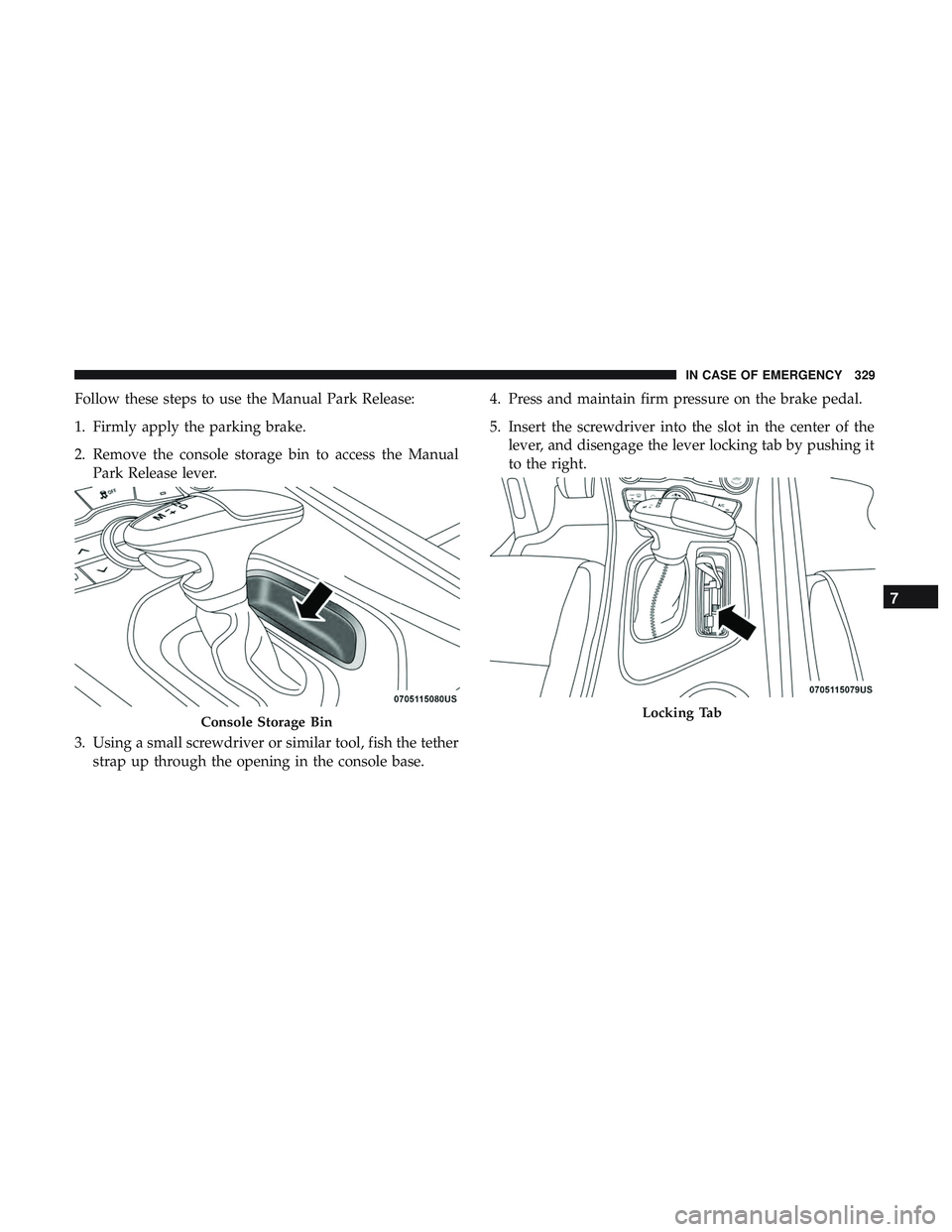
Follow these steps to use the Manual Park Release:
1. Firmly apply the parking brake.
2. Remove the console storage bin to access the ManualPark Release lever.
3. Using a small screwdriver or similar tool, fish the tether strap up through the opening in the console base. 4. Press and maintain firm pressure on the brake pedal.
5. Insert the screwdriver into the slot in the center of the
lever, and disengage the lever locking tab by pushing it
to the right.
Console Storage BinLocking Tab
7
IN CASE OF EMERGENCY 329
Page 332 of 532
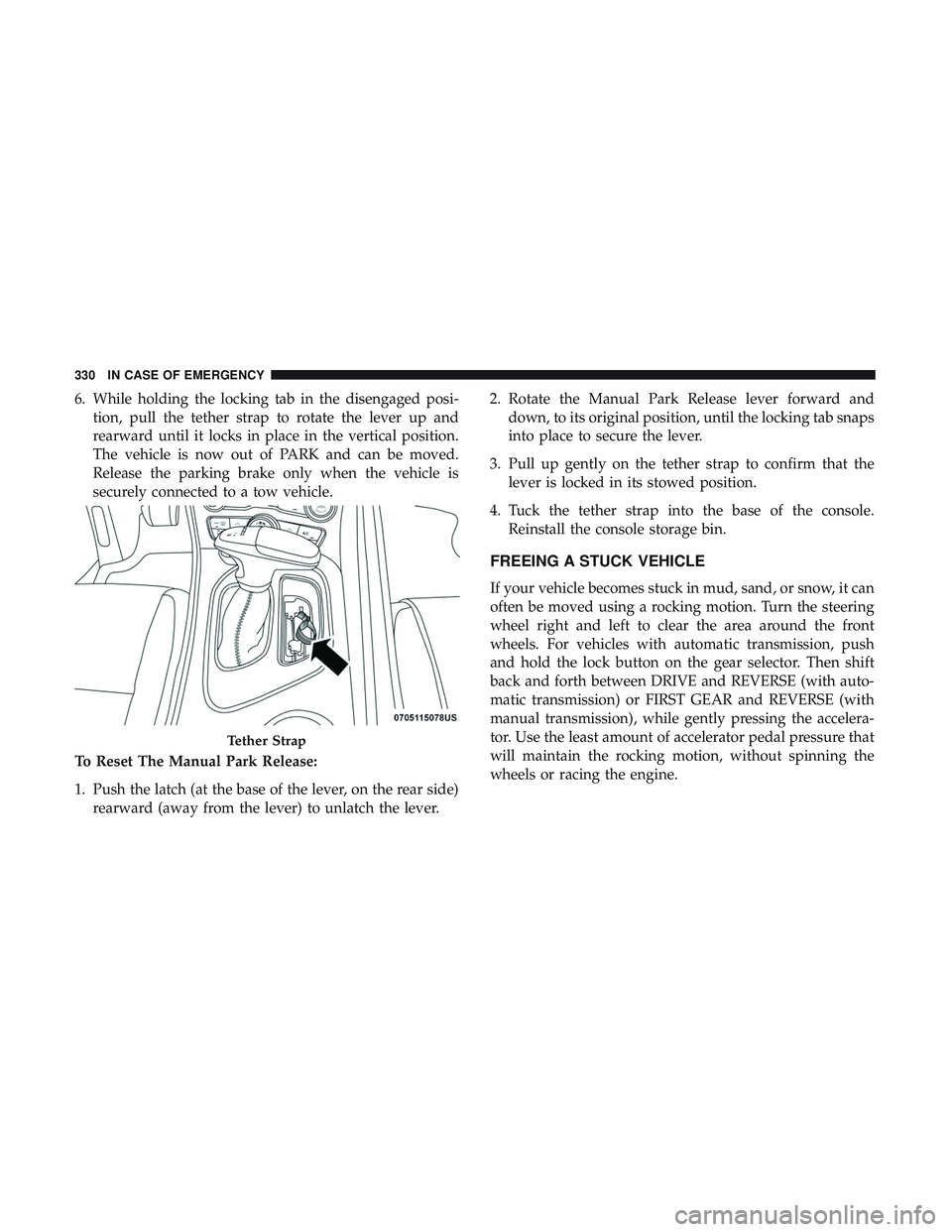
6. While holding the locking tab in the disengaged posi-tion, pull the tether strap to rotate the lever up and
rearward until it locks in place in the vertical position.
The vehicle is now out of PARK and can be moved.
Release the parking brake only when the vehicle is
securely connected to a tow vehicle.
To Reset The Manual Park Release:
1. Push the latch (at the base of the lever, on the rear side) rearward (away from the lever) to unlatch the lever. 2. Rotate the Manual Park Release lever forward and
down, to its original position, until the locking tab snaps
into place to secure the lever.
3. Pull up gently on the tether strap to confirm that the lever is locked in its stowed position.
4. Tuck the tether strap into the base of the console. Reinstall the console storage bin.
FREEING A STUCK VEHICLE
If your vehicle becomes stuck in mud, sand, or snow, it can
often be moved using a rocking motion. Turn the steering
wheel right and left to clear the area around the front
wheels. For vehicles with automatic transmission, push
and hold the lock button on the gear selector. Then shift
back and forth between DRIVE and REVERSE (with auto-
matic transmission) or FIRST GEAR and REVERSE (with
manual transmission), while gently pressing the accelera-
tor. Use the least amount of accelerator pedal pressure that
will maintain the rocking motion, without spinning the
wheels or racing the engine.
Tether Strap
330 IN CASE OF EMERGENCY
Page 335 of 532
Proper towing or lifting equipment is required to prevent
damage to your vehicle. Use only tow bars and other
equipment designed for this purpose, following equipment
manufacturer ’s instructions. Use of safety chains is man-
datory. Attach a tow bar or other towing device to main
structural members of the vehicle, not to bumpers or
associated brackets. State and local laws regarding vehicles
under tow must be observed.
If you must use the accessories (wipers, defrosters, etc.)
while being towed, the ignition must be in the ON/RUN
mode, not the ACC mode.
If the key fob is unavailable, or the vehicle’s battery is
discharged, refer to�Manual Park Release� in this section
for instructions on shifting the transmission out of PARK
for towing.
CAUTION!
• Do not use sling type equipment when towing.
Vehicle damage may occur.
• When securing the vehicle to a flat bed truck, do not
attach to front or rear suspension components. Dam-
age to your vehicle may result from improper towing.
(Continued)
CAUTION! (Continued)
•The manufacturer does not recommend towing this
vehicle using a tow dolly. Vehicle damage may occur.
All Wheel Drive (AWD) Models
The manufacturer recommends towing your vehicle with
all four wheels OFF the ground using a flatbed.
If the transmission and driveline are operable, AWD mod-
els can also be towed with the ignition in the ON/RUN
mode, the transmission in NEUTRAL (not in PARK!), and
the rear wheels OFF the ground with no limitation on
speed or distance. Since the ignition MUST be in the
ON/RUN mode to tow in this manner, AWD vehicles must
be towed with ALL FOUR wheels OFF the ground (e.g. on
a flatbed truck) if the key fob is unavailable.
CAUTION!
• Towing this vehicle using any other method can
cause severe transmission and/or transfer case dam-
age.
• Damage from improper towing is not covered under
the New Vehicle Limited Warranty.
7
IN CASE OF EMERGENCY 333
Page 336 of 532
Rear-Wheel Drive (RWD) Models
The manufacturer recommends towing your vehicle with
all four wheels OFF the ground using a flatbed.
If flatbed equipment is not available, and the transmission
is operable, the vehicle may be flat towed (with all four
wheels on the ground) under the following conditions:
•The transmission must be in NEUTRAL. Refer to
�Manual Park Release� in this section for instructions on
shifting the automatic transmission to NEUTRAL when
the engine is off.
• The towing distance must not exceed 30 miles (48 km).
• The towing speed must not exceed 30 mph (48 km/h).
If the transmission is not operable, or the vehicle must be
towed faster than 30 mph (48 km/h) or farther than 30
miles (48 km), then the only acceptable method of towing
is with a flatbed truck.
CAUTION!
Towing this vehicle in violation of the above require-
ments can cause severe engine and/or transmission
damage. Damage from improper towing is not covered
under the New Vehicle Limited Warranty.
ENHANCED ACCIDENT RESPONSE SYSTEM
(EARS)
This vehicle is equipped with an Enhanced Accident
Response System.
Please refer to “Occupant Restraint Systems” in “Safety”
for further information on the Enhanced Accident Re-
sponse System (EARS) function.
EVENT DATA RECORDER (EDR)
This vehicle is equipped with an Event Data Recorder
(EDR). The main purpose of an EDR is to record data that
will assist in understanding how a vehicle’s systems per-
formed under certain crash or near crash-like situations,
such as an air bag deployment or hitting a road obstacle.
Please refer to “Occupant Restraint Systems” in “Safety”
for further information on the Event Data Recorder (EDR).
334 IN CASE OF EMERGENCY