Page 395 of 532
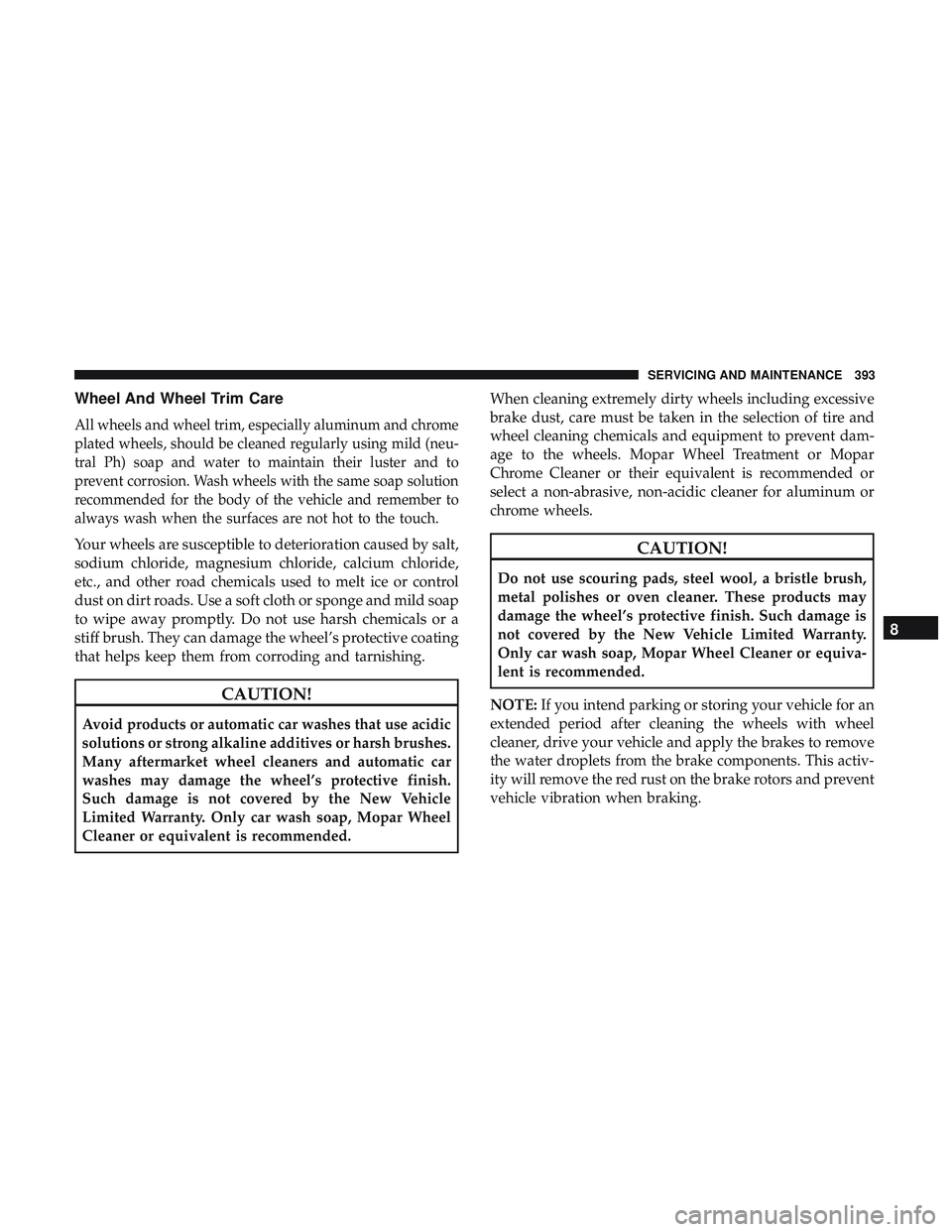
Wheel And Wheel Trim Care
All wheels and wheel trim, especially aluminum and chrome
plated wheels, should be cleaned regularly using mild (neu-
tral Ph) soap and water to maintain their luster and to
prevent corrosion. Wash wheels with the same soap solution
recommended for the body of the vehicle and remember to
always wash when the surfaces are not hot to the touch.
Your wheels are susceptible to deterioration caused by salt,
sodium chloride, magnesium chloride, calcium chloride,
etc., and other road chemicals used to melt ice or control
dust on dirt roads. Use a soft cloth or sponge and mild soap
to wipe away promptly. Do not use harsh chemicals or a
stiff brush. They can damage the wheel’s protective coating
that helps keep them from corroding and tarnishing.
CAUTION!
Avoid products or automatic car washes that use acidic
solutions or strong alkaline additives or harsh brushes.
Many aftermarket wheel cleaners and automatic car
washes may damage the wheel’s protective finish.
Such damage is not covered by the New Vehicle
Limited Warranty. Only car wash soap, Mopar Wheel
Cleaner or equivalent is recommended.When cleaning extremely dirty wheels including excessive
brake dust, care must be taken in the selection of tire and
wheel cleaning chemicals and equipment to prevent dam-
age to the wheels. Mopar Wheel Treatment or Mopar
Chrome Cleaner or their equivalent is recommended or
select a non-abrasive, non-acidic cleaner for aluminum or
chrome wheels.
CAUTION!
Do not use scouring pads, steel wool, a bristle brush,
metal polishes or oven cleaner. These products may
damage the wheel’s protective finish. Such damage is
not covered by the New Vehicle Limited Warranty.
Only car wash soap, Mopar Wheel Cleaner or equiva-
lent is recommended.
NOTE: If you intend parking or storing your vehicle for an
extended period after cleaning the wheels with wheel
cleaner, drive your vehicle and apply the brakes to remove
the water droplets from the brake components. This activ-
ity will remove the red rust on the brake rotors and prevent
vehicle vibration when braking.
8
SERVICING AND MAINTENANCE 393
Page 405 of 532

TECHNICAL SPECIFICATIONS
CONTENTS
�IDENTIFICATION DATA ...................404
▫ Vehicle Identification Number .............404
� BRAKE SYSTEM ....................... .404
� WHEEL AND TIRE TORQUE SPECIFICATIONS . .405
▫ Torque Specifications ....................405
� FUEL REQUIREMENTS ...................406
▫ 3.6L Engine ......................... .406
▫ 5.7L Engine (With Automatic Transmission) . . . .407
▫ 5.7L Engine (With Manual Transmission) ......407
▫ 6.4L Engine .......................... .408
▫ Reformulated Gasoline ..................408 ▫
Materials Added To Fuel .................408
▫ Gasoline/Oxygenate Blends ...............409
▫ Do Not Use E-85 In Non-Flex Fuel Vehicles . . . .409
▫ CNG And LP Fuel System Modifications ......410
▫ MMT In Gasoline ...................... .410
▫ Fuel System Cautions ....................410
▫ Carbon Monoxide Warnings ...............411
� FLUID CAPACITIES ......................411
� FLUIDS AND LUBRICANTS ................413
▫ Engine ............................. .413
▫ Chassis ............................ .415
9
Page 406 of 532

IDENTIFICATION DATA
Vehicle Identification Number
The Vehicle Identification Number (VIN) is on the left front
corner of the instrument panel. The VIN is visible from
outside of the vehicle through the windshield. This number
also appears on the Automobile Information Disclosure
Label affixed to a window on your vehicle, the vehicle
registration, and the title.
The Vehicle Identification Number (VIN) is also located on
the right front strut tower inside the engine compartment.NOTE:
It is illegal to remove or alter the VIN.
BRAKE SYSTEM
Your vehicle is equipped with dual hydraulic brake sys-
tems. If either of the two hydraulic systems loses normal
capability, the remaining system will still function. There
will be some loss of overall braking effectiveness. This may
be evident by increased pedal travel during application,
greater pedal force required to slow or stop, and potential
activation of the Brake Warning Light.
VIN Location
VIN Location
404 TECHNICAL SPECIFICATIONS
Page 407 of 532

In the event power assist is lost for any reason (for
example, repeated brake applications with the engine
OFF), the brakes will still function. The effort required to
brake the vehicle will be much greater than that required
with the power system operating.
WHEEL AND TIRE TORQUE SPECIFICATIONS
Proper lug nut/bolt torque is very important to ensure that
the wheel is properly mounted to the vehicle. Any time a
wheel has been removed and reinstalled on the vehicle, the
lug nuts/bolts should be torqued using a properly cali-
brated torque wrench using a high quality six sided (hex)
deep wall socket.
Torque Specifications
Lug Nut/BoltTorque **Lug Nut/Bolt
Size Lug Nut/Bolt
Socket Size
130 Ft-Lbs (176 N·m) M14 x 1.50 22 mm
**Use only your authorized dealer recommended lug nuts/
bolts and clean or remove any dirt or oil before tightening.
Inspect the wheel mounting surface prior to mounting the
tire and remove any corrosion or loose particles.
Tighten the lug nuts/bolts in a star pattern until each
nut/bolt has been tightened twice. Ensure that the socket is
fully engaged on the lug nut/bolt (do not insert it halfway).
NOTE: If in doubt about the correct tightness, have them
checked with a torque wrench by your authorized dealer or
service station.
After 25 miles (40 km), check the lug nut/bolt torque to be
sure that all the lug nuts/bolts are properly seated against
the wheel.
Wheel Mounting Surface
9
TECHNICAL SPECIFICATIONS 405
Page 417 of 532
Chassis
ComponentFluid, Lubricant, or Genuine Part
8-Speed Automatic Transmission Use only Mopar ZF 8&9 Speed ATF Automatic Transmission Fluid, or equiva- lent. Failure to use the correct fluid may affect the function or performance of
your transmission.
Manual Transmission –
If Equipped We recommend you use Mopar ATF+4 Automatic Transmission Fluid.
Brake Master Cylinder We recommend you use Mopar DOT 3, SAE J1703. If DOT 3 brake fluid is not
available, then DOT 4 is acceptable.
Front Axle We recommend you use Mopar Synthetic Gear Lubricant SAE 75W90
(API GL-5).
Rear Axle – 3.6L/5.7L Engine With
Automatic Transmission We recommend you use Mopar OD Synthetic Gear Lubricant SAE 75W85
(API GL-5).
Rear Axle – 6.4 Engine or 5.7 With
Manual Transmission We recommend you use Mopar LSD Synthetic Gear Lubricant SAE 75W85
(API GL-5).
Transfer Case – AWD (If Equipped) We recommend you use Mopar Transfer Case Lubricant for BorgWarner 44–40.
9
TECHNICAL SPECIFICATIONS 415
Page 430 of 532
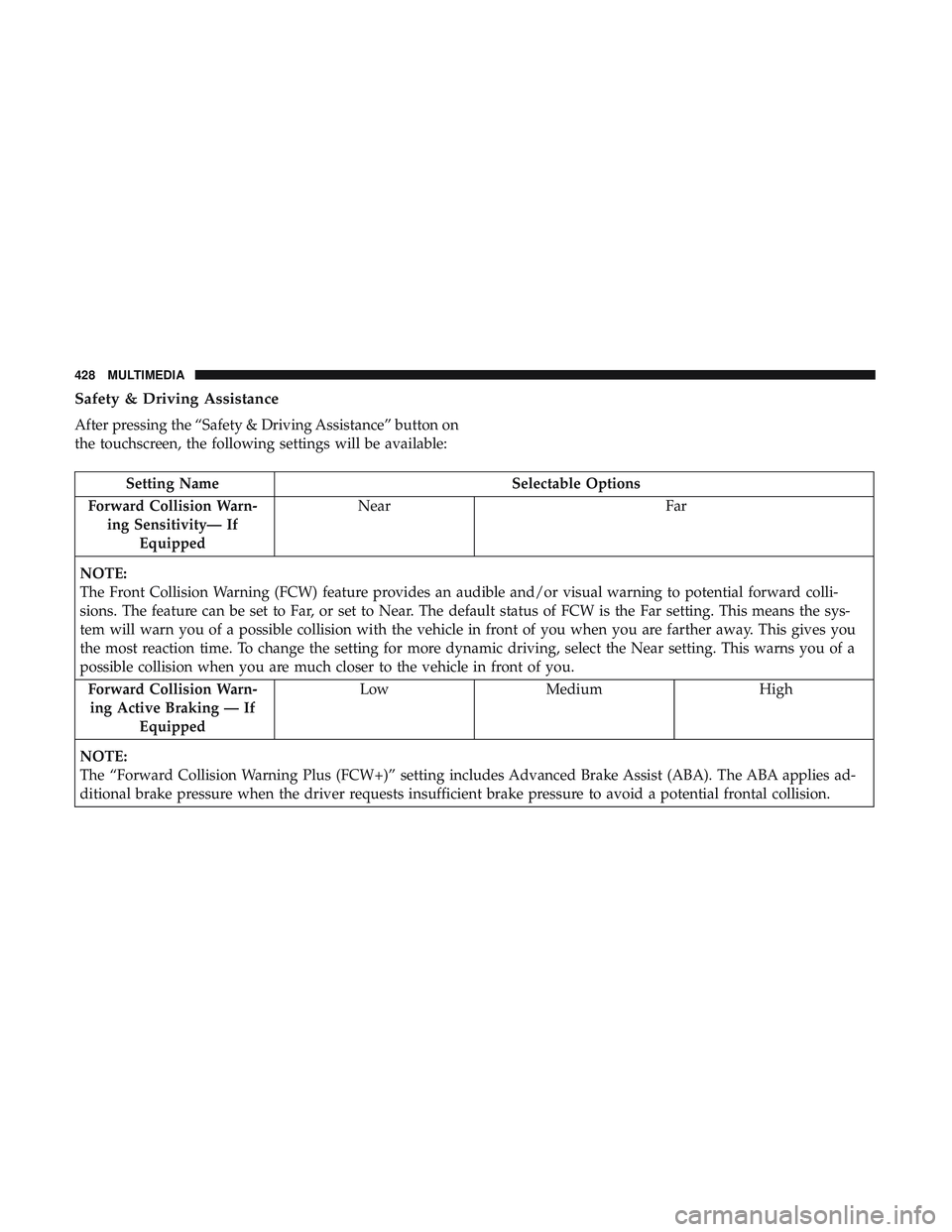
Safety & Driving Assistance
After pressing the “Safety & Driving Assistance” button on
the touchscreen, the following settings will be available:
Setting NameSelectable Options
Forward Collision Warn- ing Sensitivity— If Equipped Near
Far
NOTE:
The Front Collision Warning (FCW) feature provides an audible and/or visual warning to potential forward colli-
sions. The feature can be set to Far, or set to Near. The default status of FCW is the Far setting. This means the sys-
tem will warn you of a possible collision with the vehicle in front of you when you are farther away. This gives you
the most reaction time. To change the setting for more dynamic driving, select the Near setting. This warns you of a
possible collision when you are much closer to the vehicle in front of you. Forward Collision Warn-ing Active Braking — If Equipped Low
Medium High
NOTE:
The “Forward Collision Warning Plus (FCW+)” setting includes Advanced Brake Assist (ABA). The ABA applies ad-
ditional brake pressure when the driver requests insufficient brake pressure to avoid a potential frontal collision.
428 MULTIMEDIA
Page 452 of 532
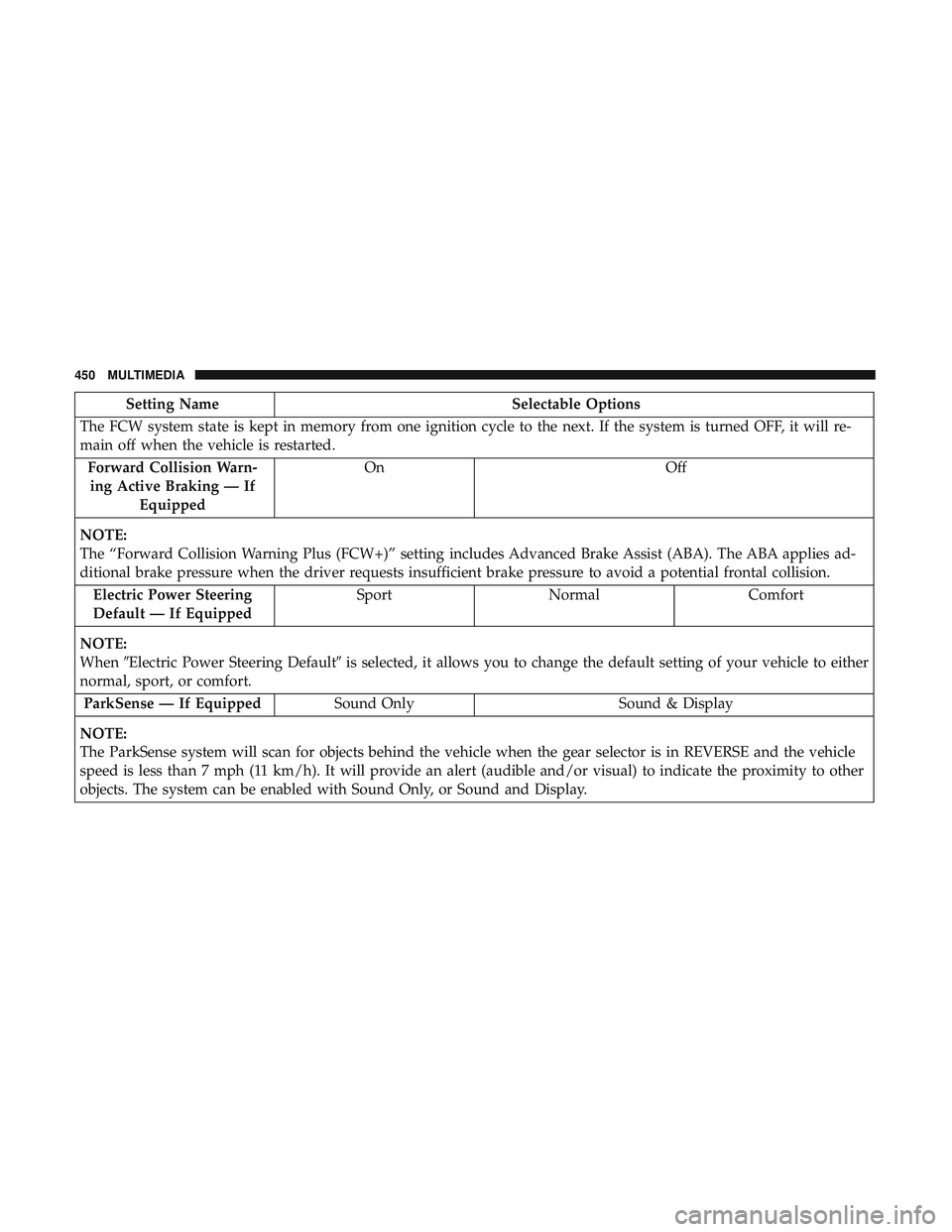
Setting NameSelectable Options
The FCW system state is kept in memory from one ignition cycle to the next. If the system is turned OFF, it will re-
main off when the vehicle is restarted. Forward Collision Warn-ing Active Braking — If Equipped On
Off
NOTE:
The “Forward Collision Warning Plus (FCW+)” setting includes Advanced Brake Assist (ABA). The ABA applies ad-
ditional brake pressure when the driver requests insufficient brake pressure to avoid a potential frontal collision. Electric Power Steering
Default — If Equipped Sport
Normal Comfort
NOTE:
When �Electric Power Steering Default� is selected, it allows you to change the default setting of your vehicle to either
normal, sport, or comfort.
ParkSense — If Equipped Sound Only Sound & Display
NOTE:
The ParkSense system will scan for objects behind the vehicle when the gear selector is in REVERSE and the vehicle
speed is less than 7 mph (11 km/h). It will provide an alert (audible and/or visual) to indicate the proximity to other
objects. The system can be enabled with Sound Only, or Sound and Display.
450 MULTIMEDIA
Page 467 of 532
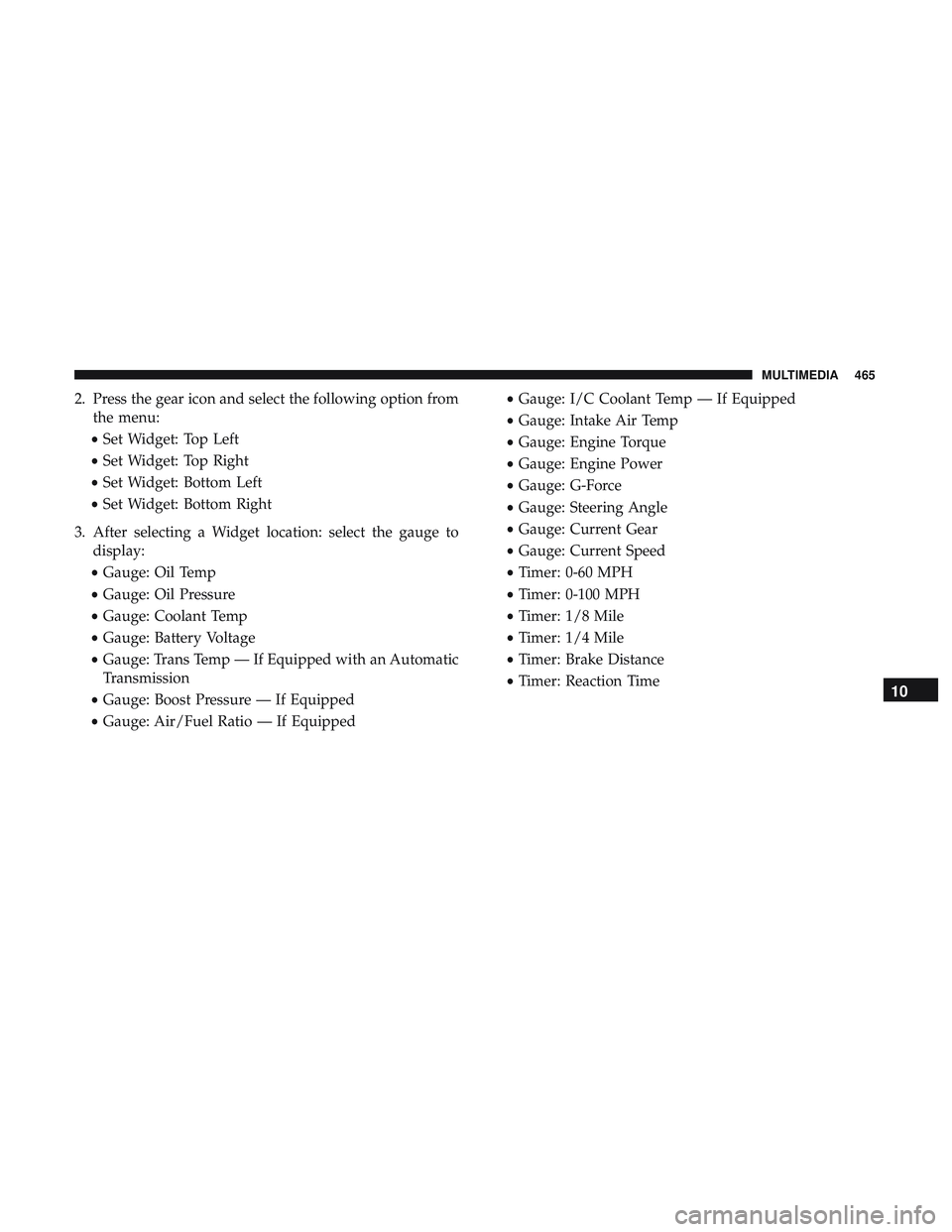
2. Press the gear icon and select the following option fromthe menu:
• Set Widget: Top Left
• Set Widget: Top Right
• Set Widget: Bottom Left
• Set Widget: Bottom Right
3. After selecting a Widget location: select the gauge to display:
• Gauge: Oil Temp
• Gauge: Oil Pressure
• Gauge: Coolant Temp
• Gauge: Battery Voltage
• Gauge: Trans Temp — If Equipped with an Automatic
Transmission
• Gauge: Boost Pressure — If Equipped
• Gauge: Air/Fuel Ratio — If Equipped •
Gauge: I/C Coolant Temp — If Equipped
• Gauge: Intake Air Temp
• Gauge: Engine Torque
• Gauge: Engine Power
• Gauge: G-Force
• Gauge: Steering Angle
• Gauge: Current Gear
• Gauge: Current Speed
• Timer: 0-60 MPH
• Timer: 0-100 MPH
• Timer: 1/8 Mile
• Timer: 1/4 Mile
• Timer: Brake Distance
• Timer: Reaction Time
10
MULTIMEDIA 465