Page 5 of 718
INTRODUCTION
CONTENTS
�INTRODUCTION .........................4
� HOW TO USE THIS MANUAL ...............5
▫ Essential Information ......................5
▫ Symbols ...............................5 �
WARNINGS AND CAUTIONS ................5
� VEHICLE MODIFICATIONS/ALTERATIONS .....5
1
Page 7 of 718

HOW TO USE THIS MANUAL
Essential Information
Consult the Table of Contents to determine which section
contains the information you desire.
Since the specification of your vehicle depends on the items
of equipment ordered, certain descriptions and illustra-
tions may differ from your vehicle’s equipment.
The detailed index at the back of this Owner’s Manual
contains a complete listing of all subjects.
Symbols
Some vehicle components have colored labels whose sym-
bols indicate precautions to be observed when using this
component. Refer to “Warning Lights and Messages” in
“Getting To Know Your Instrument Panel” for further
information on the symbols used in your vehicle.
WARNINGS AND CAUTIONS
This Owner ’s Manual containsWARNINGSagainst oper-
ating procedures that could result in a collision, bodily
injury and/or death. It also contains CAUTIONSagainst
procedures that could result in damage to your vehicle. If
you do not read this entire Owner ’s Manual, you may miss
important information. Observe all Warnings and Cau-
tions.
VEHICLE MODIFICATIONS/ALTERATIONS
WARNING!
Any modifications or alterations to this vehicle could
seriously affect its roadworthiness and safety and may
lead to a collision resulting in serious injury or death.
1
INTRODUCTION 5
Page 482 of 718
Tire Service Kit And Components And OperationUsing The Mode Select Knob And Hoses
Your Tire Service Kit is equipped with the following
symbols to indicate the air or sealant mode.
Selecting Air Mode
Push in the Mode Select Knob and turn
to this position for air mode operation
only.
Selecting Sealant Mode Push in the Mode Select Knob and turn
to this position to inject the Tire Service
Kit Sealant and to inflate the tire.
Tire Service Kit Components
1 — Mode Select Knob
2 — Sealant/Air Hose
3 — Hose Accessories
4 — Sealant Bottle
5 — Power Plug
6 — Power Switch
7 — Deflation Button
8 — Pressure Gauge
480 IN CASE OF EMERGENCY
Page 488 of 718
Using The Mode Select Knob And Hoses
Your Tire Service Kit is equipped with the following
symbols to indicate the air or sealant mode.
Selecting Air ModePush in the Mode Select Knob and turn
to this position for air pump operation
only.
Selecting Sealant Mode Push in the Mode Select Knob and turn
to this position to inject the Tire Service
Kit Sealant and to inflate the tire. Using The Power Button
Push and release the Power Button once
to turn On the Tire Service Kit. Push and
release the Power Button again to turn
Off the Tire Service Kit.
Using The Deflation Button Push the Deflation Button to reduce the
air pressure in the tire if it becomes
over-inflated.
Tire Service Kit Usage Precautions
• Replace the Tire Service Kit Sealant Bottle prior to the
expiration date (printed at the lower right hand corner
on the bottle label) to assure optimum operation of the
system. Refer to “Sealant Bottle Replacement” in this
section.
486 IN CASE OF EMERGENCY
Page 543 of 718
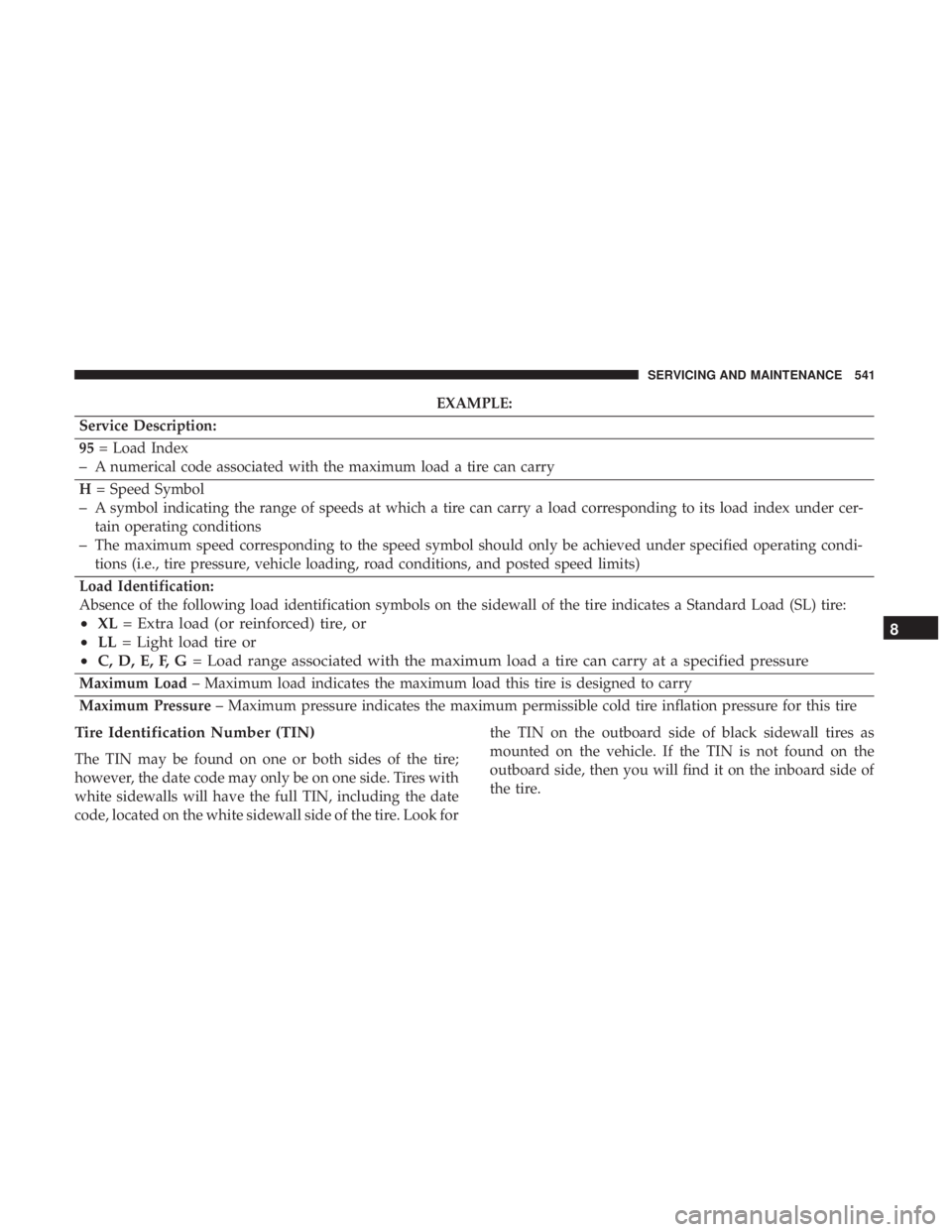
EXAMPLE:
Service Description:
95 = Load Index
–A numerical code associated with the maximum load a tire can carry
H = Speed Symbol
–A symbol indicating the range of speeds at which a tire can carry a load corresponding to its load index under cer-
tain operating conditions
–The maximum speed corresponding to the speed symbol should only be achieved under specified operating condi-
tions (i.e., tire pressure, vehicle loading, road conditions, and posted speed limits)
Load Identification:
Absence of the following load identification symbols on the sidewall of the tire indicates a Standard Load (SL) tire:
• XL = Extra load (or reinforced) tire, or
• LL = Light load tire or
• C, D, E, F, G = Load range associated with the maximum load a tire can carry at a specified pressure
Maximum Load – Maximum load indicates the maximum load this tire is designed to carry
Maximum Pressure – Maximum pressure indicates the maximum permissible cold tire inflation pressure for this tire
Tire Identification Number (TIN)
The TIN may be found on one or both sides of the tire;
however, the date code may only be on one side. Tires with
white sidewalls will have the full TIN, including the date
code, located on the white sidewall side of the tire. Look for the TIN on the outboard side of black sidewall tires as
mounted on the vehicle. If the TIN is not found on the
outboard side, then you will find it on the inboard side of
the tire.
8
SERVICING AND MAINTENANCE 541


