Page 122 of 620
When the system is set up for your comfort level, it is not
necessary to change the settings. You will experience the
greatest efficiency by simply allowing the system to func-
tion automatically.NOTE:
•
It is not necessary to move the temperature settings. The
system automatically adjusts the temperature, mode and
fan speed to provide comfort as quickly as possible.
Icon Description
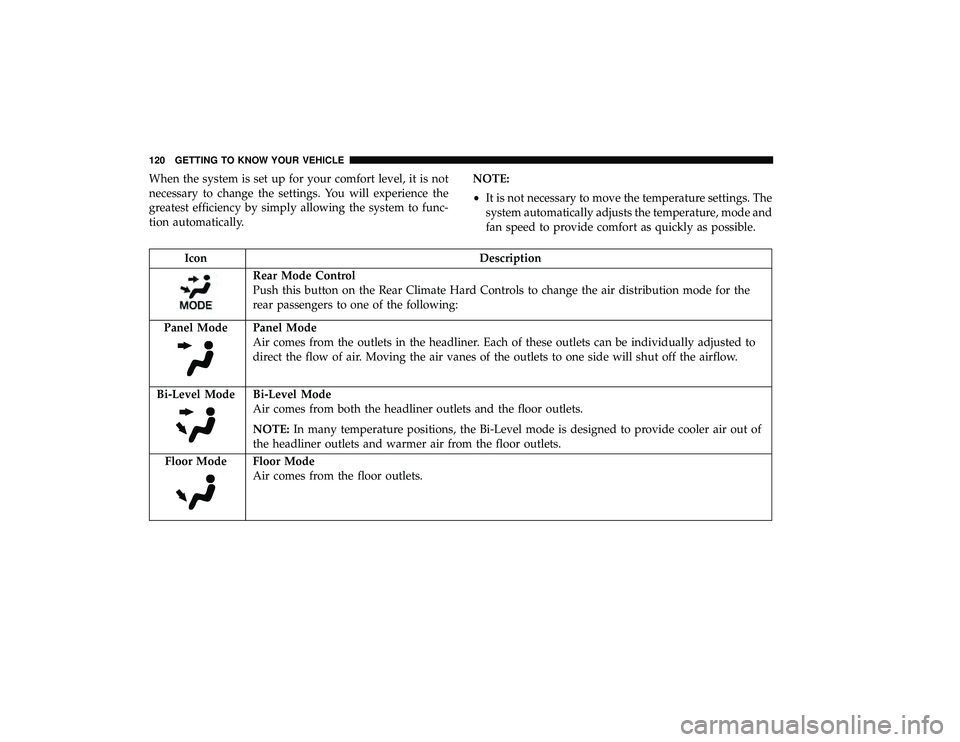
Rear Mode Control
Push this button on the Rear Climate Hard Controls to change the air distribution mode for the
rear passengers to one of the following:
Panel Mode
Panel Mode
Air comes from the outlets in the headliner. Each of these outlets can be individually adjusted to
direct the flow of air. Moving the air vanes of the outlets to one side will shut off the airflow.
Bi-Level Mode
Bi-Level Mode
Air comes from both the headliner outlets and the floor outlets.
NOTE: In many temperature positions, the Bi-Level mode is designed to provide cooler air out of
the headliner outlets and warmer air from the floor outlets.
Floor Mode
Floor Mode
Air comes from the floor outlets.
120 GETTING TO KNOW YOUR VEHICLE
Page 123 of 620

IconDescription
Rear Temperature Control
•Rear Passenger Temperature Up ButtonTo change the temperature in the rear of the vehicle,
push temperature control up button to raise the temperature. The rear temperature settings are
displayed in control head.
•Rear Passenger Temperature Down Button To change the temperature in the rear of the ve-
hicle, push temperature control down button to lower the temperature. The rear temperature
settings are displayed in control head.
Rear Blower Control
The rear blower control can be manually set to off, or any fixed blower speed by pushing the
blower control buttons. This allows the rear seat occupants to control the volume of air circulated
in the rear of the vehicle. The larger of the two icons increases blower speed, whereas the smaller
of the two icons decreases the blower speed.
AUTO Button
Automatically controls the interior cabin temperature by adjusting airflow distribution and
amount. Performing this function will cause the system to switch between manual mode and auto-
matic modes.
Refer to “Automatic Operation” within this section for more information.
Rear Climate Control/Blower Off
To manually set the rear blower controls to off, press the Rear Climate Control/Blower Off button.
3
GETTING TO KNOW YOUR VEHICLE 121
Page 136 of 620
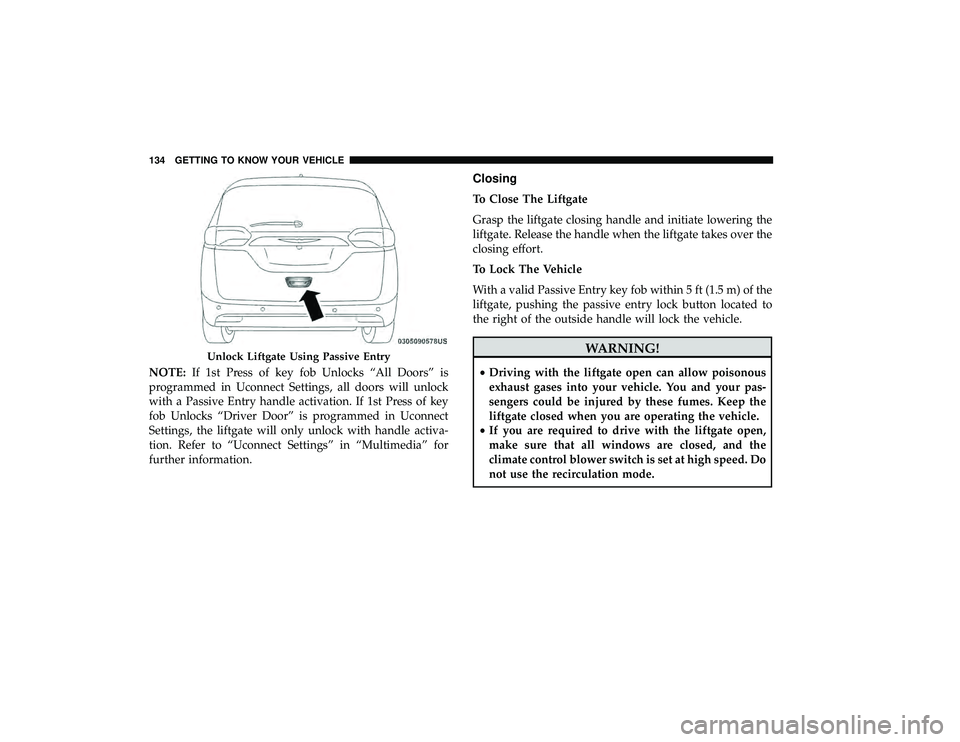
NOTE:If 1st Press of key fob Unlocks “All Doors” is
programmed in Uconnect Settings, all doors will unlock
with a Passive Entry handle activation. If 1st Press of key
fob Unlocks “Driver Door” is programmed in Uconnect
Settings, the liftgate will only unlock with handle activa-
tion. Refer to “Uconnect Settings” in “Multimedia” for
further information.
Closing
To Close The Liftgate
Grasp the liftgate closing handle and initiate lowering the
liftgate. Release the handle when the liftgate takes over the
closing effort.
To Lock The Vehicle
With a valid Passive Entry key fob within 5 ft (1.5 m) of the
liftgate, pushing the passive entry lock button located to
the right of the outside handle will lock the vehicle.
WARNING!
• Driving with the liftgate open can allow poisonous
exhaust gases into your vehicle. You and your pas-
sengers could be injured by these fumes. Keep the
liftgate closed when you are operating the vehicle.
• If you are required to drive with the liftgate open,
make sure that all windows are closed, and the
climate control blower switch is set at high speed. Do
not use the recirculation mode.
Unlock Liftgate Using Passive Entry
134 GETTING TO KNOW YOUR VEHICLE
Page 295 of 620

ENGINE BREAK-IN RECOMMENDATIONS
A long break-in period is not required for the engine and
drivetrain (transmission and axle) in your vehicle.
Drive moderately during the first 300 miles (500 km). After
the initial 60 miles (100 km), speeds up to 50 or 55 mph (80
or 90 km/h) are desirable.
While cruising, brief full-throttle acceleration within the
limits of local traffic laws contributes to a good break-in.
Wide-open throttle acceleration in low gear can be detri-
mental and should be avoided.
The engine oil installed in the engine at the factory is a
high-quality energy conserving type lubricant. Oil changes
should be consistent with anticipated climate conditions
under which vehicle operations will occur. For the recom-
mended viscosity and quality grades, refer to “Dealer
Service” in “Servicing And Maintenance”.
CAUTION!
Never use Non-Detergent Oil or Straight Mineral Oil
in the engine or damage may result.NOTE:
A new engine may consume some oil during its
first few thousand miles (kilometers) of operation. This
should be considered a normal part of the break-in and not
interpreted as a problem.
PARK BRAKE
Electric Park Brake (EPB)
Your vehicle is equipped with an Electric Park Brake
System (EPB) that offers simple operation, and some
additional features that make the park brake more conve-
nient and useful.
The park brake is primarily intended to prevent the vehicle
from rolling while parked. Before leaving the vehicle, make
sure that the park brake is applied. Also, be certain to leave
the transmission in PARK.
You can engage the park brake in two ways;
• Manually, by pressing the park brake switch.
• Automatically, by enabling the Auto Park Brake feature
in the customer programmable features section of the
Uconnect Settings.
The park brake switch is located in the integrated center
stack.
6
STARTING AND OPERATING 293
Page 516 of 620

▫Headphones Operation .................. .562
▫ Display Settings ....................... .565
▫ Listening To Audio With The Screen Closed . . . .565
▫ Rear Climate Controls................... .565
▫ Accessibility — If Equipped ...............568
▫ Wireless Streaming — If Equipped ...........568
▫ BD And DVD Region Codes ...............571
▫ Product Agreement .................... .573
▫ General Information .................... .576
▫ FCC/IC Regulatory Notices ...............576
� RADIO OPERATION AND MOBILE PHONES . . .577
▫ Regulatory And Safety Information ..........577
� UCONNECT VOICE RECOGNITION QUICK
TIPS ................................ .578
▫ Introducing Uconnect ................... .578
▫ Get Started .......................... .579
▫ Basic Voice Commands .................. .580
▫ Radio .............................. .581▫
Media .............................. .582
▫ Phone .............................. .583
▫ Voice Text Reply — If Equipped ............583
▫ Climate ............................. .585
▫ Navigation (4C NAV) ................... .585
▫ SiriusXM Guardian (4C/4C NAV) —
If Equipped .......................... .586
▫ Register (4C/4C NAV) .................. .587
▫ Vehicle Health Report/Alert (4C/4C NAV) .....587
▫ Mobile App (4C/4C NAV) ................588
▫ SiriusXM
Travel Link (4C NAV) .............588
▫ Siri Eyes Free — If Equipped ..............589
▫ Do Not Disturb ....................... .590
▫ Android Auto — If Equipped ..............591
▫ Apple CarPlay — If Equipped ..............592
▫ General Information .................... .593
▫ Additional Information .................. .593
� CD/DVD DISC MAINTENANCE ............594
514 MULTIMEDIA
Page 555 of 620
Replacing The Remote Control Batteries
Each remote control requires two AAA batteries for opera-
tion.
To replace the batteries:
1. Locate the battery compartment on the back of theremote, then slide the battery cover downward.
2. Remove the old batteries and follow battery recycling procedures for your area.
3. Install new batteries, making sure to orient them accord- ing to the polarity diagram shown inside the battery
compartment.
4. Replace the battery compartment cover.
Uconnect Theater Home Screen And Controls
Uconnect Theater Home Screen (Rear Touchscreens)
1 — Search Button (Front USB
Media Search)
2 — Power Button
3 — Settings Button
4 — Toggle Button List And
Icon View5 — Source Card Page Indicator
6 — Wired Headphone Volume
7 — Rear Climate Control But-
ton
8 — Home Button
9 — Source Cards10
MULTIMEDIA 553
Page 567 of 620

Display Settings
When watching a video source, pressing “Settings”
icon on the touchscreen activates the Settings menu.
These settings control the appearance of the video on
the screen. The factory default settings are already set
for optimum viewing, so there is no need to change
these settings under normal circumstances.
To change the settings, use one of the touchscreens or
remote. To reset all values back to the original settings,
select “Reset to Defaults”, then select “YES.”
Listening To Audio With The Screen Closed
To listen to only audio portion of the channel with the
screen closed:
• Set the audio to the desired source and channel.
• Close the video screen.
• When the screen is reopened, the video screen will
automatically turn back on and show the appropriate
display menu or media.
If the screen is closed and there is no audio heard, verify
that the headphones are turned on (the ON indicator is
illuminated) and the headphone selector switch is on the
desired channel. If the headphones are turned on, push the remote control’s power button to turn audio on. If audio is
still not heard, check that fully charged batteries are
installed in the headphones.
Rear Climate Controls
The rear climate controls can also be controlled using the
Uconnect Theater system. Refer to “Climate Controls” in
“Getting To Know Your Vehicle” for further information.
Rear Climate Controls
10
MULTIMEDIA 565
