2019 CHEVROLET VOLT parking brake
[x] Cancel search: parking brakePage 170 of 373

Chevrolet VOLT Owner Manual (GMNA-Localizing-U.S./Canada/Mexico-
12163007) - 2019 - CRC - 11/5/18
Driving and Operating 169
The light is on steady when in ON/
RUN power mode. When the vehicle
is turned off, the POWER
Olight
will turn off.
The Remote Keyless Entry (RKE)
transmitter must be in the vehicle for
the system to operate. If the vehicle
will not start, place the RKE
transmitter in the transmitter pocket.
See Remote Keyless Entry (RKE)
System Operation 031.
ON/RUN : This position is for
starting and driving. With the vehicle
off, and the brake pedal applied,
pressing POWER
Oonce will place
the vehicle in ON/RUN. When the
READY light is on in the instrument
cluster, the vehicle is ready to be
driven. This could take up to
15 seconds at extremely cold
temperatures. See Vehicle Ready
Light 0122. The engine will only
start if needed. If the vehicle did not
start, the instrument cluster will
display a screen with inactive fuel
and battery gauges. See Starting
and Stopping the Vehicle 0170. STOPPING THE VEHICLE/OFF :
To turn the vehicle off, press
POWER
Owith the vehicle in
P (Park). Retained Accessory Power
(RAP) will remain active until the
driver door is opened. See Retained
Accessory Power (RAP) 0171.
When turning off the vehicle, if the
vehicle is not in P (Park), the vehicle
will go to ACC/ACCESSORY and
display the message SHIFT TO
PARK in the Driver Information
Center (DIC).
If the vehicle must be shut off in an
emergency:
1. Brake using a firm and steady pressure. Do not pump the
brakes.
2. Shift the vehicle to N (Neutral). This can be done while the
vehicle is moving. After shifting
to N (Neutral), firmly apply the
brakes and steer the vehicle to
a safe location.
3. Come to a complete stop, shift to P (Park), and turn the vehicle
off by pressing POWER
O. 4. Set the parking brake. See
Electric Parking Brake 0183.
{Warning
Turning off the vehicle while
moving may disable the airbags.
While driving, only shut the
propulsion system off in an
emergency.
If the vehicle cannot be pulled over,
and must be shut off while driving,
press and hold POWER
Ofor
longer than two seconds, or press
twice in five seconds.
Service Mode
Caution
Placing the vehicle in Service
Mode will use the 12-volt battery.
Do not use Service Mode for an
extended period, or the vehicle
may not start.
Page 172 of 373

Chevrolet VOLT Owner Manual (GMNA-Localizing-U.S./Canada/Mexico-
12163007) - 2019 - CRC - 11/5/18
Driving and Operating 171
display a screen with inactive fuel
and battery gauges. SeeStarting
and Stopping the Vehicle 0170.
Restarting Procedure
If the vehicle must be restarted
while it is still moving, move the shift
lever to N (Neutral) and press
POWER
Otwice without pressing
the brake pedal. The propulsion
system will not restart in any other
position.
Forced Engine On
Some vehicle conditions that force
the engine to run:
. There are cold ambient
temperatures.
. The hood is open or not
completely latched while the
vehicle is not in N (Neutral).
. The high voltage battery has a
low charge.
. The engine needs to run for
maintenance.
See Maintenance Modes 0177. A chime will sound if the driver door
is opened while the vehicle is on.
Always press POWER
Oto turn the
vehicle off before exiting.
Stopping Procedure
For information on how to turn the
vehicle off, see Power Button0168.
Retained Accessory
Power (RAP)
Some vehicle accessories may be
used after the ignition is turned off.
The power windows and sunroof,
if equipped, will continue to work for
up to 10 minutes or until any door is
opened.
The infotainment system will
continue to work for 10 minutes,
until the driver door is opened,
or until the ignition is turned on or
placed in ACC/ACCESSORY.
Shifting Into Park
1. Hold the brake pedal down and
set the parking brake. See
Electric Parking Brake 0183. 2. Press shift lever button.
3. Move the shift lever into
P (Park) by pushing the lever
all the way toward the front of
the vehicle.
4. Turn the vehicle off.
Leaving the Vehicle with the
Propulsion System On
{Warning
It can be dangerous to leave the
vehicle with the propulsion
system running. It could overheat
and catch fire.
It is dangerous to get out of the
vehicle if the shift lever is not fully
in P (Park) with the parking brake
firmly set. The vehicle can roll.
Do not leave the vehicle when the
propulsion system is running.
If you have left the propulsion
system running, the vehicle can
move suddenly. You or others
could be injured. To be sure the (Continued)
Page 173 of 373

Chevrolet VOLT Owner Manual (GMNA-Localizing-U.S./Canada/Mexico-
12163007) - 2019 - CRC - 11/5/18
172 Driving and Operating
Warning (Continued)
vehicle will not move, even when
you are on fairly level ground,
always set the parking brake and
move the shift lever to P (Park).
SeeShifting Into Park 0171.
If you have to leave the vehicle with
the propulsion system on, be sure
the vehicle is in P (Park) and the
parking brake is firmly set before
you leave it. After you have moved
the shift lever into P (Park), hold
down the regular brake pedal. See if
you can move the shift lever away
from P (Park) without first pulling it
toward you. If you can, it means that
the shift lever was not fully locked
into P (Park).
Torque Lock
Torque lock is when the weight of
the vehicle puts too much force on
the parking pawl in the electric drive
unit. This happens when parking on
a hill and shifting the electric drive
unit into P (Park) is not done
properly and then it is difficult to shift out of P (Park). To prevent
torque lock, set the parking brake
and then shift into P (Park).
If torque lock does occur, your
vehicle may need to be pushed
uphill by another vehicle to relieve
the parking pawl pressure, so you
can shift out of P (Park).
Shifting out of Park
Ensure that the charge cord is
unplugged and the vehicle is on.
1. Press brake pedal.
2. Release the Electric Parking Brake. See Electric Parking
Brake 0183.
3. Press the shift lever button.
4. Move the shift lever to the desired gear.
The vehicle has an electronic shift
lock release system. The shift lock
release is designed to:
. Prevent the vehicle from turning
off unless the shift lever is in
P (Park). .
Prevent moving the shift lever
out of P (Park), unless the
vehicle is on, the brake pedal is
applied, and the charge cord is
unplugged.
Parking the vehicle in extreme cold
for several days without the charge
cord connected may cause the
electric drive unit to be locked in
P (Park) until the propulsion system
has warmed sufficiently.
The shift lock is always functional
except in the case of an uncharged
or low charged 12-volt battery (less
than 9 volts).
If the vehicle has an uncharged
12-volt battery or a 12-volt battery
with low voltage, try charging or
jump starting the 12-volt battery.
See Battery - North America 0255
or Jump Starting - North America
0 299.
If the shift lever cannot be moved
out of P (Park): 1. Apply and maintain the regular brakes.
Page 182 of 373
Chevrolet VOLT Owner Manual (GMNA-Localizing-U.S./Canada/Mexico-
12163007) - 2019 - CRC - 11/5/18
Driving and Operating 181
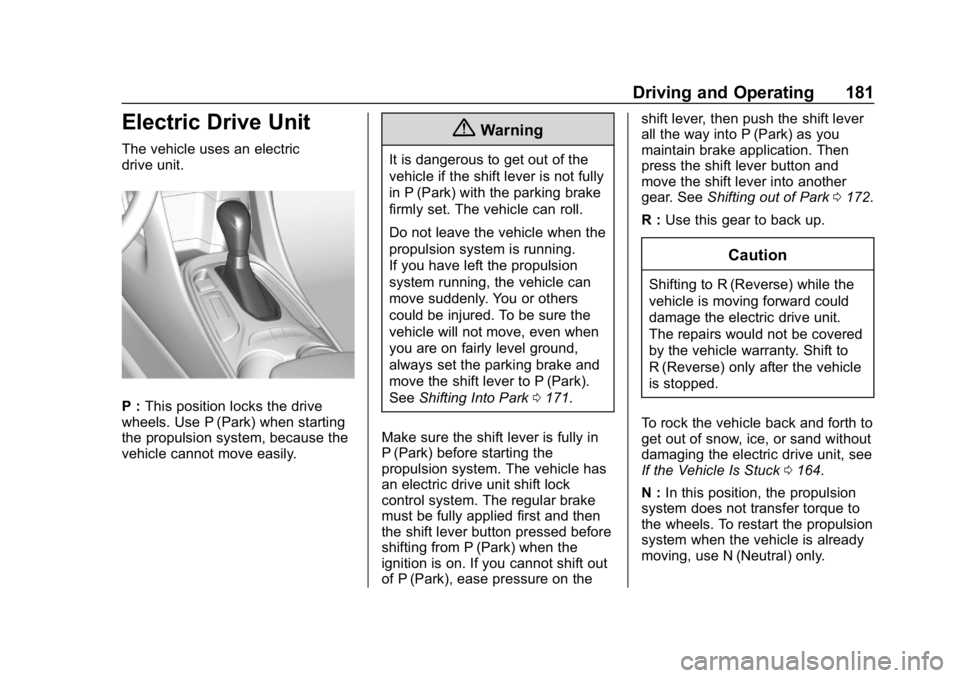
Electric Drive Unit
The vehicle uses an electric
drive unit.
P :This position locks the drive
wheels. Use P (Park) when starting
the propulsion system, because the
vehicle cannot move easily.
{Warning
It is dangerous to get out of the
vehicle if the shift lever is not fully
in P (Park) with the parking brake
firmly set. The vehicle can roll.
Do not leave the vehicle when the
propulsion system is running.
If you have left the propulsion
system running, the vehicle can
move suddenly. You or others
could be injured. To be sure the
vehicle will not move, even when
you are on fairly level ground,
always set the parking brake and
move the shift lever to P (Park).
See Shifting Into Park 0171.
Make sure the shift lever is fully in
P (Park) before starting the
propulsion system. The vehicle has
an electric drive unit shift lock
control system. The regular brake
must be fully applied first and then
the shift lever button pressed before
shifting from P (Park) when the
ignition is on. If you cannot shift out
of P (Park), ease pressure on the shift lever, then push the shift lever
all the way into P (Park) as you
maintain brake application. Then
press the shift lever button and
move the shift lever into another
gear. See
Shifting out of Park 0172.
R : Use this gear to back up.
Caution
Shifting to R (Reverse) while the
vehicle is moving forward could
damage the electric drive unit.
The repairs would not be covered
by the vehicle warranty. Shift to
R (Reverse) only after the vehicle
is stopped.
To rock the vehicle back and forth to
get out of snow, ice, or sand without
damaging the electric drive unit, see
If the Vehicle Is Stuck 0164.
N : In this position, the propulsion
system does not transfer torque to
the wheels. To restart the propulsion
system when the vehicle is already
moving, use N (Neutral) only.
Page 184 of 373

Chevrolet VOLT Owner Manual (GMNA-Localizing-U.S./Canada/Mexico-
12163007) - 2019 - CRC - 11/5/18
Driving and Operating 183
If driving safely on a wet road and it
becomes necessary to slam on the
brakes and continue braking to
avoid a sudden obstacle, a
computer senses that the wheels
are slowing down. If one of the
wheels is about to stop rolling, the
computer will separately work the
brakes at each wheel.
ABS can change the brake pressure
to each wheel, as required, faster
than any driver could. This can help
the driver steer around the obstacle
while braking hard.
As the brakes are applied, the
computer keeps receiving updates
on wheel speed and controls
braking pressure accordingly.
Remember: ABS does not change
the time needed to get a foot up to
the brake pedal or always decrease
stopping distance. If you get too
close to the vehicle in front of you,
there will not be enough time to
apply the brakes if that vehicle
suddenly slows or stops. Always
leave enough room up ahead to
stop, even with ABS.Using ABS
Do not pump the brakes. Just hold
the brake pedal down firmly and let
ABS work. You might hear the ABS
pump or motor operating and feel
the brake pedal pulsate, but this is
normal.
Braking in Emergencies
ABS allows the driver to steer and
brake at the same time. In many
emergencies, steering can help
more than even the very best
braking.
Electric Parking Brake
The vehicle has an Electric Parking
Brake (EPB). The EPB can always
be activated, even if the ignition is
off. To prevent draining the battery,
avoid repeated cycles of the EPB
system when the engine is not
running.
The system has a
Yor PARK
Electric Parking Brake light, and
a
8Service Parking Brake light.
See Electric Parking Brake Light
0 117 and Service Electric Parking
Brake Light 0117.
Before leaving the vehicle, check for
the
Yor PARK light to ensure that
the parking brake is applied.
EPB Apply
To apply the EPB:
1. Be sure the vehicle is at a complete stop.
2. Pull the EPB switch momentarily.
The
Yor PARK light will flash and
then stay on once the EPB is fully
applied. If the
Yor PARK light
Page 185 of 373

Chevrolet VOLT Owner Manual (GMNA-Localizing-U.S./Canada/Mexico-
12163007) - 2019 - CRC - 11/5/18
184 Driving and Operating
flashes continuously, then the EPB
is only partially applied or there is a
problem with the EPB. A DIC
message will display. Release the
EPB and try to apply it again. If the
light does not come on, or keeps
flashing, have the vehicle serviced.
Do not drive the vehicle if the
Yor
PARK light is flashing. See your
dealer. See Electric Parking Brake
Light 0117.
If the
8light is on, press and hold
the EPB switch. Continue to hold
the switch until the
Yor PARK
light remains on. If the
8light
remains on, see your dealer.
If the EPB is applied while the
vehicle is moving, the vehicle will
decelerate as long as the switch is
pressed. If the switch is pressed
until the vehicle comes to a stop,
the EPB will remain applied.
The vehicle may automatically apply
the EPB in some situations when
the vehicle is not moving. This is
normal, and is done to periodically
check the correct operation of the
EPB system. If the EPB fails to apply, block the
rear wheels to prevent vehicle
movement.
EPB Release
To release the EPB:
1. Turn the ignition on or to ACC/ ACCESSORY.
2. Apply and hold the brake pedal.
3. Press the EPB switch momentarily.
The EPB is released when the
Y
or PARK light is off.
If the
8light is on, release the EPB
by pressing and holding the EPB
switch. Continue to hold the switch
until the
Yor PARK light is off.
If either light stays on after release
is attempted, see your dealer.
Caution
Driving with the parking brake on
can overheat the brake system
and cause premature wear or
damage to brake system parts.
Make sure that the parking brake
is fully released and the brake
warning light is off before driving.
Automatic EPB Release
The EPB will automatically release if
the vehicle is running, placed into
gear, and an attempt is made to
drive away. Avoid rapid acceleration
when the EPB is applied, to
preserve parking brake lining life.
Hill Start Assist (HSA)
The Hill Start Assist (HSA) feature
will activate when the vehicle is
stopped on a moderate to steep
grade to help prevent it from rolling
in an unintended direction. After the
brake pedal has been released and
before the accelerator pedal has
been pressed, HSA uses braking
Page 186 of 373

Chevrolet VOLT Owner Manual (GMNA-Localizing-U.S./Canada/Mexico-
12163007) - 2019 - CRC - 11/5/18
Driving and Operating 185
pressure to hold the vehicle
stationary. If HSA is holding the
vehicle, a DIC message displays.
HSA will not activate in a forward
drive gear when facing downhill,
or in R (Reverse) when facing uphill.
Extended Hill Start
Assist (EHSA)
To change the duration of the HSA
feature, see“Extended Hill Start
Assist" under “Comfort and
Convenience” inVehicle
Personalization 0137. When
Standard Hold is selected, the
vehicle is held stationary for up to
two seconds after the brake pedal is
released. When Extended Hold is
selected, the vehicle is held
stationary for up to five minutes
after the brake pedal is released. In
either case, override the hold
feature by pressing the accelerator
pedal and attempting to drive away.
If Hill Start Assist is selected in the
Settings menu, it will hold the
vehicle for two seconds unless the
driver door is opened or the driver
seat belt is unbuckled after releasing the brake pedal.
If Extended Hill Start Assist is
selected, it will hold the vehicle for
five minutes unless the driver door
is opened and the driver seat belt is
unbuckled prior to releasing the
brake pedal. When EHSA is
deactivated after five minutes, or if it
is deactivated when the driver seat
belt is unlatched or the driver door is
opened, the Electric Parking Brake
will engage to prevent vehicle
movement.
Regenerative Braking
Some braking energy from the
moving vehicle is turned back into
electrical energy. This energy is
then stored back into the high
voltage battery system, increasing
energy efficiency.
The hydraulic disc brakes work with
the regenerative braking to ensure
effective braking, such as when a
high braking demand is requested.
The controller interprets the braking
request and uses regenerative
braking, conventional hydraulic
braking, or a combination of both as
necessary.
The brake controller applies the
hydraulic brakes using a pump. The
pump may be heard during some
braking, such as rapid applies. This
is normal.
See
Warning Lights, Gauges, and
Indicators 0107 andDriver
Information Center (DIC) 0133.
If there is a controller problem, the
brake pedal may be harder to push
and the stopping distance may be
longer.
Page 198 of 373

Chevrolet VOLT Owner Manual (GMNA-Localizing-U.S./Canada/Mexico-
12163007) - 2019 - CRC - 11/5/18
Driving and Operating 197
.The sensors are blocked.
. The Traction Control System
(TCS) or StabiliTrak/ESC system
has activated or been disabled.
. There is a fault in the system.
. The radar falsely reports a
blockage when driving in a
desert or remote area with no
other vehicles or roadside
objects. A DIC message may
display to indicate that ACC is
temporarily unavailable.
The ACC indicator will turn white
when ACC is no longer active.
Notification to Resume ACC
ACC will maintain a following gap
behind a detected vehicle and slow
your vehicle to a stop behind that
vehicle.
If the stopped vehicle ahead has
driven away and ACC has not
resumed, the vehicle ahead
indicator will flash as a reminder to
check traffic ahead before
proceeding. See “Adaptive Cruise Go Notifier”
in“Collision/Detection
Systems” underVehicle
Personalization 0137.
When the vehicle ahead drives
away, press +RES or the
accelerator pedal to resume ACC.
If stopped for more than
two minutes or if the driver door is
opened and the driver seat belt is
unbuckled, the ACC automatically
applies the Electric Parking Brake
(EPB) to hold the vehicle. The EPB
status light will turn on. See Electric
Parking Brake 0183.
A DIC warning message may
display indicating to shift to P (Park)
before exiting the vehicle. See
Vehicle Messages 0135.
{Warning
If ACC has stopped the vehicle,
and if ACC is disengaged, turned
off, or canceled, the vehicle will
no longer be held at a stop. The
vehicle can move. When ACC is
(Continued)
Warning (Continued)
holding the vehicle at a stop,
always be prepared to manually
apply the brakes.
{Warning
Leaving the vehicle without
placing it in P (Park) can be
dangerous. Do not leave the
vehicle while it is being held at a
stop by ACC. Always place the
vehicle in P (Park) and turn off
the ignition before leaving the
vehicle.
ACC Override
If using the accelerator pedal while
ACC is active, the ACC indicator
turns blue on the instrument cluster
indicating ACC braking will not
occur. ACC will resume operation
when the accelerator pedal is not
being pressed.