2019 CHEVROLET VOLT change time
[x] Cancel search: change timePage 130 of 373
Chevrolet VOLT Owner Manual (GMNA-Localizing-U.S./Canada/Mexico-
12163007) - 2019 - CRC - 11/5/18
Instruments and Controls 129
12 am to 6 am and only three hours
of charge are needed, Earliest
Possible would start charging at 12
am and Latest Possible would start
charging at 3 am. Use the Earliest
Possible setting to charge as soon
as possible. Use the Latest Possible
setting to optimize energy usage.
To edit the Charge Completion:1. From the Utility Rate Charging screen, touch Charge
Completion.
2. Select Earliest Possible or Latest Possible.
Rate Schedule Type
Utility rates, or cost per unit, may
vary based on time, weekday/
weekend, and season. During the
day when the demand for electricity
is high, the rates are usually higher
and are called Peak rates. At night
when the demand for electricity is
low, the rates are usually lower and
are called Off-Peak rates. In some
areas, a Mid-Peak rate is offered. Contact the utility company to obtain
the rate schedule for your area. The
summer and winter start dates must
be established to use a summer/
winter schedule.
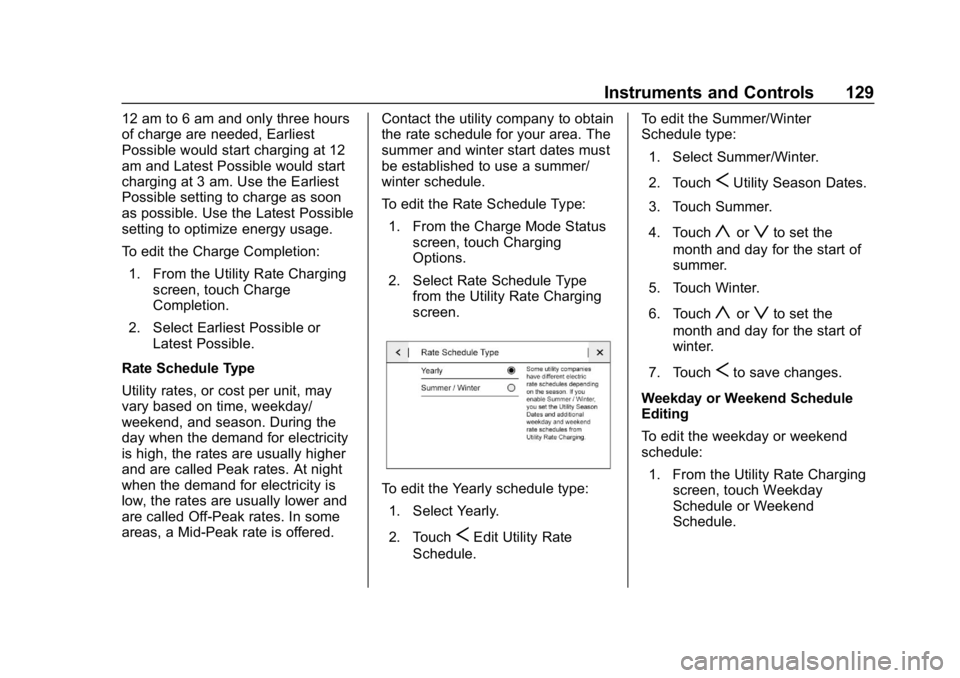
To edit the Rate Schedule Type:
1. From the Charge Mode Status screen, touch Charging
Options.
2. Select Rate Schedule Type from the Utility Rate Charging
screen.
To edit the Yearly schedule type:
1. Select Yearly.
2. Touch
SEdit Utility Rate
Schedule. To edit the Summer/Winter
Schedule type:
1. Select Summer/Winter.
2. Touch
SUtility Season Dates.
3. Touch Summer.
4. Touch
yorzto set the
month and day for the start of
summer.
5. Touch Winter.
6. Touch
yorzto set the
month and day for the start of
winter.
7. Touch
Sto save changes.
Weekday or Weekend Schedule
Editing
To edit the weekday or weekend
schedule: 1. From the Utility Rate Charging screen, touch Weekday
Schedule or Weekend
Schedule.
Page 131 of 373

Chevrolet VOLT Owner Manual (GMNA-Localizing-U.S./Canada/Mexico-
12163007) - 2019 - CRC - 11/5/18
130 Instruments and Controls
2. Touch Add A Rate Period orSubtract A Rate Period.
.Weekdays are Monday
through Friday and use the
same rate schedule.
. Weekends are Saturday
and Sunday and use the
same rate schedule.
Both weekday and weekend
schedules must be set. The rate
schedule only applies for a 24-hour
period, starting at 12:00 am and
ending at 12:00 am. There can be
five rate changes for each day; not
all must be used.
The finish times must be
consecutive. If a finish time does not
follow a start time, this error
message displays: “An invalid entry
was found in the data entered.
Please re-enter data.”
Energy Summary Pop-Up
When this function is turned on, the
Energy Summary Pop-Up will
provide a summary of energy usage
when the vehicle is turned off.
Select On or Off.
Charge Status Feedback
When this function is turned on, the
vehicle will provide audible
feedback of the charge status.
1 beep : Immediate charging
2 beeps : Delayed charging
3 beeps : Charge port door is open
4 beeps : Desired time cannot
be met
Select On or Off.
Charge Cord Theft Alert
When this function is turned on and
the vehicle is off and locked, the
horn will sound if the charge cord is
removed.
Select On or Off.
Charge Power Loss Alert
When this function is turned on and
the vehicle is charging, the horn will
sound if power is lost.
Select On or Off.
Engine Assisted Heating
In Default setting, the engine will run
at cold ambient temperatures to
assist in warming the cabin. When
Deferred is selected the engine will
not run to assist in cabin heating,
until extremely cold ambient
temperatures, or Max Defrost is
selected. See Automatic Climate
Control System 0150.
Engine Assisted Heating
Plugged In
If the vehicle is started remotely, the
engine will turn on to assist in
warming up the cabin.
Select On or Off.
Charging Interrupted or
Overridden Pop-Up
The Charging Interrupted or
Overridden message will appear if
there was an unintended loss of AC
power during the plug in charge
event. For example, there was a
power outage or the charge cord
was unplugged from the wall.
Page 135 of 373

Chevrolet VOLT Owner Manual (GMNA-Localizing-U.S./Canada/Mexico-
12163007) - 2019 - CRC - 11/5/18
134 Instruments and Controls
reset. The trip odometer can be
reset by pressing and holding
V
while this display is active.
The Average Fuel Economy display
shows the approximate average
liters per 100 kilometers (L/100 km)
or miles per gallon (mpg). This
number is calculated based on the
number of L/100 km (mpg) recorded
since the last time this menu item
was reset. This number reflects only
the approximate average fuel
economy that the vehicle has right
now, and will change as driving
conditions change. The Average
Fuel Economy can be reset along
with the trip odometer by pressing
and holding
Vwhile this display is
active.
Total Range : Shows the remaining
distance the vehicle can be driven
combining the electric range and
fuel range.
Oil Life : The Oil Life display shows
an estimate of the oil's remaining
useful life. If REMAINING OIL LIFE
99% is displayed, that means 99%
of the current oil life remains. When the remaining oil life is low,
the CHANGE ENGINE OIL SOON
message will appear on the display.
The oil should be changed as soon
as possible. See
Engine Oil0241.
In addition to the engine oil life
system monitoring the oil life,
additional maintenance is
recommended. See Maintenance
Schedule 0321.
Remember, the Oil Life display must
be reset after each oil change. It will
not reset itself. Also, be careful not
to reset the Oil Life display
accidentally at any time other than
when the oil has just been changed.
It cannot be reset accurately until
the next oil change. To reset the
engine oil life system, press and
hold
Vfor several seconds while
the Oil Life display is active. See
Engine Oil Life System 0243.
Engine Air Filter Life : Shows an
estimate of the engine air filter
remaining useful life and the state of
the system. Engine Air Filter Life
95% means 95% of the current air filter life remains. Messages will
display based on engine air filter life
and the state of the system. When
the REPLACE AT NEXT OIL
CHANGE message displays, the
engine air filter should be replaced
at the time of the next engine oil
change. When the REPLACE
ENGINE AIR FILTER NOW
message displays, the engine air
filter should be replaced as soon as
possible. The Engine Air Filter Life
display must be reset after the
engine air filter replacement. To
reset the engine air filter life system,
see
Engine Air Filter Life System
0 244.
Tire Pressure : Shows the
approximate pressures of all four
tires. Tire pressure is displayed in
either kilopascal (kPa) or in pounds
per square inch (psi). If the pressure
is low, the value for that tire is
shown in amber. See Tire Pressure
Monitor System 0280 andTire
Pressure Monitor Operation 0281.
Page 143 of 373

Chevrolet VOLT Owner Manual (GMNA-Localizing-U.S./Canada/Mexico-
12163007) - 2019 - CRC - 11/5/18
142 Lighting
Lighting
Exterior Lighting
Exterior Lamp Controls . . . . . . . 142
Headlamp High/Low-BeamChanger . . . . . . . . . . . . . . . . . . . . 144
Flash-to-Pass . . . . . . . . . . . . . . . . 144
Daytime Running Lamps (DRL) . . . . . . . . . . . . . . . 144
Automatic Headlamp System . . . . . . . . . . . . . . . . . . . . . . 145
Hazard Warning Flashers . . . . . 145
Turn and Lane-Change Signals . . . . . . . . . . . . . . . . . . . . . . 146
Interior Lighting
Instrument Panel IlluminationControl . . . . . . . . . . . . . . . . . . . . . . 146
Dome Lamps . . . . . . . . . . . . . . . . . 147
Reading Lamps . . . . . . . . . . . . . . 147
Lighting Features
Entry Lighting . . . . . . . . . . . . . . . . 148
Exit Lighting . . . . . . . . . . . . . . . . . . 148
Battery Power Protection . . . . . 148
Exterior Lighting Battery Saver . . . . . . . . . . . . . . . . . . . . . . . 148
Exterior Lighting
Exterior Lamp Controls
The exterior lamp control is on the
instrument panel to the left of the
steering column.
There are four positions.
O: Turns the exterior lamps off and
deactivates the AUTO mode. Turn
to
Oagain to reactivate the
AUTO mode.
In Canada, the headlamps will
automatically reactivate when the
vehicle is shifted out of P (Park).
AUTO : Turns the exterior lamps on
and off automatically depending on
outside lighting.
;: Turns on the parking lamps
including all lamps, except the
headlamps.
5: Turns on the headlamps
together with the parking lamps and
instrument panel lights.
IntelliBeam System
If equipped, this system turns the
vehicle's high-beam headlamps on
and off according to surrounding
traffic conditions.
The system turns the high-beam
headlamps on when it is dark
enough and there is no other traffic
present.
This light comes on in the
instrument cluster when the
IntelliBeam system is enabled.
Page 145 of 373

Chevrolet VOLT Owner Manual (GMNA-Localizing-U.S./Canada/Mexico-
12163007) - 2019 - CRC - 11/5/18
144 Lighting
.The vehicle is loaded such that
the front end points upward,
causing the light sensor to aim
high and not detect headlamps
and taillamps.
. The vehicle is being driven on
winding or hilly roads.
The IntelliBeam system may need to
be disabled if any of the above
conditions exist.
Headlamp High/
Low-Beam Changer
Push the turn signal lever away
from you and release, to turn the
high beams on. To return to low
beams, push the lever again or pull
it toward you and release.
This indicator light turns on in the
instrument cluster when the
high-beam headlamps are on.
Flash-to-Pass
The flash-to-pass feature works with
the low beams or Daytime Running
Lamps (DRL) on or off.
To flash the high beams, pull the
turn signal lever toward you
momentarily and then release it.
Daytime Running
Lamps (DRL)
The DRL system comes on in
daylight when the following
conditions are met:
. The vehicle is on.
. The exterior lamp control is
in AUTO.
. The electric drive unit is not in
P (Park).
. The light sensor determines it is
daytime.
Fully functional DRL are required on
all vehicles first sold in Canada. When the DRL are on, the taillamps,
sidemarker lamps, instrument panel
lights, and other lamps will not be
on. The instrument cluster will be lit.
When the exterior lamp control is
turned to the headlamp position, the
low-beam headlamps come on. The
other lamps that come on with the
headlamps will also come on.
The DRL turn off when the
headlamps are turned to
Oor the
vehicle is off.
For vehicles first sold in Canada,
the DRL can only be turned off
when the vehicle is parked.
The regular headlamp system
should be turned on when needed.
Page 146 of 373

Chevrolet VOLT Owner Manual (GMNA-Localizing-U.S./Canada/Mexico-
12163007) - 2019 - CRC - 11/5/18
Lighting 145
Automatic Headlamp
System
When the exterior lamp control is
set to AUTO and it is dark enough
outside, the headlamps come on
automatically.
There is a light sensor on top of the
instrument panel. Do not cover the
sensor, otherwise the headlamps
will come on when they are not
needed.
The system may also turn on the
headlamps when driving through a
parking garage or tunnel.If the vehicle is started in a dark
garage, the automatic headlamp
system comes on immediately. If it
is light outside when the vehicle
leaves the garage, there is a slight
delay before the automatic
headlamp system changes to the
DRL. During that delay, the
instrument cluster may not be as
bright as usual. Make sure the
instrument panel brightness control
is in the full bright position. See
Instrument Panel Illumination
Control
0146.
When it is bright enough outside,
the headlamps will turn off or may
change to Daytime Running
Lamps (DRL).
The automatic headlamp system
turns off when the exterior lamp
control is turned toOor the vehicle
is turned off.
Lights On with Wipers
If the windshield wipers are
activated in daylight with the vehicle
on, and the exterior lamp control is
in AUTO, the headlamps, parking
lamps, and other exterior lamps come on. The transition time for the
lamps coming on varies based on
wiper speed. When the wipers are
not operating, these lamps turn off.
Move the exterior lamp control to
O
or;to disable this feature.
Hazard Warning Flashers
|:
Press to make the front and
rear turn signal lamps flash on and
off. This warns others that you are
having trouble.
Press
|again to turn the
flashers off.
Page 147 of 373

Chevrolet VOLT Owner Manual (GMNA-Localizing-U.S./Canada/Mexico-
12163007) - 2019 - CRC - 11/5/18
146 Lighting
Turn and Lane-Change
Signals
Move the lever all the way up or
down to signal a turn.
An arrow on the instrument cluster
will flash in the direction of the turn
or lane change.Raise or lower the lever until the
arrow starts to flash to signal a lane
change. Hold it there until the lane
change is complete. If the lever is
moved momentarily to the lane
change position, the arrow will flash
three times.
The lever returns to its starting
position when it is released.
If after signaling a turn or lane
change, the arrow flashes rapidly or
does not come on, a signal bulb
may be burned out.
Have any burned out bulbs
replaced. If a bulb is not burned out,
check the fuse. See
Instrument
Panel Fuse Block 0267.
Interior Lighting
Instrument Panel
Illumination Control
The brightness of the instrument
panel cluster display, infotainment
display and controls, steering wheel
controls, and all other illuminated
controls, as well as feature status
indicators can be adjusted.
The knob for this feature is on the
instrument panel beside the steering
column.
Turn the knob clockwise or
counterclockwise to brighten or dim
the lights.
Page 149 of 373

Chevrolet VOLT Owner Manual (GMNA-Localizing-U.S./Canada/Mexico-
12163007) - 2019 - CRC - 11/5/18
148 Lighting
Lighting Features
Entry Lighting
Some exterior lamps and the interior
lights turn on briefly at night when
the Remote Keyless Entry (RKE)
transmitter
Kis pressed. The lights
turn off immediately when POWER
Ois pressed or automatically after a
brief period.
Exit Lighting
Some exterior lamps come on at
night when the vehicle is turned off
and the driver door is opened.
Some interior lights also come on
when the vehicle is turned off. The
exterior lamps and interior lights
remain on after the door is closed
for a brief period and then turn off.
The exit lighting feature can be
changed. See Vehicle
Personalization 0137.
Battery Power Protection
The battery saver feature is
designed to protect the vehicle's
12-volt battery.
If the exterior lamps or any interior
lamp is left on and the vehicle is
turned off, the battery rundown
protection system automatically
turns the lamps off after about
10 minutes.
Exterior Lighting Battery
Saver
The exterior lamps turn off about
10 minutes after the ignition is
turned off, if the parking lamps or
headlamps have been manually left
on. This protects against draining
the battery. To restart the 10-minute
timer, turn the exterior lamp control
to the off position and then back to
the parking lamp or headlamp
position.
To keep the lamps on for more than
10 minutes, the ignition must be on
or in ACC/ACCESSORY.