2019 CHEVROLET VOLT light
[x] Cancel search: lightPage 218 of 373

Chevrolet VOLT Owner Manual (GMNA-Localizing-U.S./Canada/Mexico-
12163007) - 2019 - CRC - 11/5/18
Driving and Operating 217
‐Two Flashes: 25–50% Charge
‐ Three Flashes: 50–75%
Charge
‐ Four Flashes: 75–100%
Charge
. Long Flashing Green –Vehicle
is plugged in. Battery is not fully
charged. Battery charging is
delayed.
. Solid Green –Vehicle is plugged
in. Battery is fully charged.
. Solid Yellow –Vehicle is plugged
in. It is normal for the CSI to turn
yellow for a few seconds after
plugging in a compatible charge
cord. The CSI may stay solid
yellow longer depending on the
vehicle and if there is a total
utility interruption. See Utility
Interruption of Charging 0227. This may also indicate that the
charging system has detected a
fault and will not charge the
battery. See
“Charge Cord
Status Indicators” inCharge
Cord 0221.
If the vehicle is plugged in and
vehicle power is on, the CSI will
flash or will be solid green,
depending on the charge level. This
also happens during a remote start
if the vehicle is plugged in.
If the vehicle is plugged in and the
CSI is off, a total utility interruption
or a charging fault has been
detected. See Utility Interruption of
Charging 0227 or“Charge Cord
Status Indicators” inCharge Cord
0 221.
If equipped, the charge port bezel
light acts as an additional CSI when
the vehicle is plugged in and
charging. It will flash along with the
CSI on the instrument panel. When
the charge port door is open and the
vehicle is not plugged in, the bezel
light stays on solid to light the
charging receptacle.
A message displays if the vehicle is
not able to charge.
Following is the vehicle feedback
when the charge cord is plugged in.
Page 219 of 373

Chevrolet VOLT Owner Manual (GMNA-Localizing-U.S./Canada/Mexico-
12163007) - 2019 - CRC - 11/5/18
218 Driving and Operating
Charging StatusIndicator Sound Action/Reason
Short Flashing Green
(Flash rate increases
from one to four as the
battery charges) One audible chirp Vehicle is charging.
Long Flashing Green Two audible chirps Charging is delayed by Programmable Charging or, if the vehicle is equipped
accordingly, by a total utility interruption.
Charging will begin later. SeeUtility
Interruption of Charging 0227.
Solid Green None Charging is complete.
Yellow (Upon Plug-in) None Charge cord is OK and the vehicle is preparing to charge.
Yellow (For Extended
Time Period after
Plug-in) None Charge cord is OK, but the vehicle is not
charging. This may be due to a total utility
interruption and charging will begin later.
This may also occur if the vehicle has
detected a high voltage charging system
fault. SeeUtility Interruption of Charging
0 227 orMalfunction Indicator Lamp (Check
Engine Light) 0114.
Page 220 of 373

Chevrolet VOLT Owner Manual (GMNA-Localizing-U.S./Canada/Mexico-
12163007) - 2019 - CRC - 11/5/18
Driving and Operating 219
Charging StatusIndicator Sound Action/Reason
Short Flashing Green
(From one to four
flashes depending on
charge level) Two audible chirps Vehicle is charging but will delay by
Programmable Charging at least once
before the charge is complete.
Short Flashing Green
(From one to four
flashes depending on
charge level) or Long
Flashing Green Four audible chirps Vehicle is charging but will delay by
Programmable Charging at least once
before the charge is complete.
To increase the battery state of charge at
the departure time, perform a delayed
charging override. SeeDelayed Charging
Override 0216.
None (Upon Plug-in) None Charge cord connection should be checked.
None (After Green or
Yellow CSI Indication
Observed) None Charge cord connection should be checked.
If connection is good, this may be due to a
power failure or a total utility interruption
and charging will begin later. This may also
occur if the vehicle has detected a high
voltage charging system fault. SeeUtility
Interruption of Charging 0227 or
Malfunction Indicator Lamp (Check Engine
Light) 0114.
Page 225 of 373
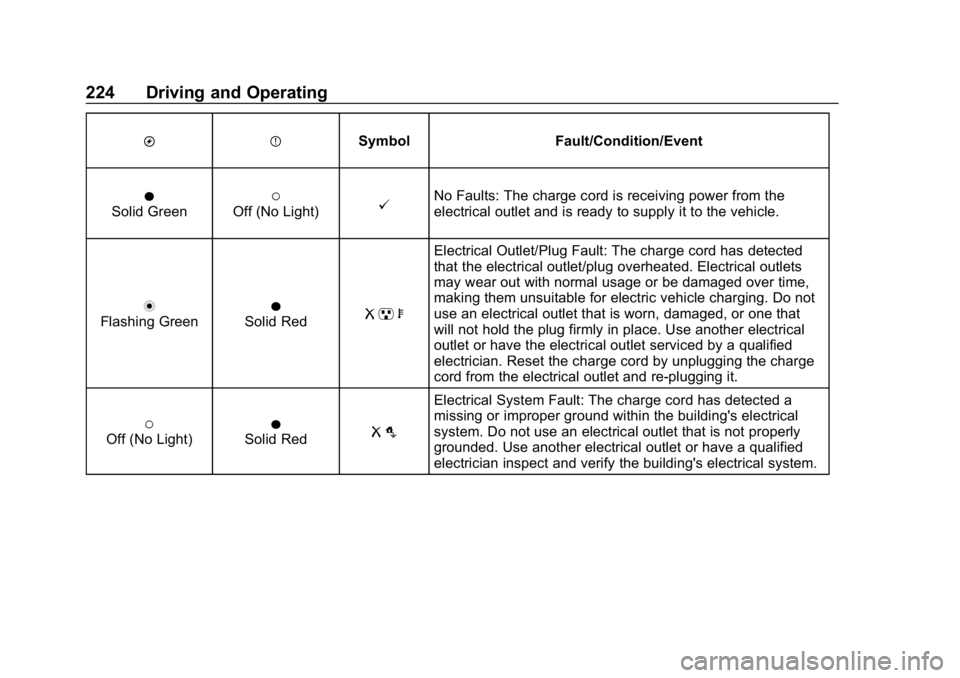
Chevrolet VOLT Owner Manual (GMNA-Localizing-U.S./Canada/Mexico-
12163007) - 2019 - CRC - 11/5/18
224 Driving and Operating
OPSymbol Fault/Condition/Event
OSolid Green(Off (No Light)@No Faults: The charge cord is receiving power from the
electrical outlet and is ready to supply it to the vehicle.
nFlashing GreenOSolid RedR pb
Electrical Outlet/Plug Fault: The charge cord has detected
that the electrical outlet/plug overheated. Electrical outlets
may wear out with normal usage or be damaged over time,
making them unsuitable for electric vehicle charging. Do not
use an electrical outlet that is worn, damaged, or one that
will not hold the plug firmly in place. Use another electrical
outlet or have the electrical outlet serviced by a qualified
electrician. Reset the charge cord by unplugging the charge
cord from the electrical outlet and re-plugging it.
(Off (No Light)OSolid RedR o
Electrical System Fault: The charge cord has detected a
missing or improper ground within the building's electrical
system. Do not use an electrical outlet that is not properly
grounded. Use another electrical outlet or have a qualified
electrician inspect and verify the building's electrical system.
Page 226 of 373

Chevrolet VOLT Owner Manual (GMNA-Localizing-U.S./Canada/Mexico-
12163007) - 2019 - CRC - 11/5/18
Driving and Operating 225
OPSymbol Fault/Condition/Event
(Off (No Light)nFlashing RedRb
Vehicle Fault: The charge cord ground-fault circuit interrupter
(GFCI) has tripped. Ensure that there is no physical damage
to the charge cord, and that the vehicle plug is seated
completely and making a good connection. Reset the charge
cord by unplugging from the electrical outlet and re-plugging
it. If the fault remains, see an authorized dealer for service.
OSolid GreennFlashing RedR m
Charge Cord Fault: The charge cord has detected a potential
problem with the charge cord. Reset the charge cord by
unplugging from the electrical outlet and re-plugging it. If the
fault remains, see an authorized dealer for service.
If no status indicators are lit, ensure
the electrical outlet is powered.
Charge Limit Selection
Charge level selection can be made
using the Portable Cord Limit
Preference screen on the center
stack. See “Charge Limit Selection”
under Programmable Charging
0 123.
{Warning
Using a charge level that exceeds
the electrical circuit or electrical
outlet capacity may start a fire or
damage the electrical circuit. Use
the lowest charge level until a
qualified electrician inspects the
electrical circuit capacity. Use the
lowest charge level if the
electrical circuit or electrical outlet
capacity is not known.
Grounding Instructions
This product must be grounded.
If this product should malfunction or
break down, grounding provides a
path of least resistance for electric
current to reduce the risk of electric
shock. This product is equipped with
a cord that has an equipment
grounding conductor and a
grounding plug. The plug must be
plugged into an appropriate outlet
Page 229 of 373

Chevrolet VOLT Owner Manual (GMNA-Localizing-U.S./Canada/Mexico-
12163007) - 2019 - CRC - 11/5/18
228 Driving and Operating
Changing the charge mode to
Immediate or performing a delayed
charging override will not disable a
utility interruption.
A pop-up will appear in the
infotainment display during the key
cycle following any utility
interruption. See“Charging
Interrupted or Overridden Pop-Up”
under Programmable Charging
0 123.
A message will display on the
instrument cluster indicating that a
utility interruption has occurred. See
Instrument Cluster 0107.
Charging Station
Troubleshooting
If the vehicle does not charge after
being plugged in to a residential
240-volt charging station:
1. Verify that the charge mode is set to Immediate.
2. Verify that the charging station’s circuit breaker has not
been tripped. 3. Plug the portable charge cord
into the wall outlet, verify that
the indicator light on the charge
cord is solid green, and
connect it to the vehicle. See
“Charge Cord Status
Indicators” inCharge Cord
0 221.
4. If the vehicle charges with the portable charge cord, there
may be a problem with the
charging station. Try to charge
the vehicle with a different
240-volt charging station, such
as a public station. If both
attempts charge the vehicle,
contact the charging station
manufacturer.Electrical Requirements
for Battery Charging
This vehicle is capable of being
charged with most standard vehicle
charging equipment complying with
one or more of the following:
.SAE J1772
. SAE J2847-2 .
IEC 61851-1
. IEC 61851-22
. IEC 61851-23
. IEC 61851-24
. IEC 62196-1
. IEC 62196-2
. IEC 62196-3
. ISO 15118
. GB/T 18487.1
. GB/T 20234.1
. GB/T 20234.2
120 volts/15 amps is the minimum
requirement for circuits used to
charge this vehicle:
Charging equipment that is rated for
240 volts will provide the fastest
charge time and the best charge
efficiency. Always follow the
charging equipment installation
instructions. Contact your dealer for
more information.
Page 233 of 373

Chevrolet VOLT Owner Manual (GMNA-Localizing-U.S./Canada/Mexico-
12163007) - 2019 - CRC - 11/5/18
232 Driving and Operating
4. After refueling, reinstall the fuelcap by turning it clockwise until
it clicks. Close the fuel door.
{Warning
Overfilling the fuel tank by more
than three clicks of a standard fill
nozzle may cause:
. Vehicle performance issues,
including engine stalling and
damage to the fuel system.
. Fuel spills.
. Potential fuel fires.
Be careful not to spill fuel. Wait
five seconds after you have finished
pumping before removing the
nozzle. Clean fuel from painted
surfaces as soon as possible. See
Exterior Care 0309.
{Warning
If a fire starts while you are
refueling, do not remove the
nozzle. Shut off the flow of fuel by
shutting off the pump or by
notifying the station attendant.
Leave the area immediately.
Caution
If a new fuel cap is needed, be
sure to get the right type of cap
from your dealer. The wrong type
of fuel cap may not fit properly,
may cause the malfunction
indicator lamp to light, and could
damage the fuel tank and
emissions system. See
Malfunction Indicator Lamp
(Check Engine Light) 0114.
Filling a Portable Fuel
Container
{Warning
Never fill a portable fuel container
while it is in the vehicle. Static
electricity discharge from the
container can ignite the fuel
vapor. You can be badly burned
and the vehicle damaged if this
occurs. To help avoid injury to you
and others:
. Dispense fuel only into
approved containers.
. Do not fill a container while
it is inside a vehicle, in a
vehicle's trunk, pickup bed,
or on any surface other than
the ground.
(Continued)
Page 234 of 373

Chevrolet VOLT Owner Manual (GMNA-Localizing-U.S./Canada/Mexico-
12163007) - 2019 - CRC - 11/5/18
Driving and Operating 233
Warning (Continued)
.Bring the fill nozzle in
contact with the inside of
the fill opening before
operating the nozzle.
Contact should be
maintained until the filling is
complete.
. Do not smoke while
pumping fuel.
. Avoid using electronic
devices.
Trailer Towing
General Towing
Information
{Warning
Never tow a trailer with your
vehicle. It was not designed or
intended to tow a trailer.
Conversions and
Add-Ons
Add-On Electrical
Equipment
{Warning
The Data Link Connector (DLC) is
used for vehicle service and
Emission Inspection/Maintenance
testing. See Malfunction Indicator
Lamp (Check Engine Light) 0114.
A device connected to the DLC —
such as an aftermarket fleet or
driver-behavior tracking device —
may interfere with vehicle
systems. This could affect vehicle
operation and cause a crash.
Such devices may also access
information stored in the vehicle’s
systems.