2019 CHEVROLET SPARK wheel
[x] Cancel search: wheelPage 107 of 343

Chevrolet Spark Owner Manual (GMNA-Localizing-U.S./Canada-12146335) -
2019 - CRC - 4/26/18
106 Instruments and Controls
Caution
Modifications to the engine,
transmission, exhaust, intake,
or fuel system, or the use of
replacement tires that do not
meet the original tire
specifications, can cause this light
to come on. This could lead to
costly repairs not covered by the
vehicle warranty. This could also
affect the vehicle’s ability to pass
an Emissions Inspection/
Maintenance test. See
Accessories and Modifications
0214.
If the light is flashing : A
malfunction has been detected that
could damage the emission control
system and increase vehicle
emissions. Diagnosis and service
may be required.
To help prevent damage, reduce
vehicle speed and avoid hard
accelerations and uphill grades. If the light continues to flash, find a
safe place to park. Turn the vehicle
off and wait at least 10 seconds
before restarting the engine. If the
light is still flashing, follow the
previous guidelines and see your
dealer for service as soon as
possible.
If the light is on steady :
A
malfunction has been detected.
Diagnosis and service may be
required.
Check the following:
. A loose or missing fuel cap may
cause the light to come on. See
Filling the Tank 0208. A few
driving trips with the cap
properly installed may turn the
light off.
. Poor fuel quality can cause
inefficient engine operation and
poor driveability, which may go
away once the engine is warmed
up. If this occurs, change the
fuel brand. It may require at
least one full tank of the proper
fuel to turn the light off. See
Recommended Fuel 0207. If the light remains on, see your
dealer.Emissions Inspection and
Maintenance Programs
If the vehicle requires an Emissions
Inspection/Maintenance test, the
test equipment will likely connect to
the vehicle's Data Link
Connector (DLC).
The DLC is under the instrument
panel to the left of the steering
wheel. Connecting devices that are
not used to perform an Emissions
Inspection/Maintenance test or to
service the vehicle may affect
vehicle operation. See
Add-On
Electrical Equipment 0210. See
your dealer if assistance is needed.
Page 111 of 343

Chevrolet Spark Owner Manual (GMNA-Localizing-U.S./Canada-12146335) -
2019 - CRC - 4/26/18
110 Instruments and Controls
If equipped, this light comes on
briefly while starting the vehicle. If it
does not come on, have the vehicle
serviced.
This light indicates a malfunction in
the system. See your dealer for
service.
SeePark Assist 0201.
Traction Off Light
This light comes on briefly while
starting the engine. If it does not,
have the vehicle serviced by your
dealer. If the system is working
normally, the indicator light then
turns off.
The traction off light comes on when
the Traction Control System (TCS)
has been turned off by pressing and
releasing the TCS/StabiliTrak/ESC
button. This light and the StabiliTrak/ESC
OFF light come on when StabiliTrak/
Electronic Stability Control (ESC) is
turned off.
If the TCS is off, wheel spin is not
limited. Adjust driving accordingly.
See
Traction Control/Electronic
Stability Control 0193.
StabiliTrak OFF Light
This light comes on briefly while
starting the engine. If it does not,
have the vehicle serviced by your
dealer.
This light comes on when the
StabiliTrak/Electronic Stability
Control (ESC) system is turned off.
If StabiliTrak/ESC is off, the Traction
Control System (TCS) is also off. If StabiliTrak/ESC and TCS are off,
the system does not assist in
controlling the vehicle. Turn on the
TCS and the StabiliTrak/ESC
systems, and the warning light
turns off.
See
Traction Control/Electronic
Stability Control 0193.
Traction Control System
(TCS)/StabiliTrak Light
This light comes on briefly when the
engine is started.
If the light does not come on, have
the vehicle serviced by your dealer.
If the system is working normally,
the indicator light turns off.
If the light is on and not flashing, the
TCS and potentially the StabiliTrak/
ESC system have been disabled.
A Driver Information Center (DIC)
Page 120 of 343

Chevrolet Spark Owner Manual (GMNA-Localizing-U.S./Canada-12146335) -
2019 - CRC - 4/26/18
Instruments and Controls 119
Remember, the Oil Life display must
be reset after each oil change. It will
not reset itself. Also, be careful not
to reset the Oil Life display
accidentally at any time other than
when the oil has just been changed.
It cannot be reset accurately until
the next oil change. To reset the
engine oil life system, press SET/
CLR while the Oil Life display is
active. SeeEngine Oil Life System
0 220.Vehicle Messages
Vehicle Messages (Base
Level Cluster)
DIC messages display when the
status of the vehicle has changed
and action may be needed to
correct the condition. Multiple
messages appear one after another.
All messages should be taken
seriously.
On the base level cluster, vehicle
messages appear as code numbers.
Some of these codes may appear
along with the service vehicle soon
light and the owner ’s manual
symbol in the DIC display.
2 : No Remote Detected, Press
Clutch To Restart
4 : A/C Off Due to High
Engine Temp
5 : Steering Column Is Locked
7 : Turn Steering Wheel, Turn Key
Off, Then On
9 : Turn Steering Wheel, Start
Vehicle Again 10 :
Brakes Overheated
15 : Check High Mounted
Brake Lamp
16 : Check Brake Lamps
17 : Headlamp Leveling Malfunction
— Contact Service
18 : Left Low Beam Failure
20 : Right Low Beam Failure
21 : Check Left Position Lamp
22 : Check Right Position Lamp
23 : Reversing Lamp Failure
24 : License Plate Lamp Failure
25 : Left Front Turn Indicator Failure
26 : Left Rear Turn Indicator Failure
27 : Right Front Turn Indicator
Failure
28 : Right Rear Turn Indicator
Failure
35 : Replace Battery In Remote Key
49 : Lane Departure Warning
Unavailable
52 : Change Timing Belt –See
Owner ’s Manual
Page 125 of 343

Chevrolet Spark Owner Manual (GMNA-Localizing-U.S./Canada-12146335) -
2019 - CRC - 4/26/18
124 Instruments and Controls
Passive Door Lock
This feature specifies if the vehicle
will automatically lock, or lock and
alert you after all the doors are
closed, and you walk away from the
vehicle with RKE transmitter.
SeeRemote Keyless Entry (RKE)
System Operation (Key Access)
0 27 orRemote Keyless Entry
(RKE) System Operation (Keyless
Access) 029.
Touch Off, On with Horn
Chirp, or On.
Remote Left in Vehicle Alert
This feature sounds an alert when
the RKE transmitter is left in the
vehicle. This menu also enables
Remote No Longer in Vehicle Alert.
Touch Off or On.
Valet Mode
This will lock the infotainment
system and steering wheel controls.
It may also limit access to vehicle
storage locations, if equipped. To enable valet mode:
1. Enter a four-digit code on the keypad.
2. Touch Enter to go to the confirmation screen.
3. Re-enter the four-digit code.
Touch Lock or Unlock to lock or
unlock the system. Touch Back to
go back to the previous menu.
Page 130 of 343
Chevrolet Spark Owner Manual (GMNA-Localizing-U.S./Canada-12146335) -
2019 - CRC - 4/26/18
Lighting 129
#:Press to turn the front fog
lamps on or off. An indicator light on
the instrument cluster comes on
when the fog lamps are on.
The fog lamps come on together
with the parking lamps.
If the high-beam headlamps are
turned on, the fog lamps will turn off.
If the high-beam headlamps are
turned off, the fog lamps will turn
back on again.
Some localities have laws that
require the headlamps to be on
along with the fog lamps.Interior Lighting
Instrument Panel
Illumination Control
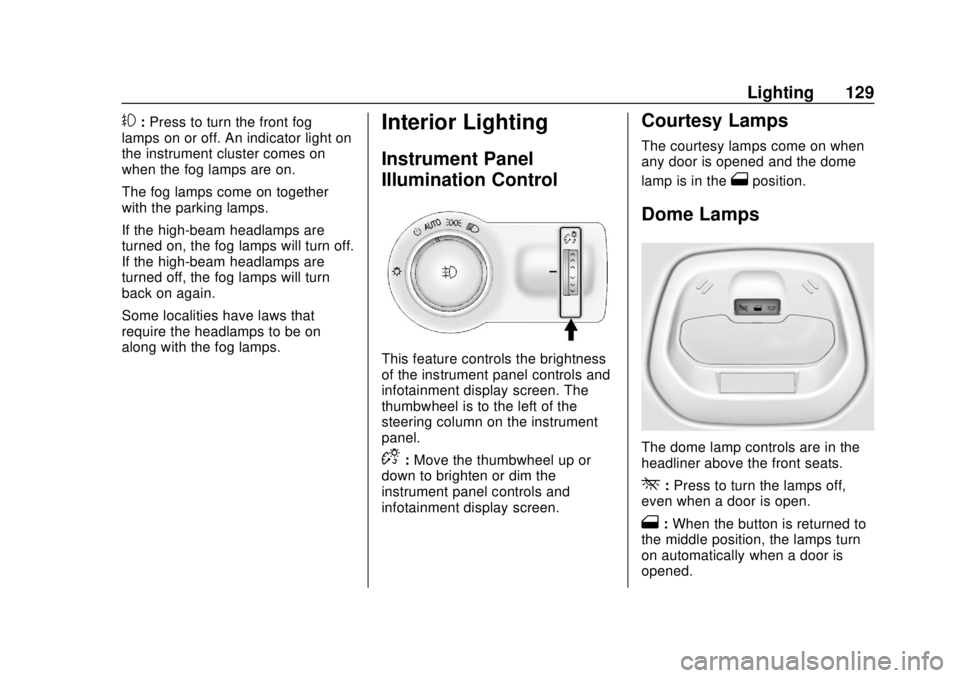
This feature controls the brightness
of the instrument panel controls and
infotainment display screen. The
thumbwheel is to the left of the
steering column on the instrument
panel.
D: Move the thumbwheel up or
down to brighten or dim the
instrument panel controls and
infotainment display screen.
Courtesy Lamps
The courtesy lamps come on when
any door is opened and the dome
lamp is in the
1position.
Dome Lamps
The dome lamp controls are in the
headliner above the front seats.
*: Press to turn the lamps off,
even when a door is open.
1: When the button is returned to
the middle position, the lamps turn
on automatically when a door is
opened.
Page 134 of 343
Chevrolet Spark Owner Manual (GMNA-Localizing-U.S./Canada-12146335) -
2019 - CRC - 4/27/18
Infotainment System 133
The infotainment system has built-in
features intended to help avoid
distraction by disabling some
functions when driving. These
functions may gray out when they
are unavailable. Many infotainment
features are also available through
the instrument cluster and steering
wheel controls.
Before driving:
.Become familiar with the
operation, center stack controls,
and infotainment display
controls. .
Set up the audio by presetting
favorite stations, setting the
tone, and adjusting the
speakers.
. Set up phone numbers in
advance so they can be called
easily by pressing a single
control or by using a single voice
command if equipped with
Bluetooth phone capability.
See Defensive Driving 0165.
To play the infotainment system with
the ignition off, see Retained
Accessory Power (RAP) 0183. Active Noise Cancellation (ANC)
If equipped, ANC reduces engine
noise in the vehicle’s interior. ANC
requires the factory-installed audio
system, radio, speakers, amplifier (if
equipped), induction system, and
exhaust system to work properly.
Deactivation is required by your
dealer if related aftermarket
equipment is installed.
Overview
Customer Assistance
Assistance is available to help with
Bluetooth pairing, other mobile
device interface, and operation
support of the infotainment system.
See
Customer Assistance Offices
0 307.
Page 135 of 343

Chevrolet Spark Owner Manual (GMNA-Localizing-U.S./Canada-12146335) -
2019 - CRC - 4/27/18
134 Infotainment System
Infotainment System
The infotainment system is controlled by using the infotainment display, the
controls on the center stack, and the steering wheel controls.
1.{
.Press to go to the Home
Page. See “Home Page”
following.
2.
g
. Radio: Press and release to
go to the previous station or
channel. Press and hold to
fast seek the previous
strongest station.
. USB/Music/Pictures: Press
to go to the previous
content. Press and hold to
fast rewind.
3.
O
. When off, pressOto turn
the system on. Press and
hold to turn off.
. When on, press
Oto mute
the system and display a
status pane. Press
Oagain
to unmute the system.
. Turn to decrease or
increase the volume.
Page 144 of 343
Chevrolet Spark Owner Manual (GMNA-Localizing-U.S./Canada-12146335) -
2019 - CRC - 4/27/18
Infotainment System 143
Artists :TouchHnext to any artist
to store the artist as a favorite.
Touch a saved favorite to recall a
favorite artist. The first song in the
artist list begins to play.
Songs : Touch
Hnext to any song
to store the song as a favorite.
Touch a saved favorite to recall a
favorite song.
Albums : Touch
Hnext to any
album to store the album as a
favorite. Touch a saved favorite to
recall a favorite album. The first
song in the album list begins to play.
Genres : Touch
Hnext to any
genre to store the genre as a
favorite. Touch a saved favorite to
recall a favorite genre. The first
song of the genre begins to play.
Podcasts : Touch
Hnext to any
podcast to store the podcast as a
favorite. Touch a saved favorite to
recall a favorite podcast. The
podcast begins to play. Audiobooks :
Touch
Hnext to
any audiobook to store the
audiobook as a favorite. Touch a
saved favorite to recall a favorite
audiobook. The first chapter in the
audiobook begins to play.
Media Playback and Mute
USB playback will be paused if the
system is muted. If the steering
wheel mute control is pressed
again, playback will resume.
If the source is changed while in
mute, playback resumes and audio
will unmute.
Auxiliary Jack
This vehicle has an auxiliary input
jack in the center stack. Possible
auxiliary audio sources include:
. Laptop computer
. Audio music player
This jack is not an audio output. Do
not plug headphones into the
auxiliary input jack. Set up an
auxiliary device while the vehicle is
parked. Connect a 3.5 mm (1/8 in) cable
from the auxiliary device to the
auxiliary input jack. When a device
is connected, the system can play
audio from the device over the
vehicle speakers.
If an auxiliary device has already
been connected, but a different
source is currently active, touch
More and select AUX to make the
source active.
Shuffle and Browse are not
available in the AUX source menu.
Bluetooth Audio
Music may be played from a paired
Bluetooth device. See
Bluetooth
(Overview) 0146 orBluetooth
(Pairing and Using a Phone) 0147.
Volume and song selection may be
controlled by using the infotainment
controls or the phone/device.
If Bluetooth is selected and no
volume is present, check the
volume setting on both your phone/
device and the infotainment system.