2019 CHEVROLET SILVERADO cam
[x] Cancel search: camPage 170 of 474
Chevrolet Silverado Owner Manual (GMNA-Localizing-U.S./Canada/Mexico-
1500-11698642) - 2019 - CRC - 2/20/19
Instruments and Controls 169
The menu may contain the
following:
Rear Seat Reminder
This allows for a chime and a
message when the rear door has
been opened before or during
operation of the vehicle.
Touch Off or On.
Climate and Air Quality
Touch and the following may
display:
.Auto Fan Speed
. Auto Defog
. Auto Rear Defog
Auto Fan Speed
This setting specifies the amount of
airflow when the climate control fan
setting is Auto Fan.
Touch Low, Medium, or High.
Auto Defog
This setting automatically directs air
to the windshield to assist in
defogging, based on temperature
and humidity conditions. Touch Off or On.
Auto Rear Defog
This setting automatically turns the
rear defogger on based on
temperature and humidity
conditions.
Touch Off or On.
Collision/Detection Systems
Touch and the following may
display:
.
Alert Type
. Forward Collision System
. Front Pedestrian Detection
. Lane Change Alert
. Park Assist
. Rear Camera Park Assist
Symbols
. Rear Cross Traffic Alert
Alert Type
This feature sets the type of alert
from the driver assistance systems
to help avoid crashes.
Touch Beeps or Safety Alert Seat. Forward Collision System
This feature will turn on or off
Forward Collision Alert (FCA) and
Forward Automatic Braking (FAB).
The Off setting disables all FCA and
FAB functions. With the Alert and
Brake setting, both FCA and FAB
are available. The Alert setting
disables FAB. See
Forward
Automatic Braking (FAB) 0264.
Touch Off, Alert, or Alert and Brake.
Front Pedestrian Detection
This feature may help avoid or
reduce the harm caused by
front-end crashes with nearby
pedestrians. See Front Pedestrian
Braking (FPB) System 0265.
Touch Off, Alert, or Alert and Brake.
Lane Change Alert
This allows the feature to be turned
on or off. See Lane Change Alert
(LCA) 0268.
When Lane Change Alert is
disabled, Side Blind Zone Alert is
also disabled.
Touch Off or On.
Page 171 of 474
Chevrolet Silverado Owner Manual (GMNA-Localizing-U.S./Canada/Mexico-
1500-11698642) - 2019 - CRC - 2/20/19
170 Instruments and Controls
Park Assist
This allows the feature to be turned
on or off. SeeAssistance Systems
for Parking or Backing 0255.
Select Off, On, or On with Towbar.
Rear Camera Park Assist Symbols
This setting enables the Rear
Camera Park Assist Symbols. See
Assistance Systems for Parking or
Backing 0255.
Touch Off or On.
Rear Cross Traffic Alert
This allows the Rear Cross Traffic
Alert feature to be turned on or off.
See Assistance Systems for Parking
or Backing 0255.
Touch Off or On.
Comfort and Convenience
Touch and the following may
display:
. Chime Volume
. Reverse Tilt Mirror
. Remote Mirror Folding Chime Volume
This determines the chime volume
level.
Touch the controls on the
infotainment display to adjust the
volume.
Reverse Tilt Mirror
This allows the feature to be turned
on or off. See
Reverse Tilt Mirrors
0 59.
Touch Off, On - Driver and
Passenger, On - Driver, or On -
Passenger.
Remote Mirror Folding
When on, the outside mirrors will
remotely fold or unfold when the
Remote Keyless Entry (RKE)
transmitter
QorKbutton is
pressed and held. See Folding
Mirrors 056.
Touch Off or On.
Lighting
Touch and the following may
display: .
Vehicle Locator Lights
. Exit Lighting
Vehicle Locator Lights
This setting flashes the vehicle’ s
headlamps when
Kis pressed on
the Remote Keyless Entry (RKE)
transmitter.
Touch Off or On.
Exit Lighting
This setting specifies how long the
headlamps stay on after the vehicle
is turned off and exited.
Touch Off, 30 Seconds, 60 Seconds,
or 120 Seconds.
Power Door Locks
Touch and the following may
display:
. Open Door Anti Lock Out
. Auto Door Unlock
. Delayed Door Lock
Page 198 of 474

Chevrolet Silverado Owner Manual (GMNA-Localizing-U.S./Canada/Mexico-
1500-11698642) - 2019 - CRC - 2/20/19
Driving and Operating 197
Driving and
Operating
Driving Information
Distracted Driving . . . . . . . . . . . . 198
Defensive Driving . . . . . . . . . . . . . 199
Drunk Driving . . . . . . . . . . . . . . . . . 199
Control of a Vehicle . . . . . . . . . . . 199
Braking . . . . . . . . . . . . . . . . . . . . . . . 199
Steering . . . . . . . . . . . . . . . . . . . . . . 200
Off-Road Recovery . . . . . . . . . . . 200
Loss of Control . . . . . . . . . . . . . . . 201
Off-Road Driving . . . . . . . . . . . . . 201
Driving on Wet Roads . . . . . . . . 206
Hill and Mountain Roads . . . . . 207
Winter Driving . . . . . . . . . . . . . . . . 207
If the Vehicle Is Stuck . . . . . . . . 209
Vehicle Load Limits . . . . . . . . . . . 210
Truck-Camper LoadingInformation . . . . . . . . . . . . . . . . . . 215
Starting and Operating
New Vehicle Break-In . . . . . . . . . 217
Ignition Positions (KeyAccess) . . . . . . . . . . . . . . . . . . . . . 218
Ignition Positions (Keyless Access) . . . . . . . . . . . . . . . . . . . . . 220
Starting the Engine . . . . . . . . . . . 222 Stop/Start System . . . . . . . . . . . . 223
Engine Heater . . . . . . . . . . . . . . . . 224
Retained Accessory
Power (RAP) . . . . . . . . . . . . . . . . 226
Shifting Into Park . . . . . . . . . . . . . 226
Shifting out of Park . . . . . . . . . . . 227
Parking over Things
That Burn . . . . . . . . . . . . . . . . . . . 228
Active Fuel Management . . . . . 228
Extended Parking . . . . . . . . . . . . 228
Engine Exhaust
Engine Exhaust . . . . . . . . . . . . . . 229
Running the Vehicle While Parked . . . . . . . . . . . . . . . . . . . . . . 229
Automatic Transmission
Automatic Transmission . . . . . . 230
Manual Mode . . . . . . . . . . . . . . . . . 233
Tow/Haul Mode . . . . . . . . . . . . . . . 235
Drive Systems
Four-Wheel Drive . . . . . . . . . . . . . 236
Brakes
Antilock BrakeSystem (ABS) . . . . . . . . . . . . . . . 241
Electric Parking Brake . . . . . . . . 242
Brake Assist . . . . . . . . . . . . . . . . . . 243
Hill Start Assist (HSA) . . . . . . . . 244
Ride Control Systems
Traction Control/Electronic Stability Control . . . . . . . . . . . . . 244
Hill Descent Control (HDC) . . . 246
Driver Mode Control . . . . . . . . . . 247
Limited-Slip Differential . . . . . . . 251
Locking Rear Axle . . . . . . . . . . . . 251
Cruise Control
Cruise Control . . . . . . . . . . . . . . . . 251
Driver Assistance Systems
Driver Assistance Systems . . . 254
Assistance Systems for Parking or Backing . . . . . . . . . . 255
Assistance Systems for Driving . . . . . . . . . . . . . . . . . . . . . . 261
Forward Collision Alert (FCA) System . . . . . . . . . . . . . . . . . . . . . . 261
Forward Automatic Braking (FAB) . . . . . . . . . . . . . . . 264
Front Pedestrian Braking (FPB) System . . . . . . . . . . . . . . . 265
Side Blind Zone Alert (SBZA) . . . . . . . . . . . . . . . . 267
Lane Change Alert (LCA) . . . . . 268
Lane Departure Warning (LDW) . . . . . . . . . . . . . 270
Lane Keep Assist (LKA) . . . . . . 270
Page 216 of 474
Chevrolet Silverado Owner Manual (GMNA-Localizing-U.S./Canada/Mexico-
1500-11698642) - 2019 - CRC - 2/20/19
Driving and Operating 215
Caution
Overloading the vehicle may
cause damage. Repairs would not
be covered by the vehicle
warranty. Do not overload the
vehicle.
Remember not to exceed the
Gross Axle Weight
Rating (GAWR) of the front or
rear axle.* Equipment Maximum
Weight
Ladder Rack
and Cargo 340 kg (750 lb)
Cross Toolbox
and Cargo 181 kg (400 lb)
Side Boxes
and Cargo 113 kg per
side (250 lb
per side)
* The combined weight for all
rail-mounted equipment should
not exceed 454 kg (1,000 lb).
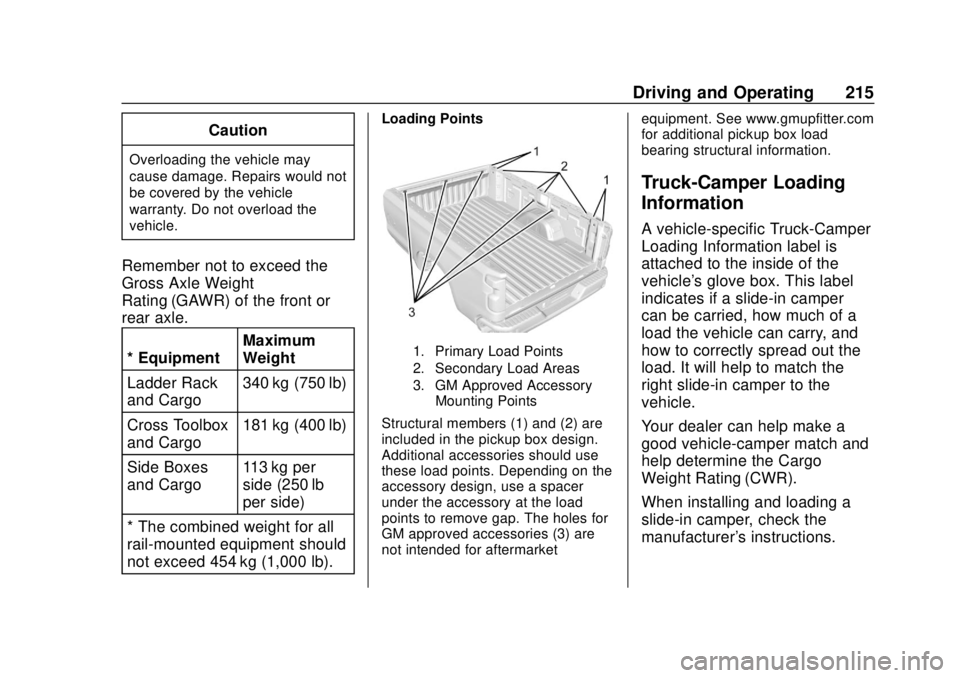
Loading Points
1. Primary Load Points
2. Secondary Load Areas
3. GM Approved Accessory Mounting Points
Structural members (1) and (2) are
included in the pickup box design.
Additional accessories should use
these load points. Depending on the
accessory design, use a spacer
under the accessory at the load
points to remove gap. The holes for
GM approved accessories (3) are
not intended for aftermarket equipment. See www.gmupfitter.com
for additional pickup box load
bearing structural information.
Truck-Camper Loading
Information
A vehicle-specific Truck-Camper
Loading Information label is
attached to the inside of the
vehicle's glove box. This label
indicates if a slide-in camper
can be carried, how much of a
load the vehicle can carry, and
how to correctly spread out the
load. It will help to match the
right slide-in camper to the
vehicle.
Your dealer can help make a
good vehicle-camper match and
help determine the Cargo
Weight Rating (CWR).
When installing and loading a
slide-in camper, check the
manufacturer's instructions.
Page 217 of 474
Chevrolet Silverado Owner Manual (GMNA-Localizing-U.S./Canada/Mexico-
1500-11698642) - 2019 - CRC - 2/20/19
216 Driving and Operating
When carrying a slide-in
camper, the total cargo load of
the vehicle is the weight of the
camper plus:
.Everything added to the
camper after it left the
factory.
.Everything in the camper.
.All the people inside.
The CWR is the maximum
weight of the load the vehicle
can carry. It does not include the
weight of the people inside. But,
use about 68 kg (150 lb) for
each seat.
The total cargo load must not be
more than the vehicle's CWR.
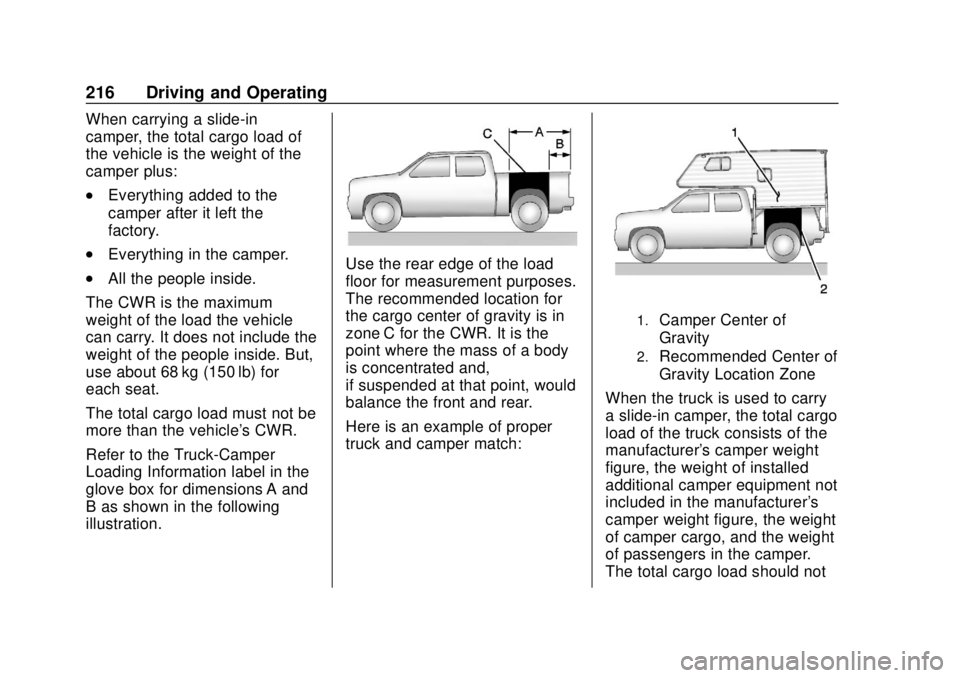
Refer to the Truck-Camper
Loading Information label in the
glove box for dimensions A and
B as shown in the following
illustration.Use the rear edge of the load
floor for measurement purposes.
The recommended location for
the cargo center of gravity is in
zone C for the CWR. It is the
point where the mass of a body
is concentrated and,
if suspended at that point, would
balance the front and rear.
Here is an example of proper
truck and camper match:
1.Camper Center of
Gravity
2.Recommended Center of
Gravity Location Zone
When the truck is used to carry
a slide-in camper, the total cargo
load of the truck consists of the
manufacturer's camper weight
figure, the weight of installed
additional camper equipment not
included in the manufacturer's
camper weight figure, the weight
of camper cargo, and the weight
of passengers in the camper.
The total cargo load should not
Page 218 of 474
Chevrolet Silverado Owner Manual (GMNA-Localizing-U.S./Canada/Mexico-
1500-11698642) - 2019 - CRC - 2/20/19
Driving and Operating 217
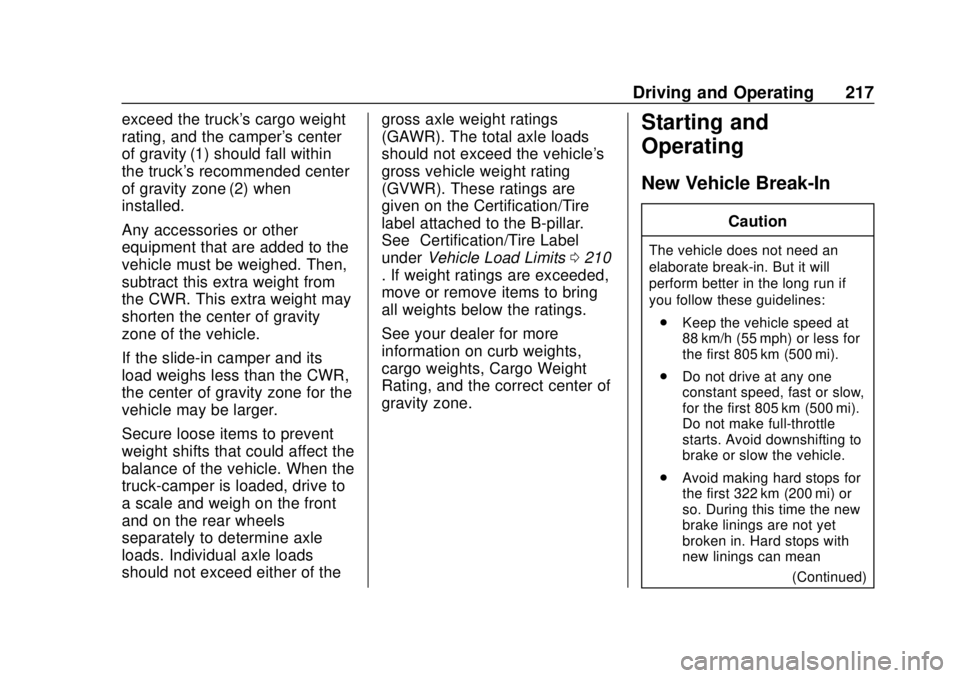
exceed the truck's cargo weight
rating, and the camper's center
of gravity (1) should fall within
the truck's recommended center
of gravity zone (2) when
installed.
Any accessories or other
equipment that are added to the
vehicle must be weighed. Then,
subtract this extra weight from
the CWR. This extra weight may
shorten the center of gravity
zone of the vehicle.
If the slide-in camper and its
load weighs less than the CWR,
the center of gravity zone for the
vehicle may be larger.
Secure loose items to prevent
weight shifts that could affect the
balance of the vehicle. When the
truck-camper is loaded, drive to
a scale and weigh on the front
and on the rear wheels
separately to determine axle
loads. Individual axle loads
should not exceed either of thegross axle weight ratings
(GAWR). The total axle loads
should not exceed the vehicle's
gross vehicle weight rating
(GVWR). These ratings are
given on the Certification/Tire
label attached to the B-pillar.
See
“Certification/Tire Label”
under Vehicle Load Limits 0210
. If weight ratings are exceeded,
move or remove items to bring
all weights below the ratings.
See your dealer for more
information on curb weights,
cargo weights, Cargo Weight
Rating, and the correct center of
gravity zone.Starting and
Operating
New Vehicle Break-In
Caution
The vehicle does not need an
elaborate break-in. But it will
perform better in the long run if
you follow these guidelines:
. Keep the vehicle speed at
88 km/h (55 mph) or less for
the first 805 km (500 mi).
. Do not drive at any one
constant speed, fast or slow,
for the first 805 km (500 mi).
Do not make full-throttle
starts. Avoid downshifting to
brake or slow the vehicle.
. Avoid making hard stops for
the first 322 km (200 mi) or
so. During this time the new
brake linings are not yet
broken in. Hard stops with
new linings can mean
(Continued)
Page 256 of 474

Chevrolet Silverado Owner Manual (GMNA-Localizing-U.S./Canada/Mexico-
1500-11698642) - 2019 - CRC - 2/20/19
Driving and Operating 255
Information Center (DIC) messages
may display when the systems are
unavailable or blocked..Front and rear bumpers and the
area below the bumpers
. Front grille and headlamps
. Front camera lens in the front
grille or near the front emblem
. Front side and rear side panels
. Outside of the windshield in front
of the rearview mirror
. Side camera lens on the bottom
of the outside mirrors
. Rear side corner bumpers
. Rear Vision Camera in the
tailgate handle
Assistance Systems for
Parking or Backing
If equipped, the Rear Vision Camera
(RVC), Surround Vision, Rear Park
Assist (RPA), Front Park Assist
(FPA), and Rear Cross Traffic Alert
(RCTA) may help the driver park or
avoid objects. Always check around
the vehicle when parking or
backing. The RVC, RPA, and Surround
Vision will not work properly if the
tailgate is down. If the tailgate is
down, do not use these systems.
Rear Vision Camera (RVC)
When the vehicle is shifted into
R (Reverse), the RVC displays an
image of the area behind the vehicle
in the infotainment display. The
previous screen displays when the
vehicle is shifted out of R (Reverse)
after a short delay. To return to the
previous screen sooner, press any
button on the infotainment system,
shift into P (Park), or, while in D
(Drive), reach a vehicle speed of
approximately 12 km/h (8 mph). The
rear vision camera is in the tailgate
handle.
Page 257 of 474
Chevrolet Silverado Owner Manual (GMNA-Localizing-U.S./Canada/Mexico-
1500-11698642) - 2019 - CRC - 2/20/19
256 Driving and Operating
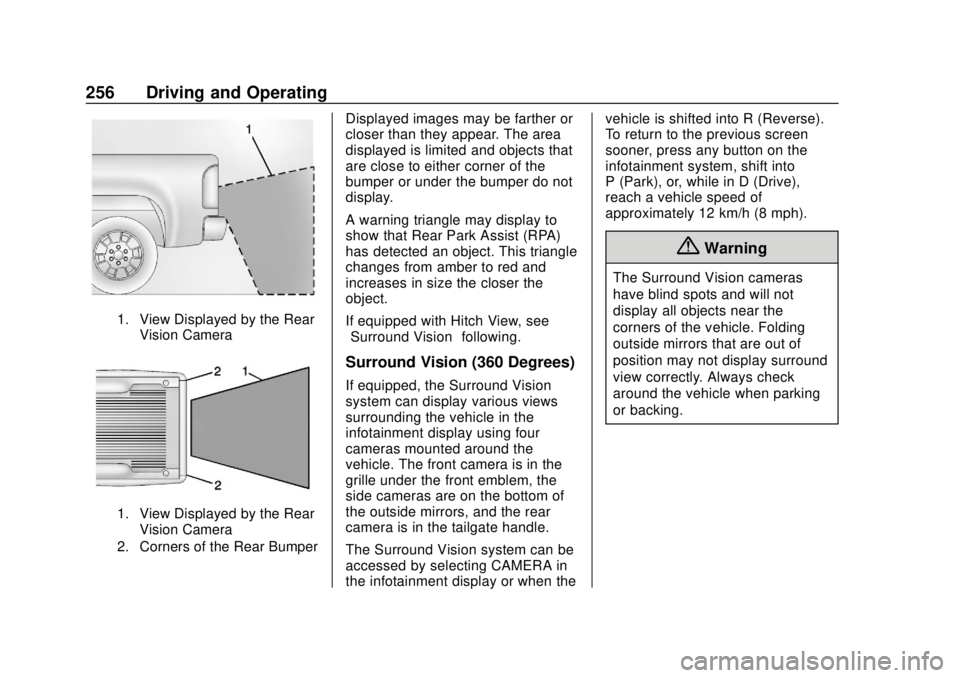
1. View Displayed by the RearVision Camera
1. View Displayed by the RearVision Camera
2. Corners of the Rear Bumper
Displayed images may be farther or
closer than they appear. The area
displayed is limited and objects that
are close to either corner of the
bumper or under the bumper do not
display.
A warning triangle may display to
show that Rear Park Assist (RPA)
has detected an object. This triangle
changes from amber to red and
increases in size the closer the
object.
If equipped with Hitch View, see
“Surround Vision” following.
Surround Vision (360 Degrees)
If equipped, the Surround Vision
system can display various views
surrounding the vehicle in the
infotainment display using four
cameras mounted around the
vehicle. The front camera is in the
grille under the front emblem, the
side cameras are on the bottom of
the outside mirrors, and the rear
camera is in the tailgate handle.
The Surround Vision system can be
accessed by selecting CAMERA in
the infotainment display or when the vehicle is shifted into R (Reverse).
To return to the previous screen
sooner, press any button on the
infotainment system, shift into
P (Park), or, while in D (Drive),
reach a vehicle speed of
approximately 12 km/h (8 mph).
{Warning
The Surround Vision cameras
have blind spots and will not
display all objects near the
corners of the vehicle. Folding
outside mirrors that are out of
position may not display surround
view correctly. Always check
around the vehicle when parking
or backing.