2019 CHEVROLET MALIBU display
[x] Cancel search: displayPage 8 of 382
Chevrolet Malibu Owner Manual (GMNA-Localizing-U.S./Canada/Mexico-
12461813) - 2019 - crc - 12/11/18
8 In Brief
Initial Drive
Information
This section provides a brief
overview about some of the
important features that may or may
not be on your specific vehicle.
For more detailed information, refer
to each of the features which can be
found later in this owner’s manual.
Stop/Start System
If equipped, the Stop/Start system
will shut off the engine to help
conserve fuel. It has components
designed for the increased number
of starts.
When the brakes are applied and
the vehicle is at a complete stop,
the engine may turn off. When
stopped, the tachometer displays
AUTO STOP. SeeTachometer
(Non-Hybrid)0119. When the brake
pedal is released or the accelerator
pedal is pressed, the engine will
restart. SeeStop/Start System
0179.
Remote Keyless Entry
(RKE) System
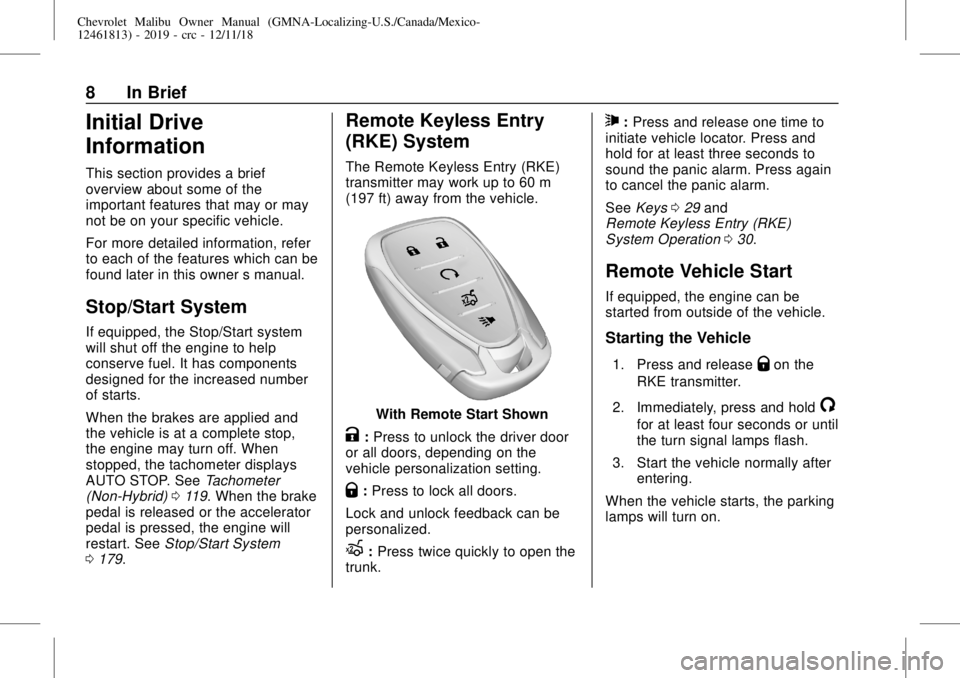
The Remote Keyless Entry (RKE)
transmitter may work up to 60 m
(197 ft) away from the vehicle.
With Remote Start Shown
K:Press to unlock the driver door
or all doors, depending on the
vehicle personalization setting.
Q:Press to lock all doors.
Lock and unlock feedback can be
personalized.
X:Press twice quickly to open the
trunk.
7:Press and release one time to
initiate vehicle locator. Press and
hold for at least three seconds to
sound the panic alarm. Press again
to cancel the panic alarm.
SeeKeys029and
Remote Keyless Entry (RKE)
System Operation030.
Remote Vehicle Start
If equipped, the engine can be
started from outside of the vehicle.
Starting the Vehicle
1. Press and releaseQon the
RKE transmitter.
2. Immediately, press and hold
/
for at least four seconds or until
the turn signal lamps flash.
3. Start the vehicle normally after
entering.
When the vehicle starts, the parking
lamps will turn on.
Page 18 of 382
Chevrolet Malibu Owner Manual (GMNA-Localizing-U.S./Canada/Mexico-
12461813) - 2019 - crc - 12/11/18
18 In Brief
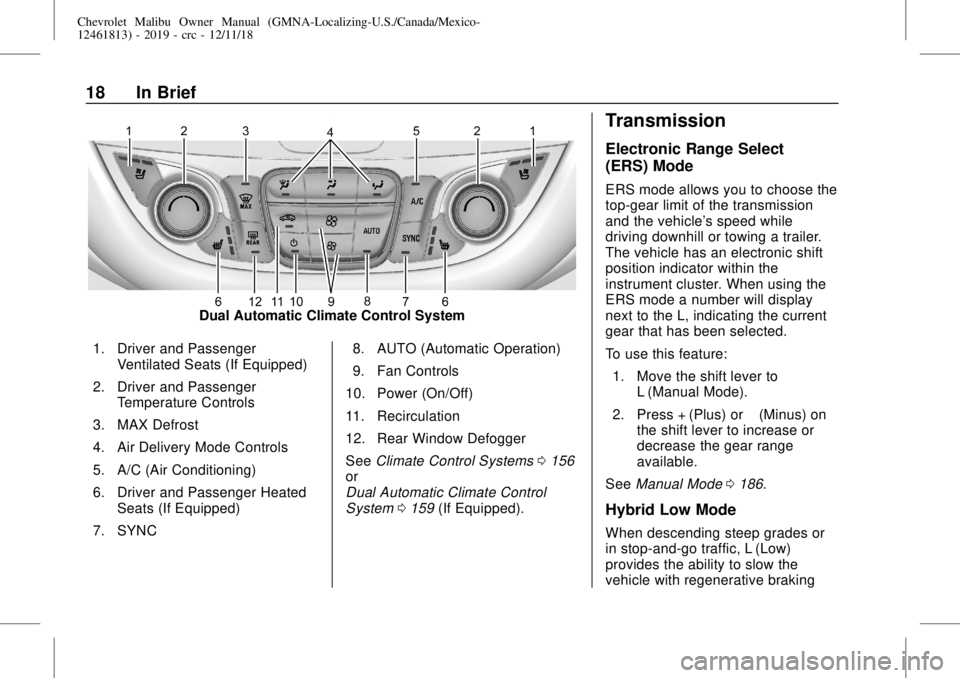
Dual Automatic Climate Control System
1. Driver and Passenger
Ventilated Seats (If Equipped)
2. Driver and Passenger
Temperature Controls
3. MAX Defrost
4. Air Delivery Mode Controls
5. A/C (Air Conditioning)
6. Driver and Passenger Heated
Seats (If Equipped)
7. SYNC8. AUTO (Automatic Operation)
9. Fan Controls
10. Power (On/Off)
11. Recirculation
12. Rear Window Defogger
SeeClimate Control Systems0156
or
Dual Automatic Climate Control
System0159(If Equipped).
Transmission
Electronic Range Select
(ERS) Mode
ERS mode allows you to choose the
top-gear limit of the transmission
and the vehicle's speed while
driving downhill or towing a trailer.
The vehicle has an electronic shift
position indicator within the
instrument cluster. When using the
ERS mode a number will display
next to the L, indicating the current
gear that has been selected.
To use this feature:
1. Move the shift lever to
L (Manual Mode).
2. Press + (Plus) or−(Minus) on
the shift lever to increase or
decrease the gear range
available.
SeeManual Mode0186.
Hybrid Low Mode
When descending steep grades or
in stop-and-go traffic, L (Low)
provides the ability to slow the
vehicle with regenerative braking
Page 20 of 382
Chevrolet Malibu Owner Manual (GMNA-Localizing-U.S./Canada/Mexico-
12461813) - 2019 - crc - 12/11/18
20 In Brief
−SET :Press briefly to set the
speed and activate cruise control.
If cruise control is already active,
use to decrease vehicle speed.
SeeCruise Control0194or
Adaptive Cruise Control0196(If
Equipped).
Driver Information
Center (DIC)
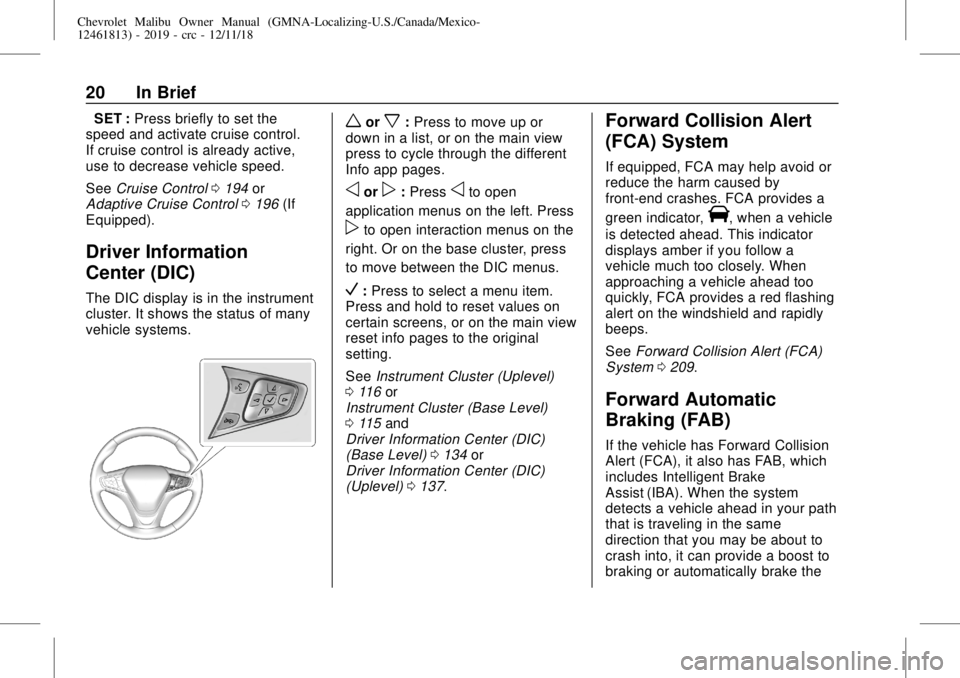
The DIC display is in the instrument
cluster. It shows the status of many
vehicle systems.
worx:Press to move up or
down in a list, or on the main view
press to cycle through the different
Info app pages.
oorp:Pressoto open
application menus on the left. Press
pto open interaction menus on the
right. Or on the base cluster, press
to move between the DIC menus.
V:Press to select a menu item.
Press and hold to reset values on
certain screens, or on the main view
reset info pages to the original
setting.
SeeInstrument Cluster (Uplevel)
0116or
Instrument Cluster (Base Level)
0115and
Driver Information Center (DIC)
(Base Level)0134or
Driver Information Center (DIC)
(Uplevel)0137.
Forward Collision Alert
(FCA) System
If equipped, FCA may help avoid or
reduce the harm caused by
front-end crashes. FCA provides a
green indicator,
V, when a vehicle
is detected ahead. This indicator
displays amber if you follow a
vehicle much too closely. When
approaching a vehicle ahead too
quickly, FCA provides a red flashing
alert on the windshield and rapidly
beeps.
SeeForward Collision Alert (FCA)
System0209.
Forward Automatic
Braking (FAB)
If the vehicle has Forward Collision
Alert (FCA), it also has FAB, which
includes Intelligent Brake
Assist (IBA). When the system
detects a vehicle ahead in your path
that is traveling in the same
direction that you may be about to
crash into, it can provide a boost to
braking or automatically brake the
Page 21 of 382
Chevrolet Malibu Owner Manual (GMNA-Localizing-U.S./Canada/Mexico-
12461813) - 2019 - crc - 12/11/18
In Brief 21
vehicle. This can help avoid or
lessen the severity of crashes when
driving in a forward gear.
SeeForward Automatic Braking
(FAB)0211.
Front Pedestrian Braking
(FPB) System
If equipped, the FPB system may
help avoid or reduce the harm
caused by front-end crashes with
nearby pedestrians when driving in
a forward gear. FPB displays a
pedestrian ahead indicator when a
nearby pedestrian is detected
directly ahead. When approaching a
detected pedestrian too quickly,
FPB provides a red flashing alert on
the windshield and rapidly beeps.
FPB can provide a boost to braking
or automatically brake the vehicle.
SeeFront Pedestrian Braking (FPB)
System0213.
Lane Keep Assist (LKA)
If equipped, LKA may help avoid
crashes due to unintentional lane
departures. It may assist by gentlyturning the steering wheel if the
vehicle approaches a detected lane
marking without using a turn signal
in that direction. It may also provide
a Lane Departure Warning (LDW)
alert as the lane marking is crossed.
The system will not assist or alert if
it detects that you are actively
steering. Override LKA by turning
the steering wheel. LKA uses a
camera to detect lane markings
between 60 km/h (37 mph) and
180 km/h (112 mph).
SeeLane Departure Warning (LDW)
0217and
Lane Keep Assist (LKA)0217.
Lane Change Alert (LCA)
If equipped, the LCA system is a
lane-changing aid that assists
drivers with avoiding lane change
crashes that occur with moving
vehicles in the side blind zone (or
spot) areas or with vehicles rapidly
approaching these areas from
behind. The LCA warning display
will light up in the corresponding
outside mirror and will flash if theturn signal is on. The Side Blind
Zone Alert (SBZA) system is
included as part of the LCA system.
SeeSide Blind Zone Alert (SBZA)
0215and
Lane Change Alert (LCA)0215.
Rear Vision
Camera (RVC)
If equipped, RVC shows a view of
the area behind the vehicle on the
infotainment display when the
vehicle is shifted into R (Reverse) to
aid with parking and low-speed
backing maneuvers.
SeeAssistance Systems for Parking
or Backing0205.
Rear Cross Traffic Alert
(RCTA) System
If equipped, the RCTA system uses
a triangle with an arrow on the
infotainment display to warn of
traffic behind your vehicle that may
cross your vehicle's path while in
R (Reverse). In addition, beeps will
sound.
Page 22 of 382
Chevrolet Malibu Owner Manual (GMNA-Localizing-U.S./Canada/Mexico-
12461813) - 2019 - crc - 12/11/18
22 In Brief
SeeAssistance Systems for Parking
or Backing0205.
Park Assist
If equipped, Front and Rear Park
Assist (FRPA) uses sensors on the
front and rear bumpers to assist
with parking and avoiding objects
during low-speed parking
maneuvers. It operates at speeds
less than 8 km/h (5 mph). The
system may show a warning triangle
on the infotainment display and a
graphic on the instrument cluster to
provide the object distance. In
addition, multiple beeps may occur
if very close to an object.
SeeAssistance Systems for Parking
or Backing0205.
Automatic Parking
Assist (APA)
If equipped, the APA system helps
to search for and maneuver the
vehicle into parallel or perpendicular
parking spots using automatic
steering, DIC displays, and beeps.When the vehicle speed is below
30 km/h (18 mph), press
Oto
enable the system.
See“Automatic Parking Assist
(APA)”underAssistance Systems
for Parking or Backing0205.
Power Outlets
The accessory power outlets can be
used to plug in electrical equipment,
such as a cell phone or MP3 player.
There are two accessory power
outlets:
.
One on the center stack below
the climate control system.
.
One on the rear of the center
console.
Open the protective cover to use the
accessory power outlet.
SeePower Outlets0110.
Sunroof
If equipped, the ignition must be on
or in ACC/ACCESSORY,
or Retained Accessory Power (RAP)
must be active to operate thesunroof. SeeIgnition Positions
0176and
Retained Accessory Power (RAP)
0181.
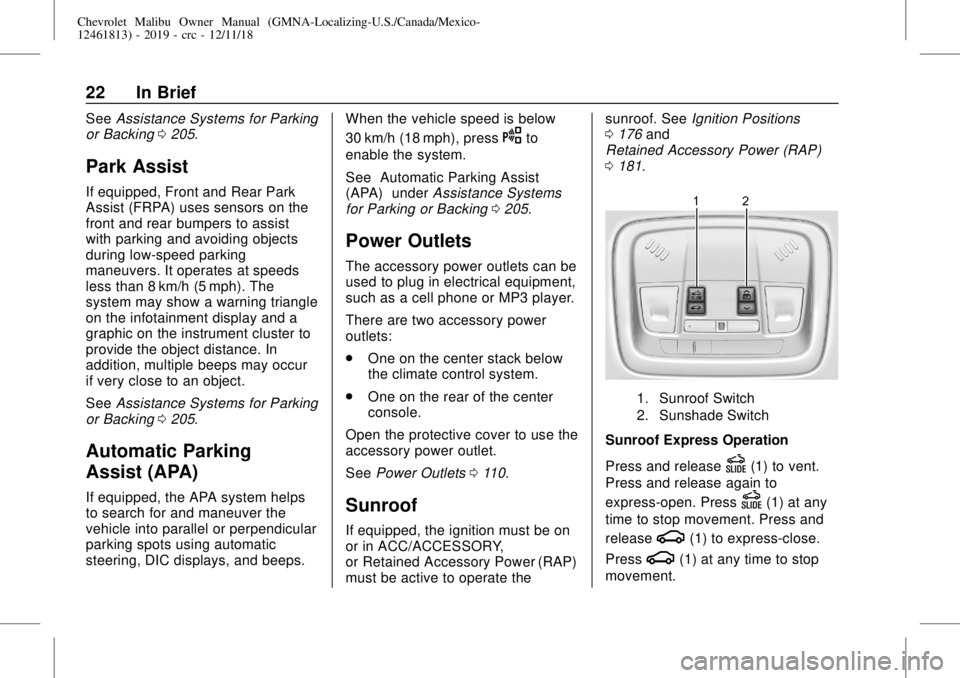
1. Sunroof Switch
2. Sunshade Switch
Sunroof Express Operation
Press and release
D(1) to vent.
Press and release again to
express-open. Press
D(1) at any
time to stop movement. Press and
release
g(1) to express-close.
Press
g(1) at any time to stop
movement.
Page 24 of 382
Chevrolet Malibu Owner Manual (GMNA-Localizing-U.S./Canada/Mexico-
12461813) - 2019 - crc - 12/11/18
24 In Brief
High Voltage Safety
Information
{Warning
Exposure to high voltage can
cause shock, burns, and even
death. The high voltage
components in the vehicle can
only be serviced by technicians
with special training.
High voltage components are
identified by labels. Do not
remove, open, take apart,
or modify these components.
High voltage cable or wiring has
orange covering or labels. Do not
probe, tamper with, cut, or modify
high voltage cable or wiring.
This vehicle has a high voltage
battery and a standard 12-volt
battery.
If the vehicle is in a crash, the
sensing system may shut down the
high voltage system. When this
occurs, the high voltage battery isdisconnected and the vehicle will
not start. The SERVICE VEHICLE
SOON message in the Driver
Information Center (DIC) will be
displayed. Before the vehicle can be
operated again, it must be serviced
at your dealer.
{Warning
Damage to the high voltage
battery or high voltage system
can create a risk of electric shock,
overheating, or fire.
If the vehicle is damaged from a
moderate to severe crash, flood,
fire, or other event, the vehicle
should be inspected as soon as
possible. Until the vehicle has
been inspected, store it outside at
least 15 m (50 ft) from any
structure or anything that can
burn. Ventilate the vehicle by
opening a window or a door.
(Continued)
Warning (Continued)
Contact Customer Assistance as
soon as possible to determine
whether an inspection is needed.
SeeCustomer Assistance Offices
0348.
SeeBattery - North America0257
for important safety information.
If an airbag has inflated, seeWhat
Will You See after an Airbag
Inflates?079.
Only a trained service technician
with the proper knowledge and tools
should inspect, test, or replace the
high voltage battery. See your
dealer if the high voltage battery
needs service.
Regenerative Braking
(Hybrid Only)
Regenerative braking takes some of
the energy from the moving vehicle
and turns it back into electrical
energy. This energy is then stored in
the high voltage battery system,
Page 27 of 382
Chevrolet Malibu Owner Manual (GMNA-Localizing-U.S./Canada/Mexico-
12461813) - 2019 - crc - 12/11/18
In Brief 27
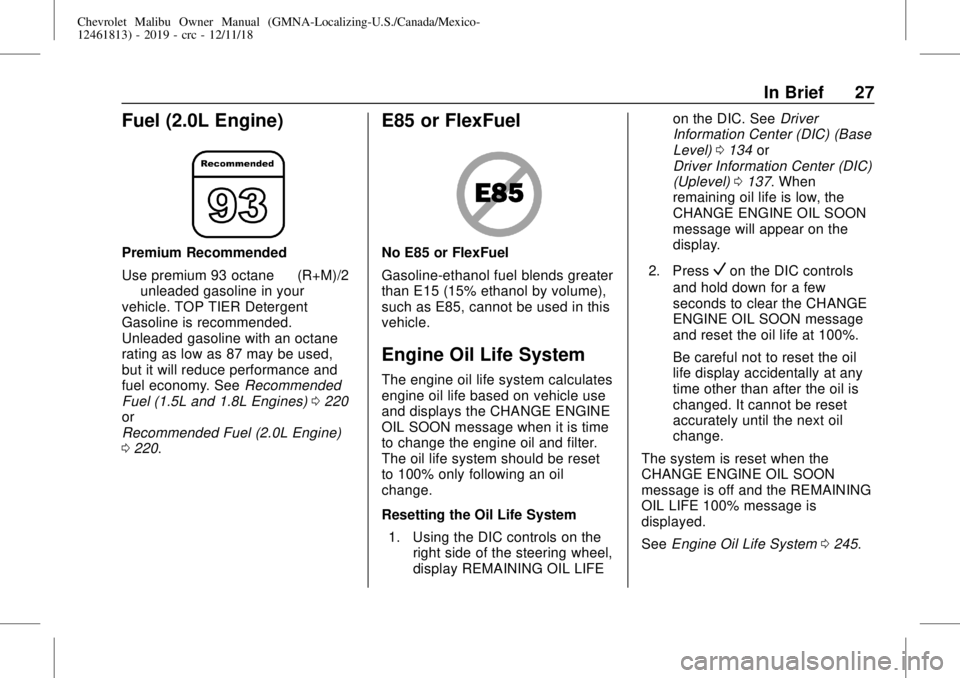
Fuel (2.0L Engine)
Premium Recommended
Use premium 93 octane—(R+M)/2
—unleaded gasoline in your
vehicle. TOP TIER Detergent
Gasoline is recommended.
Unleaded gasoline with an octane
rating as low as 87 may be used,
but it will reduce performance and
fuel economy. SeeRecommended
Fuel (1.5L and 1.8L Engines)0220
or
Recommended Fuel (2.0L Engine)
0220.
E85 or FlexFuel
No E85 or FlexFuel
Gasoline-ethanol fuel blends greater
than E15 (15% ethanol by volume),
such as E85, cannot be used in this
vehicle.
Engine Oil Life System
The engine oil life system calculates
engine oil life based on vehicle use
and displays the CHANGE ENGINE
OIL SOON message when it is time
to change the engine oil and filter.
The oil life system should be reset
to 100% only following an oil
change.
Resetting the Oil Life System
1. Using the DIC controls on the
right side of the steering wheel,
display REMAINING OIL LIFEon the DIC. SeeDriver
Information Center (DIC) (Base
Level)0134or
Driver Information Center (DIC)
(Uplevel)0137. When
remaining oil life is low, the
CHANGE ENGINE OIL SOON
message will appear on the
display.
2. Press
Von the DIC controls
and hold down for a few
seconds to clear the CHANGE
ENGINE OIL SOON message
and reset the oil life at 100%.
Be careful not to reset the oil
life display accidentally at any
time other than after the oil is
changed. It cannot be reset
accurately until the next oil
change.
The system is reset when the
CHANGE ENGINE OIL SOON
message is off and the REMAINING
OIL LIFE 100% message is
displayed.
SeeEngine Oil Life System0245.
Page 33 of 382
Chevrolet Malibu Owner Manual (GMNA-Localizing-U.S./Canada/Mexico-
12461813) - 2019 - crc - 12/11/18
Keys, Doors, and Windows 33
With the vehicle off, press and holdQandKon the RKE transmitter at
the same time for approximately
three seconds. The turn signal
lamps will flash four times quickly to
indicate access is disabled. Using
any exterior handle to unlock the
doors or open the trunk will cause
the turn signal lamps to flash four
times quickly, indicating access is
disabled. If disabled, disarm the
alarm system before starting the
vehicle.
Enabling Keyless Unlocking:
With the vehicle off, press and hold
QandKon the RKE transmitter at
the same time for approximately
three seconds. The turn signal
lamps will flash twice quickly to
indicate access is enabled.
Passive Locking
This feature will lock the vehicle
several seconds after all doors are
closed, if the vehicle is off and at
least one RKE transmitter has been
removed from the interior or none
remain in the interior.If other electronic devices interfere
with the RKE transmitter signal, the
vehicle may not detect the RKE
transmitter inside the vehicle.
If passive locking is enabled, the
doors may lock with the RKE
transmitter inside the vehicle. Do
not leave the RKE transmitter in an
unattended vehicle.
To customize the doors to
automatically lock when exiting the
vehicle, seeVehicle Personalization
0142.
Temporary Disable of Passive
Locking
Temporarily disable passive locking
by pressing and holding
Kon the
interior door switch with a door open
for at least four seconds, or until
three chimes are heard. Passive
locking will then remain disabled
until
Qon the interior door is
pressed, or until the vehicle is
turned on.Remote Left In Vehicle Alert
When the vehicle is turned off and
an RKE transmitter is left in the
vehicle, the horn will chirp three
times after all doors are closed. To
turn on or off seeVehicle
Personalization0142.
Remote No Longer In Vehicle Alert
If the vehicle is on with a door open,
and then all doors are closed, the
vehicle will check for an RKE
transmitter inside. If an RKE
transmitter is not detected, the
Driver Information Center (DIC) will
display NO REMOTE DETECTED
and the horn will chirp three times.
This occurs only once each time the
vehicle is driven. SeeVehicle
Personalization0142.
Keyless Trunk Opening
Press the touch pad on the rear of
the trunk to open it if the RKE
transmitter is within 1 m (3 ft) of the
trunk.