2019 CHEVROLET MALIBU display
[x] Cancel search: displayPage 34 of 382
Chevrolet Malibu Owner Manual (GMNA-Localizing-U.S./Canada/Mexico-
12461813) - 2019 - crc - 12/11/18
34 Keys, Doors, and Windows
Key Access
To access a vehicle with a weak
transmitter battery, seeDoor Locks
039.
Programming Transmitters to
the Vehicle
Only RKE transmitters programmed
to the vehicle will work. If a
transmitter is lost or stolen, a
replacement can be purchased and
programmed through your dealer.
The vehicle can be reprogrammed
so that lost or stolen transmitters no
longer work. Any remaining
transmitters will need to be
reprogrammed. Each vehicle can
have up to eight transmitters
matched to it.
Programming with Recognized
Transmitters
A new transmitter can be
programmed to the vehicle when
there are two recognized
transmitters. To program, the vehicle
must be off and all of thetransmitters, both currently
recognized and new, must be
with you.
1. Place the two recognized
transmitters in the cupholder.
2. Remove the key lock cylinder
cap on the driver door handle.
SeeDoor Locks039. Insert
the vehicle key of the new
transmitter into the key lock
cylinder on the outside of the
driver door and turn the key
counterclockwise five times
within 10 seconds.
The DIC displays READY FOR
REMOTE #2, 3, 4 or 5.
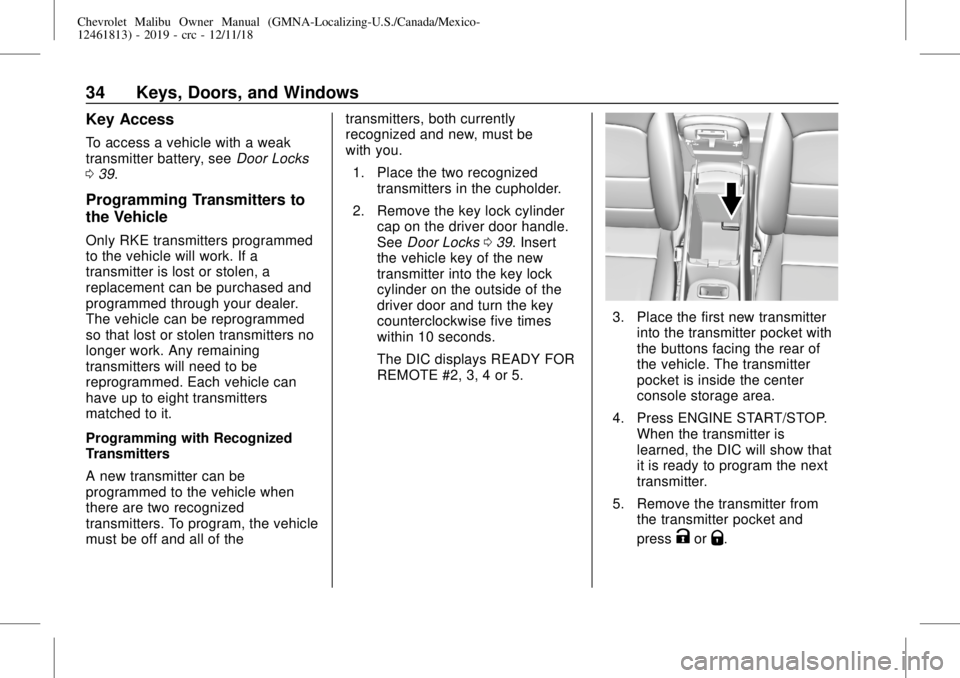
3. Place the first new transmitter
into the transmitter pocket with
the buttons facing the rear of
the vehicle. The transmitter
pocket is inside the center
console storage area.
4. Press ENGINE START/STOP.
When the transmitter is
learned, the DIC will show that
it is ready to program the next
transmitter.
5. Remove the transmitter from
the transmitter pocket and
press
KorQ.
Page 35 of 382
Chevrolet Malibu Owner Manual (GMNA-Localizing-U.S./Canada/Mexico-
12461813) - 2019 - crc - 12/11/18
Keys, Doors, and Windows 35
To program additional
transmitters, repeat Steps 3–5
for each new transmitter.
When all additional transmitters
are programmed, press and
hold ENGINE START/STOP for
12 seconds to exit
programming mode.
6. Put the key back into the
transmitter.
7. Replace the key lock cylinder
cap. SeeDoor Locks039.
Programming without Recognized
Transmitters
If two currently recognized
transmitters are not available, follow
this procedure to program up to
eight transmitters. This feature is
not available in Canada. This
procedure will take approximately
30 minutes to complete. The vehicle
must be off and all of the
transmitters to be programmed must
be with you.
1. Remove the key lock cylinder
cap on the driver door handle.
SeeDoor Locks039. Insertthe vehicle key of the
transmitter into the key lock
cylinder on the outside of the
driver door and turn the key
counterclockwise five times
within 10 seconds.
The DIC displays REMOTE
LEARN PENDING,
PLEASE WAIT.
2. Wait for 10 minutes until the
DIC displays PRESS ENGINE
START BUTTON TO LEARN
and then press ENGINE
START/STOP.
The DIC will again display
REMOTE LEARN PENDING,
PLEASE WAIT.
3. Repeat Step 2 two additional
times. After the third time, all
previously known transmitters
will no longer work with the
vehicle. Remaining transmitters
can be relearned during the
next steps.
The DIC should now display
READY FOR REMOTE # 1.
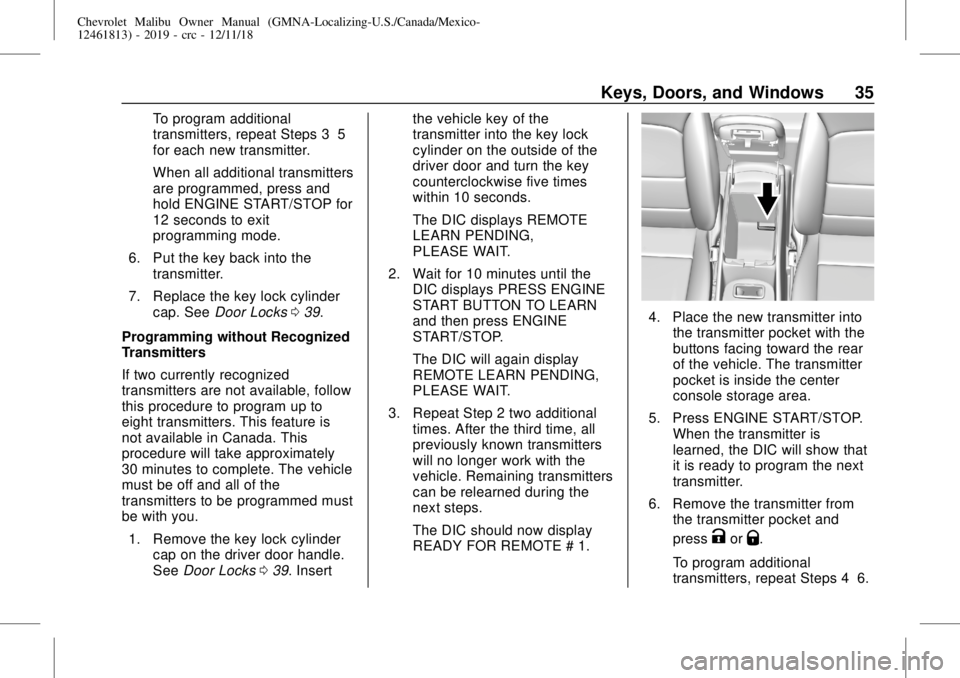
4. Place the new transmitter into
the transmitter pocket with the
buttons facing toward the rear
of the vehicle. The transmitter
pocket is inside the center
console storage area.
5. Press ENGINE START/STOP.
When the transmitter is
learned, the DIC will show that
it is ready to program the next
transmitter.
6. Remove the transmitter from
the transmitter pocket and
press
KorQ.
To program additional
transmitters, repeat Steps 4–6.
Page 36 of 382
Chevrolet Malibu Owner Manual (GMNA-Localizing-U.S./Canada/Mexico-
12461813) - 2019 - crc - 12/11/18
36 Keys, Doors, and Windows
When all additional transmitters
are programmed, press and
hold ENGINE START/STOP for
12 seconds to exit
programming mode.
7. Return the key back into the
transmitter.
8. Replace the key lock cylinder
cap. SeeDoor Locks039.
Starting the Vehicle with a Low
Transmitter Battery
While trying to start the vehicle,
if the transmitter battery is weak or if
there is interference with the signal,
the DIC may display NO REMOTE
DETECTED or NO REMOTE KEY
WAS DETECTED PLACE KEY IN
TRANSMITTER POCKET THEN
START YOUR VEHICLE. The DIC
may also display REPLACE
BATTERY IN REMOTE KEY.
To start the vehicle:
1. Open the center console and
place the transmitter in the
transmitter pocket with the
buttons facing the rear of the
vehicle.2. With the vehicle in P (Park) or
N (Neutral), press the brake
pedal and press ENGINE
START/STOP. SeeStarting the
Engine0178.
Replace the transmitter battery
as soon as possible.
Battery Replacement
Replace the battery if the DIC
displays REPLACE BATTERY IN
REMOTE KEY.
Caution
When replacing the battery, do
not touch any of the circuitry on
the transmitter. Static from your
body could damage the
transmitter.
The battery is not rechargeable. To
replace the battery:
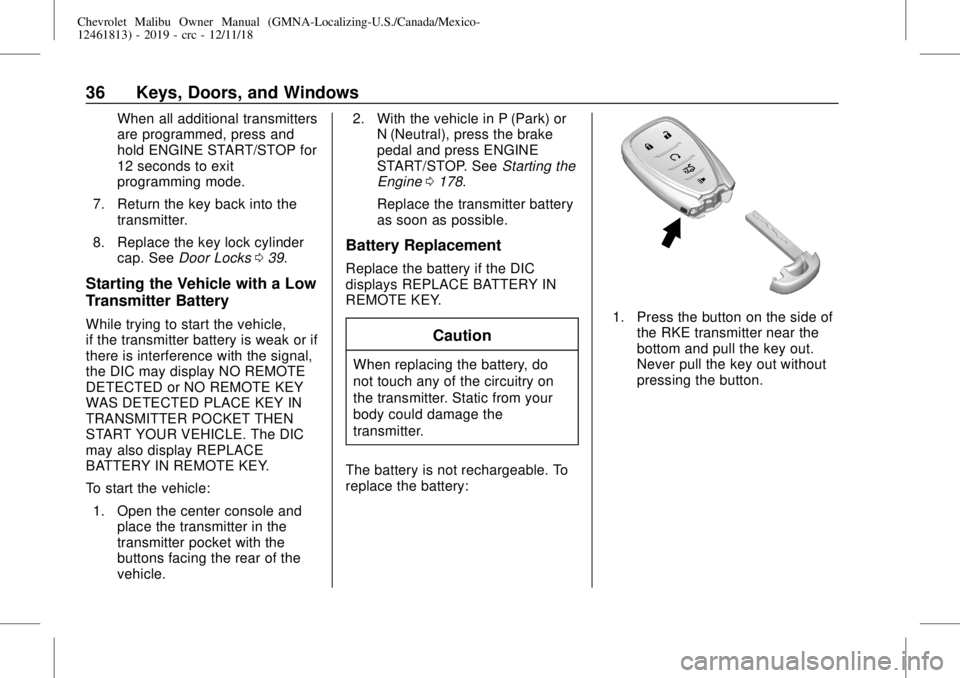
1. Press the button on the side of
the RKE transmitter near the
bottom and pull the key out.
Never pull the key out without
pressing the button.
Page 59 of 382
Chevrolet Malibu Owner Manual (GMNA-Localizing-U.S./Canada/Mexico-
12461813) - 2019 - crc - 12/11/18
Seats and Restraints 59
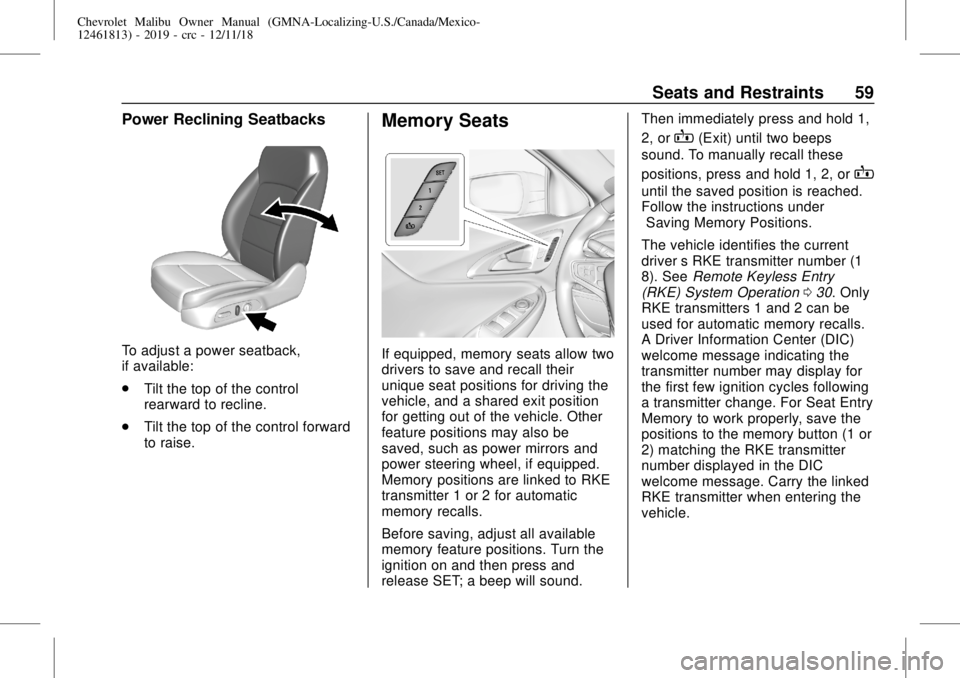
Power Reclining Seatbacks
To adjust a power seatback,
if available:
.
Tilt the top of the control
rearward to recline.
.
Tilt the top of the control forward
to raise.
Memory Seats
If equipped, memory seats allow two
drivers to save and recall their
unique seat positions for driving the
vehicle, and a shared exit position
for getting out of the vehicle. Other
feature positions may also be
saved, such as power mirrors and
power steering wheel, if equipped.
Memory positions are linked to RKE
transmitter 1 or 2 for automatic
memory recalls.
Before saving, adjust all available
memory feature positions. Turn the
ignition on and then press and
release SET; a beep will sound.Then immediately press and hold 1,
2, or
B(Exit) until two beeps
sound. To manually recall these
positions, press and hold 1, 2, or
B
until the saved position is reached.
Follow the instructions under
“Saving Memory Positions.”
The vehicle identifies the current
driver’s RKE transmitter number (1–
8). SeeRemote Keyless Entry
(RKE) System Operation030. Only
RKE transmitters 1 and 2 can be
used for automatic memory recalls.
A Driver Information Center (DIC)
welcome message indicating the
transmitter number may display for
the first few ignition cycles following
a transmitter change. For Seat Entry
Memory to work properly, save the
positions to the memory button (1 or
2) matching the RKE transmitter
number displayed in the DIC
welcome message. Carry the linked
RKE transmitter when entering the
vehicle.
Page 60 of 382
Chevrolet Malibu Owner Manual (GMNA-Localizing-U.S./Canada/Mexico-
12461813) - 2019 - crc - 12/11/18
60 Seats and Restraints
Memory adjustments may not be
available upon delivery or after
service until steps in“Saving
Memory Positions”section are
performed.
Vehicle Personalization Settings
.
To have the Seat Entry Memory
movement begin when the
vehicle is started, select the
Settings menu, then Vehicle,
then Seating Position, and then
Seat Entry Memory. Select On or
Off. See“Seat Entry Memory”
later in this section.
.
Seat Exit Memory movement
begins when the ignition is
turned off and the driver door is
opened, or when the ignition is
turned off with the driver door
already opened, select the
Settings menu, then Vehicle,
then Seating Position, and then
Seat Exit Memory. Select On or
Off. See“Seat Exit Memory”
later in this section.
.
SeeVehicle Personalization
0142for additional setting
information.Identifying Driver Number
To identify the driver number:
1. Start the vehicle with a different
key or RKE transmitter. The
DIC should display the driver
number; 1 or 2. Turn the
ignition off and remove the key
or RKE transmitter from the
vehicle.
2. Start the vehicle with the initial
key or RKE transmitter. The
DIC should display the other
driver number not shown in
Step 1.
Saving Memory Positions
Read these instructions completely
before saving memory positions.
To save preferred driving positions
1 and 2:
1. Turn the ignition on or to ACC/
ACCESSORY.
A DIC welcome message may
indicate driver number 1 or 2.
2. Adjust all available memory
features to the desired driving
position.3. Press and release SET; a beep
will sound.
4. Immediately press and hold the
1 or 2 memory button matching
the above DIC welcome
message until two beeps
sound.
If too much time passes
between releasing SET and
pressing 1, the memory
position will not be saved and
two beeps will not sound.
Repeat Steps 3 and 4.
1 or 2 corresponds to the driver
number. See“Identifying Driver
Number”previously in this
section.
5. Repeat Steps 1–4 for a second
driver using 1 or 2.
To save the position for
Band
Seat Exit Memory, repeat Steps 1–4
using
B. This saves the position
for getting out of the vehicle.
Save preferred memory feature
positions to both 1 and 2 if you are
the only driver.
Page 63 of 382
Chevrolet Malibu Owner Manual (GMNA-Localizing-U.S./Canada/Mexico-
12461813) - 2019 - crc - 12/11/18
Seats and Restraints 63
Auto Heated Seats
When the vehicle is on, this feature
will automatically activate the
heated seats at the level required by
the vehicle’s interior temperature.
The active high, medium, low, or off
heated seat level will be indicated
by the manual heated seat buttons
on the center stack. Use the manual
heated seat buttons on the center
stack to turn auto heated seats off.
If the passenger seat is unoccupied,
the auto heated seats feature will
not activate that seat. The auto
heated seats feature can be
programmed to always be enabled
when the vehicle is on.
SeeVehicle Personalization0142.
Remote Start Auto Heated and
Ventilated Seats
During a remote start, the heated or
ventilated seats, if equipped, can be
turned on automatically. When it is
cold outside, the heated seats turn
on, and when it is hot outside the
ventilated seats turn on. The heated
or ventilated seats are canceled
when the ignition is turned on. Pressthe button to use the heated or
ventilated seats after the vehicle is
started.
The heated or ventilated seat
indicator lights on the button do not
turn on during a remote start.
The heated seat temperature
performance of an unoccupied seat
may be reduced. This is normal.
The heated or ventilated seats will
not turn on during a remote start
unless they are enabled in the
vehicle personalization menu. See
Remote Vehicle Start037and
Vehicle Personalization0142.Rear Seats
Rear Seat Reminder
If equipped, the message REAR
SEAT REMINDER LOOK IN REAR
SEAT displays under certain
conditions indicating there may be
an item or passenger in the rear
seat. Check before exiting the
vehicle.
This feature will activate when a
second row door is opened while
the vehicle is on or up to 10 minutes
before the vehicle is turned on.
There will be an alert when the
vehicle is turned off. The alert does
not directly detect objects in the rear
seat; instead, under certain
conditions, it detects when a rear
door is opened and closed,
indicating that there may be
something in the rear seat.
The feature is active only once each
time the vehicle is turned on and off,
and will require reactivation by
opening and closing the second row
doors. There may be an alert even
when there is nothing in the rear
seat; for example, if a child entered
Page 67 of 382
Chevrolet Malibu Owner Manual (GMNA-Localizing-U.S./Canada/Mexico-
12461813) - 2019 - crc - 12/11/18
Seats and Restraints 67
Warning (Continued)
passengers to ride in any area of
the vehicle that is not equipped
with seats and seat belts.
Always wear a seat belt, and
check that all passenger(s) are
restrained properly too.
This vehicle has indicators as a
reminder to buckle the seat belts.
SeeSeat Belt Reminders0122.
Seat Belt Assurance System
This vehicle may have the Seat Belt
Assurance System, which prevents
the vehicle from shifting out of
P (Park). A message displays in the
Driver Information Center (DIC)
indicating the shift lever is locked if
the driver is unbuckled. The vehicle
will not shift out of P (Park). Buckle
the seat belt to unlock the shift
lever.
On some models, the Seat Belt
Assurance System may also
prevent shifting out of P (Park) if the
front outboard passenger, if present,is unbuckled. This system may not
allow the vehicle to shift out of
P (Park) if an object—such as a
briefcase, handbag, grocery bag,
laptop, or other electronic device—
is on the front outboard passenger
seat. If this happens, remove the
object from the seat or buckle the
seat belt to unlock the shift lever.
A message displays in the DIC
indicating the shift lever is unlocked
allowing the vehicle to be shifted out
of P (Park) after several seconds
following initial brake apply. See
“Seat Belts”and“Child Restraints”
in the Index for information about
the importance of proper
restraint use.
If the driver or front outboard
passenger unbuckles their seat belt
while driving, the seat belt reminder
chime and light(s) will come on. See
Seat Belt Reminders0122.
This system may not function
properly if the airbag readiness light
is on. SeeAirbag Readiness Light
0123.
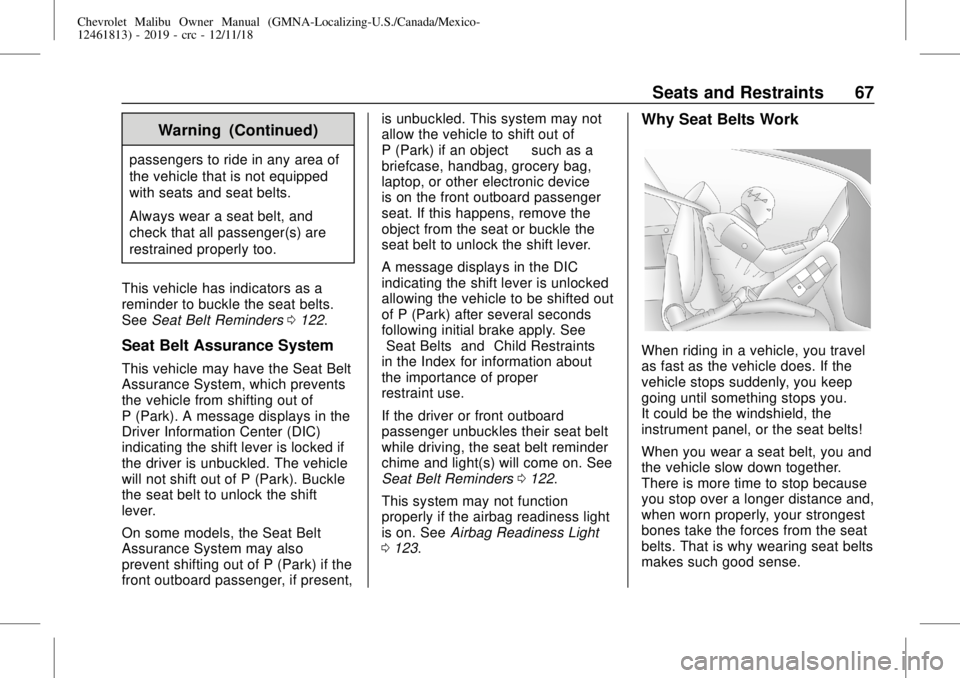
Why Seat Belts Work
When riding in a vehicle, you travel
as fast as the vehicle does. If the
vehicle stops suddenly, you keep
going until something stops you.
It could be the windshield, the
instrument panel, or the seat belts!
When you wear a seat belt, you and
the vehicle slow down together.
There is more time to stop because
you stop over a longer distance and,
when worn properly, your strongest
bones take the forces from the seat
belts. That is why wearing seat belts
makes such good sense.
Page 107 of 382
Chevrolet Malibu Owner Manual (GMNA-Localizing-U.S./Canada/Mexico-
12461813) - 2019 - crc - 12/11/18
Instruments and Controls 107
Instruments and
Controls
Controls
Steering Wheel Adjustment . . . 108
Steering Wheel Controls . . . . . . 108
Heated Steering Wheel . . . . . . . 108
Horn . . . . . . . . . . . . . . . . . . . . . . . . . . 108
Pedestrian Safety Signal
(Hybrid Only) . . . . . . . . . . . . . . . . 108
Windshield Wiper/Washer . . . . 109
Compass . . . . . . . . . . . . . . . . . . . . . 110
Clock . . . . . . . . . . . . . . . . . . . . . . . . . 110
Power Outlets . . . . . . . . . . . . . . . . 110
Wireless Charging . . . . . . . . . . . . 112
Warning Lights, Gauges, and
Indicators
Warning Lights, Gauges, and
Indicators . . . . . . . . . . . . . . . . . . . 114
Instrument Cluster (Base
Level) . . . . . . . . . . . . . . . . . . . . . . . 115
Instrument Cluster
(Uplevel) . . . . . . . . . . . . . . . . . . . . 116
Speedometer . . . . . . . . . . . . . . . . . 119
Odometer . . . . . . . . . . . . . . . . . . . . . 119
Trip Odometer . . . . . . . . . . . . . . . . 119
Tachometer (Non-Hybrid) . . . . . 119Fuel Gauge . . . . . . . . . . . . . . . . . . . 120
Power Indicator Gauge . . . . . . . 121
Engine Coolant Temperature
Gauge . . . . . . . . . . . . . . . . . . . . . . 121
Seat Belt Reminders . . . . . . . . . 122
Airbag Readiness Light . . . . . . . 123
Passenger Airbag Status
Indicator . . . . . . . . . . . . . . . . . . . . 123
Charging System Light . . . . . . . 124
Malfunction Indicator Lamp
(Check Engine Light) . . . . . . . . 124
Brake System Warning
Light . . . . . . . . . . . . . . . . . . . . . . . . 126
Electric Parking Brake
Light . . . . . . . . . . . . . . . . . . . . . . . . 127
Service Electric Parking Brake
Light . . . . . . . . . . . . . . . . . . . . . . . . 127
Antilock Brake System (ABS)
Warning Light . . . . . . . . . . . . . . . 127
Lane Keep Assist (LKA)
Light . . . . . . . . . . . . . . . . . . . . . . . . 128
Vehicle Ahead Indicator . . . . . . 128
Pedestrian Ahead Indicator . . . 128
Traction Off Light . . . . . . . . . . . . . 129
StabiliTrak OFF Light . . . . . . . . . 129
Traction Control System (TCS)/
StabiliTrak Light . . . . . . . . . . . . . 129
Engine Coolant Temperature
Warning Light
(Uplevel Only) . . . . . . . . . . . . . . . 130Tire Pressure Light . . . . . . . . . . . 130
Engine Oil Pressure Light . . . . 131
Low Fuel Warning Light (Base
Level) . . . . . . . . . . . . . . . . . . . . . . . 131
Low Fuel Warning Light
(Uplevel) . . . . . . . . . . . . . . . . . . . . 131
Security Light . . . . . . . . . . . . . . . . . 132
Vehicle Ready Light
(Hybrid) . . . . . . . . . . . . . . . . . . . . . 132
High-Beam On Light . . . . . . . . . . 132
Lamps On Reminder . . . . . . . . . 132
Cruise Control Light . . . . . . . . . . 133
Door Ajar Light (Uplevel) . . . . . 133
Information Displays
Power Flows (Hybrid) . . . . . . . . . 133
Energy Information
(Hybrid) . . . . . . . . . . . . . . . . . . . . . 134
Driver Information Center (DIC)
(Base Level) . . . . . . . . . . . . . . . . 134
Driver Information Center (DIC)
(Uplevel) . . . . . . . . . . . . . . . . . . . . 137
Vehicle Messages
Vehicle Messages . . . . . . . . . . . . 141
Engine Power Messages . . . . . 141
Vehicle Speed Messages . . . . . 141
Vehicle Personalization
Vehicle Personalization . . . . . . . 142