2019 CHEVROLET MALIBU stop start
[x] Cancel search: stop startPage 127 of 382
Chevrolet Malibu Owner Manual (GMNA-Localizing-U.S./Canada/Mexico-
12461813) - 2019 - crc - 12/11/18
Instruments and Controls 127
{Warning
The brake system might not be
working properly if the brake
system warning light is on.
Driving with the brake system
warning light on can lead to a
crash. If the light is still on after
the vehicle has been pulled off
the road and carefully stopped,
have the vehicle towed for
service.
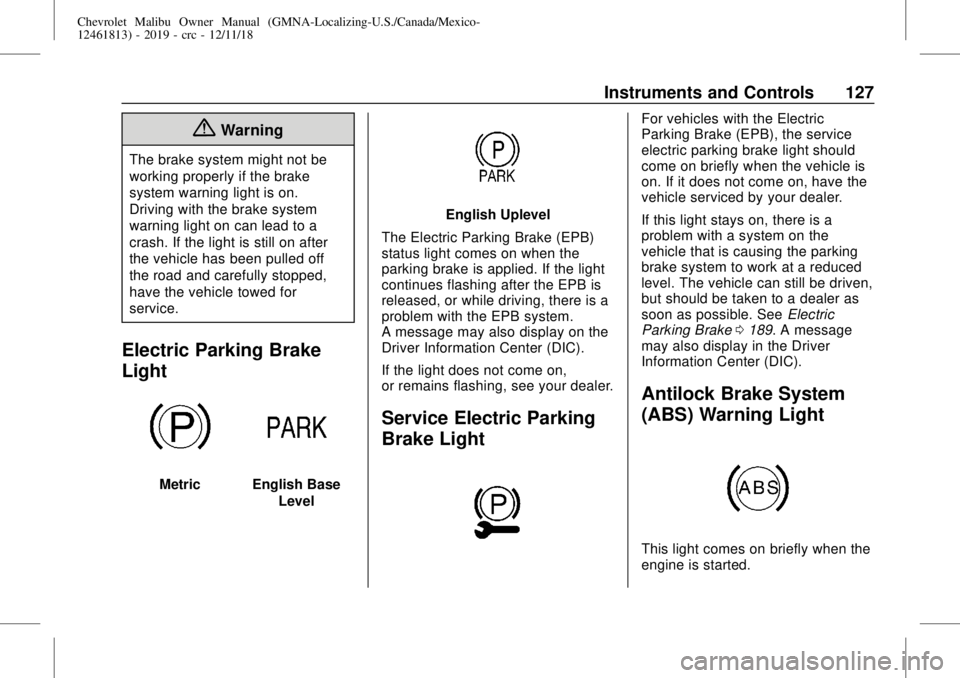
Electric Parking Brake
Light
MetricEnglish Base
Level
English Uplevel
The Electric Parking Brake (EPB)
status light comes on when the
parking brake is applied. If the light
continues flashing after the EPB is
released, or while driving, there is a
problem with the EPB system.
A message may also display on the
Driver Information Center (DIC).
If the light does not come on,
or remains flashing, see your dealer.
Service Electric Parking
Brake Light
For vehicles with the Electric
Parking Brake (EPB), the service
electric parking brake light should
come on briefly when the vehicle is
on. If it does not come on, have the
vehicle serviced by your dealer.
If this light stays on, there is a
problem with a system on the
vehicle that is causing the parking
brake system to work at a reduced
level. The vehicle can still be driven,
but should be taken to a dealer as
soon as possible. SeeElectric
Parking Brake0189. A message
may also display in the Driver
Information Center (DIC).
Antilock Brake System
(ABS) Warning Light
This light comes on briefly when the
engine is started.
Page 128 of 382
Chevrolet Malibu Owner Manual (GMNA-Localizing-U.S./Canada/Mexico-
12461813) - 2019 - crc - 12/11/18
128 Instruments and Controls
If the light does not come on, have it
fixed so it will be ready to warn if
there is a problem.
If the light comes on while driving,
stop as soon as it is safely possible
and turn off the vehicle. Then start
the engine again to reset the
system. If the ABS light stays on,
or comes on again while driving, the
vehicle needs service. A chime may
also sound when the light comes on
steady.
If the ABS light is the only light on,
the vehicle has regular brakes, but
the antilock brakes are not
functioning.
If both the ABS and the brake
system warning light are on, the
vehicle's antilock brakes are not
functioning and there is a problem
with the regular brakes. See your
dealer for service.
SeeBrake System Warning Light
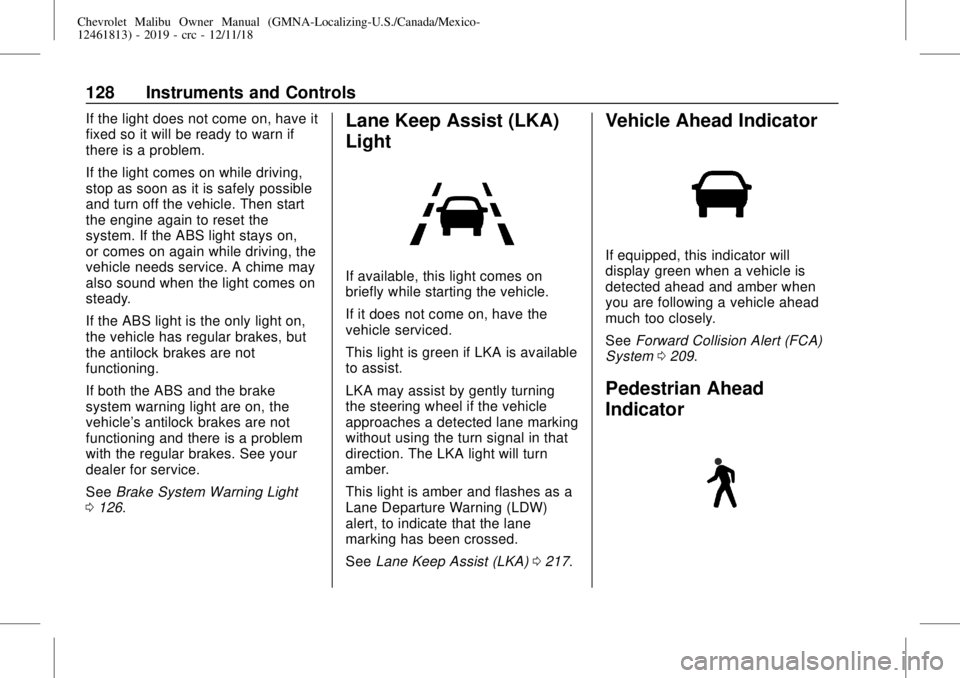
0126.Lane Keep Assist (LKA)
Light
If available, this light comes on
briefly while starting the vehicle.
If it does not come on, have the
vehicle serviced.
This light is green if LKA is available
to assist.
LKA may assist by gently turning
the steering wheel if the vehicle
approaches a detected lane marking
without using the turn signal in that
direction. The LKA light will turn
amber.
This light is amber and flashes as a
Lane Departure Warning (LDW)
alert, to indicate that the lane
marking has been crossed.
SeeLane Keep Assist (LKA)0217.
Vehicle Ahead Indicator
If equipped, this indicator will
display green when a vehicle is
detected ahead and amber when
you are following a vehicle ahead
much too closely.
SeeForward Collision Alert (FCA)
System0209.
Pedestrian Ahead
Indicator
Page 130 of 382
Chevrolet Malibu Owner Manual (GMNA-Localizing-U.S./Canada/Mexico-
12461813) - 2019 - crc - 12/11/18
130 Instruments and Controls
message may display. Check the
DIC messages to determine which
feature(s) is no longer functioning
and whether the vehicle requires
service.
If the light is on and flashing, the
TCS and/or the StabiliTrak/ESC
system is actively working.
SeeTraction Control/Electronic
Stability Control0192.
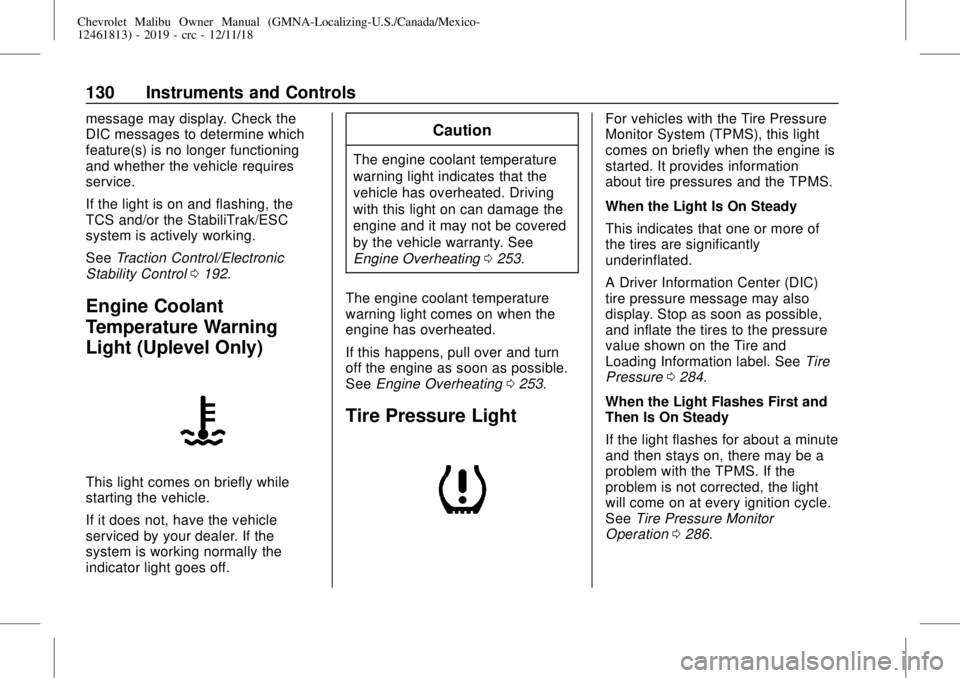
Engine Coolant
Temperature Warning
Light (Uplevel Only)
This light comes on briefly while
starting the vehicle.
If it does not, have the vehicle
serviced by your dealer. If the
system is working normally the
indicator light goes off.
Caution
The engine coolant temperature
warning light indicates that the
vehicle has overheated. Driving
with this light on can damage the
engine and it may not be covered
by the vehicle warranty. See
Engine Overheating0253.
The engine coolant temperature
warning light comes on when the
engine has overheated.
If this happens, pull over and turn
off the engine as soon as possible.
SeeEngine Overheating0253.
Tire Pressure Light
For vehicles with the Tire Pressure
Monitor System (TPMS), this light
comes on briefly when the engine is
started. It provides information
about tire pressures and the TPMS.
When the Light Is On Steady
This indicates that one or more of
the tires are significantly
underinflated.
A Driver Information Center (DIC)
tire pressure message may also
display. Stop as soon as possible,
and inflate the tires to the pressure
value shown on the Tire and
Loading Information label. SeeTire
Pressure0284.
When the Light Flashes First and
Then Is On Steady
If the light flashes for about a minute
and then stays on, there may be a
problem with the TPMS. If the
problem is not corrected, the light
will come on at every ignition cycle.
SeeTire Pressure Monitor
Operation0286.
Page 135 of 382
Chevrolet Malibu Owner Manual (GMNA-Localizing-U.S./Canada/Mexico-
12461813) - 2019 - crc - 12/11/18
Instruments and Controls 135
This number is based on the
number of L/100 km (mpg) recorded
since the last time this menu item
was reset. This number reflects only
the approximate average fuel
economy that the vehicle has right
now, and will change as driving
conditions change. Reset the
average consumption by pressing
V
when it is displayed.
Fuel Range :Displays the
approximate distance the vehicle
can be driven without refueling. The
fuel range estimate is based on an
average of the vehicle's fuel
economy over recent driving history
and the amount of fuel remaining in
the fuel tank. Fuel range cannot be
reset.
Average Vehicle Speed :Displays
the average vehicle speed of the
vehicle in kilometers per hour (km/h)
or miles per hour (mph). This
average is based on the various
vehicle speeds recorded since the
last reset. Reset the average speed
by pressing
Vwhen it is displayed.Timer :To start the timer, press
V
while Timer is displayed. The
display will show the amount of time
that has passed since the timer was
last reset, not including time the
ignition is off. Time will continue to
be counted as long as the ignition is
on, even if another display is being
shown on the DIC. The timer will
record up to 99 hours, 59 minutes,
and 59 seconds (99:59:59) after
which the display will return to zero.
To stop the timer, press
Vbriefly
while Timer is displayed. To reset
the timer to zero, press and hold
V.
Vehicle Information Menu
(VEHICLE) Items
Useworxto scroll through the
menu items. Not all items are
available on every vehicle. The
following is a list of all possible
menu items:Remaining Oil Life :Displays an
estimate of the oil's remaining useful
life. If REMAINING OIL LIFE 99% is
displayed, that means 99% of the
current oil life remains.
When the remaining oil life is low,
the CHANGE ENGINE OIL SOON
message will appear on the display.
The oil should be changed as soon
as possible. SeeEngine Oil0242.
In addition to the engine oil life
system monitoring the oil life,
additional maintenance is
recommended. SeeMaintenance
Schedule0329.
The Oil Life display must be reset
after each oil change. Do not reset
the Oil Life display accidentally at
any time other than when the oil has
just been changed. It cannot be
reset accurately until the next oil
change. To reset the engine oil life
system, seeEngine Oil Life System
0245.
Oil Pressure :Oil pressure is
displayed in either kilopascal (kPa)
or in pounds per square inch (psi).
Page 139 of 382
Chevrolet Malibu Owner Manual (GMNA-Localizing-U.S./Canada/Mexico-
12461813) - 2019 - crc - 12/11/18
Instruments and Controls 139
Air Filter Life :Shows an estimate
of the engine air filter’s remaining
useful life and the state of the
system. Engine Air Filter Life 95%
means 95% of the current air filter
life remains. Messages will display
based on the engine air filter life and
the state of the system. When the
REPLACE AT NEXT OIL CHANGE
message displays, the engine air
filter should be replaced at the time
of the next oil change. When the
REPLACE NOW message displays,
the engine air filter should be
replaced as soon as possible.
The Air Filter Life display must be
reset after the engine air filter
replacement. To reset, seeEngine
Air Filter Life System0246.
Tire Pressure :Shows the
approximate pressures of all four
tires. Tire pressure is displayed in
either kilopascal (kPa) or in pounds
per square inch (psi). If the pressure
is low, the value for that tire is
shown in amber. SeeTire Pressure
Monitor System0285and
Tire Pressure Monitor Operation
0286.Average Vehicle Speed :Displays
the average vehicle speed of the
vehicle in kilometers per hour (km/h)
or miles per hour (mph). This
average is based on the various
vehicle speeds recorded since the
last reset. Reset the average speed
by pressing
Vwhen it is displayed.
Fuel Economy :The center
displays the approximate
instantaneous fuel economy as a
number and bar graph. Displayed
above the bar graph is a running
average of fuel economy for the
most recently traveled selected
distance. Displayed below the bar
graph is the best average fuel
economy that has been achieved for
the selected distance. The selected
distance is displayed at the top of
the page as“last xxx mi/km.”
Press
pto select the distance or
reset best value. Use
wandxto
choose the distance and press
V.
Press
wandxto select“Reset
Best Score.”Press
Vto reset thebest average fuel economy. After
reset, the best value displays“-,-”
until the selected distance has been
traveled.
The display provides information on
how current driving behavior affects
the running average and how well
recent driving compares to the best
that has been achieved for the
selected distance.
Timer :This display can be used as
a timer. To start the timer, press
V
while this display is active. The
display will show the amount of time
that has passed since the timer was
last reset. To stop the timer, press
V
briefly while this display is active
and the timer is running. To reset
the timer to zero, press and hold
V
while this display is active, or press
pand select reset.
Page 165 of 382
Chevrolet Malibu Owner Manual (GMNA-Localizing-U.S./Canada/Mexico-
12461813) - 2019 - crc - 12/11/18
Driving and Operating 165
Driving and
Operating
Driving Information
Distracted Driving . . . . . . . . . . . . 166
Defensive Driving . . . . . . . . . . . . . 167
Drunk Driving . . . . . . . . . . . . . . . . . 167
Control of a Vehicle . . . . . . . . . . . 167
Braking . . . . . . . . . . . . . . . . . . . . . . . 167
Steering . . . . . . . . . . . . . . . . . . . . . . 168
Off-Road Recovery . . . . . . . . . . . 168
Loss of Control . . . . . . . . . . . . . . . 169
Driving on Wet Roads . . . . . . . . 169
Hill and Mountain Roads . . . . . 170
Winter Driving . . . . . . . . . . . . . . . . 171
If the Vehicle Is Stuck . . . . . . . . 172
Vehicle Load Limits . . . . . . . . . . . 172
Starting and Operating
New Vehicle Break-In . . . . . . . . . 176
Ignition Positions . . . . . . . . . . . . . 176
Starting the Engine . . . . . . . . . . . 178
Stop/Start System . . . . . . . . . . . . 179
Engine Heater . . . . . . . . . . . . . . . . 180
Retained Accessory
Power (RAP) . . . . . . . . . . . . . . . . 181
Shifting Into Park . . . . . . . . . . . . . 181
Shifting out of Park . . . . . . . . . . . 182Parking over Things
That Burn . . . . . . . . . . . . . . . . . . . 183
Active Fuel Management . . . . . 183
Extended Parking . . . . . . . . . . . . 183
Engine Exhaust
Engine Exhaust . . . . . . . . . . . . . . 184
Running the Vehicle While
Parked . . . . . . . . . . . . . . . . . . . . . . 184
Automatic Transmission
Automatic Transmission . . . . . . 185
Manual Mode . . . . . . . . . . . . . . . . . 186
Brakes
Antilock Brake
System (ABS) . . . . . . . . . . . . . . . 188
Parking Brake . . . . . . . . . . . . . . . . 188
Electric Parking Brake . . . . . . . . 189
Brake Assist . . . . . . . . . . . . . . . . . . 190
Hill Start Assist (HSA) . . . . . . . . 191
Regenerative Braking
(Hybrid Only) . . . . . . . . . . . . . . . . 191
Ride Control Systems
Traction Control/Electronic
Stability Control . . . . . . . . . . . . . 192
Cruise Control
Cruise Control . . . . . . . . . . . . . . . . 194
Adaptive Cruise Control . . . . . . 196
Driver Assistance Systems
Driver Assistance Systems . . . 203
Assistance Systems for
Parking or Backing . . . . . . . . . . 205
Assistance Systems for
Driving . . . . . . . . . . . . . . . . . . . . . . 209
Forward Collision Alert (FCA)
System . . . . . . . . . . . . . . . . . . . . . . 209
Forward Automatic
Braking (FAB) . . . . . . . . . . . . . . . 211
Front Pedestrian Braking
(FPB) System . . . . . . . . . . . . . . . 213
Side Blind Zone
Alert (SBZA) . . . . . . . . . . . . . . . . 215
Lane Change Alert (LCA) . . . . . 215
Lane Departure
Warning (LDW) . . . . . . . . . . . . . 217
Lane Keep Assist (LKA) . . . . . . 217
Fuel
Top Tier Fuel . . . . . . . . . . . . . . . . . 219
Recommended Fuel (1.5L and
1.8L Engines) . . . . . . . . . . . . . . . 220
Recommended Fuel (2.0L
Engine) . . . . . . . . . . . . . . . . . . . . . 220
Prohibited Fuels . . . . . . . . . . . . . . 220
Fuels in Foreign Countries . . . 221
Fuel Additives . . . . . . . . . . . . . . . . 221
Filling the Tank . . . . . . . . . . . . . . . 221
Page 169 of 382
Chevrolet Malibu Owner Manual (GMNA-Localizing-U.S./Canada/Mexico-
12461813) - 2019 - crc - 12/11/18
Driving and Operating 169
3. Turn the steering wheel to go
straight down the roadway.
Loss of Control
Skidding
There are three types of skids that
correspond to the vehicle's three
control systems:
.
Braking Skid—wheels are not
rolling.
.
Steering or Cornering Skid—
too much speed or steering in a
curve causes tires to slip and
lose cornering force.
.
Acceleration Skid—too much
throttle causes the driving
wheels to spin.
Defensive drivers avoid most skids
by taking reasonable care suited to
existing conditions, and by not
overdriving those conditions. But
skids are always possible.
If the vehicle starts to slide, follow
these suggestions:.
Ease your foot off the
accelerator pedal and steer the
way you want the vehicle to go.
The vehicle may straighten out.
Be ready for a second skid if it
occurs.
.
Slow down and adjust your
driving according to weather
conditions. Stopping distance
can be longer and vehicle
control can be affected when
traction is reduced by water,
snow, ice, gravel, or other
material on the road. Learn to
recognize warning clues—such
as enough water, ice, or packed
snow on the road to make a
mirrored surface—and slow
down when you have any doubt.
.
Try to avoid sudden steering,
acceleration, or braking,
including reducing vehicle speed
by shifting to a lower gear. Any
sudden changes could cause
the tires to slide.
Remember: Antilock brakes help
avoid only the braking skid.
Driving on Wet Roads
Rain and wet roads can reduce
vehicle traction and affect your
ability to stop and accelerate.
Always drive slower in these types
of driving conditions and avoid
driving through large puddles and
deep-standing or flowing water.
{Warning
Wet brakes can cause crashes.
They might not work as well in a
quick stop and could cause
pulling to one side. You could
lose control of the vehicle.
After driving through a large
puddle of water or a car/vehicle
wash, lightly apply the brake
pedal until the brakes work
normally.
Flowing or rushing water creates
strong forces. Driving through
flowing water could cause the
vehicle to be carried away. If this
happens, you and other vehicle
(Continued)
Page 172 of 382
Chevrolet Malibu Owner Manual (GMNA-Localizing-U.S./Canada/Mexico-
12461813) - 2019 - crc - 12/11/18
172 Driving and Operating
Warning (Continued)
the fan speed to the highest
setting. See“Climate
Control Systems.”
For more information about CO,
seeEngine Exhaust0184.
To save fuel, run the engine for
short periods to warm the vehicle
and then shut the engine off and
partially close the window. Moving
about to keep warm also helps.
If it takes time for help to arrive,
when running the engine, push the
accelerator pedal slightly so the
engine runs faster than the idle
speed. This keeps the battery
charged to restart the vehicle and to
signal for help with the headlamps.
Do this as little as possible, to
save fuel.
If the Vehicle Is Stuck
Slowly and cautiously spin the
wheels to free the vehicle when
stuck in sand, mud, ice, or snow.If stuck too severely for the traction
system to free the vehicle, turn the
traction system off and use the
rocking method. SeeTraction
Control/Electronic Stability Control
0192.
{Warning
If the vehicle's tires spin at high
speed, they can explode, and you
or others could be injured. The
vehicle can overheat, causing an
engine compartment fire or other
damage. Spin the wheels as little
as possible and avoid going
above 56 km/h (35 mph).
Rocking the Vehicle to Get
it Out
Turn the steering wheel left and
right to clear the area around the
front wheels. Turn off any traction
system. Shift back and forth
between R (Reverse) and a low
forward gear, spinning the wheels
as little as possible. To prevent
transmission wear, wait until thewheels stop spinning before shifting
gears. Release the accelerator
pedal while shifting, and press
lightly on the accelerator pedal
when the transmission is in gear.
Slowly spinning the wheels in the
forward and reverse directions
causes a rocking motion that could
free the vehicle. If that does not get
the vehicle out after a few tries, it
might need to be towed out. If the
vehicle does need to be towed out,
seeTowing the Vehicle0315.
Vehicle Load Limits
It is very important to know how
much weight the vehicle can
carry. This weight is called the
vehicle capacity weight and
includes the weight of all
occupants, cargo, and all
nonfactory-installed options.
Two labels on the vehicle may
show how much weight it may
properly carry: the Tire and
Loading Information label and
the Certification label.