2019 CHEVROLET MALIBU sensor
[x] Cancel search: sensorPage 149 of 382
Chevrolet Malibu Owner Manual (GMNA-Localizing-U.S./Canada/Mexico-
12461813) - 2019 - crc - 12/11/18
Lighting 149
The high beams may not turn off
automatically if the system cannot
detect another vehicle's lamps
because of any of the following:
.
The other vehicle's lamps are
missing, damaged, obstructed
from view, or otherwise
undetected.
.
The other vehicle's lamps are
covered with dirt, snow, and/or
road spray.
.
The other vehicle's lamps cannot
be detected due to dense
exhaust, smoke, fog, snow, road
spray, mist, or other airborne
obstructions.
.
The vehicle's windshield is dirty,
cracked, or obstructed by
something that blocks the view
of the light sensor.
.
The vehicle is loaded such that
the front end points upward,
causing the light sensor to aim
high and not detect headlamps
and taillamps.
.
Driving on winding or hilly roads.The IntelliBeam system may need to
be disabled if any of the above
conditions exist.
Exterior Lamps Off
Reminder
A warning chime sounds if the driver
door is opened while the ignition is
off and the exterior lamps are on.
Headlamp High/
Low-Beam Changer
3
:Push the turn signal lever away
from you and release, to turn the
high beams on. To return to low
beams, push the lever again or pull
it toward you and release.
This indicator light turns on in the
instrument cluster when the
high-beam headlamps are on.
Flash-to-Pass
To flash the high beams, pull the
turn signal lever toward you, and
release.
Daytime Running
Lamps (DRL)
DRL can make it easier for others to
see the front of your vehicle during
the day. Fully functional DRL are
required on all vehicles first sold in
Canada.
The DRL system comes on in
daylight when the following
conditions are met:
.
The ignition is on.
.
The exterior lamp control is in
AUTO, if equipped.
.
The light sensor determines it is
daytime.
.
The vehicle is not in P (Park).
When the DRL are on, the taillamps,
sidemarker lamps, instrument panel
lights, and other lamps will not
be on.
Page 150 of 382
Chevrolet Malibu Owner Manual (GMNA-Localizing-U.S./Canada/Mexico-
12461813) - 2019 - crc - 12/11/18
150 Lighting
The DRL turn off when the
headlamps are turned to
Oor(,
or when the ignition is off. For
vehicles first sold in Canada, the
DRL can only be turned off when
the vehicle is parked.
Automatic Headlamp
System
The headlamps come on
automatically when the exterior
lamp control is set to AUTO and it is
dark enough outside.
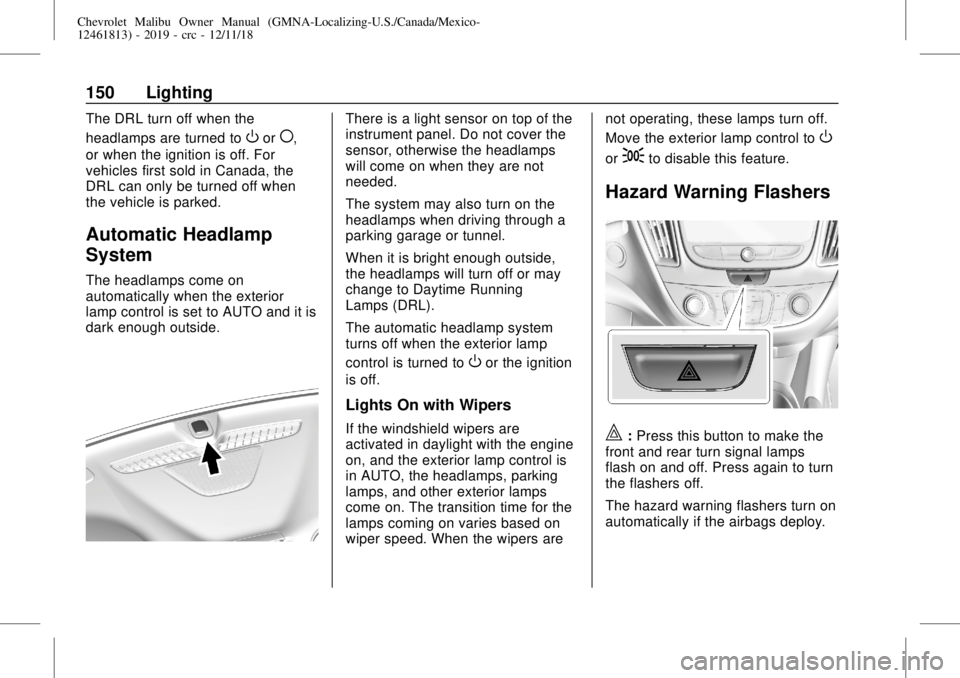
There is a light sensor on top of the
instrument panel. Do not cover the
sensor, otherwise the headlamps
will come on when they are not
needed.
The system may also turn on the
headlamps when driving through a
parking garage or tunnel.
When it is bright enough outside,
the headlamps will turn off or may
change to Daytime Running
Lamps (DRL).
The automatic headlamp system
turns off when the exterior lamp
control is turned to
Oor the ignition
is off.
Lights On with Wipers
If the windshield wipers are
activated in daylight with the engine
on, and the exterior lamp control is
in AUTO, the headlamps, parking
lamps, and other exterior lamps
come on. The transition time for the
lamps coming on varies based on
wiper speed. When the wipers arenot operating, these lamps turn off.
Move the exterior lamp control to
O
or;to disable this feature.
Hazard Warning Flashers
|:Press this button to make the
front and rear turn signal lamps
flash on and off. Press again to turn
the flashers off.
The hazard warning flashers turn on
automatically if the airbags deploy.
Page 157 of 382
Chevrolet Malibu Owner Manual (GMNA-Localizing-U.S./Canada/Mexico-
12461813) - 2019 - crc - 12/11/18
Climate Controls 157
TEMP :Turn the knob clockwise or
counterclockwise to increase or
decrease the temperature setting.
^:Turn the knob clockwise or
counterclockwise to increase or
decrease the fan speed or turn the
fan off.
Air Delivery Mode Controls :
Press the air delivery mode buttons
to change the direction of the
airflow. The indicator light in the
selected button will turn on. The
current mode appears in the display
screen.
To change the current mode, select
one or more of the following modes:
0:Air is directed to the
windshield.
{:Air is directed to the
instrument panel outlets.
z:Air is directed to the floor
outlets.
0MAX :Air is directed to the
windshield and the fan runs at a
higher speed. This mode overrides
the previous mode selected and
clears fog or frost from thewindshield more quickly. When the
button is pressed again, the system
returns to the previous mode setting
and fan speed.
For best results, clear all snow and
ice from the windshield before
defrosting.
A/C :Press to turn the air
conditioning system on or off. If the
fan control is turned off or the
outside temperature falls below
freezing, the air conditioner will
not run.
M:Press to turn on recirculation.
An indicator light comes on. Air is
recirculated to quickly cool the
inside of the vehicle or to reduce the
entry of outside air and odors.
If selected during cool or cold
weather, the windshield and
windows may fog. Turn off
recirculation to help clear the
windshield and windows.
Auto Defog :The climate control
system may have a sensor to
automatically detect high humidity
inside the vehicle. When high
humidity is detected, the climatecontrol system may adjust to
outside air supply and turn on the
air conditioner. If the climate control
system does not detect possible
window fogging, it returns to normal
operation.
To turn Auto Defog off or on, see
“Climate and Air Quality”under
Vehicle Personalization0142.
Rear Window Defogger
K:Press to turn the rear window
defogger on or off. An indicator light
on the button comes on to show that
the rear window defogger is on. The
defogger turns off when the ignition
is turned off or to ACC/
ACCESSORY.
The upper lines on the rear window
are antenna grids and are not
intended to defrost the glass.
The rear window defogger can be
set to automatic operation. See
“Climate and Air Quality”under
Vehicle Personalization0142.
When Auto Rear Defog is selected,
the rear window defogger turns on
automatically when the interior
temperature is cold and the outside
Page 161 of 382
Chevrolet Malibu Owner Manual (GMNA-Localizing-U.S./Canada/Mexico-
12461813) - 2019 - crc - 12/11/18
Climate Controls 161
^:Press the large fan symbol to
increase the fan speed. Press the
small fan symbol to decrease the
fan speed. The fan speed setting
appears on the main display. When
the fan speed is decreased
completely, the fan turns off.
Pressing either button cancels
automatic fan control and the fan is
controlled manually. Press AUTO to
return to automatic operation.
Air Delivery Mode Controls :
Press
X,Y, or[to change the
direction of the airflow. Any
combination of the three buttons
can be selected. The indicator light
in the button will turn on. The
current mode appears in the display
screen. Pressing any button cancels
automatic air delivery control and
the direction of the airflow is
controlled manually. Press AUTO to
return to automatic operation.
To change the current mode, select
one or more of the following modes:
X:Air is directed to the windshield.
Y:Air is directed to the instrument
panel outlets.
[:Air is directed to the floor
outlets.
0MAX :Air is directed to the
windshield, the fan runs at a higher
speed, and the temperature of the
air is increased if not already at
maximum. This mode overrides the
previous mode selected and clears
fog or frost from the windshield
more quickly. When the button is
pressed again, the system returns
to the previous mode setting and
fan speed.
For best results, clear all snow and
ice from the windshield before
defrosting.
A/C :Press to turn the air
conditioning system on or off. If the
fan control is turned off or the
outside temperature falls below
freezing, the air conditioner will
not run.
Pressing this button cancels
automatic air conditioning and turns
off the air conditioner. Press AUTO
to return to automatic operation andthe air conditioner runs
automatically as needed. When the
indicator light is on, the air
conditioner runs automatically to
cool the air inside the vehicle or to
dry the air needed to defog the
windshield faster.
M:Press to turn on recirculation.
An indicator light comes on. Air is
recirculated to quickly cool the
inside of the vehicle or to reduce the
entry of outside air and odors.
If selected during cool or cold
weather, the windshield and
windows may fog. Turn off
recirculation to help clear the
windshield and windows.
Auto Defog :The climate control
system may have a sensor to
automatically detect high humidity
inside the vehicle. When high
humidity is detected, the climate
control system may adjust to
outside air supply and turn on the
air conditioner. The fan speed may
slightly increase to help prevent
fogging. If the climate control
Page 162 of 382
Chevrolet Malibu Owner Manual (GMNA-Localizing-U.S./Canada/Mexico-
12461813) - 2019 - crc - 12/11/18
162 Climate Controls
system does not detect possible
window fogging, it returns to normal
operation.
To turn Auto Defog off or on, see
“Climate and Air Quality”under
Vehicle Personalization0142.
Rear Window Defogger
K:Press to turn the rear window
defogger on or off. An indicator light
on the button comes on to show that
the rear window defogger is on. The
rear window defogger only works
when the ignition is on. The
defogger turns off when the ignition
is turned off or to ACC/
ACCESSORY.
The upper lines on the rear window
are antenna grids and are not
intended to defrost the glass.
The rear window defogger can be
set to automatic operation. See
“Climate and Air Quality”under
Vehicle Personalization0142.
When Auto Rear Defog is selected,
the rear window defogger turns on
automatically when the interior
temperature is cold and the outsidetemperature is about 7 °C (45 °F)
and below. The auto rear defogger
turns off automatically.
If equipped with heated outside
mirrors, they turn on when the rear
window defogger button is on and
help to clear fog or frost from the
surface of the mirror. SeeHeated
Mirrors048.
Caution
Do not try to clear frost or other
material from the inside of the
front windshield and rear window
with a razor blade or anything
else that is sharp. This may
damage the rear window
defogger grid and affect the
radio's ability to pick up stations
clearly. The repairs would not be
covered by the vehicle warranty.
Driver and Passenger Heated and
Ventilated Seats :If equipped,
press
LorMto heat the driver or
passenger seat.If equipped, press
{orCto
ventilate the driver or passenger
seat. SeeHeated and Ventilated
Front Seats062.
Remote Start Climate Control
Operation :If equipped with remote
start, the climate control system
may run when the vehicle is started
remotely. The system will use the
defrost setting if it is cold outside or
turn on using the coldest settings if
it is hot outside. The rear defog may
come on during remote start based
on cold ambient conditions. The
rear defog indicator light does not
come on during a remote start. The
front heated seats will turn on if it is
cold outside. The heated seat
indicator lights do not come on
during a remote start.
Sensor
The solar sensor, on top of the
instrument panel near the
windshield, monitors the solar heat.
Page 163 of 382
Chevrolet Malibu Owner Manual (GMNA-Localizing-U.S./Canada/Mexico-
12461813) - 2019 - crc - 12/11/18
Climate Controls 163
The climate control system uses the
sensor information to adjust the
temperature, fan speed,
recirculation, and air delivery mode
for best comfort.
Do not cover the sensor; otherwise
the automatic climate control system
may not work properly.Air Vents
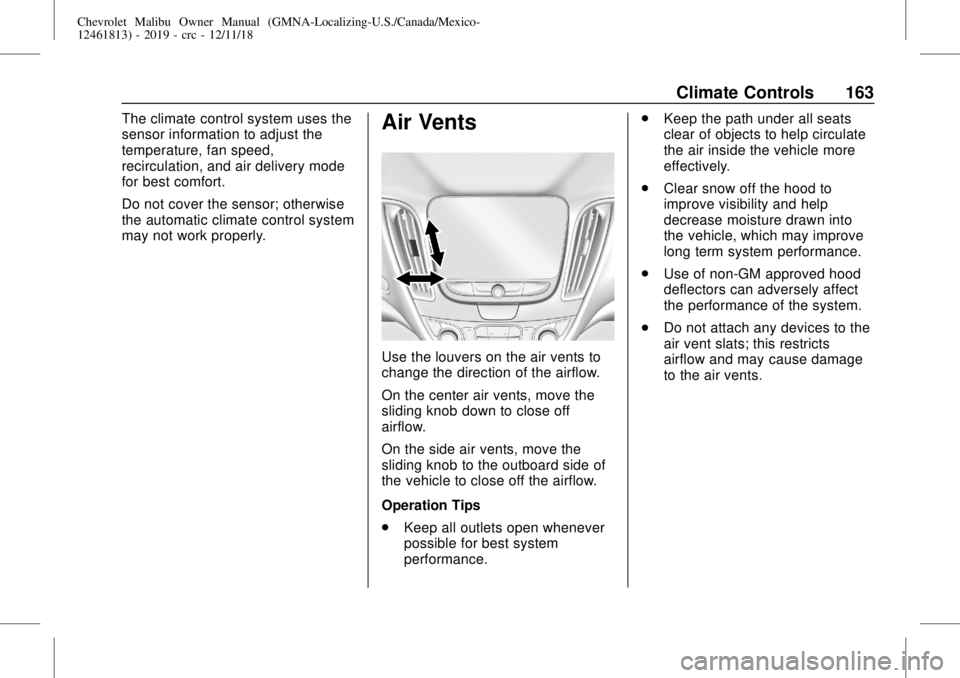
Use the louvers on the air vents to
change the direction of the airflow.
On the center air vents, move the
sliding knob down to close off
airflow.
On the side air vents, move the
sliding knob to the outboard side of
the vehicle to close off the airflow.
Operation Tips
.
Keep all outlets open whenever
possible for best system
performance..
Keep the path under all seats
clear of objects to help circulate
the air inside the vehicle more
effectively.
.
Clear snow off the hood to
improve visibility and help
decrease moisture drawn into
the vehicle, which may improve
long term system performance.
.
Use of non-GM approved hood
deflectors can adversely affect
the performance of the system.
.
Do not attach any devices to the
air vent slats; this restricts
airflow and may cause damage
to the air vents.
Page 196 of 382
Chevrolet Malibu Owner Manual (GMNA-Localizing-U.S./Canada/Mexico-
12461813) - 2019 - crc - 12/11/18
196 Driving and Operating
Using Cruise Control on Hills
How well the cruise control works
on hills depends upon the vehicle
speed, load, and the steepness of
the hills. When going up steep hills,
you might have to step on the
accelerator pedal to maintain the
vehicle speed. When going
downhill, you might have to brake or
shift to a lower gear to keep your
speed down. If the brake pedal is
applied, cruise control will
disengage.
Ending Cruise Control
There are four ways to end cruise
control:
.
Step lightly on the brake pedal.
.
Press
*.
.
Shift the transmission to
N (Neutral).
.
Press
5to turn cruise control
system off completely.Erasing Speed Memory
The cruise control set speed is
erased from memory if
5is pressed
or if the vehicle is turned off.
Adaptive Cruise Control
If equipped with Adaptive Cruise
Control (ACC), it allows you to
select the cruise control set speed
and following gap. Read this entire
section before using this system.
The following gap is the following
time between your vehicle and a
vehicle detected directly ahead in
your path moving in the same
direction. If no vehicle is detected in
your path, ACC works like regular
cruise control. ACC uses camera
and radar sensors. SeeRadio
Frequency Statement0356.
If a vehicle is detected in your path,
ACC can apply acceleration or
limited, moderate braking to
maintain the selected following gap.
To disengage ACC, apply the brake.
If ACC is controlling your vehicle
speed when the Traction Control
System (TCS) or StabiliTrak/Electronic Stability Control (ESC)
system activates, the ACC may
automatically disengage. See
Traction Control/Electronic Stability
Control0192. When road
conditions allow ACC to be safely
used, the ACC can be turned
back on.
ACC will not engage if the TCS or
StabiliTrak/ESC system is disabled.
{Warning
ACC has limited braking ability
and may not have time to slow
the vehicle down enough to avoid
a collision with another vehicle
you are following. This can occur
when vehicles suddenly slow or
stop ahead, or enter your lane.
Also see“Alerting the Driver”in
this section. Complete attention is
always required while driving and
you should be ready to take
action and apply the brakes. See
Defensive Driving0167.
Page 197 of 382
Chevrolet Malibu Owner Manual (GMNA-Localizing-U.S./Canada/Mexico-
12461813) - 2019 - crc - 12/11/18
Driving and Operating 197
{Warning
ACC will not detect or brake for
children, pedestrians, animals,
or other objects.
Do not use ACC when:
.
On winding and hilly roads
or when the sensors are
blocked by snow, ice, or dirt.
The system may not detect
a vehicle ahead. Keep the
entire front of the vehicle
clean.
.
Visibility is low, such as in
fog, rain, or snow
conditions. ACC
performance is limited under
these conditions.
.
On slippery roads where
fast changes in tire traction
can cause excessive
wheel slip.
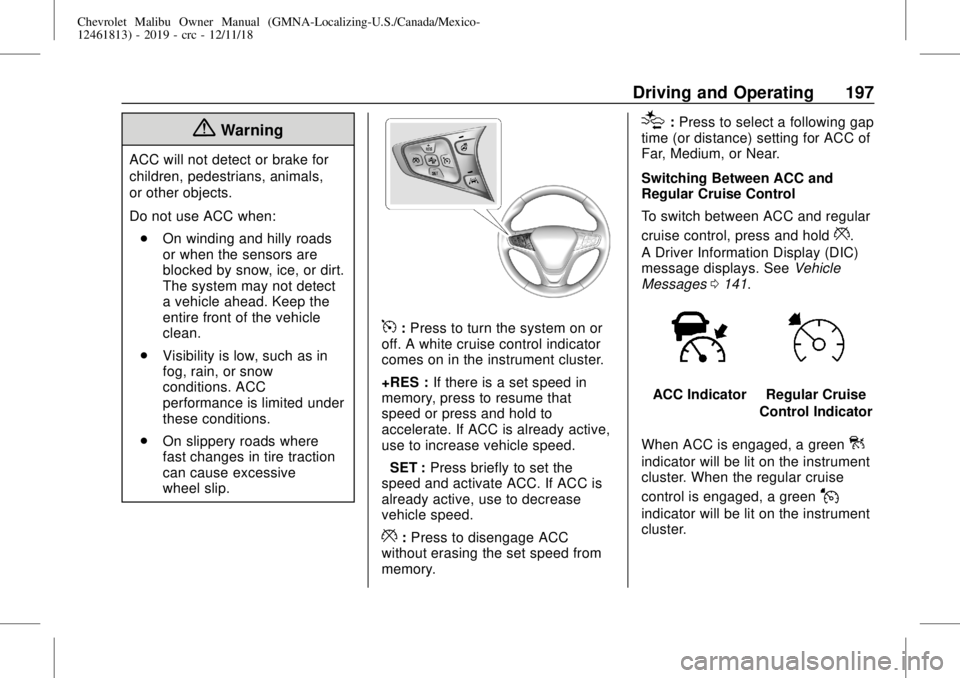
5:Press to turn the system on or
off. A white cruise control indicator
comes on in the instrument cluster.
+RES :If there is a set speed in
memory, press to resume that
speed or press and hold to
accelerate. If ACC is already active,
use to increase vehicle speed.
−SET :Press briefly to set the
speed and activate ACC. If ACC is
already active, use to decrease
vehicle speed.
*:Press to disengage ACC
without erasing the set speed from
memory.
[:Press to select a following gap
time (or distance) setting for ACC of
Far, Medium, or Near.
Switching Between ACC and
Regular Cruise Control
To switch between ACC and regular
cruise control, press and hold
*.
A Driver Information Display (DIC)
message displays. SeeVehicle
Messages0141.
ACC IndicatorRegular Cruise
Control Indicator
When ACC is engaged, a green
]
indicator will be lit on the instrument
cluster. When the regular cruise
control is engaged, a green
J
indicator will be lit on the instrument
cluster.