2019 CHEVROLET MALIBU engine
[x] Cancel search: enginePage 26 of 382
Chevrolet Malibu Owner Manual (GMNA-Localizing-U.S./Canada/Mexico-
12461813) - 2019 - crc - 12/11/18
26 In Brief
.
To turn off both TCS and
StabiliTrak/ESC, press and hold
gon the center console, untili
andgilluminate in the
instrument cluster.
.
Press and release
gagain to
turn on both systems.
SeeTraction Control/Electronic
Stability Control0192.
Tire Pressure Monitor
This vehicle may have a Tire
Pressure Monitor System (TPMS).
The low tire pressure warning light
alerts to a significant loss in
pressure of one of the vehicle's
tires. If the warning light comes on,
stop as soon as possible and inflate
the tires to the recommended
pressure shown on the Tire and
Loading Information label. SeeVehicle Load Limits0172. The
warning light will remain on until the
tire pressure is corrected.
The low tire pressure warning light
may come on in cool weather when
the vehicle is first started, and then
turn off as the vehicle is driven. This
may be an early indicator that the
tire pressures are getting low and
the tires need to be inflated to the
proper pressure.
The TPMS does not replace normal
monthly tire maintenance. Maintain
the correct tire pressures.
SeeTire Pressure Monitor System
0285.
Tire Fill Alert (If Equipped)
This feature provides visual and
audible alerts outside the vehicle to
help when inflating an underinflated
tire to the recommended cold tire
pressure. See“Tire Fill Alert (If
Equipped)”underTire Pressure
Monitor Operation0286.
Fuel (1.5L and 1.8L
Engines)
Regular Unleaded Fuel
Use only Regular 87 octane—(R
+M)/2—or higher unleaded
gasoline in your vehicle. TOP TIER
Detergent Gasoline is
recommended. Do not use gasoline
with an octane rating lower as it will
result in reduced performance and
lower fuel economy. See
Recommended Fuel (1.5L and 1.8L
Engines)0220or
Recommended Fuel (2.0L Engine)
0220.
Page 27 of 382
Chevrolet Malibu Owner Manual (GMNA-Localizing-U.S./Canada/Mexico-
12461813) - 2019 - crc - 12/11/18
In Brief 27
Fuel (2.0L Engine)
Premium Recommended
Use premium 93 octane—(R+M)/2
—unleaded gasoline in your
vehicle. TOP TIER Detergent
Gasoline is recommended.
Unleaded gasoline with an octane
rating as low as 87 may be used,
but it will reduce performance and
fuel economy. SeeRecommended
Fuel (1.5L and 1.8L Engines)0220
or
Recommended Fuel (2.0L Engine)
0220.
E85 or FlexFuel
No E85 or FlexFuel
Gasoline-ethanol fuel blends greater
than E15 (15% ethanol by volume),
such as E85, cannot be used in this
vehicle.
Engine Oil Life System
The engine oil life system calculates
engine oil life based on vehicle use
and displays the CHANGE ENGINE
OIL SOON message when it is time
to change the engine oil and filter.
The oil life system should be reset
to 100% only following an oil
change.
Resetting the Oil Life System
1. Using the DIC controls on the
right side of the steering wheel,
display REMAINING OIL LIFEon the DIC. SeeDriver
Information Center (DIC) (Base
Level)0134or
Driver Information Center (DIC)
(Uplevel)0137. When
remaining oil life is low, the
CHANGE ENGINE OIL SOON
message will appear on the
display.
2. Press
Von the DIC controls
and hold down for a few
seconds to clear the CHANGE
ENGINE OIL SOON message
and reset the oil life at 100%.
Be careful not to reset the oil
life display accidentally at any
time other than after the oil is
changed. It cannot be reset
accurately until the next oil
change.
The system is reset when the
CHANGE ENGINE OIL SOON
message is off and the REMAINING
OIL LIFE 100% message is
displayed.
SeeEngine Oil Life System0245.
Page 28 of 382
Chevrolet Malibu Owner Manual (GMNA-Localizing-U.S./Canada/Mexico-
12461813) - 2019 - crc - 12/11/18
28 In Brief
Driving for Better Fuel
Economy
Driving habits can affect fuel
mileage. Here are some driving tips
to get the best fuel economy
possible:
.
Set the climate controls to the
desired temperature after the
engine is started, or turn them
off when not required.
.
Avoid fast starts and accelerate
smoothly.
.
Brake gradually and avoid
abrupt stops.
.
Avoid idling the engine for long
periods of time.
.
When road and weather
conditions are appropriate, use
cruise control.
.
Always follow posted speed
limits or drive more slowly when
conditions require.
.
Keep vehicle tires properly
inflated.
.
Combine several trips into a
single trip..
Replace the vehicle's tires with
the same TPC Spec number
molded into the tire's sidewall
near the size.
.
Follow recommended scheduled
maintenance.
Roadside Assistance
Program
U.S.: 1-800-243-8872
TTY Users (U.S. Only):
1-888-889-2438
Canada: 1-800-268-6800
New Chevrolet owners are
automatically enrolled in the
Roadside Assistance Program.
SeeRoadside Assistance Program
0350.
Page 31 of 382
Chevrolet Malibu Owner Manual (GMNA-Localizing-U.S./Canada/Mexico-
12461813) - 2019 - crc - 12/11/18
Keys, Doors, and Windows 31
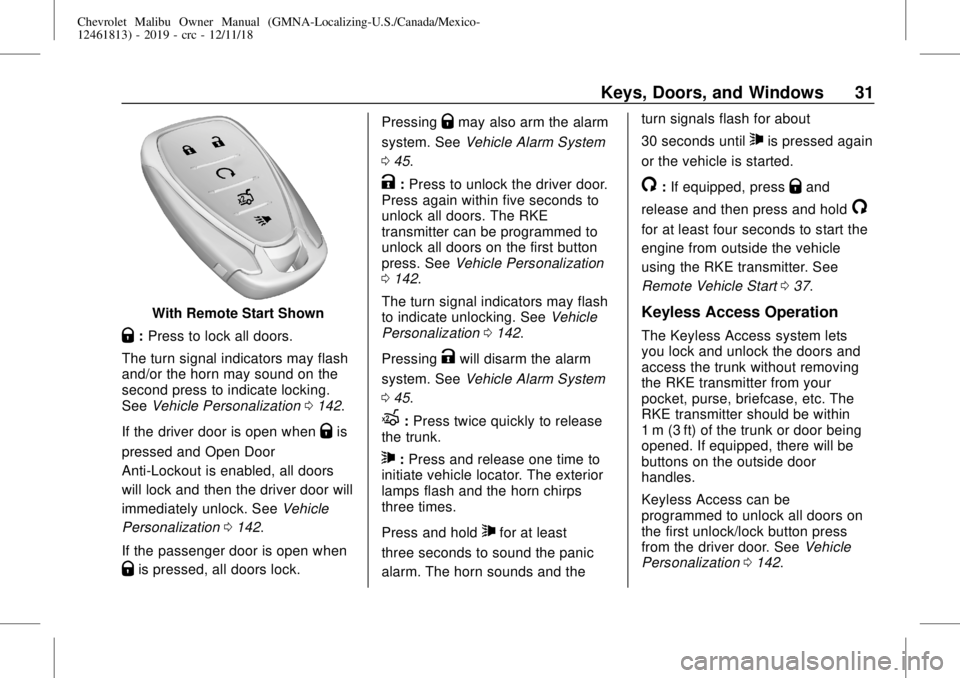
With Remote Start Shown
Q:Press to lock all doors.
The turn signal indicators may flash
and/or the horn may sound on the
second press to indicate locking.
SeeVehicle Personalization0142.
If the driver door is open when
Qis
pressed and Open Door
Anti-Lockout is enabled, all doors
will lock and then the driver door will
immediately unlock. SeeVehicle
Personalization0142.
If the passenger door is open when
Qis pressed, all doors lock.Pressing
Qmay also arm the alarm
system. SeeVehicle Alarm System
045.
K:Press to unlock the driver door.
Press again within five seconds to
unlock all doors. The RKE
transmitter can be programmed to
unlock all doors on the first button
press. SeeVehicle Personalization
0142.
The turn signal indicators may flash
to indicate unlocking. SeeVehicle
Personalization0142.
Pressing
Kwill disarm the alarm
system. SeeVehicle Alarm System
045.
X:Press twice quickly to release
the trunk.
7:Press and release one time to
initiate vehicle locator. The exterior
lamps flash and the horn chirps
three times.
Press and hold
7for at least
three seconds to sound the panic
alarm. The horn sounds and theturn signals flash for about
30 seconds until
7is pressed again
or the vehicle is started.
/:If equipped, pressQand
release and then press and hold
/
for at least four seconds to start the
engine from outside the vehicle
using the RKE transmitter. See
Remote Vehicle Start037.
Keyless Access Operation
The Keyless Access system lets
you lock and unlock the doors and
access the trunk without removing
the RKE transmitter from your
pocket, purse, briefcase, etc. The
RKE transmitter should be within
1 m (3 ft) of the trunk or door being
opened. If equipped, there will be
buttons on the outside door
handles.
Keyless Access can be
programmed to unlock all doors on
the first unlock/lock button press
from the driver door. SeeVehicle
Personalization0142.
Page 34 of 382
Chevrolet Malibu Owner Manual (GMNA-Localizing-U.S./Canada/Mexico-
12461813) - 2019 - crc - 12/11/18
34 Keys, Doors, and Windows
Key Access
To access a vehicle with a weak
transmitter battery, seeDoor Locks
039.
Programming Transmitters to
the Vehicle
Only RKE transmitters programmed
to the vehicle will work. If a
transmitter is lost or stolen, a
replacement can be purchased and
programmed through your dealer.
The vehicle can be reprogrammed
so that lost or stolen transmitters no
longer work. Any remaining
transmitters will need to be
reprogrammed. Each vehicle can
have up to eight transmitters
matched to it.
Programming with Recognized
Transmitters
A new transmitter can be
programmed to the vehicle when
there are two recognized
transmitters. To program, the vehicle
must be off and all of thetransmitters, both currently
recognized and new, must be
with you.
1. Place the two recognized
transmitters in the cupholder.
2. Remove the key lock cylinder
cap on the driver door handle.
SeeDoor Locks039. Insert
the vehicle key of the new
transmitter into the key lock
cylinder on the outside of the
driver door and turn the key
counterclockwise five times
within 10 seconds.
The DIC displays READY FOR
REMOTE #2, 3, 4 or 5.
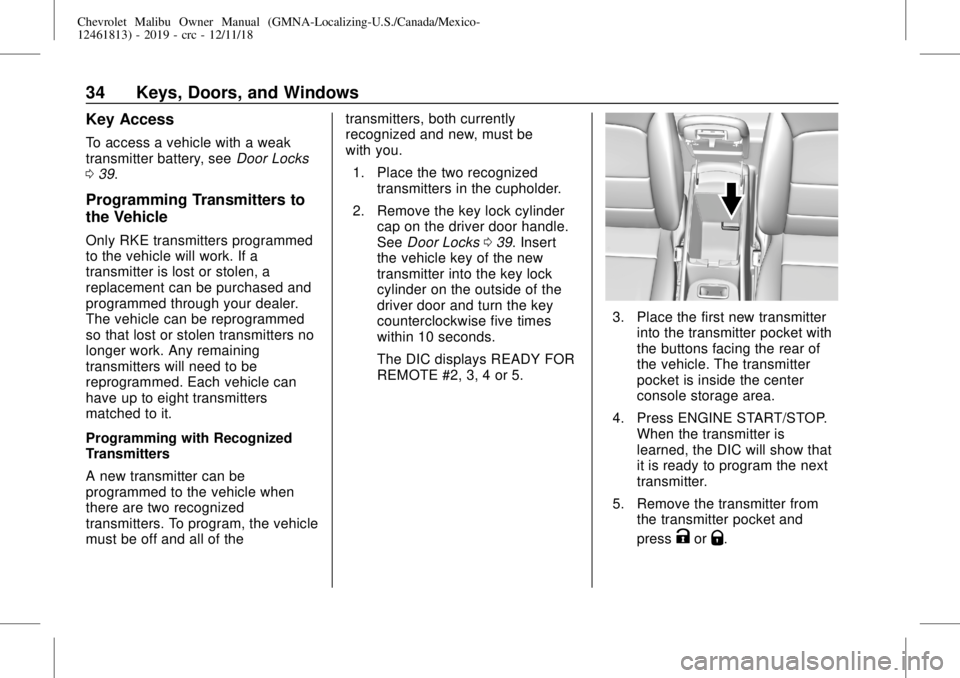
3. Place the first new transmitter
into the transmitter pocket with
the buttons facing the rear of
the vehicle. The transmitter
pocket is inside the center
console storage area.
4. Press ENGINE START/STOP.
When the transmitter is
learned, the DIC will show that
it is ready to program the next
transmitter.
5. Remove the transmitter from
the transmitter pocket and
press
KorQ.
Page 35 of 382
Chevrolet Malibu Owner Manual (GMNA-Localizing-U.S./Canada/Mexico-
12461813) - 2019 - crc - 12/11/18
Keys, Doors, and Windows 35
To program additional
transmitters, repeat Steps 3–5
for each new transmitter.
When all additional transmitters
are programmed, press and
hold ENGINE START/STOP for
12 seconds to exit
programming mode.
6. Put the key back into the
transmitter.
7. Replace the key lock cylinder
cap. SeeDoor Locks039.
Programming without Recognized
Transmitters
If two currently recognized
transmitters are not available, follow
this procedure to program up to
eight transmitters. This feature is
not available in Canada. This
procedure will take approximately
30 minutes to complete. The vehicle
must be off and all of the
transmitters to be programmed must
be with you.
1. Remove the key lock cylinder
cap on the driver door handle.
SeeDoor Locks039. Insertthe vehicle key of the
transmitter into the key lock
cylinder on the outside of the
driver door and turn the key
counterclockwise five times
within 10 seconds.
The DIC displays REMOTE
LEARN PENDING,
PLEASE WAIT.
2. Wait for 10 minutes until the
DIC displays PRESS ENGINE
START BUTTON TO LEARN
and then press ENGINE
START/STOP.
The DIC will again display
REMOTE LEARN PENDING,
PLEASE WAIT.
3. Repeat Step 2 two additional
times. After the third time, all
previously known transmitters
will no longer work with the
vehicle. Remaining transmitters
can be relearned during the
next steps.
The DIC should now display
READY FOR REMOTE # 1.
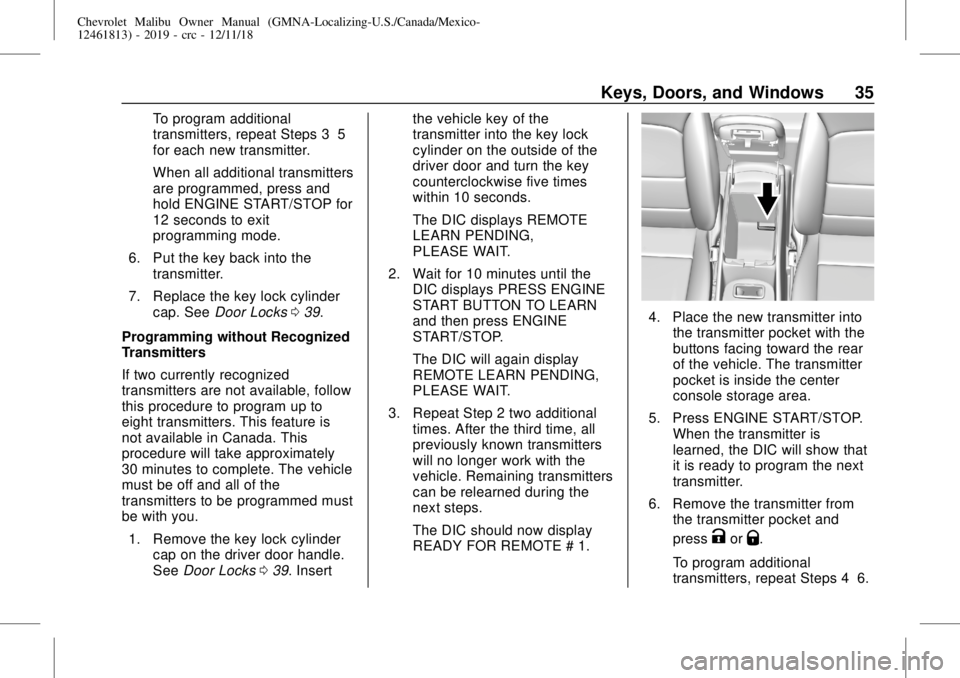
4. Place the new transmitter into
the transmitter pocket with the
buttons facing toward the rear
of the vehicle. The transmitter
pocket is inside the center
console storage area.
5. Press ENGINE START/STOP.
When the transmitter is
learned, the DIC will show that
it is ready to program the next
transmitter.
6. Remove the transmitter from
the transmitter pocket and
press
KorQ.
To program additional
transmitters, repeat Steps 4–6.
Page 36 of 382
Chevrolet Malibu Owner Manual (GMNA-Localizing-U.S./Canada/Mexico-
12461813) - 2019 - crc - 12/11/18
36 Keys, Doors, and Windows
When all additional transmitters
are programmed, press and
hold ENGINE START/STOP for
12 seconds to exit
programming mode.
7. Return the key back into the
transmitter.
8. Replace the key lock cylinder
cap. SeeDoor Locks039.
Starting the Vehicle with a Low
Transmitter Battery
While trying to start the vehicle,
if the transmitter battery is weak or if
there is interference with the signal,
the DIC may display NO REMOTE
DETECTED or NO REMOTE KEY
WAS DETECTED PLACE KEY IN
TRANSMITTER POCKET THEN
START YOUR VEHICLE. The DIC
may also display REPLACE
BATTERY IN REMOTE KEY.
To start the vehicle:
1. Open the center console and
place the transmitter in the
transmitter pocket with the
buttons facing the rear of the
vehicle.2. With the vehicle in P (Park) or
N (Neutral), press the brake
pedal and press ENGINE
START/STOP. SeeStarting the
Engine0178.
Replace the transmitter battery
as soon as possible.
Battery Replacement
Replace the battery if the DIC
displays REPLACE BATTERY IN
REMOTE KEY.
Caution
When replacing the battery, do
not touch any of the circuitry on
the transmitter. Static from your
body could damage the
transmitter.
The battery is not rechargeable. To
replace the battery:
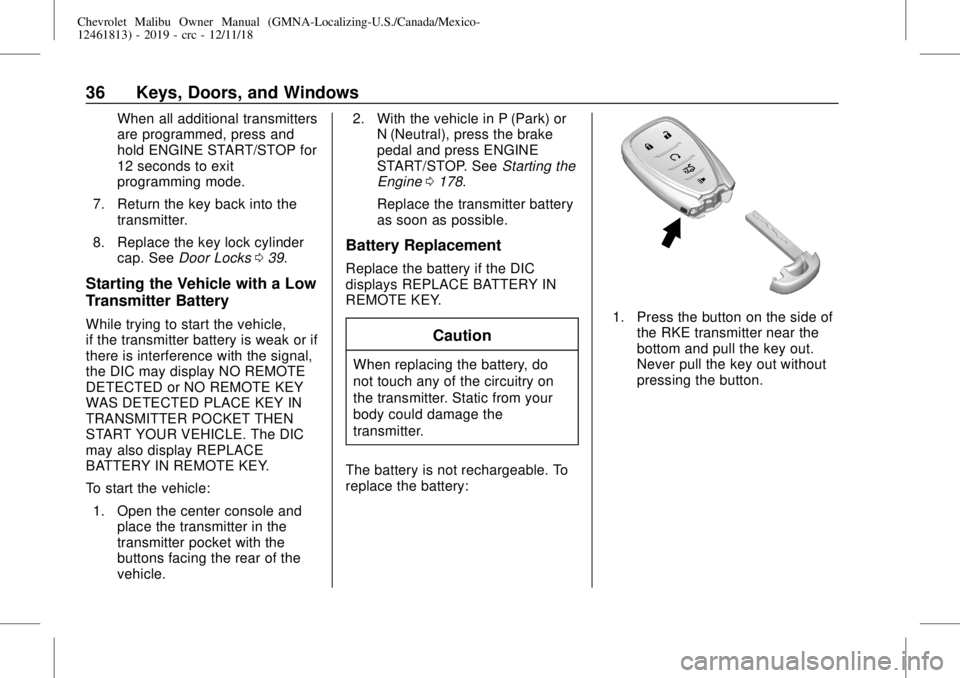
1. Press the button on the side of
the RKE transmitter near the
bottom and pull the key out.
Never pull the key out without
pressing the button.
Page 37 of 382
Chevrolet Malibu Owner Manual (GMNA-Localizing-U.S./Canada/Mexico-
12461813) - 2019 - crc - 12/11/18
Keys, Doors, and Windows 37
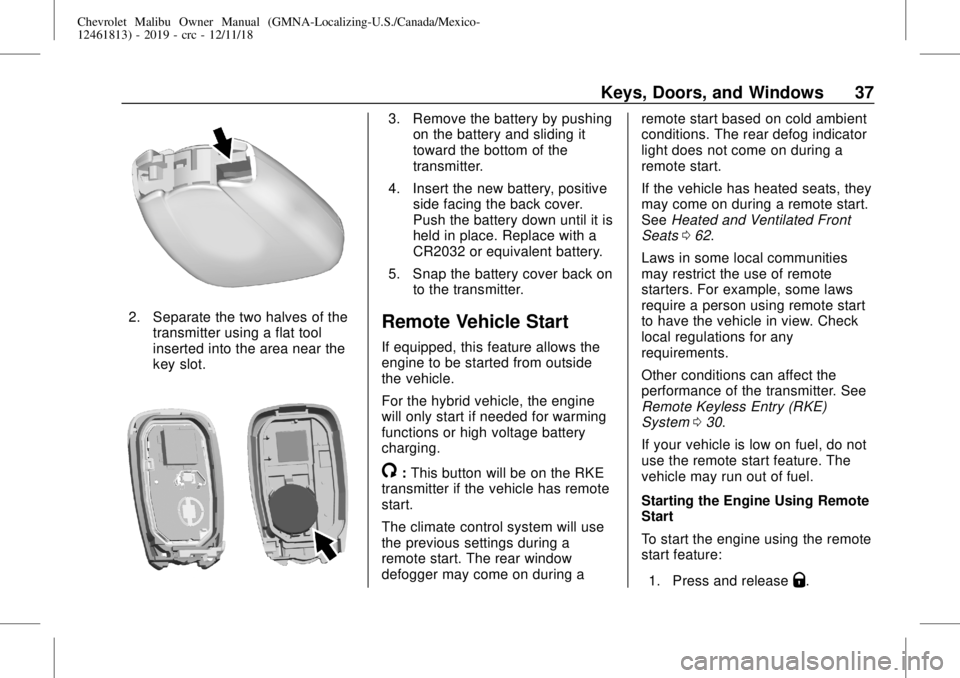
2. Separate the two halves of the
transmitter using a flat tool
inserted into the area near the
key slot.
3. Remove the battery by pushing
on the battery and sliding it
toward the bottom of the
transmitter.
4. Insert the new battery, positive
side facing the back cover.
Push the battery down until it is
held in place. Replace with a
CR2032 or equivalent battery.
5. Snap the battery cover back on
to the transmitter.
Remote Vehicle Start
If equipped, this feature allows the
engine to be started from outside
the vehicle.
For the hybrid vehicle, the engine
will only start if needed for warming
functions or high voltage battery
charging.
/:This button will be on the RKE
transmitter if the vehicle has remote
start.
The climate control system will use
the previous settings during a
remote start. The rear window
defogger may come on during aremote start based on cold ambient
conditions. The rear defog indicator
light does not come on during a
remote start.
If the vehicle has heated seats, they
may come on during a remote start.
SeeHeated and Ventilated Front
Seats062.
Laws in some local communities
may restrict the use of remote
starters. For example, some laws
require a person using remote start
to have the vehicle in view. Check
local regulations for any
requirements.
Other conditions can affect the
performance of the transmitter. See
Remote Keyless Entry (RKE)
System030.
If your vehicle is low on fuel, do not
use the remote start feature. The
vehicle may run out of fuel.
Starting the Engine Using Remote
Start
To start the engine using the remote
start feature:
1. Press and release
Q.