2019 CHEVROLET MALIBU center console
[x] Cancel search: center consolePage 110 of 382
Chevrolet Malibu Owner Manual (GMNA-Localizing-U.S./Canada/Mexico-
12461813) - 2019 - crc - 12/11/18
110 Instruments and Controls
the windshield washer had been
activated. SeeWasher Fluid0254
for information on filling the
windshield washer fluid reservoir.
{Warning
In freezing weather, do not use
the washer until the windshield is
warmed. Otherwise the washer
fluid can form ice on the
windshield, blocking your vision.
Compass
The vehicle may have a compass
display on the Driver Information
Center (DIC). The compass receives
its heading and other information
from the Global Positioning
System (GPS) antenna, StabiliTrak/
Electronic Stability Control (ESC),
and vehicle speed information.
The compass system is designed to
operate for a certain number of
miles or degrees of turn before
needing a signal from the GPS
satellites. When the compass
display shows CAL, drive thevehicle for a short distance in an
open area where it can receive a
GPS signal. The compass system
will automatically determine when a
GPS signal is restored and provide
a heading again.
Clock
The time and date for the clock can
be set using the infotainment
system. See“Time/Date”in
“System”under“Settings”in the
infotainment manual.
Power Outlets
Power Outlet 12-Volt Direct
Current
The accessory power outlets can be
used to plug in electrical equipment,
such as a cell phone or MP3 player.
There are two accessory power
outlets:
.
One on the center stack below
the climate control system
.
One on the rear of the center
consoleThe outlet is powered when the
ignition is on or in ACC/
ACCESSORY, or until the driver
door is opened within 10 minutes of
turning off the vehicle. SeeRetained
Accessory Power (RAP)0181.
Open the protective cover to use the
accessory power outlet.
Certain electrical accessories may
not be compatible with the
accessory power outlets and could
overload vehicle or adapter fuses.
If there is a problem, see your
dealer.
When adding electrical equipment,
be sure to follow the installation
instructions included with the
equipment. SeeAdd-On Electrical
Equipment0231.
Caution
Hanging heavy equipment from
the power outlet can cause
damage not covered by the
vehicle warranty. The power
(Continued)
Page 111 of 382
Chevrolet Malibu Owner Manual (GMNA-Localizing-U.S./Canada/Mexico-
12461813) - 2019 - crc - 12/11/18
Instruments and Controls 111
Caution (Continued)
outlets are designed for
accessory power plugs only, such
as cell phone charge cords.
Always unplug electrical equipment
when not in use and do not plug in
equipment that exceeds the
maximum 20 amps rating.
Power Outlet 110/120-Volt
Alternating Current
If equipped, this power outlet can be
used to plug in electrical equipment
that uses a maximum limit of 150
watts.
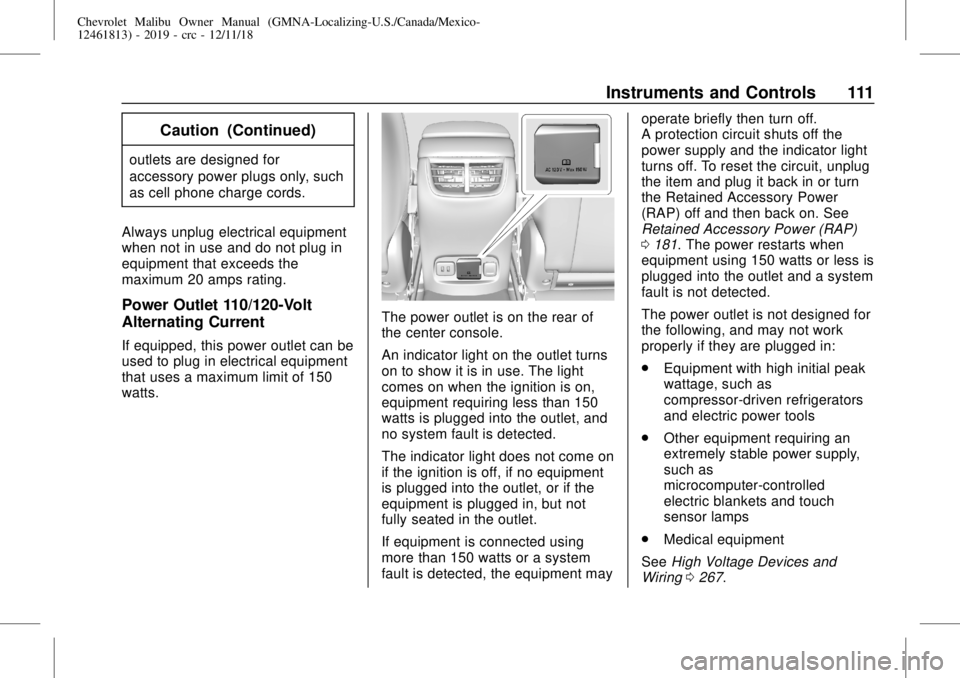
The power outlet is on the rear of
the center console.
An indicator light on the outlet turns
on to show it is in use. The light
comes on when the ignition is on,
equipment requiring less than 150
watts is plugged into the outlet, and
no system fault is detected.
The indicator light does not come on
if the ignition is off, if no equipment
is plugged into the outlet, or if the
equipment is plugged in, but not
fully seated in the outlet.
If equipment is connected using
more than 150 watts or a system
fault is detected, the equipment mayoperate briefly then turn off.
A protection circuit shuts off the
power supply and the indicator light
turns off. To reset the circuit, unplug
the item and plug it back in or turn
the Retained Accessory Power
(RAP) off and then back on. See
Retained Accessory Power (RAP)
0181. The power restarts when
equipment using 150 watts or less is
plugged into the outlet and a system
fault is not detected.
The power outlet is not designed for
the following, and may not work
properly if they are plugged in:
.
Equipment with high initial peak
wattage, such as
compressor-driven refrigerators
and electric power tools
.
Other equipment requiring an
extremely stable power supply,
such as
microcomputer-controlled
electric blankets and touch
sensor lamps
.
Medical equipment
SeeHigh Voltage Devices and
Wiring0267.
Page 112 of 382
Chevrolet Malibu Owner Manual (GMNA-Localizing-U.S./Canada/Mexico-
12461813) - 2019 - crc - 12/11/18
112 Instruments and Controls
Wireless Charging
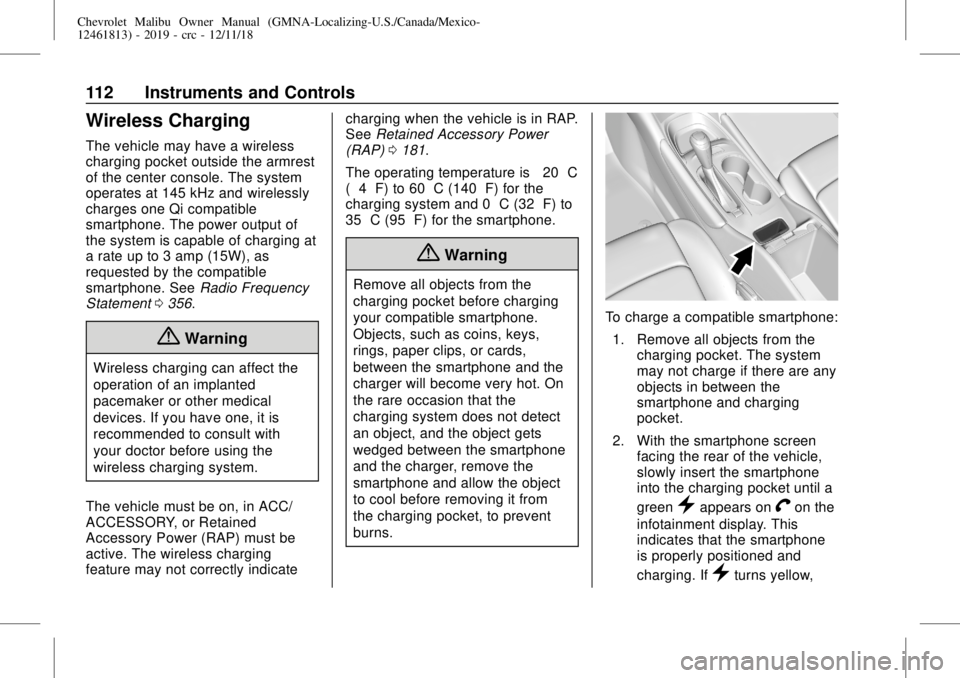
The vehicle may have a wireless
charging pocket outside the armrest
of the center console. The system
operates at 145 kHz and wirelessly
charges one Qi compatible
smartphone. The power output of
the system is capable of charging at
a rate up to 3 amp (15W), as
requested by the compatible
smartphone. SeeRadio Frequency
Statement0356.
{Warning
Wireless charging can affect the
operation of an implanted
pacemaker or other medical
devices. If you have one, it is
recommended to consult with
your doctor before using the
wireless charging system.
The vehicle must be on, in ACC/
ACCESSORY, or Retained
Accessory Power (RAP) must be
active. The wireless charging
feature may not correctly indicatecharging when the vehicle is in RAP.
SeeRetained Accessory Power
(RAP)0181.
The operating temperature is−20 °C
(−4 °F) to 60 °C (140 °F) for the
charging system and 0 °C (32 °F) to
35 °C (95 °F) for the smartphone.
{Warning
Remove all objects from the
charging pocket before charging
your compatible smartphone.
Objects, such as coins, keys,
rings, paper clips, or cards,
between the smartphone and the
charger will become very hot. On
the rare occasion that the
charging system does not detect
an object, and the object gets
wedged between the smartphone
and the charger, remove the
smartphone and allow the object
to cool before removing it from
the charging pocket, to prevent
burns.
To charge a compatible smartphone:
1. Remove all objects from the
charging pocket. The system
may not charge if there are any
objects in between the
smartphone and charging
pocket.
2. With the smartphone screen
facing the rear of the vehicle,
slowly insert the smartphone
into the charging pocket until a
green
}appears onVon the
infotainment display. This
indicates that the smartphone
is properly positioned and
charging. If
}turns yellow,
Page 152 of 382
Chevrolet Malibu Owner Manual (GMNA-Localizing-U.S./Canada/Mexico-
12461813) - 2019 - crc - 12/11/18
152 Lighting
Courtesy Lamps
The courtesy lamps come on when
any door is opened unless the dome
lamp override is activated. To
deactivate the dome lamp override,
press
jOFF and the indicator
light on the button will turn off.
Dome Lamps
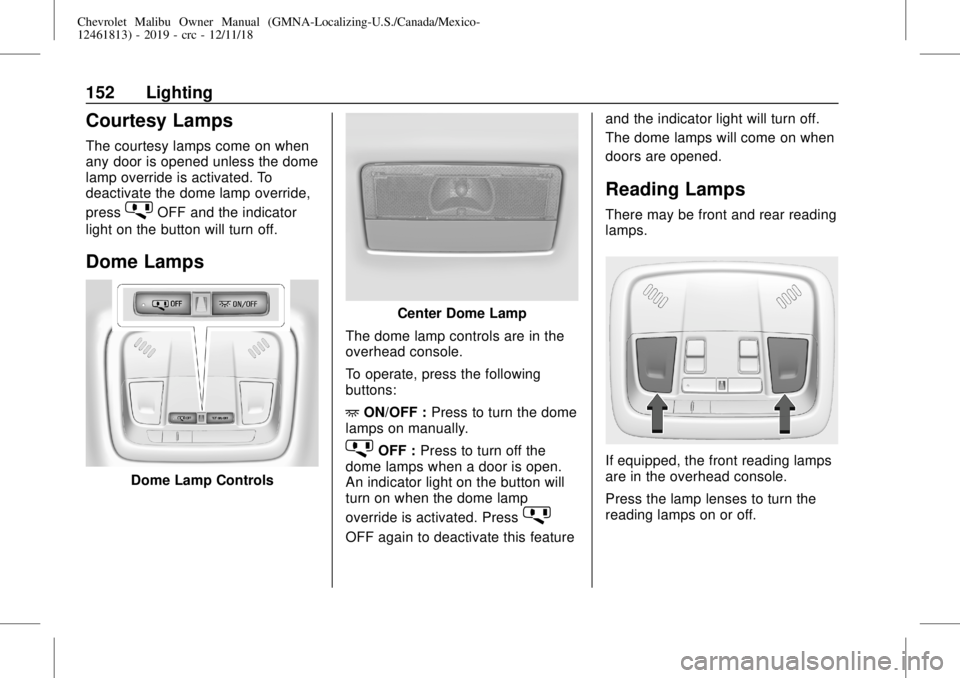
Dome Lamp Controls
Center Dome Lamp
The dome lamp controls are in the
overhead console.
To operate, press the following
buttons:
+ON/OFF :Press to turn the dome
lamps on manually.
jOFF :Press to turn off the
dome lamps when a door is open.
An indicator light on the button will
turn on when the dome lamp
override is activated. Press
j
OFF again to deactivate this featureand the indicator light will turn off.
The dome lamps will come on when
doors are opened.
Reading Lamps
There may be front and rear reading
lamps.
If equipped, the front reading lamps
are in the overhead console.
Press the lamp lenses to turn the
reading lamps on or off.
Page 207 of 382
Chevrolet Malibu Owner Manual (GMNA-Localizing-U.S./Canada/Mexico-
12461813) - 2019 - crc - 12/11/18
Driving and Operating 207
Rear Cross Traffic Alert (RCTA)
If equipped, when the vehicle is
shifted into R (Reverse), RCTA
displays a red warning triangle with
a left or right pointing arrow on the
infotainment display to warn of
traffic coming from the left or right.
This system detects objects coming
from up to 20 m (65 ft) from the left
or right side of the vehicle. When an
object is detected, three beeps
sound from either the left or right,
depending on the direction of the
detected vehicle.
Turning the Features On or Off
TheXbutton on the center
console is used to turn on or off the
Front and Rear Park Assist and
Rear Cross Traffic Alert at the same
time. The indicator light next to thebutton comes on when the features
are on and turns off when the
features have been disabled.
To turn the rear Park Assist symbols
or guidance lines on or off, see
“Rear Camera Park Assist Symbols”
underVehicle Personalization
0142.
RCTA can also be turned on or off
through vehicle personalization. See
“Collision/Detection Systems”under
Vehicle Personalization0142.
Automatic Parking
Assist (APA)
If equipped, APA searches for and
steers the vehicle into parallel or
perpendicular parking spots. When
using APA, you must still shift gears,
and control the brakes and
accelerator. A display and audible
beeps help to guide parking
maneuvers.
{Warning
APA does not apply the brakes.
APA may not detect objects in the
parking space, objects that are
soft or narrow, objects high off the
ground such as flatbed trucks,
or objects below ground level
such as large potholes. Always
verify that the parking space is
appropriate for parking a vehicle.
APA does not respond to changes
in the parking space, such as
movement of an adjacent vehicle,
or a person or object entering the
parking space. APA does not
detect or avoid traffic that is
behind or alongside of the
vehicle. Always be prepared to
stop the vehicle during the
parking maneuver.
Press
Oon the center console to
enable the system to search for a
parking space that is large enough
and within 1.5 m (5 ft) of the vehicle.
The vehicle speed must be below
30 km/h (18 mph).
Page 373 of 382

Chevrolet Malibu Owner Manual (GMNA-Localizing-U.S./Canada/Mexico-
12461813) - 2019 - crc - 12/11/18
Index 373
Assistance Program,
Roadside . . . . . . . . . . . . . . . . . . . . . . 350
Assistance Systems for
Driving . . . . . . . . . . . . . . . . . . . . . . . . 209
Assistance Systems for
Parking and Backing . . . . . . . . . . 205
Auto Stop
Stop/Start System . . . . . . . . . . . . 179
Automatic
Door Locks . . . . . . . . . . . . . . . . . . . . . 42
Forward Braking . . . . . . . . . . . . . . .211
Headlamp System . . . . . . . . . . . . 150
Transmission . . . . . . . . . . . . . . . . . 185
Transmission Fluid . . . . . . . . . . . 246
Automatic Transmission
Manual Mode . . . . . . . . . . . . . . . . . 186
Shift Lock Control Function
Check . . . . . . . . . . . . . . . . . . . . . . . 260
B
Battery
Exterior Lighting Battery
Saver . . . . . . . . . . . . . . . . . . . . . . . 154
Load Management . . . . . . . . . . . . 153
Power Protection . . . . . . . . . . . . . 154
Battery - North America . . . . 257, 312
Blade Replacement, Wiper . . . . . 261Brake
Parking, Electric . . . . . . . . . . . . . . 189
System Warning Light . . . . . . . . 126
Brakes . . . . . . . . . . . . . . . . . . . . . . . . . . 255
Antilock . . . . . . . . . . . . . . . . . . . . . . . 188
Assist . . . . . . . . . . . . . . . . . . . . . . . . . 190
Fluid . . . . . . . . . . . . . . . . . . . . . . . . . . 256
Parking . . . . . . . . . . . . . . . . . . . . . . . 188
Regenerative Braking . . . . . . . . . 191
Braking . . . . . . . . . . . . . . . . . . . . . . . . . 167
Automatic Forward . . . . . . . . . . . .211
Braking System
Front Pedestrian (FPB) . . . . . . . 213
Break-In, New Vehicle . . . . . . . . . . 176
Bulb Replacement
Halogen Bulbs . . . . . . . . . . . . . . . . 263
Headlamp Aiming . . . . . . . . . . . . . 263
Headlamps . . . . . . . . . . . . . . . . . . . 263
Headlamps, Front Turn
Signal, Sidemarker, and
Parking Lamps . . . . . . . . . . . . . . 264
License Plate Lamps . . . . . . . . . 266
Taillamps, Turn Signal,
Stoplamps, and
Back-up Lamps . . . . . . . . 264, 266
Buying New Tires . . . . . . . . . . . . . . . 293
C
Calibration . . . . . . . . . . . . . . . . . . . . . . 110
California
Perchlorate Materials
Requirements . . . . . . . . . . . . . . . 234
California
Proposition
65 Warning . . . . . . . . . .234, 257, 312,
Back Cover
Canadian Vehicle Owners . . . . . . . . 2
Capacities and
Specifications . . . . . . . . . . . . . . . . . 343
Carbon Monoxide
Engine Exhaust . . . . . . . . . . . . . . . 184
Trunk . . . . . . . . . . . . . . . . . . . . . . . . . . . 43
Winter Driving . . . . . . . . . . . . . . . . 171
Cargo
Tie-Downs . . . . . . . . . . . . . . . . . . . . 105
Caution, Danger, and Warning . . . . 3
Center Console Storage . . . . . . . . 105
Chains, Tire . . . . . . . . . . . . . . . . . . . . 297
Charging
Wireless . . . . . . . . . . . . . . . . . . . . . . .112
Charging System Light . . . . . . . . . 124
Check
Engine Light (Malfunction
Indicator) . . . . . . . . . . . . . . . . . . . . 124
Page 381 of 382

Chevrolet Malibu Owner Manual (GMNA-Localizing-U.S./Canada/Mexico-
12461813) - 2019 - crc - 12/11/18
Index 381
StabiliTrak
OFF Light . . . . . . . . . . . . . . . . . . . . . 129
Start Assist, Hill . . . . . . . . . . . . . . . . . 191
Start Vehicle, Remote . . . . . . . . . . . 37
Starter Switch Check . . . . . . . . . . . 260
Starting the Engine . . . . . . . . . . . . . 178
Steering . . . . . . . . . . . . . . . . . . . . . . . . 168
Heated Wheel . . . . . . . . . . . . . . . . 108
Wheel Adjustment . . . . . . . . . . . . 108
Wheel Controls . . . . . . . . . . . . . . . 108
Stop/Start System . . . . . . . . . . . . . . 179
Stoplamps and Back-up Lamps
Bulb Replacement . . . . . . . 264, 266
Storage Areas
Center Console . . . . . . . . . . . . . . . 105
Convenience Net . . . . . . . . . . . . . 106
Glove Box . . . . . . . . . . . . . . . . . . . . 104
Umbrella . . . . . . . . . . . . . . . . . . . . . . 105
Storage Compartments . . . . . . . . . 104
Storing the Tire Sealant and
Compressor Kit . . . . . . . . . . . . . . . 306
Struts
Gas . . . . . . . . . . . . . . . . . . . . . . . . . . . 262
Stuck Vehicle . . . . . . . . . . . . . . . . . . . 172
Summer Tires . . . . . . . . . . . . . . . . . . 278
Sun Visors . . . . . . . . . . . . . . . . . . . . . . . 51
Sunroof . . . . . . . . . . . . . . . . . . . . . . . . . . 51
Symbols . . . . . . . . . . . . . . . . . . . . . . . . . . 3System
Engine Air Filter Life . . . . . . . . . . 246
Forward Collision
Alert (FCA) . . . . . . . . . . . . . . . . . . 209
Infotainment . . . . . . . . . . . . . 155, 359
Systems
Driver Assistance . . . . . . . . . . . . . 203
T
Tachometer . . . . . . . . . . . . . . . . . . . . . 119
Taillamps
Bulb Replacement . . . . . . . 264, 266
Text Telephone (TTY) Users . . . . 349
Theft-Deterrent Systems . . . . . . . . . 46
Immobilizer . . . . . . . . . . . . . . . . . . . . . 46
Time . . . . . . . . . . . . . . . . . . . . . . . . . . . . 110
Tires . . . . . . . . . . . . . . . . . . . . . . . . . . . . 276
All-Season . . . . . . . . . . . . . . . . . . . . 277
Buying New Tires . . . . . . . . . . . . . 293
Chains . . . . . . . . . . . . . . . . . . . . . . . . 297
Changing . . . . . . . . . . . . . . . . . . . . . 306
Compact Spare . . . . . . . . . . . . . . . .311
Designations . . . . . . . . . . . . . . . . . 280
Different Size . . . . . . . . . . . . . . . . . 294
If a Tire Goes Flat . . . . . . . . . . . . 298
Inspection . . . . . . . . . . . . . . . . . . . . 291
Low Profile . . . . . . . . . . . . . . . . . . . 277
Pressure . . . . . . . . . . . . . . . . . 284, 285Tires (cont'd)
Pressure Light . . . . . . . . . . . . . . . . 130
Pressure Monitor Operation . . 286
Pressure Monitor System . . . . . 285
Rotation . . . . . . . . . . . . . . . . . . . . . . 291
Sealant and
Compressor Kit . . . . . . . . . . . . . 299
Sealant and Compressor
Kit, Storing . . . . . . . . . . . . . . . . . . 306
Sidewall Labeling . . . . . . . . . . . . . 278
Terminology and Definitions . . 281
Uniform Tire Quality
Grading . . . . . . . . . . . . . . . . . . . . . 294
Wheel Alignment and Tire
Balance . . . . . . . . . . . . . . . . . . . . . 296
Wheel Replacement . . . . . . . . . . 296
When It Is Time for New
Tires . . . . . . . . . . . . . . . . . . . . . . . . 292
Winter . . . . . . . . . . . . . . . . . . . . . . . . 277
Top Tier Fuel . . . . . . . . . . . . . . . . . . . 219
Towing
Driving Characteristics . . . . . . . . 224
Equipment . . . . . . . . . . . . . . . . . . . . 229
General Information . . . . . . . . . . 223
Recreational Vehicle . . . . . . . . . . 316
Trailer . . . . . . . . . . . . . . . . . . . . . . . . 227
Vehicle . . . . . . . . . . . . . . . . . . . . . . . 315