2019 CHEVROLET IMPALA trunk release
[x] Cancel search: trunk releasePage 8 of 353

Chevrolet Impala Owner Manual (GMNA-Localizing-U.S./Canada-12146115) -
2019 - crc - 8/27/18
In Brief 7
1.Instrument Panel Illumination
Control 0147.
2. Air Vents 0159.
3. Trunk Release. See Trunk
0 39.
Park Assist Button. See
Assistance Systems for
Parking or Backing 0198 (If
Equipped).
Lane Departure Warning
(LDW) Button. See Lane
Departure Warning (LDW)
0 206.
4. Turn Signal Lever. See Turn
and Lane-Change Signals
0 147.
5. Instrument Cluster 0114.
Driver Information Center (DIC)
0 129.
6. Windshield Wiper/Washer
0108.
7. Hazard Warning Flashers
0146.
8. Light Sensor. See Automatic
Headlamp System 0146. 9. Storage Area with USB Port
Inside (If Equipped). See
Instrument Panel Storage
0102 and“USB Port” in the
infotainment manual.
10. Infotainment 0151.
11. Climate Control Systems
0152.
Dual Automatic Climate Control
System 0155.
12. Storage Area with Accessory Power Outlet Inside.
SeeCenter Console Storage
0 103 andPower Outlets
0 109.
13. Heated and Ventilated Front
Seats 060 (If Equipped).
14. Traction Control/Electronic
Stability Control 0186.
15. Shift Lever. See Automatic
Transmission 0180.
16. Ignition Positions 0172.
17. Steering Wheel Controls 0107.
Driver Information Center
Buttons. See Driver Information
Center (DIC) 0129. 18.
Steering Wheel Controls 0107
(Out of View).
19. Horn 0107.
20. Steering Wheel Adjustment
0107.
21. Cruise Control 0188 (If
Equipped).
Adaptive Cruise Control 0190
(If Equipped).
Heated Steering Wheel 0107
(If Equipped).
Forward Collision Alert (FCA)
System 0201 (If Equipped).
22. Instrument Panel Storage
0102 (If Equipped).
Fuse Cover. See Instrument
Panel Fuse Block 0254.
23. Hood Release. See Hood
0 224.
24. Data Link Connector (Out of View). See Malfunction
Indicator Lamp (Check Engine
Light) 0122.
25. Electric Parking Brake 0184.
Page 9 of 353

Chevrolet Impala Owner Manual (GMNA-Localizing-U.S./Canada-12146115) -
2019 - crc - 8/27/18
8 In Brief
Initial Drive
Information
This section provides a brief
overview about some of the
important features that may or may
not be on your specific vehicle.
For more detailed information, refer
to each of the features which can be
found later in this owner’s manual.
Stop/Start System
If equipped, the Stop/Start system
will shut off the engine to help
conserve fuel. It has components
designed for the increased number
of starts.
When the brakes are applied and
the vehicle is at a complete stop,
the engine may turn off. When
stopped, the tachometer displays
AUTO STOP. SeeTachometer
0 117. When the brake pedal is
released or the accelerator pedal is
pressed, the engine will restart. See
Stop/Start System 0175 in Driving
and Operating.
Remote Keyless Entry
(RKE) System
The Remote Keyless Entry (RKE)
transmitter may work up to 60 m
(197 ft) away from the vehicle.
RKE with Remote Start Shown,
without Similar
Press the button to extend the key.
The key can be used for all locks.
K: Press to unlock the driver door
or all doors.
Q: Press to lock all doors. Lock and unlock feedback can be
personalized. See
Vehicle
Personalization 0132.
Y:Press and hold to release the
trunk.
7: Press and release one time to
initiate vehicle locator. Press and
hold for at least three seconds to
sound the panic alarm. Press again
to cancel the panic alarm.
See Keys 027 and Remote Keyless
Entry (RKE) System Operation 028.
Remote Vehicle Start
If equipped, the engine can be
started from outside of the vehicle.
Starting the Vehicle
1. Press and releaseQon the
RKE transmitter.
2. Immediately press and hold
/
for at least four seconds or until
the turn signal lamps flash.
Start the vehicle normally after
entering.
Page 30 of 353

Chevrolet Impala Owner Manual (GMNA-Localizing-U.S./Canada-12146115) -
2019 - crc - 8/27/18
Keys, Doors, and Windows 29
within 1 m (3 ft). See“Keyless
Access Operation” later in this
section.
The transmitter functions may work
up to 60 m (197 ft) away from the
vehicle.
Other conditions can impact the
performance of the transmitter. See
Remote Keyless Entry (RKE)
System 028.
With Remote Start Shown
Q:Press to lock all doors.
The turn signal indicators may flash
and/or the horn may sound on the
second press to indicate locking.
See Vehicle Personalization 0132. If Unlocked Door Anti-Lockout is
enabled through vehicle
personalization and the driver door
is open when
Qis pressed, all
doors lock and the driver door will
immediately unlock. See Vehicle
Personalization 0132.
If the passenger door is open when
Qis pressed, all doors lock.
Pressing
Qmay also arm the alarm
system. See Vehicle Alarm System
0 41.
K:Press to unlock the driver door.
Press again with five seconds to
unlock all doors. The RKE
transmitter can be programmed to
unlock all doors on the first button
press. See Vehicle Personalization
0 132.
The turn signal indicators may flash
to indicate unlocking. See Vehicle
Personalization 0132.
Pressing
Kwill disarm the alarm
system. See Vehicle Alarm System
0 41.
Y:Press and hold to release the
trunk.
7: Press and release one time to
initiate vehicle locator. The exterior
lamps flash and the horn chirps
three times.
Press and hold
7for at least
three seconds to sound the panic
alarm. The horn sounds and the
turn signals flash for about
30 seconds or until
7is pressed
again or the vehicle is started.
/: If equipped, pressQand
release and then immediately press
and hold
/for at least
four seconds to start the engine
from outside the vehicle using the
RKE transmitter. See Remote
Vehicle Start 034.
Keyless Access Operation
The Keyless Access system lets
you lock and unlock the doors and
access the trunk without removing
the RKE transmitter from your
pocket, purse, briefcase, etc. The
RKE transmitter must be within 1 m
(3 ft) of the trunk or door being
unlocked. There is a button on the
outside door handles.
Page 40 of 353
Chevrolet Impala Owner Manual (GMNA-Localizing-U.S./Canada-12146115) -
2019 - crc - 8/27/18
Keys, Doors, and Windows 39
transmitter is detected and the
number of RKE transmitters has not
reduced, the driver door will unlock.
Lockout Protection Override
Lockout protection can be manually
overridden with the driver door open
by pressing and holding
Qon the
power door lock switch.
Unlocked Door Anti-Lockout
If Unlocked Door Anti-Lockout is
turned on and the vehicle is off, the
driver door is open, and locking is
requested, all the doors will lock and
the driver door will remain open.
Press the button again to lock the
driver door. The Unlocked Door
Anti-Lockout feature can be turned
on or off. See Vehicle
Personalization 0132.
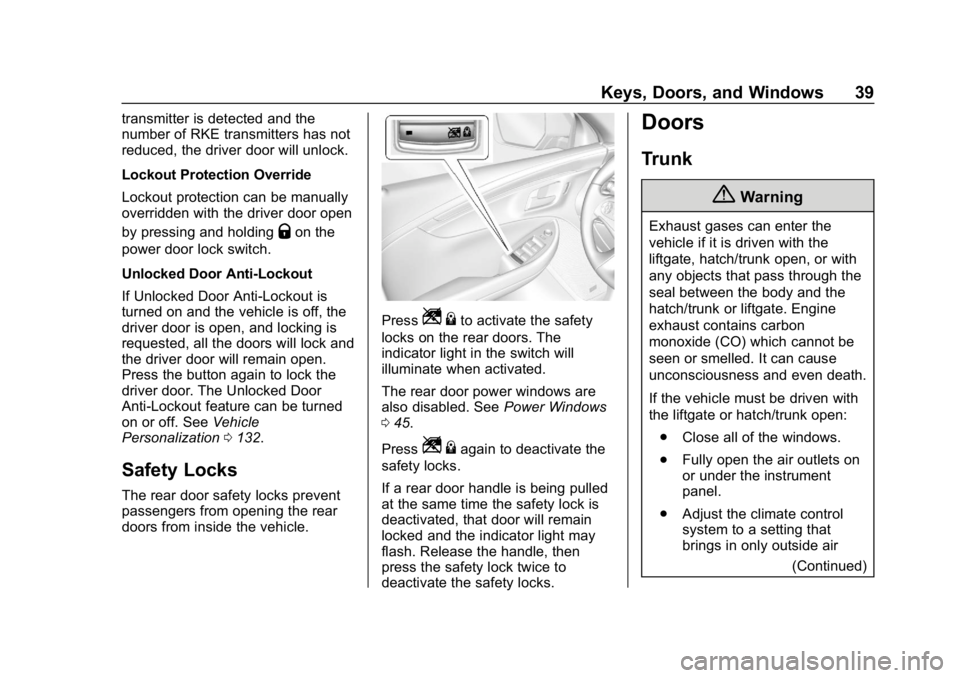
Safety Locks
The rear door safety locks prevent
passengers from opening the rear
doors from inside the vehicle.
PressZ {to activate the safety
locks on the rear doors. The
indicator light in the switch will
illuminate when activated.
The rear door power windows are
also disabled. See Power Windows
0 45.
Press
Z {again to deactivate the
safety locks.
If a rear door handle is being pulled
at the same time the safety lock is
deactivated, that door will remain
locked and the indicator light may
flash. Release the handle, then
press the safety lock twice to
deactivate the safety locks.
Doors
Trunk
{Warning
Exhaust gases can enter the
vehicle if it is driven with the
liftgate, hatch/trunk open, or with
any objects that pass through the
seal between the body and the
hatch/trunk or liftgate. Engine
exhaust contains carbon
monoxide (CO) which cannot be
seen or smelled. It can cause
unconsciousness and even death.
If the vehicle must be driven with
the liftgate or hatch/trunk open:
. Close all of the windows.
. Fully open the air outlets on
or under the instrument
panel.
. Adjust the climate control
system to a setting that
brings in only outside air
(Continued)
Page 41 of 353

Chevrolet Impala Owner Manual (GMNA-Localizing-U.S./Canada-12146115) -
2019 - crc - 8/27/18
40 Keys, Doors, and Windows
Warning (Continued)
and set the fan speed to the
highest setting. See
“Climate Control Systems”
in the Index.
. If the vehicle is equipped
with a power liftgate, disable
the power liftgate function.
For more information about
carbon monoxide, see Engine
Exhaust 0179.
To open the trunk:
.
Press
|with the transmission
in P (Park).
. Press and hold
Yon the RKE
transmitter.
. If equipped, press the touch pad
on the underside of the trunk lid
after unlocking all doors.
The RKE transmitter must be within
1 m (3 ft) of the trunk. Press the
touch pad on the underside of the
trunk lid and lift to open. See
Remote Keyless Entry (RKE)
System Operation 028.
When closing the trunk, use the
pull cup.
Emergency Trunk Release
Handle
Caution
Do not use the emergency trunk
release handle as a tie-down or
anchor point when securing items
in the trunk as it could damage
the handle.
If equipped, there is a
glow-in-the-dark emergency trunk
release handle on the trunk lid. This
handle will glow following exposure
to light. Pull the release handle to
open the trunk from the inside.
After use, return to the stored
position.
Page 245 of 353

Chevrolet Impala Owner Manual (GMNA-Localizing-U.S./Canada-12146115) -
2019 - crc - 8/27/18
244 Vehicle Care
Caution
Allowing the wiper arm to touch
the windshield when no wiper
blade is installed could damage
the windshield. Any damage that
occurs would not be covered by
the vehicle warranty. Do not allow
the wiper arm to touch the
windshield.
To replace the wiper blade: 1. Pull the wiper assembly away from the windshield.
2. Lift up on the latch in themiddle of the wiper blade
where the wiper arm attaches.
3. With the latch open, pull the wiper blade down toward the
windshield far enough to
release it from the J-hooked
end of the wiper arm.
4. Remove the wiper blade.
5. Reverse Steps 1–3 for wiper blade replacement.
Windshield Replacement
Driver Assistance Systems
If the windshield needs to be
replaced and the vehicle is
equipped with a front camera sensor
for the Driver Assistance Systems, a
GM replacement windshield is
recommended. The replacement
windshield must be installed
according to GM specifications for
proper alignment. If it is not, these
systems may not work properly, they
may display messages, or they may
not work at all. See your dealer for
proper windshield replacement.
Acoustic Windshield
The vehicle is equipped with an
acoustic windshield. If the
windshield needs to be replaced, be
sure to get an acoustic windshield
so you will continue to have the
benefits an acoustic windshield can
provide.
Gas Strut(s)
This vehicle is equipped with gas
strut(s) to provide assistance in
lifting and holding open the hood/
trunk/liftgate system in full open
position.
{Warning
If the gas struts that hold open
the hood, trunk, and/or liftgate fail,
you or others could be seriously
injured. Take the vehicle to your
dealer for service immediately.
Visually inspect the gas struts for
signs of wear, cracks, or other
damage periodically. Check to
make sure the hood/trunk/liftgate
(Continued)
Page 255 of 353

Chevrolet Impala Owner Manual (GMNA-Localizing-U.S./Canada-12146115) -
2019 - crc - 8/27/18
254 Vehicle Care
FusesUsage
42 Cooling fan high speed
44 Starter control
45 Cooling fan low speed
46 Cooling fan control
47 Pre catalytic converter O2 sensors/Canister
purge solenoid
49 Right HID headlamp
50 Left HID headlamp
51 Horn
52 Display/Ignition
53 Inside rearview mirror/ Rear vision camera
54 Instrument panel/ Ignition
55 Exterior rearview mirror
56 Front washer
60 Heated mirror
62 Obstacle detection Fuses
Usage
64 Rain sensor/Rear seat audio
66 Trunk release
67 Chassis control module
69 Battery voltage sensor
71 Memory seat
Relays Usage
1 A/C clutch
2 Starter pinion
4 Front wiper speed
5 Front wiper control
6 Cabin Coolant pump/ Air solenoid
7 Powertrain
8 Transmission auxiliary pump
9 Cooling fan high speed
10 Cooling fan low speed
11 Starter Relays
Usage
13 Cooling fan control
14 Low-beam HID headlamp
15 Run/Crank
17 Rear window defogger
Instrument Panel Fuse
Block
The instrument panel fuse block is
in the instrument panel, on the
driver side of the vehicle.
Page 256 of 353

Chevrolet Impala Owner Manual (GMNA-Localizing-U.S./Canada-12146115) -
2019 - crc - 8/27/18
Vehicle Care 255
To access the fuses on vehicles
equipped with a storage bin:1. Push forward on the top edge of the bin to unlatch it.
2. Press in on the sides of the bin to release it from the
instrument panel.
3. Pivot the door downward, allowing it to hang from the
instrument panel.
4. To close the bin, swing it upward and push in until
closed.
To access the fuses on vehicles not
equipped with a storage bin: 1. Pull the lower edge of the cover rearward. The clips on
the lower edge will release,
and the upper edge will fall
away from the instrument
panel.
2. To replace the cover, hook the upper edge of the cover on the
instrument panel, and swing
the lower edge of the cover into
place. 3. Press the lower edge of the
cover until the clips engage.
The vehicle may not be equipped
with all of the fuses, relays, and
features shown.
Fuses Usage
1 Wireless charging
2 Rear stoplamps/ Courtesy lamps/
Reverse lamps/Shift
lock solenoid/Puddle
lamps
3 LED indicator light
4 Radio Fuses Usage
5 Cluster/Auxiliary jack/HMI/USB/Radio
display/CD player
6 Console power outlet
7 Rear console power outlet
8 Trunk release/Brake pedal apply/Keyless
start indicators/
Hazard switch
illumination/CHMSL/
Brake relay/
Sidemarker lamps/
Washer relay/Run/
Crank relay
9 Trunk lamp/Right low-beam headlamp/
DRL/Right front turn
lamp/Right rear
parking lamp/
Stoplamp
10 Door unlock 11 Front HVAC blower