2019 CADILLAC XT5 Controls
[x] Cancel search: ControlsPage 2 of 388

Cadillac XT5 Owner Manual (GMNA-Localizing-U.S./Canada/Mexico-
12146119) - 2019 - crc - 7/27/18
ContentsIntroduction . . . . . . . . . . . . . . . . . . . . . . . . . . 2
In Brief . . . . . . . . . . . . . . . . . . . . . . . . . . . . . . . 5
Keys, Doors, and Windows . . . . . . . . . 26
Seats and Restraints . . . . . . . . . . . . . . . 56
Storage . . . . . . . . . . . . . . . . . . . . . . . . . . . . . 106
Instruments and Controls . . . . . . . . 112
Lighting . . . . . . . . . . . . . . . . . . . . . . . . . . . . 159
Infotainment System . . . . . . . . . . . . . 166
Climate Controls . . . . . . . . . . . . . . . . . . 167
Driving and Operating . . . . . . . . . . . . 176
Vehicle Care . . . . . . . . . . . . . . . . . . . . . . . 253
Service and Maintenance . . . . . . . . . 333
Technical Data . . . . . . . . . . . . . . . . . . . . 346
Customer Information . . . . . . . . . . . . 350
Reporting Safety Defects . . . . . . . . . 360
OnStar . . . . . . . . . . . . . . . . . . . . . . . . . . . . . . 364
Connected Services . . . . . . . . . . . . . . . 372
Index . . . . . . . . . . . . . . . . . . . . . . . . 376
Page 6 of 388

Cadillac XT5 Owner Manual (GMNA-Localizing-U.S./Canada/Mexico-
12146119) - 2019 - crc - 7/27/18
IN BRIEF 5
In Brief
Instrument Panel
Instrument Panel Overview . . . . . . . . . 6
Initial Drive Information
Initial Drive Information . . . . . . . . . . . 8
Stop/Start System . . . . . . . . . . . . . . . . . . . 8
Remote Keyless Entry (RKE)System . . . . . . . . . . . . . . . . . . . . . . . . . . . . . 8
Remote Vehicle Start . . . . . . . . . . . . . . . 8
Door Locks . . . . . . . . . . . . . . . . . . . . . . . . . . 9
Liftgate . . . . . . . . . . . . . . . . . . . . . . . . . . . . . 10
Windows . . . . . . . . . . . . . . . . . . . . . . . . . . . 10
Seat Adjustment . . . . . . . . . . . . . . . . . . . 10
Memory Features . . . . . . . . . . . . . . . . . . 11
Second Row Seats . . . . . . . . . . . . . . . . . 12
Heated and Ventilated Seats . . . . . . 12
Head Restraint Adjustment . . . . . . . 12
Seat Belts . . . . . . . . . . . . . . . . . . . . . . . . . . . 13
Passenger Sensing System . . . . . . . . 13
Mirror Adjustment . . . . . . . . . . . . . . . . 13
Steering Wheel Adjustment . . . . . . . 14
Interior Lighting . . . . . . . . . . . . . . . . . . . 14
Exterior Lighting . . . . . . . . . . . . . . . . . . . 15
Windshield Wiper/Washer . . . . . . . . 16
Climate Controls . . . . . . . . . . . . . . . . . . . 17
Transmission . . . . . . . . . . . . . . . . . . . . . . . 18
Vehicle Features
Infotainment System . . . . . . . . . . . . . . 18
Steering Wheel Controls . . . . . . . . . . 18
Cruise Control . . . . . . . . . . . . . . . . . . . . . 18
Driver Information Center (DIC) . . . . . . . . . . . . . . . . . . . . . . 19
Forward Collision Alert (FCA) System . . . . . . . . . . . . . . . . . . . . . . . . . . . . 19
Forward Automatic Braking (FAB) . . . . . . . . . . . . . . . . . . . . 19
Front Pedestrian Braking (FPB) System . . . . . . . . . . . . . . . . . . . . . . . . . . . . 20
Lane Keep Assist (LKA) . . . . . . . . . . . 20
Lane Change Alert (LCA) . . . . . . . . . . 20
Surround Vision . . . . . . . . . . . . . . . . . . . 20
Rear Vision Camera (RVC) . . . . . . . . 20
Rear Cross Traffic Alert (RCTA) System . . . . . . . . . . . . . . . . . . . . . . . . . . . . 21
Park Assist . . . . . . . . . . . . . . . . . . . . . . . . . 21
Automatic Parking Assist (APA) . . . . . . . . . . . . . . . . . . . . . . 21
Reverse Automatic Braking (RAB) . . . . . . . . . . . . . . . . . . . . 21
Power Outlets . . . . . . . . . . . . . . . . . . . . . . 21
Universal Remote System . . . . . . . . . 22
Sunroof . . . . . . . . . . . . . . . . . . . . . . . . . . . . . 22
Performance and Maintenance
Traction Control/Electronic Stability Control . . . . . . . . . . . . . . . . . . 23
Tire Pressure Monitor . . . . . . . . . . . . . 23
Fuel . . . . . . . . . . . . . . . . . . . . . . . . . . . . . . . . . 24
E85 or FlexFuel . . . . . . . . . . . . . . . . . . . . 24
Engine Oil Life System . . . . . . . . . . . . 24
Driving for Better Fuel Economy . . . . . . . . . . . . . . . . . . . . . . . . . . 25
Roadside Service . . . . . . . . . . . . . . . . . . . 25
Page 8 of 388

Cadillac XT5 Owner Manual (GMNA-Localizing-U.S./Canada/Mexico-
12146119) - 2019 - crc - 7/27/18
IN BRIEF 7
1.Air Vents 0174.
2. Exterior Lamp Controls 0159.
Turn Signal Lever. See Turn and
Lane-Change Signals 0162.
IntelliBeam System Button (If
Equipped). See Exterior Lamp
Controls 0159.
3. Tap Shift Controls. See Manual
Mode 0199.
4. Instrument Cluster (Uplevel
Cluster) 0124 orInstrument
Cluster (Base Level Cluster) 0122.
Driver Information Center (DIC)
Display. See Driver Information
Center (DIC) 0140.
5. Windshield Wiper/Washer 0113.
Rear Window Wiper/Washer
0 116.
6. ENGINE START/STOP Button. See Ignition Positions 0187.
7. Park Assist Button. See Assistance Systems for Parking or
Backing 0220. Automatic Parking Assist (APA)
Button. See
Assistance Systems
for Parking or Backing 0220.
8. Light Sensor. See Automatic
Headlamp System 0161.
9. Hazard Warning Flashers 0162.
10. Infotainment 0166.
11. Heated and Ventilated Front Seats
063 (If Equipped).
12. Dual Automatic Climate Control
System 0167.
13. MODE Switch. See Driver Mode
Control 0207.
Traction Control/Electronic
Stability Control 0205.
All-Wheel Drive 0201 (If
Equipped).
14. Shift Lever. See Automatic
Transmission 0195.
15. Steering Wheel Controls 0113.
Driver Information Center (DIC)
Controls. See Driver Information
Center (DIC) 0140.
16. Steering Wheel Controls 0113. 17.
Horn 0113.
18. Forward Collision Alert (FCA)
System 0226 (If Equipped).
Lane Keep Assist (LKA) 0235 (If
Equipped).
Heated Steering Wheel 0113 (If
Equipped).
19. Cruise Control 0208.
Adaptive Cruise Control 0210 (If
Equipped).
Phone Button. See Steering Wheel
Controls 0113.
20. Steering Wheel Adjustment 0113
(Out of View).
21. Head-Up Display (HUD) 0143 (If
Equipped).
22. Hood Release. See Hood0256.
Data Link Connector (DLC) (Out
of View). See Malfunction
Indicator Lamp (Check Engine
Light) 0132.
23. Instrument Panel Illumination
Control 0163.
24. Electric Parking Brake 0202.
Page 13 of 388

Cadillac XT5 Owner Manual (GMNA-Localizing-U.S./Canada/Mexico-
12146119) - 2019 - crc - 7/27/18
12 IN BRIEF
Second Row Seats
Rear Seat Adjustment
The second row seats slide forward for
more room.
To adjust the seat position, lift the
lever below the seat cushion and slide
the seat forward or backward.
Folding the Seatback
Either side of the seatback can be
folded for more cargo space.
SeeRear Seats 065.
Heated and Ventilated
Seats
If equipped, the buttons are near the
climate controls on the center stack.
To operate, the engine must be
running.
Press
MorLto heat the driver or
passenger seat cushion.
Press
Cor{to ventilate the driver
or passenger seat.
Press the button once for the highest
setting. With each press of the button,
the seat will change to the next lower
setting, and then to the off setting. The indicator lights above the buttons
indicate three for the highest setting
and one for the lowest. If the front
heated seats are on high, the level
may automatically be lowered after
approximately 30 minutes.
See
Heated and Ventilated Front Seats
0 63.
Head Restraint Adjustment
Do not drive until the head restraints
for all occupants are installed and
adjusted properly.
To achieve a comfortable seating
position, change the seatback recline
angle as little as necessary while
keeping the seat and the head
restraint height in the proper position.
See Head Restraints 057 and Reclining
Seatbacks 060.
Page 15 of 388

Cadillac XT5 Owner Manual (GMNA-Localizing-U.S./Canada/Mexico-
12146119) - 2019 - crc - 7/27/18
14 IN BRIEF
Interior Mirror
Adjust the rearview mirror for a clear
view of the area behind your vehicle.
Manual Rearview Mirror
If equipped, push the tab forward for
daytime use and pull it rearward for
nighttime use to avoid glare of the
headlamps from behind.
Automatic Dimming Rearview Mirror
If equipped, automatic dimming
reduces the glare of headlamps from
behind. The dimming feature comes
on when the vehicle is started.
Rear Camera Mirror
If equipped, this automatic dimming
rearview mirror provides a wide angle
camera view of the area behind the
vehicle. Adjust the mirror with the tab
pushed forward so that the display is
off. SeeRear Camera Mirror 050.
Steering Wheel Adjustment
Power Tilt and Telescoping Steering
Wheel
Press the control to move the tilt and
telescoping steering wheel up and
down or forward and rearward.
Do not adjust the steering wheel while
driving.
Interior Lighting
Dome Lamps
The dome lamp controls are in the
overhead console.
To operate, press the following
buttons:
jOFF : Press to turn off the dome
lamps when a door is open. An
indicator light on the button will turn
on when the dome lamp override is
activated. Press
jOFF again to
deactivate this feature and the
Page 16 of 388

Cadillac XT5 Owner Manual (GMNA-Localizing-U.S./Canada/Mexico-
12146119) - 2019 - crc - 7/27/18
IN BRIEF 15
indicator light will turn off. The dome
lamps will come on when doors are
opened.
+ON/OFF : Press to turn the dome
lamps on manually.
Reading Lamps
There are front and rear reading
lamps on the overhead console and
over the rear passenger doors. These
lamps come on automatically when
any door is opened.
To manually turn the reading lamps
on or off:
Press the lamp lenses on the front
reading lamps.
Press the lamp lenses over the rear
passenger doors.
For more information on interior
lighting, see Instrument Panel
Illumination Control 0163.
Exterior Lighting
The exterior lamp control is on the
turn signal lever. Turn the control to the following
positions:
O:
Turns the exterior lamps off and
deactivates the AUTO mode. Turn to
Oagain to reactivate the AUTO mode.
In Canada, the headlamps will
automatically reactivate when the
vehicle is shifted out of P (Park).
AUTO : Automatically turns the
exterior lamps on and off, depending
on outside lighting.
;: Turns on the parking lamps
including all lamps, except the
headlamps.
5: Turns on the headlamps together
with the parking lamps and
instrument panel lights.
See:
. Exterior Lamp Controls 0159.
. Turn and Lane-Change Signals
0162.
Page 18 of 388
Cadillac XT5 Owner Manual (GMNA-Localizing-U.S./Canada/Mexico-
12146119) - 2019 - crc - 7/27/18
IN BRIEF 17
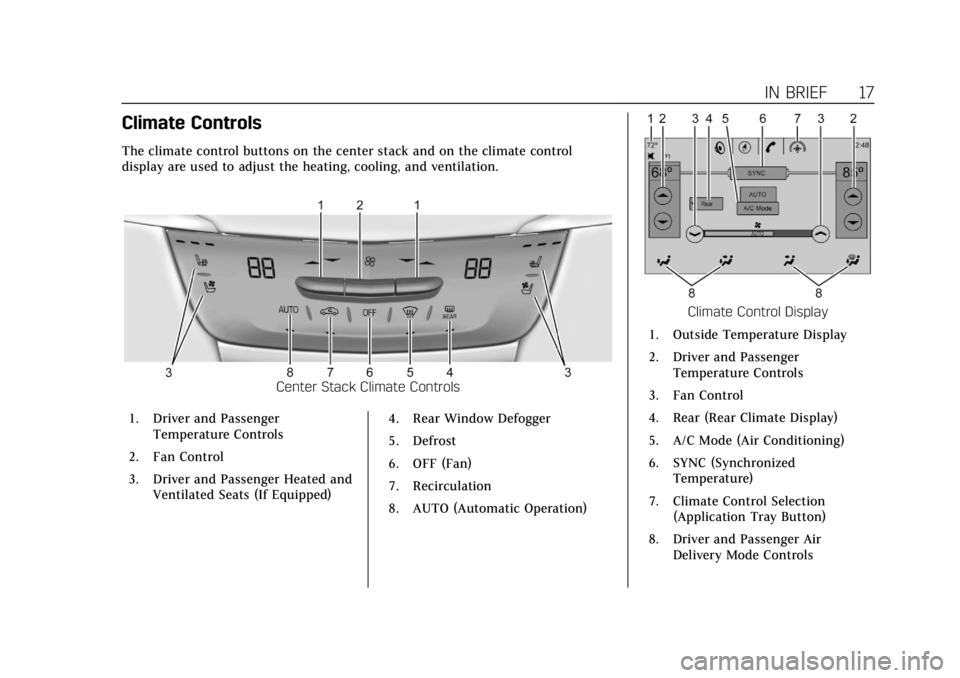
Climate Controls
The climate control buttons on the center stack and on the climate control
display are used to adjust the heating, cooling, and ventilation.
Center Stack Climate Controls
1. Driver and Passenger Temperature Controls
2. Fan Control
3. Driver and Passenger Heated and Ventilated Seats (If Equipped) 4. Rear Window Defogger
5. Defrost
6. OFF (Fan)
7. Recirculation
8. AUTO (Automatic Operation)
Climate Control Display
1. Outside Temperature Display
2. Driver and Passenger Temperature Controls
3. Fan Control
4. Rear (Rear Climate Display)
5. A/C Mode (Air Conditioning)
6. SYNC (Synchronized Temperature)
7. Climate Control Selection (Application Tray Button)
8. Driver and Passenger Air Delivery Mode Controls
Page 19 of 388

Cadillac XT5 Owner Manual (GMNA-Localizing-U.S./Canada/Mexico-
12146119) - 2019 - crc - 7/27/18
18 IN BRIEF
SeeDual Automatic Climate Control
System 0167 and Rear Climate Control
System 0172 (if equipped).
Transmission
Tap Shift
If equipped, Tap Shift allows you to
shift an automatic transmission
similar to a manual transmission. To
use the Tap Shift feature:
1. When in D (Drive), pull back on the shift lever to enter
M (Manual Mode).
2. Use Tap Shift to manually shift the automatic transmission.
3. To exit, pull back on the shift lever a second time.
See Manual Mode 0199.
Vehicle Features
Infotainment System
See the infotainment manual for
information on the radio, audio
players, phone, navigation system, and
voice or speech recognition. It also
includes information on settings.
Steering Wheel Controls
The infotainment system can be
operated by using the steering wheel
controls. See “Steering Wheel
Controls ”in the infotainment manual.
Cruise Control
J:Press to turn the system on and
off. A white indicator appears in the
instrument cluster when turned on.
RES+ : If there is a set speed in
memory, press briefly to resume to
that speed or press and hold to
accelerate. If the cruise control is
already active, use to increase vehicle
speed. To increase speed by 1 km/h
(1 mph), press RES+ to the first detent.
To increase speed to the next 5 km/h
(5 mph) mark on the speedometer,
press RES+ to the second detent.