2019 BUICK REGAL SPORTBACK turn signal
[x] Cancel search: turn signalPage 14 of 78
Buick Regal Infotainment System (GMNA-Localizing-U.S./Canada-
12680696) - 2019 - crc - 6/25/18
Radio 13
HD Radio Technology
If equipped, HD Radio is a free
service with features such as digital
quality sound, more stations
available on a single frequency such
as HD2 and HD3, and display
information such as artist and song
title.
From the AM or FM display, touch
the HD Radio icon to turn HD on
or off.
Station Access
To access HD Radio stations:1. Tune the radio to the station. If HD Radio is turned on and
the station is broadcasting in
HD Radio, the radio will
automatically tune to the HD
version of the current channel
(HD1) after several seconds.
The radio will also display
icons representing additional
channels (HD2, ...HD8), that
may be available. When the
radio successfully tunes to a HD station, the HD logo will
display and digital audio
will play.
2. Touch the display arrows to tune to the previous or next HD
Radio station.
There may be a delay before the
station starts playing.
The HD Radio station number is
indicated next to the HD logo.
HD Radio stations can be saved as
favorites.
For a list of all stations, see
www.hdradio.com.
HD Radio Troubleshooting
Digital Audio Delay : Wait for the
signal to process. This can take
several seconds.
Volume Change, Audio Skip,
Echo, Digital Audio Lost : Station
signal strength may be weak, the
station is out of range, or the station
may be out of alignment. Verify
proper reception on another station. If the HD Radio signal loses
reception while listening to HD1, the
radio will go back to the analog
version of the radio station.
If the HD Radio signal loses
reception while listening to stations
HD2 to HD8, the radio mutes until
the signal can be recovered or until
the station is changed.
HD Radio reception can be disabled
if driving in a weak signal area.
Touch HD Radio On/Off to toggle
HD Radio reception on and off.
Radio Data System (RDS)
If equipped, RDS features are
available for use only on FM
stations that broadcast RDS
information. With RDS, the
radio can:
.
Seek stations broadcasting the
selected type of programming.
. Receive announcements
concerning local and national
emergencies.
. Display messages from radio
stations.
Page 15 of 78
Buick Regal Infotainment System (GMNA-Localizing-U.S./Canada-
12680696) - 2019 - crc - 6/25/18
14 Radio
This system relies on receiving
specific information from these
stations and only works when the
information is available. It is
possible that a radio station could
broadcast incorrect information that
causes the radio features to work
improperly. If this happens, contact
the radio station.
When information is broadcast from
the current FM station, the station
name or call letters display on the
audio screen. RDS can provide a
program type (PTY) for current
programming and the name of the
program being broadcasted.
Satellite Radio
If equipped, vehicles with a valid
SiriusXM satellite radio subscription
can receive SXM programming.
SiriusXM satellite radio has a wide
variety of programming and
commercial-free music, coast to
coast, in digital-quality sound. In the
U.S. see www.siriusxm.com or call1-888-601-6296. In Canada see
www.siriusxm.ca or call
1-877-438-9677.
When SXM is active, the channel
name, number, song title, and artist
appear on the display.
Radio Reception
Unplug electronic devices from the
accessory power outlets if there is
interference or static in the radio.
FM
FM signals only reach about 16 to
65 km (10 to 40 mi). Although the
radio has a built-in electronic circuit
that automatically works to reduce
interference, some static can occur,
especially around tall buildings or
hills, causing the sound to fade in
and out.
AM
The range for most AM stations is
greater than for FM, especially at
night. The longer range can cause
station frequencies to interfere with
each other. Static can also occur
when things like storms and powerlines interfere with radio reception.
When this happens, try reducing the
treble on the radio.
SiriusXM Satellite Radio
Service
If equipped, SiriusXM Satellite
Radio Service provides digital radio
reception. Tall buildings or hills can
interfere with satellite radio signals,
causing the sound to fade in and
out. In addition, traveling or standing
under heavy foliage, bridges,
garages, or tunnels may cause loss
of the SiriusXM signal for a period of
time. Some cellular services may
interfere with SXM reception
causing loss of signal.
Mobile Device Usage
Mobile device usage, such as
making or receiving calls, charging,
or just having the mobile device on
may cause static interference in the
radio. Unplug the mobile device or
turn it off if this happens.
Page 36 of 78
Buick Regal Infotainment System (GMNA-Localizing-U.S./Canada-
12680696) - 2019 - crc - 6/25/18
Navigation 35
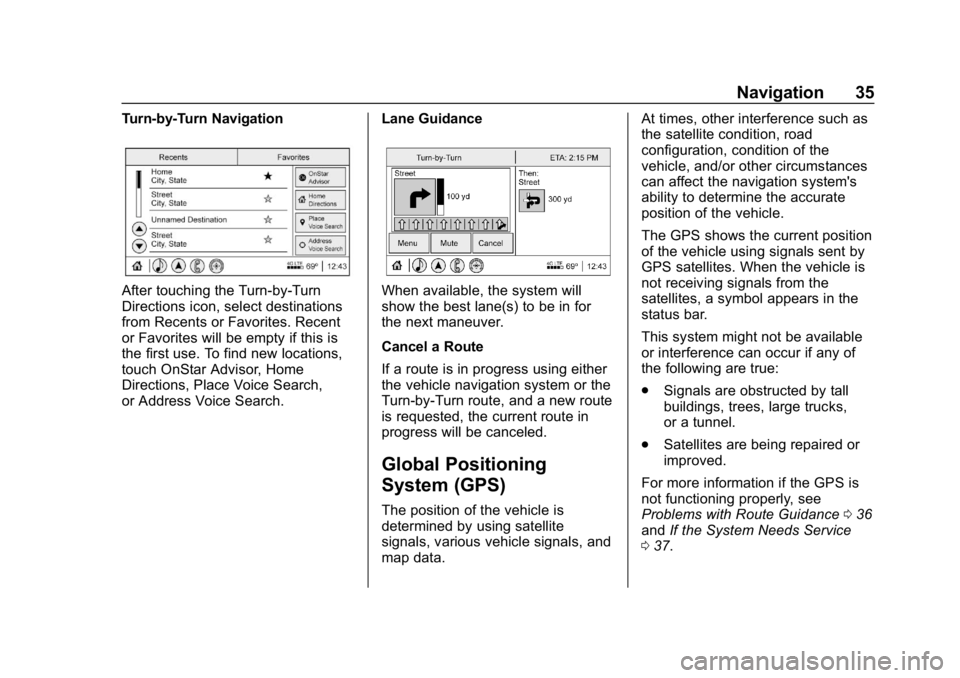
Turn-by-Turn Navigation
After touching the Turn-by-Turn
Directions icon, select destinations
from Recents or Favorites. Recent
or Favorites will be empty if this is
the first use. To find new locations,
touch OnStar Advisor, Home
Directions, Place Voice Search,
or Address Voice Search.Lane GuidanceWhen available, the system will
show the best lane(s) to be in for
the next maneuver.
Cancel a Route
If a route is in progress using either
the vehicle navigation system or the
Turn-by-Turn route, and a new route
is requested, the current route in
progress will be canceled.
Global Positioning
System (GPS)
The position of the vehicle is
determined by using satellite
signals, various vehicle signals, and
map data.At times, other interference such as
the satellite condition, road
configuration, condition of the
vehicle, and/or other circumstances
can affect the navigation system's
ability to determine the accurate
position of the vehicle.
The GPS shows the current position
of the vehicle using signals sent by
GPS satellites. When the vehicle is
not receiving signals from the
satellites, a symbol appears in the
status bar.
This system might not be available
or interference can occur if any of
the following are true:
.
Signals are obstructed by tall
buildings, trees, large trucks,
or a tunnel.
. Satellites are being repaired or
improved.
For more information if the GPS is
not functioning properly, see
Problems with Route Guidance 036
and If the System Needs Service
0 37.
Page 37 of 78
Buick Regal Infotainment System (GMNA-Localizing-U.S./Canada-
12680696) - 2019 - crc - 6/25/18
36 Navigation
Vehicle Positioning
At times, the position of the vehicle
on the map could be inaccurate due
to one or more of the following
reasons:
.The road system has changed.
. The vehicle is driving on slippery
road surfaces such as sand,
gravel, or snow.
. The vehicle is traveling on
winding roads or long, straight
roads.
. The vehicle is approaching a tall
building or a large vehicle.
. The surface streets run parallel
to a freeway.
. The vehicle has been transferred
by a vehicle carrier or a ferry.
. The current position calibration
is set incorrectly.
. The vehicle is traveling at high
speed. .
The vehicle changes directions
more than once, or the vehicle is
turning on a turn table in a
parking lot.
. The vehicle is entering and/or
exiting a parking lot, garage, or a
lot with a roof.
. The GPS signal is not received.
. A roof carrier is installed on the
vehicle.
. Tire chains are installed on the
vehicle.
. The tires are replaced or worn.
. The tire pressure for the tires is
incorrect.
. This is the first navigation use
after the map data is updated.
. The 12-volt battery has been
disconnected for several days.
. The vehicle is driving in heavy
traffic where driving is at low
speeds, and the vehicle is
stopped and started repeatedly.
Problems with Route
Guidance
Inappropriate route guidance can
occur under one or more of the
following conditions:
.
The turn was not made on the
road indicated.
. Route guidance might not be
available when using automatic
rerouting for the next right or
left turn.
. The route might not be changed
when using automatic rerouting.
. There is no route guidance when
turning at an intersection.
. Plural names of places might be
announced occasionally.
. It could take a long time to
operate automatic rerouting
during high-speed driving.
. Automatic rerouting might
display a route returning to the
set waypoint if heading for a
destination without passing
through a set waypoint.