2019 BUICK LACROSSE low
[x] Cancel search: lowPage 156 of 374

Buick LaCrosse Owner Manual (GMNA-Localizing-U.S./Canada-12032549) -
2019 - crc - 8/20/18
Lighting 155
voltage move up or down. This is
normal. If there is a problem, an
alert will be displayed.
The battery can be discharged at
idle if the electrical loads are very
high. This is true for all vehicles.
This is because the generator
(alternator) may not be spinning fast
enough at idle to produce all of the
power needed for very high
electrical loads.
A high electrical load occurs when
several of the following are on, such
as: headlamps, high beams, rear
window defogger, climate control fan
at high speed, heated seats, engine
cooling fans, trailer loads, and loads
plugged into accessory power
outlets.
EPM works to prevent excessive
discharge of the battery. It does this
by balancing the generator's output
and the vehicle's electrical needs.
It can increase engine idle speed to
generate more power whenever
needed. It can temporarily reduce
the power demands of some
accessories.Normally, these actions occur in
steps or levels, without being
noticeable. In rare cases at the
highest levels of corrective action,
this action may be noticeable to the
driver. If so, a DIC message might
be displayed and it is recommended
that the driver reduce the electrical
loads as much as possible.
Battery Power Protection
The battery saver feature is
designed to protect the vehicle's
battery.
If the exterior lamps or any interior
lamp is left on and the ignition is
turned off, the battery rundown
protection system automatically
turns the lamp off after about
10 minutes.
Exterior Lighting Battery
Saver
The exterior lamps turn off about
10 minutes after the ignition is
turned off, if the parking lamps or
headlamps have been manually left
on. This protects against drainingthe battery. To restart the 10-minute
timer, turn the exterior lamp control
to the off position and then back to
the parking lamp or headlamp
position.
To keep the lamps on for more than
10 minutes, the ignition must be on
or in ACC/ACCESSORY.
Page 159 of 374
Buick LaCrosse Owner Manual (GMNA-Localizing-U.S./Canada-12032549) -
2019 - crc - 8/20/18
158 Climate Controls
9. ON/OFF (Power)
10. AUTO (Automatic Operation)
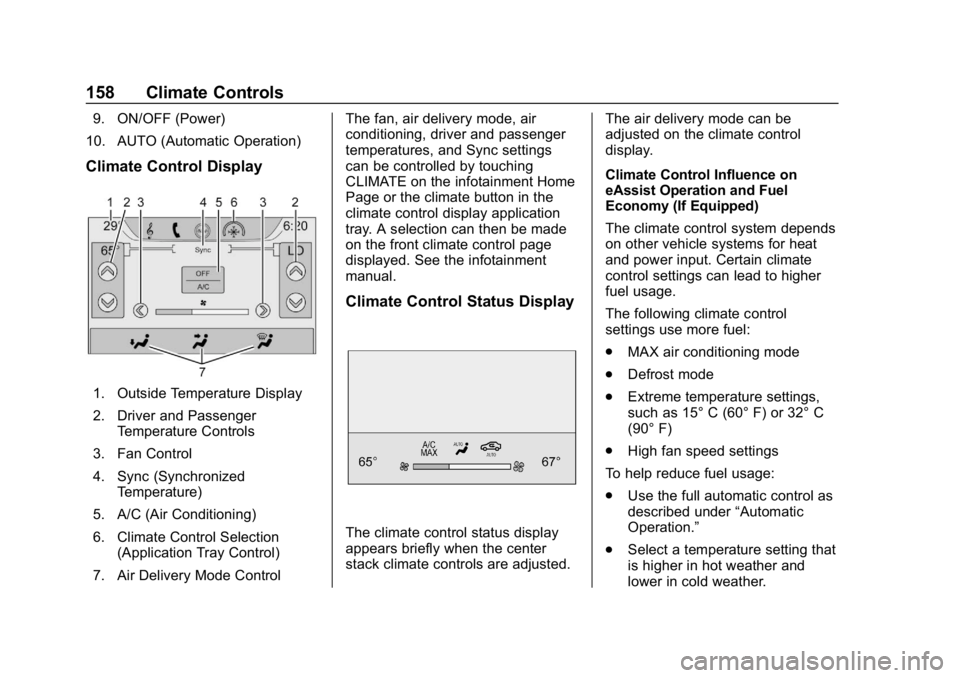
Climate Control Display
1. Outside Temperature Display
2. Driver and Passenger Temperature Controls
3. Fan Control
4. Sync (Synchronized Temperature)
5. A/C (Air Conditioning)
6. Climate Control Selection (Application Tray Control)
7. Air Delivery Mode Control The fan, air delivery mode, air
conditioning, driver and passenger
temperatures, and Sync settings
can be controlled by touching
CLIMATE on the infotainment Home
Page or the climate button in the
climate control display application
tray. A selection can then be made
on the front climate control page
displayed. See the infotainment
manual.
Climate Control Status Display
The climate control status display
appears briefly when the center
stack climate controls are adjusted.
The air delivery mode can be
adjusted on the climate control
display.
Climate Control Influence on
eAssist Operation and Fuel
Economy (If Equipped)
The climate control system depends
on other vehicle systems for heat
and power input. Certain climate
control settings can lead to higher
fuel usage.
The following climate control
settings use more fuel:
.
MAX air conditioning mode
. Defrost mode
. Extreme temperature settings,
such as 15° C (60° F) or 32° C
(90° F)
. High fan speed settings
To help reduce fuel usage:
. Use the full automatic control as
described under “Automatic
Operation.”
. Select a temperature setting that
is higher in hot weather and
lower in cold weather.
Page 160 of 374

Buick LaCrosse Owner Manual (GMNA-Localizing-U.S./Canada-12032549) -
2019 - crc - 8/20/18
Climate Controls 159
.Turn off the air conditioning
when it is not needed.
. Only use defrost to clear the
windows.
Automatic Operation
The system automatically controls
the fan speed, air delivery, air
conditioning, and recirculation in
order to heat or cool the vehicle to
the desired temperature.
When AUTO is lit, all four functions
operate automatically. Each function
can also be manually set and the
selected setting is displayed.
Functions not manually set will
continue to be automatically
controlled, even if the AUTO
indicator is not lit.
For automatic operation:
1. Press AUTO.
2. Set the temperature. Allow the system time to stabilize. Adjust
the temperature as needed for
best comfort. To improve fuel efficiency and to
cool the vehicle faster with A/C on,
recirculation may be automatically
selected in warm weather. Press
@to select recirculation; press it
again to select outside air.
Driver and Passenger
Temperature Controls : The
temperature can be adjusted
separately for the driver and the
passenger. Turn the knob clockwise
or counterclockwise to increase or
decrease the driver or passenger
temperature setting.
The driver and passenger
temperatures can also be adjusted
by touching the controls on the
climate control display.
Sync : Touch Sync on the climate
control display to link all passenger
settings to the driver settings. Adjust
the driver side temperature control
to change the linked temperature.
When the passenger settings are
adjusted, Sync is displayed when
the temperatures are unlinked.
Manual Operation
CLIMATE : Press CLIMATE to show
the climate control display.
ON/OFF : Press to turn the fan on
or off.
hi: Touch or press the fan controls
on the climate control display or
center stack to increase or decrease
the fan speed. The fan speed
setting displays. When the fan
speed is decreased completely, the
climate control system turns off.
It will turn back on if the fan speed
is increased.
Pressing either control cancels
automatic fan control and the fan is
controlled manually. Press AUTO to
return to automatic operation.
Air Delivery Mode Control : When
the climate information is displayed,
touch
6,Y, orXon the climate
control display to change the
direction of airflow. Any combination
of the three controls can be
selected. The selected air delivery
mode is lit. Pressing any control
cancels automatic air delivery
Page 161 of 374

Buick LaCrosse Owner Manual (GMNA-Localizing-U.S./Canada-12032549) -
2019 - crc - 8/20/18
160 Climate Controls
control and the direction of the
airflow is controlled manually. Press
AUTO to return to automatic
operation.
To change the current mode, select
one or more of the following:
6:Air is directed to the floor
outlets, with some air to the
windshield and side windows.
Y: Air is directed to the instrument
panel outlets.
X: Clears the windows of fog or
moisture. Air is directed to the
windshield.
1MAX : Air is directed to the
windshield, the fan runs at a higher
speed, and the temperature of the
air is increased if not already at
maximum. This mode overrides the
previous mode selected and clears
fog or frost from the windshield
more quickly. When the control is
pressed again, the system returns
to the previous mode setting and
fan speed. For best results, clear all snow and
ice from the windshield before
defrosting.
For eAssist vehicles that have the
auto defog feature, Auto Stops can
occur in defrost mode. In this mode,
the Auto Stops are shorter and less
frequent than other air delivery
modes to prevent window fogging.
A/C :
Touch A/C on the climate
control display to cycle between the
MAX, ECO, and OFF modes. The
MAX, ECO, or OFF indicator will
appear on the display. If the fan is
turned off, the air conditioner will not
run and the indicator light will
turn off.
Touch AUTO to return to automatic
operation and the air conditioner
runs automatically as needed. The
A/C will return to ECO A/C
operation.
For MAX A/C, touch A/C.
For ECO A/C, touch A/C again. This
setting balances fuel economy and
air conditioning comfort. This setting allows higher humidity inside the
vehicle, and window fogging may
occur before the engine restarts.
@:
Press to turn on recirculation.
An indicator light comes on. Air is
recirculated to quickly cool the
inside of the vehicle or to reduce the
entry of outside air and odors.
If selected during cool or cold
weather, the windshield and
windows may fog. Turn off
recirculation to help clear the
windshield and windows.
Auto Defog : If equipped, the
climate control system may have a
sensor to automatically detect high
humidity inside the vehicle. When
high humidity is detected, the
climate control system may adjust to
outside air supply and turn on the
air conditioner. The fan speed may
slightly increase to help prevent
fogging. If the climate control
system does not detect possible
window fogging, it returns to normal
operation. For eAssist vehicles,
there may be shorter and less
frequent Auto Stops when auto
defog is in use.
Page 162 of 374
Buick LaCrosse Owner Manual (GMNA-Localizing-U.S./Canada-12032549) -
2019 - crc - 8/20/18
Climate Controls 161
To turn Auto Defog off or on, see
“Climate and Air Quality”under
Vehicle Personalization 0138.
Ionizer : If equipped with an ionizer,
this feature helps to clean the air
inside the vehicle and remove
contaminants such as pollen, odors,
and dust. If the climate control
system is on and the ionizer is
enabled, the ionizer status indicator
will be lit on the climate control
display. To turn the ionizer on or off,
see “Climate and Air Quality” under
Vehicle Personalization 0138.
Rear Window Defogger
K:Press to turn the rear window
defogger on or off. An indicator light
on the control comes on to show
that the rear window defogger is on.
The rear window defogger only
works when the engine is running.
It turns off when the ignition is
turned off or in ACC/ACCESSORY.
The rear window defogger can be
set to automatic operation. See
“Climate and Air Quality” under
Vehicle Personalization 0138.
When Auto Rear Defog is selected, the rear window defogger turns on
automatically when the interior
temperature is cold and the outside
temperature is about 4 °C (40 °F)
and below. The auto rear defogger
turns off automatically after about
10 minutes, or after five minutes if
the outside temperature is not
as cold.
For eAssist vehicles, auto rear
defog will only run during a remote
start and the feature is not available
in the Vehicle Personalization menu.
The upper gridlines on the rear
window are antenna lines and are
not intended to heat when the
defogger is activated.
The heated outside mirrors turn on
when the rear window defogger
control is on and help to clear fog or
frost from the surface of the mirror.
See
Heated Mirrors 046.
Caution
Do not try to clear frost or other
material from the inside of the
front windshield and rear window
with a razor blade or anything
else that is sharp. This may
damage the rear window
defogger grid and affect the
radio's ability to pick up stations
clearly. The repairs would not be
covered by the vehicle warranty.
Heated and Ventilated Seats
MorL:If equipped, pressMorLto heat the driver or passenger seat.
Cor{:If equipped, pressCor{to ventilate the driver or
passenger seat. See Heated and
Ventilated Front Seats 059.
Remote Start Climate Control
Operation : The climate control
system may run when the vehicle is
started remotely. If equipped with
heated or ventilated seats, they may
come on during a remote start.
Page 163 of 374

Buick LaCrosse Owner Manual (GMNA-Localizing-U.S./Canada-12032549) -
2019 - crc - 8/20/18
162 Climate Controls
SeeRemote Vehicle Start 035 and
Heated and Ventilated Front Seats
0 59.
Sensors
The solar sensor, on top of the
instrument panel near the
windshield, monitors the solar heat.
Do not cover the solar sensor or the
system will not work properly.
The climate control system uses the
sensor information to adjust the
temperature, fan speed,
recirculation, and air delivery mode
for best comfort.
Do not cover the sensor; otherwise
the automatic climate control system
may not work properly.
Air Vents
Use the slider knob on the air vent
louvers to change the amount and
direction of the airflow.
To close the outboard air vents,
move the slider knob to the full
outboard position.
To close the center air vents, move
the slide knob to the full inboard
position.
To close the rear passenger air
vents, move the slider knob to the
full inboard position. Operation Tips
.
Clear away any ice, snow,
or leaves from air inlets at the
base of the windshield that could
block the flow of air into the
vehicle.
. Clear snow off the hood to
improve visibility and help
decrease moisture drawn into
the vehicle.
. Keep all outlets open whenever
possible for best system
performance.
. Keep the path under all seats
clear of objects to help circulate
the air inside the vehicle more
effectively.
. Use of non-GM approved hood
deflectors can adversely affect
the performance of the system.
Page 164 of 374

Buick LaCrosse Owner Manual (GMNA-Localizing-U.S./Canada-12032549) -
2019 - crc - 8/20/18
Climate Controls 163
Maintenance
Air Intake
Clear away any ice, snow, or leaves
from the air intake at the base of the
windshield that can block the flow of
air into the vehicle.
Passenger Compartment
Air Filter
The filter removes dust, pollen, and
other airborne irritants from outside
air that is pulled into the vehicle.
The filter should be replaced as part
of routine scheduled maintenance.
SeeMaintenance Schedule 0320
for replacement intervals. For more
information, see your dealer.
Service
All vehicles have a label underhood
that identifies the refrigerant used in
the vehicle. The refrigerant system
should only be serviced by trained
and certified technicians. The air
conditioning evaporator should
never be repaired or replaced by one from a salvage vehicle.
It should only be replaced by a new
evaporator to ensure proper and
safe operation.
During service, all refrigerants
should be reclaimed with proper
equipment. Venting refrigerants
directly to the atmosphere is harmful
to the environment and may also
create unsafe conditions based on
inhalation, combustion, frostbite,
or other health-based concerns.
The air conditioning system requires
periodic maintenance. See
Maintenance Schedule
0320.
Page 167 of 374

Buick LaCrosse Owner Manual (GMNA-Localizing-U.S./Canada-12032549) -
2019 - crc - 8/20/18
166 Driving and Operating
{Warning
Taking your eyes off the road too
long or too often could cause a
crash resulting in injury or death.
Focus your attention on driving.
Refer to the infotainment section for
more information on using that
system and the navigation system,
if equipped, including pairing and
using a cell phone.
Defensive Driving
Defensive driving means “always
expect the unexpected.” The first
step in driving defensively is to wear
the seat belt. See Seat Belts063.
. Assume that other road users
(pedestrians, bicyclists, and
other drivers) are going to be
careless and make mistakes.
Anticipate what they might do
and be ready.
. Allow enough following distance
between you and the driver in
front of you. .
Focus on the task of driving.
Drunk Driving
Death and injury associated with
drinking and driving is a global
tragedy.
{Warning
Drinking and then driving is very
dangerous. Your reflexes,
perceptions, attentiveness, and
judgment can be affected by even
a small amount of alcohol. You
can have a serious —or even
fatal —collision if you drive after
drinking.
Do not drink and drive or ride with
a driver who has been drinking.
Ride home in a cab; or if you are
with a group, designate a driver
who will not drink.
Control of a Vehicle
Braking, steering, and accelerating
are important factors in helping to
control a vehicle while driving.
Braking
Braking action involves perception
time and reaction time. Deciding to
push the brake pedal is perception
time. Actually doing it is
reaction time.
Average driver reaction time is
about three-quarters of a second. In
that time, a vehicle moving at
100 km/h (60 mph) travels 20 m
(66 ft), which could be a lot of
distance in an emergency.
Helpful braking tips to keep in mind
include:
. Keep enough distance between
you and the vehicle in front
of you.
. Avoid needless heavy braking.
. Keep pace with traffic.
If the engine ever stops while the
vehicle is being driven, brake
normally but do not pump the
brakes. Doing so could make the
pedal harder to push down. If the
engine stops, there will be some
power brake assist but it will be
used when the brake is applied.