2019 AUDI TT ROADSTER lock
[x] Cancel search: lockPage 25 of 304

8S58012721BA
Opening and closing
from transmitters near the vehicle working
in the same frequency range (such as a cell
phone or radio equipment). Always check if
your vehicle is locked!
— For an explanation on conformity with the
FCC regulations in the United States and the
Industry Canada regulations, see
> page 283.
Removing the mechanical key
BFV-0279
Fig. 12 Remote control master key: removing the mechani-
cal key
> Press the release buttons @) 9 fig. 12 and re-
move the mechanical key from the remote con-
trol key.
Using the mechanical key, you can:
— Lock or unlock the glove compartment.
— Manually lock or unlock the vehicle > page 26.
— Mechanically lock the doors > page 26.
LED and batteries in the remote control key
BFV-0280
Fig. 13 Remote control key: removing the battery holder
BFV-0277
Fig. 14 Remote control key (rear side): removing the bat-
tery holder
LED on the remote control key
The LED @) informs you of the remote control key
operation.
> If you press a button briefly, the LED blinks
once.
> If you press and hold a button (convenience
opening/closing), the LED blinks several times.
> If the LED does not blink, the remote control
key battery is drained. The B indicator light
turns on and the message Remote control key:
replace key battery appears in the driver infor-
mation system. Replace the battery in the re-
mote control key.
Replacing the remote control key battery
> Press the release buttons @) 9 fig. 13 and re-
move the mechanical key.
> Press the release buttons @) > fig. 14 on the
battery holder and pull the battery holder out
of the remote control key in the direction of the
arrow at the same time.
> Insert the new battery with the “+” facing
down.
> Slide the battery holder carefully into the re-
mote control key.
> Insert the mechanical key.
@) For the sake of the environment
Discharged batteries must be disposed of us-
ing
methods that will not harm the environ-
ment. Do not dispose of them in household
trash.
23
Page 26 of 304

Opening and closing
@ Tips
Replacement batteries for the remote control
key must meet the same specifications as the
original battery.
Unlocking and locking by remote control
BFV-0240
Fig. 15 Remote control key: button programming
> To unlock the vehicle, press the & button
> fig. 15.
> To lock the vehicle, press the f9 button once.
> To unlock the luggage compartment lid, press
the <3 button.
> To trigger the alarm, press the red [PANIC] but-
ton.
The vehicle horn and emergency flashers
will activate.
> To switch off the alarm, press the red [PANIC
button again.
If you unlock the vehicle and do not open any of
the doors, the hood, or the luggage compart-
ment lid within 45 seconds, the vehicle automati-
cally locks again. This feature prevents the vehi-
cle from being accidentally left unlocked for a
long period of time.
The settings in the Infotainment system deter-
mine if the entire vehicle or only the driver's door
is unlocked when unlocking the vehicle
=> page 26.
ZX WARNING
No one, especially children, should stay in the
vehicle when it is locked from the outside, be-
cause the windows can no longer be opened
from the inside > page 27. Locked doors
make it more difficult for emergency workers
to get into the vehicle, which puts lives at risk.
24
G) Tips
— Only use the remote control key when you
are within view of the vehicle.
—The selector lever must be in the P position
on vehicles with a convenience key*; other-
wise the vehicle will not lock.
— Only use the panic function in an emergen-
cy.
Unlocking and locking with the
convenience key
Applies to: vehicles with convenience key
The doors and luggage compartment lid can be
unlocked and locked without using the remote
control key.
BFV-0007
Fig. 16 Door handle: sensor for locking
Unlocking the vehicle
> Grip the door handle. The door unlocks auto-
matically.
> Pull on the door handle to open the door.
Locking the vehicle
> Place the selector lever in the "P" position; oth-
erwise, the vehicle cannot be locked.
> To lock the vehicle, close the door and touch
the sensor in the door handle once > fig. 16. Do
not hold the door handle while doing this.
Deactivating the unlock function
You can deactivate the unlock function with the
convenience key (keyless access) for one locking
and unlocking cycle.
> Place the selector lever in the "P" position; oth-
erwise, the vehicle cannot be locked.
> Close the door.
Page 27 of 304

8S58012721BA
Opening and closing
> Press the ff lock button on the convenience key
and touch the sensor on the door handle (driv-
er's door) one time within five seconds of press-
ing the button > fig. 16. Do not grasp the door
handle while locking the vehicle, or else the ve-
hicle will not lock.
> To check if the function has been deactivated,
wait at least 10 seconds and pull the door han-
dle again. The door should not open.
After that, it will only be possible to unlock the
vehicle using the remote control key or by me-
chanically unlocking the lock cylinder. Keyless ac-
cess will be active again after the next time the
vehicle is locked/unlocked.
You can unlock/lock the vehicle at every door. The
convenience key must no be more than approxi-
mately 5 feet (1.5 m) away from the door handle.
The function should not be impaired if the con-
venience key is in your jacket pocket or in your
briefcase, for example.
If you hold the door handle while locking, this
can impair the locking function.
The door cannot be opened for a brief period di-
rectly after locking it. This way you have the op-
portunity to check if the doors locked correctly.
The settings in the Infotainment system deter-
mine if the entire vehicle or only one of the doors
is unlocked when unlocking the vehicle
=> page 26.
ZA\ WARNING
No one, especially children, should stay in the
vehicle when it is locked from the outside, be-
cause the windows can no longer be opened
from the inside > page 27. Locked doors
make it more difficult for emergency workers
to get into the vehicle, which puts lives at risk.
Z\ WARNING
Read and following all WARNINGS. > A in
Key set on page 22
@) Tips
If your vehicle is left standing for a long peri-
od
of time, note the following:
—To prevent the vehicle battery from dis-
charging, the energy management gradual-
ly switches off convenience functions that
are not needed. You then may no longer be
able to unlock your vehicle with the sensors.
— For an explanation on conformity with the
FCC regulations in the United States and the
Industry Canada regulations, see
=> page 283.
Central locking switch
©) 3 S
2 s x
oo
Fig. 17 Driver's door: central locking switch
> To lock the vehicle, press the & button > A\.
> To unlock the vehicle, press the @ button.
When locking the vehicle with the central locking
switch, the following applies:
— The doors and the luggage compartment lid
cannot be opened from the outside for security
reasons, such as to prevent unauthorized open-
ing while stopped at a light.
— The LED in the central locking switch turns on
when all doors are closed and locked.
— You can open the doors individually from the in-
side by pulling the door handle.
— In the event of a crash with airbag deployment,
the doors unlock automatically to allow access
to the vehicle.
Z\ WARNING
—The central locking switch also works when
the ignition is switched off and automatical-
ly locks the entire vehicle when the & button
is pressed.
— The central locking switch is inoperative
when the vehicle is locked from the outside. |>
25
Page 28 of 304

Opening and closing
— Locked doors make it more difficult for
emergency workers to get into the vehicle,
which puts lives at risk. Do not leave anyone
behind in the vehicle, especially children.
@ Tips
Your vehicle locks automatically when it
reaches a speed of 9 mph (15 km/h) (Auto
Lock) = page 21. You can unlock the vehicle
again using the @ button in the central lock-
ing switch.
Setting the central locking system
You can adjust the central locking system to your
preferences. The settings depend on the vehicle
equipment.
> Select in the Infotainment system: [MENU] but-
ton > Vehicle > left control button >Vehicle set-
tings.
Door unlocking - you can decide if All doors or
only the Driver door should unlock. The luggage
compartment lid also unlocks when All is select-
ed. If you select Driver in a vehicle with a conven-
ience key*, only the door whose handle you pull
will unlock.
Long press to open windows - you can select if
all windows should open using the vehicle key
=> page 29, Convenience opening and closing. If
you press and hold the f button on the vehicle
key, all of the windows will close.
If you select Driver, all the doors and luggage
compartment lid will unlock if you press the @
button on the remote control key twice.
Lock when driving”) - if you select On, all doors
and the luggage compartment lid will be locked
automatically when driving (Auto Lock).
Fold mirrors - if you select On, the exterior rear-
view mirrors fold will in automatically when you
press the f button on the remote control key or
touch the sensor* in the handle.
D This function is not available in all countries.
26
Mechanically unlocking and locking the
doors
If the central locking fails, you must unlock or
lock the doors separately.
BFV-0257
BFV-0242
Fig. 19 Front passenger's door: emergency release
Unlocking and locking the driver's door with
the mechanical key
>» Remove the mechanical key > page 23.
> To unlock the driver's door, turn the key to the
unlock position in the direction of arrow @)
° fig. 18.
> To lock the driver's door, move the selector lev-
er to the P position (automatic transmission)
and turn the key one time to the lock position
in the direction of arrow @).
Locking the front passenger's door with the
mechanical key
The
mechanical lock is located on the edge of the
front passenger's door. It is only visible when the
door is open.
> Remove the mechanical key > page 23.
> Remove the cap from the opening > fig. 19. >
Page 29 of 304
8S8012721BA
Opening and closing
> Insert the key into the slot inside and turn it all
the way to the right (right door) or to the left
(left door*).
Once the front passenger's door is closed, it is no
longer possible to open it from the outside. The
door can be opened from the inside by pulling
the door handle.
PV ae Te
If the anti-theft alarm system detects a vehicle
break-in, audio and visual warning signals are
triggered. The anti-theft alarm system is switch-
ed on or off when locking or unlocking your vehi-
cle. If the alarm is triggered, it will shut off auto-
matically after a certain amount of time.
Switching the alarm off manually
> To switch the alarm off, press the G button on
the remote control key or switch the ignition
on.
Break-in security feature
The alarm will sound if there is a break-in at the
doors, hood, and/or luggage compartment lid.
Luggage compartment
lid
Opening and closing the luggage
compartment lid
Opening the luggage compartment lid
> To unlock the luggage compartment lid, press
the < button on the remote control key. Or
> Lift the luggage compartment lid.
Closing the luggage compartment lid
>» Use the inside grip to pull the luggage com-
partment lid down and allow it to close using a
gentle push > A\.
Z\ WARNING
— After closing the luggage compartment lid,
make sure that it is latched. Otherwise the
luggage compartment lid could open sud-
denly when driving, which increases the risk
of an accident.
— Never drive with the luggage compartment
lid ajar or open, because poisonous gases
can enter the vehicle interior and create the
risk of asphyxiation.
— Never leave your vehicle unattended when
the luggage compartment lid is open. A
child could crawl into the luggage compart-
ment. If the luggage compartment lid was
then closed, the child would be trapped in
the vehicle and unable to escape. To reduce
the risk of injury, do not allow children to
play in or around the vehicle. Always keep
the luggage compartment lid and the doors
closed when the vehicle is not in use.
— Always make sure no one is in the luggage
compartment lid's range of motion when it
is closing, especially near the hinges. Fin-
gers or hands could be pinched.
@) Tips
— When the vehicle is locked, the luggage
compartment lid can be unlocked separately
by pressing the << button on the remote
control key. The luggage compartment lid
locks automatically when it is closed again.
— Incase of an emergency or a faulty handle,
the luggage compartment lid can be opened
manually from the inside > page 28.
27
Page 30 of 304
Opening and closing
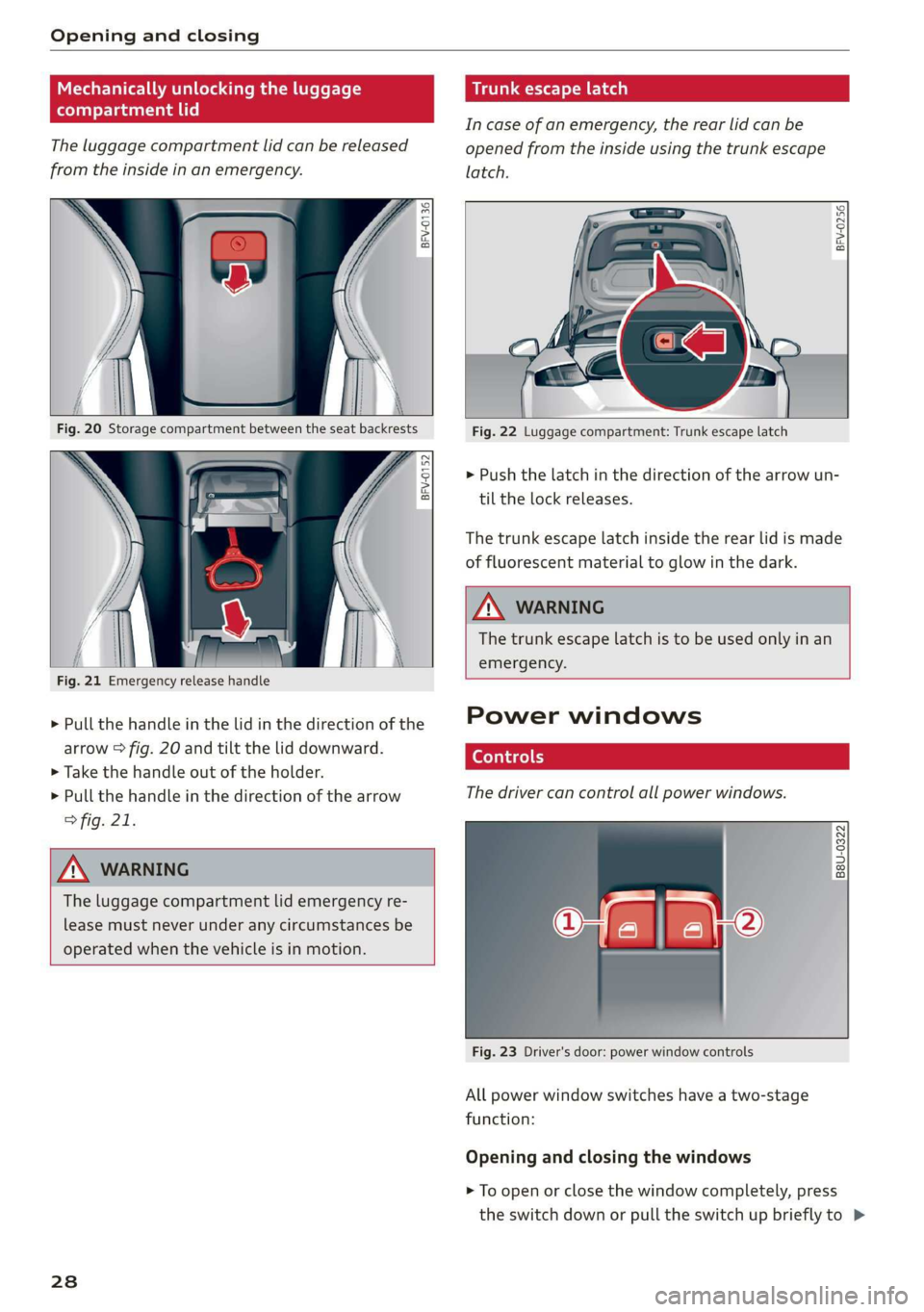
Mechanically unlocking the luggage
compartment lid
The luggage compartment lid can be released
from the inside in an emergency.
BFV-0136
BFV-0152
Fig. 21 Emergency release handle
> Pull the handle in the lid in the direction of the
arrow > fig. 20 and tilt the lid downward.
> Take the handle out of the holder.
> Pull the handle in the direction of the arrow
> fig. 21.
ZX WARNING
The luggage compartment lid emergency re-
lease must never under any circumstances be
operated when the vehicle is in motion.
238
Trunk escape latch
Incase of an emergency, the rear lid can be
opened from the inside using the trunk escape
latch.
BFV-0256
Fig. 22 Luggage compartment: Trunk escape latch
> Push the latch in the direction of the arrow un-
til the lock releases.
The trunk escape latch inside the rear lid is made
of fluorescent material to glow in the dark.
Z\ WARNING
The trunk escape latch is to be used only in an
emergency.
Power windows
The driver can control all power windows.
q Q
2
id =|
2 a
Fig. 23 Driver's door: power window controls
All power window switches have a two-stage
function:
Opening and closing the windows
> To open or close the window completely, press
the switch down or pull the switch up briefly to >
Page 31 of 304

8S8012721BA
Opening and closing
the second level. The operation will stop if the
switch is pressed or pulled again.
> To select a position in between opened and
closed,
press or pull the switch to the first level
until
the desired window position is reached.
Power window switches
@ Left door
@ Right door
ZA WARNING
— Pay careful attention when closing the win-
dows. Pinching could cause serious injuries.
— When locking the vehicle from outside, the
vehicle must be unoccupied since the win-
dows can no longer be opened in an emer-
gency.
G@) Tips
— You can still open and close the windows for
approximately 10 minutes after turning the
ignition off. The power windows do not
switch off until the driver's door or front
passenger's door has been opened.
— When opening the doors and when open-
ing/closing the power top, the windows au-
tomatically lower approximately 0.4 inches
(10 mm).
Convenience opening and closing
All windows can be opened and closed at the
same time.
For power top* convenience opening/closing, re-
fer to the information in > page 34.
Convenience opening feature
> Press and hold the @ button on the remote con-
trol key until all windows reach the desired po-
sition.
Convenience closing feature
> Press and hold the & button on the remote con-
trol key until all windows are closed > /\.
Convenience closing with the convenience
key*
> Touch the sensor* on the door handle long
enough until all windows are closed. Do not
place your hand in the door handle when doing
this.
Setting convenience opening in the
Infotainment system
The function can be switched on/off in the Info-
tainment system > page 26.
ZA WARNING
— Never close the windows carelessly or in an
uncontrolled manner, because this increases
the risk of injury.
— For security reasons, the windows can only
be opened and closed with the remote con-
trol key at a maximum distance of approxi-
mately 6 ft (2 m) away from the vehicle.
When pressing the ff button, always watch
the windows while they are closing so that
no one is pinched in the window. The closing
process will stop immediately when the f&
button is released.
Correcting power window malfunctions
You can reactivate the one-touch up/down func-
tion if it malfunctions.
> Pull the power window switch up until the win-
dow is completely raised.
> Release the switch and pull it up again for at
least one second.
29
Page 35 of 304

8S58012721BA
Power top
Power top
Automatic power top
General information
The power top opens and closes automatically.
When open, the power top is stored completely
in the power top compartment. The power top
can be opened or closed at speeds up to 30 mph
(50 km/h). The power top will not open when the
temperature is below 5 °F (-15 °C).
Under normal conditions, the power top is wind-
and waterproof. In rare cases, small droplets of
water may form under extreme weather condi-
tions such as torrential or prolonged rain. That is
normal and no cause for concern.
Follow
the care instructions to keep the power
top free of leaks and to maintain its appearance
=> page 262, Care and cleaning. Also observe the
following:
— Open and stow the power top only when it is
clean and dry. Stowing the power top when it is
damp can create imprints in it, and if it is left
that way for long periods of time, mildew and
other damage can form. To prevent scratching
or damaging the power top, do not use any
sharp-edged objects to remove ice and snow.
The rear window may be cleared with a stand-
ard ice scraper.
— Do not leave the power top open for several
weeks or the creases in it may become discol-
ored.
— Do not open the power top when the tempera-
ture is below 32 °F (0 °C). The fabric in the
power top loses elasticity in sub-zero tempera-
tures.
Opening and closing the power top
toad B
= >
im oC
Fig. 27 Center console: power top switch (example)
Opening and closing the power top
> Switch the ignition on.
> To open or close the power top, pull/press and
hold the button during the entire process.
Opening/closing the power top using the
one-touch function
> Switch the ignition on.
> To open/close the power top all the way, briefly
pull/press the power top switch. It is not neces-
sary to hold the switch. The one-touch function
is only available at speeds between 4 mph
(6 km/h) and 30 mph (50 km/h).
The status of the power top is shown in the in-
strument cluster when operating the power top
switch.
A message will appear in the instrument cluster
if the power top cannot be opened or closed
> page 34.
ZX WARNING
— When operating the power top, make sure
the function is not affected by wind or other
factors and that it does not interfere with
other drivers.
— Never drive when the power top is not
locked correctly. The wind from driving
could cause the power top to open. This can
result in injuries and damage to the vehicle.
— Make sure no one will be injured by the pow-
er top supports and other moving compo-
nents when opening and closing the top. >
33