2019 AUDI TT COUPE change time
[x] Cancel search: change timePage 84 of 312

Parkingaid
@®Tips
—Thevisualdisplayintheleftpartofthedis-
playshouldhelpyoudetectthecriticalvehi-
cleareas.
—Youcanchangethevolumeofthesignals
andthedisplay>page82.
Perpendicularparking
Appliesto:vehicleswithrearviewcamera
Thisviewmaybe usedwhenparkinginagarage
orinaparkingspace.
4d.Look!Safetomove?
Fig.87Infotainmentsystem:aligningthevehicle
>Turn theInfotainmentsystemonandshiftinto
reversegear.
>Theorangeorientationlines@showthevehi-
cle'sdirectionoftravel.Turn thesteeringwheel
untiltheorangeorientationlinesalignwiththe
parkingspace>fig.86.Usethemarkings@)to
helpyouestimatethedistancetoanobstacle.
Eachmarkingrepresentsapproximately3 feet
(1m).Thebluearearepresentsanextensionof
thevehicle'soutlinebyapproximately16ft(5
meters)totherear.
>Whiledrivinginreversegear,adjustthesteer-
ingwheelangletofittheparkingspaceusing
theorangeorientationlinesforassistance>/\
82
inGeneralinformationonpage81,>@)in
Generalinformationonpage81.Area@)repre-
sentstherearbumper.Attheverylatest,stop
thevehiclewhentheredorientationline@)
bordersanobject.
Adjustingthedisplay
andthewarningtones
Appliesto:vehicleswithparkingsystemplus
Thedisplayandwarningtonescanbeadjustedin
theInfotainment.
MENU >SelectintheInfotainmentsystem:but-
ton>Vehicle> leftcontrolbutton>Driveras-
sistance>Parkingaid.
Signaltones
Frontvolume-volumeforthefrontarea
Rearvolume-volumeforthereararea
Entertainmentfader-whentheparkingsystem
isturnedon,thevolumeoftheaudio/video
sourceislowered
G)Tips
—Thesettings areautomaticallystoredand
assignedtotheremotecontrolkeythatisin
use.
— Thenewlevelisdemonstratedbriefly*when
thevolumeisadjusted.
Errormessages
Appliesto:vehicleswithrearparkingsystem/parkingsystem
plus
Rearparkingaid:malfunction!Obstaclescannot
bedetected
Parkingaid:malfunction!Obstaclescannotbe
detected
ThereisasystemmalfunctioniftheLEDinthe
Psbuttonblinkswhenswitchingonthe system.
Iftheerrorisnotcorrectedbeforeyouswitchoff
theignition,theLEDinthePbuttonwillblink
thenexttimeyouswitchontheparkingsystem
byshifting intoreverse.Aslongastheerrorisac-
tive,youcandisplaytheerrormessagesinthe
secondtabofthedriverinformationsystem.>
Page 91 of 312

8S1012721BA
IntelligentTechnology
ZA\WARNING
Improperoperationoftherearspoilercan
causecrushinginjuries.
—Alwaysmakesure thatnobody,especially
children,isinthewaywhentherearspoiler
isdeployedorretracted.
()Note
—Neverpushonthevehicleontherearspoil-
er.Thiscouldcausedamage.
—Topreventdamagetotherearspoilerdo
notleanorplaceanythingonit.
—Onlyoperatetherearspoilermanuallywhen
theluggagecompartmentlidiscloseand
therearspoilermovingpartsarenot
blocked.Otherwise,damagecouldoccur.
@Tips
Cleantherearspoilercompartmentevery2 to
3
months.Tofunctioncorrectly,therear
spoilermustbefreeofice,snowandleaves.
Energymanagement
Yourvehicleisequippedwithanintelligentener-
gymanagementsystemfordistributingelectrici-
ty.Thissignificantlyimprovesthestartingability
andincreasesthevehiclebatterylife.
@Tips
—Ifyoudriveshortdistancesfrequently,the
vehiclebatterymaynotchargeenough
whiledriving.Asaresult,conveniencefunc-
tionsforelectricalequipmentmaybetem-
porarilyunavailable.
—Thevehiclebatterywillgraduallydrainif
thevehicleisnotdrivenforlongperiodsof
time,orifelectricalequipmentisused
whentheengineisnotrunning.Toensure
thatthevehiclecanstillbestarted,the
electricalequipmentwillbelimitedor
switchedoff.
Informationaboutdata
recordedbyvehicle
controlmodules
Yourvehicleisnotequippedwithacrashdatare-
corder.Thisdeviceisinstalledbysomevehicle
manufacturersto recorddataaboutcrashesso
thatitcanbeanalyzedlater.Crashdatarecorders
arealsocalled“EventDataRecorders(EDR)”.
Insomelegaljurisdictions,itisnotpermittedto
accessordownloaddatarecordedbypre-instal-
ledcrashdatarecordersinordertoevaluatea
crashwithoutclearconsentofthevehicleowner.
Yourvehicleisnotequippedwithacrashdatare-
corder.Howeveritdoescontainavarietyofelec-
troniccontrolmodulesforvariousvehiclesys-
temssuchasenginefunction,exhausttreatment
orairbagsandsafetybelts.
Theseelectroniccontrolmodulesrecordvehicle
dataduringnormaldrivingfordiagnosisandre-
pairpurposes.Therecordingcapabilityofthe
electroniccontrolmodulesislimitedtodataonly
-nosoundisrecorded.Ifthecontrolmodulede-
tectsasystemmalfunctionorotherchangein
status,averylimitedamountofdataisrecorded
foranextremelysmallperiodoftime.Datathat
isrecordedinsuchacasemayincludevehicle
speed,drivingdirection,theloadonthe brakes
andheadrestraintsandperformanceintheevent
ofanaccidentorotherchangeinstatus.Thestor-
eddatacanonlybereadordownloadedwithspe-
cialdevices.
89
Page 102 of 312
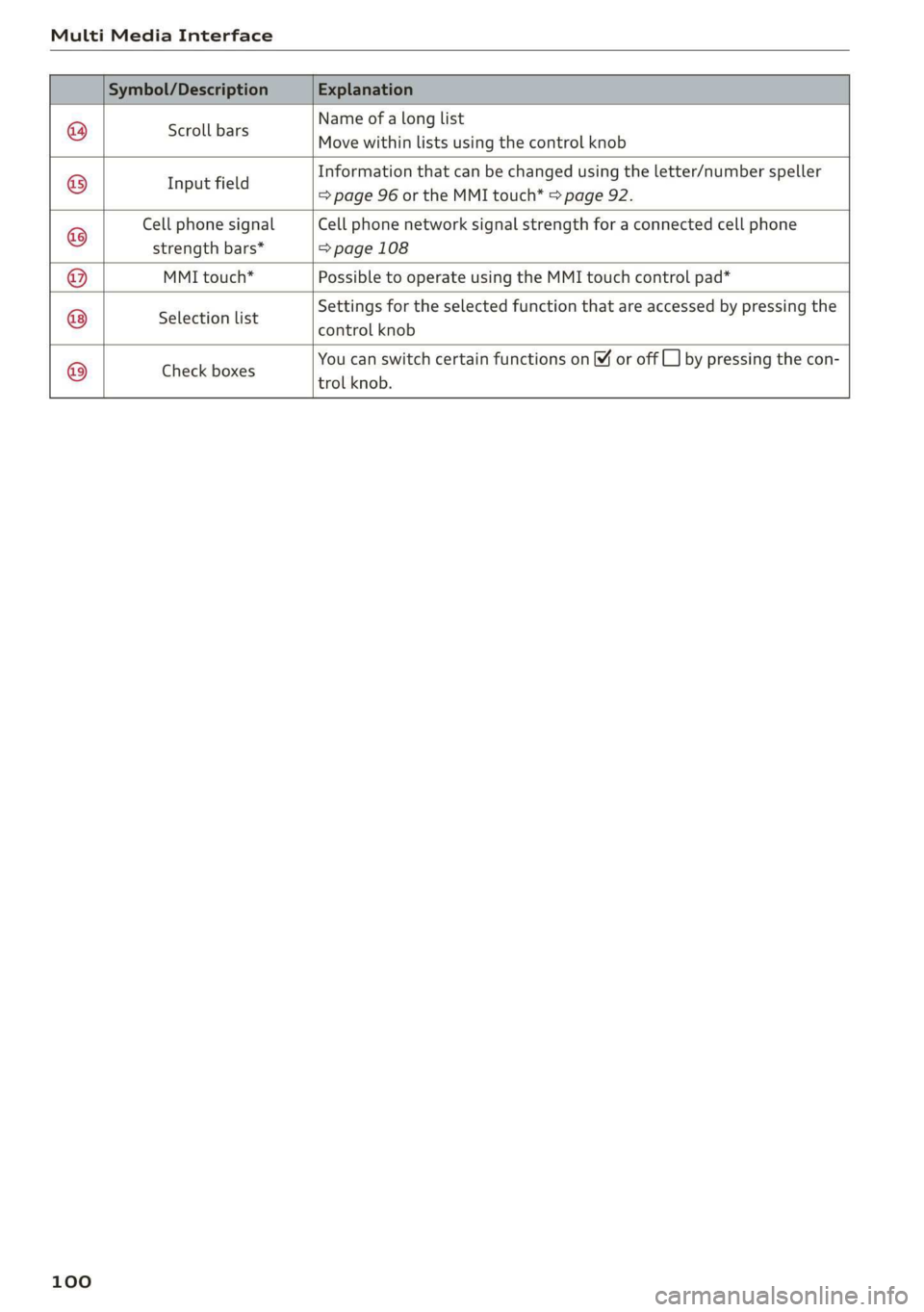
MultiMediaInterface
Nameofalonglist
Movewithinlistsusingthecontrolknob
Scrollbars
Informationthatcan bechangedusingtheletter/numberspeller
Ifi
ppeamels=>page96ortheMMItouch*>page92.
CellphonesignalCellphonenetworksignalstrengthforaconnectedcellphone
strengthbars*=>page108
MMItouch*PossibletooperateusingtheMMItouchcontrolpad*
Settingsfortheselectedfunctionthatareaccessed bypressingthe
SelectionlisteSREROLKROL
YoucanswitchcertainfunctionsonYoroffCL]bypressingthecon-
trolknob.
©®|®
|O;/O|O)/®
Checkboxes
100
Page 104 of 312

Voicerecognitionsystem
Voicerecognitionsystem
Operating
Appliesto:vehicleswithvoicerecognitionsystem
YoucanoperatemanyInfotainmentfunctions
convenientlybyspeaking.
Requirement:theignitionandtheMMImustbe
switched
on.Asystemlanguagesupportedby
thevoicerecognitionsystemmustbeset.There
mustbenophonecallsinprogressandthepark-
ingaidmustnotbeactive.
>Switchingon:brieflypressthe[2]button@)
=>page14,fig.10onthemultifunctionsteer-
ing
wheelandsaythedesiredcommandafter
theBeep.
>Switchingoff:pressandholdthe|™]button.
Or:saythecommandCancel.
>Pausing:saythecommandPause.Toresume,
pressthe|]button.
>Correcting:pressthe[>]buttononetime©
=>page12,fig.6.Or:saythecommandCorrec-
tion.
Inputassistance
Thesystemguidesyouthroughtheinputwith
visualandaudiofeedback.
—Visualinputassistance:afterswitchingon
voicerecognition,adisplaywithaselectionof
possiblecommandsappears.Thecommand
displaycanbe switchedon/offunder[MENU]>
Settings>leftcontrolbutton>MMIsettings>
Speechdialogsystem.
—Audioinputassistance: tohavethepossible
commandsread,pressthe[2]buttononthe
multifunctionsteeringwheelbrieflyandsay
Help.
Forthesystemtounderstandyou:
Speakclearlyanddistinctly atanormalvolume.
Speaklouderwhendrivingfaster.
Emphasizethewordsinthecommandsevenly
anddonotleavelongpauses.
Donotspeakacommandwhenthevoicerecogni-
tionsystemismakinganannouncement.
102
Closethedoors,thewindows,andthesunroof*
toreducebackgroundnoise.Makesurethatpas-
sengersarenot speakingwhenyouaregivinga
voicecommand.
Onlyusethesystemfromthedriver'sseatbe-
causethehands-freemicrophoneisdirectedto-
wardthatseat.
Additionalsettings
See>page174,Voicerecognitionsystem.
ZAWARNING
—Directyourfullattentiontodriving.Asthe
driver,youhavecompleteresponsibilityfor
safetyintraffic.Onlyuse thefunctionsin
suchawaythatyoualwaysmaintaincom-
pletecontroloveryourvehicleinalltraffic
situations.
—Donotuse thevoicerecognitionsystemin
emergenciesbecauseyourvoicemaychange
instressfulsituations.Thesystemmaytake
longertodialthenumberormaynotbe
abletodialitatall.Dialtheemergency
numbermanually.
G)Tips
— Thedialogpauseswhenthereisanincom-
ingphonecallandwillcontinueifyouig-
norethecall.Thedialogendsifyouanswer
thecall.
—Therearenovoiceguidance*promptswhen
adialogisactive.
—Youcanselectan iteminthelistusingei-
therthevoicerecognitionsystemorthe
controlknob.
Commandoverview
information
Appliesto:vehicleswithvoicerecognitionsystem
Thefollowingoverviewsdescribethecommands
thatcan beusedtooperatetheMMIusingthe
voicerecognitionsystem.
Alternativecommandsareseparatedusinga“/”,
forexamplesay:Telephone/(or)Navigation/
(or)Radio.
Page 108 of 312

Voicerecognitionsystem
FunctionSay:
GeneralmapoptionsMap/Daymap/Nightmap/Automaticallychangemapcolor
Maptype2Dheading-upmap/2Dnorth-upmap/3Dmap/Destina-
tionmap/Overviewmap/Standardmap/Trafficmap/Satel-
litemap*®)
Showingtheroute listRoutelist
Showingtheremainingdistance/
timewhenrouteguidanceisactive
Destinationinformation
SpeedlimitpromptHowfastcanIdrivehere
Settingvoiceguidanceforactive
routeguidance
Voiceguidanceon|Voiceguidanceoff|Voiceguidanceshort-
ened|Voiceguidancecomplete|Voiceguidancetraffic
Blockingacertainsectiononthe
route
Blockroutefor(XY)meters/kilometers/yards/miles/Block
nextroute/Avoidnextsectionofroute
)AUDIAGprovidesaccesstoservicesfromthirdpartyproviders.Permanentavailabilitycannotbeguaranteed,becausethat
dependsonthethirdpartyprovider.
@Tips
—Destinationsmayhavetobespelledwhen
entered,dependingonthecountrywhere
youarelocatedandwhichmenulanguage
youhaveselected.
—Alwaysreadthe chapter>page123,Audi
connect.
Appliesto:vehicleswithvoicerecognitionsystem
Requirement:theRadiomustalreadybeopen.Youcansaythefollowingcommandsdepending
ontheselectedfrequencyband:
FunctionSay:
SelectingthefrequencybandFM/SIRIUSXM*/AM
Selectingastationfromthestation
list
Channel(XY)/Frequency(XY)/Laststations
SelectingastationfromthepresetsRadiopresets>Line(XY)
SettingthefrequencyFrequency(XY)
SettingthefrequencyFrequency(XY)/Frequency(XY)HD1
CorrectingdatainputNoImeant(XY)
Closingthefull-screencommand
list
Close
Appliesto:vehicleswithvoicerecognitionsystem
Requirement:youmustbeintheMediamenu.
106
Youcansaythefollowingcommandsdepending
ontheactivemedia:
Page 111 of 312

8S1012721BA
Telephone
devicesareshownintheInfotainmentsystem
display.Or:searchfortheMMIinyourcell
phonethroughtheBluetoothdevicesearch.
>Selectandconfirmthedesiredcellphonefrom
thelistofdisplayedBluetoothdevices.
>TheMMIgeneratesaPINforthe connection
setup>fig.106.
>SelectandconfirmYes.
>»EnterthePINforconnectingonyourcell
phone.Or:whenthePINisdisplayedonyour
cellphone,confirmthePINonyourcellphone
andintheMMI.Thetimeallowedforentering
thePINislimitedtoapproximately30seconds.
>Payattentiontoanyadditionalsystemprompts
displayedonyourcellphone,forexampleifthe
systemshouldconnectautomaticallyinthefu-
ture.
Dependingonthecellphone,youmay
havetoconfirmdownloadingthedirectorysep-
arately.
Afterconnectingsuccessfully
Afterconnectingsuccessfully,ashortmessage
withinformationabouttheconnectedprofiles
willappear.Youcanalsochangeprofileslater.
Select:[MENU]button>Settings> leftcontrol
button>MMIsettings>Connectionmanager
=>page171.
Inaddition,thecellphonecontactsareautomat-
icallyloadedintheMMIdirectory.Thisprocess
cantakeseveralminutes,dependingonthenum-
berofcontacts.
@)Note
Alwaysfollowtheinformationfoundin>@in
Generalinformationonpage123.
@)Tips
— MakingphonecallsthroughtheMMIisonly
possibleusingtheHandsfreeBluetoothpro-
file.
—Youcan applyadditionalsettings tocon-
nectedmobiledevicesusingthe connection
manager©page170.
—YoucanalsosearchfortheMMIonyourmo-
biledeviceusingtheBluetoothdevice
search.
—Youonlyhavetopairyourdeviceonetime.
Bluetoothdevicesthatarealreadypaired
automaticallyconnecttotheMMIwhenthe
Bluetoothfunctionisswitchedon,when
theyarewithinrange,andwhentheignition
isswitchedon.Thelastconnectedmobile
deviceisgivenfirstpriority.
—AuthorizingtheMMIconnectiononyour
mobiledevicewillmakeitpossibletocon-
nectautomatically.
—Payattentiontoanysystempromptsdis-
playedonyourcellphone,forexampleif
thesystemshouldconnectautomaticallyin
thefuture.Dependingonthecellphone,
youmayalsoneedtodownloadthedirecto-
ryandconfirmaccesstoyourtextmessages
separately.
—Whenleavingthevehicle,theBluetooth
connectiontothemobiledevicewillauto-
maticallydisconnect.Depending onyour
mobiledevice,phonecallsinprogressmay
beautomaticallyredirectedfromtheMMI
toyourmobiledevice sothatyoucancon-
tinuethecallonyourphone.
—Youcanobtainmoreinformationfromyour
mobiledeviceserviceproviderorfromyour
mobiledeviceuserguide. Forinformation
onusingthetelephone,visitwww.audiusa.
com/bluetoothorcontactanauthorizedAu-
didealerorauthorizedAudiServiceFacility.
—Appliesto:vehicleswithoutsecondary
phone:Severalcellphonescanbepairedto
the MMI,butonlyonecellphonecanbeac-
tivelyconnectedtotheMMI.
—Appliesto:vehicleswithoutsecondary
phone:IfaBluetoothdeviceisalreadycon-
nectedtotheMMI,itwillbe disconnected
whenanotherdeviceconnectstotheMMI.
109
Page 128 of 312

Audiconnect
DependingontheequipmentandtheAudicon-
nectInfotainmentserviceselected,thefollowing
basicfunctionsmaybeavailable:
Saveaspreview
YoucanalsoseeapreviewoftheselectedAudi
connectInfotainmentservicesontheAudicon-
nectInfotainmenthomepage.
Showonmap
Youcanshowselectedcontentsonthemapand
usethemforrouteguidance.
Login
See>page125.
Readout!)
YoucanallowtheMMItoreadouttheselected
contents.
Call
If aphonenumberwasassignedtoanentry,you
cancallthenumber,forexampleto reservetick-
ets.
Refresh
ThecontentsfortheselectedAudiconnectInfo-
tainmentservicearerefreshed.
Startrouteguidance
If alocationwassavedwithanentry,youcan use
itasthenavigationdestination.Routeguidance
startsimmediately.
Changesearcharea
Thesetsearchareacanbechangedatanytime.
Additionalinformationonsearchareascan be
foundunder>page133.
ClosingAudiconnectInfotainmentservices
Regardlessofthefunctionselected,youcan
closean AudiconnectInfotainmentserviceat
anytimeandreturn tothehomescreen.
D_Notavailableinalllanguages.
126
Services
Appliesto:vehicleswith AudiconnectInfotainment
Dependingonthecountryandthevehicleequip-
ment,thefollowingservicesmaybeavailable:
Weather
Informationoncurrentweatherconditionsas
wellasweatherforecastsfortheselectedsearch
area.
>SelectandconfirmWeather.
News
>Select:Onlinenews>desirednewsfeed>a
headline.
IfyouloggedintomyAudiinyourvehicle
=>page125,personalizednewsfeedscanbedis-
played.
Twitter
Requirement:youmusthaveconnectedyourve-
hiclewithmyAudi>page125.Youmusthave
connectedyourmyAudiaccountwithTwitter.
YoucanonlyconnectoneTwitteraccountwith
yourmyAudiaccount.Notallsettingscanbead-
justedintheMMI.Somecanonlybeadjusted
throughtheTwitterwebsite.
>SelectTwitter>leftcontrolbutton>desired
function(forexample,Trends).
ZAWARNING
Alwaysfollowtheinformationfoundin>A\
inGeneralinformationonpage123.
()Note
Alwaysfollowtheinformationfoundin©in
Generalinformationonpage123.
Additionaloptions
Appliesto:vehicleswithAudiconnectInfotainment
»Select:[MENU]button>Audiconnect>right
controlbutton.
Page 132 of 312

Navigation
Navigation
Openingnavigation
Appliesto:vehicleswithnavigationsystem
Thenavigationsystemdirectsyoutoyourdestination,aroundtrafficincidents,andonalternative
routes,ifdesired.
Laledanlw-lee1g
“OO
JohnSmith
a2
Fig.114Diagram:Enterdestinationmenu
>Pressthe [NAV/MAP]button.
TheEnterdestinationmenuisdisplayedafter
openingnavigation>fig.114.Thefollowingin-
formationcan bedisplayedintheInfotainment
systemdisplay:
@Inputfieldforfreetextsearch>page131
@Homeaddress>page132
Lastdestinations>page131pag
Storedfavorites>page132g'
Assoonasyouselectanentryfromthelist(de-
pendingonthevehicleequipment),thecorre-
spondingdestinationdisplaysasamappreview*
©°fig.114.
Ifyouhaveconnectedamobiledevicetothe
MMI,yourdirectorycontactswillalsobelistedif
they havenavigationdataassignedtothem.
TheFavorites(4)menuitemaswellasthedirec-
tory/contactsareonlyshownintheEnterdesti-
nationmenuifyouhaveenteredoneormore
charactersusingtheinputfield.
Switchingbetweenthedestinationentryand
themap
130
—Pressthe [NAV/MAP]buttonrepeatedlyuntil
themapisdisplayed.Or:selecttheleftcontrol
button>Switchtomap.
ZA\WARNING
— Thedemandsoftrafficrequireyourfullat-
tention.Alwaysreadthechapter>page90,
Trafficsafety information.
—Obeyalltrafficlawswhendriving.
— Theroutecalculatedbythenavigationsys-
temisarecommendationforreachingyour
destination.Obeytrafficlights,stoppingre-
strictions,one-waystreets,lanechangere-
strictions,etc.
—Adjustthevolumeoftheaudiosystemso
thatsignalsfromoutsidethevehicle,such
aspoliceandfiresirens,canbeheardeasily
atalltimes.
@)Note
Ifthedrivingdirectionsconflictwithtraffic
laws,obeythetrafficlaws.