2019 AUDI Q7 AUX
[x] Cancel search: AUXPage 240 of 394

Media
Openingfreetextsearch
>Keepturningthecontrolknobtotheleftuntil
thefreetextsearchinputfield@>fig.216
appears.Or:pushthecontrolknobup.
Usingthefreetextsearch:see>page162,Free
textsearch.
Entriesthatcontaintheenteredsearchtermare
listedintheresultslist©9fig.216.Youcan
searchforartists(2)>fig.216,albums@)or
tracks@)aswellasgenresandvideos.
@Tips
—Onlyfilesintheactivesourcewillbe
searched.
—IfyouopenfreetextsearchintheFolders
category(7)>page236,fig.215orthe
Composers,PodcastsandAudiobookscat-
egories,itwillonlysearchthroughthefiles
inthatfolder.
ete
ThebigB
JMaen
old)
kBa
Fig.217Example: playlist
Thetrack,artist,albumandalbumcover,ifappli-
cable,willappearintheplaylist>fig.217.
Optionsmenu
See>page238,Additionalsettings.
Upto50entriesforeverymediasourcecanbe
storedinanyorderinthefavoriteslist.
Requirement:theplaylistormediacentermust
beopen.
—Selectthedesiredentryfromtheplaylistor
mediacenter.
238
—Select:rightcontrolbutton>Storeasfavorite.
Or:
pressandholdthecontrolknobforseveral
seconds.
Whenyoustoreatrackasafavorite,theassociat-
edalbumwillappearinthefavoriteslistasan
entry.
Requirement:atleastoneentrymustbestored
inthefavoriteslist.
Displayingthefavoriteslist:pressthe[MEDIA
button.Presstheleftcontrolbuttonuntilthe
sourcesoverview>page235isdisplayed.Select
the sourcethat containsthecategories
=>page236(forexample,SDcard).SelecttheFa-
voritescategory.
Requirement:thefavoriteslistmustbedis-
played.
—Listeningtoafavorite:selectandconfirm afa-
voritefromthelist.
—Movefavorite:selectafavoritefromthelist>
rightcontrolbutton>Movefavorite.Select
andconfirmthelocationoftheselectedfavor-
ite.
—Deletingafavorite:selectafavoritefromthe
list>rightcontrolbutton>Deletefavorite>
DeletethisfavoriteorDeleteallfavorites.
Additionalsettings
Context-specificfunctionsandsettingsareavail-
abledependingontheselectedsource.
>Presstherightcontrolbutton.
Soundsettings
See>page251.
Inputlevel
Requirement:amobiledevicemustbeconnected
totheAUXconnectioncableor toaUSBadapter
=page233,Multimediaconnections.
Thevolumeofthemobiledeviceisadaptedto
theMMI.Audirecommendsadjustingthevolume
onthemobiledeviceto70%ofthemaximum
volumeoutput.
Page 245 of 394
4M0012721BG
Media
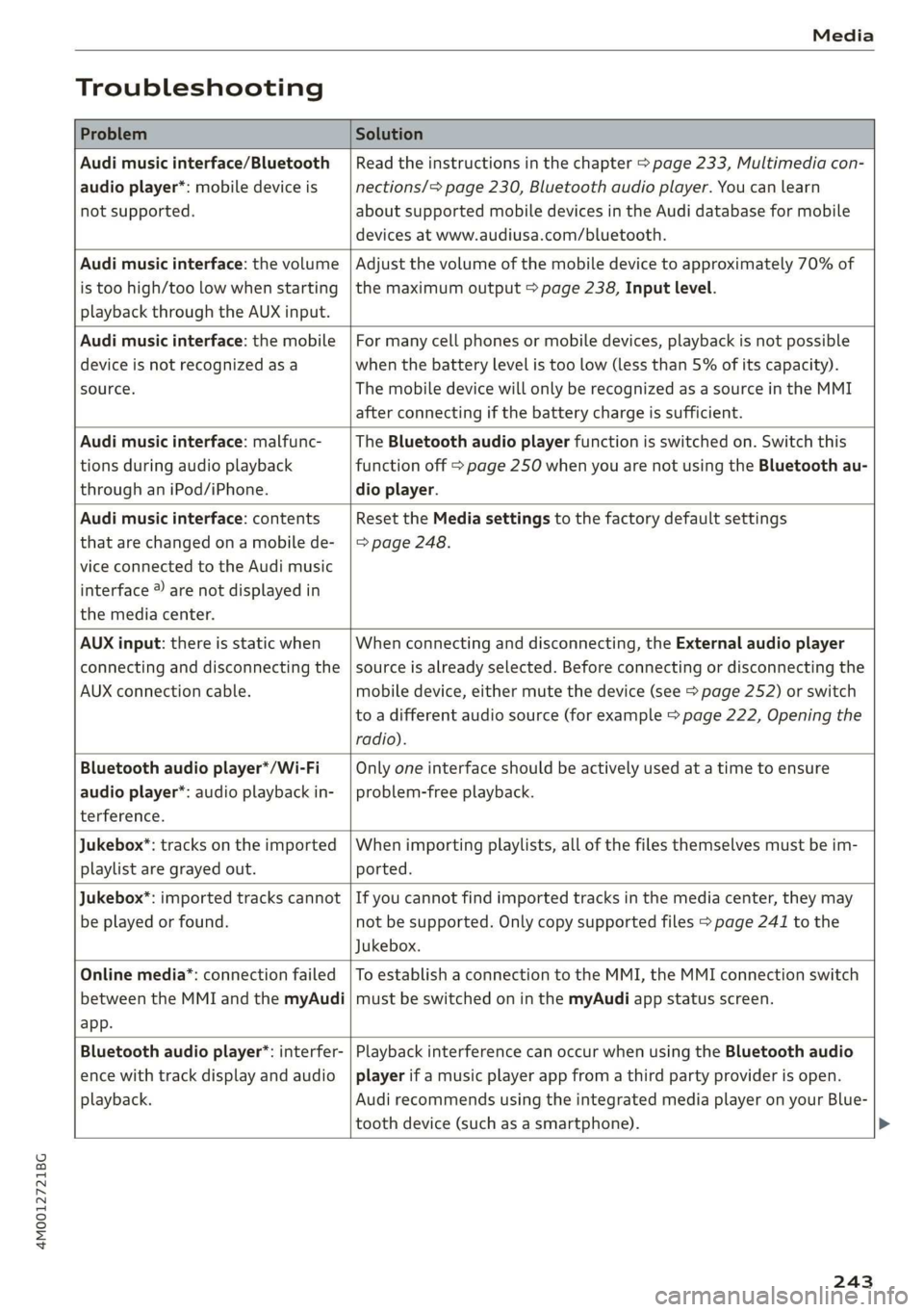
Troubleshooting
ProblemSolution
Audimusicinterface/Bluetooth
audioplayer*:mobiledeviceis
notsupported.
Readtheinstructionsinthechapter>page233,Multimediacon-
nections/=>page230,Bluetoothaudioplayer.Youcanlearn
aboutsupportedmobiledevicesintheAudidatabaseformobile
devicesatwww.audiusa.com/bluetooth.
Audimusicinterface:thevolume
istoohigh/toolowwhenstarting
playbackthroughtheAUXinput.
Adjustthevolumeofthemobiledevicetoapproximately70%of
themaximumoutput>page238,Inputlevel.
Audimusicinterface:themobile
deviceisnotrecognizedasa
source.
Formanycellphonesormobiledevices,playbackisnotpossible
when
thebatteryLevelistoolow(lessthan5%ofitscapacity).
ThemobiledevicewillonlyberecognizedasasourceintheMMI
afterconnectingifthebatterychargeissufficient.
Audimusicinterface:malfunc-
tionsduringaudioplayback
throughaniPod/iPhone.
TheBluetoothaudioplayerfunctionisswitchedon.Switchthis
functionoff>page250whenyouarenotusingtheBluetoothau-
dio
player.
Audimusicinterface:contents
thatarechangedonamobilede-
viceconnectedtotheAudimusic
interface®arenotdisplayedin
themediacenter.
Reset theMediasettingstothefactorydefaultsettings
=>page248.
AUXinput:thereisstaticwhen
connectinganddisconnectingthe
AUXconnectioncable.
Whenconnectinganddisconnecting,theExternalaudioplayer
sourceisalreadyselected.Beforeconnectingordisconnectingthe
mobiledevice,eithermutethedevice(see>page252)orswitch
toadifferentaudiosource(forexample>page222,Openingthe
radio).
Bluetoothaudioplayer*/Wi-Fi
audioplayer*:audioplaybackin-
terference.
Onlyoneinterfaceshouldbeactivelyusedatatimetoensure
problem-freeplayback.
Jukebox*:tracksontheimported
playlistaregrayedout.
Whenimportingplaylists,allofthefilesthemselvesmustbeim-
ported.
Jukebox®*:importedtrackscannot
beplayedorfound.
Ifyoucannotfindimportedtracksinthemediacenter,theymay
notbesupported.Onlycopysupportedfiles>page241tothe
Jukebox.
Onlinemedia*:connectionfailed
betweentheMMIandthemyAudi
app.
ToestablishaconnectiontotheMMI,theMMIconnectionswitch
mustbe switchedoninthemyAudiappstatusscreen.
Bluetoothaudioplayer*:interfer-
encewithtrackdisplayandaudio
playback.
PlaybackinterferencecanoccurwhenusingtheBluetoothaudio
playerifamusicplayerappfromathirdpartyproviderisopen.
AudirecommendsusingtheintegratedmediaplayeronyourBlue-
toothdevice (such asasmartphone).
243
Page 324 of 394

CheckingandFilling
Battery
Peleeeees(el)
Becauseofthecomplexpowersupply,allworkon
batteriessuchasdisconnecting,replacing,etc.,
should only beperformedby anauthorizedAudi
dealerorauthorizedAudiServiceFacility>A\.
Multiplebatterieswithdifferenttechnologies
maybeinstalledinyourvehicle:
—Vehiclebattery(forexample,forstartingthe
engine,basicpowersupply)>page322,Lead
batteryor>page323,Otherbatterytypes
—Auxiliarybattery(forexample,forrecuperation
oroptionalequipment)>page323,Otherbat-
terytypes
Notrunningthevehicleforlongperiodsof
time
Thebatterywillgraduallydrainifthevehicle
doesnotrunforlongperiodsoftime.Toensure
thatthevehiclecanstillbestarted,theelectrical
equipmentwillbereducedorswitchedoff
=page151.Someconveniencefunctions,such
asinteriorlightingorpowerseatadjustment,
maynotbeavailableundercertaincircumstan-
ces.Theseconveniencefunctionswillbeavailable
againonceyouswitchtheignitiononandstart
theengine.
Evenwhenelectricalequipmentisswitchedoff,
theequipmentcanstilldrainthebatteryifthe
vehicleisnotdrivenforLongperiodsoftime.
Deepdrainingresultsinachemicalreactionthat
destroys
theinsideofthebattery.Thebattery
mustbechargedevery monthtopreventthis
=page323.ContactanauthorizedAudidealeror
authorizedAudiServiceFacilityformoreinfor-
mation.
Winteroperation
Coldweatherplaceshigherdemandsonthebat-
tery.Thisresultsinreducedstartingability.Have
thebatterycheckedbyanauthorizedAudidealer
orauthorizedAudiServiceFacilitybeforecold
weatherbegins.
322
ZAWARNING
—Allworkonthebatteryorelectricalsystem
inyourvehiclecanresultininjuries,chemi-
calburns,accidents,or burns.Becauseof
this,allworkmustbeperformedonlybyan
authorizedAudidealerorauthorizedAudi
ServiceFacility.
—Neverconnectthechargingcableorjump
startcabledirectlytoyourvehiclebattery.
Onlyusethe connectionsintheenginecom-
partment>page323.
ZA\WARNING
CaliforniaProposition65Warning:
—Batteryposts,terminalsandrelatedacces-
soriescontainleadandleadcompounds,
chemicalsknowntotheStateofCalifornia
tocausecancerandreproductiveproblems.
Washhandsafterhandling.
C)Note
—Ifthevehiclewillbe parkedforlongperiods
oftime,protectthebatteryagainstthecold
sothatitwillnot be destroyed by“freezing”
=>page323,Chargingthebattery.
—Thereareelectricalcomponentsunderthe
cargofloorbehindatrimpanelthatwarm
upduringoperation.To reducetheriskof
thecomponentsoverheating, donotstore
objectssuchasblanketsunderthecargo
floor.Ifthecomponentsoverheat,theywill
switchofftemporarily.Thiswillbeindicated
byamessagethatwillbedisplayedinthe
instrumentclusteruntilthetemperaturere-
turnstonormal.
Leadbattery
Explanationofwarnings:
©Alwaysweareyeprotection.
Batteryacidishighlycorrosive.Always
wearprotectiveglovesandeyeprotection.
forbidden.>
®Fire,sparks,openflame,andsmokingare
Page 380 of 394

Index
AudiSide:assistcscs= 2ceceoeceeoeteeos119
Rearcross-trafficassist..............0.123
Audi smartphoneinterface..........245,250
Audivirtualcockpit
refertoInstrumentcluster..............14
AUTO
Automaticheadlights..................42
AutoLock(centrallockingsystem).........28
Automaticbeltretractor................263
Automaticclimatecontrol............000567
Operations:«ewes:< 2was5¢es3eee68,71
Automaticclimatecontrolsystem
Audidriveselectssci¢ 2causs=waaroowe127
SOCUP6cessesowssennine&erreneuea 6seesaw§stemnne70,73
Automaticluggagecompartmentlid....34,36
Automatictransmission..................85
Emergencyprogram.................5-89
Hilldescentcontrolicsss ¢avessseesssees88
Kickedownieec«2wc saseravoowenowee889
Manualshifting..................0000-88
Parkinglockemergencyrelease..........90
Selectorleverpositions.............000.85
Automaticwipe/washsystem.............49
AUTO(button)
Automaticclimatecontrol...........69,72
Auxiliaryheater(automaticclimatecon-
trol)...eeeeee70,73
AUXTMPUEcessesooconensa &sears¢eamoweesa233
Averageconsumption.«veccoseseoeacim19
Averagespeed...cececcceeeeeenceeee19
B
BACKBUtton=sais= eewessees2Heeseae153
Balance(sound)secs=:seus2 tpees:eee251
Band
refertoFrequencyband...............222
Bass(sound)
Batt@rysans= 3veue¢seemsyoeesFeeeets
Caringsew«+wae+ %were8 &enue0 ©memes
378
Bluetooth
Audioplayer........ccceeeeeeeee230
Connectingacellphone...............178
SOEINGSwee.sxmusesvvarones@ 1oeaacoumees250
Booster'seats::««smisoowenooeenooowen299
Brakefluid
Checkingthebrakefluidlevel...........320
Brakesenses« @ewesovewanoomeme8wwe©we149
Brakeassist...0...ceeeeeeee146
Braké@fluidic:=ssews= 2eeesgceeseeee320
Electromechanicalparkingbrake.........81
Emergencybrakingfunction.............81
N@WBrakeDads«sansxagus8 xGeeu5 iees149
Break-insecurityfeature.................34
Breakingin
Newbrakepads..............---0eee149
NCWINESic5 owsuns2torneooenaeeenon333
Browser
refertoMediacenter...............04.236
BulDStesisninorswscrouoweoserouaticevanaesatawinsa 6363
Buttons
Controlpanel(MMI)................-.153
Multifunctionsteeringwheel............16
SwitchingtheInfotainmentsystemdisplay
On/Off...keeeeeee154
Cable(USBadapter/AUXconnectorcable)..233
CaliforniaProposition65Warning........314
Batteryspecific...............0--.00.322
Calllist..0.0...ceeeeeee183
Calloptions..................00000008190
Capacities
Fueltank.....2...ceceeeeeee eee375
Washerfluidreservoir.........00000005375
Cargoarea
refertoLoadingtheluggagecompartment.62
CargoflOOFwc=2exye= +sarge©Hews3sHes65
GatKOYsez=ees¢ =seeny ©nesscegeesEgee29
CamWashis¢ ssuewi5 5satesx §Sac&&So48aS346
Catalyticconverter............0...eeeee312
CD
drive(mediadrives)...............--228
Cellphone
refertoTelephone.................05-178
Cellphonecompartment
refertoAudiphonebox.............4. 181