2019 AUDI Q5 phone
[x] Cancel search: phonePage 246 of 392
Audismartphoneinterface
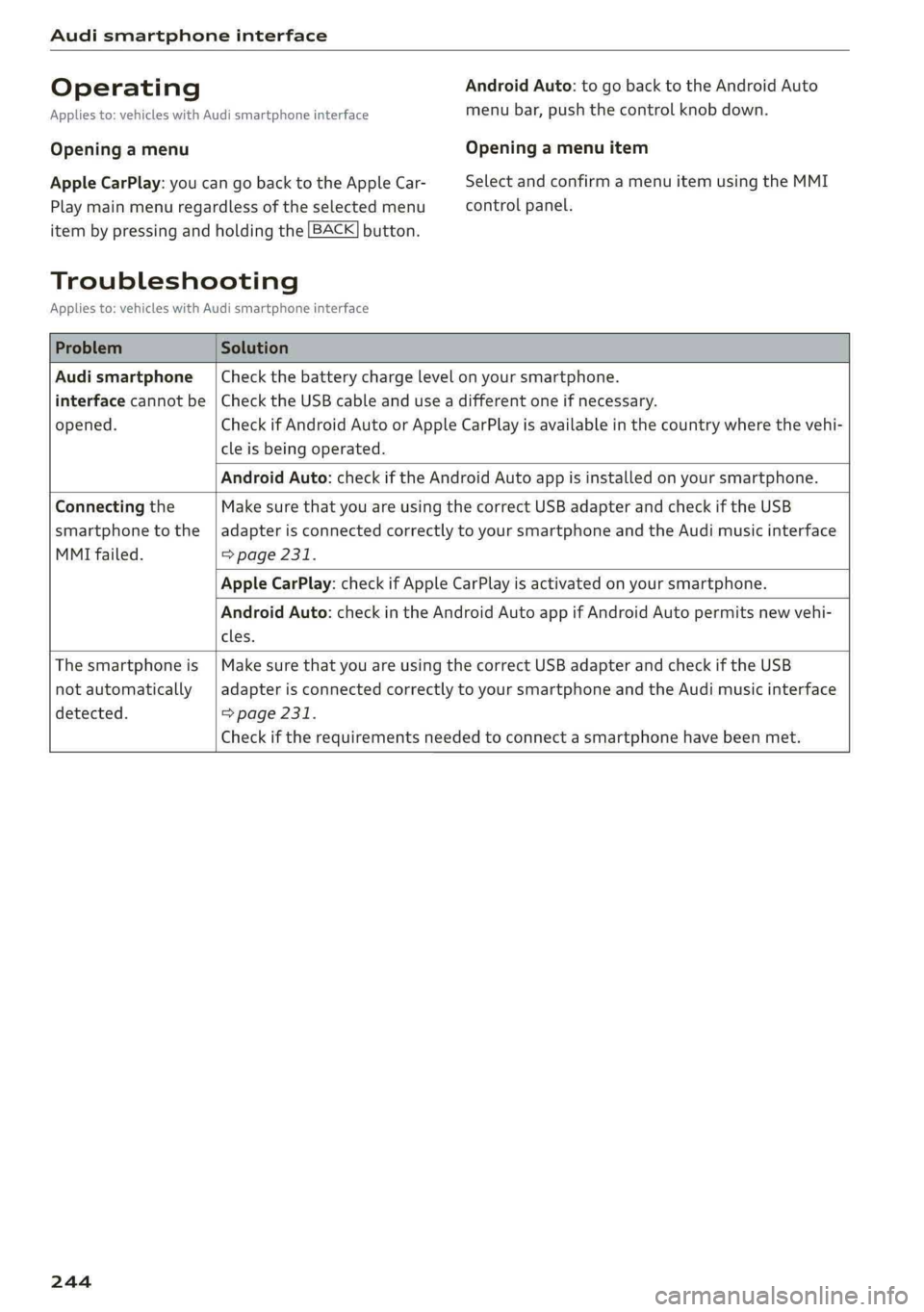
OperatingAndroidAuto:togobacktotheAndroidAuto
Appliesto:vehicleswithAudismartphoneinterfacemenubar,pushthecontrolknob down.
OpeningamenuOpeningamenuitem
AppleCarPlay:youcangobacktotheAppleCar-SelectandconfirmamenuitemusingtheMMI
Playmainmenuregardlessoftheselectedmenucontrolpanel.
itembypressingandholdingthe[BACK]button.
Troubleshooting
Appliesto:vehicleswithAudismartphoneinterface
ProblemSolution
Audismartphone
interfacecannotbe
opened.
Checkthebatterychargelevelonyoursmartphone.
ChecktheUSBcableanduseadifferentoneifnecessary.
CheckifAndroidAutoorAppleCarPlayisavailableinthecountrywherethevehi-
cleisbeingoperated.
AndroidAuto:checkiftheAndroidAutoappisinstalledonyoursmartphone.
Connectingthe
smartphonetothe
MMIfailed.
MakesurethatyouareusingthecorrectUSBadapterandcheckiftheUSB
adapterisconnectedcorrectlytoyoursmartphoneandtheAudimusicinterface
=>page231.
AppleCarPlay:checkifAppleCarPlayisactivatedonyoursmartphone.
AndroidAuto:checkintheAndroidAutoappifAndroidAutopermitsnewvehi-
cles.
Thesmartphoneis
notautomatically
detected.
MakesurethatyouareusingthecorrectUSBadapterandcheckiftheUSB
adapterisconnectedcorrectlytoyoursmartphoneandtheAudimusicinterface
=>page231.
Checkiftherequirementsneededtoconnectasmartphonehavebeenmet.
244
Page 247 of 392
![AUDI Q5 2019 Owners Manual 80A012721BG
Systemsettings
Systemsettings
Settingthedateand
time
Youcanset theclocktimemanuallyorusingthe
GPS*,
>Select:[MENU]button>Settings>leftcontrol
button>MMIsettings>Date&time.
>Or:select](/manual-img/6/57631/w960_57631-246.png "AUDI Q5 2019 Owners Manual 80A012721BG
Systemsettings
Systemsettings
Settingthedateand
time
Youcanset theclocktimemanuallyorusingthe
GPS*,
>Select:[MENU]button>Settings>leftcontrol
button>MMIsettings>Date&time.
>Or:select")
80A012721BG
Systemsettings
Systemsettings
Settingthedateand
time
Youcanset theclocktimemanuallyorusingthe
GPS*,
>Select:[MENU]button>Settings>leftcontrol
button>MMIsettings>Date&time.
>Or:select:[MENU]button>Vehicle>leftcon-
trolbutton>Vehiclesettings>Date&time.
Automaticsetting
Whenthisfunctionisswitchedon¥,thetime
anddateareautomaticallyset.
Time
Requirement:theAutomaticsettingmustbe
switchedoff.
Pressthecontrolknob.YoucansettheTime
manuallybyturningandpressingthecontrol
knob.
Date
Requirement:theAutomaticsettingmustbe
switchedoff.
Pressthecontrolknob.YoucansettheDate
manuallybyturningandpressingthecontrol
knob.
Timezone
Whenselectingtheappropriatetimezone,a
samplingofcountriesinthiszonewillbelisted.
Automatictimezone*
Whenthisfunctionisswitchedon@,thetime
willautomaticallyadjusttothecorresponding
timezone.
Automaticdaylightsavingtime*
WhenthisfunctionisswitchedonM,thetime
willautomaticallyswitchtodaylightsavingtime.
D_TheQistandardmakesitpossibletocharge yourmobile
devicewirelessly.
Timeformat
Ifyouselect24h,theclockwilldisplay,forexam-
ple,13:00.IfyouselectAM/PM,theclockwill
display,forexample,1:00PM.
Dateformat
IfyouselectDD.MM.YYYY,thedatedisplaywill
show,forexample,31.08.2018.Ifyouselect
MM/DD/YYVY,thedatedisplaywillshow,forex-
ample,08/31/2018.IfyouselectYYYY-MM-DD,
thedatedisplaywillshow,forexample,
2018-08-31.
MMIsettings
>Select:[MENU]button>Settings>leftcontrol
button>MMIsettings.
Language
Youcanchangethedisplaylanguageaswellas
thelanguageforthevoiceguidance*andvoice
recognitionsystem”*.
Thenumberoflanguagesavailabledependson
themarket.
Measurementunits
Thefollowingmeasurementunitscan besetde-
pendingonavailability:Speed,Distance,Tem-
perature,Fuelconsumption,Volume,Pressure.
Mobiledeviceremindersignal
Appliesto:vehicleswithAudiphonebox
Requirement:yourcellphonemustbeQi-capa-
ble)orconnectedtotheAudimusicinterface@
withaUSBadaptercable>page180,fig.178.
Whenthedeviceremindersignalisswitchedon,
youwillbenotifiedthatyourmobiledeviceisstill
intheAudiphonebox*whenyouleavethevehi-
cle.YoucanselectbetweenSpokencue,Signal
toneandOff.
Mobiledeviceremindersignalvolume:youcan
adjusttheremindersignalvolumebyturningthe
controlknob.
245
Page 248 of 392

Systemsettings
Switchoffpop-up:whenthefunctionisswitched
on[¥,themessagesintheInfotainmentsystem
displayregardingthechargingstatusofyourcell
phoneinthe Audiphonebox*arehidden.There-
mindernottoforgetyourcellphonewhenleav-
ingthevehicleisalsoswitchedoff.
Tooltips
WhenthisfunctionisswitchedonM,yourMMI
showsyoutipsforinput.Thefrequencyofhow
oftenitdisplaysdecreaseswithtime.
Speechdialogsystem
Appliesto:vehicleswithvoicerecognitionsystem
Dependingonvehicleequipment,thefollowing
functions
maybeavailable:
Commanddisplay:whenthisfunctionisswitch-
edonM,theMMIwillshowyouthepossible
commandsforvoiceinputintherespective
menu.
Shortdialog:whenthisfunctionisswitchedon
,ashorterformofthepromptsisused.
Commandduringvoiceoutput*:thisfunctionis
switchedonatthefactory.Whenthisfunctionis
switchedon[M,youcansaynewcommandsdur-
ingannouncements.Youdonotneedtowaitfor
thesignaltone(beep)duringanannouncement.
Whenthefunctionisswitchedoff(J,youneedto
waitforthesignaltone(beep)tosayanewcom-
mand.
Volume:youcanadjustthevolumeofthe
promptsbyturningthecontrolknob.
Individualspeechtraining(onlywhenthevehi-
cleisstationary):youcanadaptthevoicerecog-
nitionsystemtoyourvoiceorpronunciationinor-
dertoimprovethesystem'sabilitytorecognize
yourspeech.Individualspeechtrainingiscom-
prisedof20speechentriesthatconsistofcom-
mandsandsequencesofnumbers.Youcande-
letetheprogrammedvoicetrainingwiththeRe-
setindividualspeechtrainingfunction.
Displaybrightness
YoucanadjustthebrightnessoftheInfotain-
mentsystemdisplaybyturningthecontrolknob.
246
Factorysettings
Dependingonthevehicleequipment,thefollow-
ingfunctionscanberesettofactorysettings:
—Soundsettings
—Radio
—Mediasettings
—Jukebox*
—Directory
—Telephone
—BluetoothandWi-Fi*
—Navigationsettings*
—Navigationandonlinememory*
—Speechdialogsystem*
—Shortcutkeys
—Messagesettings*
—Apps*
—Tooltips
—Audiconnect*
—Audismartphoneinterface*
Youcanselectthedesiredfunctionsindividually
orallatoncewiththeoptionSelectallentries.
Selectandconfirm Restorefactorysettings.
Gi)Tips
Makesurethatnotonlythesettingswerede-
letedbutalsothestoreddata,ifnecessary.
Connectionmanager
Introduction
Theconnectionmanagerprovidesanoverviewof
yourconnecteddevicesandtheirnetworkstatus.
>Select:[MENU]button>Settings>leftcontrol
button>MMIsettings>Connectionmanager.
>Selectandconfirmamenuitem.
If amobiledevicewasalreadyconnectedandyou
selectandconfirmthecorrespondingmenuitem,
thedevicenameandconnectionstatusaredis-
playedunderthemenuitem.
Youcanindividuallyconnect(M)ordisconnect
(L))apaireddevice.
Page 249 of 392

80A012721BG
Systemsettings
Requirement:
—Thevehiclemustbestationaryandtheignition
mustbe switchedon.
—TheBluetoothsettingswillopenonyourmo-
biledeviceduringtheconnectionsetup.
—TheBluetoothfunctionandvisibility oftheMMI
=>page248andmobiledevicemustbeswitch-
edon.
—Themobiledevicetobeconnectedmustnot be
connectedtoanyotherBluetoothdevice.
aatutlevadarelit
Appliesto:vehicleswithtelephone
—Connectnewdevice:searchforandconnecta
cellphone.
—Listofdevicesalreadypaired:selectyourcell
phonefromthelistofallthedevicesthatare
alreadypaired.
YelleaveaCe
Appliesto:vehicleswithtelephone
—Connectnewdevice:searchforandconnecta
cellphone.
—Listofdevicesalreadypaired:selectyourcell
phonefromthelistofallthedevicesthatare
alreadypaired.
PELMeolaa-laaol)
Appliesto:vehicleswithAudiconnectInfotainment
—Thedataconnectionismadeusingtheembed-
dedSIMcard))>page193.Youdonotneedto
adjustanyadditionalsettings.
@)Note
Alwaysfollowtheinformationfoundin>@in
Generalinformationonpage192.
myAudiapp
Appliesto:vehicleswithAudiconnectInfotainment
Requirement:themyAudiappmustbeinstalled
andopenonyourmobiledevice.
2)SIMcardinstalledinthevehicleatthefactory.
—Connectnewdevice:searchforandconnecta
mobiledevice(such asasmartphone).
—Listofdevicesalreadypaired:selectyourmo-
biledevicefromthelistofallthedevicesthat
arealreadypaired.
Audioplayer
Appliesto:vehicleswithBluetoothorWi-Fiaudioplayer
Bluetoothplayer*
Requirement:theBluetoothfunctionandvisibili-
tymustbe switchedonintheMMI>page248
andontheBluetoothaudioplayer.
—Connectnewdevice:pressthecontrolknob.
SelectBluetoothaudioplayer.Searchforand
connectamobiledevice.
—Listofdevicesalreadypaired:selectaBlue-
toothdevicefromthelistofallthedevicesthat
arealreadypaired.
Wi-Fiaudioplayer*
Requirement:theWi-Fihotspot*ontheMMI
=page198andonyourWi-Fiaudioplayermust
be switchedon.
—Connectnewdevice:pressthecontrolknob.
SearchforandconnectaWi-Ficapabledevice.
—DisconnectWi-Fiaudioplayer:deactivatethe
Wi-FionyourWi-Ficapabledevice.Thedevice
willbeautomaticallyremovedfromthelist.
@)Note
Alwaysfollowtheinformationfoundin>@in
Generalinformationonpage192.
Appliesto:vehicleswithtelephone
Displaycontactsfromacellphone(oranaddi-
tionalcellphone).
Requirement:nocellphonescanbeconnectedto
theMMIusingtheHandsfreeprofile.
—Connectnewdevice:searchforandconnecta
newcellphone.
247
Page 250 of 392

Systemsettings
—Listofdevicesalreadypaired:selectyourcell
phonefromthelistofallthecellphonesthat
arealreadypaired.
Audismartphoneinterface
Appliesto:vehicleswithAudismartphoneinterface
—Connectyourcellphonetothe Audimusicin-
terface>page231usingaUSBadapter
=>page231,fig.209.
—Selectyourcellphonefromthelistofcell
phonesthathavealreadybeenconnected.
PelelaCe]MeyLatour
Dependingontheselectedfunction,youcanuse
therightcontrolbuttontoaccesstheavailable
additionaloptionsintheconnectionmanager.
DeleteBluetoothdevice*
Theselectedcellphone/mobiledeviceisdiscon-
nectedfromtheMMIandisremovedfromthe
listofalldevicesthatarealreadypaired.
ShowBluetoothprofiles*
YoucanConnectorDisconnecttheHandsfree,
Messages’,Directory/contactsandBluetooth
audioplayerprofilesseparately.
Bluetoothsettings*
—Bluetooth:selectandconfirmasettingforthe
Bluetooth
connectionvisibility.SelectVisible
fortheMMItobevisibletootherdevices.Se-
lectInvisiblefortheMMItonotbevisibleto
otherdevices.However,itisstillpossibletoes-
tablishaBluetoothconnectionwithpairedde-
viceswhenthevisibilityisswitchedoff.Select
Offtoturnvisibilityoff.ThenaBluetoothcon-
nectionisnotpossible.
—Bluetoothaudioplayer:whenthisfunctionis
switchedon,theBluetoothaudioplayeris
availableasasourceintheMediamenu.
—Bluetoothname:theMMIBluetoothname(for
example"AUDIMMI")isdisplayedandcanbe
changed.
Onlinesettings*
—Datausagecounter:theamountofdatapack-
etsthataresentandreceivedthroughtheMMI
248
isdisplayed.Youcanresetthedatausageinfor-
mationtozerousingtheResetdatacounter
option.
—Networkstatus:themobilenetworkprovider
fordataserviceaswellasthenetworkstatus
aredisplayed.
Wi-Fisettings*
See>page198,Wi-Fisettings.
Storingasadefaulttelephone
Appliesto:vehicleswithtelephone
Requirement:amobiledevicemustbeconnected
totheMMI>page177.
WhenthemobiledeviceisinrangeandtheBlue-
toothfunctiononthemobiledeviceandinthe
MMLisswitchedon,thismobiledevicewillbe
givenpriorityovertheotherBluetoothdevices
andwillbeconnecteddirectlytotheMMI.The
connectedmobiledeviceisdisplayedfirstinthe
devicelist.
Networksettings*
—Login:youcanchoseanAutomaticloginto
yourcellphoneserviceprovider'snetwork,or
youcanchooseaManualloginfromthelistof
availablenetworks.
—Networkselection:availablenetworksinthe
presentlocationcan beselectedundernetwork
selection.Thisfunctionisonlyavailableforthe
Manualloginsetting.
AppleCarPlaysoundsettings/AndroidAuto
soundsettings
Appliesto:vehicleswith Audismartphoneinterface
See>page249.
AboutAppleCarPlay/AboutAndroidAuto
Appliesto:vehicleswith Audismartphoneinterface
Hereyouwillfindlegalinformationregardingthe
useofAppleCarPlayorAndroidAutoandinfor-
mationaboutdevice-specificdataexchange.
DeleteAppleCarPlaydevice/DeleteAndroid
Autodevice
Appliesto:vehicleswithAudismartphoneinterface
Requirement:yourcellphonemustnotbecon-
nectedtotheAudimusicinterfacewithaUSB
adapter.
Page 251 of 392

80A012721BG
Systemsettings
Select:Audismartphone>adevicefromthelist
>rightcontrolbutton.
Toremoveyourmobiledevicefromthelist,select
andconfirm DeleteAppleCarPlaydeviceorDe-
leteAndroidAutodevice.
Systemupdate
>Select:[MENU]button>Settings>leftcontrol
button>Systemmaintenance.
—Systemupdate:insertthestoragedevicewith
theupdatedataintotheappropriatedrive
=page226.Selectandconfirm thedrive>
Startupdate.Thelengthoftheprocessde-
pendsonthesizeoftheupdate.
—Resetdriverinstallation:theselectedmedia
driverpackageisresettothesettingsatthe
timeofdelivery.
—Versioninformation:informationontheMMI
softwareversionandthenavigationdatabase*
softwareversionisdisplayed.TheSoftwarein-
formationfunctionalsoprovidesinformation
onthesoftwarecontainedintheMMIandthe
licensingagreement.
Soundsettings
ThesounddistributionandvolumeoftheMMI
canbeadjustedindividually.Thesettingsdepend
onthevehicleequipment.
Fig.216Adjustingthebalance/fader
>Select:[MENU]button>Sound>leftcontrol
button>Entertainment.
Treble/Bass
YoucanadjusttheTrebleandBasssettingsby
turningthecontrolknob.Thechangedsettings
onlyapplyfortheaudiosourcethatisactiveat
thetime.Thisallowsyoutoadjustthesoundset-
tingsforeachaudiosourceseparately.
Balance/fader(Soundfocus)
—Adjustingthesounddistributiontotheleftor
right:pressthecontrolknob.Turnthecontrol
knobtotheleftorrighttothedesiredposition.
—Adjustingthesounddistributiontothefront
orrear:pressthecontrolknobagain.Turnthe
controlknobtotheleftorrighttothedesired
Position.
—Adjustingthesounddistributionusingthe
MMItouch*:moveyourfingerontheMMI
touchcontrolpanelinthedesireddirection.
Soundeffects
SelectandconfirmaFocussetting:
—All:allspeakersinthevehicleareactive(sym-
metricalsounddistribution).
—Front:onlythespeakersinthefrontoftheve-
hicleareactive.
—Rear*:onlythespeakersintherearofthevehi-
cleareactive.
Selectandconfirma3Deffect*setting(surround
sound):
—Off:the3Deffectisswitchedoff.
—Low:the3Deffectisoptimized,forexample
foraudiobooks.
—Medium:the3Deffectisoptimizedforallsour-
ces.
—High:the3Deffectisatthemaximum.
Subwoofer*
Turnthecontrolknobtoadjustthesubwoofer.
Speeddependentvolumecontrol
Turnthecontrolknobtoadjusttheplaybackvol-
umetothenoiseinsidethevehicle.
249
Page 252 of 392

Systemsettings
Volumesettings
Adjustingthevolume
Thevolumeofanaudiosourceorasystemmes-
sage(forexample,fromthevoicerecognition
system*)canbeadjusteddirectlywhilethe
soundisplayingusingtheOn/Offknob.
—Increasingordecreasingthevolume:turnthe
On/Offknob@)>page152,fig.154tothe
rightorleft.
—Mutingorpausing:presstheOn/Offknob
briefly.Or:turntheOn/Offknobtotheleftun-
tilthesymbol@>page161appears.Anactive
audio/videosourceisstopped.
—Unmutingorresuming:presstheOn/Offknob
briefly.Or:turntheOn/Offknobtotheright.
Z\,WARNING
To reducetheriskofanaccident,adjustthe
volumeoftheaudiosystemsothataudible
signalsfromoutsidethevehicle,suchas po-
liceandfiresirens,canbe heardeasilyatall
times.
G)Tips
Volumethatistoohighortoolowisautomat-
icallyadjustedtoasetlevelwhentheMMIis
switchedon.
Adjustingthesystemvolume
>Select:[MENU]button>Sound>leftcontrol
button.
Telephone
Appliesto:vehicleswithtelephone
Mutetelephone:messagesandringtonesareset
tomute.
Ringtone:see>page189,Ringtoneandvolume
settings.
Ringtonevolume:youcanadjustthevolumeof
theselectedringtone byturningthecontrol
knob.
Messagevolume:youcanadjustthevolumeof
thenotificationforanincomingtextmessageby
turningthecontrolknob.
250
Microphoneinputlevel:youcanadjustthecall
volumeduringaphonecallbyturningthecontrol
knob.
Navigation
Appliesto:vehicleswithnavigationsystem
Voiceguidance:see>page212.
Voiceguidanceduringphonecall:see
>page212.
Voiceguidancevolume:youcanadjustthevoice
guidancevolumebyturningthecontrolknob.Or:
youcanadjustthevoiceguidancevolumeduring
activerouteguidancebyturningtheOn/Offknob.
Entertainmentfader:thevolumeofaudioplay-
backcanbetemporarilyloweredwhenthepark-
ingsystemorvoiceguidanceisactive.
Voicerecognitionsystem
Appliesto:vehicleswithvoicerecognitionsystem
Commanddisplay:see>page246.
Shortdialog:see>page246.
Speechdialogsystemvolume:See>page246.
Individualspeechtraining:see>page246.
Parkingaid*
Youcanadjustthevolumeofthesignaltoneby
turningthecontrolknob.
—Adjustingthe Front volume:selectandcon-
firmHigh,MediumorLow.
—AdjustingtheRearvolume:selectandconfirm
High,MediumorLow.
MMItouch*
Turnthecontrolknobtoadjustthevolumeofthe
spokenpromptsfromtheMMItouch*.
Page 254 of 392

Drivingsafety
Drivingsafety
Basics
Safedrivinghabits
Pleaseremember-safetyfirst!
Theindividualsafetyfeaturesofyourvehiclecan
worktogetherasasystemtohelpprotectyou
and
yourpassengersinawiderangeofaccidents.
Thesefeaturescannotworkasasystemifthey
arenot alwayscorrectlyadjustedandcorrectly
used.
Thischaptercontainsimportantinformation,
tips,instructionsandwarningsthatyouneedto
readandobserveforyourownsafety,thesafety
of
yourpassengersandothers.Wehavesummar-
izedherewhatyouneedtoknowaboutsafety
belts,airbags,childrestraintsaswellaschild
safety.Yoursafetyisforusprioritynumber1.Al-
waysobservetheinformationandwarningsin
thissection-foryourownsafetyaswellasthat
ofyourpassengers.
Theinformationinthissectionapplies toall
modelversionsofyourvehicle.Someofthefea-
turesdescribedinthissectionsmaybe standard
equipmentonsomemodels,ormaybeoptional
equipmentonothers.Ifyouarenotsure,ask
yourauthorizedAudidealer.
ZXWARNING
—Alwaysmakesurethatyoufollowthe in-
structionsandheedtheWARNINGSinthis
manual.Itisinyourinterestandinthein-
terestofyourpassengers.
—AlwayskeepalloftheOwner'sLiterature
manualsinyourAudiwhenyoulendorsell
yourvehiclesothatthisimportantinforma-
tionwillalwaysbeavailabletothedriver
andpassengers.
—AlwayskeeptheOwner'sLiteraturehandyso
thatyoucanfinditeasilyifyouhaveques-
tions.
252
Importantthingstodobeforedriving
Safetyiseverybody'sjob!Vehicleandoccupant
safetyalwaysdependsontheinformedandcare-
fuldriver.
Foryoursafetyandthesafety ofyourpassen-
gers,beforedrivingalways:
>Makesurethatalllightsandsignalsareoperat-
ingcorrectly.
> Makesurethatthetirepressureiscorrect.
>
Makesurethatallwindowsarecleanandafford
goodvisibility totheoutside.
>Secureallluggageandotheritemscarefully
=>page61.
>Makesurethatnothingcaninterferewiththe
pedals.
>Adjustfrontseat,headrestraintandmirrors
correctlyforyourheight.
>Instructpassengerstoadjusttheheadre-
straintsaccordingtotheirheight.
> Makesuretousetherightchildrestraintcor-
rectlytoprotectchildren>page288,Child
safety.
>Sitproperlyinyourseatandmakesurethat
yourpassengersdothesame>page55,Front
seats.
>Fastenyoursafetybeltandwearitproperly.Al-
soinstructyourpassengerstofastentheirsafe-
tybeltsproperly>page258.
Whatimpairsdrivingsafety?
Safedrivingisdirectlyrelatedtotheconditionof
thevehicle,thedriveraswellasthedriver’sabili-
tytoconcentrateontheroadwithoutbeingdis-
tracted.
Thedriverisresponsibleforthesafetyoftheve-
hicleandallofitsoccupants.If yourabilityto
driveisimpaired,safetyrisksforeverybodyinthe
vehicleincreaseand youalsobecomeahazardto
everyoneelseontheroad>/\.Therefore:
>Donotletyourselfbedistractedbypassengers
orbyusingacellulartelephone.
>NEVERdrivewhenyourdrivingabilityisim-
paired(bymedications,alcohol,drugs,etc.).
>Observealltrafficlaws,rulesoftheroadand
speedlimitsandplaincommonsense.