2019 AUDI Q5 infotainment
[x] Cancel search: infotainmentPage 154 of 392

MultiMediaInterface
MMIOn/Offknobwith
joystickfunction
Operating
RAH-8536|
Fig.154MMIOn/Offknobwithjoystickfunction
SwitchingtheMMIon/off:theMMIcanbe
switched
on/offmanually.
—Switchingonmanually:presstheOn/Offknob
@briefly>fig.154.Or:pressthe[MENU]but-
ton©>page151,fig.153oroneofthebut-
tonstoopenthemenusdirectly().
—Switchingoffmanually:pressandholdthe
On/Offknob@)>fig.154untiltheMMI
switchesoff.IftheMMIhasbeenswitchedoff
manually,itdoesnotswitchonagainautomati-
callythenexttimetheignitionisswitchedon.
Additionalfunctions:
—Adjustingthevolume:turntheOn/Offknob@)
>fig.154.
—Muting:presstheOn/Offknob@)©fig.154
briefly.
—Selectingtheprevious/nextfunction(forex-
ample,aradiostation/track):presstheOn/Off
knob@)®fig.154brieflytowardtheleftKKor
rightDPI.
—Fastforwarding/rewinding(forexample
songs):pressandholdtheOn/Offknob@)
>fig.154towardtheleftKdorrightPo.
ZAWARNING
Adjustthevolumeoftheaudiosystemsothat
signalsfromoutsidethevehicle,suchas po-
liceandfiresirens,canbeheardeasilyatall
times.
152
G)Tips
TheMMIswitchesoffautomaticallyiftheen-
gineisnotrunningandthevehiclebatteryis
low.
Infotainmentsystem
display
Siarcelal
>Pressthe[6]buttontoswitchtheInfotainment
systemonandoff.
WhentheMMIisswitchedonandthedisplayis
switchedoff,youcanoperatecertainfunctions
usingtheOn/OffknobwiththeMMIjoystick
function>page152.
G)Tips
Theremaybedelayswhenswitchingonthe
display.
clearleClmemCaley
Thedisplayversiondependsonvehicleequip-
ment.
Fig.155DisplayversionA
Fig.156DisplayversionB
Additionalcontent(suchasalbumcoverandmap
material)isshownondisplayversionB,ifappli-
cable@©fig.156.Becausetheothercontent>
Page 156 of 392

MultiMediaInterface
Openingtheselectionmenu/optionsmenu
thecontrolbuttons
= z
||zrxG3
Appliesto:MMIcontrolpanelwithintegratedcontrolbut-
tonsontheMMItouchcontrolpad
Fig.159ControlbuttonsontheMMIcontrolpanel
RAH-8542
Appliesto:MMIcontrolpanelwithseparatecontrolbut-
tonsontheMMIcontrolpanel
Fig.160ControlbuttonsontheMMIcontrolpanel
154
Selectionmenu:throughtheselectionmenu,
youcanopenadditionalfunctionswithinamenu
item(suchasRadio).
Requirement:theselectionmenusymbolmust
bedisplayedintheInfotainmentsystemdisplay
>fig.160.
Openingandclosingtheselectionmenu:press
theleftcontrolbutton>fig.160.Thenyoucan
selectandconfirmafunctionusingthecontrol
knob.
Optionsmenu:usingtheoptionsmenu,youcan
selectandconfirmcontext-dependentfunctions
aswellassettingswithinamenuitem(suchas
Radio).
Requirement:theoptionsmenusymbol[+]must
bedisplayedintheInfotainmentsystemdisplay
>fig.160.
Openingandclosingtheoptionsmenu:press
therightcontrolbutton>fig.160.Thenyoucan
selectandconfirmafunctionusingthecontrol
knob.
Meleeelak)Celieeerary
Thisguideshowsyouat aglancethepathsfor
openingadesiredmenuand itssettingsand
functions.
Exampleofapath
>Select:[RADIO]button>leftcontrolbutton>
FM.
Followingthepath
>Pressthe[RADIO]button.
>Presstheleftcontrolbutton.
>Turn thecontrolknobtotheFMmenuitemto
selectit.
>Pressthecontrolknobtoconfirmtheselected
FMmenuitem.
>Theselectedandconfirmedfunctionisexecut-
ed.In thisexample,theFMfrequencybandis
set.
Page 157 of 392

80A012721BG
MultiMediaInterface
MMItouch
MMItouchcontrolpad
Appliesto:vehicleswithMMItouch
Youcanenterdatausinghandwritingrecogni-
tionontheMMItouchcontrolpad.
®©-co=~Angeles,CA
=>ae)i
Jbgdeewn,LosAngeles,CAYT
Fig.161Example:enteringanavigationdestinationusing
theMMItouch
TheMMItouchcontrolpadislocatedbetween
thecontrolbuttons>fig.161.
Enteringnumbers,letters,andsymbols
Appliesto:vehicleswithMMItouch
TheMMItouchallowsyoutoenterdataonthe
MMItouchcontrolpadusinghandwritingrecog-
nition.
Fig.162DisplaywhenMMItouchisactive
Requirement:itmustbepossible toentertext or
numbersandthesymbol(@>fig.162 mustap-
pearintheInfotainmentsystemdisplay.
—Initialentry:writeanindividualuppercaseor
lowercaseletterornumber/symbolonthe
MMItouchcontrolpadusingyourfinger.A
symbolthatisrecognizedclearlyby thesystem
isdisplayedintheInfotainmentsystemdisplay
@&page155,fig. 161,confirmedwithanau-
diblesignalifnecessary,andtransferredtothe
inputfield.
—Enteringspaces:moveyourfingeracrossthe
MMItouchcontrolpadfromlefttoright.
—Deletingcharacters:moveyourfingeracross
theMMItouchcontrolpadfromrighttoleft.
—Selectingtheinputsuggestion:pressthecon-
trolknob.
—Switchingdirectlytotheresultslist:turnthe
controlknobtotheright.
—Openingthespeller:selecttherightcontrol
button>Openspeller.Textornumbersare en-
tered usingthespeller>page159.
—MMItouchvolume:presstherightcontrolbut-
ton.See>page250.
155
Page 160 of 392
MultiMediaInterface
pushingthecontrolknobupagain>page159,
Letter/numberspeller.
Onthemap
Requirement:amapmustbedisplayed
=>page212.
—Displayingtheinputfield:pushthecontrol
knobup.
—Displaying routeguidance:whenrouteguid-
anceisactive,youcanalsodisplaytheroute
guidancebypushingthecontrolknobup
=>page207,fig. 189.
—Zoomingin/outonthemap(zoom):turnthe
controlknobtotheright/lefttozoomin/outon
themap.
Appliesto:vehicleswithoutMMItouchwithjoystickfunction
—Showing/hidingthecrosshairs:pressthecon-
trolknob.Thecrosshairsareshownonthemap.
Pressthe[BACK]buttonto hidethecrosshairs.
—Movingthecrosshairs:whenthecrosshairsare
visible,turnthecontrolknobinthedirection
thecrosshairsshouldmove.Pressthecontrol
knob andholdituntilthecrosshairsareinthe
desiredpointonthemap.
—Additionaloptionsonthemap:see
>page214
Adjustingthesoundfocus
Applies
to:vehicleswithoutMMItouchwithjoystickfunction
Requirement:thebalance/faderfunctionmust
beselected>page249.
—Movingthesoundfocususingthecrosshairs:
thecrosshairscanbemovedhorizontally.Turn
the
controlknobtotheleftortotheright.
Pressthecontrolknobtomovethecrosshairs
vertically.Turnthecontrolknobtotheleftorto
theright.Pressthecontrolknobagaintosave
thesetting.
UsingtheDVDmainmenu
Requirement:aDVDmustbeplaying
=page234.TheDVDmainmenuisshown.
—Selectingamenuitem:movethecontrolknob
withjoystickfunctionupordownortotheleft
orright.
—Confirmingaselection:pressthecontrolknob.
158
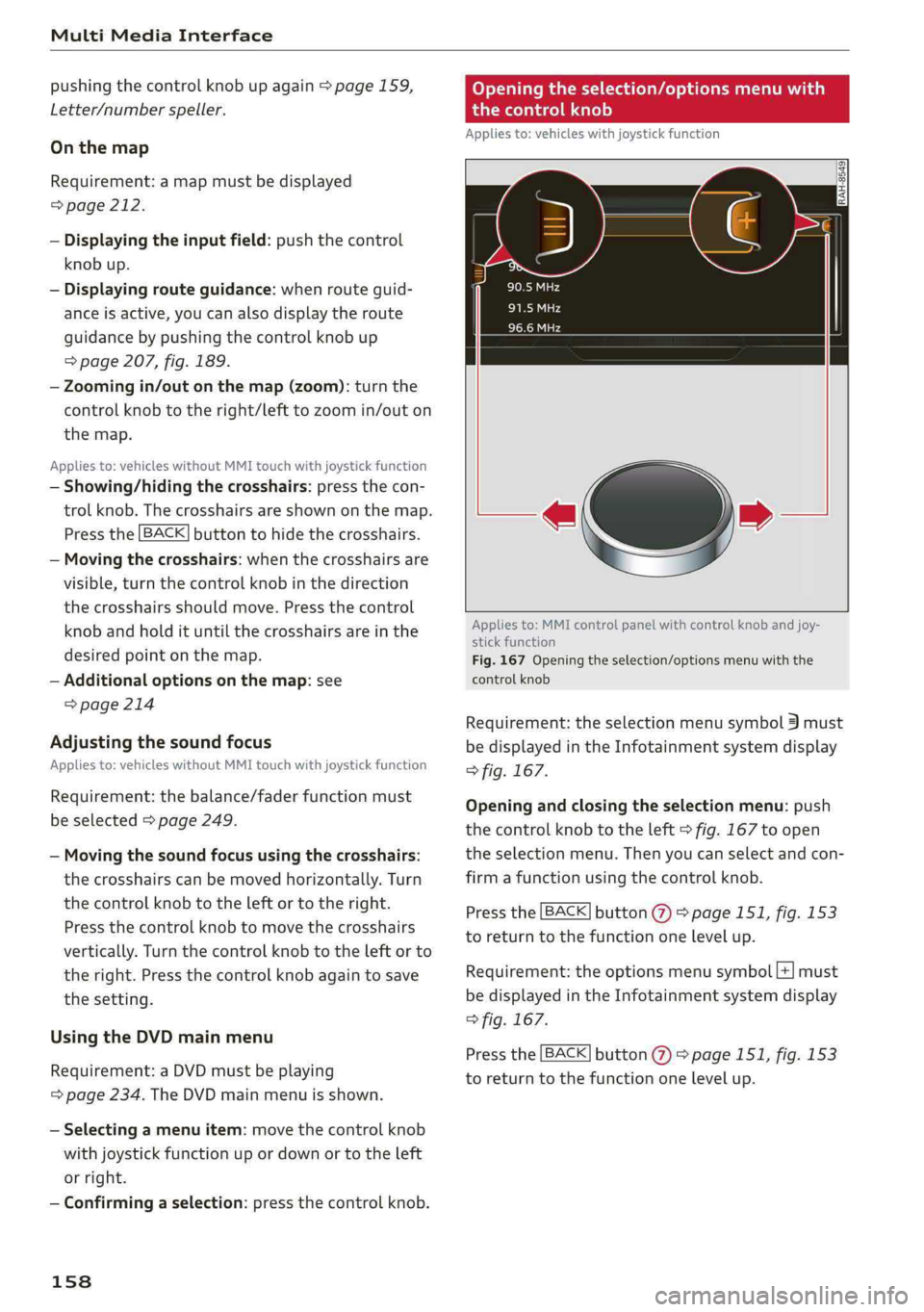
Openingtheselection/optionsmenuwith
thecontrolknob
Appliesto:vehicleswithjoystickfunction
¢»
Appliesto:MMIcontrolpanelwithcontrolknobandjoy-
stickfunction
Fig.167Openingtheselection/optionsmenuwiththe
controlknob
Requirement:theselectionmenusymbol3must
bedisplayedintheInfotainmentsystemdisplay
>fig.167.
Openingandclosingtheselectionmenu:push
thecontrolknobtotheleft>fig.167toopen
theselectionmenu.Thenyoucanselectandcon-
firm
afunctionusingthecontrolknob.
Pressthe[BACK]button(7)>page151,fig.153
to returntothefunctiononelevelup.
Requirement:theoptionsmenusymbol[+]must
bedisplayedintheInfotainmentsystemdisplay
>fig.167.
Pressthe[BACK]button()>page151,fig.153
to returntothefunctiononelevelup.
Page 165 of 392

80A012721BG
Multifunctionsteeringwheel
Multifunctionsteering
wheel
Introduction
Appliesto:vehicleswith multifunctionsteeringwheel
Inthedriverinformationsystemdisplay,youcan
controlnumerousInfotainmentfunctionsusing
themultifunctionsteeringwheelplus*>page 15
orthemultifunctionsteeringwheel*>page18.
Youcancontrol additionalInfotainmentfunc-
tionsusingtheMMIcontrolpanel>page151in
theInfotainmentsystemdisplay.
ZAWARNING
Directyourfullattentiontodriving.Asthe
driver,youhavecompleteresponsibilityfor
safetyintraffic.Only use thefunctionsinsuch
awaythatyoualwaysmaintaincompletecon-
troloveryourvehicleinalltrafficsituations.
Radio
Appliesto:vehicleswith multifunctionsteeringwheelandra-
dio
Appliesto:vehicleswith multifunctionsteeringwheel
>Pressthe[MODE]buttononthemultifunction
steeringwheelrepeatedlyuntiltheRadio/
Mediatabisdisplayed.
Appliesto:vehicleswith multifunctionsteeringwheelplus
>Pressthe|< >|buttononthemultifunction
steeringwheelrepeatedlyuntiltheRadio/
Mediatabisdisplayed.
>Presstheleftcontrolbutton>page16.
Dependingonvehicleequipment,thefollowing
functions
maybeavailableinthedriverinforma-
tionsystem.
—Selectingthefrequencyband:selectandcon-
firmafrequencyband.
—Selectingastationfromthestationlist:select
andconfirmaradiostation.
—Selectingastationfromthepresetslist:select
andconfirmPresetsandthenaradiostation.
—Openingamediasource:selectandconfirmTo
media.
Additionalsettings
—Select:rightcontrolbutton>desiredentry.
See>page223.
G)Tips
PayattentiontotheInfotainmentsystemdis-
playifnecessary.Dependingontheselected
function,itmaybenecessarytousetheMMI
control panel.
Media
Appliesto:vehicleswithmultifunctionsteeringwheeland
media
Requirement:amediadrivemustcontainaudio/
videofiles>page226.
Appliesto:vehicleswithmultifunctionsteeringwheel
>Pressthe[MODE]buttononthemultifunction
steeringwheelrepeatedlyuntiltheRadio/
Mediatabisdisplayed.
Appliesto:vehicleswithmultifunctionsteeringwheelplus
>»Pressthe[<>]buttononthemultifunction
steeringwheelrepeatedlyuntiltheRadio/
Mediatabisdisplayed.
>Presstheleftcontrolbutton>page16.
Depending onvehicleequipment,thefollowing
functionsmaybeavailableinthedriverinforma-
tionsystem.
—Selectingamediasource:selectandconfirma
sourcesuchastheSDcard.
—Switchingtotheradio:selectandconfirmTo
radio.
—Playinganaudio/videofile:selectandconfirm
afile.
—Pausing/resumingplayback:presstheright
thumbwheel@)>page17,fig.11.Toresume
playback,presstherightthumbwheelagain.
—Openingadditionaltrackinformation:select:
rightcontrolbutton>Show"NowPlaying"
screen.
Foradditionalinformation, see>page237.>
163
Page 166 of 392

Multifunctionsteeringwheel
@Tips
—Alwaysfollowtheinformationfoundin
=>page225.
—Pleasenotethatwithinamediasourcein
thedriverinformationsystem,onlyplaylists
thatwereselectedthroughtheMMIcontrol
panelcanbeplayed>page235.
—PayattentiontotheInfotainmentsystem
displayifnecessary.Dependingonthese-
lectedfunction,itmaybenecessarytouse
theMMIcontrolpanel.
Telephone
Appliesto:vehicleswith multifunctionsteeringwheeland
telephone
AlPe
Calllist
Pe
Weg
Fig.171Example:telephonefunctionsinthedriverinfor-
mationsystem
Requirement:amobiledevicemustbeconnected
totheMMI>page177.
Appliesto:vehicleswith multifunctionsteeringwheel
>Pressthe[MODE]buttononthemultifunction
steeringwheelrepeatedlyuntiltheTelephone
tabisdisplayed.
Appliesto:vehicleswith multifunctionsteeringwheelplus
> Pressthe[<>]buttonrepeatedlyuntiltheTele-
phonetabisdisplayed.
>Presstheleftcontrolbutton>page16.
Dependingonvehicleequipment,thefollowing
functionsmaybeavailableinthedriverinforma-
tionsystem.
—Accessingacontact:selectandconfirmCall
list/Favorites/Directory.Selectandconfirma
contact.
164
Directorycontacts*:thedriverinformationsys-
temonlydisplaysdirectorycontacts thathavea
phonenumberstored.Ifseveralphonenumbers
arestoredwithacontact,thelistofstorednum-
bersisdisplayedfirstwhentheentryisselected.
Recentcalls*:therecentcallslistcontainsallin-
coming,outgoingandmissedcalls.
Callerinformation*:thename,phonenumberor
Unknownappearsinthedriverinformationsys-
temdisplaydependingonwhetherthecallerhas
beenstoredinthedirectoryandifthephone
numberhasbeentransmitted.
Functionsduringanincomingcall
—Acceptingacall:presstheleftthumbwheel
whenthereisanincomingcall.
—Decliningacall:selectandconfirmDecline
whenthereisanincomingcall.
—Endinga phonecall:selectandconfirmEnd
call.
Functionsduringa phonecall:
—Makinganadditionalcall*:selectandconfirm
Holdcall.Presstheleftcontrolbutton>Direc-
toryorCalllist>thedesiredentry.
—Answeringacallwhileinacallandwhile
thereisanothercall onhold*:selectandcon-
firmAnswer.Theactivecallisreplacedwiththe
incomingcall.
Additionalfunctionsinclude:
Mute®*:ifyouselectandconfirmthisfunction,
theotherpersononthephonecannothearyou.
Youwillstillbeabletohear theotherperson.
Holding/resumingacall*:youcanplacetheex-
istingcallonholdandresumeitagain.
Swapcall*:youcanalternatebetweentwophone
callsatthesametime.Oneofthecallswillbeon
hold.SelectingEndcallwillendtheactivephone
call.Acallthatwasplacedonholdstaysonhold
andcanbetakenoffholdwithResumeheldcall.
Conferencecall*:acallonholdanduptofiveac-
tiveparties(dependingonthecellphoneservice
provider)canbeaddedtoaconferencecall.To
makeanadditionalcall,putallparticipantsin
thecurrentconferencecallonholdusingHold>
Page 172 of 392

Voicerecognitionsystem
Voicerecognitionsystem
Operating
Appliesto:vehicleswithvoicerecognitionsystem
YoucanoperatemanyInfotainmentfunctions
convenientlybyspeaking.
Requirement:theignitionandtheMMImustbe
switched
on>page152.Asystemlanguagesup-
portedbythevoicerecognitionsystemmustbe
set.Theremustbenophonecallsinprogressand
theparkingaidmustnotbeactive.
>Switchingon:pressthe[%]button@
=>page17,fig.11or>page18,fig.13briefly
onthemultifunctionsteeringwheelandsay
thedesiredcommandaftertheBeep.
>Switchingoff:pressandholdthe|™]button.
Or:pressthe|5|button.
>Pausing:saythecommandPause.Toresume,
pressthe|]button.
>Correcting:saythecommandCorrection.Or:
simplysayanewcommandduringanan-
nouncement>page246.
Inputassistance
Thesystemguidesyouthroughtheinputwith
visualandaudiofeedback.
—Visualinputassistance:afterswitchingon
voicerecognition,adisplaywithaselectionof
possiblecommandsappears.Thiscommand
displaycanbe switchedonoroff.Select:
MENU]button>Settings>leftcontrolbutton
>MMIsettings>Speechdialogsystem.
—Audioinputassistance: tohavethepossible
commandsread,turnthevoicerecognitionsys-
temonandsayHelp.
Forthesystemtounderstandyou:
Speakclearlyanddistinctly atanormalvolume.
Speaklouderwhendrivingfaster.
Emphasizethewordsinthecommandsevenly
anddonotleavelongpauses.
Closethedoors,thewindows,andthesunroof*
toreducebackgroundnoise.Makesurethatpas-
sengersarenotspeakingwhenyouaregivinga
voicecommand.
170
Donotdirecttheventstowardthehands-freemi-
crophone,whichisintheroofheadlinernearthe
frontinteriorlights.
Onlyusethesystemfromthedriver'sseatbe-
causethehands-freemicrophoneisdirectedto-
wardthatseat.
Additionalsettings
See>page246,Speechdialogsystem.
ZAWARNING
—Directyourfullattentiontodriving.Asthe
driver,youhavecompleteresponsibilityfor
safetyintraffic.Onlyusethefunctionsin
suchawaythatyoualwaysmaintaincom-
pletecontroloveryourvehicleinalltraffic
situations.
—Donotuse thevoicerecognitionsystemin
emergenciesbecauseyourvoicemaychange
instressfulsituations.Thesystemmaytake
longertodialthenumberormaynotbe
abletodialitatall.Dialtheemergency
numbermanually.
Gi)Tips
— Thedialogpauseswhenthereisanincom-
ingphonecallandwillcontinueifyouig-
norethecall.Thedialogendsifyouanswer
thecall.
—Youcanselectan iteminthelistusingei-
therthevoicerecognitionsystemorthe
controlknob.
Commandoverview
information
Appliesto:vehicleswithvoicerecognitionsystem
Thefollowingoverviewsdescribethecommands
thatcan beusedtooperatetheMMIusingthe
voicerecognitionsystem.
Alternativecommandsareseparatedusinga“/”,
forexamplesay:Telephone/(or)Navigation/
(or)Radio.
Sequencesofcommandsusedtoperformanac-
tionareidentifiedwitha “>”,forexamplesay:
Enteraddress>(then)Entercountry/state.>
Page 174 of 392

Voicerecognitionsystem
FunctionSay:
CallingthelastnumberdialedRedial
DialingaphonenumberEnternumber>whenprompted,saythetelephonenumberin
groupsofindividualnumbers,forexample.8885551212>Di-
al
Correctingthephonenumberthat
wasentered
Correction/Deletenumber
ShowingcontactinformationDirectory>saythedesiredcontactwhenprompted,
forexampleJohnSmith
ListeningtomessagesCallvoicemail
EnteringthePIN(SIM)EnterPIN>whenprompted,saythePINinindividualnumbers
>Save
CorrectingthePINentryCorrection/DeletePIN
CorrectingdatainputNoImeant(XY)
Closingthefull-screencommand
list
Close
@)Tips
—Contactsinthedirectorycanselectedusing
thefullname(“firstnamelastname”and
“lastname,firstname”)aswellaswithonly
thefirstorlastname.Thisappliestocell
—Pleasenotethatcommandscanonlybegiv-
enfortheprimaryphone*>page178.
—Formoreinformationonsupportedmobile
devices,visitwww.audiusa.com/bluetooth
orcontactanauthorizedAudidealeror au-
thorizedAudiServiceFacility.
phonesthattransmit namesseparatedinto
firstandlastnames.
AudiconnectInfotainment
Appliesto:vehicleswithvoicerecognitionsystem andAudiconnectInfotainment
Requirement:TherequirementsforAudiconnect
Infotainmentmustbemet>page192.
FunctionSay:
AccessingAudiconnectInfotain-
mentservices
Audiconnect>follow thesystemprompts
AudiconnectInfotainmentservicesWeather/Onlinenews/Fuelprices/Parkinginformation/
Travelinformation/Twitter/Trafficinformation
SearchareasforAudiconnectInfo-
tainmentservices
Neardestination/Nearby/In anewcity
Correctingdatainput
NoImeant(XY)
@Tips
Alwaysreadthechapter>page192,Audi
connect.
172