2019 AUDI Q3 ESP
[x] Cancel search: ESPPage 122 of 280
Driver assistance
Applies to: vehicles with lane departure warning
B4M-0064
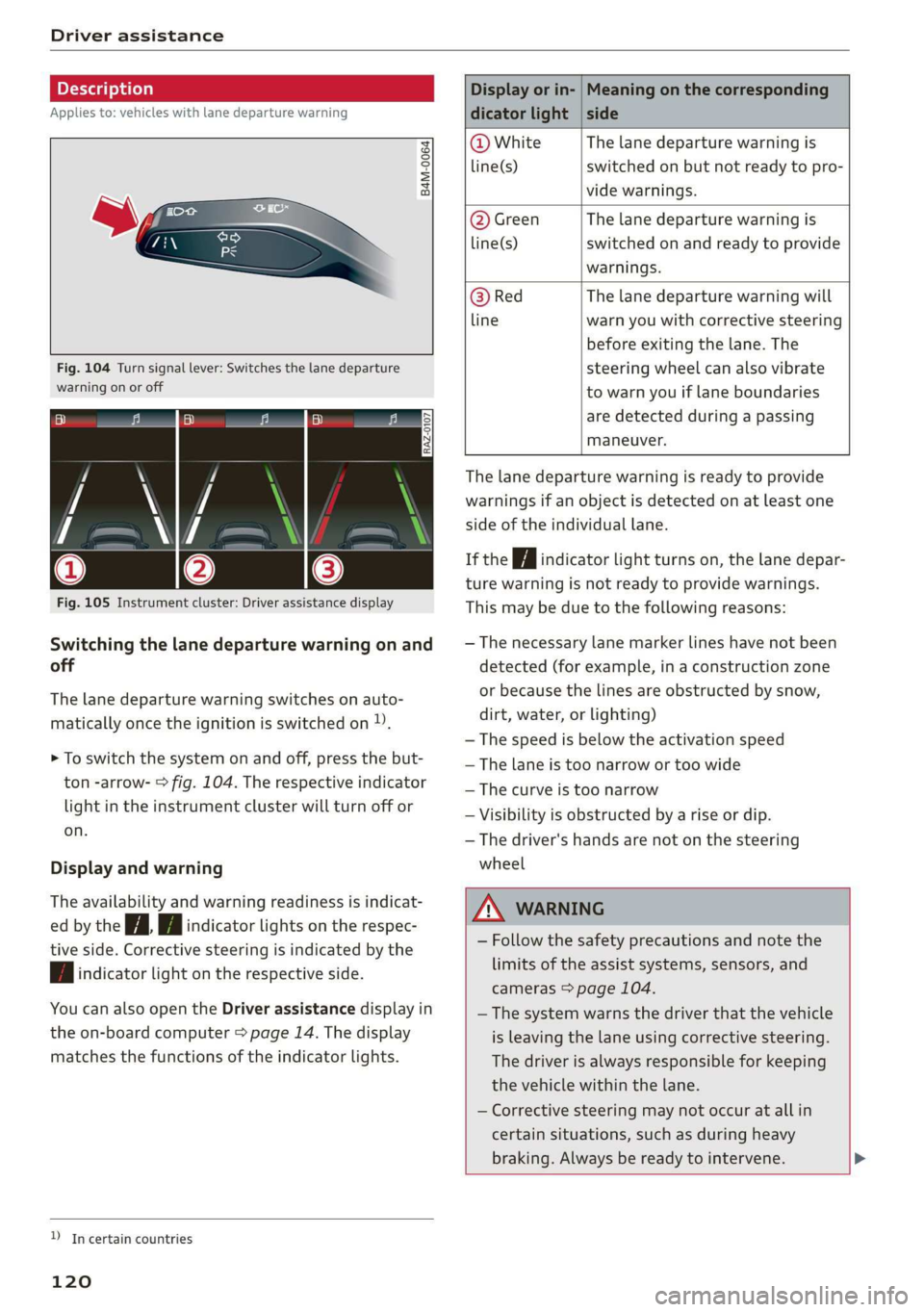
Fig. 104 Turn signal lever: Switches the lane departure
warning on or off
RAZ-0107
Fig. 105 Instrument cluster: Driver assistance display
Switching the lane departure warning on and
off
The lane departure warning switches on auto-
matically once the ignition is switched on )).
> To switch the system on and off, press the but-
ton -arrow- > fig. 104. The respective indicator
light in the instrument cluster will turn off or
on.
Display and warning
The availability and warning readiness is indicat-
ed by the iA Hi indicator lights on the respec-
tive side. Corrective steering is indicated by the
fA indicator light on the respective side.
You can also open the Driver assistance display in
the on-board computer > page 14. The display
matches the functions of the indicator lights.
YD In certain countries
120
Display or in- | Meaning on the corresponding
dicator light | side
@ White The lane departure warning is
line(s) switched on but not ready to pro-
vide warnings.
@ Green The lane departure warning is
line(s) switched on and ready to provide
warnings.
@ Red The lane departure warning will
line warn you with corrective steering
before exiting the lane. The
steering wheel can also vibrate
to warn you if lane boundaries
are detected during a passing
maneuver.
The lane departure warning is ready to provide
warnings if an object is detected on at least one
side of the individual lane.
If the Hi indicator light turns on, the lane depar-
ture warning is not ready to provide warnings.
This may be due to the following reasons:
— The necessary lane marker lines have not been
detected (for example, in a construction zone
or because the lines are obstructed by snow,
dirt, water, or lighting)
— The speed is below the activation speed
— The lane is too narrow or too wide
—The curve is too narrow
— Visibility is obstructed by a rise or dip.
— The driver's hands are not on the steering
wheel
ZA WARNING
— Follow the safety precautions and note the
limits of the assist systems, sensors, and
cameras > page 104.
— The system warns the driver that the vehicle
is leaving the lane using corrective steering.
The
driver is always responsible for keeping
the vehicle within the lane.
— Corrective steering may not occur at all in
certain situations, such as during heavy
braking. Always be ready to intervene. >
Page 123 of 280

83A012721BA
Driver assistance
@) Tips
— Always keep your hands on the steering
wheel. The driver is always responsible for
adhering to the regulations applicable in
the country where the vehicle is being oper-
ated.
— The system does not provide any corrective
steering or steering wheel vibrations if it de-
tects that you are passing another vehicle.
ONT em MT Me() Sade em ea Tale)
Applies to: vehicles with lane departure warning
You can switch the optional steering wheel vibra-
tion warning for the lane departure warning on
and off. The settings depend on the vehicle
equipment.
— Applies to: MMI: Select on the home screen:
VEHICLE > Driver assistance > Lane departure
warning > Vibration warning.
Messages
Applies to: vehicles with lane departure warning
ir or is displayed when there is a malfunc-
tion, the lane assist/lane departure warning may
be unavailable or may be limited.
A message that indicates the cause and possible
solution may appear with some displays. The
weather conditions may be too poor or the cam-
era may be covered. Clean the area in front of the
camera > page 106, fig. 88 and try to turn on the
systems again later.
If the malfunction remains, drive to an author-
ized Audi dealer or authorized Audi Service Facili-
ty immediately to have the malfunction correct-
ed.
Lane departure warning: please drive in the cen-
ter of the lane!
This message appears and an audio signal sounds
if the lane departure warning must intervene for
a long period of time.
& Please take over steering!
This message appears if steering activity is no
longer detected and the vehicle comes close to
leaving the lane multiple times. Always keep your
hands on the steering wheel so you can be ready
to steer at any time. The lane departure warning
is switched on but not ready to provide warnings.
G@) Tips
Always keep your hands on the steering
wheel. The driver is always responsible for ad-
hering to the regulations applicable in the
country where the vehicle is being operated.
Audi pre sense
Introduction
Applies to: vehicles with Audi pre sense
Within the limits of the system, the Audi pre
sense functions can initiate measures in certain
driving situations to protect the vehicle occu-
pants and other road users. Depending on the ve-
hicle equipment, various Audi pre sense systems
may
be installed:
— Audi pre sense basic can react during emergen-
cy and dangerous braking maneuvers and un-
stable driving situations (such as oversteering
or understeering).
— Audi pre sense front can detect an impending
frontal impact and react with warnings, braking
interventions, and preemptive safety measures
for the vehicle occupants.
Audi pre sense preemptive safety measures
Applies to: vehicles with Audi pre sense
Depending on the vehicle speed and the vehicle
equipment, the following functions may be initi-
ated in certain situations:
— Visual and audio warnings
— Reversible tensioning of the front safety belts
— Closing the windows and panoramic glass roof
ZA\ WARNING
Follow the safety precautions and note the
limits of the assist systems, sensors, and
cameras > page 104. >
121
Page 124 of 280
Driver assistance
@ Tips
— Depending on the dangerous situation that
is detected and the selected Audi drive se-
lect* mode, all preemptive safety measures
may not be initiated under certain circum-
stances. Certain functions can be adjusted
or skipped if necessary.
— Audi pre sense may also be limited or un-
available under certain circumstances, for
example if:
— There are passengers with unfastened
safety belts
— It has only been several seconds since the
ignition was switched on The
light turns on)2),
— When driving in reverse
— The front passenger's airbag is switched
off
— There is an airbag control module mal-
function
— The ESC is limited, switched off, or mal-
functioning > page 99
Oe eee
Applies to: vehicles with Audi pre sense basic
Audi pre sense basic is automatically active at
speeds of approximately 20 mph (30 km/h) and
higher. Audi pre sense basic can trigger the Audi
pre sense preemptive safety measures during
emergency braking and dangerous braking ma-
neuvers as well as in unstable driving situations,
such as oversteering or understeering.
Z\ WARNING
Follow the safety precautions and note the
limits of the assist systems, sensors, and
cameras > page 104.
D System availability may be limited depending on the mar-
ket.
2) In preparation at the time of printing.
3) This is not available in some countries.
122
Audi pre sense front
Applies to: vehicles with Audi pre sense front
The Audi pre sense front system uses the data
from the radar sensors and calculates the proba-
bility of a rear-end collision. Within the limits of
the system, an impending collision with the front
of the vehicle can be detected in both urban and
rural speed ranges.
Audi pre sense front is active at speeds of approx-
imately 3 mph (5 km/h) and higher. The system
can respond to pedestrians crossing the street or
going in the same direction of travel 3) at speeds
up to 40 mph (65 km/h). It can also respond to
stationary vehicles at speeds up to 52 mph (85
km/h) as well as to vehicles driving ahead or
stopped vehicles at speeds up to 155 mph (250
km/h).
Early warning/acute warning
The system can recognize various dangerous sit-
uations. The early warning occurs if:
—Avehicle driving ahead brakes suddenly
— Your vehicle is traveling at speeds between ap-
proximately 20 to 50 mph (30 to 85 km/h) and
it approaches a stationary vehicle.
— Your vehicle is traveling at speeds between ap-
proximately 20 to 155 mph (30 to 250 km/h)
and it approaches a vehicle that is clearly trav-
eling more slowly or a vehicle in your direction
of travel that is stopped.
— Ifa crossing pedestrian?) moves into the lane
and you are driving at speeds between approxi-
mately 18 to 40 mph (30 to 65 km/h).
— If a pedestrian is moving in your direction of
travel and in your lane 2) and you are driving at
speeds between approximately 18 to 40 mph
(30 to 65 km/h).
The message Audi pre sense o and a warning
tone will warn you about the danger.
If there is an impending collision with vehicles,
there may also be an acute warning inthe form >
Page 125 of 280

83A012721BA
Driver assistance
of sharp braking. You will also be warned by an
indicator in the instrument cluster display. When
this warning occurs, it may only be possible to
avoid a collision by swerving or braking strongly.
Automatic deceleration
If you do not react to the acute warning, Audi pre
sense front can brake the vehicle to a full stop
within the limits of the system. This reduces the
vehicle speed in the event of a collision.
Automatic braking force increase
If Audi pre sense determines that you are not
braking strongly enough when a collision is immi-
nent, it can increase the braking force based on
the situation.
Take-over
If the message oa Please take over! appears, the
vehicle has been braked to a stop by Audi pre
sense and you must resume control of the vehi-
cle.
Z\ WARNING
— Follow the safety precautions and note the
limits of the assist systems, sensors, and
cameras > page 104.
— Audi pre sense front cannot overcome natu-
ral physical laws. It is a system designed to
assist and it cannot prevent a collision in ev-
ery circumstance. The driver must always in-
tervene. The driver is always responsible for
braking at the correct time. Do not let the
increased safety provided tempt you into
taking risks. This could increase your risk of
a collision.
— Among other things, Audi pre sense front
does not react to pedestrians who are sta-
tionary, stopped, oncoming, and crossing at
an angle. It also does not react to cyclists,
groups of people, animals, crossing vehicles,
or oncoming vehicles and objects, such as
posts, guardrails, and railway vehicles.
— Audi pre sense front may be limited or un-
available when driving in curves.
D_ In certain countries
— Loose objects can be thrown around the ve-
hicle interior during sudden driving or brak-
ing maneuvers, which increases the risk of
an accident. Store objects securely while
driving.
—In trailer mode, the braking behavior of the
trailer can be different than usual during au-
tomatic braking.
G) Tips
— If you switch off the ESC, Audi pre sense al-
so switches off automatically > page 99.
— Certain Audi pre sense front functions are
unavailable or have limited availability for
approximately 20 seconds after starting the
vehicle (may be longer depending on the
driving situation).
Adjusting Audi pre sense
Applies to: vehicles with Audi pre sense
You can adjust the Audi pre sense functions to
your preferences. The settings depend on the ve-
hicle equipment.
> Applies to: MMI: Select on the home screen:
VEHICLE > Driver assistance > Audi pre sense.
Possible settings:
The system can be switched off and on.
Prewarning!) - The prewarning can be switched
off or the Audi pre sense warning time can be set
(Early/Medium/Late).
Set the warning time for the early warning to
Early at first. If you feel that the prewarnings ap-
pear too early, then set the warning time to Me-
dium. The Late warning time should only be set
in special circumstances.
@) Tips
— If Audi pre sense is switched off, it switches
on again automatically once the ignition is
switched on again.)
— Switch Audi pre sense off when you are not
using public streets, when loading the
123
>
Page 126 of 280

Driver assistance
vehicle onto a vehicle carrier, train, ship, or
other type of transportation, or when tow-
ing the vehicle. This can help to prevent an
undesired intervention from the Audi pre
sense system.
Messages
Applies to: vehicles with Audi pre sense
ry ° is displayed when there is a malfunc-
tion, the Audi pre sense functions may be un-
available or may be limited.
A message that indicates the cause and possible
solution may appear with some displays. The
weather conditions may be too poor or a sensor
may be covered. Clean the area in front of the
sensors > page 105, fig. 87 and try to turn on
the systems again later.
If the malfunction remains, drive to an author-
ized Audi dealer or authorized Audi Service Facili-
ty immediately to have the malfunction correct-
ed.
Side assist
pled foda Coda)
Applies to: vehicles with side assist
RAZ-0169|
Fig. 106 For example: driving situations and exterior mir-
ror display
124
General information
Side assist monitors the blind spot and traffic be-
hind your vehicle. Within the limits of the sys-
tem, side assist can detect traffic that is ap-
proaching from behind and provide a warning
when you are changing lanes. The system uses
the data from the radar sensors at the rear cor-
ners of the vehicle.
The side assist is active at walking speeds and
higher. If an object that is classified as critical is
approaching, the display in the exterior mirror @)
on the corresponding side of the vehicle will light
up.
Driving situations
The system can provide warnings about the fol-
lowing risks:
@ Vehicles that are approaching: a vehicle may
be classified as critical in some cases, even if
it is farther away. The faster a vehicle ap-
proaches, the sooner the display in the out-
side mirror will turn on.
@® Vehicles traveling in the same direction: the
indicator will turn on in the outside mirror
when vehicles traveling in the same direction
are classified as critical. The side assist warns
you of all detected vehicles when they are in
the blind spot or before they reach that
point.
@ Vehicles you are passing: if you slowly pass a
vehicle that side assist has detected (the dif-
ference in speed between the vehicle and
your vehicle is less than 9 mph (15 km/h )),
the display in the exterior mirror will turn on
when the vehicle enters your blind spot. The
display will not turn on if you quickly pass a
vehicle that side assist has detected (the dif-
ference in speed is greater than approximate-
ly 9 mph (15 km/h)).
Information stage
At the information level, the side assist informs
you of detected objects that are classified as criti-
cal.
The display remains dim in the information stage
so that you are not distracted while looking for-
ward.
Page 130 of 280

Parking and maneuvering
ZA WARNING
Follow the safety precautions and note the
limits of the assist systems, sensors, and
cameras > page 104.
@) Note
Keep enough distance from the curb to avoid
damage to the rims.
G) Tips
If the parking aid is switched off, it can only
be reactivated automatically when one of the
following conditions is met:
— The vehicle speed exceeds 6 mph (10 km/h)
— The ignition is switched off and back on
again
— The parking brake is set and then released
— The "P" gear is engaged and released again
Applies to: vehicles with parking system plus
Fig. 108 Center display: distance display
If the sensors detect an obstacle, audible and vis-
ual signals will warn you.
Audio signals
The closer your vehicle gets to a detected obsta-
cle, the shorter the time between the audible sig-
nals. A continuous tone sounds when an obstacle
is less than approximately 1 foot (0.30 m) away
from the front or rear of the vehicle. A continu-
ous tone sounds when an obstacle is less than
approximately 0.7 feet (0.20 m) away from the
sides* of the vehicle. Do not continue driving for-
ward or in reverse >.
To switch off audio signals while parking, press
in the center display. The audio warnings will
128
turn on again automatically the next time the
parking system is switched on. The volume can
be changed in the settings |] > page 138.
Visual warnings
The visual warnings in the center display help you
to detect the critical vehicle area and to estimate
the distance to an obstacle.
Red segments (2) show detected obstacles that
are in your vehicle's path. The red lines (2) mark
the expected direction of travel based on the
steering angle. A white segment @) indicates a
detected obstacle that is outside of the vehicle's
path. The closer your vehicle comes to the obsta-
cle, the closer the segments will move to the ve-
hicle. The collision area has been reached when
the next to last segment is displayed. Obstacles
in the collision area, including those outside of
the vehicle's path, are shown in red. Do not con-
tinue driving farther.
Error messages
If P4 appears, the sensor in the respective area
or the speaker is faulty. Drive immediately to an
authorized Audi dealer or authorized Audi Service
Facility to have the malfunction repaired. The
LED
in the Ps button may also flash when the
system is switched on.
ff is displayed when there is a malfunction,
the parking system functions may be unavailable
or may be limited.
A message that indicates the cause and possible
solution may appear with some displays. The
weather conditions may be too poor or a sensor
may be covered. Clean the area in front of the
sensors > page 105, fig. 87 and try to turn on
the systems again later.
If the malfunction remains, drive to an author-
ized Audi dealer or authorized Audi Service Facili-
ty immediately to have the malfunction correct-
ed.
Z\ WARNING
— Follow the safety precautions and note the
limits of the assist systems, sensors, and
cameras > page 104. >
Page 137 of 280

83A012721BA
Parking and maneuvering
Parking space search
Applies to: vehicles with park assist
zt + oS gz
3 & oO
Fig. 117 Center console: Park assist button
RAZ-0339
a3
Fig. 118 Center display: activated parking space search
Switching on the parking space search
> To turn on the parking space search, press the
Pe button © fig. 117, or
> To turn on the parking space search when the
parking system is switched on, select P@ in the
center display.
The LED in the button will turn on and the display
for finding a parking space will appear in the cen-
ter display > fig. 118.
Searching for parking spaces
> Drive forward to the row of parking spaces ata
low speed. For the best parking results, the ve-
hicle should be approximately 3 feet (1 m) from
the row of parking spaces.
> The parking space search is first done on one
side of the lane. To switch the side to park on,
turn on the turn signal for the other side or tap
that side next to the vehicle in the center dis-
play.
Selecting the parking space
If the system finds a parking space that could be
suitable for the vehicle length and width, it will
be displayed. The system automatically suggests
a parking option @.
If the parking space allows different parking op-
tions, they can be selected manually. Select one
of the suggested parking options (@) in the center
display.
Starting the parking process
As soon as the vehicle has reached the correct po-
sition, a P will appear in the center display above
the selected parking space @). The roof in the
parking system display (2) may show the required
braking or driving direction.
> Keep the vehicle as parallel as possible to the
parked vehicles or to the side of the road.
>» Make sure that the parking space is suitable for
your vehicle >@).
Start parking using the park assist > page 136.
Maneuvering area
The vehicle can go off course during the parking
process > A\. If there are obstacles within the
maneuvering area that block or endanger the
parking process, for example on the opposite
side of the street, a message may appear. You
may need to drive farther forward and stay closer
to the row of parking spaces.
A WARNING
— Follow the safety precautions and note the
limits of the assist systems, sensors, and
cameras > page 104.
— The driver is always responsible when enter-
ing or exiting a parking space and during
similar maneuvers.
— Sensors and cameras have spots in which
the surrounding area cannot be detected.
Objects, animals, and people may only be
detected with limitations may not be detect-
ed at all. Always monitor the traffic and the
vehicle's surroundings directly and do not
become distracted.
CG) Note
— Parking spaces classified as suitable by the
system may have been detected incorrectly.
135
Page 138 of 280

Parking and maneuvering
The driver must decide if the parking space
displayed is suitable for the vehicle.
— Certain conditions near the parking space
may cause the parking process to fail, such
as if the parking space is near trees or posts,
or if the ground is covered, for example,
with gravel, snow, or ice.
G) Tips
— If you did not drive past a suitable parking
space too quickly, you can also select Pe to
activate the system afterwards.
— The Electronic Stabilization Control (ESC)
must not be switched off during the parking
process. If the ESC intervenes, the parking
process
will be canceled.
— You can also drive into a perpendicular park-
ing space yourself and then activate the sys-
tem. If this is the case, the front of the vehi-
cle should already be in the space (4)
= page 134, fig. 116 so that the sensors
can measure the space.
— You cannot park with the parking assist sys-
tems when you are towing a trailer or have
the connector inserted in the trailer socket.
— The system is not available when certain as-
sist systems are switched on.
— If there are suitable parking spaces on both
sides of the street, for example on a one-
way street, you can change the side where
the system is searching for parking spaces
by activating the turn signal for the other
side or by pressing on that side in the center
display.
— The park systems do not provide support for
assisted parking on tight curves.
Park assist
(eT eeeeue lela)
Applies to: vehicles with park assist
The park assist helps you when parking and exit-
ing parking spaces after the parking space
search. The park assist takes over the steering of
the vehicle while the driver accelerates, brakes,
and
monitors the vehicle's surroundings. Park as-
sist can be interrupted at any time.
136
Z\ WARNING
— Follow the safety precautions and note the
limits of the assist systems, sensors, and
cameras > page 104.
— The driver is always responsible when enter-
ing or exiting a parking space and during
similar maneuvers.
— Do not use this function if the vehicle cannot
move freely, for example when on a vehicle
jack.
— Sensors and cameras have spots in which
the surrounding area cannot be detected.
Objects, animals, and people may only be
detected with limitations may not be detect-
ed at all. Always monitor the traffic and the
vehicle's surroundings directly and do not
become distracted.
@) Note
— Do not use the park assist systems when
transporting cargo that extends out of the
vehicle, when snow chains are mounted, or
when the parking space is on a hill or in-
cline.
— Park assist guides the vehicle either away
from curbs or onto them if other vehicles
are parked on the curb. Make sure that your
vehicle's tires and rims are not damaged.
Resume control of the vehicle in time or
stop the parking process if needed to pre-
vent damage.
G) Tips
Follow the legal regulations in the country
where you are located when using Park assist.
dem ne eee
Applies to: vehicles with park assist
Requirement: a suitable parking space must be
found and selected > page 134. The vehicle must
initially be stationary.
> Select the reverse gear after stopping briefly.
> Remove your hands from the steering wheel.
> Pay attention to the path of the vehicle. If the
traffic situation permits, accelerate carefully
of.