2019 Alfa Romeo Stelvio Steering
[x] Cancel search: SteeringPage 165 of 244

RUN FLAT TYRES
(where provided)
157) 158) 159)
"Run Flat" tyres allow you to maintain
control of the car after a puncture and to
continue driving safely for about 50 mi
(80 km) at a maximum speed of 50 mph
(80 km/h).
The reinforced tyre wall retains its shape
and supports the weight of the car in the
event of pressure loss.
Cars equipped with Run Flat tyres are
NOT provided with Tire Repair Kits. For
repair, contact an Alfa Romeo Dealership
as soon as possible.
WARNING
157)Do not exceed the maximum distance
or speed (80 km - 80 km/h) in the event of
pressure loss-puncture.
158)A pressure loss alters the driving
behaviour of the car, for example, causing
less directional stability when braking,
longer braking distances and altered
steering geometry. Therefore, adjust your
driving style to avoid sudden turns or
obstacles such as pavements and potholes.
159)Do not exceed 60 km/h when driving
with an especially heavy trailer.
JUMP STARTING
If the battery is flat, a jump starting can
be performed using the battery and the
cables of another vehicle, or using an
auxiliary battery. In all cases, the battery
used must have a capacity equal to or a
little higher than the flat one.
Jump starting may be dangerous if
carried out incorrectly: carefully follow
the procedures described below.
61)
IMPORTANT NOTES
Do not use an auxiliary battery or any
other source of external supply with a
voltage above 12 V: the battery, the
starter, the alternator and the electrical
system of the vehicle could be damaged.
Do not attempt jump starting if the
battery is frozen. The battery could break
and explode!
REMOTE BATTERY CONNECTION
POLES
To facilitate the operation, the remote
poles of the battery for the jump starting
can be found in the engine compartment:
the battery, on the other hand, is placed
in the luggage compartment.
The negative terminal (-) fig. 166 is
positioned next to the right bonnet lock.You can access the positive terminal (+)
by lifting the protective flap fig. 167.
The pole is shown in fig. 168.
16608076V0006EM
16708076V0002EM
163
Page 169 of 244

take the tow hook from its housing in
the boot and carefully clean the threaded
housing on the vehicle before using it;
tighten the vehicle's tow hook in its
place for about 11 turns.
IMPORTANT The largest work angle of
the cable to fix on the tow hook must not
exceed 15°, as shown in fig. 171.
WARNING
163)Move the ignition device to ON and
then to STOP, without opening the door.
164)The brake servo and the
electromechanical power steering will not
work while the vehicle is being towed. You
will therefore need to apply more force on
the brake pedal and steering wheel. Do not
use flexible ropes when towing, and avoid
jerky movements. While towing, make sure
that the trailer hitch does not damage any
components it is touching. When towing the
car, you must comply with all specific traffic
regulations and adopt an appropriate
driving behaviour. Do not start the engine
while towing the vehicle. Before tightening
the ring, clean the threaded housing
thoroughly. Make sure that the ring is fully
screwed into the housing before towing the
car.
17008136V0003EM
17108136V0002EM
167
Page 190 of 244

WHEELS AND TYRES
180) 181) 182)
Before embarking on a long trip, and
every two weeks, check the tyre inflation
pressure. Check the tyres when cold.
SNOW CHAINS
76)
Rear Wheel Drive and All-wheel drive
versions
It is possible to fit 0.5 in (13 mm) chains
on all the tyres except for R20.
Important notes
The use of snow chains should be in
compliance with local regulations of each
country. In certain countries, tyres
marked with code M+S (Mud and Snow)
are considered as winter equipment;
therefore their use is equivalent to that
of the snow chains.
IMPORTANT The snow chains may be
applied only to the rear wheel tyres.
Installing them on the rear wheel tyres
could damage the suspension and
transmission.
Check the tension of the snow chains
after the first few metres have been
driven.
IMPORTANT Using snow chains with
tyres with non-original dimensions may
damage the vehicle.
IMPORTANT Using different size or type
(M+S, snow, etc.) tyres between front and
rear axle may adversely affect car
driveability, with the risk of losing control
of the car and resulting accidents.
SUGGESTIONS ABOUT THE ROTATION
OF THE TYRES
The front and rear tyres are subject to
different loads and stress due to
steering, manoeuvres and braking. For
this reason they are subject to uneven
wear.
To resolve this problem, tyres should be
rotated at the appropriate time (6200 /
9300 miles (10000 / 15000 km)).
Inverting the tyres means moving them
to different positions on the same side of
the car (front to back and vice versa).
IMPORTANT Crossing the tyres is not
advised, so placing a tyre on a different
axle on the other side of the car is
impossible.
Tyre rotation contributes to the
preservation of the grip and traction
performance on wet, muddy or snowy
roads, guaranteeing optimal driveability
of the car.In the case of irregular wear of the tyres
identify the cause and correct it as soon
as possible, by contacting an Alfa Romeo
Dealership.
WARNING
180)The road holding qualities of the car
also depend on the correct inflation pressure
of the tyres.
181)If tyre pressure is too low, it may
overheat and be severely damaged as a
result.
182)Never submit alloy rims to repainting
treatments requiring the use of
temperatures exceeding 150°C. The
mechanical properties of the wheels could
be impaired.
IMPORTANT
76)Keep your speed down when snow chains
are fitted; do not exceed 50 km/h (or the
equivalent in miles). Avoid potholes, do not
drive over steps or pavements and do not
drive long distances over roads without
snow, to avoid damaging both your vehicle
and the road surface.
188
SERVICING AND CARE
Page 213 of 244

This chapter describes the main functions of the Connect system
(6.5” and 8.8” displays) that can be fitted on the vehicle.
MULTIMEDIA
ROAD SAFETY...............................212
RECEPTION CONDITIONS........................212
CARE AND MAINTENANCE.......................212
ANTITHEFT PROTECTION........................213
IMPORTANT NOTES............................213
CONTROLS.................................214
STEERING WHEEL CONTROLS.....................217
INTRODUCTION..............................219
RADIO MODE................................219
MEDIA MODE................................220
Bluetooth® SOURCE ............................220
USB/iPod/AUX SUPPORT........................220
PHONE MODE . ..............................221
NAVIGATION MODE............................222
CAR......................................222
SETTINGS..................................224
VOICE COMMANDS . . ..........................227
OFFICIAL TYPE APPROVALS......................228
ALFA CONNECT..............................228
Page 219 of 244
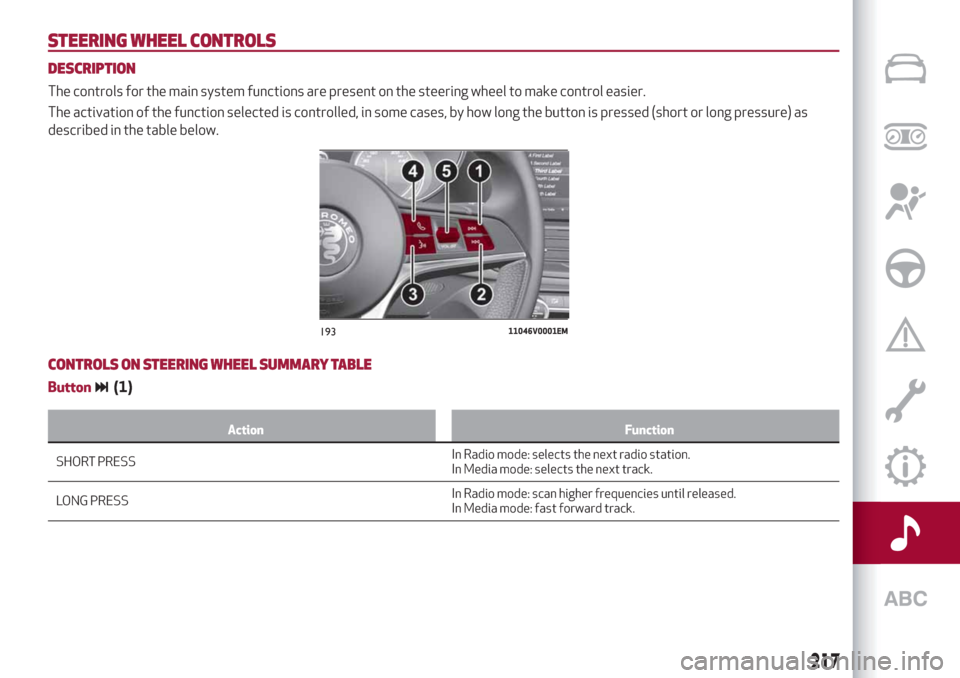
STEERING WHEEL CONTROLS
DESCRIPTION
The controls for the main system functions are present on the steering wheel to make control easier.
The activation of the function selected is controlled, in some cases, by how long the button is pressed (short or long pressure) as
described in the table below.
CONTROLS ON STEERING WHEEL SUMMARY TABLE
Button(1)
Action Function
SHORT PRESSInRadio mode: selects the next radio station.
In Media mode: selects the next track.
LONG PRESSIn Radio mode: scan higher frequencies until released.
In Media mode: fast forward track.
19311046V0001EM
217
Page 225 of 244

automatically shown on the Connect
system display.
To check the compatibility of your
smartphone, see the indications on the
websites:
https://www.android.com/intl/it_it/auto/
and http://www.apple.com/it/ios/
carplay/.
If the smartphone is connected correctly
to the car via the USB port, the Apple
CarPlay or Android Auto icon will be
displayed in the main menu.
NOTE Interaction with the smartphone
may be needed to enable Apple
Carplay/Android Auto and some other
functions. Complete the action on your
device (smartphone) as needed.
To use Apple CarPlay, connect your
iPhone to the car using a MFI (made for
iPhone) certified USB cable. To use
Android Auto, connect your smartphone
to the car using a USB for Android phones
having appropriate features. Using
unsuitable cables may prevent correct
system operation.Apple CarPlay App Setup
Apple CarPlay is compatible with the
iPhone 5 or more recent models, with the
iOS 7.1 operating system or later
versions.
Before using Apple CarPlay, enable Siri
from the settings on your smartphone.
To use Apple CarPlay, the smartphone
must be connected to the car with a USB
cable.
Android Auto APP Setup
Before use, download the Android Auto
application to your smartphone from
Google Play Store.
The application is compatible with
Android 5.0 (Lollipop) and later versions.
To use Android Auto, the smartphone
must be connected to the car with a USB
cable.
Interaction
After the setup procedure, on connecting
your smartphone to the car's USB port,
the application will automatically run on
the Connect system.
The Rotary Pad can be used to select and
confirm the available smartphone
functions.
You can interact with the Apple CarPlay
and Android Auto voice assistants using
the control on the steering wheel (long
press of the
button to start theinteraction and short press to close the
voice assistant).
The Telephone application of the
smartphone can be accessed directly
using the control on the steering wheel
.
Multimedia contents on the smartphone
can be accessed directly via “MEDIA”
mode of Connect.
Navigation
With the Apple CarPlay and Android Auto
applications, the user can choose to use
the navigation system on their
smartphone.
Exiting from the Apple CarPlay and
Android Auto apps
To end the Apple CarPlay or Android Auto
session, physically disconnect the
smartphone from the USB port.
223
Page 229 of 244

VOICE COMMANDS
IMPORTANT For languages not
supported by the system, voice
commands are not available.
To use the voice commands, press the
button on the steering wheel controls
and say the function you want to activate
aloud.
The following lists give the main word for
each command.
Radio functions
The
button lets you activate the
following functions:
Tune into the station
Tune to the frequency
Add to favourites
Show Available Stations
Show Favourite Stations
FM
AM
DAB (where provided)
SiriusXM (where provided)
Media function
The
button lets you activate the
following functions:
Display Album
Play Album
Display Artist
Play Artist
Display Composer
Play Composer
Display Genre
Play Genre
Display Playlist
Play Playlist
Play song
Play All
Display all the albums
Display all the artists
Display all the composers
Display all the genres
Display all the playlists
View all songs
Activate shuffle
Deactivate shuffle
Change Source to Aux
Change Source to USB 1
Change Source to USB 2
Change Source to Bluetooth
NOTE These controls are valid on devices
connected to the system via USB ports
and not through the
Bluetooth®
system.
Telephone function
The
button lets you activate the
following functions:
Dial
Call
Redial
Show contacts
Show all calls
Show missed calls
SearchNavigation functions
(where provided)
The
button lets you activate the
following functions:
Navigate to
Favourites
Set 2D map
Set detailed 3D map
Set overhead view
Route preview
Start navigation
Stop navigation
Repeat instructions
Show map
Find the nearest
227
Page 239 of 244

INDEX
ABS (system)................72
Active Cruise Control..........120
Active safety systems...........72
Additive for diesel emissions
AdBlue (UREA)............136
AFS function................28
Airbag
Front airbags.............103
Side airbags..............107
Airbag (SRS supplementary
restraint system)...........103
Alarm.....................15
Alfa Connect...............228
Alfa DNA system.............116
Automatic dual-zone climate
control system.............33
Automatic high beam headlights....29
Automatic transmission.........114
Automatic transmission gear lever
unlocking................165
Battery..................182
Battery recharging............184
Bodywork (cleaning and
maintenance).............189
Bonnet....................38
Brakes
Brake fluid level............182
Broken-down vehicle towing......166
BSM (Blind Spot Monitoring).......76
Carrying children safely.........91
Changing a bulb..............146
Checking levels..............177
Child protection systems.........91
Child safety device.............17
Climate control system..........33
CO2 emissions..............209
Control panel and on-board
instruments...............44
Controls..................214
Controls on steering wheel
summary table............217
Tunnel control summary table . . .214
Cruise Control...............119
Cybersecurity devices...........3
Daytime running lights (DRL)......27
Dimensions................199
Dipped headlights.............27
Dipped headlights (changing a bulb)......................149
Direction indicators (changing a
bulb)...................150
Display....................46
Doors.....................15
Driving assistance systems.......76
DTC (system)................72
Dusk sensor.................27
Electric parking brake..........111
Electric steering wheel heating.....24
Electric sunroof..............36Electric windows..............35
Engine...................193
Engine coolant level .........182
Engine compartment..........177
Engine Immobilizer (system).......14
Engine oil
Consumption.............181
Level check..............181
ESC (Electronic Stability Control)
system..................72
External lights...............26
Fluids and lubricants..........205
Fog lights (bulb replacement).....150
Forward Collision Warning (system).......................78
Front ceiling light..............31
Front fog lights . . .............27
Front light cluster with main
beam/dipped beam halogen
headlights (bulb replacement) . . .149
Front light cluster with main
beam/dipped beam Xenon gas
discharge headlights (bulb
replacement). .............150
Front seats (electric adjustment)....20
Front seats (manual adjustments)....19
Fuel consumption............209
Fuel cut-off system . ..........165
Fuse boxes................151
Fuses (replacement) . ..........151
Hazard warning lights..........146