2019 Alfa Romeo Stelvio Steering
[x] Cancel search: SteeringPage 26 of 244

To adjust the position bring the lever 1
fig. 22 down to position A, after which the
steering wheel can be adjusted to the
most suitable position and subsequently
locked in this position by bringing lever
1 to position B again.
ELECTRIC STEERING WHEEL HEATING(where provided)
With ignition device at ON, press the
fig. 23 button on the air conditioner
control panel.
When the function is enabled, the LED on
the button switches on.
IMPORTANT If this function is activated
with the engine stopped the battery may
run down.
WARNING
14)All adjustments must be carried out only
with the car stationary and engine stopped.
15)It is absolutely forbidden to carry out
any after-market operation involving
steering system or steering column
modifications (e.g. installation of anti-theft
device) that could adversely affect
performance, invalidate the warranty, cause
SERIOUS SAFETY PROBLEMS and also
result in the car not meeting type-approval
requirements.
REAR VIEW MIRRORS
INTERIOR MIRROR
Operate lever fig. 24 to adjust the mirror
into two different positions: normal or
anti-glare.
The mirror is fitted with a safety device
that causes its release in the event of a
violent impact with the passenger.
2304086V0002EM
2404106S0001EM
24
KNOWING YOUR CAR
Page 30 of 244

are switched on. The light can be
switched off by pressing the
button
again or by switching off the dipped
beam headlights.
When the engine is stopped with the rear
fog lights on, the next time the engine is
started the lights will, however, be off.
PARKING LIGHTS
They are switched on if, within a few
seconds from stopping the engine, the
light switch is put first in the
position
and then the
position. All side lights
switch on, if you want to leave only those
on one side (right/left) switched on, you
need to move the direction indicators
control on the position on the side you
wish to leave on.
When a front door is opened with the
light switch in position
, a tone will be
heard to inform the driver that the
parking lights are on.
The
warning light switches on in the
instrument panel.
IMPORTANT Turning the ignition switch
to ON turns off the parking lights, which
were on only on one side.
HEADLIGHTS OFF TIMER
The "Follow Me" function delays the
switching off of the headlights after the
car has been stopped.
The function can be enabled from theConnect system by selecting the
following functions from the main menu
in sequence: "Settings", "Lights" and
"Follow me"; the side lights and the
dipped beam headlights stay on for a
time that can be set between 30, 60 and
90 seconds.
Function activation
With the headlights on, take the ignition
device to the STOP position: the timer
starts when the light switch is turned to
the
position.
IMPORTANT To activate this function the
headlights must be deactivated within
2 minutes after the ignition device has
been taken to STOP.
Function deactivation
This function is deactivated by switching
on the headlights, the side lights or
bringing the ignition device to ON.
AFS FUNCTION (Adaptive Frontlight
System)
(where provided)
This is a system combined with Xenon
headlights (Bi-Xenon Headlamps 35W
version) which directs the main light
beam, horizontally and vertically, and
continuously and automatically adapts it
to the driving conditions round
bends/when cornering.
The system directs the light beam to light
up the road in the best way, taking intoaccount the speed of the car, the
bend/corner angle and the speed of
steering.
MAIN BEAM HEADLIGHTS
To activate the fixed main beam
headlights push the left lever towards
the instrument panel fig. 29. The light
switch must be turned to
or.
With main beam headlights on, the
warning light/icon on the instrument
panel will come on at the same time.
The main beam headlights are switched
off by pushing the left stalk forward
again. Warning light/icon
switches off
in the instrument panel.
Flashing the headlights
The flashing of the main beam headlights
is activated by pulling the left stalk
2904126S0020EM
28
KNOWING YOUR CAR
Page 31 of 244

towards the steering wheel, the lights
remain on while you are operating the
lever.
Automatic high beam (AHB system)
headlights
(where provided)
The AHB system is used to switch the
high beam headlights on and off
automatically and to adapt the lighting
near towns.
Function enabling
This function is enabled in the Connect
system by selecting “Settings”, “Lights”
fig. 30 and then “Automatic High Beam”
and with the light switch turned to
position
.
Function activation
The first time the high beam headlights
are activated (pushing the left lever), the
function is activated (the warning light
or thesymbol comes on in the
instrument panel).
If the high beam headlights are actually
on, the blue icon/warning light
will
also come on in the instrument panel.
The function activates the high beam
headlights when the speed is higher than
37 mph (60 km/h).
When the speed is lower than 15 mph
(25 km/h) and the function is active, the
function switches the main beam
headlights off.
If the fixed main beam headlights are
operated quickly again (pushing the left
stalk towards the instrument panel), the
warning light/icon
will switch on in the
instrument panel and the main beam
headlights will be switched on constantly
until the speed exceeds 37 mph
(60 km/h).
Function deactivation
To deactivate the automatic function
rotate the light switch ring nut to position
.
IMPORTANT NOTES
The correct operation of the automatic
high beam function may be influenced by:
presence of reflections on road sign
surfaces;
dim light of other road users (e.g.
cyclists or pedestrians);
bad weather (rain or fog);
presence of dirt on the sensor or
obstruction of the sensor;
damage to the windscreen or presence
of dirt or ice/snow or misting up of the
windscreen;
presence of vehicles approaching in
the opposite direction partially obscured
by a central obstacle.
IMPORTANT Make sure that the
windscreen is always defrosted and
demisted in winter.
DIRECTION INDICATORS
Move the left stalk fig. 29 to the end of
its travel (unstable position):
up: right direction signal activated, the
warning light
flashes on the
instrument panel;
down: left direction signal activated,
the warning light
flashes on the
instrument panel.
The direction indicators are switched off
automatically when the steering wheel is
straightened.
"Lane Change" function
When you want to signal a lane change,
move the lever until the first impulse
(about half stroke).
The direction indicator on the selected
side flashes three times and then
switches off automatically.
3011126S0009EM
29
Page 34 of 244
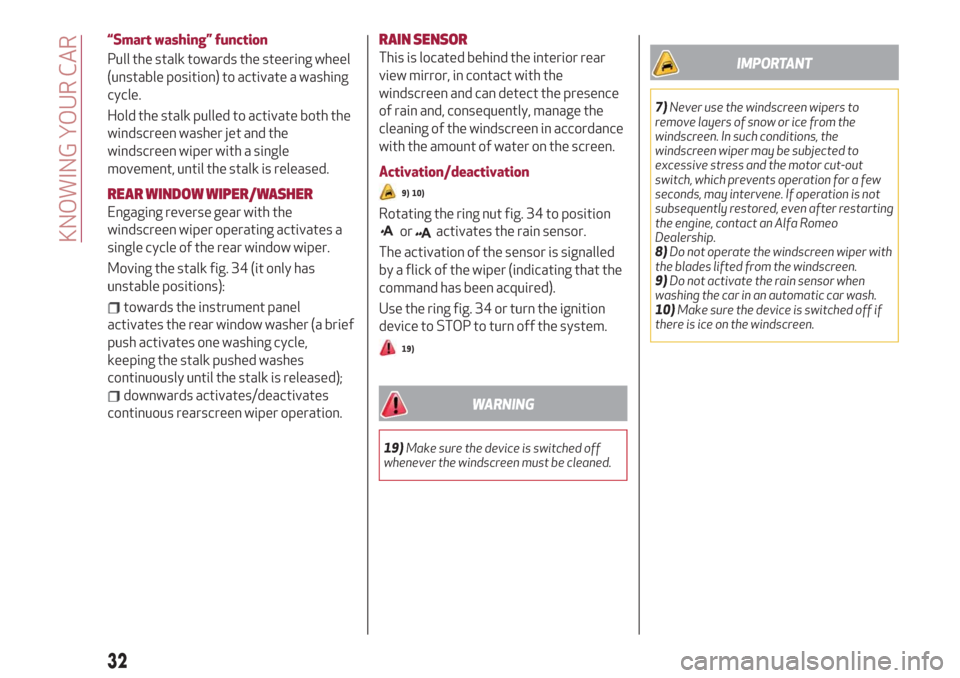
“Smart washing” function
Pull the stalk towards the steering wheel
(unstable position) to activate a washing
cycle.
Hold the stalk pulled to activate both the
windscreen washer jet and the
windscreen wiper with a single
movement, until the stalk is released.
REAR WINDOW WIPER/WASHER
Engaging reverse gear with the
windscreen wiper operating activates a
single cycle of the rear window wiper.
Moving the stalk fig. 34 (it only has
unstable positions):
towards the instrument panel
activates the rear window washer (a brief
push activates one washing cycle,
keeping the stalk pushed washes
continuously until the stalk is released);
downwards activates/deactivates
continuous rearscreen wiper operation.
RAIN SENSOR
This is located behind the interior rear
view mirror, in contact with the
windscreen and can detect the presence
of rain and, consequently, manage the
cleaning of the windscreen in accordance
with the amount of water on the screen.
Activation/deactivation
9) 10)
Rotating the ring nut fig. 34 to position
oractivates the rain sensor.
The activation of the sensor is signalled
by a flick of the wiper (indicating that the
command has been acquired).
Use the ring fig. 34 or turn the ignition
device to STOP to turn off the system.
19)
WARNING
19)Make sure the device is switched off
whenever the windscreen must be cleaned.
IMPORTANT
7)Never use the windscreen wipers to
remove layers of snow or ice from the
windscreen. In such conditions, the
windscreen wiper may be subjected to
excessive stress and the motor cut-out
switch, which prevents operation for a few
seconds, may intervene. If operation is not
subsequently restored, even after restarting
the engine, contact an Alfa Romeo
Dealership.
8)Do not operate the windscreen wiper with
the blades lifted from the windscreen.
9)Do not activate the rain sensor when
washing the car in an automatic car wash.
10)Make sure the device is switched off if
there is ice on the windscreen.
32
KNOWING YOUR CAR
Page 35 of 244

CLIMATE CONTROLSYSTEM
AUTOMATIC DUAL-ZONE CLIMATE CONTROLSYSTEM
2)
Controls
1. Driver side temperature adjustment knob; 2. Driver side AUTO function activation button (automatic operation); 3. Driver's
side air distribution selection button; 4. MAX-DEF function activation button (rapid defrosting/demisting); 5. Fan speed
adjustment knob; 6. Heated rear window on/off button; 7. Passenger side air distribution selection button; 8. Passenger side
AUTO function activation button (automatic operation); 9. Passenger side temperature adjustment knob; 10. Driver/passenger
SYNC function activation button (alignment of set temperatures); 11. Passenger side seat heater activation button; (where
provided, see chapter on seats); 12. Climate control compressor on/off button; 13. Steering wheel heater activation button;
(where provided, see chapter on steering wheel); 14. Driver side seat heater activation button; (where provided, see chapter on
"Seats"); 15. Internal air recirculation and automatic operation on/off button.
3504156V0005EM
33
Page 49 of 244

1 Transmission Information
Shows the following information related
to the transmission operation mode (M, P,
R, N, D).
If the gear is changed using the steering
wheel lever (where provided), In D mode
or manual M mode, it also displays the
engaged gear.
In M mode, it also shows when to shift
gear up or down.
2 Front, side anti-collision systems,
Cruise Control
Displays the operation the following
modes:
Forward Collision Warning (FCW)
Lane Departure Warning (LDW)
Cruise Control (CC) or Active Cruise
Control (ACC) (where provided)
For further information, see relevant
paragraphs.
3 Speed limit warning light
Shows information regarding the Speed
Limiter function.
For further information, see relevant
paragraph.
4 Reconfigurable main area
Can display the following screens:
Home
Trip A
Trip B (can be activated/deactivated
on the Connect system)
PerformanceThe screens can be selected, on rotation,
by pressing the button shown in fig. 52.
Depending on the chosen driving mode
(Dynamic / Dynamic + (where provided),
Normal, Advanced Efficiency), which can
be selected through the “Alfa DNA™”
system, the screens can be graphically
different. The navigation instructions and
call information can be repeated on the
Connect system display and also in this
area of the display. These functions can
be set on the Connect system.
Home
The parameters shown on the display, for
the modes: Dynamic / Dynamic + (where
provided), Normal and Advanced
Efficiency are:
Time (on the 3.5" FT display shown
only if the Phone function repeat mode
has not previously been activated).
Outside temperature (on the 3.5" FT
display shown only if the Phone function
repeat mode has not previously been
activated).
Current speed (shown if the repeat
modes of the Phone and Navigation
functions have not been previously
activated).
Range (on the 3.5" FT display shown if
the Radio and Media functions repeat
mode have not been previously
activated).
Trip A and B
The "Trip computer" can be used to
display, for all driving modes (Dynamic,
Normal, Advanced Efficiency) and with
the ignition device ON, the
measurements regarding the operating
state of the car. This function is
characterised by two separate records,
called “Trip A” and “Trip B” (the latter can
be deactivated by the Connect system),
where the car’s “complete missions”
(journeys) are recorded in a reciprocally
independent manner.
“Trip A” and “Trip B” allow you to see the
following values:
Distance travelled
Average fuel consumption
Average speed
Active trip
Fuel consumption indicator (7" TFT
Display only)
5205036V0002EM
47
Page 56 of 244

Amber warning lights
Warning
lightWhat it means
ABS FAILURE
The warning light switches on when the ignition device is brought to ON, but it should switch off after a few seconds.
The warning light switches on to indicate an ABS fault. In this case the braking system maintains its efficiency unaltered but
without the advantage of the ABS system.
Drive carefully and contact an Alfa Romeo Dealership as soon as possible.
TPMS FAILURE
The warning light switches on when a failure is detected in the TPMS. Should one or more wheels be fitted without sensors, the
display will show a warning message until initial conditions are restored.
Do not continue driving with one or more flat tyres as handling may be compromised. Stop the vehicle, avoiding sharp braking and
steering. Immediately restore the correct inflation pressure using the Tire Repair Kit (see "Repairing a wheel" paragraph in the "In
an emergency" chapter) and contact the dedicated Alfa Romeo Dealership as soon as possible.
Tyre pressure low
The warning light switches on to indicate that the tyre pressure is lower than the recommended value and/or that slow pressure
loss is occurring. In these cases, optimal tyre duration and fuel consumption may not be guaranteed.
In any situation in which the message on the display is "See manual", it is ESSENTIAL to refer to the contents of the "Wheels and
rims" paragraph in the "Technical data" chapter, strictly complying with the indications that you find there.
ESC SYSTEM
When the ignition device is brought to ON, the warning light switches on, but should switch off as soon as the engine is started.
ESC system intervention: Intervention by the system is indicated by the flashing of the warning light: it indicates that the car is in
critical stability and grip conditions.
ECS system failure: If the warning light does not switch off, or if it stays on with the engine running, a failure was found in the ESC
system.
In these cases, contact an Alfa Romeo Dealership as soon as possible.
Hill Start Assist system failure: the switching on of the warning light indicates a Hill Start Assist system failure.
In these cases, contact an Alfa Romeo Dealership as soon as possible.
PARTIAL / TOTAL DEACTIVATION OF ACTIVE SAFETY SYSTEMS
When the ignition device is brought to ON, the warning light switches on, but should switch off as soon as the engine is started.
The warning light switches on to indicate that some active safety systems have been partially or totally deactivated.
For further details about the active safety systems see the "Active safety systems" paragraph in the "Safety" chapter. When the
active safety systems are reactivated, the warning light switches off.
54
KNOWING THE INSTRUMENT PANEL
Page 60 of 244

SYMBOLS ON THE DISPLAY
Red symbols
Symbol What it means
LOW ENGINE OIL PRESSURE
The symbol indicates that the engine oil pressure is low.
If it turns on temporarily or flashes (for about 5 seconds), check the oil level by following the corresponding procedure (see the
description in the “Checking levels” paragraph in the “Maintenance and care” chapter) and top up to the correct level if necessary.
If the symbol turns on continuously, contact an Alfa Romeo Dealership to have the system checked.
WARNING IF THE SYMBOL TURNS ON CONTINUOUSLY: Do not use the car until the failure has been solved. When the symbol
turns on, it does not indicate the amount of oil in the engine: the oil level can be checked on the display upon entering the vehicle
and also by activating the "Oil level" function on the Connect system.
14)
ALTERNATOR FAILURE
The switching on of the symbol with engine on corresponds to an alternator failure.
Contact an Alfa Romeo Dealership as soon as possible.
POWER STEERING FAILURE
If the symbol remains on, you could not have steering assistance and the effort required to operate the steering wheel could be
increased; steering is, however, possible.
Contact an Alfa Romeo Dealership as soon as possible.
ALFA™ SYSTEM STEERING TORQUE (AST) FAILURE
The switching on of the symbol signals a failure in the automatic steering correction system.
Contact an Alfa Romeo Dealership to have the system checked.
IMPORTANT
14)If thesymbol switches on when driving, stop the engine immediately and contact an Alfa Romeo Dealership.
58
KNOWING THE INSTRUMENT PANEL