2019 Alfa Romeo Giulia clock
[x] Cancel search: clockPage 20 of 232

thus preventing a person from getting
stuck inside the passenger compartment
by entering the vehicle through, and then
closing, the open door.
Deactivating the device
The device disengages automatically:
when the doors are unlocked (pressing
button
on the key with remote
control);
when the ignition device is set to ON.
CHILD SAFETY DEVICE
7) 8)
This system prevents the rear doors from
being opened from the inside.
This device fig. 12 can be engaged only
with the doors open.
position: device engaged (door
locked);
position: device not engaged (door
may be opened from the inside).The device remains engaged even if the
doors are electrically unlocked.
IMPORTANT The rear doors cannot be
opened from the inside when the child
safety device is engaged.
UNLOCKING THE DOORS WITH A FLAT
BATTERY
Proceed as follows to unlock the doors if
the car battery is flat.
Rear doors and passenger door
Proceed as follows:
insert the metal insert of the
electronic key in the release device
housing fig. 13;
turn the key clockwise for the right
door locks or anticlockwise for the left
door locks;
remove the key from the housing.
Proceed in one of the following ways torealign the door lock device (only when
the battery charge has been restored):
press thebutton on the electronic
key;
press thebutton on the door panel;
open by inserting the key insert in the
driver's door lock;
operate the internal door handle.
IMPORTANT For the rear doors, if the
child lock device was engaged and the
previously described locking procedure
carried out, operating the internal handle
will not open the door but will only realign
the lock release device. To open the door,
the outside handle must be used. The
door central locking/unlocking buttons
are not deactivated when the emergency
lock is engaged.
WARNING
6)Once the Power Lock system is engaged,
it is impossible to open the doors from inside
the vehicle. Before getting out of the car,
please therefore check that there is no-one
left inside.
7)NEVER leave children unattended inside
the car, let alone leave the car with the doors
unlocked in a place that children can access
easily. Children may seriously, or even
fatally, injure themselves. Also ensure that
children do not inadvertently operate the
electric parking brake, the brake pedal or the
transmission lever.
1204056S0007EM
1304056S0008EM
18
KNOWING YOUR CAR
Page 51 of 232

PARAMETERS SET BY USER
A series of user-programmable functions
can be set using the Connect system.
The basic settings only are described:
Units & Language
Time and Date
Control panel
To access the list with the
aforementioned items, proceed as
follows: from the main menu, activated
by pressing the MENU button fig. 54,
select the function "Settings", by turning
and pressing the Rotary Pad.
Turn the Rotary Pad to choose the
desired option and press to activate it.Units & Language
The following settings can be modified
when this mode is selected fig. 55:
Measure units (by selecting this item
you can choose between the metric,
imperial or custom systems; this last
option lets you set the measure unit for
each individual size).
Language (by selecting this item you
can choose the system viewing language).
Restore Settings (deletes the current
settings and restores the factory
settings).
To access and set the various functions,
turn and press the Rotary Pad to select
and confirm the selection.Time and Date
The following settings can be modified
when this mode is selected fig. 56:
Sync with GPS Time (activates/
deactivates the clock synchronization
through the GPS; if the function is
deactivated, the options Set Time and
Set Date are enabled).
Set time (allows to manually set the
time).
Time format (allows to choose the
time format between a 12-hour and a
24-hour clock).
Set date (to set the date manually).
Restore Settings (deletes the current
settings and restores the factory
settings).
To access and set the various functions,
turn and press the Rotary Pad to select
and confirm the selection.5405036S0040EM
5505036S0016EM5605036S0017EM
49
Page 136 of 232

indication appears on the instrument
panel display (see “Warning lights and
messages" paragraph in the “Knowing the
instrument panel” chapter), fill the
AdBlue® tank with at least 1.11 UK gal –
5 litres;
if containers which can be screwed to
the filler are used, the reservoir is full
when the AdBlue® level in the container
stops pouring out. Do not proceed
further.
Operations after refilling
Proceed as follows:
fit the cap 4 fig. 115 back on the
AdBlue®filler by turning it clockwise and
screwing it completely;
set the ignition device to ON (it is not
necessary to start the engine);
wait for the indication on the
instrument panel to switch off before
moving the car. The indication may stay
on for a few seconds to approximately
half a minute. If the engine is started and
the car is moved, the indication will
remain on for longer. This will not
compromise engine operation;
if the AdBlue® was topped up when the
tank was empty, see the “Refuelling ”
paragraph in the “Technical
Specifications” chapter and wait for
2 minutes before starting the engine.
IMPORTANT If AdBlue® is spilled out of
the filler neck, clean up well the area andproceed to filling up again. If the liquid
crystallises, eliminate it with a sponge
and warm water.
IMPORTANT
If AdBlue® is spilled on painted
surfaces or aluminium, immediately
clean the area with water and use
absorbent material to collect the fluid
that has been spilled on the ground.
Do not try to start the engine if
AdBlue® was accidentally added to the
Diesel fuel tank, this can result in
serious engine damage, contact an Alfa
Romeo Dealership.
Do not add additives or other fluids
to AdBlue®, doing so could damage the
system.
The use of non-conforming or
degraded AdBlue® may lead to
indications appearing on the
instrument panel display (see “Warning
lights and messages" paragraph in the
“Knowing the instrument panel”
chapter).
Never pour AdBlue® into another
container: it could be contaminated.
In case of damage to the sewage
system of exhaust gas resulting from
the use of additives / tap water, the
introduction of diesel fuel, or at least
by not fulfilling the requirements, the
warranty expires.
If the AdBlue® runs out, see “Warning
lights and messages" paragraph in the
“Knowing the instrument panel”
chapter to continue using the car
normally.
The AdBlue® level is not updated if
the car is parked on a sloping road.
Fuels - identification of vehicle
compatibility. Graphic symbol for
consumer information in accordance
with EN16942
The symbols, shown below, make it easier
to recognise the correct fuel type to use
with your car.
Before refuelling, check the symbols
(where provided) inside the fuel filler flap
and compare them with the symbols
shown on the fuel pump (where provided).
Symbols for petrol powered cars
E5: unleaded petrol containing up to
2.7% (m/m) oxygen and with maximum
5.0% (V/V) ethanol compliant with the
EN228 specification.
E10: unleaded petrol containing up to
3.7% (m/m) oxygen and with maximum
10.0% (V/V) ethanol compliant with the
EN228 specification.
134
STARTING AND DRIVING
Page 143 of 232

TYPES OF BULBS
The vehicle is equipped with the following bulbs
Glass bulbs (type A): they are press-fitted. Pull to extract.
Bayonet-type bulbs (type B): to remove them from their holder, press
the bulb and turn it anticlockwise, then extract it.
Tubular bulbs (type C): release them from their contacts to remove.
Halogen bulbs (type D): to remove the bulb, turn the connector to the
side and pull it out.
Halogen bulbs (type E): to remove the bulb, turn it anticlockwise.
Xenon gas discharge bulb (type F): to remove the bulb, contact an Alfa
Romeo Dealership.
141
Page 145 of 232

REPLACING AN EXTERNAL BULB
Front light cluster with main
beam/dipped beam halogen headlights
Dipped beam headlights
To change the bulb of these lights,
proceed as follows:
remove the top cover from the wheel
arch by unscrewing the fixing screws
fig. 122;
remove the cover fig. 123;
remove the bulb/connector assembly
from the headlight body fig. 124;
remove the bulb by sliding it off the
connector;
install the new bulb, making sure it is
correctly inserted in the connector;
then insert the bulb/connector
assembly in the housing on the headlight
body and make sure that it is locked
correctly;
remount the lid and cover, tightening
the fixing bolts.
Main beam headlights
To change the bulb of these lights,
proceed as follows:
operating inside the engine
compartment fig. 125;
remove the cover fig. 126;
turn the bulb, bulb holder and
connector assembly anticlockwise and
then slide it off the headlight body
fig. 127;
12208026S0001EM
12308026S0002EM
12408026S0003EM
12508026S0023EM
12608026S0004EM
143
Page 146 of 232

remove the bulb by sliding it off the
bulb holder;
install the new bulb, making sure it is
correctly inserted in the bulb holder;
then insert the bulb, bulb holder and
connector assembly in the housing on the
headlight body and turn it clockwise,
making sure that it is locked correctly;
refit the protective cover.
Direction indicators
To change the bulb of these lights,
proceed as follows:
operating inside the engine
compartment fig. 128;
remove cover by turning it fig. 129;
release the bulb, bulb holder and
connector assembly and then slide it off
the headlight body fig. 130;
remove the bulb by sliding it off the
bulb holder;
install the new bulb, making sure it is
correctly inserted in the bulb holder;
then insert the bulb, bulb holder and
connector assembly in the housing on the
headlight body and turn it clockwise,
making sure that it is locked correctly;
refit the protective cover.
Fog lights
To replace the bulbs, proceed as follows:
remove the lower cover from the
wheel arch by unscrewing the fixing
screws fig. 131;
12708026S0005EM12808026S0023EM
12908026S0006EM
13008026S0007EM
144
IN AN EMERGENCY
Page 147 of 232

pull out the bulb-bulb holder unit from
the headlight body by turning it
anticlockwise fig. 132;
remove the bulb by sliding it off the
bulb holder
install the new bulb, making sure it is
correctly inserted in the bulb holder;
then insert the bulb, bulb holder and
connector assembly in the housing on the
headlight body and turn it clockwise,
making sure that it is locked correctly;
refit the cover by tightening the fixing
screws.
Front light cluster with main
beam/dipped beam Xenon gas
discharge headlights
To replace the bulbs of the main beam
headlights/dipped headlights contact an
Alfa Romeo Dealership
WARNING
129)Before replacing the bulb, wait for the
exhaust ducts to cool down: DANGER OF
SCALDING!
130)Modifications or repairs to the electric
system that are not carried out properly or
do not take the system technical
specifications into account can cause
malfunctions leading to the risk of fire.
131)Halogen bulbs contain pressurised gas,
in the case of breakage they may burst
causing glass fragments to be projected
outwards.
132)Only replace the light bulbs when the
engine is off and in a position that does not
interfere with traffic and lets you safely
replace them (see the description in the
“Replacement” paragraph). Also ensure that
the engine is cold, to prevent the risk of
burns.
IMPORTANT
59)Halogen bulbs must be handled holding
the metallic part only. Touching the
transparent part of the bulb with your
fingers may reduce the intensity of the
emitted light and even reduce the lifespan of
the bulb. In the event of accidental contact,
wipe the bulb with a cloth moistened with
alcohol and let the bulb dry.
13108026S0021EM
13208026S0022EM
145
Page 208 of 232
CONTROLS
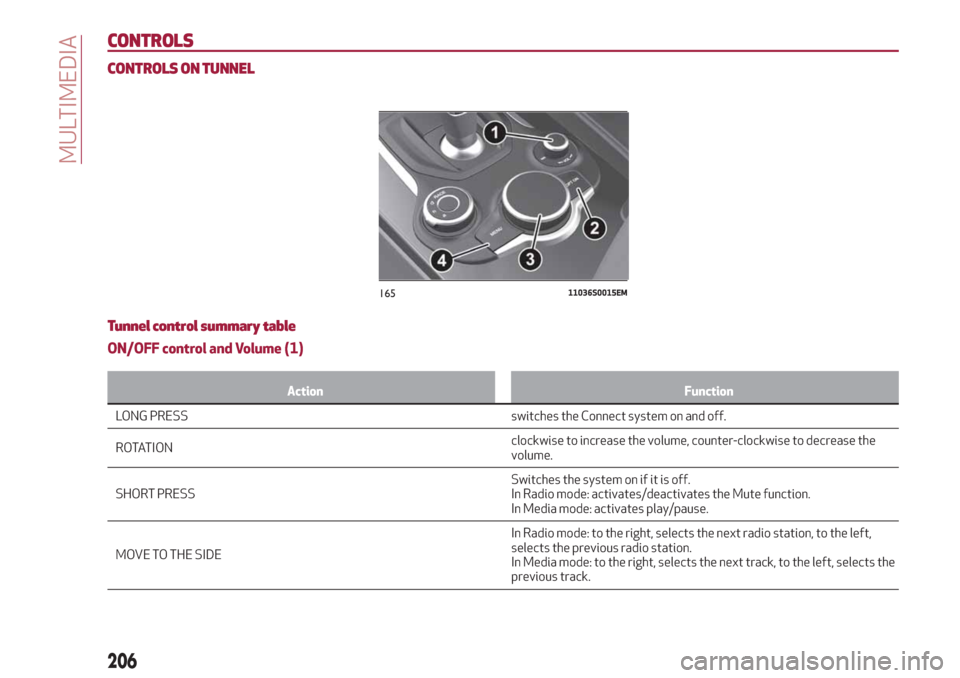
CONTROLS ON TUNNEL
Tunnel control summary table
ON/OFF control and Volume (1)
Action Function
LONG PRESS switches the Connect system on and off.
RO
TATIONclockwise to increase the volume, counter-clockwise to decrease the
volume.
SHORT PRESSSwitches the system on if it is off.
In Radio mode: activates/deactivates the Mute function.
In Media mode: activates play/pause.
MOVE TO THE SIDEIn Radio mode: to the right, selects the next radio station, to the left,
selects the previous radio station.
In Media mode: to the right, selects the next track, to the left, selects the
previous track.
16511036S0015EM
206
MULTIMEDIA