Page 77 of 649
76
uuIndicators u
Instrument Panel
IndicatorNameOn/BlinkingExplanationMessage
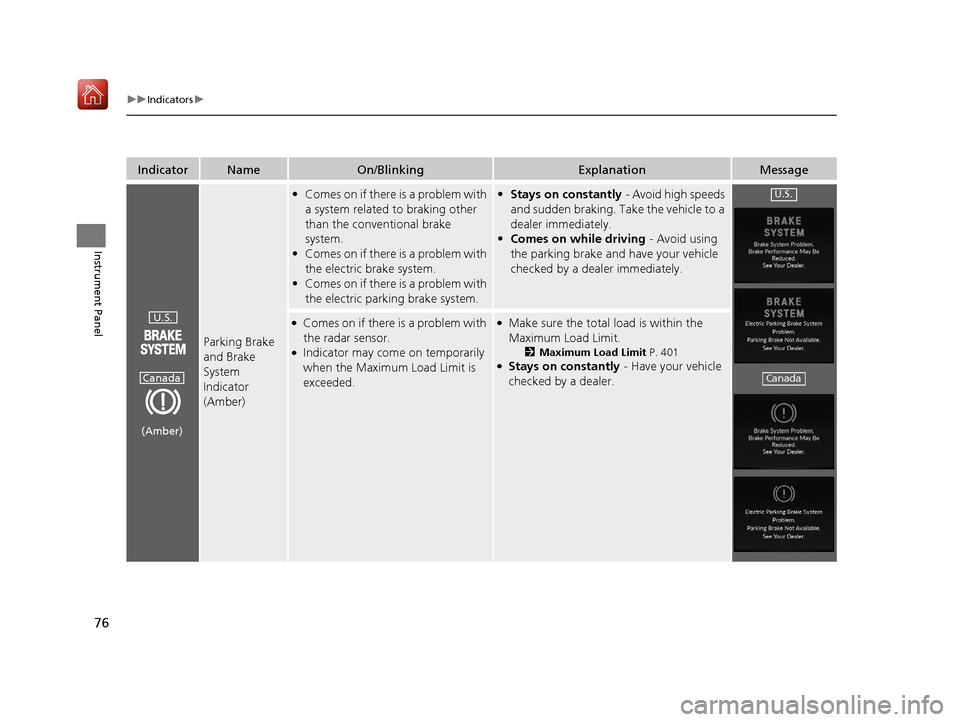
Parking Brake
and Brake
System
Indicator
(Amber)
•Comes on if there is a problem with
a system related to braking other
than the conventional brake
system.
• Comes on if there is a problem with
the electric brake system.
• Comes on if there is a problem with
the electric parking brake system.• Stays on constantly - Avoid high speeds
and sudden braking. Take the vehicle to a
dealer immediately.
• Comes on while driving - Avoid using
the parking brake and have your vehicle
checked by a dealer immediately.
●Comes on if there is a problem with
the radar sensor.
●Indicator may come on temporarily
when the Maximum Load Limit is
exceeded.
●Make sure the total load is within the
Maximum Load Limit.
2 Maximum Load Limit P. 401●Stays on constantly - Have your vehicle
checked by a dealer.
U.S.
Canada
(Amber)
U.S.
Canada
19 ACURA RDX-31TJB6000.book 76 ページ 2018年4月26日 木曜日 午後4時51分
Page 78 of 649
77
uuIndicators u
Continued
Instrument Panel
IndicatorNameOn/BlinkingExplanationMessage
Parking Brake
and Brake
System
Indicator
(Amber)
•Comes on if there is a problem with
the automatic brake hold system.
2 Automatic Brake Hold P. 491
Automatic
Brake Hold
System
Indicator
●Comes on when the automatic
brake hold system is on.
2Automatic Brake Hold P. 491
Automatic
Brake Hold
Indicator
●Comes on when the automatic
brake hold is activated.
2Automatic Brake Hold P. 491—
U.S.
Canada
(Amber)
U.S.
Canada
U.S.
Canada
19 ACURA RDX-31TJB6000.book 77 ページ 2018年4月26日 木曜日 午後4時51分
Page 82 of 649
81
uuIndicators u
Continued
Instrument Panel
IndicatorNameOn/BlinkingExplanationMessage
Transmission
System
Indicator
•The current gear position or all the
gear positions blink if there is a
problem with the transmission and
the vehicle is no longer able to run.•Immediately park your car in a safe place.
2 Emergency Towing P. 622
•Have your vehicle checked by a dealer.
•The current gear position or all the
gear positions blink if there is a
problem with the transmission and
it is not possible to select
(P.
•Depending on the circumstances, you can
set the power mode to on as an
emergency measure.
2 If the Transmission System Indicator
Blinks along with the Warning
Message P. 614
•While the vehicle is stopped, apply the
parking brake.
• Have your vehicle checked by a dealer
immediately.
19 ACURA RDX-31TJB6000.book 81 ページ 2018年4月26日 木曜日 午後4時51分
Page 98 of 649

97
uuIndicators uMulti-Information Display Warning and Information Messages
Continued
Instrument Panel
Multi-Information Display Warn ing and Information Messages
The following messages appear only on the multi-information display. Roll the right selector wheel to see the message again with the
system message indicator on.
2 Switching the Display P. 129
MessageConditionExplanation
●Appears when the vehicle is no longer able to run
due to a malfunction.●Immediately stop in a safe place.
●Appears when there is a ri sk that the vehicle will
move unexpectedly after you have stopped due to a
malfunction with the vehicle.●While the vehicle is stoppe d, apply the parking brake.●Have your vehicle checked by a dealer.
●Appears when you set the power mode to ON again
and the vehicle is able to run.
2Starting the Engine P. 411
●Appears when the engine stops without the
transmission in
(P, and does not restart
automatically.
●Appears if you open the bonnet while Auto Idle Stop
activates.
●If you want to set the power mode to ON, put the
transmission into
(P.●If you want to start the engine, follow the normal
procedure.
2 Starting the Engine P. 411
19 ACURA RDX-31TJB6000.book 97 ページ 2018年4月26日 木曜日 午後4時51分
Page 104 of 649
103
uuIndicators uMulti-Information Display Warning and Information Messages
Continued
Instrument Panel
MessageConditionExplanation
●Appears when the automatic brake hold system is
turned off.
2 Automatic Brake Hold P. 491
●Appears when the automatic brake hold button is
pressed without wearing the driver’s seat belt.●Fasten the driver’s seat belt.
2Automatic Brake Hold P. 491
●Appears when the automatic brake hold button is
pressed without depressing the brake pedal while
the automatic brake hold is in operation.●Press the automatic brake hold button with the brake
pedal depressed.
2 Automatic Brake Hold P. 491
●Appears when the parking brake is applied
automatically while it is in operation.
2Automatic Brake Hold P. 491
2 Parking Brake P. 486
19 ACURA RDX-31TJB6000.book 103 ページ 2018年4月26日 木曜日 午後4時51分
Page 105 of 649
104
uuIndicators uMulti-Information Display Warn ing and Information Messages
Instrument Panel
MessageConditionExplanation
●Appears if the automatic brake hold is automatically
canceled while it is in operation.●Immediately depress the brake pedal.
●Appears when the electric parking brake switch is
pulled without depressing the brake pedal while the
electric parking brake is in operation.●Pull the electric parking brake switch with the brake
pedal depressed.
2 Parking Brake P. 486
19 ACURA RDX-31TJB6000.book 104 ページ 2018年4月26日 木曜日 午後4時51分
Page 109 of 649
108
uuIndicators uMulti-Information Display Warn ing and Information Messages
Instrument Panel
MessageConditionExplanation
•Appears if you press the ENGINE START/STOP
button while the vehicle is moving.• The message will disappear after six seconds or when
the power mode is set to VEHICLE OFF.
●Appears after the driver’s door is opened when the
power mode is in ACCESSORY.●Press and hold the ENGINE START/STOP button with
your foot off the brake pedal to change the power
mode to VEHICLE OFF.
●Appears if you try to start the engine when the
transmission is in
(N and the parking brake is
disengaged.
●Put the transmission into (P, then start the engine in
the normal procedure.
2 Starting the Engine P. 411
19 ACURA RDX-31TJB6000.book 108 ページ 2018年4月26日 木曜日 午後4時51分
Page 113 of 649

112
uuIndicators uMulti-Information Display Warn ing and Information Messages
Instrument Panel
MessageConditionExplanation
•Appears when the (P button is pressed while the
vehicle is moving.
• Appears if you put the transmission into
(R while
the vehicle is moving forward, or into
(D while the
vehicle is reversing.
• Make sure that the vehicl e comes to a stop before
operating the select button.
• Appears when you set the power mode to OFF while
driving.•Immediately stop in a safe place, set the parking brake,
then restart the engine. If the message disappears,
continue driving.
•Appears if the vehicle is stopped and the driver’s seat
belt is unfastened, as ther e is a possibility that the
vehicle may roll.• When the vehicle is idling or when you are parking or
exiting the vehicle, put the transmission into
(P before
releasing the brake pedal.
2 Shift Operation P. 420
●Appears when you attempt to change to another
gear position with the transmission in
(P and the
engine OFF.
●To select another gear position while in (P, the engine
must be ON.
19 ACURA RDX-31TJB6000.book 112 ページ 2018年4月26日 木曜日 午後4時51分