Page 330 of 649
329
uuGeneral Information on the Audio System uLicense Information
Continued
Features
Use of the Made for Apple badge means th at an accessory has been designed to
connect specifically to the Apple product(s) identified in the badge, and has been
certified by the developer to meet Appl e performance standards. Apple is not
responsible for the operation of this devi ce or its compliance with safety and
regulatory standards.
“The Bluetooth ® word mark and logos are re gistered trademarks owned by
Bluetooth SIG, Inc. and any use of such marks by DENSO CORPORATION is under
license. Other trademarks and trade names are those of their respective owners.”
This product is protected by certain intellectual property rights of Microsoft. Use or
distribution of such technology outside of this product is prohibited without a
license from Microsoft.
■Apple
■Bluetooth
■Windows Media
19 ACURA RDX-31TJB6000.book 329 ページ 2018年4月26日 木曜日 午後4時51分
Page 331 of 649
330
uuGeneral Information on the Audio System uLicense Information
Features
Mpeg4 Visual
THIS PRODUCT IS LICENSED UNDER THE MPEG-4 VISUAL PATENT PORTFOLIO
LICENSE FOR THE PERSONAL AND NON-COMMERCIAL USE OF A CONSUMER FOR
(i) ENCODING VIDEO IN COMPLIANCE WITH THE MPEG-4 VISUALA STANDARD
(“MPEG-4 VIDEO”) AND/OR (ii) DECODI NG MPEG-4 VIDEO THAT WAS ENCODED
BY A CONSUMER ENGAGED IN A PERS ONAL AND NONCOMMERCIAL ACTIVITY
AND/OR WAS OBTAINED FROM A VIDEO PR OVIDER LICENSED BY MPEG LA TO
PROVIDE MPEG-4 VIDEO. NO LICENSE IS GRANTED OR SHALL BE IMPLIED FOR ANY
OTHER USE. ADDITIONAL INFORMATION INCLUDING THAT RELATING TO
PROMOTIONAL, INTERNAL AND COMMERCI AL USES AND LICENSING MAY BE
OBTAINED FROM MPEG LA, LLC. SEE HTTP://WWW.MPEGLA.COM.
VC-1
THIS PRODUCT IS LICENSED UNDER THE VC-1 PATENT PORTFOLIO LICENSE FOR THE
PERSONAL AND NON-COMMERCIAL USE OF A CONSUMER TO (i) ENCODE VIDEO
IN COMPLIANCE WITH THE VC-1 STANDAR D (“VC-1 VIDEO”) AND/OR (ii) DECODE
VC-1 VIDEO THAT WAS ENCODED BY A CONSUMER ENGAGED IN A PERSONAL
AND NON-COMMERCIAL ACTIVITY AND/OR WAS OBTAINED FROM A VIDEO
PROVIDER LICENSED TO PROVIDE VC-1 VI DEO. NO LICENSE IS GRANTED OR SHALL
BE IMPLIED FOR ANY OTHER USE. ADDITIONAL INFORMATION MAY BE OBTAINED
FROM MPEG LA, L.L.C. SEE HTTP://WWW.MPEGLA.COM .
■MPEG
19 ACURA RDX-31TJB6000.book 330 ページ 2018年4月26日 木曜日 午後4時51分
Page 332 of 649
331
uuGeneral Information on the Audio System uLicense Information
Features
AVC/H.264
THIS PRODUCT IS LICENSED UNDER THE AVC PATENT PORTFOLIO LICENSE FOR THE
PERSONAL AND NONCOMMERCIAL USE OF A CO NSUMER TO (i) ENCODE VIDEO IN
COMPLIANCE WITH THE AVC STANDARD (“ AVC VIDEO”) AND/OR (ii) DECODE
AVC VIDEO THAT WAS ENCODED BY A CONSUMER ENGAGED IN A PERSONAL
AND NON-COMMERCIAL ACTIVITY AND/OR WAS OBTAINED FROM A VIDEO
PROVIDER LICENSED TO PROVIDE AVC VIDE O. NO LICENSE IS GRANTED OR SHALL
BE IMPLIED FOR ANY OTHER USE. ADDIT IONAL INFORMATION MAY BE OBTAINED
FROM MPEG LA, L.L.C. SEE HTTP://WWW.MPEGLA.COM .
19 ACURA RDX-31TJB6000.book 331 ページ 2018年4月26日 木曜日 午後4時51分
Page 333 of 649
332
Features
Customized Features
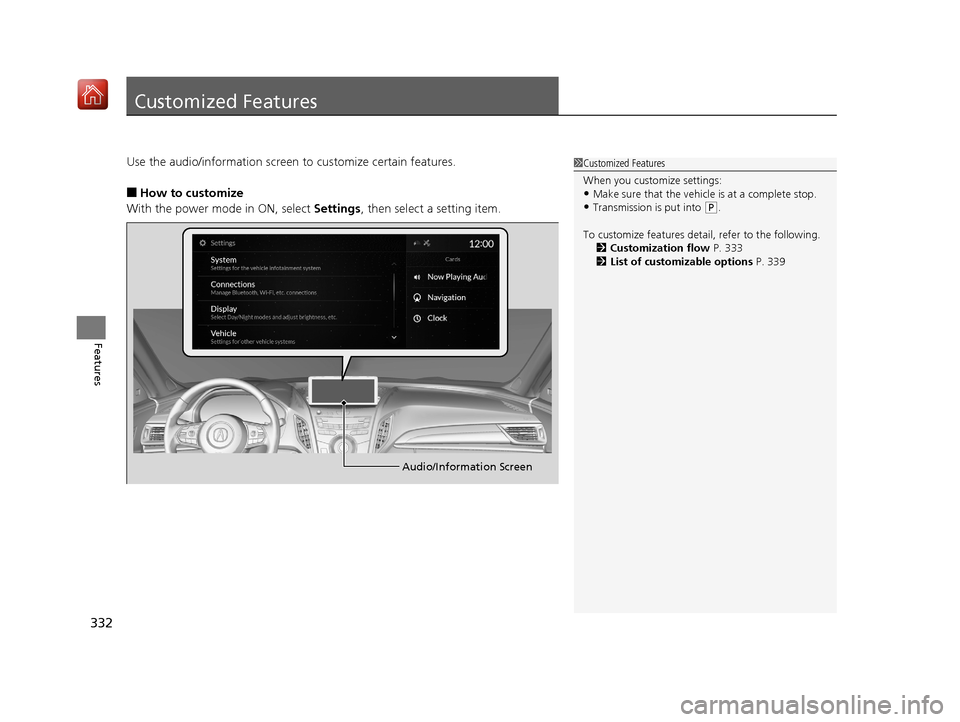
Use the audio/information screen to customize certain features.
■How to customize
With the power mode in ON, select Settings, then select a setting item.
1Customized Features
When you customize settings:
•Make sure that the vehicle is at a complete stop.
•Transmission is put into (P.
To customize features detail, refer to the following. 2 Customization flow P. 333
2 List of customizable options P. 339
Audio/Information Screen
19 ACURA RDX-31TJB6000.book 332 ページ 2018年4月26日 木曜日 午後4時51分
Page 339 of 649
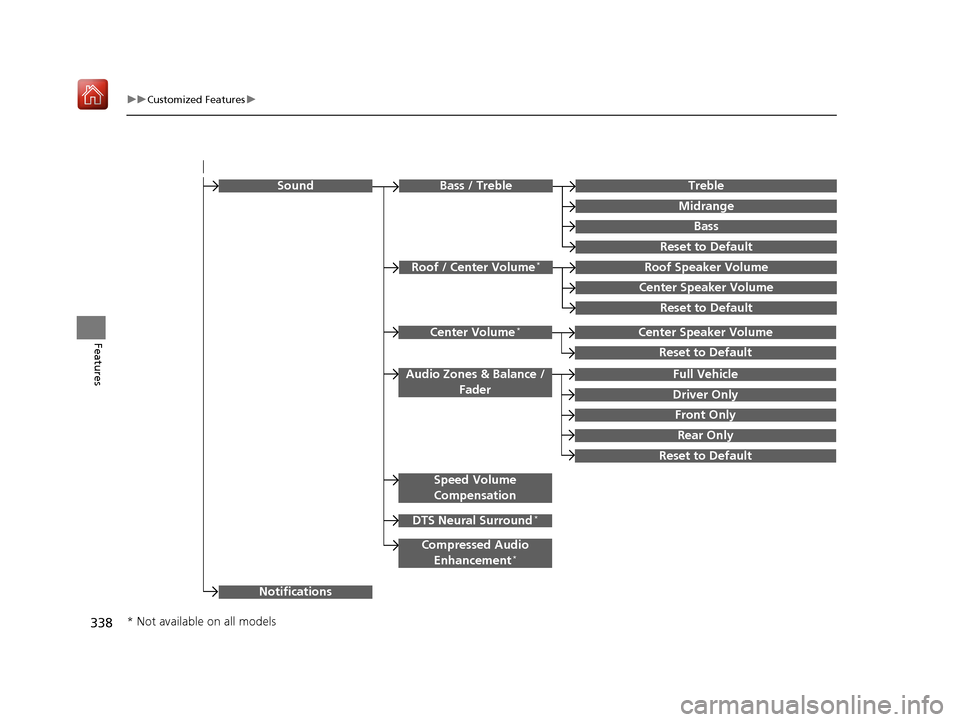
338
uuCustomized Features u
Features
Rear Only
Reset to Default
Front Only
Full Vehicle
Driver Only
Roof Speaker Volume
Center Speaker Volume
Reset to Default
Roof / Center Volume*
Sound
Speed Volume
Compensation
DTS Neural Surround*
Notifications
Compressed Audio
Enhancement*
Treble
Midrange
Bass
Bass / Treble
Center Speaker Volume
Reset to Default
Center Volume*
Reset to Default
Audio Zones & Balance / Fader
* Not available on all models
19 ACURA RDX-31TJB6000.book 338 ページ 2018年4月26日 木曜日 午後4時51分
Page 341 of 649
340
uuCustomized Features u
Features
*1:Default SettingSetup Group Customizable Features
Description Selectable Settings
System
Date & TimeSet Time
Zone
Automatic
Time ZoneSets the audio system to automatically
adjust the clock when driving through
different time zones.
On*1/ Off
(Select time
zone)Changes the time zone manually.—
System Units
Changes the speed/di stance unit on
the multi-information display, head-up
display
* and audio/information screen.
Miles*1/ KM (U.S.)
Miles /KM*1 (Canada)
LanguageChanges the display language.English*1/Français /
Español
Factory Data Reset
Resets all the settings to their factory
default.
2 Defaulting All the Settings P. 354
Continue/Cancel
AboutDisplays the Android setting items.—
Advanced
OptionsLocation Access
Selects Off not to allow apps including
the navigation system* to access the
vehicle’s location.On*1/ Off
* Not available on all models
19 ACURA RDX-31TJB6000.book 340 ページ 2018年4月26日 木曜日 午後4時51分
Page 345 of 649
344
uuCustomized Features u
Features
*1:Default SettingSetup Group Customizable Features
Description Selectable Settings
Connections Apple
CarPlay(Saved
Devices)Allow Apple
CarPlay
Sets up the Apple CarPlay connection.
Disable/Enable
AcuraLink
Assist Turn AcuraLink Assist on and off.
On
*1/Off
Delete Delete a Apple CarPlay device. Cancel/Delete
Display
BrightnessChanges the brightness of the audio/
information screen.—
Display OffTurns the audio/information screen
brightness off.—
Night ModeChanges between the daytime mode
and nighttime mode.
2Display Setup P. 270
—Day Mode
More
SettingsContrastChanges the contrast of the audio/
information screen.—
Black LevelChanges the black level of the audio/
information screen.—
19 ACURA RDX-31TJB6000.book 344 ページ 2018年4月26日 木曜日 午後4時51分
Page 353 of 649
352
uuCustomized Features u
Features
*1:Default SettingSetup Group Customizable Features
Description Selectable Settings
Sound Bass / Treble
Treble
Adjusts the settings of the audio
speakers’ sound.
2Adjusting the Sound P. 269
—
Midrange
Bass
Reset to Default
Roof / Center
Volume
*
Roof Speaker Volume
Center Speaker Volume
Reset to Default
Center
Volume
*
Center Speaker Volume
Reset to Default
Audio Zones
& Balance /
Fader Full Vehicle
Driver Only
Front Only
Rear Only
Reset to Default
* Not available on all models
19 ACURA RDX-31TJB6000.book 352 ページ 2018年4月26日 木曜日 午後4時51分