2019 Acura MDX codes
[x] Cancel search: codesPage 83 of 701

82
uuIndicators u
Instrument Panel
IndicatorNameOn/BlinkingExplanationMessage
Low Oil Pressure
Indicator
●Comes on when you set the
power mode to ON, and goes off
when the engine starts.
●Comes on when the engine oil
pressure is low.
●Comes on while driving - Immediately stop
in a safe place.
2 If the Low Oil Pressure Indicator Comes
On P. 657
Malfunction
Indicator Lamp
●Comes on when you set the
power mode to ON, and goes off
either when the engine starts or
after several seconds if the
engine did not start. If “readiness
codes” have not been set, it
blinks five times before it goes
off.
●Comes on if there is a problem
with the emissions control
systems.
●Blinks when a misfire in the
engine’s cylinders is detected.
●Readiness codes are part of the on board
diagnostics for the emis sions control systems.
2Testing of Readiness Codes P. 681●Comes on while driving - Have your vehicle
checked by a dealer.
●Blinks while driving - Stop in a safe place
where there are no flammable objects. Stop
the engine for 10 minutes or more, and wait
for it to cool down. Then, take your vehicle to
a dealer.
2 If the Malfunction Indicator Lamp Comes
On or Blinks P. 658
Charging System
Indicator
●Comes on when you set the
power mode to ON, and goes off
when the engine starts.
●Comes on when the battery is
not charging.
●Comes on while driving - Turn off the
climate control system and rear defogger in
order to reduce electricity consumption.
2 If the Charging System Indicator Comes
On P. 657
19 ACURA MDX-31TZ56510.book 82 ページ 2018年12月11日 火曜日 午後4時47分
Page 328 of 701

327
uuGeneral Information on the Audio System uHonda App License Agreement
Continued
Features
E. Information Collection and Storage
1. Information Collection , Use, Transmission and Storage of Data. Consent to Use of Data:
You agree that HONDA and PROVIDERS may
collect and use your information gathered in any manner as part of product support services related to the SOFTWARE or related services.
HONDA may share such information with third parties, including, without limitation, PR OVIDERS, third party software and services
suppliers, their affiliates and/or their designated agents, solely to improve their products or to provide services or technolo gies to you.
HONDA, third party software and syst ems suppliers, their affiliates and/or their de signated agent may disclose this information to others,
but not in a form that pe rsonally identifies you.
2. Information Storage.
Depending on the type of multimedia system you have in your VEHICLE, certain information may be stored for ease
of use of the SOFTWARE including, without limitation, search hi story, location history in certain applications, previous and saved
destinations, map locations within certain applicat ions, and device numbers and contact information.
(a) Vehicle Health Information.
Your VEHICLE may remotely transmit information re garding the status and health of your VEHICLE
(“VEHICLE INFORMATION”) to HONDA without notification to you. VEHICLE INFORMATION may contain VEHICLE maintenance and
malfunction status that is derived from VEHICLE diagnostic data and includes, but is not limited to, status of powered doors and windows,
battery life data, battery charging data, VE HICLE speed, coolant temperature, air comp ressor revolution, output power, warning codes,
diagnostic trouble codes, fuel injection volume, and engine rotations per minute. VEHICLE HEALTH INFORMATION may be used by HON DA
for research and development, to deliver HONDA SERVICES and informat ion to you, and to contact you, and is retained only for a period
of time necessary to fulfill these goals.
(b) VEHICLE Geolocation Data (non-navigation/map based).
If you opt-in to geolocation-based SERVICES, your vehicle’s geolocation data
(latitude and longitude) will be automatically sent from your VEHICLE to HONDA and PROVIDERS.
(c) You understand that the inputting or uploading of information to your VEHICLE’s multimedia system or the SOFTWARE or SERVIC ES is
at your own risk and that HONDA is not responsible for unauthori zed access to or use of any personal or other information. All information
uploaded to the SOFTWARE and SERVICES may be stored on your VEHICLES’s multimedia system and you understand that the security and
safety of your VEHICLE’s multimedia system is your sole responsibility.
19 ACURA MDX-31TZ56510.book 327 ページ 2018年12月11日 火曜日 午後4時47分
Page 395 of 701
uuHomeLink ® Universal Transceiver uTraining HomeLink
394
Features
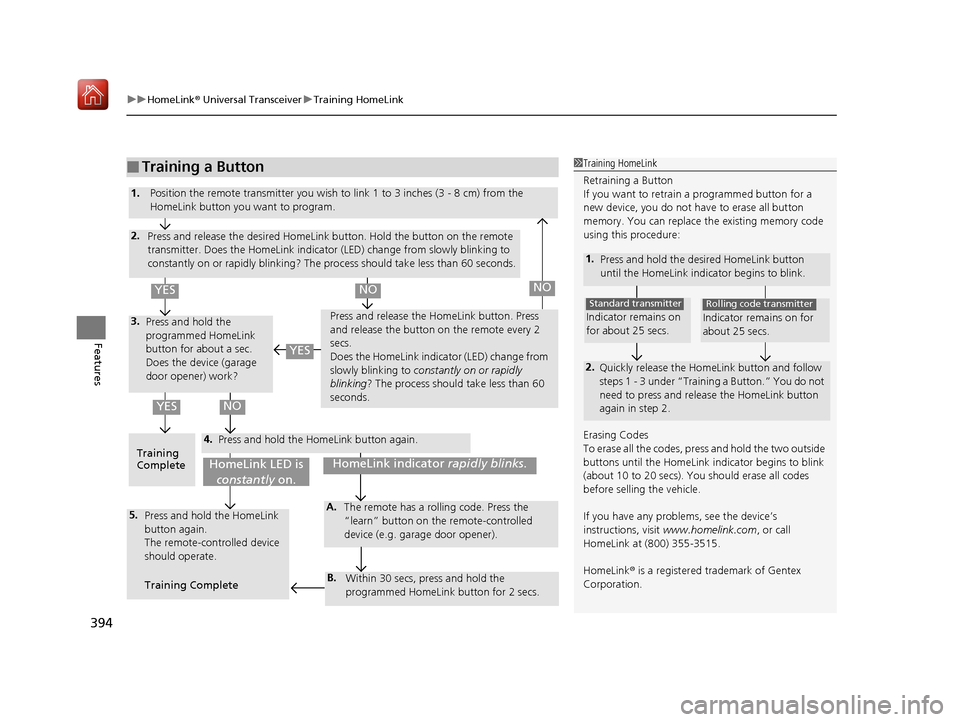
■Training a Button1Training HomeLink
Retraining a Button
If you want to retrain a programmed button for a
new device, you do not ha ve to erase all button
memory. You can replace the existing memory code
using this procedure:
1. Press and hold the desired HomeLink button
until the HomeLink indi cator begins to blink.
2.
Quickly release the Home Link button and follow
steps 1 - 3 under “Training a Button.” You do not
need to press and rele ase the HomeLink button
again in step 2.
Indicator remains on
for about 25 secs.
Standard transmitter
Indicator remains on for
about 25 secs.
Rolling code transmitter
Erasing Codes
To erase all the codes, press and hold the two outside
buttons until the HomeLink i ndicator begins to blink
(about 10 to 20 secs). You should erase all codes
before selling the vehicle.
If you have any problems, see the device’s
instructions, visit www.homelink.com , or call
HomeLink at (800) 355-3515.
HomeLink® is a registered tra demark of Gentex
Corporation.4.
3.
2.
5.A.
B.
1. Position the remote transmitter you wish to link 1 to 3 inches (3 - 8 cm) from the
HomeLink button you want to program.
Press and release the desi red HomeLink button. Hold the button on the remote
transmitter. Does the HomeLink indicato r (LED) change from slowly blinking to
constantly on or rapidly blinking? The pr ocess should take less than 60 seconds.
Press and hold the
programmed HomeLink
button for about a sec.
Does the device (garage
door opener) work? Press and release the Ho
meLink button. Press
and release the button on the remote every 2
secs.
Does the HomeLink indicator (LED) change from
slowly blinking to constantly on or rapidly
blinking ? The process should take less than 60
seconds.
Training
Complete Press and hold the HomeLink button again.
Press and hold the HomeLink
button again.
The remote-controlled device
should operate.
Training Complete The remote has a ro
lling code. Press the
“learn” button on the remote-controlled
device (e.g. garage door opener).
Within 30 secs, press and hold the
programmed HomeLink button for 2 secs.
HomeLink indicator rapidly blinks.HomeLink LED is
constantly on.
YESNO
YES
YESNONO
19 ACURA MDX-31TZ56510.book 394 ページ 2018年12月11日 火曜日 午後4時47分
Page 461 of 701

uuTowing a Trailer uTowing Preparation
460
Driving
■Trailer light
Trailer lights and equipment must comply with federal, state, province/territory, and
local regulations. Check with your local trailer sales or rental agency for the
requirements in the area where you plan to tow.
We recommend that you have a dealer instal l a Acura wiring harness and converter.
They are designed for your vehicle.
■Hitches
Read the trailer manufacturer’s instructions , and select the appropriate draw bar for
the height of the trailer you will be towing.
■Weight distribution hitches
Your vehicle is designed to tow without the need for a load distributing hitch. If you
wish to use one, please consult your trailer maker for proper installation and set-up.
Improper set-up could degrade the handling , stability, and braking performance of
your vehicle.
1 Trailer light
The trailer lighting connect or is located behind the
left side panel in the cargo area.
Even if you are planning to use the non-Acura trailer
lighting harness and converte r, ask a dealer for the
correct connector and pins.
+B Trailer Charge
+B Trailer Hazard Light +B Trailer Hazard Light +B Trailer Back Light
Back Light +B ELEC Brake
Right Turn Signal
Stop Light
Pins’ wiring color codes and their purposes:
+B Trailer Small IG2 HAC
Left Turn Signal
19 ACURA MDX-31TZ56510.book 460 ページ 2018年12月11日 火曜日 午後4時47分
Page 676 of 701
675
Information
This chapter includes your vehicle’s specifications, locations of identification numbers, and other
information required by regulation.
Specifications.................................... 676
Identification Numbers Vehicle Identification Number (VIN), Engine Number, and Transmission
Number ......................................... 678
Devices that Emit Radio Waves ....... 679
Reporting Safety Defects ................. 680Emissions Testing
Testing of Readiness Codes.............. 681
Warranty Coverages ........................ 683
Authorized Manuals ......................... 685
Client Service Information ............... 686
19 ACURA MDX-31TZ56510.book 675 ページ 2018年12月11日 火曜日 午後4時47分
Page 682 of 701

681Continued
Information
Emissions Testing
Testing of Readiness Codes
Your vehicle has readiness code as part of the onboard self diagnostic system.
Some states use these codes for testing to verify whether your vehicle’s emissions
components are working properly.
The codes may not be read properly if testing is performed just after the battery has
gone dead or been disconnected.
To check if they are set, set the power mo de to ON, without starting the engine. The
malfunction indicator lamp will come on for several seconds. If it then goes off, the
readiness codes are set. If it blinks fi ve times, the readiness codes are not set.
If you are required to have your vehicle te sted before the readiness codes are ready,
prepare the vehicle for retest ing by doing the following:
1. Fill the gas tank to approximately 3/4 full.
2. Park the vehicle and leave the engine off for 6 hours or more.
3. Make sure the ambient temperature is between 40°F and 95°F (4°C and 35°C).
4. Start the engine without touching the ac celerator pedal, and let it idle for 20
seconds.
5. Keep the vehicle in
(P. Increase the engine speed to 2,000 rpm, and hold it there
for about 3 minutes.
6. Let the engine idle with your foot off the accelerator for 20 seconds.
1Testing of Readiness Codes
The readiness codes are erased when the battery is
disconnected, and set again only after several days of
driving under a variety of conditions.
If a testing facility determines that the readiness
codes are not set, you may be requested to return at
a later date to complete the test.
If the testing facility determines the readiness codes
are still not set, see a dealer.
19 ACURA MDX-31TZ56510.book 681 ページ 2018年12月11日 火曜日 午後4時47分
Page 683 of 701

682
uuEmissions Testing uTesting of Readiness Codes
Information
7. Select a nearby, lightly traveled major hi ghway where you can maintain a speed
of 50 to 60 mph (80 to 97 km/h) for at least 20 minutes. Drive on the highway in
(D. Do not use cruise control. When tra ffic allows, drive for 90 seconds without
moving the accelerator pedal. (Vehicle spee d may vary slightly; this is okay.) If you
cannot do this for a continuous 90 seconds because of traffic conditions, drive for
at least 30 seconds, then repeat it two mo re times (for a total of 90 seconds).
8. Drive in city or suburban traffic for at le ast 10 minutes. When traffic conditions
allow, let the vehicle coast for several se conds without using the accelerator pedal
or the brake pedal.
9. Park the vehicle and leave the engine off for 30 minutes.
19 ACURA MDX-31TZ56510.book 682 ページ 2018年12月11日 火曜日 午後4時47分
Page 693 of 701

692
Index
Coat Hook................................................. 216
Collision Mitigation Braking SystemTM
(CMBSTM) .................................................. 539
Compact Spare Tire .......................... 629, 677
Compass .................................................... 445
Console Compartment ............................. 210
Controls ..................................................... 137
Coolant (Engine) ....................................... 591
Adding to the Radiator ............................ 592
Adding to the Reserve Tank ..................... 591
Overheating............................................. 655
Creeping (Automatic Transmission) ........ 474
Cross Traffic Monitor ................................ 554
Cup Holders ............................................... 212
Customized Features ........................ 126, 360
D
Daytime Running Lights ........................... 176
Dead Battery ............................................. 653
Defrosting the Windshield and
Windows .................................................. 226
Detachable Anchor ..................................... 38
Devices that Emit Radio Waves ................ 679
Dimming Headlights ............................................... 173
Rearview Mirror ....................................... 189
Dipstick (Engine Oil) ................................. 587
Directional Signals (Turn Signal) .............. 172
Door Mirrors ............................................. 190 Doors
......................................................... 139
Auto Door Locking .................................. 154
Auto Door Unlocking .............................. 154
Door Open Message.................................. 32
Keys ........................................................ 139
Locking/Unlocking the Doors from the Inside .............................................. 13, 151
Locking/Unlocking the Doors from the
Outside ................................................. 142
Lockout Prevention System ...................... 149
DOT Tire Quality Grading ........................ 607
Driver’s Knee Airbag .................................. 48
Driving ...................................................... 447
Automatic Transmission .......................... 474
Braking ................................................... 531
Off-Highway Driving Guidelines............... 465
Shifting Gear ........................................... 475
Starting the Engine.................................. 467
Driving Position Memory System ............ 186
Dust and Pollen Filter ............................... 619
Dynamic Mode button ............................. 489
E
Elapsed Time............................................. 123
Electric Parking Brake Indicator.................................................... 80
Switch ..................................................... 531
Electric Parking Brake System Indicator.................................................... 80
Electronic Stability Control (ESC) ............. 520Emergency
................................................ 670
Emissions Testing (Readiness Codes) ...... 681
Engine ....................................................... 678
Coolant .................................................. 591
Jump Starting ......................................... 653
Remote Engine Start ............................... 469
Starting................................................... 467
Engine Compartment Cover .................... 585
Engine Coolant ........................................ 591
Adding to the Radiator ........................... 592
Adding to the Reserve Tank .................... 591
Overheating ............................................ 655
Temperature Gauge ................................ 119
Engine Oil
Adding ................................................... 588
Checking ................................................ 587
Displaying Oil Life ................................... 579
Low Oil Pressure Indicator ................. 82, 657
ENGINE START/STOP Button .................... 169
EPS (Electric Power Steering) System ............................................... 88, 659
Exhaust Gas Hazard (Carbon Monoxide) .. 74
Exterior Care (Cleaning) .......................... 622
Exterior Mirrors ........................................ 190
F
Features.................................................... 233
Filters Dust and Pollen....................................... 619
Oil .......................................................... 589
19 ACURA MDX-31TZ56510.book 692 ページ 2018年12月11日 火曜日 午後4時47分