Page 251 of 621
250
uuAudio System Basic Operation uPlaying Hard Disk Drive (HDD) Audio
Features
Delete all music data on the HDD.
1.Select Audio Menu .
2. Select Audio Settings .
3. Select CD/HDD .
4. Select Delete All HDD Data .
u The confirmation message will appear.
5. Select Yes.
■Deleting all HDD Data
19 ACURA ILX-31TX66610.book 250 ページ 2020年4月17日 金曜日 午前8時52分
Page 264 of 621

263
uuAudio System Basic Operation uPlaying Bluetooth ® Audio
Continued
Features
Playing Bluetooth ® Audio
Your audio system allows you to listen to music from your Bluetooth-compatible
phone.
This function is available when the phone is paired an d connected to the vehicle’s
Bluetooth ® HandsFreeLink ® (HFL) system.
2Phone Setup P. 376
1Playing Bluetooth ® Audio
Not all Bluetooth-enabled phones with streaming
audio capabilities are compatible with the system.
For a list of compatible phones:
•U.S.: Visit www.handsfreelink.com/Acura , or call 1-
888-528-7876.
•Canada: For more info rmation on smartphone
compatibility, call 1-855-490-7351.
In some states, it may be il legal to perform some data
device functions while driving.
If more than one phone is paired to the HFL system,
there will be a delay before the system begins to play.
Some functions may not be available on some
devices.
If a phone is currently conne cted via Apple CarPlay or
Android Auto, Bluetooth® Audio from that phone is
unavailable. However, a se cond previously paired
phone can stream Bluetooth® Audio by selecting
Connect to Audio from the Edit Bluetooth
Device .
2 Phone Setup P. 376Source
Select to change an audio
source.
VOL/ (Volume/Power)
Knob
Press to turn the audio
system on and off.
Turn to adjust the
volume.
(Information) Icon
Select to display the
current file details.
Select to display the
previous screen.
Skip/Seek Icons
Select or to change files.
On Demand Multi-Use DisplayTM
Play Icon
Pause Icon Browse
Select to display
the track list
screen. Audio Menu
Select to display
the menu items.
Folder Up/Down Icons
Select or to change
folders.
19 ACURA ILX-31TX66610.book 263 ページ 2020年4月17日 金曜日 午前8時52分
Page 268 of 621

Continued267
uuAudio System Basic Operation uApple CarPlay
Features
■Phone
Access the contact list, make phone ca lls, or listen to voice mail.
■Messages
Check and reply to text messages, or have messages read to you.
■Music
Play music stored on your iPhone.
■Maps
Display Apple Maps and use the navigation function just as you would on your
iPhone.
Only one navigation system (pre-installed navigation or Apple Maps) can give
directions at a time. When you are using one system, directions to any prior
destination set on the other system will be canceled, and the system you are
currently using will direct you to your destination.
1 Apple CarPlay
Apple CarPlay Operating Requirements &
Limitations
Apple CarPlay requi res a compatible iPhone with an
active cellular connecti on and data plan. Your
carrier’s rate plans will apply.
Changes in operating systems, hardware, software,
and other technology integral to providing Apple
CarPlay functionality, as well as new or revised
governmental regulations, may result in a decrease or
cessation of Apple CarPlay functionality and services.
Acura cannot and does not provide any warranty or
guarantee of future Appl e CarPlay performance or
functionality.
It is possible to use 3r d party apps if they are
compatible with Apple CarPlay. Refer to the Apple
homepage for information on compatible apps.
Models with navigation system
19 ACURA ILX-31TX66610.book 267 ページ 2020年4月17日 金曜日 午前8時52分
Page 272 of 621

Continued271
uuAudio System Basic Operation uAndroid Auto
Features
*1:The operation methods may differ from your connected Android phone.
■Android Auto Menu1Android Auto
For details on c ountries and regions where Android
Auto is available, as well as information pertaining to
function, refer to the Android Auto homepage.
Android Auto Operating Requirements &
Limitations
Android Auto requires a compatible Android phone
with an active cellular connection and data plan.
Your carrier’s rate plans will apply.
Changes in operating systems, hardware, software,
and other technology integral to providing Android
Auto functionality, as well as new or revised
governmental regulations, may result in a decrease or
cessation of Android Auto functionality and services.
Acura cannot and does not provide any warranty or
guarantee of future Android Auto performance or
functionality.
It is possible to use 3r d party apps if they are
compatible with Android Auto. Refer to the Android
Auto homepage for informat ion on compatible apps.
6
Information Screen
Android Auto menu screen
SMARTPHONE Button
Press to display the Android Auto menu screen.
Interface Dial ( ENTER/MENU Button)
*1
Move and rotate the interface dial to select the item.
Press to enter the item.
BACK Button*1
Press to go back to the previous display.
19 ACURA ILX-31TX66610.book 271 ページ 2020年4月17日 金曜日 午前8時52分
Page 278 of 621
277
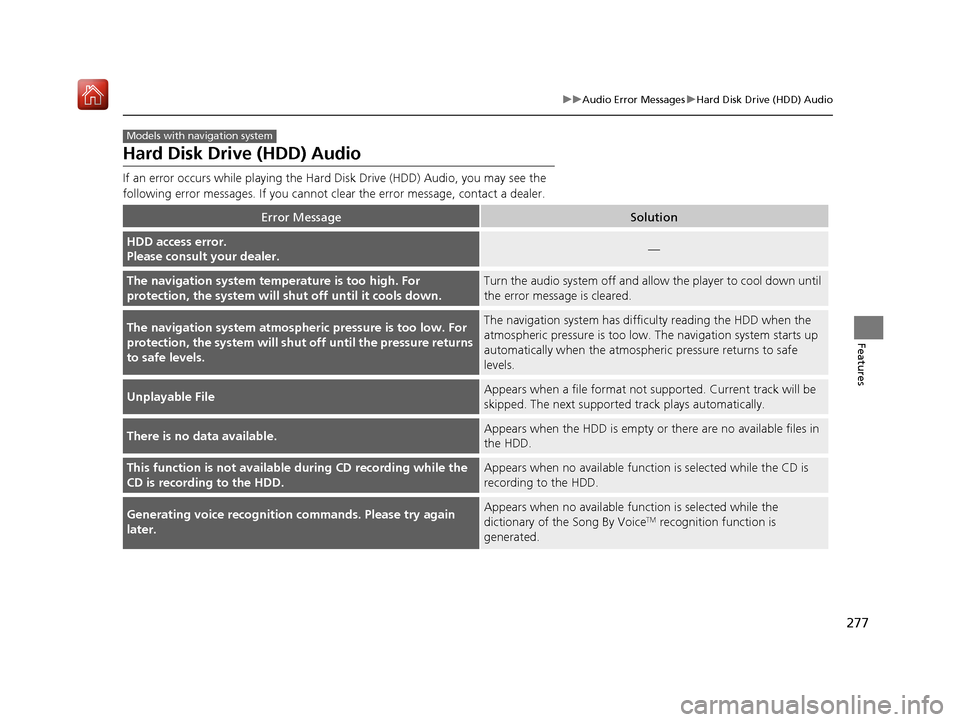
uuAudio Error Messages uHard Disk Drive (HDD) Audio
Features
Hard Disk Drive (HDD) Audio
If an error occurs while playing the Hard Disk Driv e (HDD) Audio, you may see the
following error messages. If you cannot cl ear the error message, contact a dealer.
Error MessageSolution
HDD access error.
Please consult your dealer.—
The navigation system temperature is too high. For
protection, the system will shut off until it cools down.Turn the audio system off and allow the player to cool down until
the error message is cleared.
The navigation system atmospheric pressure is too low. For
protection, the system will shut off until the pressure returns
to safe levels.The navigation system has diffi culty reading the HDD when the
atmospheric pressure is too low. The navigation system starts up
automatically when the atmosphe ric pressure returns to safe
levels.
Unplayable FileAppears when a file format not su pported. Current track will be
skipped. The next supporte d track plays automatically.
There is no data available.Appears when the HDD is empty or there are no available files in
the HDD.
This function is not available during CD recording while the
CD is recording to the HDD.Appears when no available function is selected while the CD is
recording to the HDD.
Generating voice recognition commands. Please try again
later.Appears when no available function is selected while the
dictionary of the Song By VoiceTM recognition function is
generated.
Models with navigation system
19 ACURA ILX-31TX66610.book 277 ページ 2020年4月17日 金曜日 午前8時52分
Page 280 of 621

279
uuAudio Error Messages uiPod/USB Flash Drive
Continued
Features
*1:Models with one display
*2:Models with two displays
Error MessageSolution
Retry Connection*1
Appears when the system does not acknowledge the iPod. Reconnect the iPod.There is an authentication
error. When safe, please
reconnect your device.
*2
Unplayable File*1Appears when the files in the USB flash drive are DRM or an unsupported format. This error message
appears for about 3 seconds, then plays the next song.
This function is not available
because the system has
encountered a file error or a
DRM protected file.
*2
Appears when you select the grayed-out option on the screen while displaying the DRM or an
unsupported format file.
No Data*1
Appears when the iPod is empty.
Appears when the USB flash drive is empty or there are no MP3, WMA, or AAC files in the USB flash
drive.
Check that compatible files are stored on the device.
There is no data detected.
When safe, please check
your device and try again.
*2
iPod*2
USB flash drive
iPod*2 and USB flash drive
19 ACURA ILX-31TX66610.book 279 ページ 2020年4月17日 金曜日 午前8時52分
Page 283 of 621

282
uuAudio Error Messages uPandora®
Features
Error MessageSolution
This USB device is incompatib le. Please see your owner’s
manual for more details.Appears when an incompatible device is connected. Disconnect
the device. Then turn the audio system off, and turn it again. Do
not reconnect the device that caused the error.
There is an unsupported device detected. When safe, please
reconnect your device.Appears when there is a problem with the audio system. Check if
the device is compatible with the audio system.
No stations have been created. When safe, please create a
station on the device.
Appears when there is no station list on the device. Use the device
to create a station.There is no active station.
This PANDORA station is currently not available. Please select
another station.
Music licenses force us to limi t the number of tracks you may
skip each hour.Appears when you try to skip a track over the predetermined
number of times in an hour.
The system is unable to save rating.
The system is unable to save bookmark.
or
The system is unable to skip.
Appears when the commanded operation is failed. Try again later.
There is no data available.Appears when no data is available with Pandora® activated.
Reboot the app and reconnect the device.
The PANDORA app version on your device is not supported.
When safe, please update the app and try again later.Appears when Pandora ® version is not supported. Update
Pandora® to the latest version.
Models with two displays
19 ACURA ILX-31TX66610.book 282 ページ 2020年4月17日 金曜日 午前8時52分
Page 288 of 621
287
uuGeneral Information on the Audio System uRecommended CDs
Continued
Features
Recommended CDs
• Use only high-quality CD-R or CD-RW discs labeled for audio use.
• Use only CD-R or CD-RW discs on wh ich the recordings are closed.
• Play only standard round-shaped CDs.
• Some software files may not allow for audio play or text data display.
• Some versions of MP3, WMA or AAC formats may be unsupported.1Recommended CDs
A Dual-disc cannot play on this audio unit. If recorded
under certain conditions, a CD-R or CD-RW may not
play either.
■CDs with MP3, WMA or AAC files
The CD packages or jackets should have one of these marks.
19 ACURA ILX-31TX66610.book 287 ページ 2020年4月17日 金曜日 午前8時52分

