2018 VOLVO XC90 TWIN ENGINE wheel
[x] Cancel search: wheelPage 527 of 686

AUDIO, MEDIA AND INTERNET
}}
525
Removing a Bluetooth-connected
phone
Phones in the list of registered Bluetooth
devi-
ces can be removed. 1. Tap Settings in the Top view.
2.
Tap Communication Bluetooth
Devices .
>
A list of registered Bluetooth devices is
displayed.
3. Tap the name of the phone you would like to remove.
4. Tap Remove device and confirm.
>
The phone is no longer registered in the
vehicle.
Related information
• Phone (p. 520)
• Connecting a phone to the car via Bluetooth
for the first time (p. 521)
• Disconnecting a Bluetooth-connected phone
(p. 524)
• Switch between phones connected via Blue-
tooth (p. 524)
• Settings for Bluetooth devices (p. 529) Handling phone calls
Handling phone calls in the vehicle for a
Bluetooth-connected cellular phone.
Generic illustration.Making calls1. Open the phone tile.
2. Initiate a call by selecting the phone number
from the recent calls list, entering the num-
ber on the keypad or selecting a number
from the phone book (list of contacts). You
can search or scroll to find a contact in the
phone book. Tap in the phone book to
add a contact to Favorites.
3. Tap .
4. Tap to end the call.Calls can also be made from the list of recent
calls using the app menu, which can be opened
using the button on the right-side steering
wheel keypad.
Making multiple calls
While the call is in progress:
1. Tap Add call.
2.
Select from the list of recent calls, favorites
or contacts.
3. Tap an item/row in the list of recent calls or for the contact in the phone book.
4. Tap Swap call to switch between calls.
5. Tap to end the current call.
Group (conference) calls
While multiple calls are in progress:
1.
Tap Join calls to merge ongoing calls.
2. Tap to end the call.
Incoming callsIncoming phone calls will be shown on the instru-
ment panel and in the center display. Manage the
calls using the right-side steering wheel keypad
or the center display.
1.
Tap Answer/Reject.
2. Tap to end the call.
Page 528 of 686

||AUDIO, MEDIA AND INTERNET
526
Incoming calls while another call is in
progress
1.
Tap Answer/Reject.
2. Tap to end the call.
Privacy
–
While a call is in progress, tap Privacy and
select setting:
• Switch to mobile phone - the hands-
free function will be disabled and the call
will proceed on the cellular phone.
• Driver focused - the microphone in the
ceiling liner on the passenger side will be
muted and the call will proceed using the
vehicle's hands-free function.
Related information
• Phone (p. 520)
• Connecting a phone to the car via Bluetooth
for the first time (p. 521)
• Voice control for cellular phones (p. 147)
• Handling the App menu in the instrument
panel (p. 104)
• Entering characters, letters and words by
hand in the center display (p. 129)
• Managing the phone book (p. 527)
• Handling text messages (p. 526)
• Sound settings (p. 486) Handling text messages
A
Bluetooth-connected cellular phone's text
messages can be handled in the vehicle. Text message functionality needs to be activated
in certain phones. Not all phones are fully com-
patible and therefore cannot display contacts and
messages in the vehicle. For additional informa-
tion on compatibility, see support.volvocars.com.
Handling text messages in the center
display
Text messages are only shown in the center dis-
play if the relevant setting is made.
Tap Messages in App view to
handle text messages in the
center display.
NOTE When the vehicle is moving:
• Only one row of the message will be dis-
played. Tap
Read out to have the entire
message read aloud.
• The center display's keyboard cannot be
used.
Reading text messages in the center display
Tap the icon to have the message read
aloud.
Sending text messages in the center
display 10
1. It is possible to reply to text messages or
create a new message.
• To reply to a text message - tap the name
of the contact who sent the message and
then tap
Answer.
• To create a new message - tap
Create
new. Select a contact or enter a phone number.
2.
Write the message.
3. Tap Send.
Handling test messages in the
instrument panel
Text messages are only shown in the instrument
panel if the relevant setting is made.
Reading new text messages in the
instrument panel
–To have the message read aloud, select
Read out using the steering wheel keypad.
10 Only certain phones can send messages via the vehicle. For additional in\
formation on compatibility, see support.volvocars.com.
Page 529 of 686

AUDIO, MEDIA AND INTERNET
}}
* Option/accessory. 527
Dictating replies in the instrument panel
After the test message has been read aloud, it is
possible to answer briefly with dictation if the
vehicle has an Internet connection.
–Tap Answer using the steering wheel key-
pad. A dictation dialog will start.
Message notificationNotifications can be activated and deactivated in
the text message settings.
Related information
• Phone (p. 520)
• Text message settings (p. 527)
• Phone settings (p. 528)
• Internet-connected vehicle* (p. 529)
• Voice control for cellular phones (p. 147)
• Entering characters, letters and words by
hand in the center display (p. 129)
• Connecting a phone to the car via Bluetooth
for the first time (p. 521) Text message settings
Settings for handling text messages received
through a connected phone can be personal-
ized. 1. Tap Settings in the Top view.
2.
Tap Communication Text Messages
and select settings:
• Notification in center display - display
text message notifications in the center
display's status bar.
• Notification in driver display - displays
notifications in the driver's display and
incoming messages can be managed
using the steering wheel's right-hand key-
pad.
• Text message tone - select tone for
incoming text messages.
Related information
• Phone (p. 520)
• Connecting a phone to the car via Bluetooth
for the first time (p. 521)
• Handling text messages (p. 526)
• Phone settings (p. 528) Managing the phone book
Contacts in a
Bluetooth-connected cellular
phone can be managed in the vehicle. Scroll by letter or to find contacts. Only
letters matching existing contacts in the
phone book will be shown. Search contacts
- tap to search by
phone number or name in the phone book. Favorites
- tap to add/remove a con-
tact from the list of favorites.
NOTE Only contacts from an active Bluetooth-con-
nected phone are shown in the center display.
Up to 3000 contacts can be displayed.
Page 552 of 686
WHEELS AND TIRES
550Tires
The function of the tires is to carry loads, provide
traction on road surfaces, reduce vibrations and
protect the wheels from wear. The tires significantly influence the vehicle's driv-
ing characteristics. The type, dimensions, tire
pressure and speed rating have a considerable
impact on how the vehicle performs.
Your vehicle is equipped with tires according to
the vehicle's tire information placard on the B-pil-
lar (the structural member at the side of the vehi-
cle, at the rear of the driver's door opening).
WARNING A damaged tire could cause the driver to lose
control of the vehicle.
CAUTION Some Volvo models are equipped with an
Ultra High Performance tire and wheel com-
bination designed to provide maximum dry
pavement performance with consideration for
hydroplaning resistance. They may be more
susceptible to road hazard damage and,
depending on driving conditions, may achieve
a tread life of less than 30,000 km (20,000
miles). Even if this vehicle is equipped with
Volvo's advanced AWD or stability system,
these tires are not designed for winter driving,
and should be replaced with winter tires when
weather conditions dictate.
The tires have good road holding characteristics
and offer good handling on dry and wet surfaces.
It should be noted however that the tires have
been developed to give these features on snow/
ice-free surfaces.
Most models are equipped with "all-season" tires,
which provide a somewhat higher degree of road-
holding on slippery road surfaces than tires with-
out the "all-season" rating. However, for optimal
roadholding on icy or snow-covered roads, we
recommend snow tires on all four wheels.
When replacing tires, be sure that the new tires
are the same size designation, type (radial) and
preferably from the same manufacturer, on allfour wheels. Otherwise there is a risk of altering
the vehicle's roadholding and handling characte-
ristics.
Recommended tiresOn delivery, the car is equipped with Volvo origi-
nal tires that have the VOL
1
marking on the side
of the tires. These tires have been designed spe-
cifically for your vehicle. It is therefore important
when replacing tires that the new tires have this
same marking to help maintain the vehicle's driv-
ing characteristics, comfort and fuel consumption.
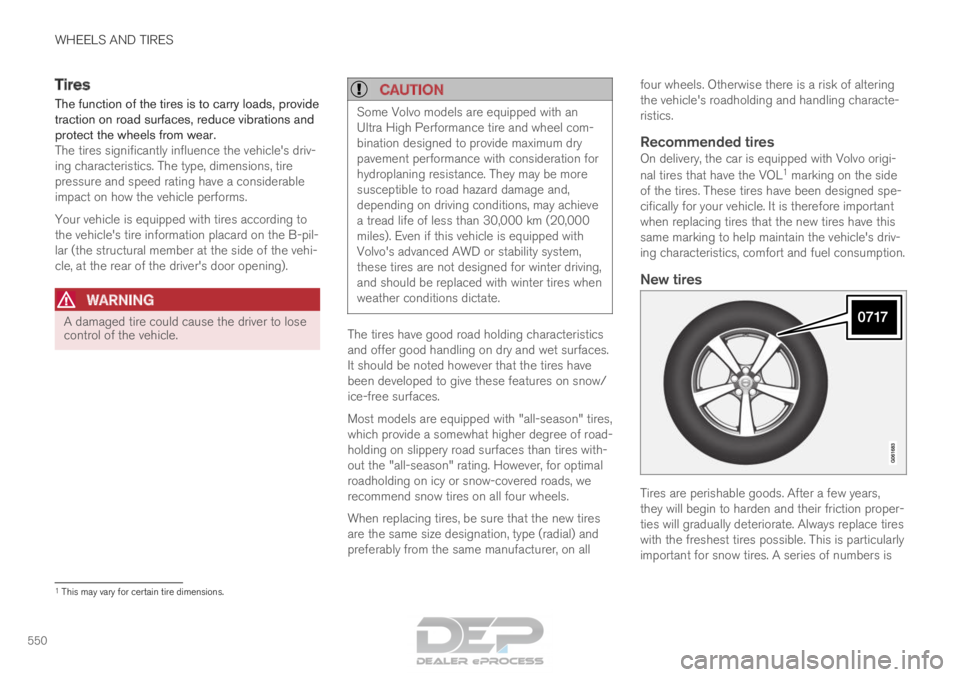
New tires Tires are perishable goods. After a few years,
they will begin to harden and their friction proper-
ties will gradually deteriorate. Always replace tires
with the freshest tires possible. This is particularly
important for snow tires. A series of numbers is
1
This may vary for certain tire dimensions.
Page 553 of 686

WHEELS AND TIRES
}}
551
imprinted on the sidewall of the tire. The last four
digits in the series is the Department of
Transportation (DOT) stamp and indicates the
week and year the tire was manufactured. The
tire in the illustration has 0717 as the last four
digits, which means it was manufactured week 7
of 2017.
Tire ageTires degrade over time, even when they are not
being used. It is recommended that tires gener-
ally be replaced after 6 years of normal service.
Heat caused by hot climates, frequent high load-
ing conditions or Ultra Violet (U.V.) exposure can
accelerate the aging process. The temporary
spare
2
should also be replaced at 6-year inter-
vals, even if it has never been used. A tire with
e.g., visible cracks or discoloration should be
replaced immediately.
Tire economy
• Maintain correct tire pressure.
• Avoid fast starts, hard braking and tire
screeching.
• Tire wear increases with speed.
• Correct front wheel alignment is very impor-
tant.
• Unbalanced wheels impair tire economy and
driving comfort. •
Tires must maintain the same direction of
rotation throughout their lifetime.
• When replacing tires, the tires with the most
tread should be mounted on the rear wheels
to reduce the chance of oversteer during
hard braking.
• Hitting curbs or potholes can damage the
tires and/or wheels permanently.
Tire rotationYour vehicle has no required tire rotation. Driving
style, tire pressure, climate and road conditions
affect how quickly the tires age and exhibit signs
of wear. Maintaining the correct tire pressure
helps keep tread wear evenly distributed.
To help prevent differences in tread depth and
wear patterns forming on the tires, the front and
rear wheels should be rotated, i.e. the front tires
moved to the rear and the rear tires moved to the
front. Ideally, tire rotation should be done the first
time after approximately 5000 km (ca
3100 miles) and thereafter at 10,000 km
(approx. 6200 miles) intervals.
If you have any questions regarding tread depth,
Volvo recommends consulting an authorized
Volvo workshop. If significant differences in wear
(> 1 mm difference in tread depth) between the
tires have already occurred, the least worn tires
should always be mounted on the rear wheels. A
front-wheel skid (understeer) is usually easier to control than a rear-wheel skid (oversteer). If the
front wheels skid, the vehicle will continue in a
straight line instead of the rear wheels skidding
to the side, which could cause you to completely
lose control of the vehicle. It is therefore impor-
tant that the rear wheels never lose grip before
the front wheels.
Storing wheels and tiresWhen storing complete wheels (tires mounted on
rims), they should be suspended off the floor or
placed on their sides on the floor.
Tires not mounted on rims should be stored on
their sides or standing upright, but should not be
suspended.
CAUTION
Tires should preferably be stored in a cool,
dry, dark place, and should never be stored in
close proximity to solvents, gasoline, oils, etc.
2
Not available on all models.
Page 554 of 686
||WHEELS AND TIRES
* Option/accessory.
552
WARNING •
The wheel and tire sizes for your Volvo
are specified to meet stringent stability
and handling requirements. Unapproved
wheel/tire size combinations can nega-
tively affect your vehicle's stability and
handling.
• Any damage caused by installation of
unapproved wheel/tire size combinations
will not be covered by your new vehicle
warranty. Volvo assumes no responsibility
for death, injury, or expenses that may
result from such installations.
Related information
•Checking tire pressure (p. 557)
• Tire direction of rotation (p. 552)
• Tread wear indicator (p. 553)
• Tire pressure monitoring system* (p. 559)
• Tire sealing system (p. 572)
• Uniform Tire Quality Grading (p. 556)
• Tire terminology (p. 553)
• Tire sidewall designations (p. 554)
• Loading recommendations (p. 586) Tire direction of rotation
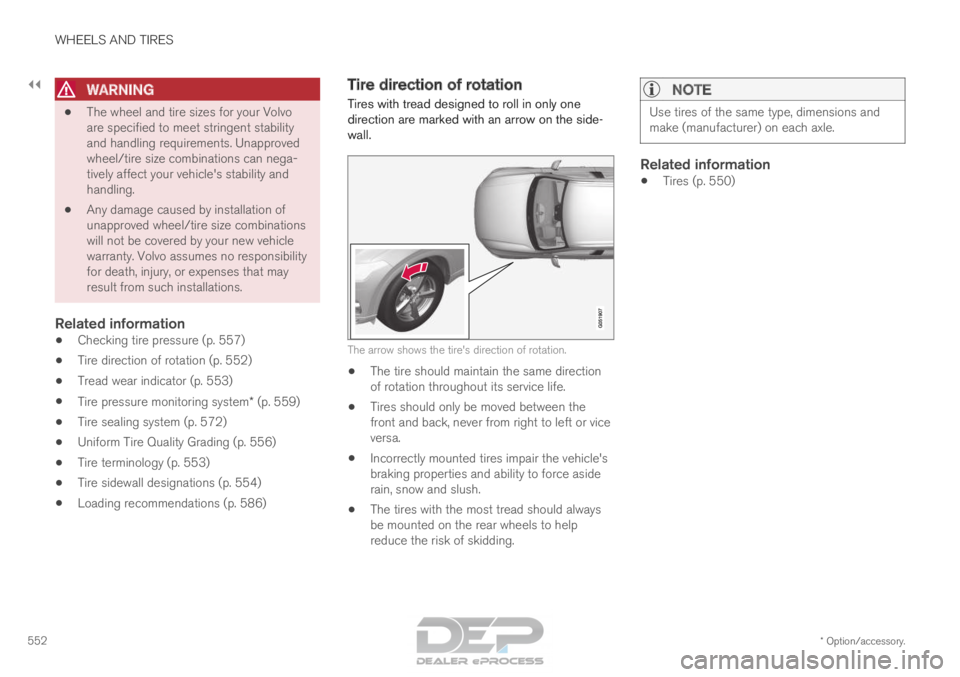
Tires with tread designed to roll in only one
direction are marked with an arrow on the side-
wall. The arrow shows the tire's direction of rotation.
• The tire should maintain the same direction
of rotation throughout its service life.
• Tires should only be moved between the
front and back, never from right to left or vice
versa.
• Incorrectly mounted tires impair the vehicle's
braking properties and ability to force aside
rain, snow and slush.
• The tires with the most tread should always
be mounted on the rear wheels to help
reduce the risk of skidding.
NOTE Use tires of the same type, dimensions and
make (manufacturer) on each axle.
Related information
•
Tires (p. 550)
Page 555 of 686

WHEELS AND TIRES
}}
553
Tread wear indicator
The tread wear indicator shows the status of the
tire's tread. The tread wear indicator is a narrow elevated
strip running across the tire's longitudinal tread
grooves. The letters TWI (Tread Wear Indicator)
are visible on the side of the tire. When approxi-
mately 1.6 mm (1/16 inch) is left on the tread,
the tread will be at the same height as the tread
wear indicator. Replace the tire as soon as possi-
ble. Tires with low tread offer very poor traction in
rain or snow.
Related information
•
Tires (p. 550) Tire terminology
The following is a glossary of tire-related terms.
The tire suppliers may have additional markings,
notes or warnings such as standard load, radial
tubeless, etc.
• Tire information placard: A placard show-
ing the OE (Original Equipment) tire sizes,
recommended inflation pressure, and the
maximum weight the vehicle can carry.
• Tire Identification Number (TIN): A number
on the sidewall of each tire providing infor-
mation about the tire brand and manufactur-
ing plant, tire size and date of manufacture.
• Inflation pressure: A measure of the
amount of air in a tire.
• Standard load: A class of P-metric or Metric
tires designed to carry a maximum load at 35
psi [37 psi (2.5 bar) for Metric tires]. Increas-
ing the inflation pressure beyond this pres-
sure will not increase the tires load carrying
capability.
• Extra load: A class of P-metric or Metric
tires designed to carry a heavier maximum
load at 41 psi [43 psi (2.9 bar) for Metric
tires]. Increasing the inflation pressure
beyond this pressure will not increase the
tire's load carrying capability.
• kPa: Kilopascal, a metric unit of air pressure.
• PSI: Pounds per square inch, a standard unit
of air pressure. •
B-pillar: The structural member at the side
of the vehicle behind the front door.
• Bead area of the tire: Area of the tire next
to the rim.
• Sidewall of the tire: Area between the bead
area and the tread.
• Tread area of the tire: Area of the perime-
ter of the tire that contacts the road when
mounted on the vehicle.
• Rim: The metal support (wheel) for a tire or a
tire and tube assembly upon which the tire
beads are seated.
• Maximum load rating: a figure indicating
the maximum load in pounds and kilograms
that can be carried by the tire. This rating is
established by the tire manufacturer.
• Maximum permissible inflation pressure:
the greatest amount of air pressure that
should ever be put in the tire. This limit is set
by the tire manufacturer.
• Recommended tire inflation pressure:
inflation pressure, established by Volvo,
which is based on the type of tires that are
mounted on a vehicle at the factory. This
information can be found on the tire inflation
placard(s) located on the driver's side B-pillar
and in the tire inflation table in this chapter.
• Cold tires: The tires are considered to be
cold when they have the same temperature
as the surrounding (ambient) air. This tem-
Page 556 of 686

||WHEELS AND TIRES
554
perature is normally reached after the vehicle
has been parked for at least 3 hours.
Related information
•
Tires (p. 550) Tire sidewall designations
The following information can be found on a
tire's sidewall. Federal law mandates that tire manufacturers
place standardized information on the sidewall of
all tires (see the illustration).
The vehicle has been certified with certain combi-
nations of wheels and tires.
The following information is listed on the tire
sidewall:
The tire designation:
NOTE Please be aware that the following tire desig-
nation is an example only and that this par-
ticular tire may not be available on your vehi-
cle.
1.
215: the width of the tire (in millimeters)
from sidewall edge to sidewall edge. The
larger the number, the wider the tire.
2. 65: The ratio of the tire's height to its width
in percent.
3. R: Radial tire (the designation RF and the symbol indicate that the vehicle is
equipped with optional self-supporting run
flat tires 3
.
4. 15: The diameter of the wheel rim (in
inches).
5. 95: The tire's load index. In this example, a
load index of 95 equals a maximum load of
1521 lbs (690 kg).
6. H: The tire's speed rating, or the maximum
speed at which the tire is designed to be
driven for extended periods of time, carrying
a permissible load for the vehicle, and with
correct inflation pressure. For example, H
indicates a speed rating of 210 km/h
(130 mph). 3
Self-supporting run flat tires may not be available on all models.