2018 VOLVO XC90 TWIN ENGINE fuel type
[x] Cancel search: fuel typePage 506 of 686

||AUDIO, MEDIA AND INTERNET
* Option/accessory.
504
5 days
Tap to see weather information for the coming 5
days.
Tap Back to return to the Local screen or Close
to return to the SiriusXM Travel Link home
screen.
Ski conditionTap to display a list of ski areas in the vicinity of
the vehicle. Tap a name in the list for information
such as if the ski area is open/closed, tempera-
ture, wind conditions, snow conditions, the num-
ber of lifts that are in operation, etc.
• Weather locations
• Ski location
Tap Map view to display a map and a weather
legend.
Tap Map options to display the following alter-
natives.
• Weather radar
• Storm attributes
• Surface features
• Tropical storm tracks
• Winds
Tap the relevant box to the right of the option to
select/deselect it. Tap Done to confirm and
return to the previous screen or Cancel.
AreasTap Areas to display a list of areas/locations in
states from the SiriusXM Travel Link database.
Scroll to a state and tap to display:
• Weather locations: tap arrow to the right to
display a list of towns. Scroll to desired town
and tap for detailed weather information. You
can choose Map view, today, 5 days or Favor-
ites (star)
• Ski locations: tap arrow at right to display
local ski areas. Tap an area for detailed info.
For information about storing a location, state,
town, etc. as a favorite, see the heading "Favor-
ites" in the article "SiriusXM Travel Link."
Related information
• SiriusXM Travel Link ®
* (p. 502)
• SiriusXM Travel Link ®
* - Fuel (p. 505)
• SiriusXM Travel Link ®
* - Sports (p. 506)
• SiriusXM Travel Link ®
* - Notifications
(p. 504) SiriusXM Travel Link
®
* -
Notifications
This SiriusXM Travel Link service provides notifi-
cations of potential weather problems or other
emergency situations in the vicinity of the vehi-
cle.
From the SiriusXM Travel Link home screen, to
show notifications:
– Tap the
Alerts button to display this screen.
• If any notifications are currently available, a
message will appear at the top of the screen.
They can also be listed from the
Settings
menu in the center display's Top view.
• If no notifications are available, No active
alerts will be displayed.
Types of notifications
To select the types of notifications to be dis-
played:
1. From the Alerts screen, tap the Select
alerts button at the bottom of the screen.
2.
This displays the types of notifications that
can be displayed. Tap the box to the right of
each type of notification to select/deselect it.
3. Tap Done when you have made your selec-
tions. You will return to the Alerts screen.
Page 507 of 686

AUDIO, MEDIA AND INTERNET
}}
* Option/accessory. 505
Information about a notification
If any notifications have been displayed on the
screen, tap one for more detailed information (i.e.,
the location of the weather problem on a map
and a description of the situation).
If a phone number is available in a notification, a
Call button will be displayed. Tap this button for additional information.
Related information
• SiriusXM Travel Link ®
* (p. 502)
• SiriusXM Travel Link ®
* - Fuel (p. 505)
• SiriusXM Travel Link ®
* - Sports (p. 506)
• SiriusXM Travel Link ®
* - Weather (p. 503) SiriusXM Travel Link
®
* - Fuel 5
This SiriusXM Travel Link service provides infor-
mation and guidance to service stations near the
vehicle providing the type of fuel that you prefer/
require for your vehicle.
From the SiriusXM Travel Link home screen, to
show fuel information:
– Tap the
Fuel button to display the main fuel
screen.
The following categories are shown:
• Search (the magnifying glass icon)
• Nearby
• Recommended
• Favorites
• Brands
Tap one of the alternatives to display its screen.
NOTE In each of the categories listed, tapping the
Select fuel type button near the bottom of
the screen opens a sub-view where you can
specify the type of fuel preferred/required
(Regular, Midrange, Premium, Diesel,
Electric 120V, etc.) Tap Done to return to
the previous screen.
SearchTap the magnifying glass icon. If the function is
supported in the current context, a keyboard will
appear on the screen. Enter the text of your
choice and tap Search for detailed information if
available.
NearbyTap for a list of service stations in the vicinity of
the vehicle, with the nearest station at the top of
the list.
The following information will be provided where
available:
• For vehicles using gasoline, the price infor-
mation for regular gasoline (unless another
grade/type of fuel has been selected in
Select fuel type)
• For electric vehicles/hybrids, information
about charging stations, showing the total
number of charging ports and the number of
ports currently not in use
• the distance to the station
• a star icon to set the service station as a
favorite
Tap the name of a service station to display more
detailed information.
For guidance to the service station, tap the Start
navigation or Add as waypoint buttons. See 5
This service is not available in Canada.
Page 508 of 686

||AUDIO, MEDIA AND INTERNET
* Option/accessory.
506 the Sensus Navigation* supplement for additional
information about using the navigation system.
RecommendedTap for a list of service stations near the vehicle,
displayed according to the price of regular gaso-
line (unless another grade/type of fuel has been
selected in Select fuel type) or of stations
offering the greatest number of available charg-
ing ports for electric vehicles/hybrids. The station
offering the lowest price/most available charging
ports will be displayed at the top of the list. Tap
the name of a service station to display more
detailed information.
FavoritesTap for a list of service stations that have been
stored as favorites. See also the heading
Favorites in the article "SiriusXM Travel Link" for
information explaining how to create favorites.
Tap the name of a service station to display more
detailed information.
In addition to the Select fuel type button at the
bottom of the screen, tap the
Edit button to
delete individual stations from the list or tap
Delete to clear the list. Tap Done to return to the previous screen.
Brands1. Tap Brands to display a list of service sta-
tion brands in the area. 2.
Tap a brand to display a list of service sta-
tions affiliated with that brand (BP, Exxon,
etc.).
3. Tap the name of a service station to display more detailed information.
In addition to the Select fuel type button at the
bottom of the screen, tap the
Sort button to
arrange the list according to Nearest or
Cheapest/Recommended. Tap Done to return to the previous screen.
Related information
• SiriusXM Travel Link ®
* (p. 502)
• SiriusXM Travel Link ®
* - Notifications
(p. 504)
• SiriusXM Travel Link ®
* - Sports (p. 506)
• SiriusXM Travel Link ®
* - Weather (p. 503) SiriusXM Travel Link
®
* - Sports
This SiriusXM Travel Link service provides infor-
mation about sporting events, tournaments,
teams, leagues, etc.
From the SiriusXM Travel Link home screen, to
display sports information:
– Tap the
Sports button to display the main
sports screen.
A number of sports categories will be listed
(Football, Baseball, Basketball, etc.)
Tap a sport to select a league in that sport (NFL,
MLB, etc.) or a sport organization (PGA, LPGA,
etc.).
The following is an example of the result of
tapping Baseball:
1.
MLB (Major League Baseball) will be dis-
played.
2. Tap MLB to display the two leagues in Major League Baseball (American League or
National League).
3. Tap one of the league names to display the divisions in the league.
Page 552 of 686
WHEELS AND TIRES
550Tires
The function of the tires is to carry loads, provide
traction on road surfaces, reduce vibrations and
protect the wheels from wear. The tires significantly influence the vehicle's driv-
ing characteristics. The type, dimensions, tire
pressure and speed rating have a considerable
impact on how the vehicle performs.
Your vehicle is equipped with tires according to
the vehicle's tire information placard on the B-pil-
lar (the structural member at the side of the vehi-
cle, at the rear of the driver's door opening).
WARNING A damaged tire could cause the driver to lose
control of the vehicle.
CAUTION Some Volvo models are equipped with an
Ultra High Performance tire and wheel com-
bination designed to provide maximum dry
pavement performance with consideration for
hydroplaning resistance. They may be more
susceptible to road hazard damage and,
depending on driving conditions, may achieve
a tread life of less than 30,000 km (20,000
miles). Even if this vehicle is equipped with
Volvo's advanced AWD or stability system,
these tires are not designed for winter driving,
and should be replaced with winter tires when
weather conditions dictate.
The tires have good road holding characteristics
and offer good handling on dry and wet surfaces.
It should be noted however that the tires have
been developed to give these features on snow/
ice-free surfaces.
Most models are equipped with "all-season" tires,
which provide a somewhat higher degree of road-
holding on slippery road surfaces than tires with-
out the "all-season" rating. However, for optimal
roadholding on icy or snow-covered roads, we
recommend snow tires on all four wheels.
When replacing tires, be sure that the new tires
are the same size designation, type (radial) and
preferably from the same manufacturer, on allfour wheels. Otherwise there is a risk of altering
the vehicle's roadholding and handling characte-
ristics.
Recommended tiresOn delivery, the car is equipped with Volvo origi-
nal tires that have the VOL
1
marking on the side
of the tires. These tires have been designed spe-
cifically for your vehicle. It is therefore important
when replacing tires that the new tires have this
same marking to help maintain the vehicle's driv-
ing characteristics, comfort and fuel consumption.
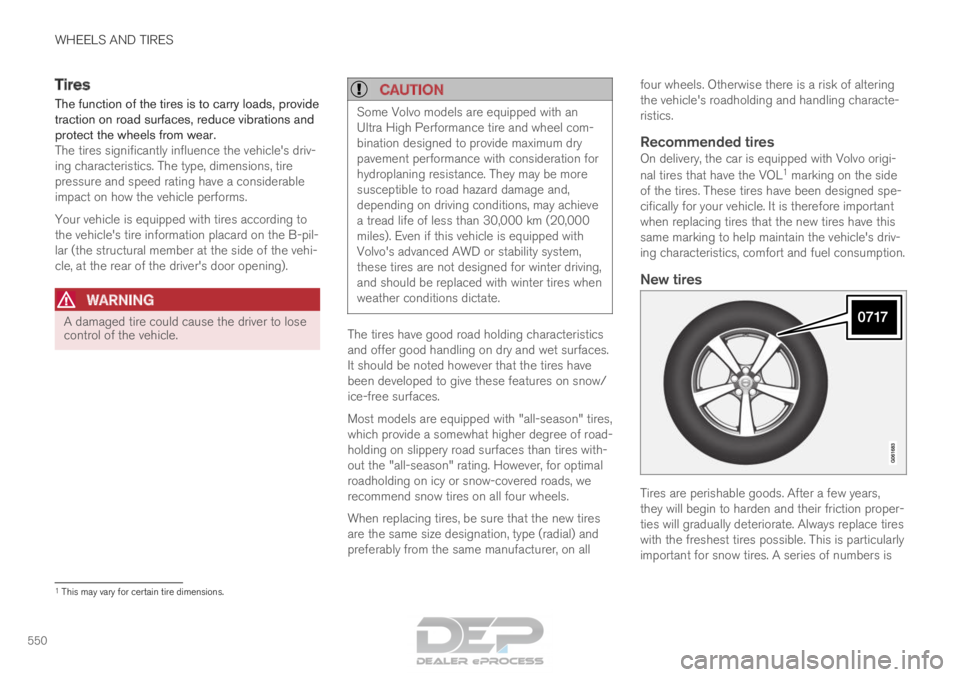
New tires Tires are perishable goods. After a few years,
they will begin to harden and their friction proper-
ties will gradually deteriorate. Always replace tires
with the freshest tires possible. This is particularly
important for snow tires. A series of numbers is
1
This may vary for certain tire dimensions.
Page 601 of 686

MAINTENANCE AND SERVICE
}}
599
Periodic maintenance helps minimize
emissions
NOTE •
Refer to your Service and Warranty Book-
let for a comprehensive service and main-
tenance schedule up to 240,000 km
(150,000 miles). This program contains
inspections and services necessary for
the proper function of your vehicle and
includes components that affect vehicle
emissions.
• The Warranty and Service Records Infor-
mation booklet also contains detailed
information concerning the warranties
that apply to your vehicle.
On-board Diagnostic SystemOBD II is part of your vehicle's computerized
engine management system. It stores diagnostic
information about your vehicle's emission con-
trols. It can light the Check Engine light (MIL) if it
detects an emission control "fault." A "fault" is a
component or system that is not performing
within an expected range. A fault may be perma-
nent or temporary. OBD II will store a message
about any fault.
Emission inspection readiness
How do states use OBD II for emission
inspections?
Many states connect a computer directly to a
vehicle's OBD II system. The inspector can then
read "faults." In some states, this type of inspec-
tion has replaced the tailpipe emission test.
How can my vehicle fail OBD II emission
inspection?
Your vehicle can fail OBD II emission inspection
for any of the following reasons:
• If your Check Engine (MIL) light is lit, your
vehicle may fail inspection.
• If your vehicle's Check Engine light was lit,
but went out without any action on your part,
OBD II will still have a recorded fault. Your
vehicle may pass or fail, depending on the
inspection practices in your area.
• If you had recent service that required dis-
connecting the battery, OBD II diagnostic
information may be incomplete and "not
ready" for inspection. A vehicle that is not
ready may fail inspection.
How can I prepare for my next
OBD II
emission inspection?
• If your Check Engine (MIL) light is lit - or was
lit but went out without service, have your vehicle diagnosed and, if necessary, serviced
by a qualified Volvo technician.
• If you recently had service for a lit Check
Engine light, or if you had service that
required disconnecting the battery, a period
of driving is necessary to bring the OBD II
system to "ready" for inspection. Two half-
hour trips of mixed stop-and-go/highway
driving are typically needed to allow OBD II to
reach readiness. Your Volvo retailer can pro-
vide you with more information on planning a
trip.
• Maintain your vehicle in accordance with your
vehicle's maintenance schedule.
Owner maintenancePeriodic maintenance requirements and intervals
are described in your vehicle's Warranty and
Service Records Information booklet.
The following points can be carried out between
the normally scheduled maintenance services.
Each time the car is refueled:
•Check the engine oil level.
• Clean the windshield, windshield wipers,
headlights, and taillights.
Page 612 of 686

MAINTENANCE AND SERVICE
610Engine oil
For the recommended service intervals and war-
ranties to be applied, an approved engine oil
must be used. Volvo recommends: If the engine oil is not checked regularly and the
level becomes low, this could cause serious
engine damage.
CAUTION
To satisfy the requirements for the engine's
service intervals, all engines are factory-filled
with a specially adapted synthetic engine oil.
Great care has been put into the choice of oil,
with consideration given to service life, starta-
bility, fuel consumption and environmental
impact.
For the recommended service intervals to
apply, an approved engine oil must be used.
Only use the prescribed oil grade to top off or
change the oil. Otherwise, there is a risk of
the vehicle's service life, startability, fuel con-
sumption and environmental impact being
affected.
Failure to use engine oil of the prescribed
grade and viscosity could cause damage to
engine-related components. Volvo Car Corpo-
ration disclaims warranty liability for such type
of damage.
Volvo recommends entrusting oil changes to
an authorized Volvo workshop.
Volvo uses different systems to warn if the oil
level is too low/high or the oil pressure is low. On
engine variants with an oil pressure sensor, awarning symbol is displayed in the instrument
panel when oil pressure is low . On engine
variants with an oil level sensor, the warn-
ing symbol in the instrument panel and display
messages are used to alert the driver. Some
engine variants have both systems. Contact a
Volvo retailer for more information.
Change the engine oil and oil filter according to
the schedule specified in the Warranty and Main-
tenance Records Information booklet. Oils of a
higher grade than that specified may be used. If
the vehicle is driven in adverse conditions, Volvo
recommends using an oil with a higher grade
than that specified.
Related information
• Checking and filling engine oil (p. 611)
• Engine oil specifications (p. 662)
Page 621 of 686

MAINTENANCE AND SERVICE
619
Hybrid battery
The vehicle's electric motor is powered by a
rechargeable, maintenance-free, lithium-ion
hybrid battery.
NOTE The vehicle cannot be started if the hybrid
battery is discharged.
NOTE
If both the starter battery and the hybrid bat-
tery are discharged, both batteries must be
charged. In such cases, it is not possible to
charge only the hybrid battery first.
The starter battery must have a certain level
of charge for it to be possible to charge the
hybrid battery.
WARNING
Hybrid battery replacement may only be per-
formed by a workshop – an authorized Volvo
workshop is recommended.
CoolantThe hybrid battery's cooling system has its own
expansion tank.
CAUTION Filling the hybrid battery coolant should only
be performed by a workshop – an authorized
Volvo workshop is recommended.
SpecificationsType: Lithium-ion
Power reserve: 10.4 kWh.
NOTE
The capacity of the hybrid battery decreases
with age and use, which could result in
increased use of the combustion engine,
leading to higher fuel consumption and
reduced electric motor range.
Related information
•
Battery symbols (p. 620)
• Start battery (p. 615)
• Charging the hybrid battery (p. 407)
Page 664 of 686

SPECIFICATIONS
662Engine oil specifications
Fully synthetic engine oil of at least
ACEA A5/B5 must be used. Lower oil grades
may not offer the same fuel economy, engine
performance or engine protection.
Volvo recommends:
GeneralSee the Service and warranty booklet for infor-
mation about oil change intervals.
NOTE This vehicle is delivered from the factory with
synthetic oil.
Do not use oil additives.
Oil viscosityThe wrong oil viscosity can shorten engine serv-
ice life during normal use. SAE 5W-30 provides
good fuel economy and engine protection. See
the viscosity chart. Viscosity chart
Extreme driving conditions
Volvo's VCC RBS0-2AE/SAE 0W20 oil is recom-
mended for extreme conditions.
Oil volume
The oil volume for the engine is:
Liter (approx.)
5.6
US qts (approx.) 5.9
Related information
•Type designations (p. 654)
• Checking and filling engine oil (p. 611) •
Engine oil (p. 610)