2018 VOLVO XC90 T8 charge battery
[x] Cancel search: charge batteryPage 11 of 686

9
Activating/deactivating Steering assistance during collision risks withoncoming vehicles376
Limitations of steering assistanceduring collision risks from oncomingtraffic 376
Steering assistance during collision risks from behind * 377
Activating/deactivating Steering assistance during collision risks from behind * 378
Limitations of steering assistance during collision risks from behind 378
Symbols and messages for steeringassistance during collision risks 380
Park Assist *
381
Park Assist front, rear and sides 382
Activating/deactivating Park Assist 383
Park Assist limitations 383
Recommended maintenance forPark Assist 384
Park Assist symbols and messages 385
Park Assist Camera *
386
Park Assist Camera views 387
Park Assist Camera trajectory lines 388
Sensor field from Park Assist forPark Assist Camera 390
Starting the Park Assist Camera 391
Park Assist Camera limitations391
Recommended maintenance of the Park Assist Camera 393
Park Assist Camera symbols andmessages 394
Park Assist Pilot *
395
Types of parking with Park Assist Pilot 395
Parking with Park Assist Pilot 396
Leaving a parking space with ParkAssist Pilot 399
Park Assist Pilot * limitations
400
Recommended maintenance forPark Assist Pilot 402
Park Assist Pilot * messages
403
HYBRID INFORMATION
General information about Twin Engine
406
Charging the hybrid battery 407
Charging current 408
Charge cable 409
Charging cable residual current device 410
Charging cable temperature monitoring 411
Opening and closing the charging socket cover 411
Initiating hybrid battery charging 412
Charging status in the vehicle'scharging socket 414
Charging status in the chargingcable's charging module 415
Charging status in the instrument panel 416
Stopping hybrid battery charging 418
Twin Engine symbols and messagesin the instrument panel 419
Long-term storage of vehicles withhybrid batteries 421
Page 12 of 686

10
STARTING AND DRIVING
Starting the vehicle424
Switching off the vehicle 426
Ignition modes 427
Selecting ignition mode 428
Brake functions 429
Brakes 429
Brake Assist System 431
Braking on wet roads 431
Braking on salted roads 431
Maintenance of the brake system 432
Parking brake 432
Activating and deactivating the park- ing brake 433
Settings for automatically activatingthe parking brake 434
Parking on a hill 434
Parking brake malfunction 435
Auto-hold brakes 436
Activating and deactivating Auto-hold at a standstill 436
Hill Start Assist 437
Braking assist after a collision 437
Transmission 438
Gear selector positions for automatictransmissions 439
Using the steering wheel paddles
* to
shift 441
Shiftlock 442
The kickdown function 442
Gear indicator *
442
All Wheel Drive (AWD) 443
Drive systems 443
Starting and stopping the combus- tion engine in Twin Engine vehicles 444
Drive modes 445
Changing drive mode 449
Leveling control * and suspension
450
Leveling control settings *
453
Low Speed Control 453
Activating and deactivating LowSpeed Control using the function button 454
Hill Descent Control 454
Activating and deactivating HillDescent Control using the functionbutton 455
Economical driving 456
Using the electric motor only 457
Factors affecting electric motor range 458
"Hold" and "Charge" functions 459
Preparing for a long trip 460
Winter driving 461
Driving through standing water462
Opening/closing the fuel filler door 462
Refueling 463
Fuel 464
Octane rating 465
Emission controls 467
Overheating of engine and transmission 468
Battery drain 469
Jump starting using another battery 469
Detachable towbar *
471
Driving with a trailer 472
Trailer Stability Assist *
474
Checking trailer lights 475
Towing using a towline 476
Attaching and removing the towing eyelet 476
Recovery 477
HomeLink ®
* 478
Programming HomeLink ®
* 479
Using HomeLink 480
Type approval for HomeLink ®
* 481
Compass 481
Activating and deactivating the compass 482
Calibrating the compass 482
Page 30 of 686
||
YOUR VOLVO
* Option/accessory.
28 goal. In addition to continuous environmental refinement of conventional gasoline-poweredinternal combustion engines, Volvo is activelylooking at advanced technology alternative-fuelvehicles. When you drive a Volvo, you become our partner in the work to lessen the vehicle's impact on theenvironment. To reduce your vehicle's environ-mental impact, you can:
• Maintain proper air pressure in your tires.Tests have shown decreased fuel economywith improperly inflated tires.
• Follow the recommended maintenanceschedule in your Warranty and ServiceRecords Information booklet.
• Drive at a constant speed whenever possible.
• See a trained and qualified Volvo servicetechnician as soon as possible for inspectionif the check engine (malfunction indicator)light illuminates, or stays on after the vehiclehas started.
• Properly dispose of any vehicle-related wastesuch as used motor oil, used batteries, brakepads, etc.
• When cleaning your vehicle, please use gen-uine Volvo car care products. All Volvo carcare products are formulated to be environ-mentally friendly.
Twin Engine vehicles
•If possible, precondition the vehicle with thecharging cable before driving.
• If preconditioning is not possible in coldweather, use the seat and steering wheelheating primarily. Avoid heating the entirepassenger compartment, which reduces thehybrid battery's charge level.
• Choose the
Pure drive mode to help mini-
mize electric power consumption.
• In hilly terrain, put the gear selector in mode B
to utilize the electric motor's braking func-
tion when the accelerator pedal is released. This helps charge the hybrid battery.
Related information
• Economical driving (p. 456)
• Starting and stopping preconditioning(p. 231)
• The Owner's Manual and the environment(p. 23)
• Air quality (p. 204)
IntelliSafe - driver support
IntelliSafe is Volvo Cars' philosophy regarding vehicle safety. IntelliSafe consists of a number ofsystems, both standard and optional, that aredesigned to help make driving safer, preventaccidents and protect passengers and otherroad users.
SupportIntelliSafe includes driver support functions such as Adaptive cruise control * which helps the driver
to maintain an even speed combined with a pre- selected time interval to the vehicle ahead. Pilot Assist 4
helps the driver keep the vehicle in
the current traffic lane by providing steering assistance and maintaining an even speed and aset time interval to the vehicle ahead. Park Assist Pilot * helps the driver pull into and
out of parking spaces. Other examples of systems that can help the driver are the Active main beam, Cross Traffic Alert (CTA) * and Blind Spot Information (BLIS) *
systems.
PreventionCity Safety is a function intended to help prevent accidents. The function can help prevent or miti-gate a collision with pedestrians, cyclists, largeanimals or other vehicles. Light, sound and pulsa-tions in the brake pedal are provided to alert of a
4 Depending on market, this function can be either standard or optional.
Page 86 of 686

DISPLAYS AND VOICE CONTROL
* Option/accessory.
84
Instrument panel
The instrument panel displays information rela- ted to the vehicle and driving.
The instrument panel contains gauges, indicators and monitoring and warning symbols. What isshown in the instrument panel varies dependingon the equipment, settings and functions cur-rently active. The instrument panel is activated as soon as a door is opened, i.e. in ignition mode 0. The panel
will power down after a short period of time if it is not used. To reactivate it, do one of the following:
• Depress the brake pedal.
• Activate ignition mode
I. •
Open one of the doors.
WARNING
If the instrument panel is not functioning properly, information about brakes, airbags orother safety-related systems may not be dis-played. The driver will then not be able tocheck the status of the vehicle systems orreceive relevant warnings and information.
WARNING
If the instrument panel turns off, does not activate when the ignition is switched on, orpart/all of the panel cannot be read, do notdrive the vehicle. Consult a workshop immedi-ately. Volvo recommends an authorized Volvoworkshop.
Location in the instrument panel:
Left sideIn the centerRight side
Speedometer Indicator and warning symbols Tachometer/Hybrid gaugeA
Trip odometer Ambient temperature sensor Gear indicator Odometer B
Clock Drive Mode
(Hybrid, Off Road, Pure, Power or AWD)
Cruise control/speed limiter information Message (also graphics in some cases) Fuel gauge Road sign information * Door and seat belt status Hybrid gauge
– Hybrid battery's charge level Distance to empty tank
Page 87 of 686

DISPLAYS AND VOICE CONTROL
85
Left sideIn the centerRight side
– Media player Distance to discharged battery
– Navigation system map Current fuel consumption
– PhoneApp menu (activated using steering wheel keypad)
– Voice Control –
– CompassA
–
ADepends on selected drive mode.
B Total distance.
Dynamic symbolDynamic symbol in basic mode.
In the center of the instrument panel is a dynamic symbol that changes appearance according tothe type of message displayed. The severity ofthe control or warning symbol is indicated by anamber or red marking around the symbol. An ani-mation may be used to change the symbol into alarger image in order to graphically depict thelocation of a problem or to clarify information.
Example with indicator symbol.
Related information
• Instrument panel settings (p. 86)
• Warning symbols in the instrument panel (p. 97) •
Indicator symbols in the instrument panel(p. 94)
• Trip computer (p. 89)
• Messages in the instrument panel (p. 105)
• Handling the App menu in the instrumentpanel (p. 104)
Page 89 of 686
DISPLAYS AND VOICE CONTROL
}}
87
Hybrid gauge
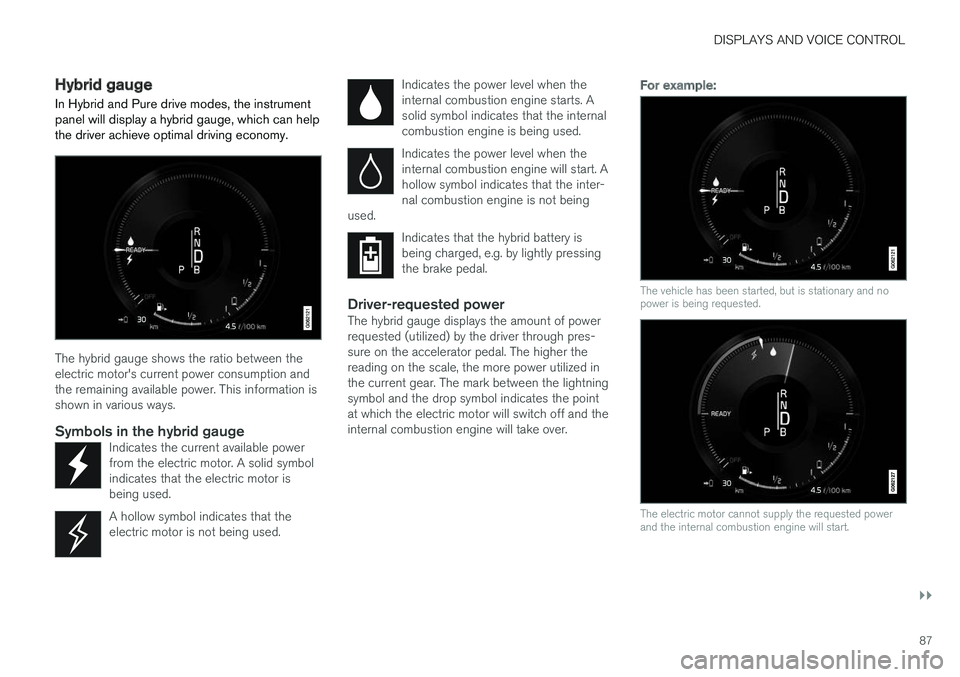
In Hybrid and Pure drive modes, the instrument panel will display a hybrid gauge, which can help the driver achieve optimal driving economy.
The hybrid gauge shows the ratio between the electric motor's current power consumption andthe remaining available power. This information isshown in various ways.
Symbols in the hybrid gaugeIndicates the current available powerfrom the electric motor. A solid symbolindicates that the electric motor isbeing used.
A hollow symbol indicates that the electric motor is not being used.
Indicates the power level when the internal combustion engine starts. Asolid symbol indicates that the internalcombustion engine is being used.
Indicates the power level when the internal combustion engine will start. Ahollow symbol indicates that the inter-nal combustion engine is not being
used.
Indicates that the hybrid battery is being charged, e.g. by lightly pressingthe brake pedal.
Driver-requested powerThe hybrid gauge displays the amount of power requested (utilized) by the driver through pres-sure on the accelerator pedal. The higher thereading on the scale, the more power utilized inthe current gear. The mark between the lightningsymbol and the drop symbol indicates the pointat which the electric motor will switch off and theinternal combustion engine will take over.
For example:
The vehicle has been started, but is stationary and no power is being requested.
The electric motor cannot supply the requested power and the internal combustion engine will start.
Page 90 of 686

||
DISPLAYS AND VOICE CONTROL
88
The vehicle is generating current to recharge the battery, e.g. during light braking or engine braking on a down-slope.
Related information
•Drive modes (p. 445)
• Instrument panel (p. 84)
• Brakes (p. 429)
• Using the electric motor only (p. 457)
• Starting and stopping the combustion engine in Twin Engine vehicles (p. 444)
Hybrid gauge
The hybrid battery gauge shows how much cur- rent is left in the hybrid battery.
The current in the hybrid battery is used to power the electric motor, but can also be used to heator cool the vehicle. The trip computer calculatesan approximate driving distance with the remain-ing current in the hybrid battery.
Symbols in the hybrid battery gauge
The symbol in the hybrid battery gauge indi-
cates that the Hold function is activated. The
symbol indicates that the Charge function
is activated.
Related information
• Instrument panel (p. 84)
• Charging the hybrid battery (p. 407)
• "Hold" and "Charge" functions (p. 459)
Page 91 of 686

DISPLAYS AND VOICE CONTROL
}}
89
Trip computer The vehicle's trip computer registers and calcu- lates data while driving such as mileage, fuelconsumption and average speed.
To help promote fuel-efficient driving, data is recorded on both current and average fuel con-sumption. Data from the trip computer can bedisplayed in the instrument panel.
Trip computer information in the instrument panel1
.
The trip computer includes the following gauges:
• Trip odometer
• Odometer
• Current fuel consumption
• Distance to empty tank
• Distance to discharged battery
• Tourist - alternative speedometer Unit standards for distance, speed, etc. can be changed via system settings in the center display.
Trip odometerThere are two trip odometers: TM and TA. TM can be reset manually and TA is reset auto- matically if the vehicle is not used for four hours. During a drive, the trip odometer registers data on:
• Mileage
• Driving time
• Average speed
• Average fuel consumption
The readings since the trip odometer's last resetare displayed.
OdometerThe odometer records the vehicle's total mileage.This reading cannot be reset.
Current fuel consumptionThis gauge shows the vehicle's fuel consumptionat that moment. The reading is updated aboutonce a second.
Distance to empty tankThe trip computer calculates the distance thatcan be driven on the fuel remaining in the tank. This calculation is based on average fuel con-sumption during the last 30 km (20 miles) andthe amount of fuel remaining in the tank. When the gauge displays "----", there is not enough fuel remaining to calculate the remainingmileage. Refuel as soon as possible.
NOTE
This may vary if your driving style changes.
An economical driving style will generally increase how far you can drive on a certainamount of fuel.
Distance to discharged batteryThe gauge shows the approximate dis-tance that can be driven with theremaining current in the hybrid battery.
When the gauge displays "----", there is little charge remaining in the battery and distancecannot be reliably calculated. This calculation is based on average consump- tion with a normally loaded vehicle in normal driv-ing conditions, and takes into account whetherthe air conditioning is on or off. Changing drive modes from
Hybrid to Pure may increase the
calculated distance because Pure mode has
reduced climate control settings (ECO Climate).
1 The illustration is generic - details may vary according to vehicle model.